Underwrite - Instant Insurtech Landing Page Template
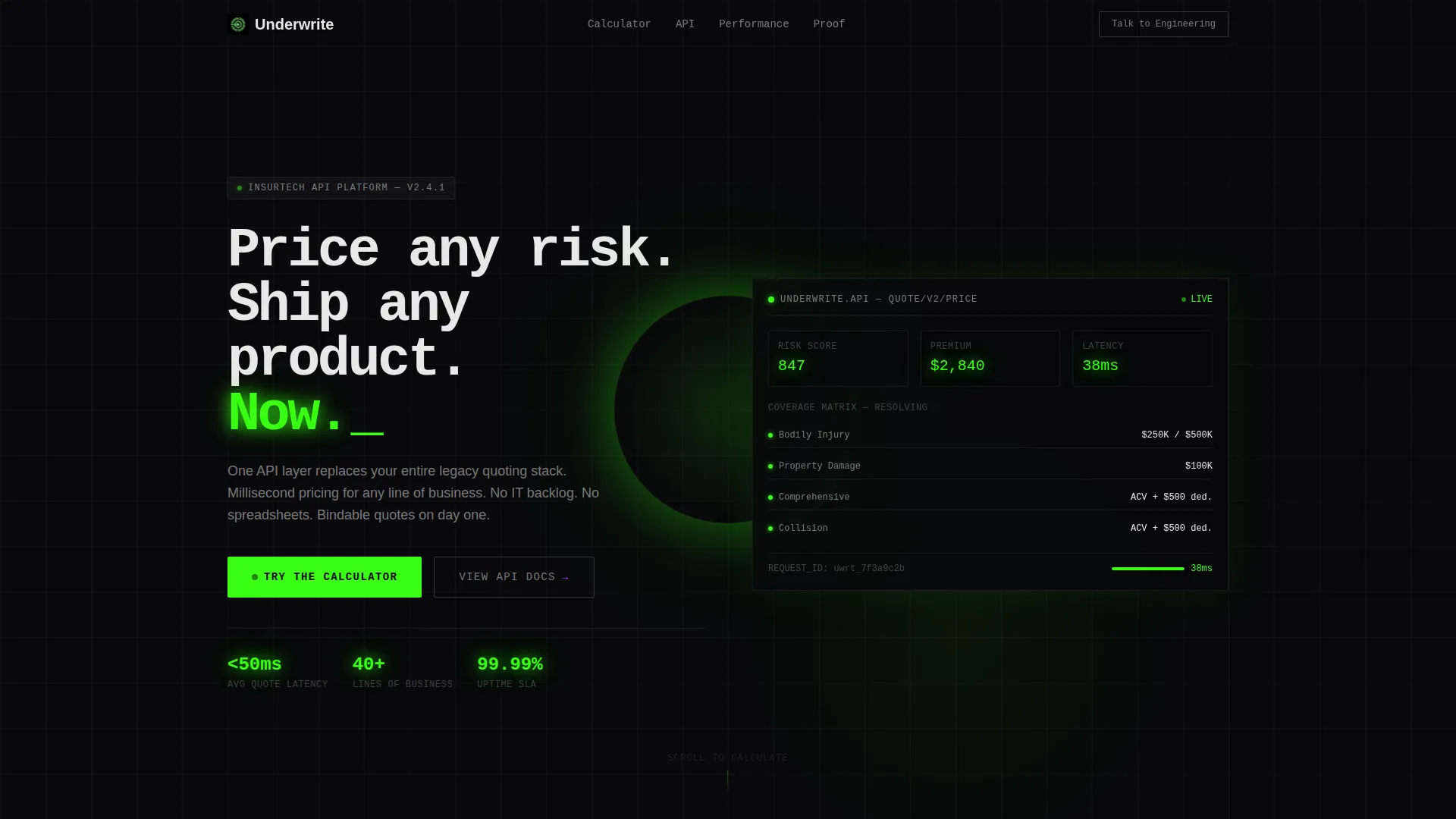
Underwrite is a hub-and-spoke landing page template built for InsurTech enterprise startups. It puts a live premium calculator front and center, then guides VP-level buyers through API architecture proof, throughput comparisons, deployment timelines, and a compliance module map. The page earns a demo booking by letting the product demonstrate speed before asking for anything.
by Rocket studio
Quick summary
Underwrite is a single-page, anchor-nav landing page template designed for InsurTech platforms that price risk through a modern API layer. It opens with an interactive premium calculator and flows through enterprise proof points: architecture diagrams, animated performance comparisons, customer deployment timelines, and a compliance module map. Every section is built to move a technical buyer from curiosity to a booked demo.
Who this template is for
This template is built for enterprise InsurTech startups that need to close deals with skeptical, technical buyers. If your product replaces legacy quoting infrastructure, this page speaks your audience's language from the first scroll.
- VP-level product owners at mid-market carriers managing significant technical debt
- Managing General Agents (MGAs) launching new programs who need bindable quotes quickly
- Enterprise actuaries who need rating changes shipped without waiting on IT backlogs
What problem this template solves
Insurance technology teams face a trust gap. Buyers have seen too many vendor promises fail against real-world policy volume and integration complexity. This template closes that gap by showing proof before it asks for anything.
- Legacy quoting engines and spreadsheet workflows slow down product launches and pricing changes
- Technical buyers skip marketing copy and demand architecture evidence before they book a demo
- Standard landing pages ask for contact details before delivering value, breaking trust with enterprise audiences
What you get with this template
You get a fully structured, single-page hub-and-spoke layout with a sticky anchor navigation system. Every section is purpose-built for an enterprise InsurTech sales conversation.
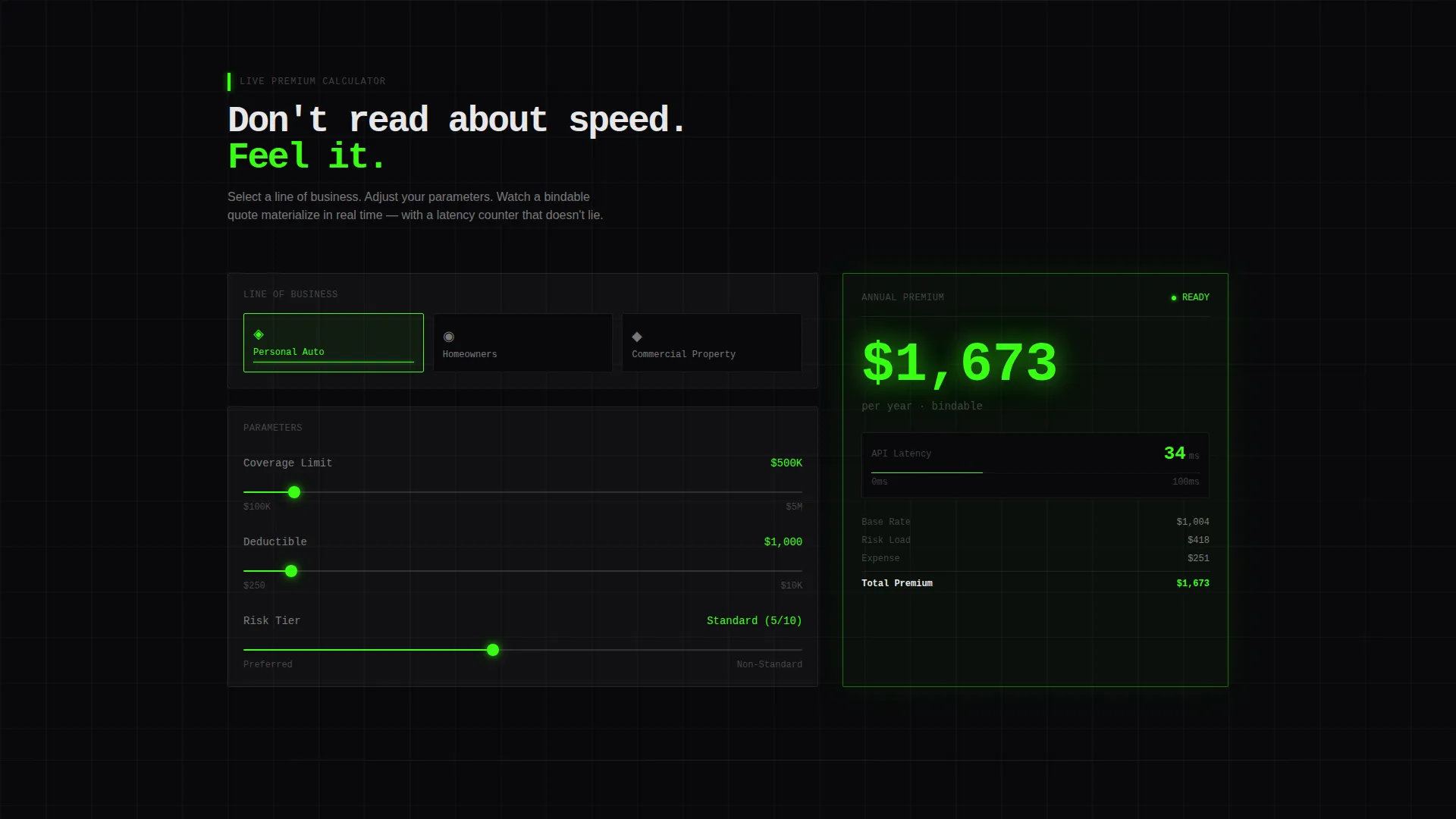
- A live interactive premium calculator with line-of-business selectors, three adjustable sliders, and a real-time latency counter
- An anchor nav with phosphor-green active indicators and a persistent ghost button for technical buyers
- Sections covering API architecture, throughput animation, customer deployment proof, and a compliance module map
Feature list
This template ships with six purpose-built sections and a coordinated interaction design that moves buyers through a structured proof sequence.
Live Premium Calculator with Latency Counter
Users select a line of business from auto, homeowners, or commercial property. They then adjust three sliders covering coverage limit, deductible, and risk tier. A quote generates instantly and a millisecond latency counter displays alongside it, making API speed tangible and credible.
Sticky Anchor Navigation with Active State Indicators
A persistent navigation bar links every spoke section directly. Phosphor-green indicators mark the active section as users scroll. A ghost button reading "Talk to Engineering" remains visible at all times for technical buyers who skip the calculator entirely.
API Architecture Diagram Section
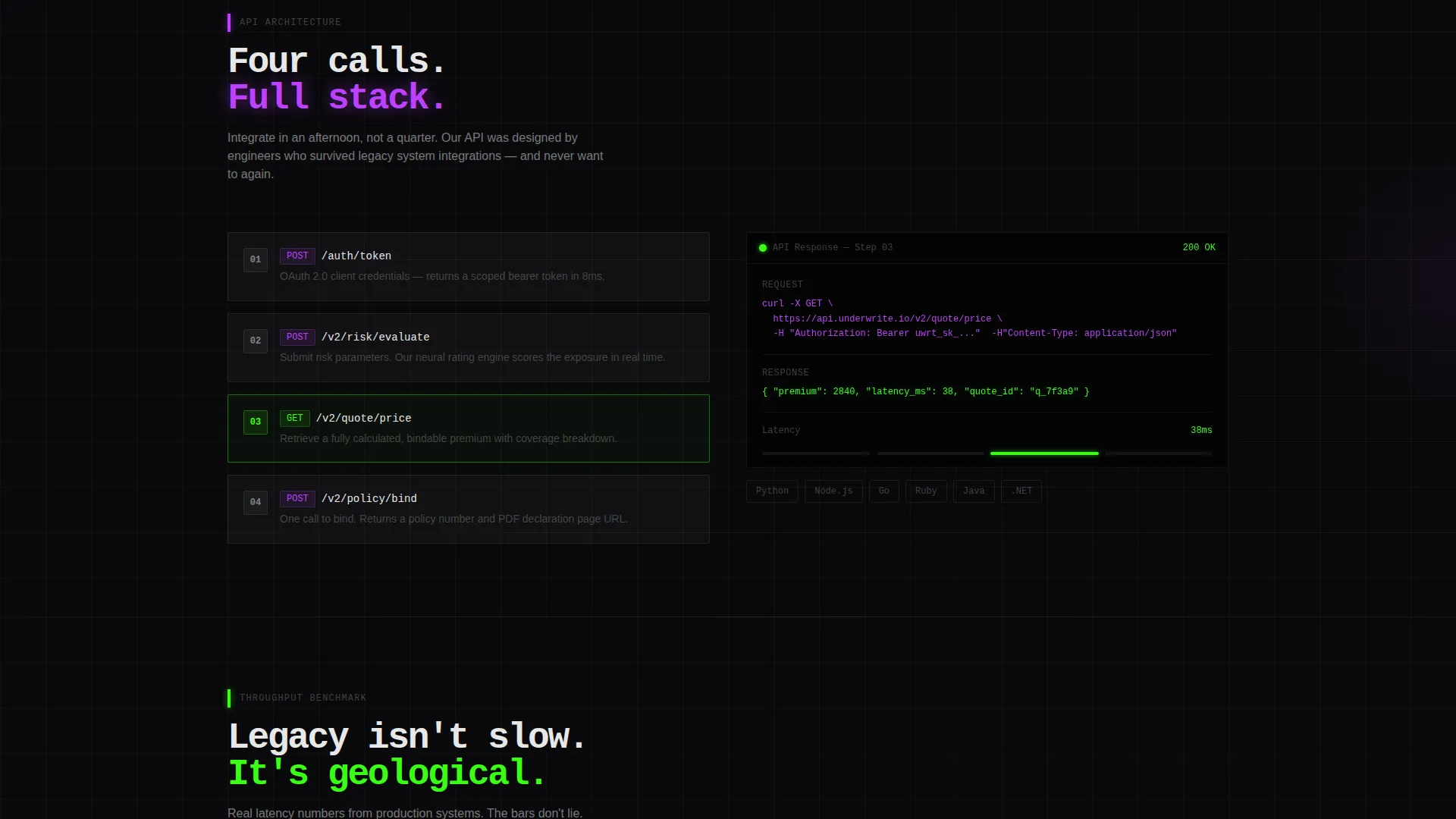
A dedicated spoke section visualizes the full integration flow in four API calls. It gives architects and engineering leads a clear picture of how the platform connects without requiring a separate technical document.
Animated Throughput Comparison
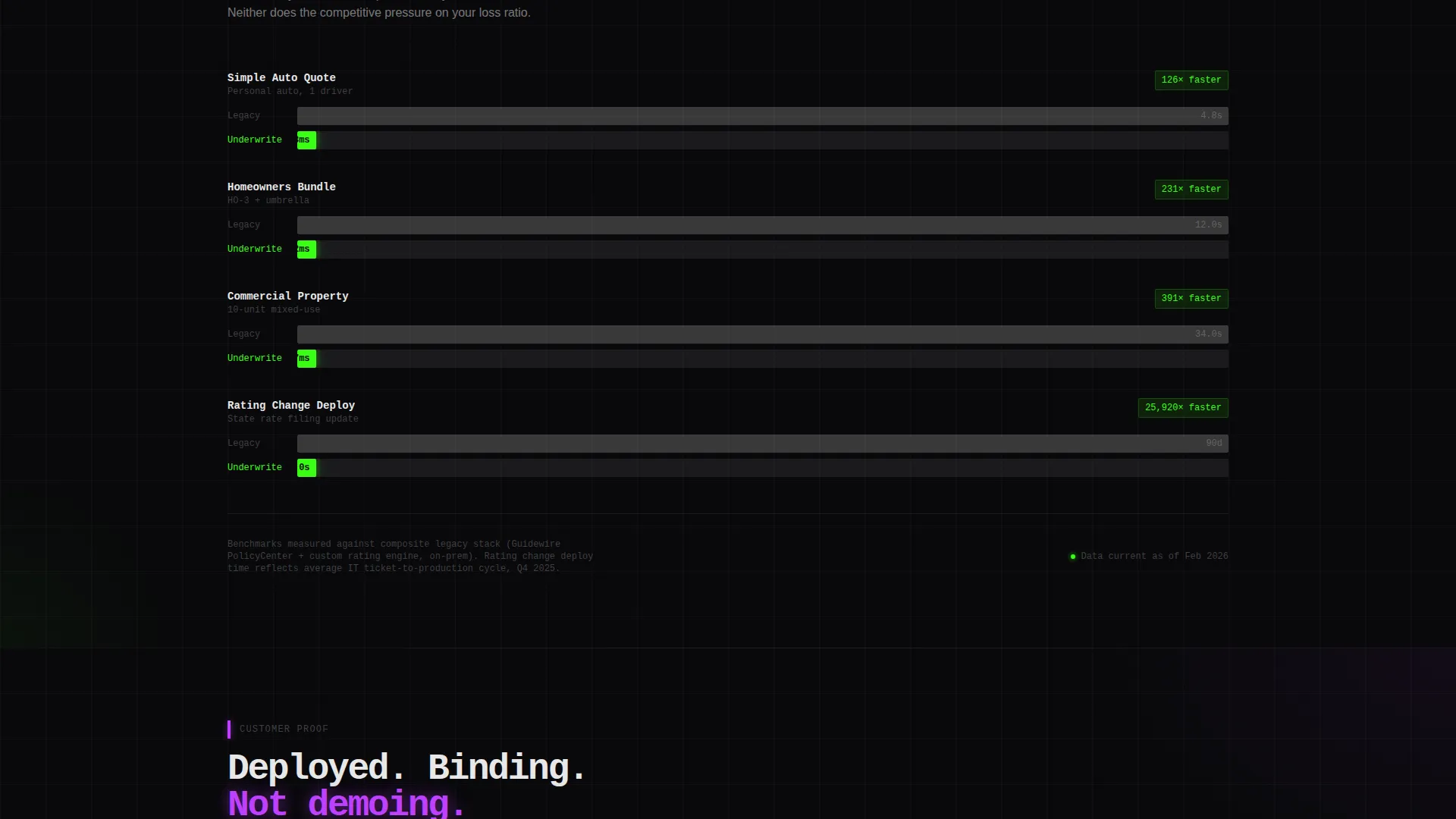
A bar-race animation contrasts legacy quoting engine performance against the Underwrite platform in real time. This section translates API speed into a visual argument that resonates with actuaries and product leads equally.
Customer Deployment Proof Section
This spoke displays customer logos alongside specific deployment timelines, such as "Bound first policy in 11 days." Concrete timelines replace vague testimonials and speak directly to buyers with tight go-live deadlines.
Context-Aware Primary call to action
The primary call to action, "See Your Lines Live," appears beneath the calculator only after the user has interacted with at least one slider. It carries the user's calculator selections as URL parameters into the demo scheduler, so the sales team receives pre-qualified context before the first conversation.
Page sections overview
| Section | Purpose |
|---|---|
| Hero Header | Sets speed-first brand tone |
| Premium Calculator | Interactive risk pricing tool |
| Anchor Navigation Bar | Sticky section-to-section links |
| API Architecture Diagram | Four-call integration visual |
| Throughput Comparison | Animated legacy versus. platform race |
| Deployment Proof | Customer logos with timelines |
| Compliance Module Map | Enterprise compliance coverage view |
| Demo Booking call to action | Context-aware click-through trigger |
Design & branding system
The visual identity uses a Dashboard Pro theme with an Acid Digital color system. Every surface is built around void black as the dominant background, with phosphor green and electric violet as functional accent colors. The palette is designed for extended screen use, where the glow of data serves as the primary light source.
- Void black (#09090B) floods every background surface; phosphor green (#39FF14) marks live data, active states, and primary call-to-action elements
- Electric violet (#BF40FF) handles secondary actions, graph accents, and hover states; interface white (#E8E8E8) covers all body typography and divider lines
- Headlines use a tight monospaced typeface; the header includes a full-bleed dark viewport with a softly pulsing phosphor-green glow illuminating a live quoting dashboard silhouette
Mobile & speed optimization
The template is structured for clarity and scannability across screen sizes. The hub-and-spoke layout and anchor navigation are designed to remain functional on smaller viewports without losing the visual hierarchy of the dark-surface design system.
- The sticky anchor nav collapses cleanly so mobile users retain section-level access without scroll confusion
- Interactive calculator sliders and the latency counter are sized for touch interaction, keeping the core tool usable on mobile devices
How this template helps you convert
This template is built around a click-through conversion goal. Every design and interaction decision is oriented toward earning a demo booking, not filling a form.
- The calculator creates investment before the ask: users interact with their own data first, which makes the "See Your Lines Live" call-to-action feel like a natural next step rather than an interruption.
- URL parameter passing means the demo scheduler receives the user's selected lines of business automatically, so the sales team enters the first call already knowing what matters to that buyer.
- The "Talk to Engineering" ghost button gives technical buyers a direct path that bypasses marketing sections entirely, reducing drop-off from high-intent visitors who would otherwise leave without converting.
Other information about this template
This template sits at the intersection of the Startup and Launch category and the InsurTech Enterprise Startup niche. It is built as a hub-and-spoke, single-page layout with anchor navigation, which suits early-stage platforms that need to establish credibility fast without a large content library. The Calculator/Tool First creative direction is a deliberate editorial choice: it prioritizes demonstrating value over describing it. The Dark Full-Bleed and Glow header concept is specific to the Dashboard Pro theme and the Acid Digital color system, which together create a terminal-like visual register that resonates with quantitative and engineering-focused buyers.
- The template uses no stock imagery or human faces; all visual content centers on the dashboard and data visualization elements
- No contact form appears on the page; conversion happens entirely through call to action clicks that pass context into an external demo scheduler
- The Intersection Match Score for this template is 13, indicating a highly specific alignment between the template style, creative direction, and target niche
Theme
Dashboard Pro
Creative direction
Calculator/Tool First
Color system
Acid Digital
Style
Hub & Spoke (Anchor Nav)
Direction
Click-Through
Page Sections
Live Premium Calculator with Latency Counter
Sticky Anchor Navigation with Active Indicators
API Architecture Diagram Section
Animated Throughput Comparison
Customer Deployment Proof Section
Context-aware Demo Booking Call to Action
Related questions
Does this template include a working calculator or is it a visual mockup?
Is there a contact form included in this template?
Who is the intended audience for this landing page template?
Can the anchor navigation sections be reordered or customized?
What makes this template different from a generic SaaS landing page?



