Real Estate Finance Cost Calculator Website Template
Underwrite is a commercial mortgage broker landing page template built for middle-market deal flow. It opens with a live Commercial Mortgage Estimator, then walks visitors through a structured Comparison Journey using zigzag sections, deal case studies, and a progressive lead capture form. The design follows a crisp Arctic White system that feels like a freshly underwritten term sheet.
by Rocket studio
Quick summary
Underwrite is a single-page commercial mortgage broker template designed to turn deal curiosity into qualified leads. A working estimator sits above the fold, letting sponsors and owner-operators run their own numbers before the pitch even begins. The layout alternates between emotional reassurance and hard data, guiding every visitor from first estimate to form submission.
Who this template is for
This template is built for commercial mortgage brokers who serve middle-market borrowers across a range of deal types. It speaks directly to the sponsors, operators, and developers who need fast, credible capital placement without spending weeks shopping lenders on their own.
- First-time syndicators closing their first deal and navigating unfamiliar loan structures
- Owner-operators refinancing out of costly hard-money loans and needing a clearer rate picture
- Developers sourcing construction-to-permanent financing who cannot afford a two-month lender search
What problem this template solves
Shopping for commercial real estate financing alone is slow, opaque, and exhausting. Borrowers face incomplete term sheets, inconsistent lender requirements, and no easy way to compare bridge, permanent, CMBS (Commercial Mortgage-Backed Securities), or SBA 504 options side by side. This template addresses that frustration head-on, replacing confusion with structured clarity from the first scroll.
- Borrowers waste weeks contacting a dozen lenders and still receive no comparable offers
- Term sheets arrive in different formats with no clear way to evaluate rate, recourse, or prepayment terms
- Sponsors have no visibility into how lenders actually assess their deal before a submission goes out
What you get with this template
You get a fully structured, single-page layout optimized for commercial mortgage lead generation. Every section is designed to build trust through specificity, moving the visitor from a live rate estimate to a completed three-step inquiry form. The page ships with all the visual and structural components described below.
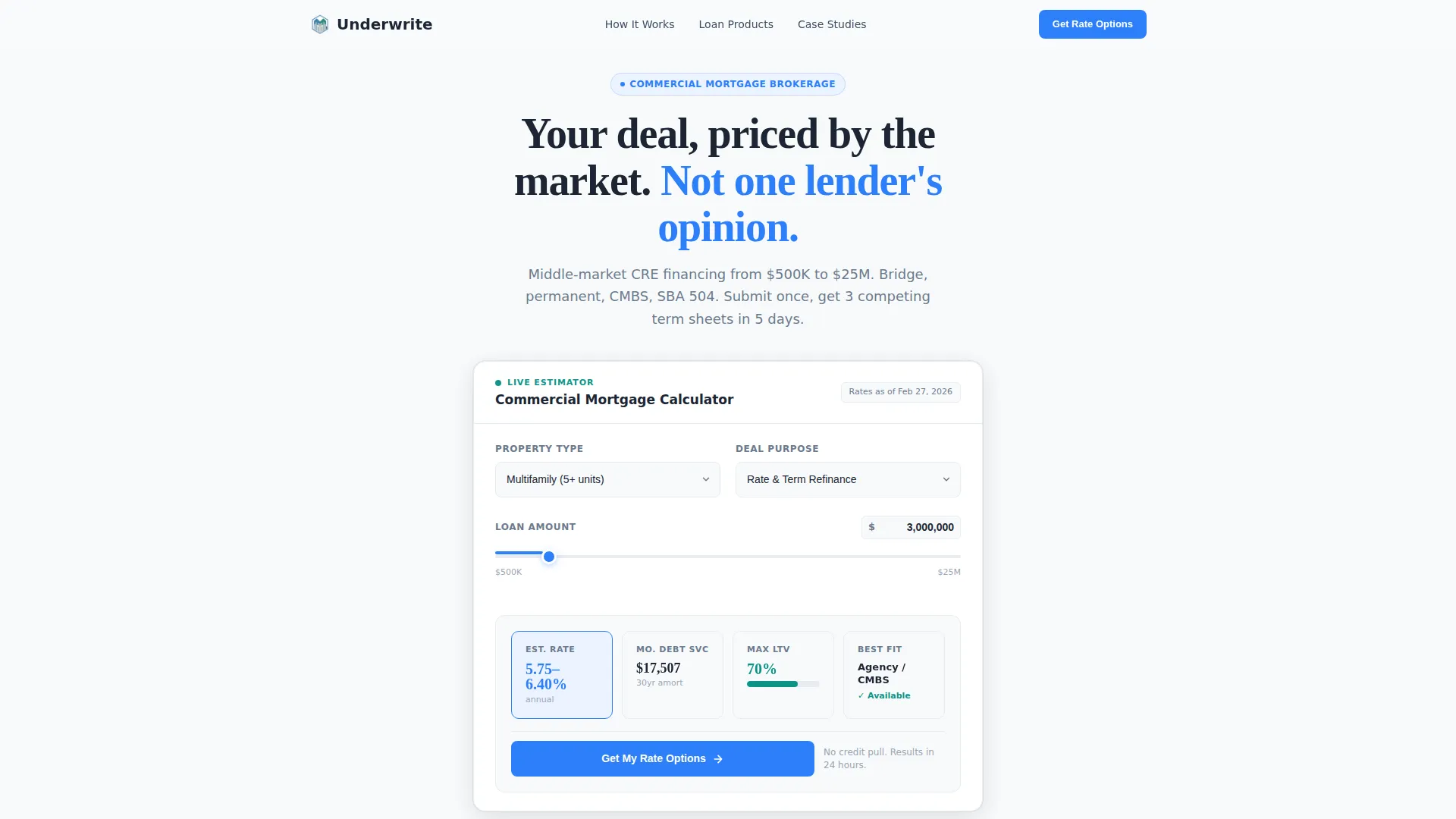
- A functional Commercial Mortgage Estimator with live output fields for rate range, monthly debt service, and a loan-to-value gauge
- A Comparison Journey built from alternating zigzag sections covering broker value, product comparisons, deal case studies, and lender perspective
- A progressive three-step lead capture form pre-filled from calculator inputs, plus a secondary PDF download conversion path
Feature list
This template is built around purposeful components. Each one earns its place by moving a skeptical borrower one step closer to submitting their deal.
Live Commercial Mortgage Estimator
The header is a working estimator, not a static hero image. Three input fields sit above the fold: a property type dropdown (multifamily, retail, office, industrial, mixed-use), a loan amount slider from $500K to $25M with manual entry, and a deal purpose selector covering acquisition, refinance, cash-out, and construction. A live output panel renders estimated rate range, approximate monthly debt service, and a loan-to-value gauge, all updating in real time as the visitor adjusts inputs.
Zigzag Comparison Sections
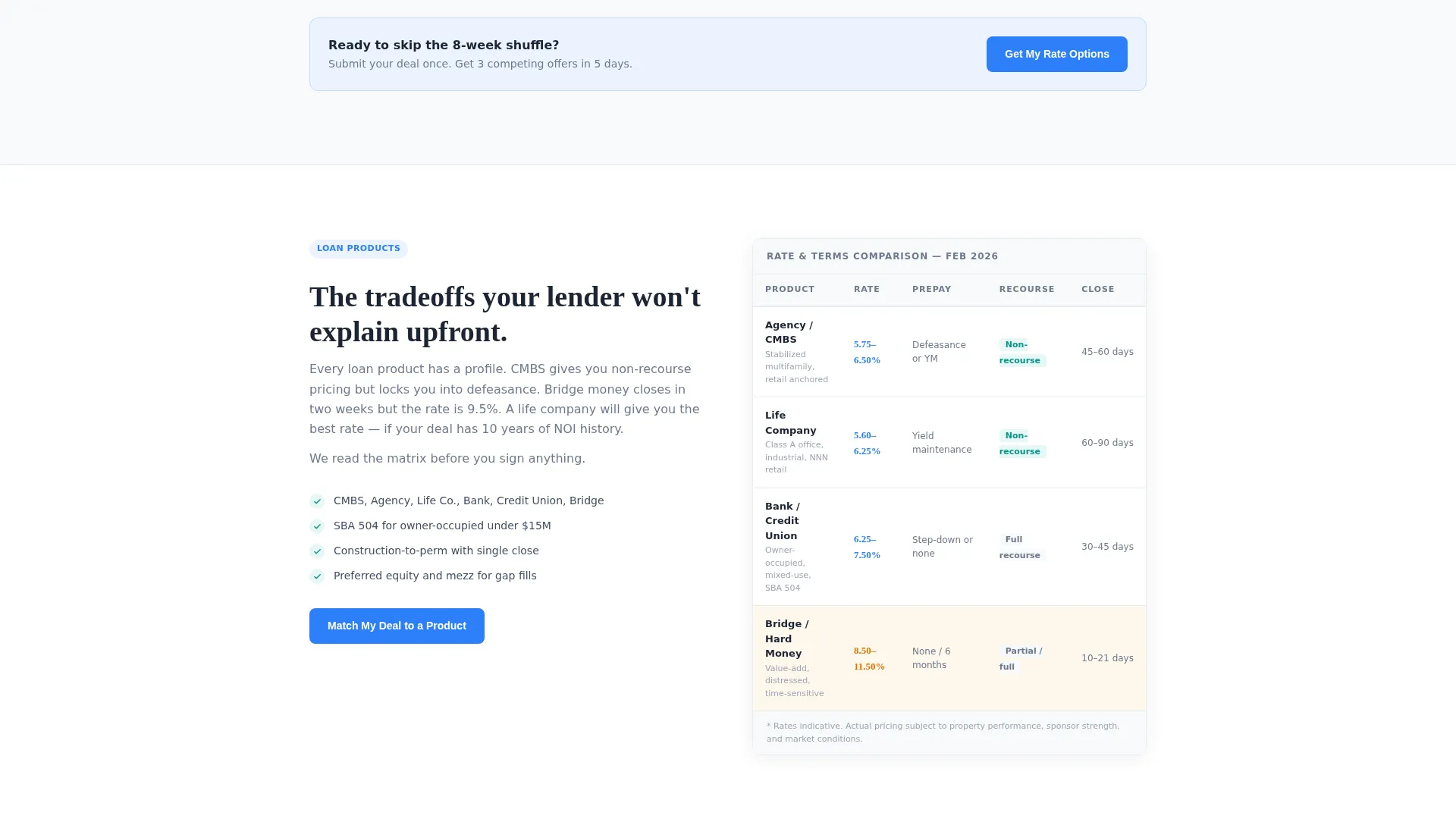
The alternating layout structures the visitor's journey through four escalating proof points. The first block contrasts "Shopping Alone" against "Broker-Matched" with concrete timeline data. The second compares loan products (CMBS, bank, credit union, bridge) in a side-by-side data table showing rate, prepayment penalty, recourse, and closing speed. Each subsequent block adds deeper specificity, including deal case studies and a lender-perspective section.
Deal Case Study Blocks
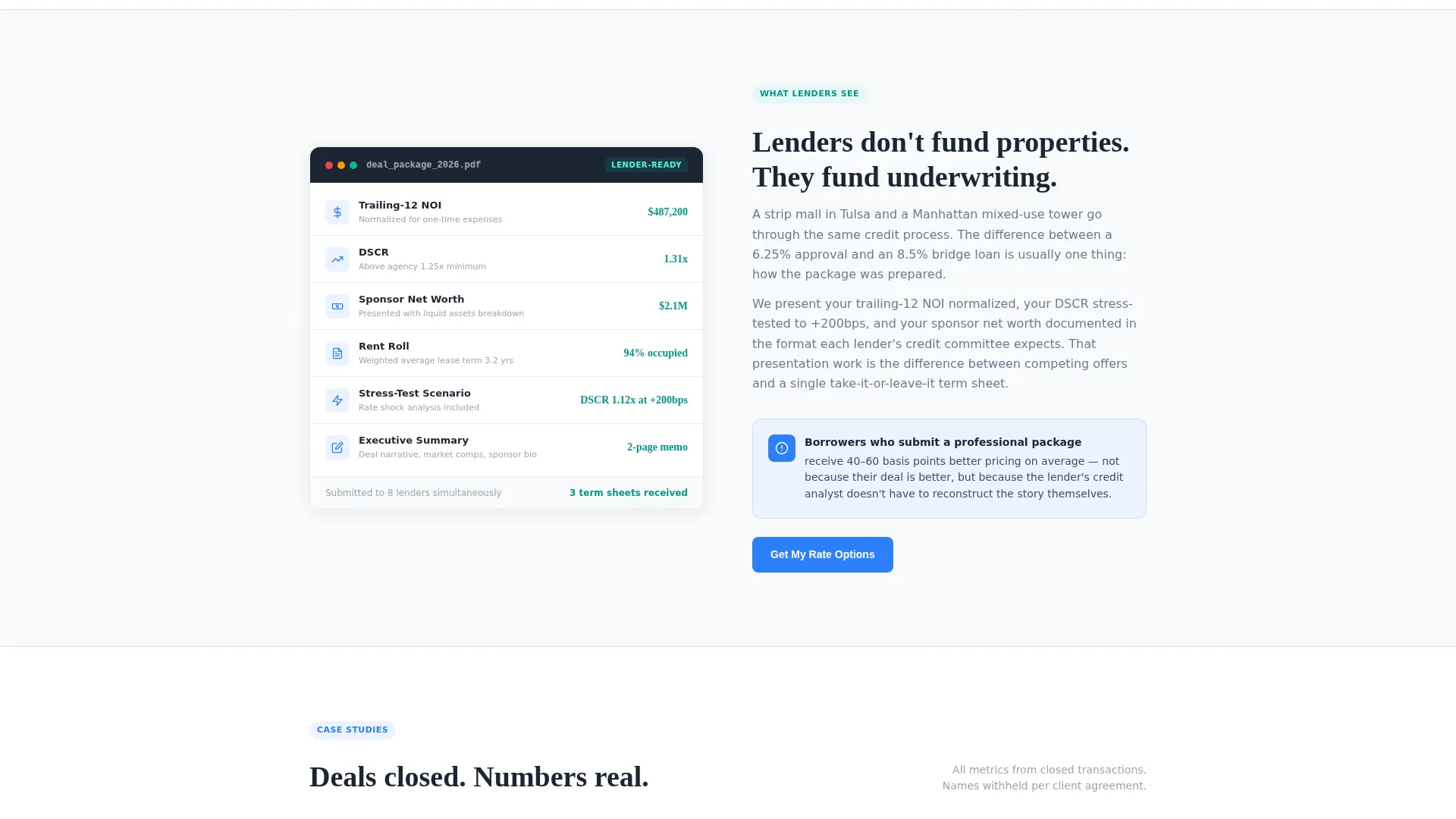
Real deal metrics appear in dedicated case study sections. Each block includes property type, loan amount, spread achieved, and days to close. These blocks alternate with analytical sections to create a scroll rhythm that balances emotional relief with verifiable proof, keeping both first-time sponsors and experienced developers engaged.
Progressive Three-Step Lead Form
The lead capture form is split into three focused steps to reduce drop-off. Step one captures property type and loan amount, pre-filled if the visitor used the estimator. Step two asks for deal timeline and borrower experience level. Step three requests name, email, and phone. This staged approach lowers the perceived commitment at each stage.
Secondary PDF Conversion Path
A "Download the CRE Loan Comparison Guide" call to action gates a PDF resource behind a single email field. This catches visitors who are researching but not yet ready to submit a deal, giving the broker a second chance to capture and nurture the lead.
Sticky Mobile Call-to-Action Bar
A persistent bottom bar on mobile keeps the primary call to action visible throughout the scroll. The "Get My Rate Options" button appears in cold cerulean and remains anchored at the bottom of the screen, so the conversion opportunity is never more than one tap away.
Page sections overview
| Section | Purpose |
|---|---|
| Mortgage Estimator Header | Lets visitors run live rate and debt service estimates above the fold |
| Shopping Alone versus. Broker | Contrasts timelines and outcomes to establish broker value immediately |
| Loan Product Comparison | Displays CMBS, bank, credit union, and bridge side by side in a data table |
| Deal Case Studies | Shows real deal metrics to prove execution across property types |
| What Lenders See | Reveals how professional packaging improves deal presentation and outcomes |
| Progressive Lead Form | Captures qualified borrower intent across three low-friction steps |
| PDF Download call to action | Offers a secondary conversion path for early-stage researchers |
| Sticky Mobile Bar | Keeps the primary call to action accessible at all scroll depths on mobile |
Design & branding system
The visual identity follows a Dashboard Pro theme built on an Arctic White color system. Every design decision reinforces the feeling of a clean, well-underwritten document rather than a generic finance website.
- Color palette: glacier white (#F8FAFB) for the primary background, pale frost (#E8ECF1) for section dividers, graphite (#1B2533) for headline and data text, cold cerulean (#2D7FF9) for interactive elements and active calculator states, and muted teal (#0D9488) for positive indicators like approval likelihood signals and green checkmarks
- The calculator panel floats with a subtle 1px frost border and a faint box shadow, positioned like a card lifted off a physical desk
- Typography and spacing treat every pixel of whitespace as structural, ensuring numbers and data points have room to breathe rather than compete for attention
Mobile & speed optimization
The layout is designed to remain fully usable on smaller screens without sacrificing the data-dense presentation that makes this template credible to analytical borrowers.
- The estimator inputs stack vertically on mobile, keeping all three fields and the live output panel within a single thumb-scroll viewport
- The sticky bottom bar pins the primary call-to-action button at the base of the screen throughout the entire page scroll on mobile devices
- Section widths and table layouts adapt to narrower viewports so the loan product comparison table remains readable without horizontal scrolling
How this template helps you convert
This template is engineered around a single insight: a borrower who has already run their own numbers is far more likely to submit a deal. Every structural choice reinforces that momentum.
- The estimator creates personal investment before the pitch begins. Once a visitor sees their estimated debt service update in real time, they have mentally placed themselves inside the deal. The "Get My Rate Options" call to action then simply asks them to make those numbers official.
- The Comparison Journey removes the alternative. By showing the borrower exactly what shopping alone costs in time and missed offers, then contrasting that with the broker-matched outcome, the template closes the most common objection before a visitor can voice it.
- The progressive form reduces friction at the moment of commitment. Pre-filled fields from the calculator lower the perceived effort of step one, and the staged structure means a visitor is never asked for contact details before they already feel invested in the process.
Other information about this template
This template is a strong fit for commercial real estate finance professionals who want a lead generation page that feels authoritative without feeling corporate or cold. A few additional details worth noting before you build:
- The template is structured as a single landing page, not a multi-page website, so all conversion paths live within one continuous scroll experience
- The loan product comparison table is designed for four product types (CMBS, bank, credit union, bridge), and the columns cover rate, prepayment penalty, recourse, and closing speed
- Deal case study blocks are placeholder-ready, formatted to accept real metrics from your own closed transactions
- The PDF download path requires only an email address, making it a low-barrier entry point for borrowers early in their research phase
- The template suits brokers specializing in middle-market deals, generally defined in the brief as transactions ranging from $500K to $25M in loan amount

Theme
Dashboard Pro
Creative direction
Comparison Journey
Color system
Arctic White
Style
Zigzag/Alternating
Direction
Lead Generation
Page Sections
Live Commercial Mortgage Estimator
Zigzag Comparison Journey Layout
Loan Product Comparison Table
Progressive Three-step Lead Form
Secondary PDF Download Path
Sticky Mobile Call-to-action Bar
Related questions
Can I update the estimator with my own rate ranges?
Does the template support all four loan product types in the comparison table?
How does the progressive lead form connect to the calculator?
Is the PDF download a separate conversion path from the main lead form?
What deal size range is this template designed around?



