Newlywed Insurance FAQ Website Template
Vow is a newlywed home insurance comparison landing page template built for couples who just merged two renters' lives into one mortgage. It uses an FAQ-driven layout, side-by-side coverage comparison tables, and a warm Charcoal and Amber visual identity to answer real insurance fears and guide visitors toward downloading a Newlywed Coverage Checklist.
by Rocket studio
Quick summary
Vow is a single-page insurance comparison template designed for newly married, first-time homeowners. It surfaces the real coverage questions couples search at midnight, answers each one with a clear comparison table, and builds toward a checklist download. The Legal Shield visual theme pairs deep charcoal with warm amber to feel authoritative and celebratory at once.
Who this template is for
This template is built for insurance brands, brokers, and financial services providers who want to speak directly to a newly married audience navigating their first joint home purchase. It is ideal for teams who need a polished, content-led landing page that earns trust before asking for a conversion.
- Newlywed home insurance providers targeting couples aged 27 to 34
- Independent brokers or agencies specializing in first-time homeowner policies
- Financial services marketers building content resources around life-change insurance moments
What problem this template solves
Newly married couples rarely realize how many gaps their existing policies carry until something goes wrong. Generic homeowner policies were written for established households, not for two people who merged two renter histories into one deed in the same calendar year. This template addresses that specific anxiety head-on.
- Existing renter policies do not automatically extend to cover a partner's belongings or a shared mortgage
- Standard homeowner coverage often leaves wedding gifts, engagement rings, and honeymoon-period claims in a grey area
- Couples have no easy way to compare generic coverage against newlywed-specific coverage without jargon
What you get with this template
The template delivers a complete, section-led landing page ready to customize for a newlywed home insurance offer. Every section has a defined purpose, from the cinematic hero to the checklist download form.
- A full-bleed hero section with an amber-glow cinematic header and animated headline sequence
- Three FAQ-anchored content sections, each paired with a side-by-side coverage comparison table
- A lead capture form with a partner name field, email input, and a home-close status toggle, plus a secondary coverage gap tool link at the footer
Feature list
This template is built around five prompt-backed capabilities that work together to move a nervous couple from question to confidence.
FAQ-Driven Scroll Architecture
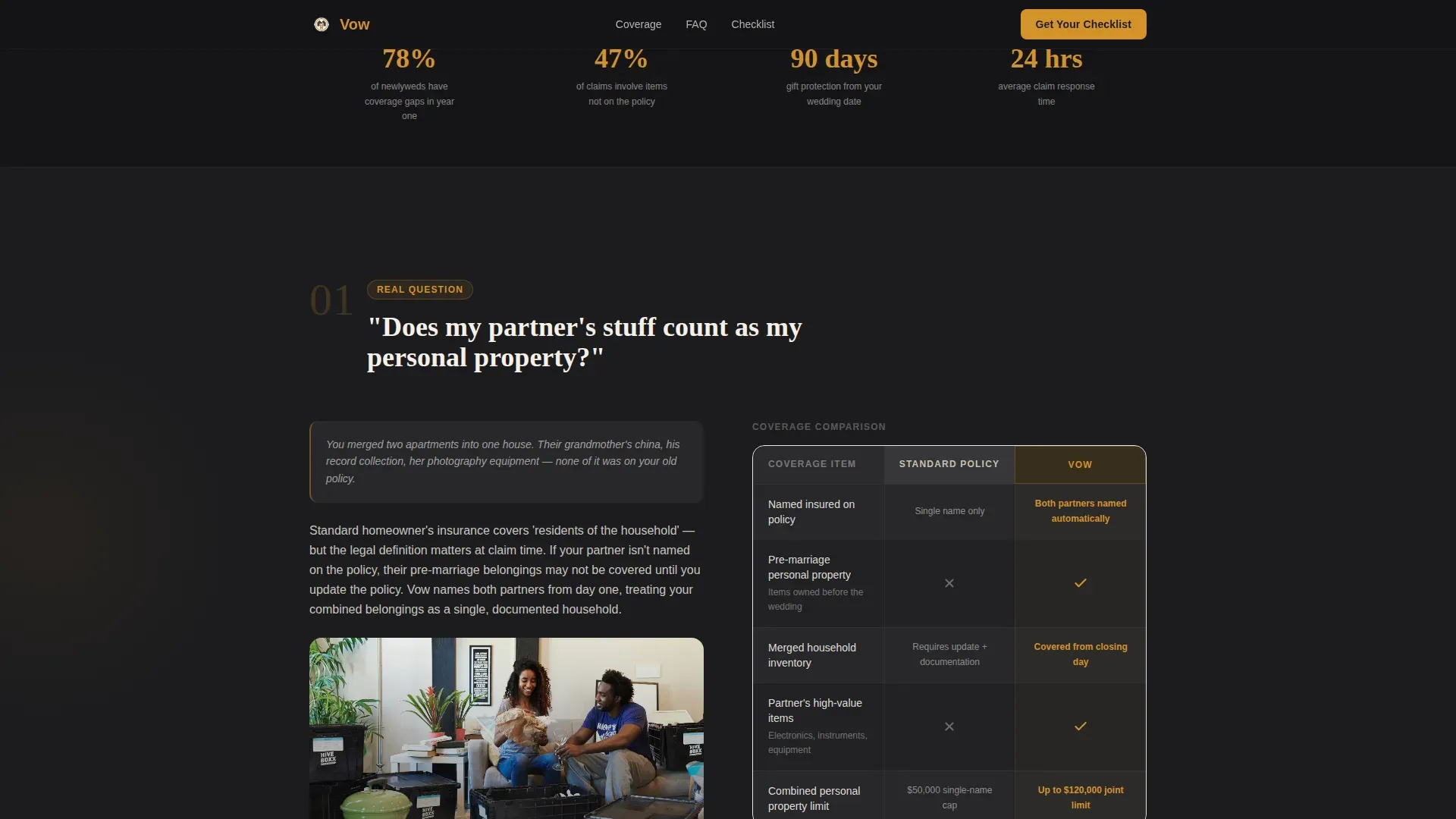
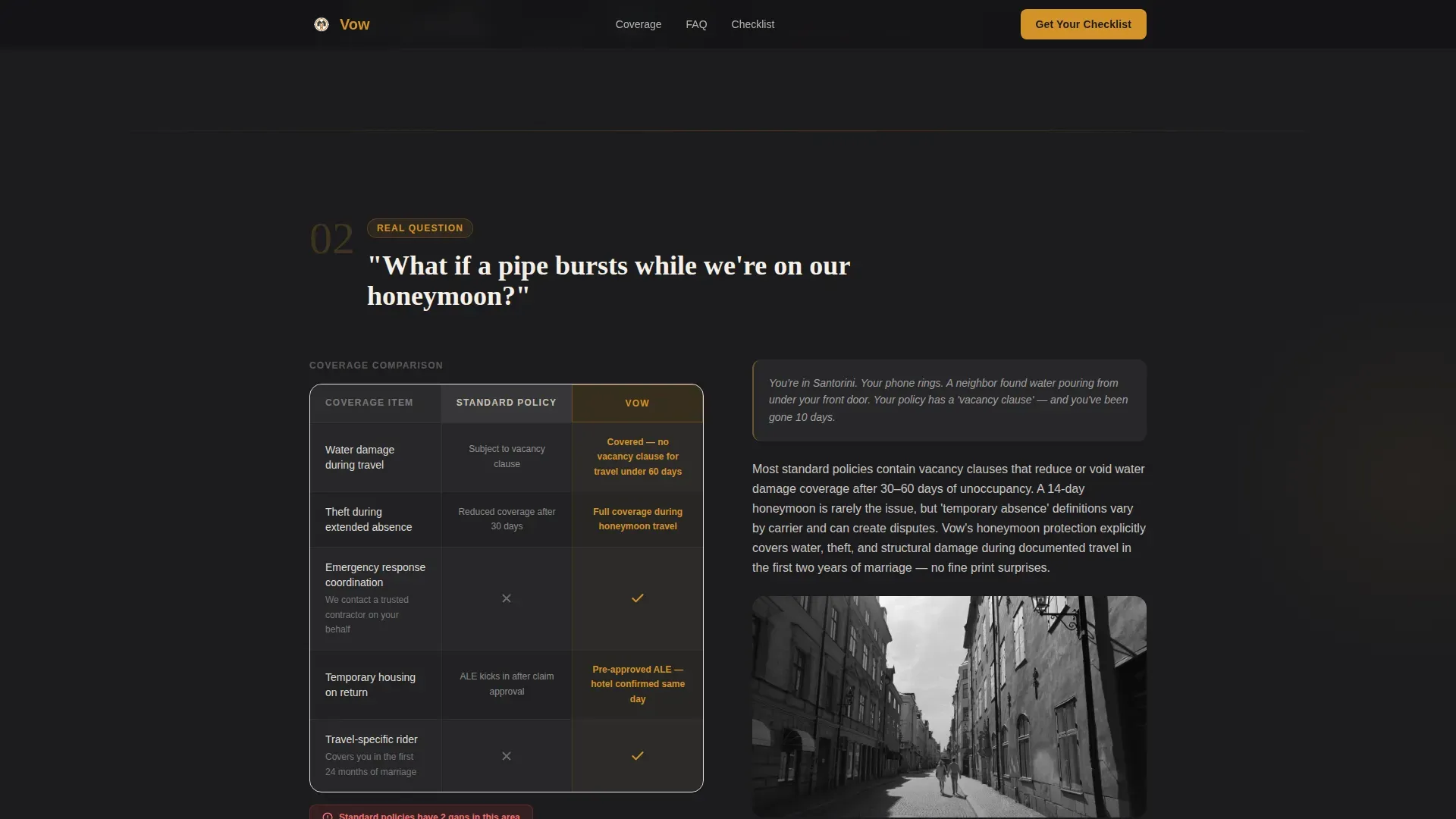
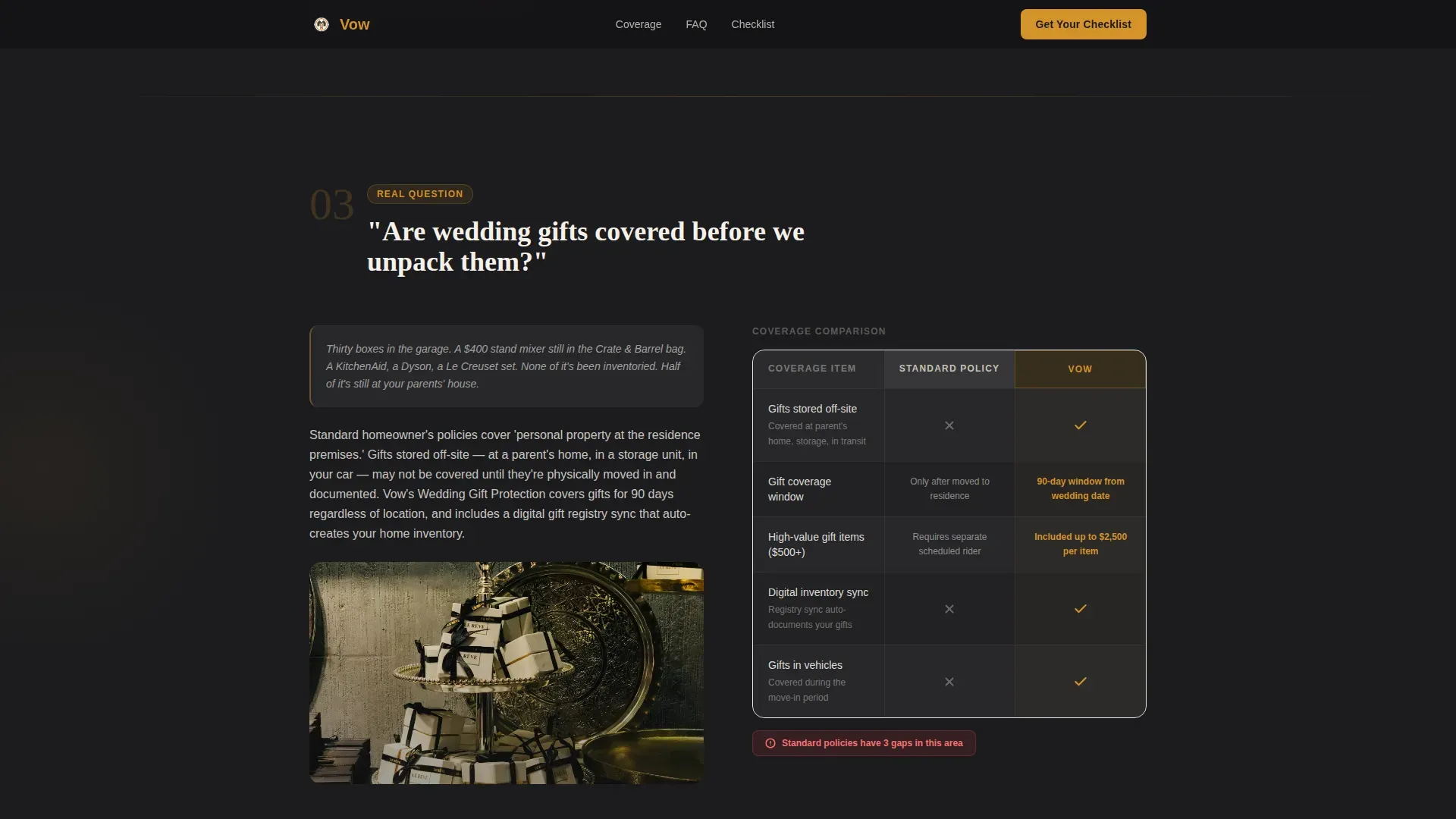
Each scroll section opens with a real question couples type into search bars, such as whether a partner's belongings count as personal property or whether wedding gifts are covered before unpacking. The question anchors the section, and the comparison table below it delivers the answer visually.
Side-by-Side Coverage Comparison Tables
Every FAQ section pairs with a structured table showing standard homeowner coverage against newlywed-specific coverage. Amber checkmarks on charcoal rows make the gaps in generic policies impossible to ignore at a glance.
Cinematic Amber-Glow Hero Section
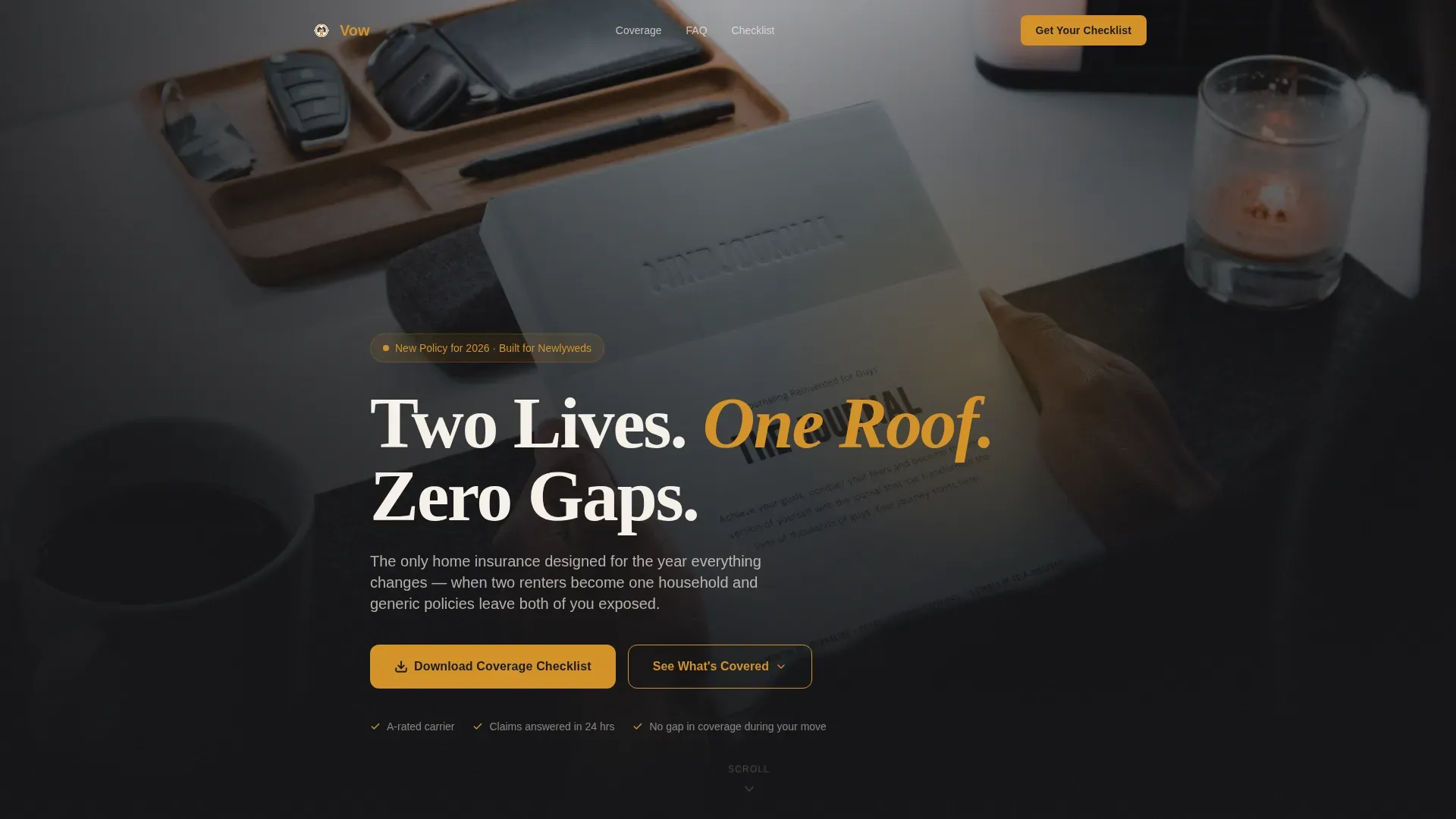
The header uses a dark full-bleed scene, a cinematic overhead shot of a couple's hands resting on closing documents with new house keys between them. A warm amber light source bleeds a soft halo across the charcoal background, and the headline fades in with a staggered animation sequence.
Newlywed Coverage Checklist Lead Form
A primary call to action placed after the third FAQ section invites visitors to download the Newlywed Coverage Checklist. The form collects a first name, a partner's first name, an email address, and a single toggle asking whether the couple has already closed on their home.
Secondary Coverage Gap Tool
A second conversion path sits at the page footer. Visitors can enter their current insurance provider name to see a highlighted breakdown of what their existing policy is missing, making the case for a newlywed-specific policy without any hard sell.
Scroll-Reveal Animation System
The template uses medium-weight scroll-reveal and stagger animations throughout. The amber glow pulse on trust indicators and interactive comparison rows adds visual rhythm without overwhelming the content.
Page sections overview
| Section | Purpose |
|---|---|
| Hero Header | Introduce the newlywed coverage promise with cinematic amber-glow visuals and the "Two Lives. One Roof. Zero Gaps." headline |
| FAQ Section One | Answer "Does my partner's stuff count as my personal property?" with a coverage comparison table |
| FAQ Section Two | Answer "What if a pipe bursts while we're on our honeymoon?" with a coverage comparison table |
| FAQ Section Three | Answer "Are wedding gifts covered before we unpack them?" with a coverage comparison table |
| Checklist call to action | Capture leads via the Newlywed Coverage Checklist download form after trust has been established |
| Footer | Provide secondary conversion path through the interactive coverage gap tool and linear single-row footer pattern |
Design & branding system
The visual identity follows a Legal Shield theme, pairing the authority of a formal document with the warmth of a new beginning. Every color choice reinforces both trust and celebration.
- Deep charcoal (#1C1C1E) as the primary background, soft graphite (#3A3A3C) for card surfaces and table rows, and warm amber (#D4922A) for highlights, interactive toggles, and trust indicators
- Clean parchment (#F5F0E8) for body text, contrast panels, and subheadlines to maintain readability against dark backgrounds
- Fraunces serif for display headings and DM Sans for body copy, creating a tone that feels both legally serious and personally warm
Mobile & speed optimization
The template is built mobile-first, reflecting the reality that most newlywed couples search for insurance answers on their phones late at night. Every section is designed to read and convert cleanly on small screens.
- CSS-based animations are preferred over heavy JavaScript to keep scroll-reveal and amber glow effects lightweight on mobile
- Images are structured for optimization, with the cinematic hero image treated as a single key asset rather than a multi-image layout
- The comparison tables and FAQ expand interactions are designed for thumb-friendly tap targets on mobile viewports
How this template helps you convert
The page is built as a content and resource destination, not a hard-sell product page. It earns trust through education before it asks for anything in return.
- Each FAQ section answers a specific fear couples actually type into search bars, building credibility question by question before the first call to action appears
- The primary checklist download form is placed after the third FAQ section, timed to appear once enough value has been demonstrated rather than at the top of the page
- The secondary coverage gap tool at the footer gives hesitant visitors a second, lower-commitment entry point that still captures their current provider data and highlights missing coverage
Other information about this template
This template sits at the intersection of the Finance and Insurance category and the Newlywed Insurance subcategory, making it a focused tool for a specific life-stage moment rather than a general insurance product page. A few additional details worth knowing before you build with it.
- The footer uses a linear single-row pattern to keep the page close on a clean, uncluttered note
- The toggle input on the lead form ("Have you closed on your home yet?") helps segment leads between pre-close and post-close couples without requiring a complex form
- The amber checkmark trust indicators used throughout the comparison tables serve as visual social proof anchors that reinforce credibility at each decision point along the scroll
Theme
Legal Shield
Creative direction
FAQ-Driven
Color system
Charcoal & Amber
Style
Comparison Table
Direction
Content/Resource
Page Sections
Faq-driven Scroll Architecture
Side-by-side Coverage Comparison Tables
Cinematic Amber-glow Hero Section
Newlywed Coverage Checklist Lead Form
Secondary Coverage Gap Tool
Scroll-reveal and Amber Glow Animation System
Related questions
What kind of business is this template designed for?
Can I customize the FAQ questions and comparison table content?
How does the lead capture form work?
Is this a single page or a multi-page template?
What typography and color system does this template use?



