Joint & Family Finance Portfolio & Case Study Website Template
Ledger is a dark-themed, sidebar companion landing page template built for joint and family business checking accounts. It pairs a Stats-First Impact layout with a Data Command visual identity to showcase real-time multi-signer visibility, live balance updates, and per-member transaction tagging. Designed for married couples, LLC partners, and sibling co-owners who need one shared general ledger account and zero guesswork.
by Rocket studio
Quick summary
Ledger is the ledger real time joint checking account landing page template built for fintech products serving families and business partners. It opens with a cockpit-dark hero, escalates through stats-led scroll sections, and closes with a progressive freemium signup form. Every section leads with a number before a word of copy appears, building trust through data before asking for identity.
Who this template is for
This template speaks directly to people who share money and need a reliable, shared general ledger account to track it. It is built for teams of two or more who are tired of texting screenshots of bank statements back and forth.
- Married couples and domestic partners managing household budgets across two incomes
- LLC co-founders and business partners splitting operational expenses and tracking business transactions
- Siblings or family groups co-managing inherited rental properties and shared assets
What problem this template solves
Shared finances break down when no one has a single source of truth. Without a clear accounting system, joint account holders miss daily transactions, argue over running balance discrepancies, and struggle to produce accurate financial reports at tax time. This template solves the conversion challenge for fintech products that fix exactly that problem.
- Visitors arrive confused about how joint accounts work; the stats-first layout answers their biggest questions before they scroll past the fold
- No clear account information or trust signals means visitors leave; this template places security badges and social proof near every primary call to action
- Frictionless signup friction kills conversions; the progressive three-screen form asks only what is needed, when it is needed
What you get with this template
You get a fully structured, single-page layout with a fixed sidebar companion panel, a dark full-bleed hero section, and five scroll-driven content zones. The template is ready to populate with your product data, real account balances, and user quotes.
- A persistent sidebar that morphs from feature navigation to a mini account simulator to a final signup form as the visitor scrolls
- Five distinct page sections covering the hero cockpit dashboard, stats impact blocks, live sync demo, use-case toggle, and a freemium pricing comparison
- A progressive three-screen signup form collecting account type, two signer email addresses, and a free-versus-pro tier comparison
Feature list
This section covers the core built-in capabilities delivered by the Ledger template.
Stats-First Hero Dashboard
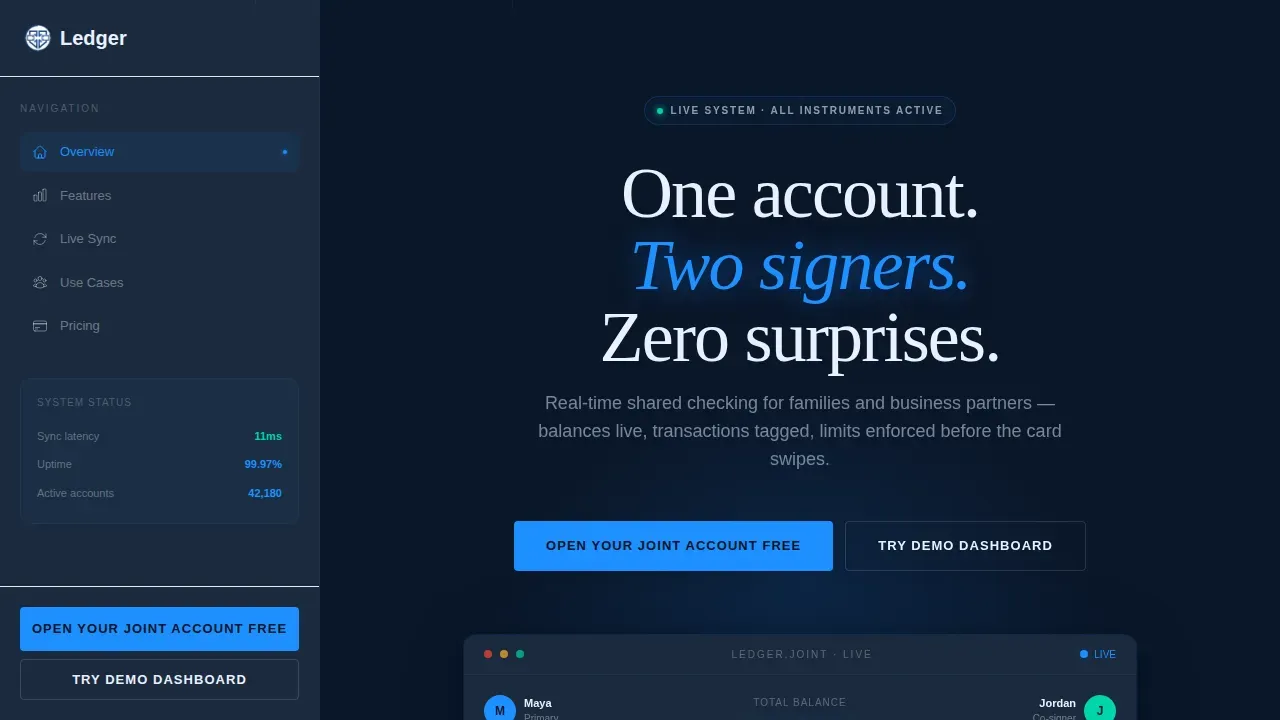
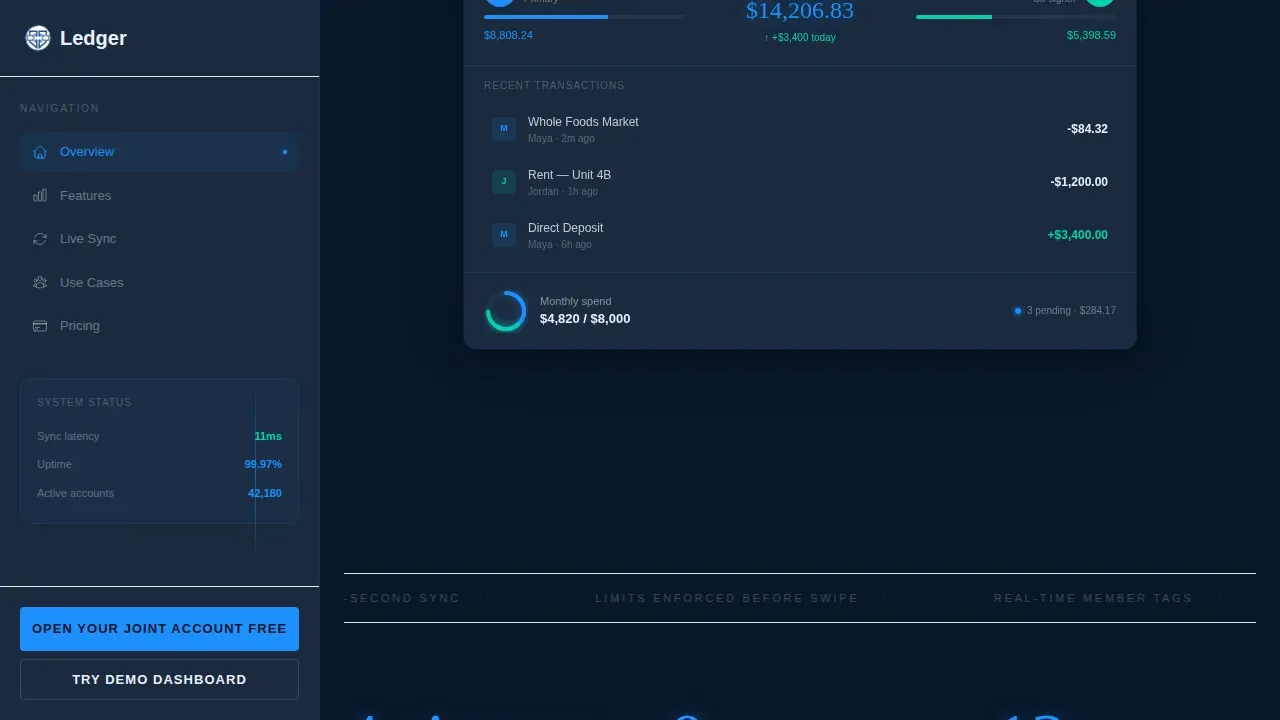
The hero occupies the full viewport in deep terminal navy. A shared checking dashboard materializes at center with a phosphor bloom radiating behind it. Two account-holder avatars anchor the top corners, each paired with a live balance contribution bar. Real figures are visible on load, including a total balance readout, three pending transactions with member tags, and a spending ring chart split by signer. No lifestyle photography appears; the product interface is the hero.
Sidebar Companion Panel
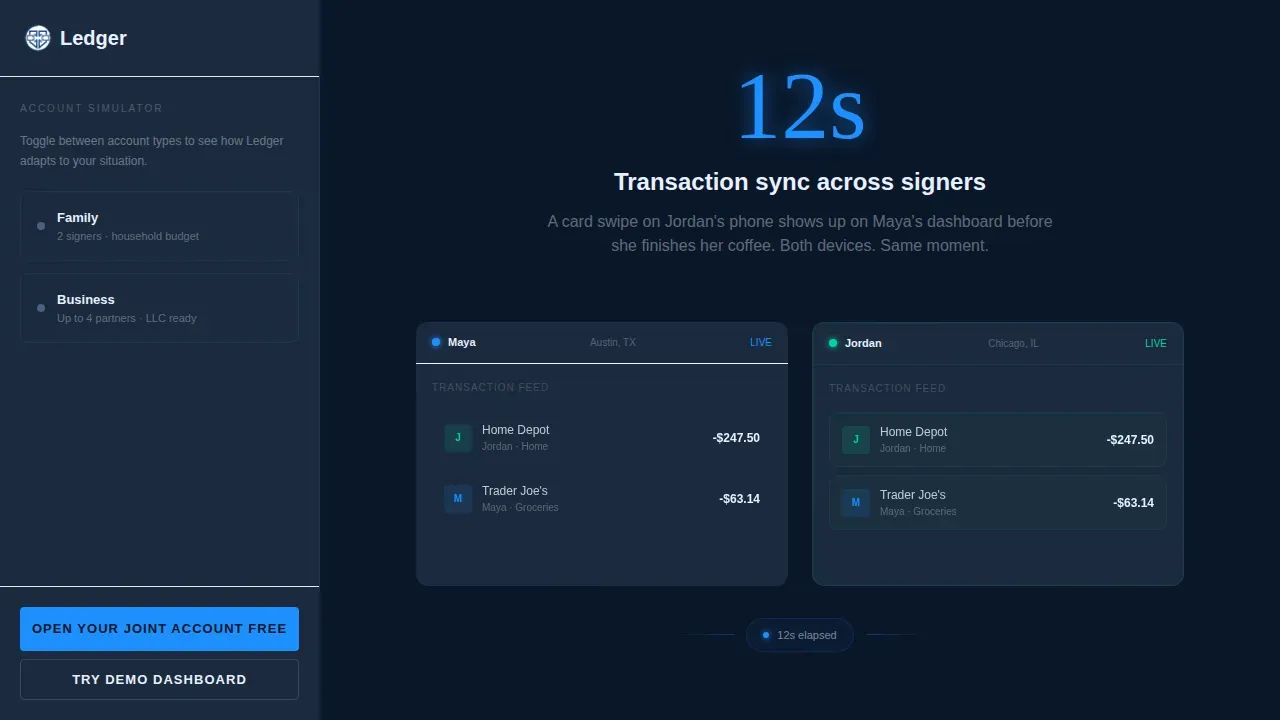
The sidebar stays fixed in vault gray throughout the scroll journey. It opens as a feature navigation index, then transforms into a mini account simulator where visitors toggle between family and business modes to see contextual ledger data. As the visitor nears the bottom, the sidebar collapses into the signup form. This morphing behavior keeps the conversion path visible at every stage without interrupting the main scroll lane.
Stats Impact Scroll Sections
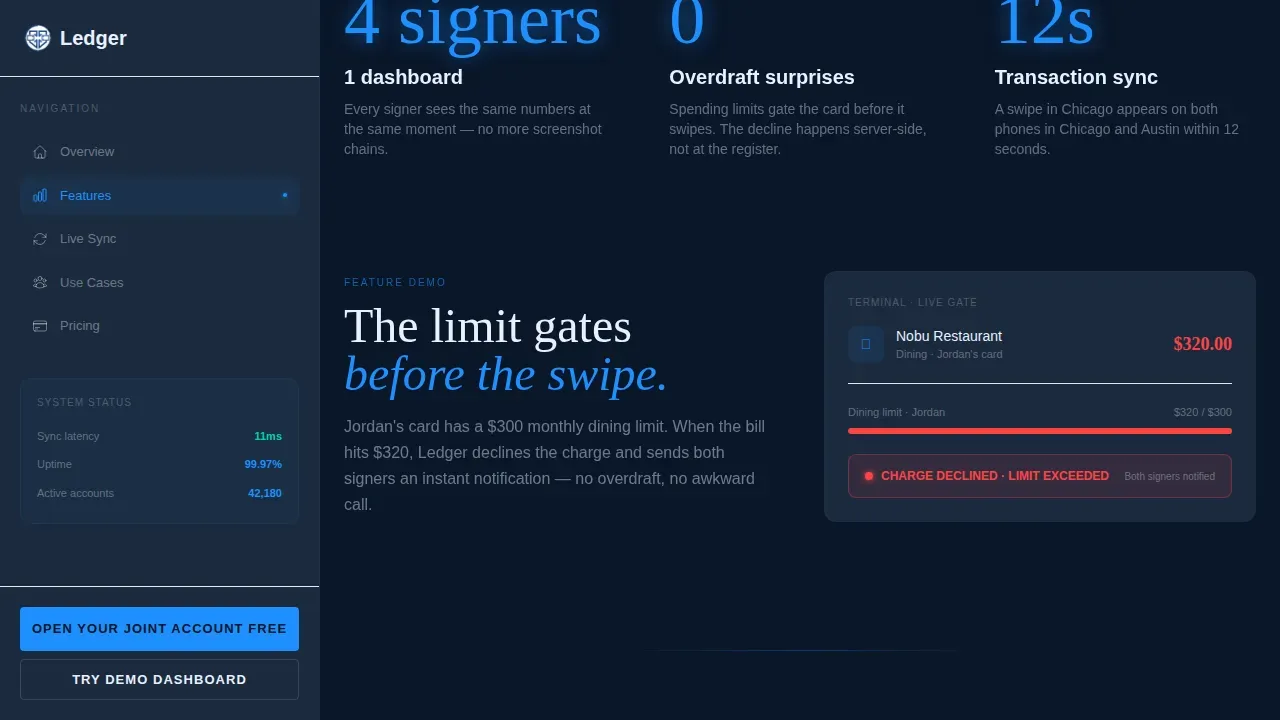
Each scroll event leads with a large typographic stat before any explanatory copy appears. The first stat reads "4 signers, 1 dashboard." The second stat reads "$0 overdraft surprises" and animates a declined over-limit card swipe. The third stat reads "12-second sync" and shows a transaction appearing simultaneously on two devices. This sequence builds from convenience to control to trust, mirroring how a confident business owner evaluates a new financial tool.
Progressive Freemium Signup Form
The three-screen form reduces friction at every step. Screen one presents two glowing toggle cards asking "Family or Business?" Screen two collects one email address per signer. Screen three shows the free tier alongside the Pro tier in a side-by-side comparison covering multi-signer permissions and advanced analytics. A secondary path lets visitors try a demo dashboard using synthetic data, with no email required.
Use-Case Mode Toggle
A dedicated section lets visitors switch between Family mode and Business mode. Each mode surfaces contextually relevant ledger template data: household expenses and income splits for families, accounts payable, accounts receivable, and equity breakdowns for business partners. This toggle demonstrates how the same general ledger account structure adapts to different account types without requiring separate products.
Social Proof Blocks
Social proof entries use specific figures: dollar amounts, sync times, and transaction counts. Each quote is attributed to a named user type, for example a married couple running a dual-income household or an LLC partner tracking operational expenses. Specificity builds the credibility that generic testimonials cannot.
Page sections overview
| Section | Purpose |
|---|---|
| Hero Cockpit Dashboard | Opens with full-bleed dark hero displaying live balance, signer avatars, and spending ring chart |
| Stats Impact Blocks | Delivers three scroll-triggered stats with animated demos before any body copy appears |
| Live Sync Demo | Shows a transaction appearing on two devices in twelve seconds to prove real-time capability |
| Use-Case Toggle | Lets visitors switch between Family and Business modes to see relevant ledger data |
| Pricing Comparison | Presents the free tier against the Pro tier in a side-by-side layout with progressive form |
| Footer Row | Single linear row with minimal links and trust signals |
Design & branding system
The visual identity follows a Data Command theme built to feel like a Bloomberg terminal at 2 a.m.: authoritative, precise, and engineered for people who read numbers faster than words.
- Color system uses deep terminal navy (#0A1628) for all backgrounds, signal blue (#1E90FF) for live data highlights and interactive states, vault gray (#1C2A3D) for sidebar and card surfaces, and phosphor white (#E8F0FE) for all typography and numerical readouts
- Typography pairs Fraunces serif for headline numerals and display moments with DM Sans for body copy, user interface labels, and form fields
- Every stat, toggle, and active element pulses signal blue; the sidebar stays cool vault gray while the main scroll lane lives in bottomless navy
Mobile & speed optimization
The template is designed desktop-first to honor the cockpit aesthetic, with a responsive mobile fallback that preserves the core data-command experience on smaller screens.
- The sidebar companion collapses gracefully on mobile, converting the morphing panel into a sticky bottom bar that follows the visitor through the scroll journey
- Mobile-optimized form screens are trimmed to one to three fields per screen, reducing friction in the sign-up process on touch devices
- Scroll-reveal animations and counter effects are built with Client Components for interactive elements while static sections use Server Components, keeping the page load balanced
How this template helps you convert
The Ledger template is structured so every design decision moves a visitor closer to opening a joint account. Trust, simplicity, and immediate value are the three pillars behind every layout choice.
- The hero delivers real numbers and a live-data interface above the fold, so visitors immediately understand the product value without reading a paragraph of description
- The progressive form removes zero-balance anxiety and commitment fear by separating the "Family or Business?" question from the email collection step, then offering a no-email demo path for hesitant visitors
- Security trust signals and a clear description of no-monthly-maintenance-fee positioning sit adjacent to every primary call-to-action button, reducing final-step anxiety before the visitor commits
Other information about this template
The Ledger template draws on established general ledger principles to frame its visual and structural design. Understanding these principles helps you communicate product value to visitors who are already familiar with financial record-keeping concepts.
- A general ledger is the central record of all financial transactions within a business; the template mirrors this by presenting all the transactions in one shared dashboard view
- General ledger templates provide standardized accounting frameworks without the complexity of enterprise accounting software; the Ledger template positions its product the same way for joint account holders
- A proper general ledger must include a journal entry, a description, debit and credit columns, and a running balance; the hero dashboard reflects this structure visually with member-tagged debit and credit rows and a live running balance readout
- The dollar amount of total debits must equal total credits in the double-entry accounting system; the spending ring chart in the hero section communicates this balance visually to non-accountant visitors
- General ledger templates can be used in both Microsoft Excel and Google Sheets, but the Ledger template goes further by embedding the ledger experience directly into the product interface shown on the landing page
- Free general ledger templates often require manual journal entry and offer no real-time sync; this template is designed to highlight exactly that gap as a conversion argument
- The general ledger must balance, with total debits matching total credits; displaying a trial balance summary inside the hero dashboard reinforces accuracy and builds confidence in the product
- A well-maintained general ledger helps in tracking income and expenses effectively across an entire accounting period; the use-case toggle section demonstrates this for both household and business contexts
- The balance sheet and income statement both trace back to the general ledger; the template references financial statements and financial reports to signal credibility to financially literate visitors
- Automated general ledger templates reduce common mistakes by using built-in formulas; the landing page communicates this benefit through the "$0 overdraft surprises" stat block
- The Simplified ledger template variant uses "Money In" and "Money Out" language for users who need basic transaction tracking without technical accounting knowledge; this approach informs how the Family mode toggle is framed
- The Comprehensive ledger template variant supports 50 to 200 monthly transactions and includes category standardization features; this maps to the Business mode toggle targeting LLC partners tracking accounts payable, accounts receivable, and fixed assets
- The Basic ledger template variant requires minimal setup and suits sole proprietorships and freelance operations processing fewer than 50 monthly transactions; the free tier in the pricing section targets this same user
- Frictionless forms should allow one partner to start the application and the other to complete it later via a shared link; this behavior is reflected in the two-email-address screen of the progressive form
- Keeping track of every transaction date, account name, account number, and journal reference ensures accurate record maintenance across the full accounting cycle; the template demonstrates this discipline through its data-first visual hierarchy
- The chart of accounts structure underpins how the dashboard organizes different accounts, from asset accounts and equity lines to revenue and expense categories, giving every business owner a comprehensive list of financial activity at a glance
- Cash management clarity is a core promise of the product; the overall financial health ring chart and the per-signer balance bars make this promise tangible in the first scroll
Theme
Data Command
Creative direction
Stats-First Impact
Color system
Midnight Blue
Style
Sidebar Companion
Direction
Freemium/Trial
Page Sections
Stats-first Hero with Live Dashboard
Morphing Sidebar Companion Panel
Scroll-triggered Stats Impact Blocks
Progressive Three-screen Signup Form
Use-case Mode Toggle
Social Proof with Specific Figures
Related questions
Does this template work for both family and business joint accounts?
Is a demo dashboard included without requiring signup?
How does the progressive signup form reduce friction?
What typography and color system does this template use?
Can the sidebar be used as a standalone conversion tool?



