Newlywed Auto Insurance Landing Page Template
The Merge Newlywed Auto Insurance Policy Audit landing page template gives insurance professionals and FinTech teams a data-driven, dashboard-style page built for newly married couples. It helps partners review, compare, and combine their policies using interactive tools, a savings calculator, and a gated audit download, all wrapped in a commanding Navy Authority visual system.
by Rocket studio
Quick summary
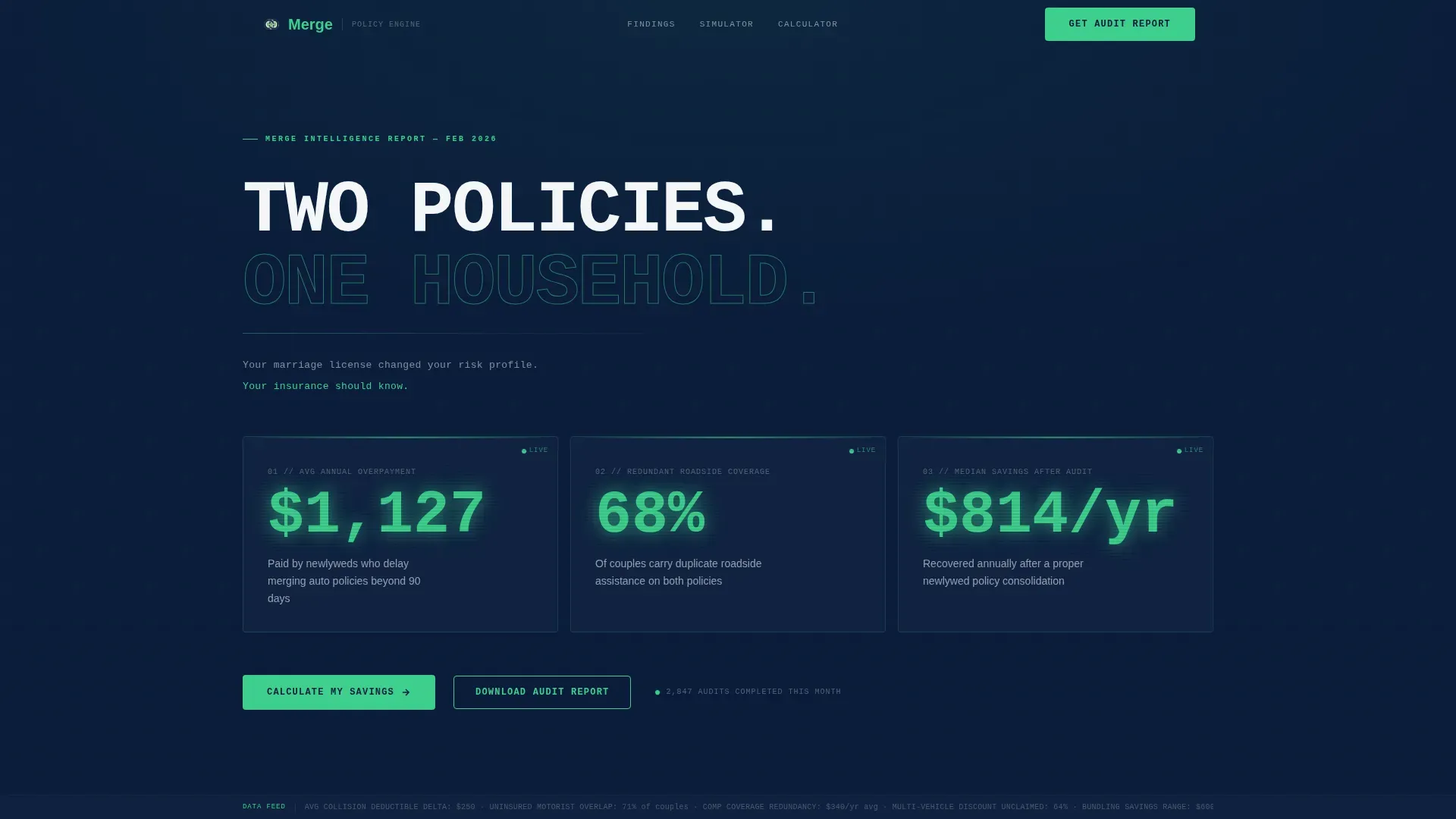
This template is a single-page, data-command resource hub designed to help newlyweds evaluate and merge their auto insurance policies. It leads with three bold statistics, walks visitors through a coverage overlap simulator, surfaces the top five insurance mistakes, and closes with a gated audit download. Every section earns the next click before asking for anything in return.
Who this template is for
This template is built for InsurTech teams, independent agencies, and financial platforms targeting newly married couples. It suits any team that wants to combine education with lead capture on one focused page.
- Insurance professionals who want to engage newlyweds ready to review their policies
- FinTech or InsurTech product teams building a content and lead-generation resource
- Financial planners who discuss policy changes with married clients as part of broader finances planning
What problem this template solves
Most newlyweds sit with two separate insurance cards, two renewal dates, and no clear plan. They overpay because nobody has shown them how to compare and combine. This template addresses that gap directly.
- Duplicate auto coverage silently costs a married couple over $1,000 in year one
- Couples forget to update beneficiaries on a life insurance policy after the wedding event
- Neither spouse knows which insurer to contact first or how to assess their combined insurance needs
What you get with this template
You get a fully structured, high-interactivity landing page that moves visitors from curiosity to conversion. Every section is a numbered research finding, and the tone escalates from diagnosis to prescription.
- A Bloomberg-terminal stats wall with three oversized data panels showing real savings figures
- An interactive coverage overlap simulator and a quick-estimate savings calculator
- A gated audit download form and a secondary ungated calculator path for lower-friction engagement
Feature list
This template ships with purpose-built components that focus on trust, clarity, and action.
Stats Wall Hero Panel
Three oversized metric panels open the page. They display the average annual overpayment, the share of couples carrying redundant roadside coverage, and the median savings after a proper policy audit. Numbers render in signal green against command navy.
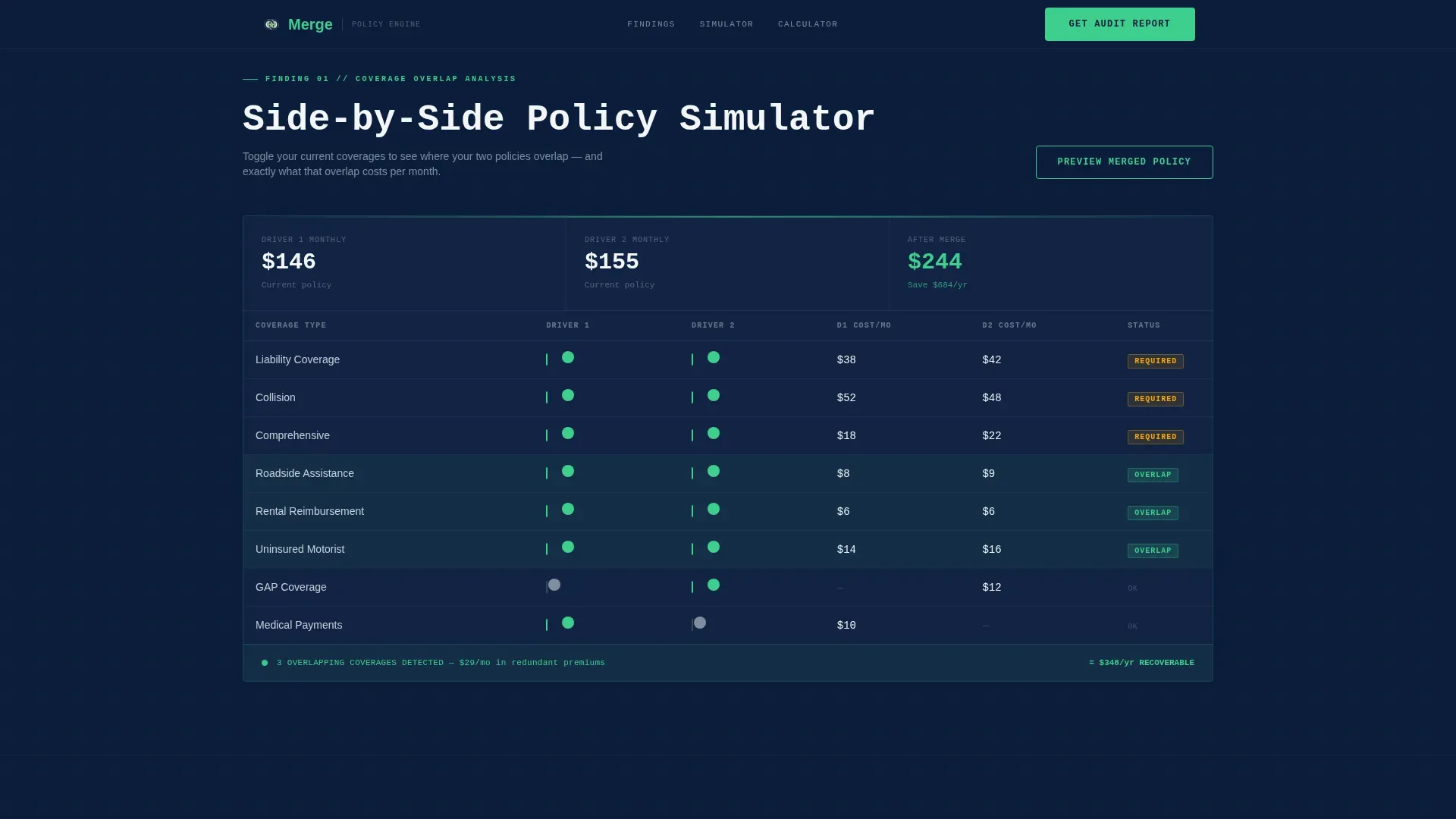
Coverage Overlap Simulator
A side-by-side policy comparison table lets visitors toggle between their two current policies. It helps each married couple determine where their auto policy overlaps and where gaps exist in their coverage limits.
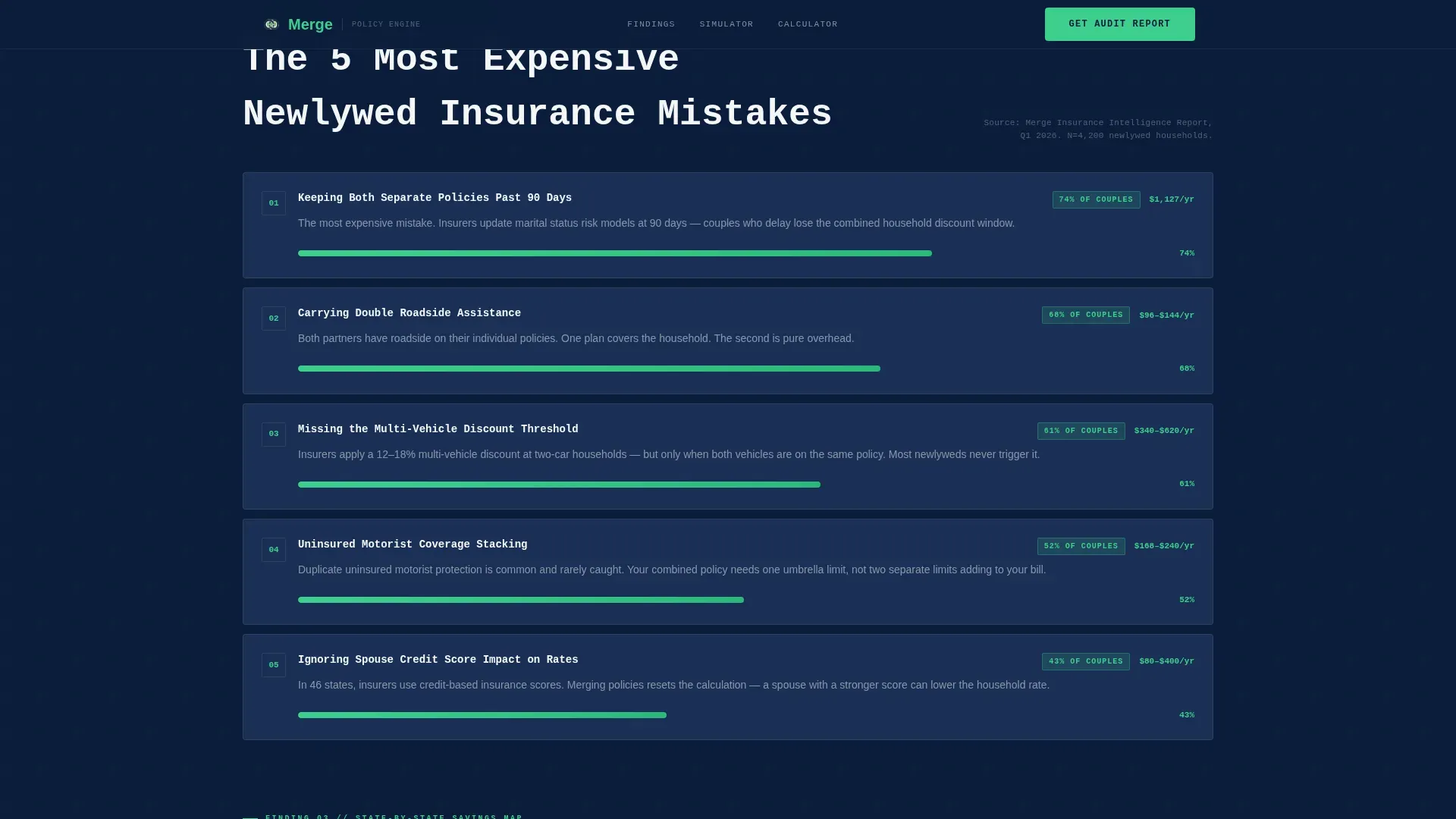
Top Five Mistakes Bar Chart
A horizontal bar chart section presents the five most common newlywed insurance mistakes as numbered research findings. Visitors can review each finding and talk through the implications with their agent.
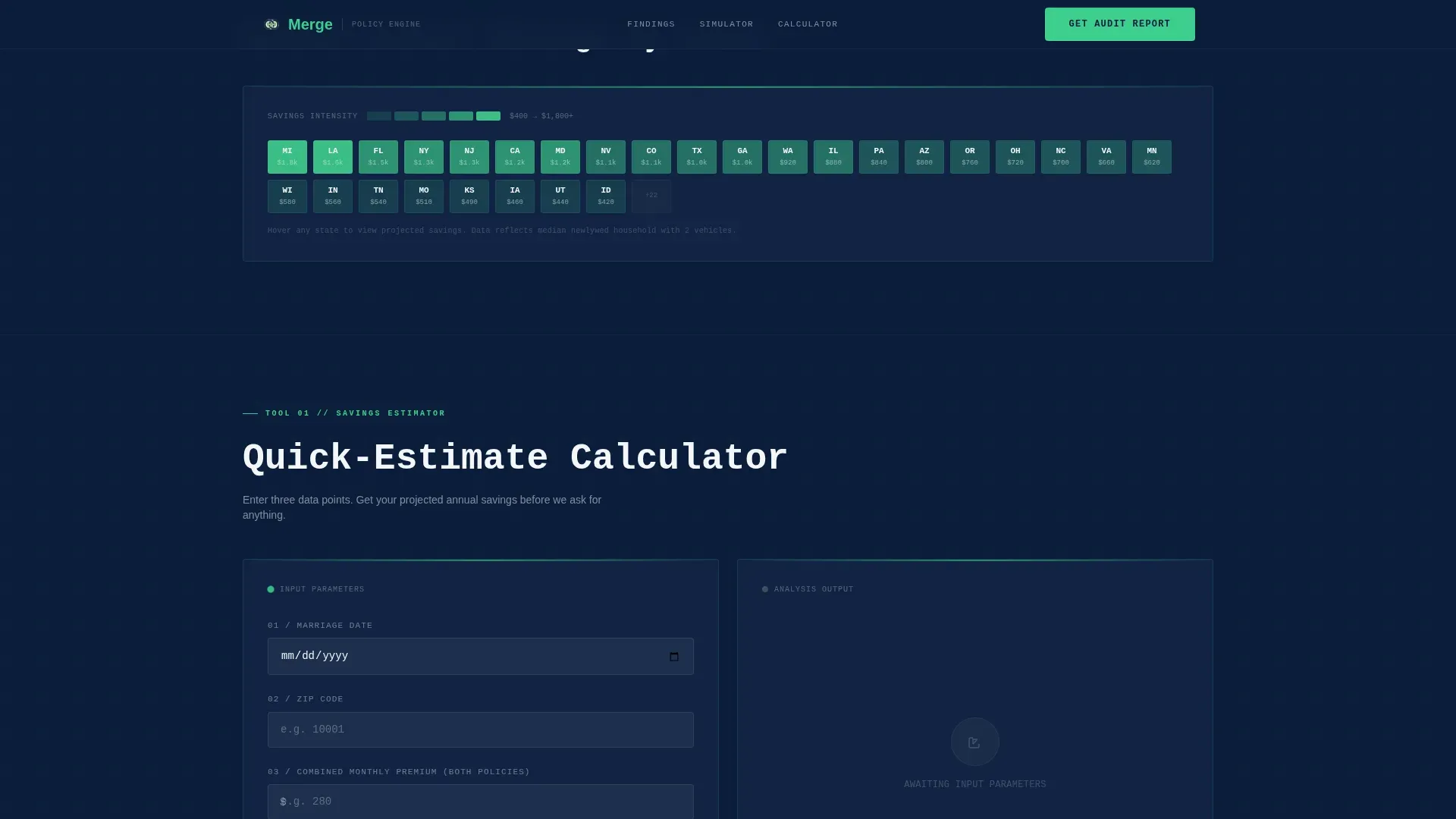
Quick-Estimate Savings Calculator
Visitors enter their marriage date, zip code location, and current monthly premium. The calculator returns projected savings before prompting an email capture, so the insurer earns trust before asking for contact details.
Gated Audit Download Form
The primary conversion point is a two-field form: email address and number of vehicles. It gates the full Newlywed Insurance Audit report and keeps the sign-up process simple enough to protect completion rates.
State-by-State Savings Heatmap
A visual heatmap lets couples assess potential savings by location. It adds a data layer that makes the resource feel like an industry report rather than a sales page.
Page sections overview
| Section | Purpose |
|---|---|
| Hero Stats Wall | Display three key overpayment metrics |
| Coverage Overlap Simulator | Compare side-by-side auto policies |
| Top 5 Mistakes | Rank common newlywed insurance errors |
| Savings Calculator | Estimate projected savings instantly |
| Audit Download call to action | Gate the full report behind a form |
| Footer | Linear single-row navigation close |
Design & branding system
The visual identity follows a Data Command theme. Every color earns its place, and nothing decorative competes with the numbers.
- Navy (#0B1D3A) dominates backgrounds and data card surfaces; steel gray (#3D4F5F) separates grid modules
- Signal green (#3ECF8E) appears only on savings indicators and interactive call-to-action elements
- JetBrains Mono handles all data labels; DM Sans carries body text for clean reading contrast
Mobile & speed optimization
The template is built desktop-first to honor the dashboard grid aesthetic, with a responsive layout that adapts for smaller screens. Interactive components use client-side rendering while static sections use server components.
- GSAP counter animations and scroll reveals trigger as each data panel enters the viewport
- Policy simulator toggles and the savings calculator are built for client-side interactivity
- Static content sections render server-side to keep initial load lean
How this template helps you convert
Every design and copy decision plan in this template pushes toward two clear conversion paths without pressuring the visitor before they are ready.
- The ungated savings calculator delivers a real projected number first, then prompts visitors to get their full audit report with an email capture, lowering the barrier to that first yes.
- The gated two-field audit download form keeps friction minimal. Visitors who complete it are already engaged and informed, making them higher-quality leads for any insurance agent or platform team.
Other information about this template
This template is the Merge Newlywed Auto Insurance Policy Audit landing page template, built specifically for the newlywed auto insurance category within the broader Finance and Insurance space.
- Before merging, couples should make a home inventory to assess personal property value, including high value items and jewelry received as wedding gifts
- A comprehensive review should compare deductibles, coverage limits, and premium costs; if one spouse has driving violations, discuss whether a named driver exclusion makes more sense than a full merge
- Gathering a driver's license number and Vehicle Identification Number for both partners is an important early step in the process
- Newlyweds should also evaluate all the insurance policies they hold together: health insurance, life insurance, and additional policies like renters or home coverage
- Life insurance is a cornerstone of married life financial planning; update beneficiaries on any life insurance policy immediately after the wedding
- Insurance companies often consider married partners lower risk, which can unlock discounts beyond the standard auto policy rate
- Couples should talk to an agent about bundling home and auto to ensure they capture every available multi-policy plan discount
- Practices like reviewing policies at each renewal help protect both partners as life changes over time
- This template can support any team that wants to address insurance needs, combine vehicles under one plan, and give couples the security and peace of mind they deserve as they enjoy married life
Theme
Data Command
Creative direction
Industry Report
Color system
Navy Authority
Style
Dashboard/Data Grid
Direction
Content/Resource
Page Sections
Bloomberg-style Stats Wall
Interactive Coverage Overlap Simulator
Quick-estimate Savings Calculator
Gated Audit Download Form
Top Five Mistakes Bar Chart
State-by-state Savings Heatmap
Related questions
Can I customize the stats and data panels for my own research figures?
Does the savings calculator connect to a live pricing engine?
What makes this template effective for newlyweds specifically?
How does the gated audit form work?
Is this template suitable for an independent insurance agent or a larger platform?



