Colocation Data Center Landing Page Template
Uptime is a single-page colocation landing page template built for data center operators and colocation providers. It uses a Before/After Slider header, an interactive campus explorer, and a gallery-plus-detail layout to guide enterprise prospects through facility specs, environmental stats, and tour scheduling, all inside a calm, pastoral visual identity that sets it apart from typical data center marketing.
by Rocket studio
Quick summary
Uptime is a colocation landing page template designed for data center leasing businesses. It opens with a dramatic Before/After Slider, moves through an interactive illustrated site map, and closes with a frictionless tour-booking module. The pastoral Cloud Canvas color system makes complex infrastructure feel approachable, giving enterprise prospects the confidence to explore before committing.
Who this template is for
This template is built for colocation providers and wholesale data center operators who need to market their facilities to serious enterprise buyers. It speaks the language of infrastructure decisions, not generic real estate.
- Data center operators marketing colocation bays, wholesale suites, or powered-shell space to enterprise clients
- Facility sales teams targeting CTOs migrating out of aging on-premises server rooms and SaaS companies scaling beyond a single cloud region
- Compliance-sensitive industries such as regional banking, where prospects need to see cage security, physical access, and power density specs before booking a tour
What problem this template solves
Most data center websites bury specs inside PDFs, rely on stock photography of server racks, and offer nothing but a contact form. Prospects leave before they understand what the facility actually offers. This template solves that by turning the page itself into an interactive facility tour, earning trust before asking for any contact information.
- Enterprise buyers need power density figures, cooling redundancy tiers, and carrier-neutral cross-connect options upfront, not hidden behind a sales call
- The colocation sales cycle is long, and most landing pages fail to hold attention long enough to reach the scheduling step
- Compliance officers and risk-averse buyers need visible proof of operational quality, not just marketing language
What you get with this template
You get a fully structured single-page layout that guides a prospect from first impression through facility exploration to tour booking, with no dead ends and no forced form fills early in the flow.
- A viewport-wide Before/After Slider header, an interactive illustrated campus site map with clickable buildings, and expandable gallery plus detail panels for each facility zone
- Per-rack power density specs, cooling redundancy tier callouts, cross-connect options, and a carrier-neutral meet-me room section with carrier logos displayed in each detail panel
- A lightweight tour-booking module at the bottom of the page with a calendar embed, a power requirement dropdown ranging from 5 kW to 500 kW and above, and an optional migration notes field
Feature list
This section covers the core built-in components that make the Uptime template functional for colocation marketing.
Before/After Viewport Slider
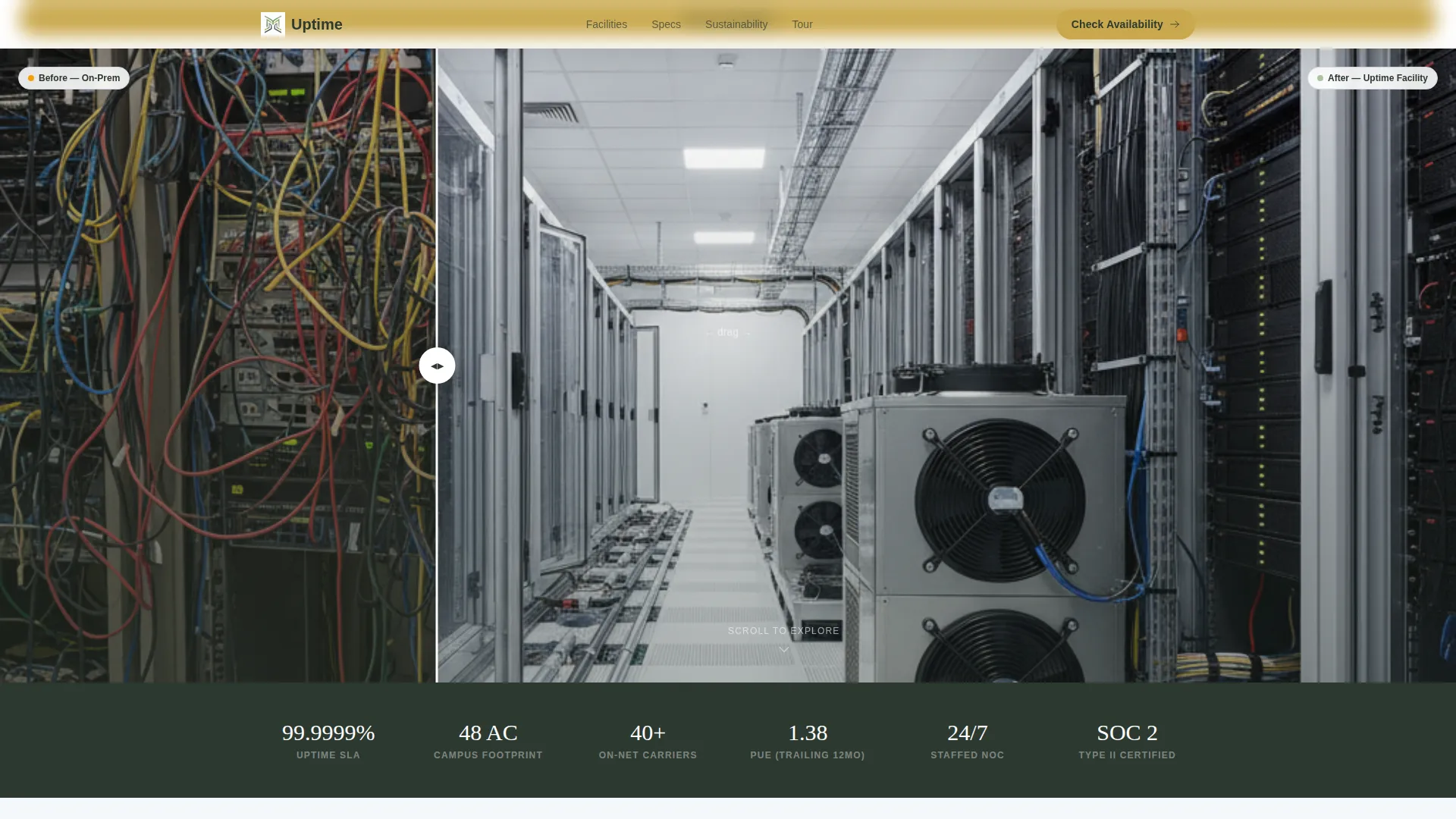
The header splits the full viewport into two camera-matched scenes. Left shows a chaotic, cable-dense server closet under flickering fluorescent light. Right reveals the same angle inside the leased facility: cold-aisle containment, uniform waterfall cabling, and a green LED status strip. A single headline fades in once the handle crosses center.
Interactive Illustrated Campus Map
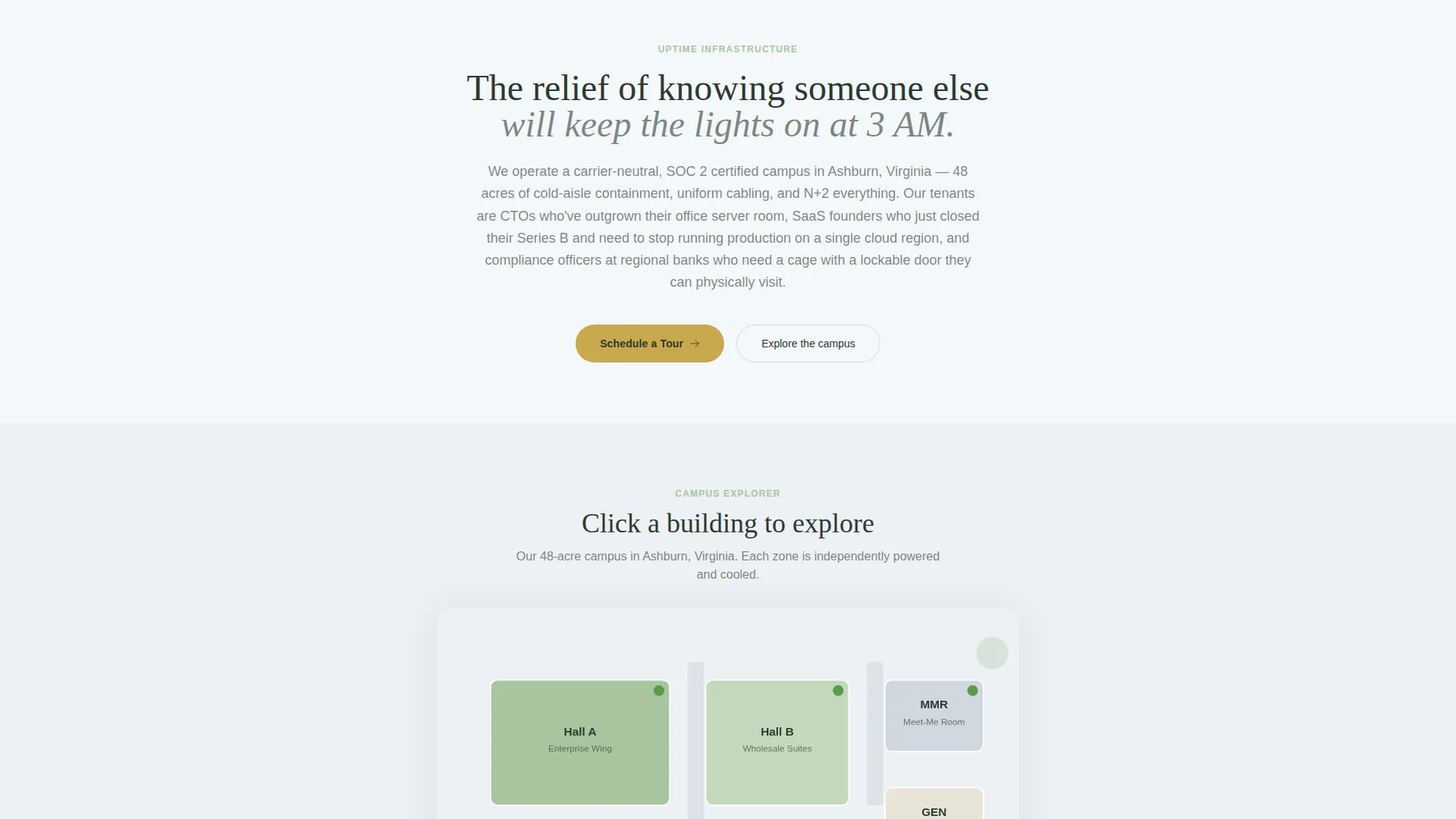
After the header, visitors enter a top-down illustrated site map of the campus. Clicking any building launches the gallery-plus-detail pattern for that hall. This rewards exploration and keeps prospects engaged without forcing a linear scroll.
Gallery Plus Detail Panels
Each facility zone gets a photo grid covering the raised floor, meet-me room, loading dock, and generator yard. Every thumbnail expands into a detail panel showing available power density per rack, cooling redundancy tier, cross-connect options, and carrier logos for the meet-me room.
Environmental Stats Layer
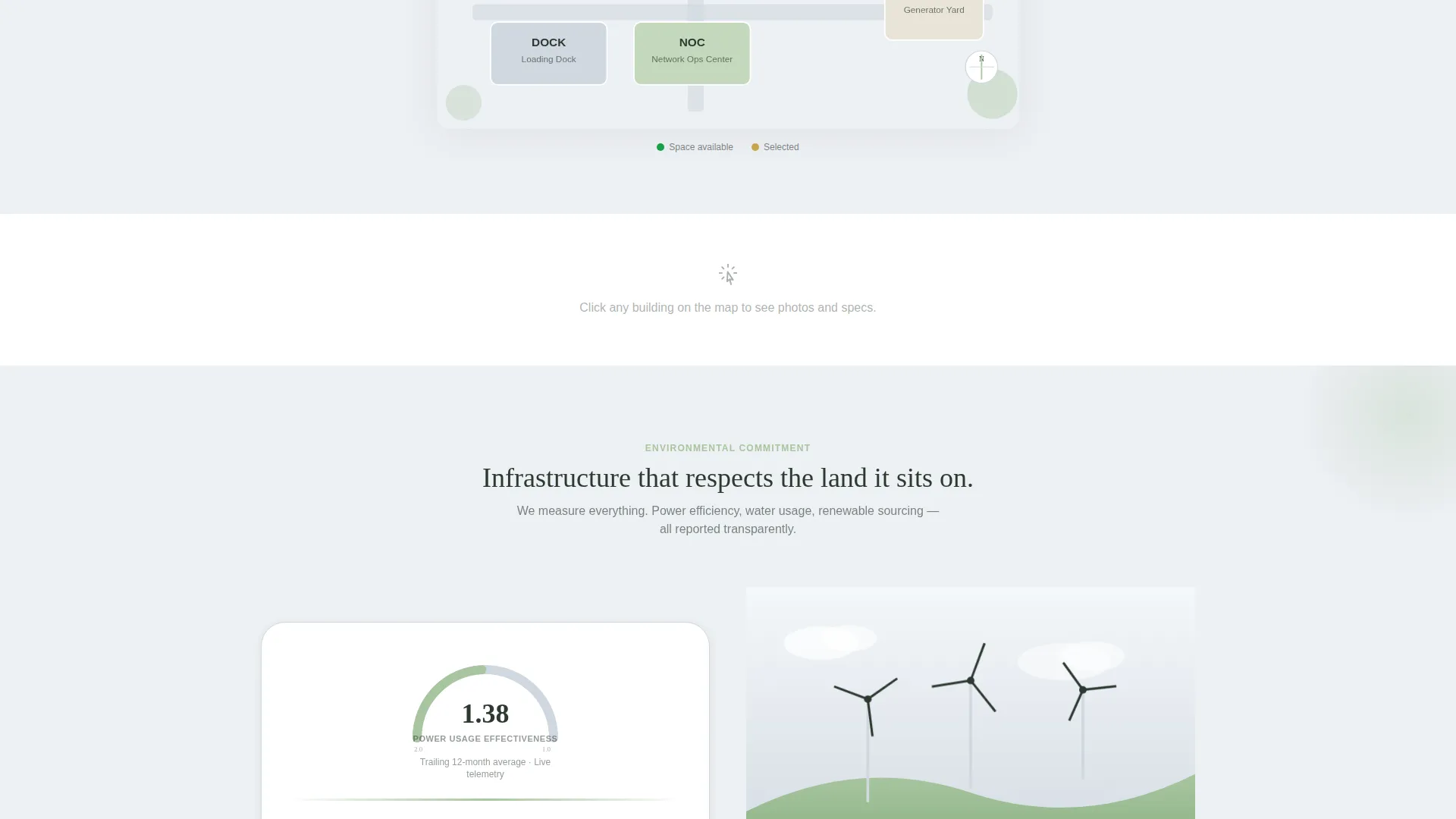
A real-time Power Usage Effectiveness (PUE) dial animates gently as the visitor scrolls into the environmental section. Renewable energy sourcing appears as a pastoral illustration showing wind turbines on a green ridge behind the facility.
Frictionless Tour Booking Module
The bottom of the page anchors a lightweight scheduling module. It contains a calendar embed with available tour slots by facility, a single dropdown for power requirement range, and an optional free-text field for migration context. No lengthy form, no forced data entry.
Sticky Availability call to action Bar
A slim top bar reading "Check Availability" follows the scroll unobtrusively. Visitors who are ready to skip exploration can reach the booking module instantly from any point on the page.
Page sections overview
| Section | Purpose |
|---|---|
| Before/After Slider | Opens the page with a visual contrast between a chaotic server closet and an organized colocation facility |
| Campus Site Map | Interactive illustrated top-down map lets visitors click individual buildings to explore |
| Gallery Detail Panels | Expandable photo grids show each zone with full specs and carrier information |
| Environmental Stats Layer | Animated PUE dial and renewable energy illustration communicate operational efficiency |
| Tour Booking Module | Calendar embed with power range selector and optional migration notes closes the funnel |
| Sticky call to action Bar | Persistent top bar lets ready visitors jump directly to booking at any scroll position |
Design & branding system
The template uses a Cloud Canvas color system drawn from pastoral, outdoor imagery. The result is a visual identity that feels calm and spacious, which is a deliberate contrast to the electric blue and black that dominates most data center marketing.
- Core palette: open-sky white (#F4F7FA) and morning-fog gray (#D0D8E0) alternate as section backgrounds; deep loam (#2C3930) anchors all body text; soft pasture green (#A8C5A0) appears only in iconography and section dividers; muted gold (#C9A84C) is reserved for call-to-action buttons and hover states
- Typography and spatial rhythm favor wide breathing room, unhurried layouts, and watercolor-style illustrations that reinforce the pastoral calm theme throughout the page
Mobile & speed optimization
The template layout is structured to perform cleanly on smaller screens. Interactive components such as the site map and detail panels are designed to remain usable without a mouse.
- The Before/After Slider adapts to touch-drag interaction on mobile, and the campus map scales to a vertically scrollable list of facility zones on narrow viewports
- Detail panels open as full-screen overlays on mobile, keeping specs readable and the "Schedule a Tour" button consistently visible without scrolling within the panel
How this template helps you convert
The Uptime template is structured around a single insight: enterprise infrastructure buyers need to feel informed before they will give you their calendar. Every design and layout decision supports that principle.
- The Before/After Slider creates an immediate emotional contrast, connecting the visitor's current pain (a cramped, poorly managed server room) with the relief your facility offers, before a single word of marketing copy appears
- The interactive campus explorer lets prospects self-qualify by digging into the specs, power ranges, and carrier options that matter to them, so by the time they reach the tour booking module they are already sold on the facility fit
- The sticky "Check Availability" bar and the bottom-of-page calendar embed reduce the distance between interest and action, turning a passive scroll into a scheduled conversation without forcing a form fill at the top of the page
Other information about this template
This template sits inside the Real Estate and Property category with a Commercial Real Estate subcategory focus, oriented toward data center leasing and colocation facility marketing. It is classified as a Gallery plus Detail template style with a Lead Generation funnel direction.
- The template is suited for colocation providers, wholesale data center operators, and enterprise-grade facility leasing teams who need a polished, spec-forward marketing page
- The Pastoral Calm theme and Cloud Canvas color system are intentional departures from the dark, immersive aesthetic common in the data center industry, helping the Uptime template stand out in a crowded market
- The page structure supports a click-through funnel approach: transparency first, commitment last, with no form gating until the visitor has already explored the full campus
Theme
Dark Immersive
Creative direction
Gallery Walk
Color system
Sunset Mesa
Style
Gallery + Detail
Direction
Lead Generation
Page Sections
Before/after Viewport Slider Header
Interactive Illustrated Campus Map
Expandable Gallery Detail Panels
Animated Environmental Stats Layer
Frictionless Tour Booking Module
Sticky Check Availability Bar
Related questions
Is this template suitable for a single colocation facility or a multi-site operator?
Can I update the power density specs and carrier logos in the detail panels?
What does the tour booking module include out of the box?
Is the template designed for compliance-sensitive buyers like regional banks?
How does the Before/After Slider work on a phone or tablet?



