Valuate — Expert Townhouse Appraisal Landing Page Template
Appraise is a precision-built landing page for townhouse seller's agents who need to convert curious homeowners into qualified leads. The page leads with an address-input calculator, cascades data cards for comps and market trends, then guides visitors through a five-step valuation quiz. The result is a confident, high-trust experience that turns equity anxiety into a booked appointment.
by Rocket studio
Quick summary
Appraise is a modular, card-grid landing page built for a townhouse brokerage that leads with instant valuation. Visitors enter their address, get a live estimate, explore block-level comps, and complete a five-step refinement quiz. By the time they see the contact form, they have already invested their curiosity and feel informed, not pressured.
Who this template is for
This template is built for townhouse seller's agents and boutique brokerages who price at the unit level, not the zip-code level. It works best for teams operating in transitional neighborhoods where multiple units on the same block are turning over quickly.
- Seller's agents who want to capture seller leads before a listing agreement is signed
- Brokerages that differentiate on hyper-local pricing data and micro-comparable sales
- Real estate teams that prefer a tool-first funnel over a credentials-first pitch
What problem this template solves
Townhouse owners in active markets watch nearby sales and wonder about their own equity position. Most agent websites answer that question with a contact form, not a number. This template closes that gap immediately.
- It replaces a passive "request a valuation" form with an active, address-driven calculator that loads above the fold
- It prevents drop-off by revealing data in stages, keeping visitors engaged through each card and quiz step
- It removes the psychological barrier of the contact form by making it the natural last step, not the first ask
What you get with this template
The template delivers a fully structured, single-page lead generation experience organized around a calculator-first flow. Every section is purpose-built and arranged in a logical progression from curiosity to conversion.
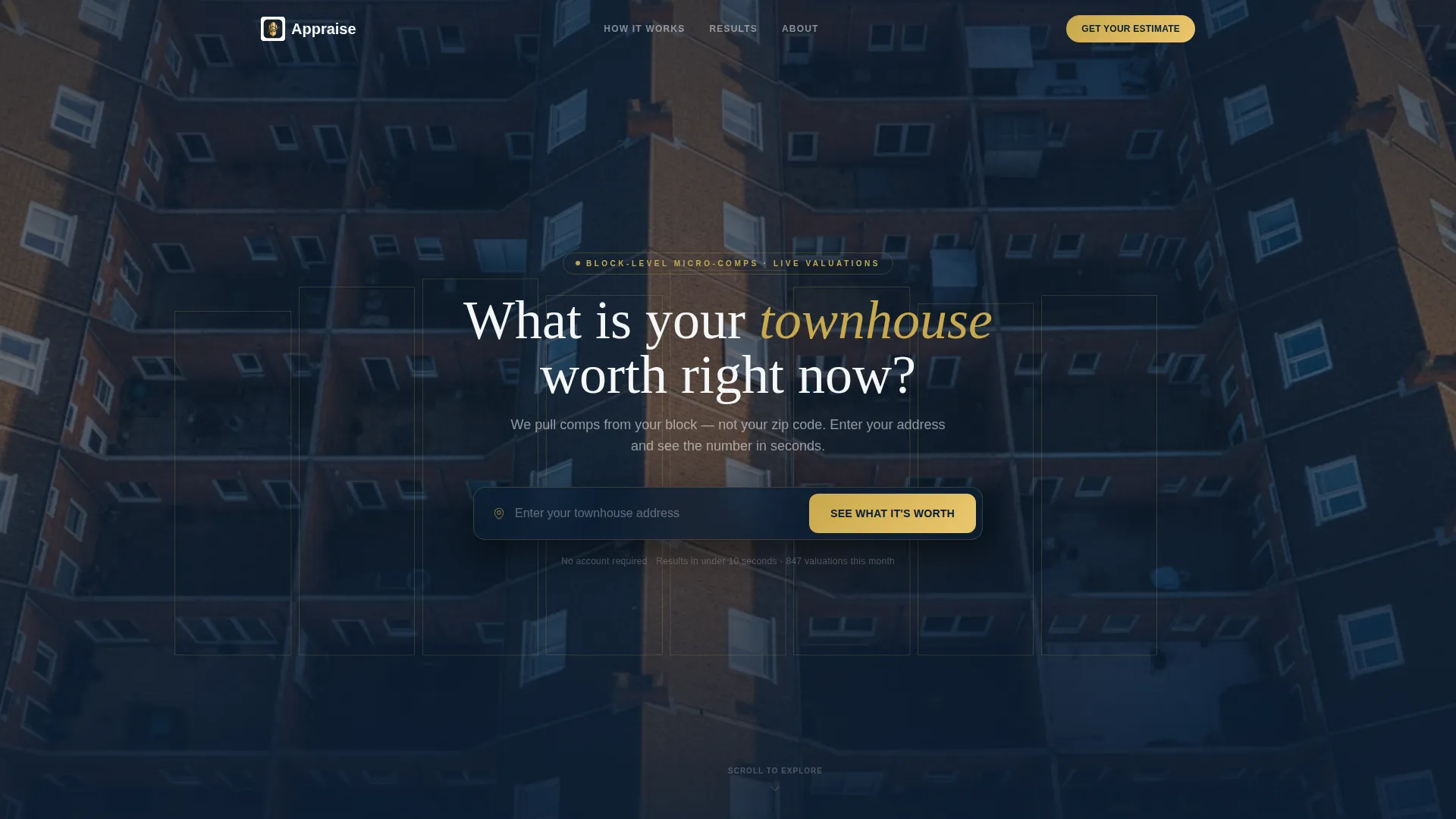
- A panoramic aerial hero section with a centered address input field and a gold call-to-action button
- A cascade of modular data cards covering estimated value range, block-level comparable sales, days-on-market trend, and a renovation return-on-investment slider
- A five-step micro-quiz that refines the estimate in real time and ends with a three-field contact form
Feature list
This section covers the core built-in components and interactions that define the Appraise template experience.
Address-Input Hero Section
The hero spans the full width with a low-altitude drone photograph of attached townhouse rooflines at golden hour. A centered input field prompts visitors to enter their address. A gold-bordered call-to-action button labeled "See What It's Worth" triggers the calculator and loads the data cards before the visitor scrolls.
Cascading Modular Data Cards
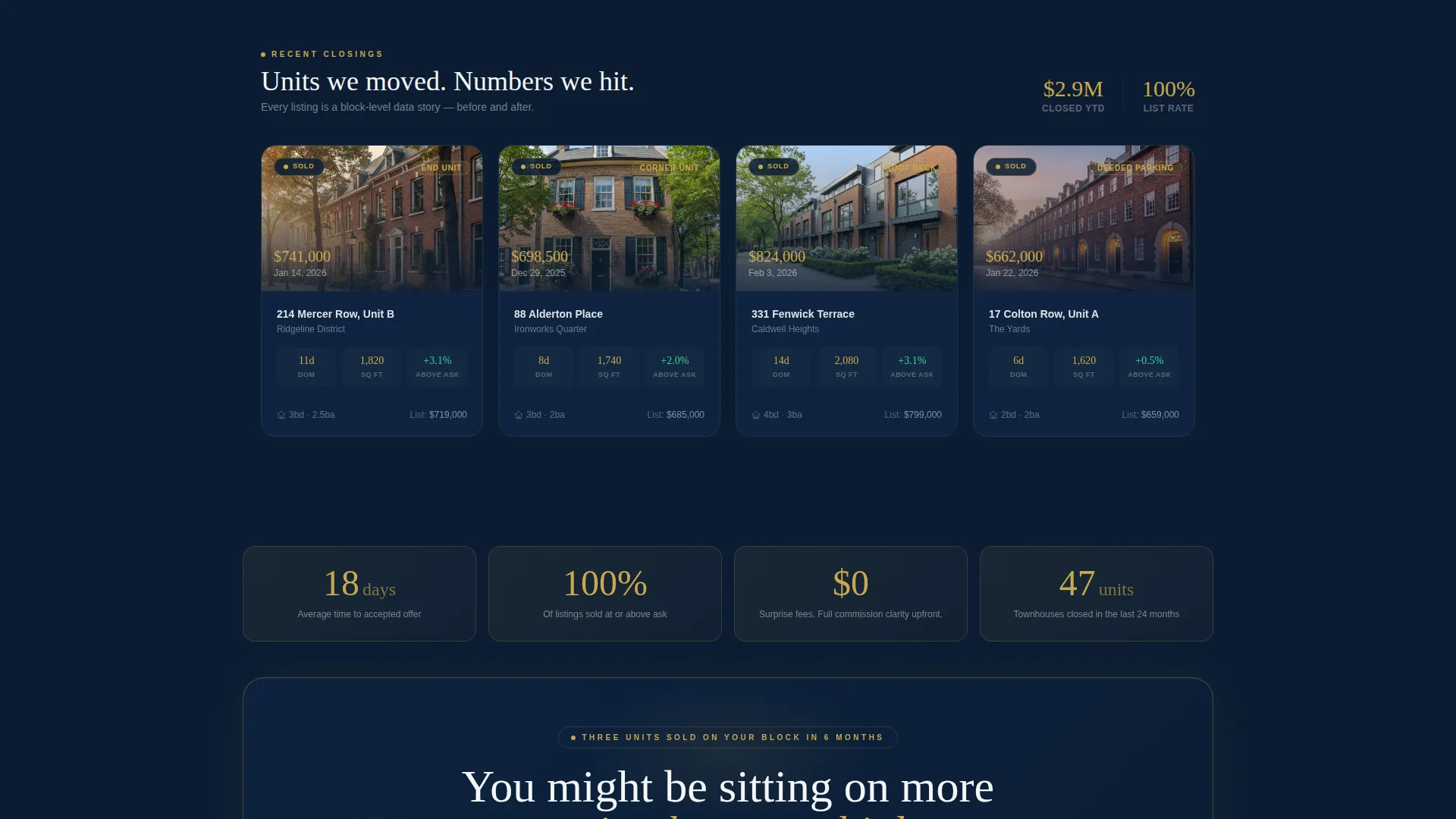
Below the hero, four self-contained cards appear in sequence: an estimated value range card, a block-level comparable sales card with actual sale prices, a days-on-market trend card, and a renovation return-on-investment slider. Each card is independently styled and rearranges responsively across screen sizes.
Five-Step Valuation Quiz
A "Refine Your Valuation" button opens a progressive micro-quiz. Each step collects one detail: unit position, renovation recency, outdoor space type, parking situation, and timeline to sell. Every answer visibly adjusts the displayed estimate in real time, building investment in the outcome before the contact form appears.
Social Proof Card Grid
After the tool section, sold-unit cards appear in the same card style as the data cards. This visual consistency makes social proof feel like a continuation of evidence rather than a shift into marketing. Each card can display a sold price, neighborhood, and transaction detail.
Credential and Sold-Unit Evidence Flow
The page transitions from data into proof without breaking the grid rhythm. Sold-unit cards follow the same modular layout as the calculator output, so the design language reinforces trust at every scroll depth.
Gold-Accented Corporate Precision Design
Valuation gold is used selectively on call-to-action borders, active states, and data highlights. The palette creates the visual atmosphere of a private wealth environment, using deep navy, polished slate, and crisp ledger white as the structural colors.
Page sections overview
| Section | Purpose |
|---|---|
| Panoramic Hero | Address input and instant call to action |
| Estimated Value Card | Displays the initial price range |
| Block Comps Card | Shows nearby sale prices |
| Days-on-Market Card | Reveals local selling pace |
| Renovation ROI Slider | Estimates improvement impact |
| Valuation Refinement Quiz | Collects five unit-specific data points |
| Contact Form Screen | Captures name, email, and phone |
| Sold-Unit Cards | Provides social proof in grid format |
Design & branding system
The visual identity follows a Corporate Precision theme built on a Midnight Blue color system. The palette is deliberately disciplined, using each color for a specific role rather than decoration.
- Deep terminal navy (#0B1D33) forms the page background and card bases, slate (#3A4A5C) defines card surfaces and dividers, and ledger white (#F4F6F8) carries all body text and labels
- Valuation gold (#C9A84C) is reserved for call-to-action borders, active input states, and data highlight figures
- The hero photograph features thin gold keylines outlining individual townhouse units, reinforcing the idea that each home holds its own distinct value
Mobile & speed optimization
The card grid layout is built to reflow naturally on smaller screens without losing the data hierarchy. Each modular card is self-contained, so the responsive behavior does not disrupt the calculator flow.
- Cards stack vertically on mobile while preserving the sequential reveal logic of the valuation tool
- The five-step quiz is designed as a single-focus screen at each step, reducing cognitive load on small displays
- The panoramic hero image and input field remain centered and accessible across device widths
How this template helps you convert
Every structural decision in this template is oriented toward one outcome: getting a townhouse owner to submit their contact information after feeling genuinely informed.
- The calculator loads above the fold, so the visitor receives value before they are asked for anything, reducing resistance from the first second on the page.
- The five-step quiz creates progressive commitment through ninety seconds of personal input, making the final contact form feel like the natural conclusion of a process the visitor chose to start.
Other information about this template
This template is categorized under Real Estate and Property with a focus on the townhouse real estate subcategory. It is designed as a lead generation landing page with a calculator-first creative direction.
- The template style is modular card grid, making individual sections easy to identify, reorder, and customize for different market areas or branding preferences
- The header concept uses a panoramic aerial photograph, which can be replaced with a locally sourced drone image to match a specific neighborhood
- This template is well-suited for agents and teams who want a townhouse valuation landing page that functions as an interactive tool rather than a static brochure page
- The quiz-to-form funnel structure is a deliberate progressive disclosure pattern, designed to lower form abandonment by building context and investment before requesting contact details


Theme
Atelier Studio
Creative direction
Calculator/Tool First
Color system
Warm Stone
Style
Gallery + Detail
Direction
Lead Generation
Page Sections
Address-input Hero with Calculator Trigger
Modular Cascading Data Cards
Five-step Real-time Valuation Quiz
Social Proof in Matching Card Style
Gold-accented Corporate Precision Palette
Progressive Disclosure Contact Form
Related questions
What kind of agent or brokerage is this template designed for?
Can I replace the hero photograph with my own image?
How does the five-step quiz connect to the contact form?
Do the data cards and quiz function as static design components?
Is this template suited to a single neighborhood or multiple markets?



