Self-Storage & Mini-Storage Professional Website Template
Vault is a premium climate-controlled storage landing page template designed for executive-tier storage facilities. It pairs an interactive aerial facility map with a gallery-style unit explorer, letting visitors browse vault interiors by storage class before reserving space. The lead capture flow is clean and sequential, built to convert high-value clients from first impression to confirmed reservation.
by Rocket studio
Quick summary
Vault is a single-page template for climate-controlled storage facilities serving high-value clients. It opens with an interactive aerial campus map, flows through a curated gallery of vault interiors organized by storage class, and closes with a focused reservation form. The design feels like a private estate experience, not a warehouse directory.
Who this template is for
This template is built for premium storage facility operators who serve discerning, high-value clients. It suits businesses that need to communicate precision, security, and environmental control before a visitor ever picks up the phone.
- Operators of climate-controlled storage facilities handling fine art, wine, medical samples, or heirloom furniture
- Facility owners targeting estate attorneys, private collectors, and pharmaceutical representatives
- Storage businesses that want a gallery-style landing page rather than a generic feature list
What problem this template solves
Most storage facility pages look like warehouse catalogs. They list square footage, quote a price, and show a stock photo of a padlock. That approach fails completely when your clients are storing irreplaceable collections or temperature-sensitive pharmaceutical samples.
- Visitors cannot visualize what a premium vault environment actually looks and feels like
- Generic storage pages give no sense of the environmental precision or security tier behind each door
- High-value clients need confidence before committing, and a plain feature list does not build it
What you get with this template
Vault delivers a structured, experience-led landing page that moves visitors from curiosity to commitment. Every section is designed to raise the perceived value of the facility before the reservation form appears.
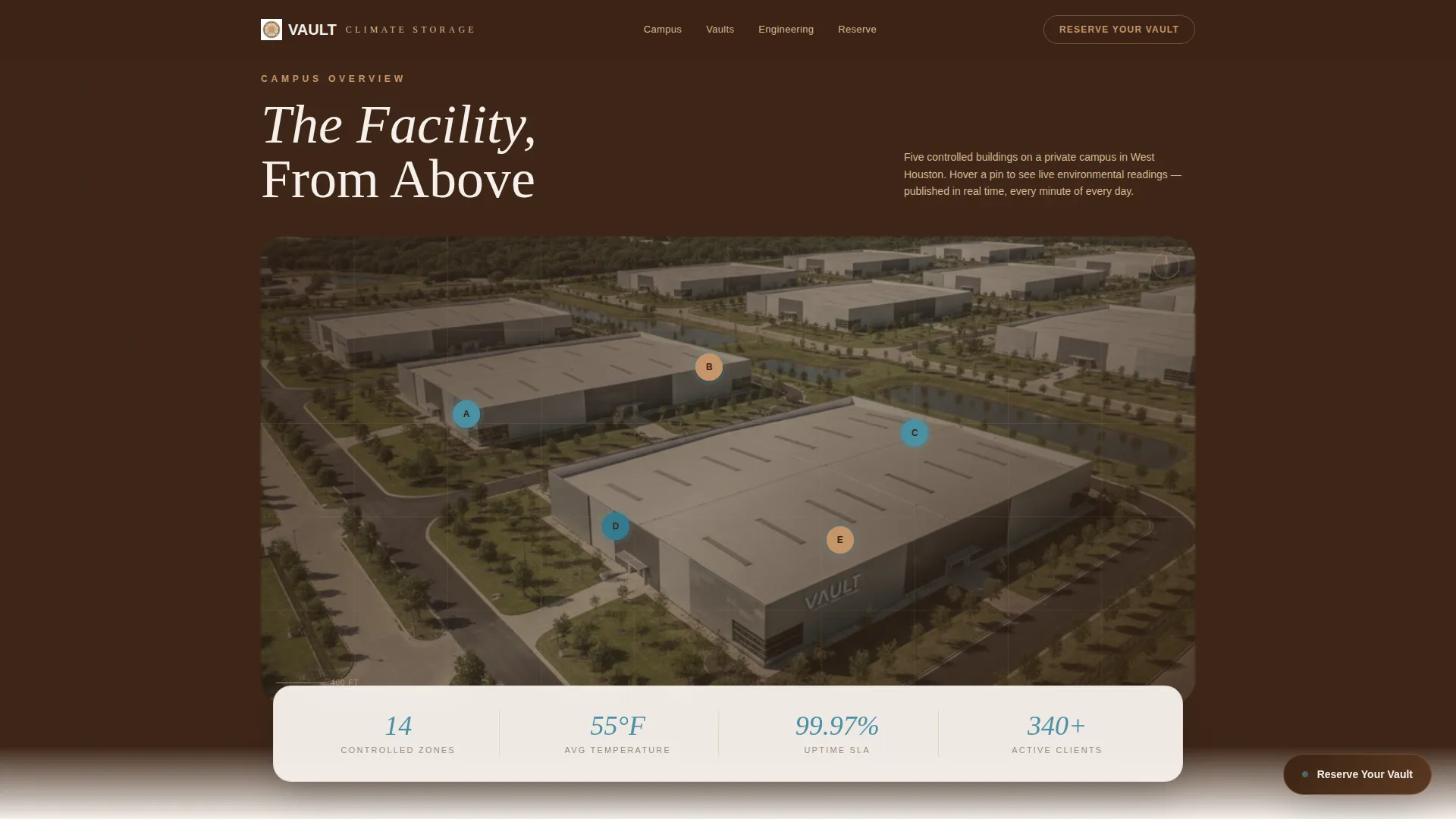
- An interactive aerial campus map with numbered building pins and live climate data tooltips
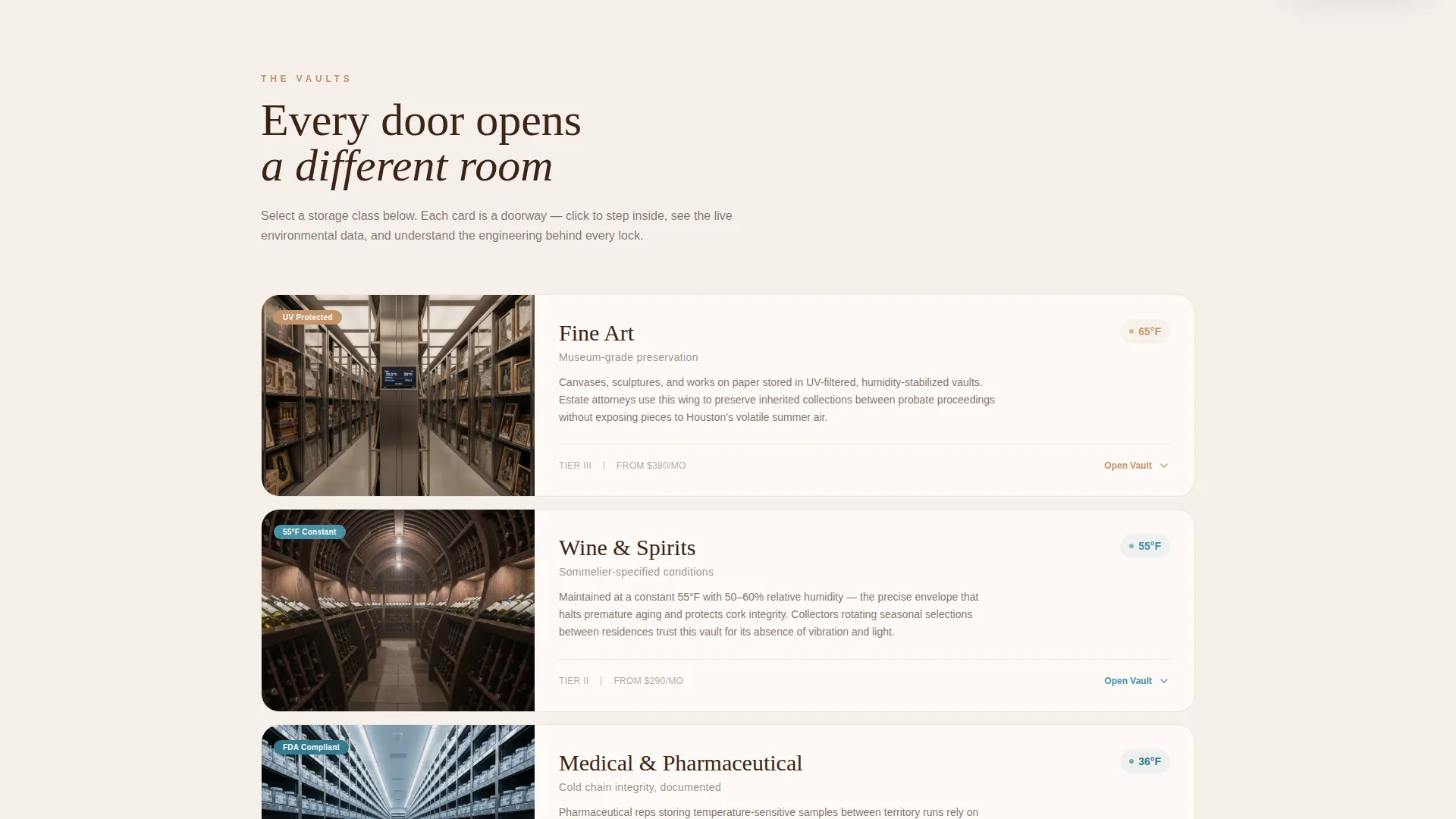
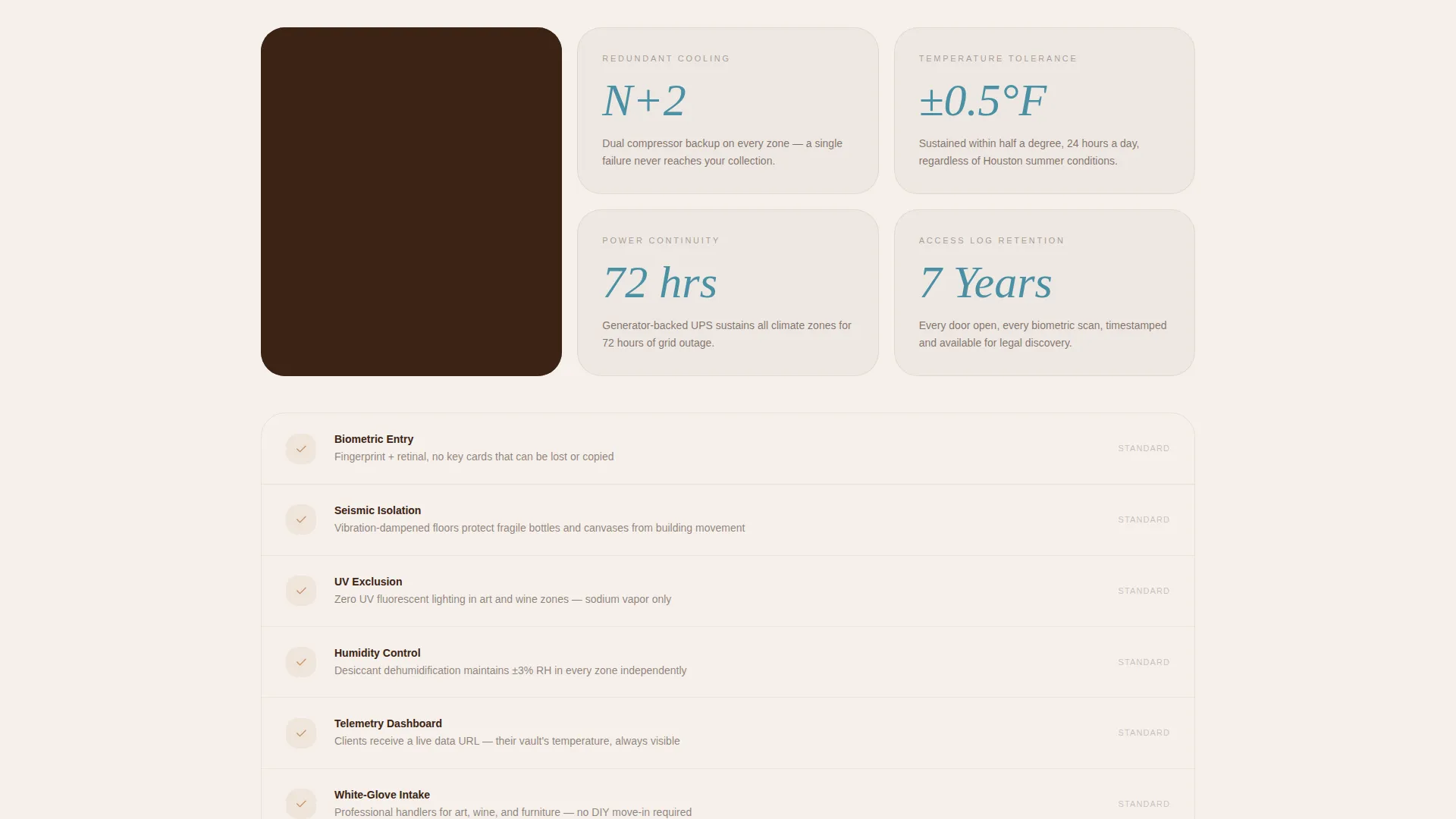
- A gallery explorer organized by storage class, with expandable detail panels showing interior photography, temperature and humidity gauges, security tier specs, and square footage options
- A sequential three-question lead capture form and a secondary walkthrough scheduling path
Feature list
This template ships with a precise set of interactive and visual components drawn directly from the facility experience brief.
Interactive Aerial Campus Map
The header is an aerial satellite-style view of the facility campus rendered in warm mesa tones. Numbered building pins pulse with live climate data. Hovering a pin reveals a tooltip showing the building name, current temperature, relative humidity, and storage class, giving visitors an immediate sense of operational precision.
Gallery-Style Vault Explorer
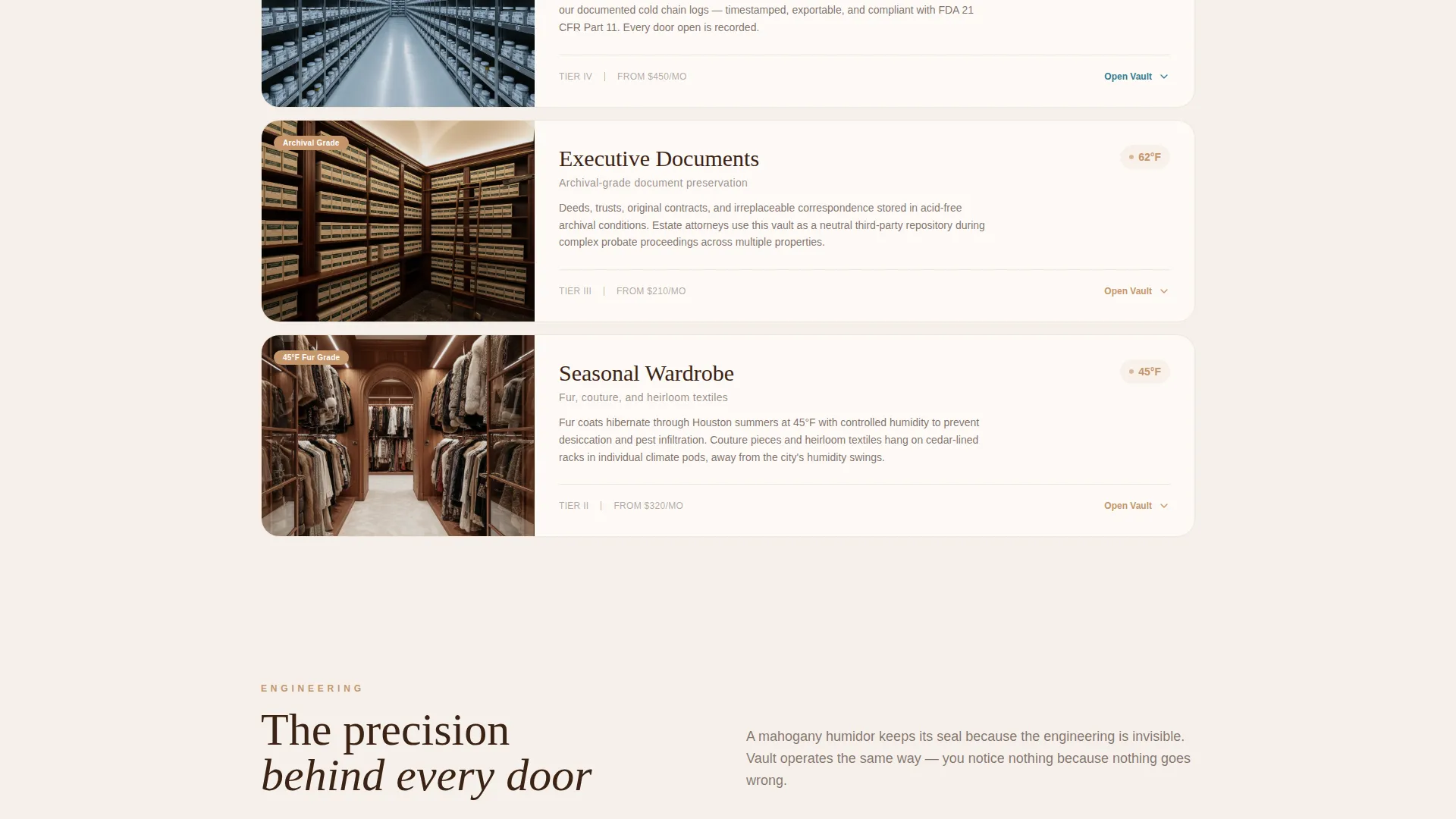
Below the map, vault interiors are displayed as a curated gallery organized by storage class: Fine Art, Wine, Medical, Executive Document, and Seasonal Wardrobe. Each card acts as a doorway. Clicking expands a detail panel with interior photography, real-time environmental gauges, security tier specifications, and available square footage options.
Sequential Lead Capture Form
The primary call to action, "Reserve Your Vault," appears as a floating button after the map interaction and is anchored at the bottom of each detail panel. The form asks three questions in order: what the visitor is storing, approximate square footage needed via a slider from 25 to 500 or more square feet, and preferred access hours.
Secondary Walkthrough Scheduling Path
Visitors who want to see the facility before committing have a clear alternative route. A "Schedule a Walkthrough" option sits alongside the primary reservation flow, reducing friction for prospects who need in-person confirmation before signing up.
Live Environmental Data Display
Real-time temperature and humidity badges appear on the campus map tooltips and inside each vault detail panel. These live readouts reinforce the facility's operational credibility. Visitors trust a facility that publishes its own thermostat readings.
Sunset Mesa Visual System
The full color palette, Sandstone Bluff for section backgrounds, Deep Mesquite for headers and navigation, Cooling-Unit White for card breathing room, and Thermostat Blue for hover states and live data badges, is built into every component. The palette communicates warmth, precision, and quiet authority without a single word.
Page sections overview
| Section | Purpose |
|---|---|
| Aerial Campus Map | Opens the page with an interactive overhead view of the facility and live climate pin tooltips |
| Vault Gallery Explorer | Displays vault interiors by storage class as expandable gallery cards |
| Fine Art Vault Detail | Shows interior photography, environmental gauges, and security specs for fine art storage |
| Wine Storage Detail | Presents temperature, humidity, and square footage options for wine collection aging |
| Medical Storage Detail | Covers pharmaceutical-grade cold chain specs and security tier details |
| Executive Document Detail | Highlights controlled environment and access options for document preservation |
| Seasonal Wardrobe Detail | Showcases climate-controlled wardrobe storage for fur and textile collections |
| Reserve Your Vault | Hosts the sequential three-question lead capture form with floating call to action button |
| Schedule a Walkthrough | Provides a secondary conversion path for in-person facility visits |
Design & branding system
The template follows an Executive Suite visual identity using the Sunset Mesa color system. Every color has a defined role, and every interactive state is intentional.
- Sandstone Bluff (#C4956A) dominates section backgrounds, Deep Mesquite (#3B2314) anchors navigation and headers, and Cooling-Unit White (#F5F0EB) separates gallery cards with open breathing room
- Thermostat Blue (#4A90A4) is reserved exclusively for hover states, live temperature badges, and interactive data readouts, reinforcing precision at every touch point
- The overall palette reads like a desert lodge at golden hour, warm terracotta surfaces absorbing the last light while the interior stays precisely controlled
Mobile & speed optimization
The template is structured for clean rendering across screen sizes without sacrificing the gallery or map experience. Interactive components are designed to remain functional and readable on smaller viewports.
- The gallery explorer and detail panels are laid out to reflow naturally on tablet and mobile screen widths
- The floating "Reserve Your Vault" button and sequential form are positioned for thumb-friendly interaction on mobile devices
- Live environmental badge displays and tooltip interactions are designed to remain legible at reduced screen sizes
How this template helps you convert
The page is engineered around a single insight: high-value storage clients commit when they feel trust, not when they see a price list. Every layout decision pushes toward that trust before the form appears.
- The aerial campus map establishes operational credibility immediately, showing real building geometry and live climate data before a visitor reads a single paragraph
- The gallery explorer raises perceived value progressively, opening each storage class as a curated room rather than a line item, so visitors self-qualify and arrive at the form already convinced
- The dual conversion paths, "Reserve Your Vault" for ready buyers and "Schedule a Walkthrough" for cautious ones, capture both decision styles without forcing either
Other information about this template
This template is purpose-built for the art and collectibles storage niche within the broader self-storage and mini-storage category. It is equally suited to facilities serving wine collectors, pharmaceutical representatives, and estate attorneys managing probate property transitions.
- The template sits within the Real Estate and Property category, targeting the Self-Storage and Mini-Storage subcategory with a specific focus on high-value and climate-sensitive goods
- The creative direction follows a gallery and detail pattern, which suits any facility that needs to show, not just describe, the quality of its storage environments
- The split-screen layout structure and panoramic header concept make it straightforward to adapt the campus map section to different facility footprints or campus configurations
- No stock photography of employees or generic warehouse imagery is assumed; the template is designed around facility photography and environmental data displays
Theme
Pastoral Calm
Creative direction
Calculator/Tool First
Color system
Sunset Mesa
Style
Split Screen (50/50)
Direction
Direct Sales
Page Sections
Interactive Aerial Campus Map
Gallery-style Vault Explorer
Sequential Lead Capture Form
Secondary Walkthrough Scheduling Path
Live Environmental Data Badges
Related questions
What types of storage businesses fit this template best?
Can I adapt the storage class gallery to match my own facility categories?
How does the lead capture form work?
Does the template include live temperature and humidity data displays?
Is this template suitable for a facility with multiple buildings or zones?



