Vault - Premium Vehiclestorage Landing Page Template
Vault is a premium vehicle and boat storage landing page template built for climate-controlled storage facilities. It uses an asymmetric 60/40 grid, a charcoal and amber visual identity, and a stats-first layout strategy. The primary call to action is a five-step "Find Your Bay" guided quiz that recommends a bay size, estimated rate, and availability based on visitor inputs.
by Rocket studio
Quick summary
Vault is a single-page landing page template designed for premium vehicle and boat storage businesses. It opens with an architectural stats wall instead of a hero image, guides visitors through proof-first scroll segments, and closes with an interactive bay-finding quiz. The design feels like a master craftsman's garage after hours: purposeful, quiet, and worth trusting.
Who this template is for
This template is built for storage facility operators who handle high-value vehicles and want their page to match the quality of what they store. It speaks directly to clients who need more than a basic unit.
- Boat owners who winterize after the season and need covered, climate-controlled storage
- Classic car and collector vehicle owners rotating inventory from an overflowing private garage
- Recreational vehicle owners, including fifth-wheel and RV travelers, locking up before a long absence
What problem this template solves
Most storage facility pages lead with photos and generic copy. Vault flips that approach. Visitors with expensive vehicles need proof before persuasion, and this template delivers it in the right order.
- Generic templates fail to communicate the trust signals that high-value vehicle owners require
- A standard hero image layout buries the operational facts that actually close the sale
- Visitors who already know what they store lose patience with long onboarding forms and vague pricing
What you get with this template
You get a fully structured landing page layout that puts quantifiable credibility at the top and guides every visitor type toward the right inquiry path. The design is ready to adapt to your facility's real numbers and branding.
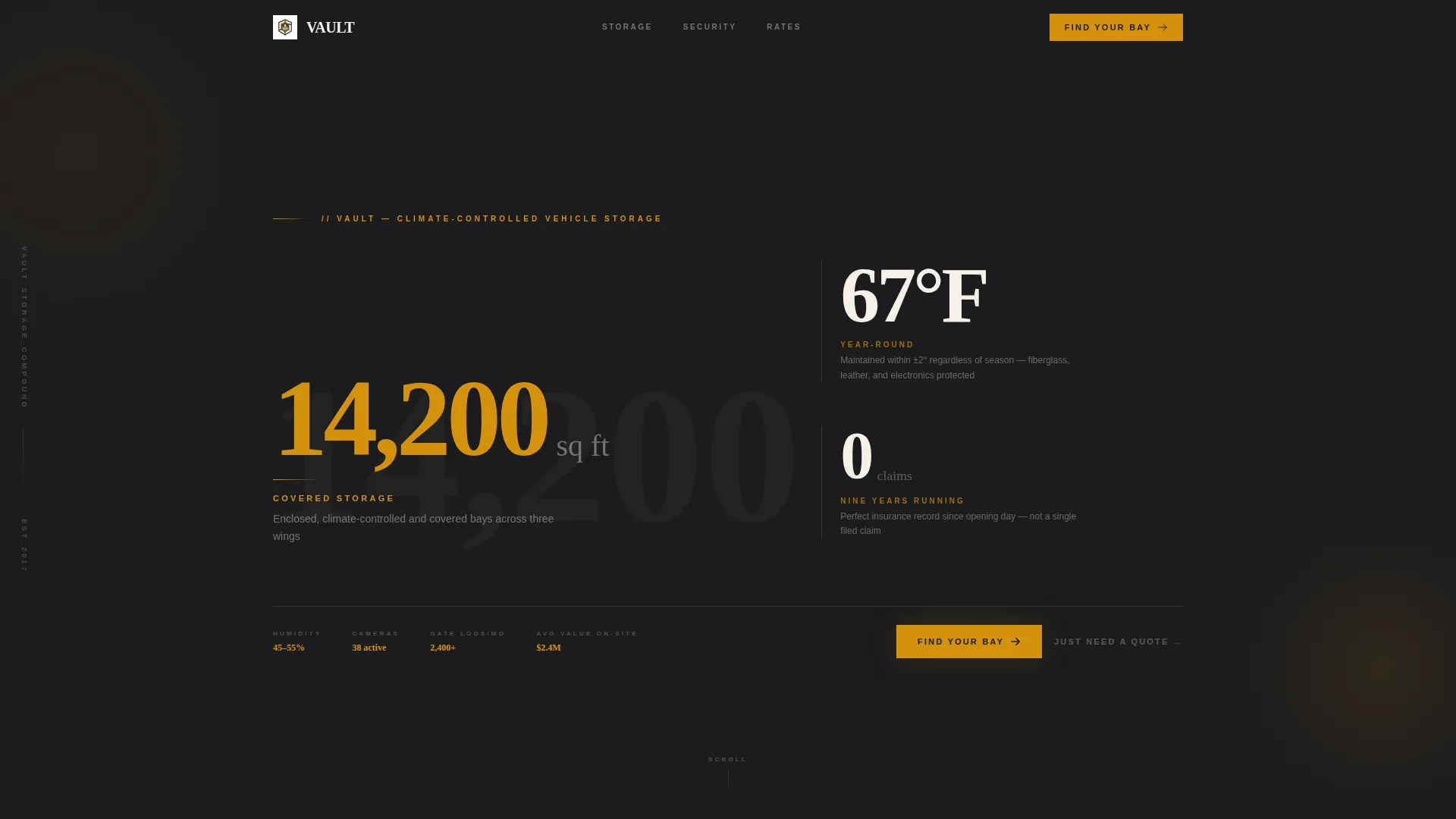
- An asymmetric 60/40 grid header featuring three oversized stat callouts: covered square footage, year-round climate temperature, and a zero-incident insurance record
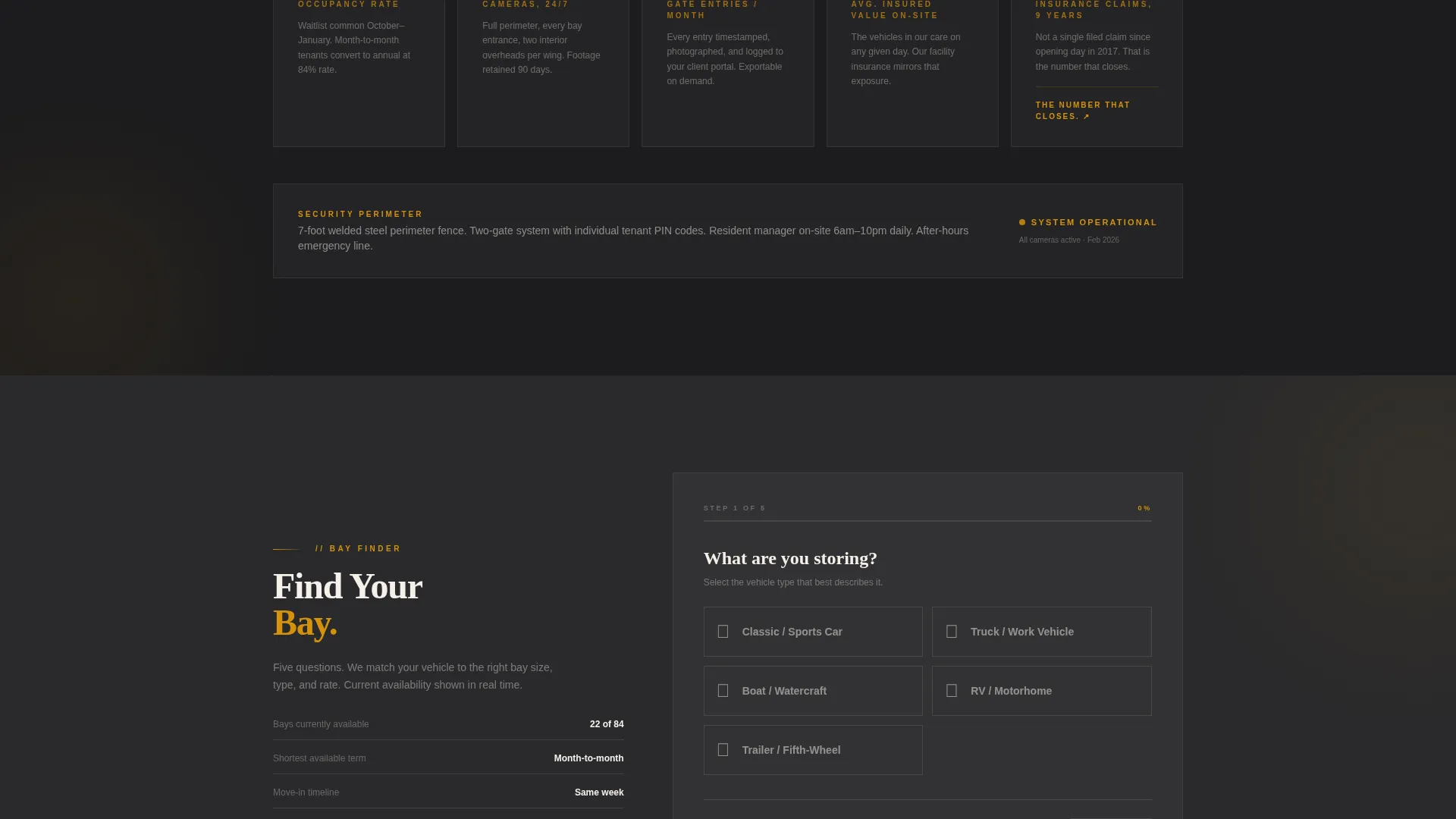
- A five-step guided quiz labeled "Find Your Bay" covering vehicle type, length, storage preference, season duration, and climate control needs
- A secondary "Just Need a Quote" contact form path for visitors who skip the quiz and already know what they need
Feature list
This template is built around a specific set of purposeful components. Each one serves the stats-first, trust-before-copy conversion strategy.
Asymmetric Stats-First Header
Three oversized amber numerals sit against deep charcoal in a 60/40 split grid. The primary stat anchors the wider column; two supporting figures stack in the narrower column. Context text fades in a half-second after the numbers render, letting the scale of the data register before any explanation appears.
Stats-Driven Scroll Segments
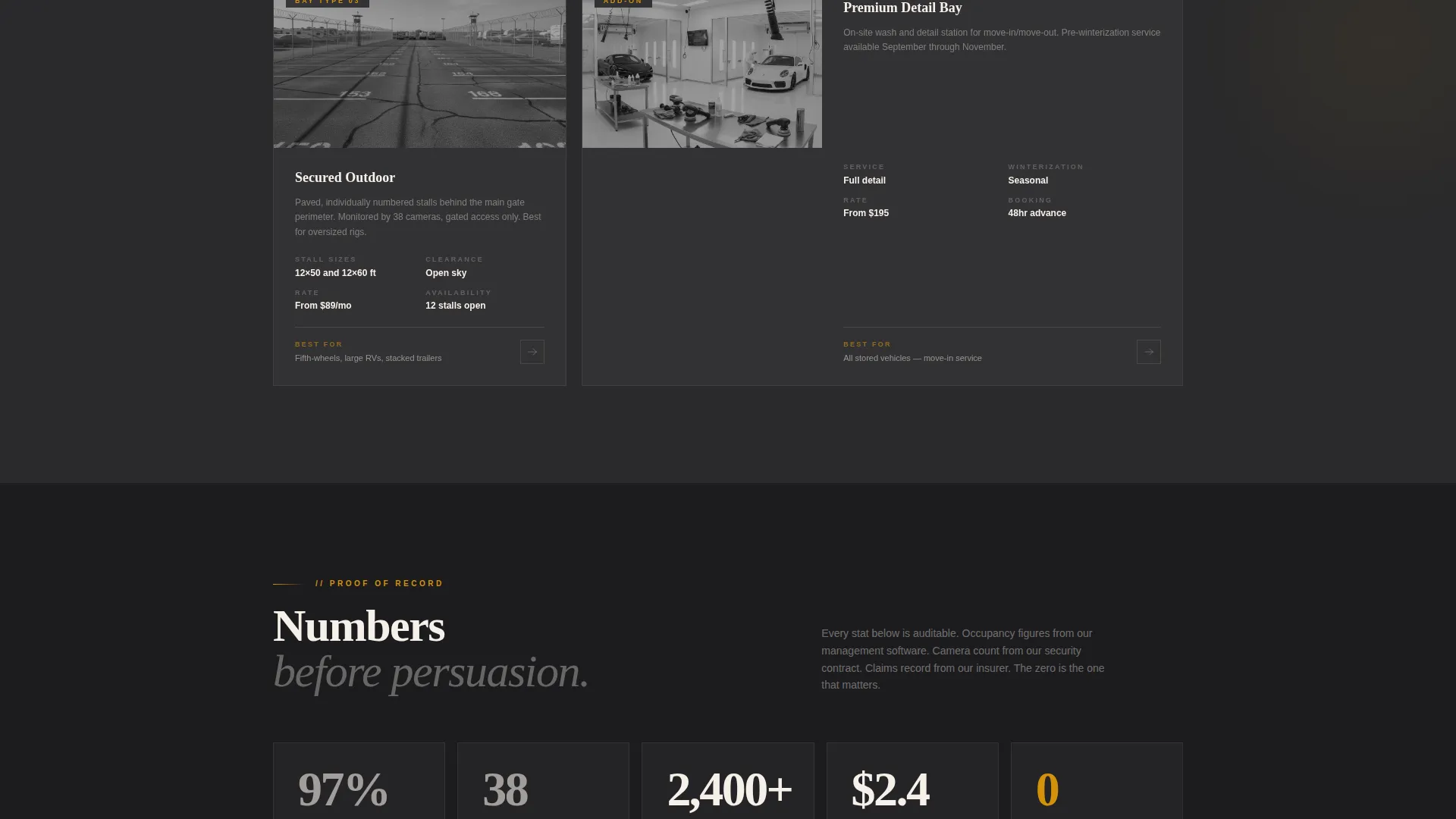
Every scroll section opens with a data point before any paragraph appears. Metrics escalate in emotional weight as the visitor moves down the page, from square footage to total insured value on premises to the zero-incident safety record. The structure means the numbers make the argument before a single persuasive sentence is read.
Five-Step "Find Your Bay" Quiz
The primary call to action launches a guided five-step assessment. Visitors select vehicle type, input length via a visual slider, choose between indoor, covered, or open storage, set their season duration, and indicate whether climate control matters. The result surfaces a recommended bay size, an estimated monthly rate, and current availability.
Secondary Quote Request Form
A direct contact form is available for visitors who already know their storage needs. Labeled "Just Need a Quote," this path skips the quiz entirely and drops to a simple form, reducing friction for returning clients or those with straightforward requirements.
Charcoal and Amber Visual System
The color palette pairs deep workshop charcoal with polished amber and soft bone white. Amber marks every clickable surface and stat callout. Bone white opens content panels so the high density of data never feels crowded. The result is a visual identity that communicates premium care without decorative excess.
Climate-Control Proof Sections
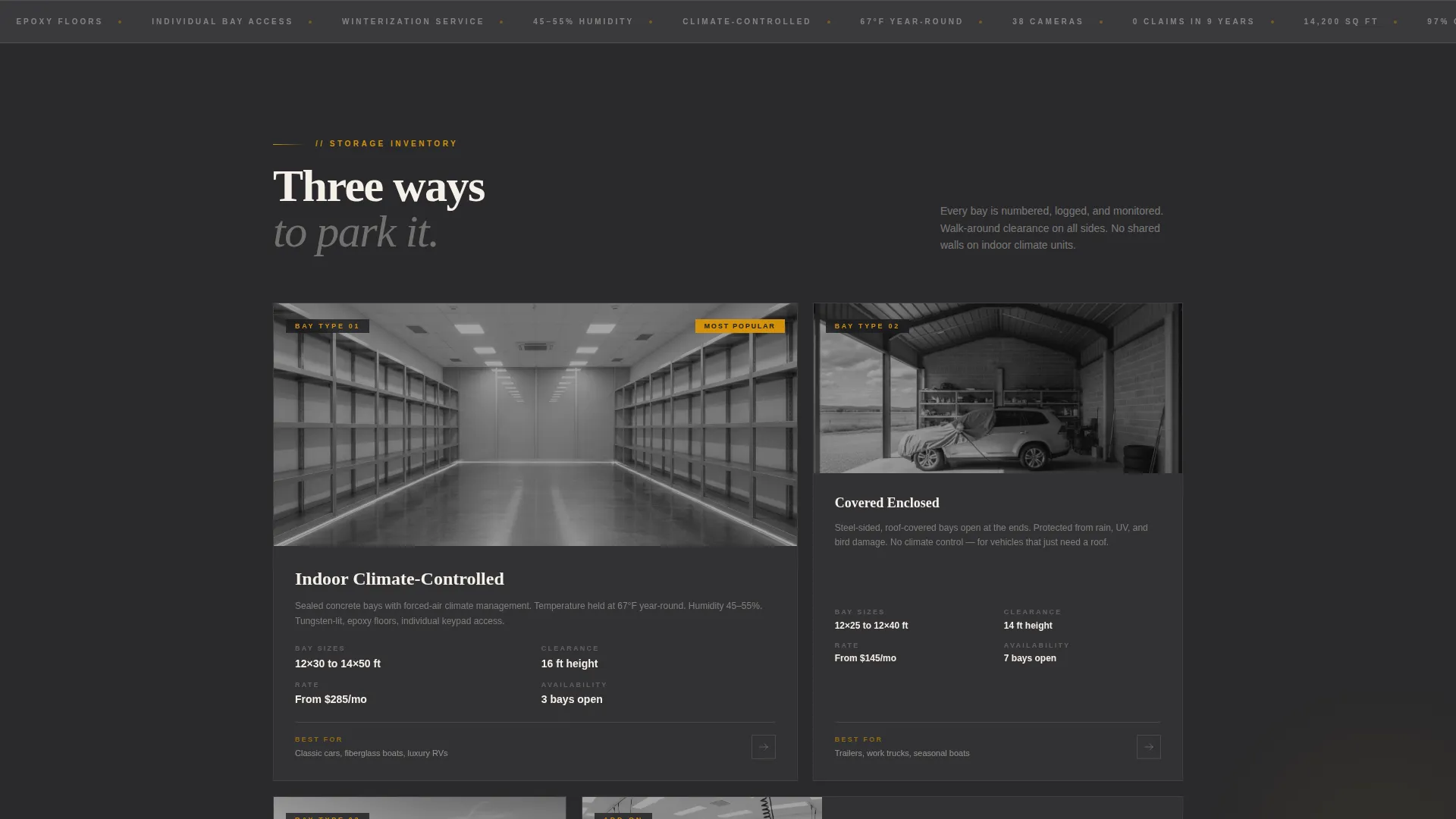
Dedicated scroll segments surface operational metrics such as the year-round temperature maintained, humidity levels, camera counts, and gate-access log entries per month. These are presented as visual stat blocks, not buried in body copy, reinforcing the facility's credibility at each step of the scroll.
Page sections overview
| Section | Purpose |
|---|---|
| Stats Header Wall | Lead with three oversized facility metrics before any copy |
| Occupancy Rate Block | Show current demand as a trust signal early in the scroll |
| Vehicle Value Segment | Surface total insured value on premises as a credibility anchor |
| Climate Control Stats | Display temperature, humidity, and environmental proof points |
| Security Metrics Row | Present camera count and gate-access log frequency |
| Zero-Incident Record | Close the proof sequence with the safety milestone stat |
| Find Your Bay Quiz | Guide visitors through five steps to a bay recommendation |
| Quote Request Form | Provide a direct path for visitors who skip the quiz |
Design & branding system
The visual identity is built on an Atelier Studio theme with a charcoal and amber color system. Every design decision reinforces the atmosphere of a serious, well-maintained facility.
- Deep workshop charcoal (#1C1C1E) dominates backgrounds and typography; warm tool-steel gray (#3A3A3C) provides mid-tone depth
- Polished amber (#D4920B) marks all clickable elements, stat callouts, and interactive highlights throughout the page
- Soft bone white (#F5F0E8) opens up content panels, providing breathing room between dense data segments
Mobile & speed optimization
The layout is structured to remain clear and readable at smaller screen sizes. The asymmetric grid adapts to a stacked single-column flow on mobile without losing the visual hierarchy of the stats-first approach.
- Oversized numerals in the header scale proportionally so impact is preserved on smaller viewports
- The five-step quiz and the secondary quote form are both structured for straightforward touch interaction
- Scroll-segment stat blocks reformat into full-width cards on mobile, keeping each data point prominent and legible
How this template helps you convert
Vault is built around a single insight: high-value vehicle owners decide with data, not decoration. The layout reflects that from the first pixel.
- The stats-first scroll structure delivers proof in escalating emotional weight, so visitors arrive at the call to action already persuaded by the numbers rather than by copy alone.
- The "Find Your Bay" quiz personalizes the result for each visitor, surfacing a specific bay size, estimated rate, and availability rather than a generic contact prompt.
- The "Just Need a Quote" secondary path ensures that visitors who are already decided are not slowed down by the quiz flow, reducing drop-off among high-intent visitors.
Other information about this template
This template is categorized under Real Estate and Property, specifically within the Self-Storage and Mini-Storage subcategory, with an intersection alignment toward Art and Collectibles Storage. That niche overlap makes it equally well-suited for facilities that store fine art transport cases, collector motorcycles, or vintage automobiles alongside boats and recreational vehicles.
- The template is designed as a single landing page, not a multi-page website
- The Intersection Match Score for this template is 9 out of 10, reflecting strong alignment between the vehicle storage use case and the premium self-storage niche
- The page structure supports facilities of varying sizes; the stat callouts in the header are editable to reflect your actual square footage, temperature range, and safety record
- No prior design experience is required to replace the placeholder numbers with your facility's real metrics
Theme
Pastoral Calm
Creative direction
Calculator/Tool First
Color system
Sunset Mesa
Style
Split Screen (50/50)
Direction
Direct Sales
Page Sections
Asymmetric 60/40 Stats Header
Stats-first Scroll Architecture
Five-step Bay Finder Quiz
Secondary Quote Request Form
Charcoal and Amber Visual Identity
Climate and Security Metric Blocks
Related questions
Can I use this template if my facility does not offer climate control?
How does the Find Your Bay quiz guide visitors to a result?
Is this template suited for facilities that store both boats and land vehicles?
Can visitors bypass the quiz and go straight to a contact form?
What type of page is this template, and how many pages does it include?



