Military Service Member Insurance Cost Estimator Website Template
Shield is a military critical illness insurance landing page template built for active-duty service members, military spouses, and retiring personnel facing real coverage gaps. The dashboard-style design uses a live gap calculator, claims data cards, and a side-by-side comparison table to show visitors exactly what their current insurance election leaves exposed, then routes them to a rate quote in seconds.
by Rocket studio
Quick summary
The Shield verified coverage gap dashboard landing page template is a precision-built insurance landing page for the military market. It combines an interactive gap calculator, claims-paid data cards, and a coverage comparison table inside an Executive Suite design. Every element focuses on one action: showing service members their exact exposure and routing them to a rate.
Who this template is for
This insurance landing page template is designed for insurance companies, independent agents, and financial service businesses targeting the active-duty and veteran market. If you sell critical illness insurance policies to military households, this template gives you a credible, data-first landing page that earns trust fast.
- Active-duty NCOs (E-5 through E-7) comparing coverage options during downtime
- Military spouses managing household finances and health insurance decisions during a deployment
- Retiring service members who need to understand their coverage gap before a Tricare transition
What problem this template solves
Most insurance landing pages in the military space rely on generic imagery and vague benefit language. That approach fails with data-driven service members who want numbers, not promises. This template solves the clarity problem by making the coverage gap visible and personal in under 90 seconds.
- Visitors leave standard insurance pages without understanding what their policy actually leaves uncovered
- A health insurance landing page that shows real out-of-pocket averages by diagnosis builds far more trust than copy alone
- Service members need a fast, focused insurance landing page that answers key questions and drives action, not a brochure website
What you get with this template
You get a complete, single-page insurance landing page with every section pre-structured and ready to customize. The design system, interactive calculator layout, data grid, and call-to-action flow are all included out of the box.
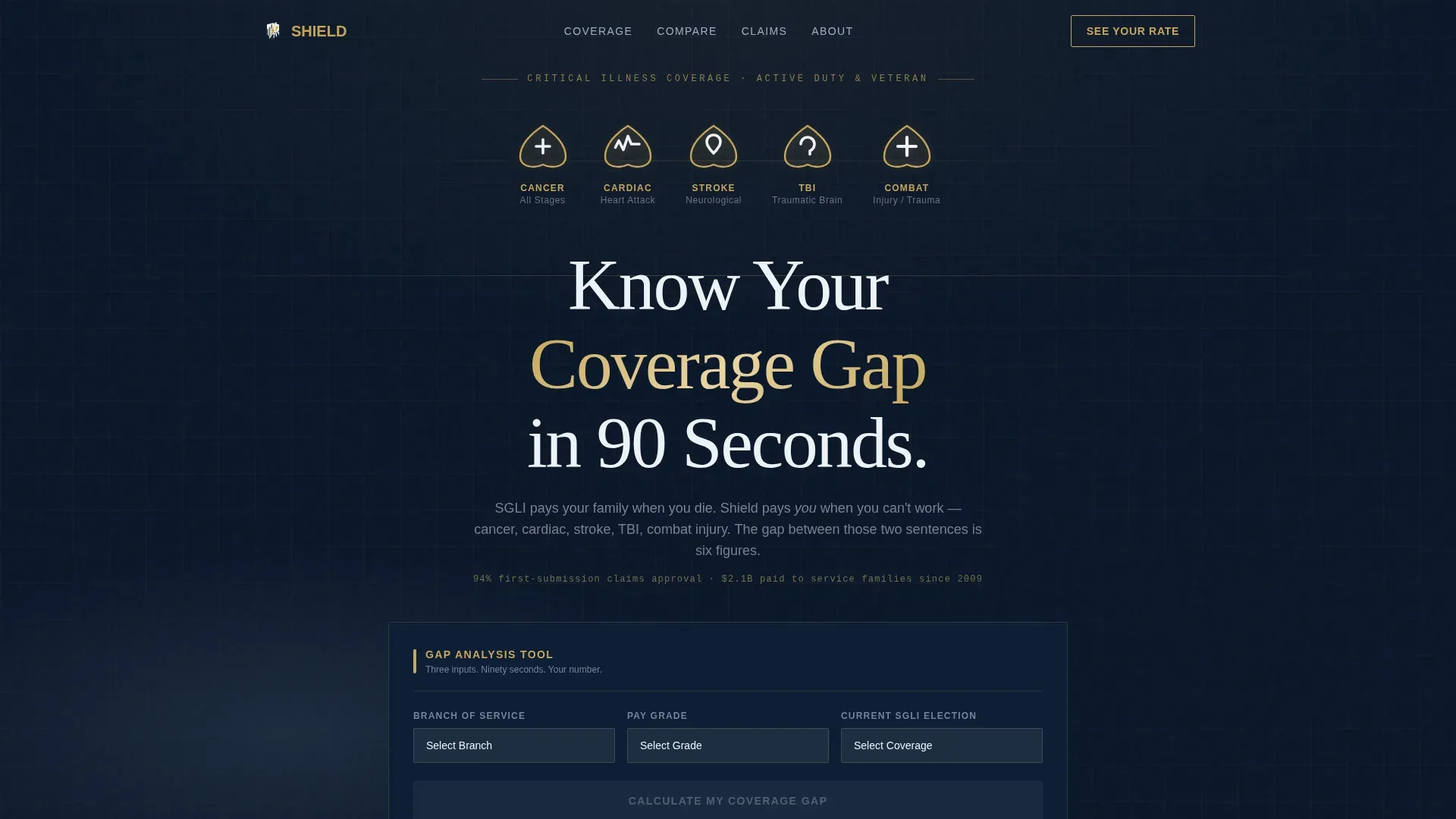
- A live gap calculator section with branch, pay grade, and SGLI election inputs
- Claims data cards, a three-way coverage comparison table, and a testimonial block
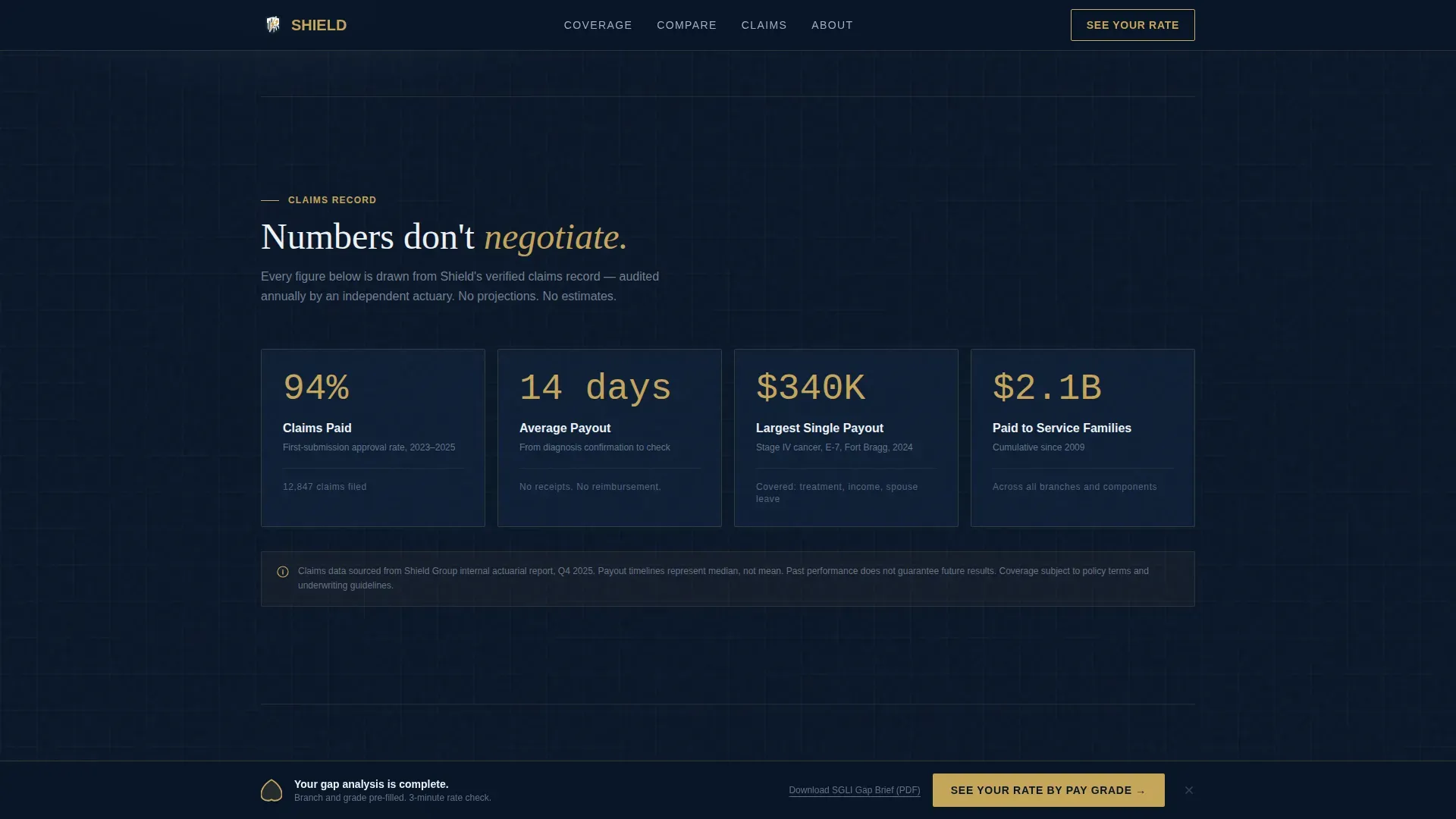
- A pinned footer call-to-action that routes visitors to the quote engine with pre-filled parameters, plus a secondary PDF capture link
Feature list
This insurance landing page template ships with six core features. Each one serves a specific conversion purpose inside the insurance landing flow.
Award Badge Header Rack
Five shield-shaped insignia represent the five coverage pillars: Cancer, Cardiac, Stroke, Traumatic Brain Injury, and Combat Injury. They sit across the top of the viewport with a subtle gold foil shimmer animation. No stock photography, no clutter. The design communicates verified authority through structure and style alone, giving visitors an immediate signal that this insurance landing page is serious.
Live Coverage Gap Calculator
The calculator is the creative direction anchor for this template. It accepts three inputs: branch of service, pay grade (E-1 through O-10 dropdown), and current Servicemembers' Group Life Insurance election. The dashboard instantly populates a data grid showing the dollar gap per diagnosis, lost housing and subsistence allowances during recovery, and spousal income disruption. Each row is expandable. This is where an insurance landing page becomes genuinely useful rather than just persuasive, saving time for the visitor and the agent alike.
Claims Data Cards
Below the calculator, animated counter cards display real claims-paid statistics. ScrollTrigger-powered number animations reveal figures as visitors scroll, making every metric feel earned. This section deepens trust by showing the insurance landing page is grounded in actual outcomes, not aspirational copy. It is one of the clearest examples of how the best insurance landing pages use data to protect visitor confidence.
Three-Way Comparison Table
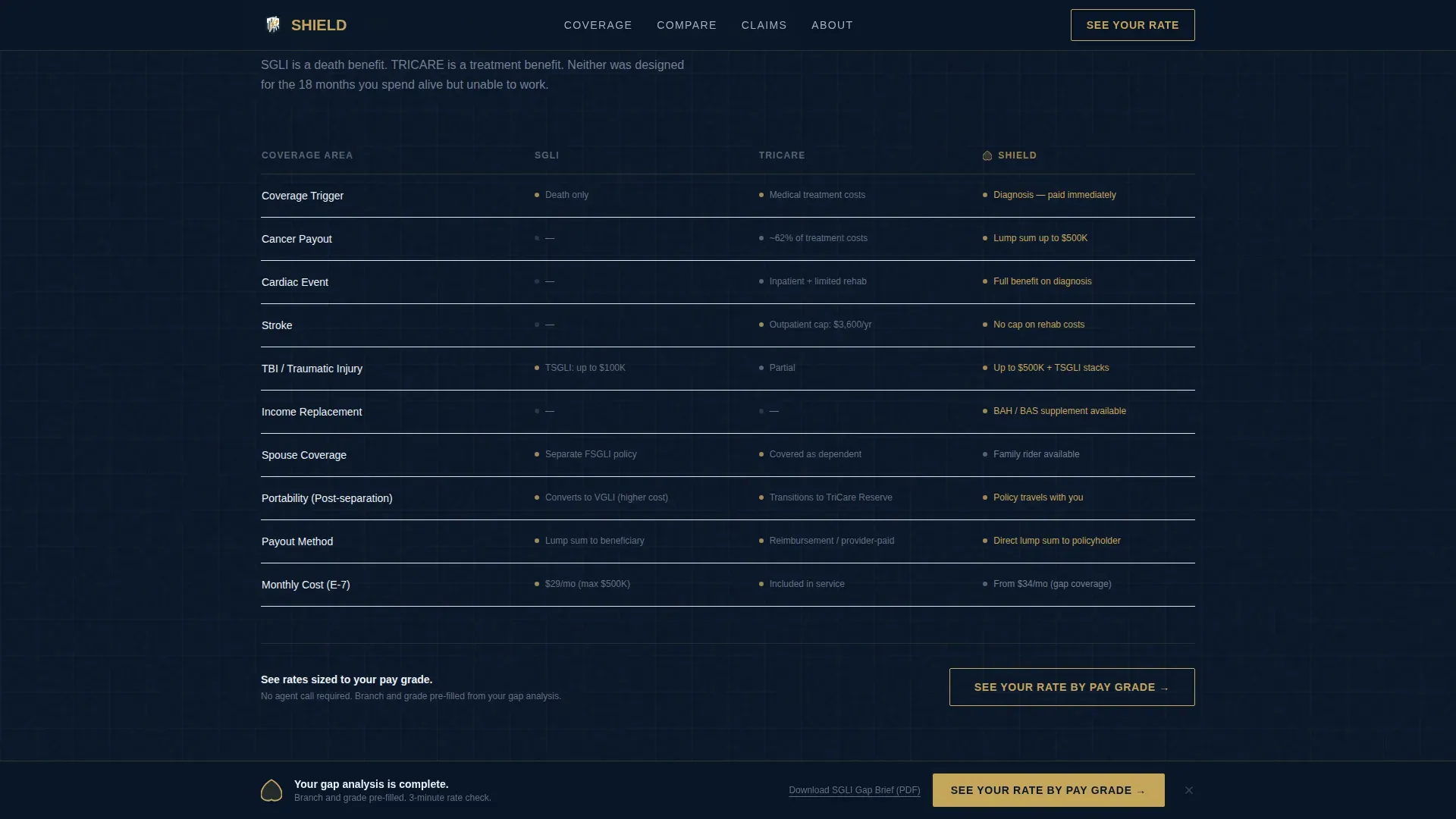
A structured table compares the standard Servicemembers' Group Life Insurance policy, Tricare coverage, and this critical illness insurance product side by side. The design guides visitors to the most important coverage gaps first. Clarity and transparency are built into the layout, not bolted on. This section is equally effective for spouses and retiring members who need to understand their options quickly.
Click-Through Call-to-Action System
The primary call-to-action, labeled "See Your Rate by Pay Grade," is pinned at the dashboard footer and repeated after the comparison table. It routes visitors to the carrier quote engine with branch, grade, and coverage tier pre-filled via URL parameters. No form sits on this insurance landing page. The calculator already qualifies the visitor. A secondary text link captures emails for visitors who want to download a one-page briefing paper formatted like an official military document.
Gold Star Testimonial Block
A single testimonial block from a Gold Star family financial advisor anchors the social proof section. The best insurance landing pages use real customer voices to build credibility, and this block is designed to do exactly that. It sits after the comparison table, where trust is most needed before the final call-to-action.
Page sections overview
| Section | Purpose |
|---|---|
| Hero Badge Rack | Display coverage pillars and headline |
| Gap Calculator Grid | Quantify the visitor's personal coverage gap |
| Claims Data Cards | Show verified claims-paid statistics |
| Coverage Comparison Table | Compare three insurance options side by side |
| Advisor Testimonial Block | Build trust with a real advisor endorsement |
| Pinned call to action Footer | Route qualified visitors to the quote engine |
Design & branding system
The design follows an Executive Suite theme. Every color choice and typographic decision communicates authority without noise. The palette reads like the wall of a secure briefing room, not a retail insurance website.
- Colors: Midnight navy (#0A1628) for backgrounds, gunmetal command gray (#2C3E50) for panels, starched white (#EDF2F7) for body text, and a single decisive gold (#C5A55A) reserved for interactive elements, badge outlines, and call-to-action borders
- Typography: DM Sans handles all data labels, dropdown menus, and user interface elements; Fraunces serif is used for display headlines to add weight and formality
- Animation: GSAP ScrollTrigger powers counter animations on the claims cards, staggered section reveals on scroll, gold pulse effects on the call-to-action, and foil shimmer on the badge rack
Mobile & speed optimization
The template is built desktop-first to match the primary use case, which is an NCO comparing coverage on a laptop during a break or a spouse reviewing options at home. Full mobile support is included so the insurance landing page loads fast and stays readable on any device.
- Responsive layout adapts the calculator grid, comparison table, and data cards cleanly for smaller screens
- Static sections use server-side rendering for fast initial load; the interactive calculator runs as a client component to keep the rest of the page light
- The landing page is designed to load fast and look good on any device, ensuring visitors on mobile can still access the full coverage gap experience without hassle
How this template helps you convert
This insurance landing page is designed to convert visitors into leads by focusing on one action at a time. Every section earns the next scroll by revealing a number or insight the visitor did not already have.
- The calculator personalizes the insurance landing page experience in seconds. Visitors input three values and immediately see a data grid built around their pay grade and coverage election. Personalizing content makes the experience feel directly relevant to each visitor, which keeps them engaged rather than bouncing.
- The pinned call-to-action and pre-filled URL parameters remove every barrier between the visitor and the quote engine. Companies using focused landing pages generate significantly more leads than those that route visitors to a general website. The click-through design keeps the process clean and the path to action short, saving time for both visitor and agent.
- Social proof and transparent data protect conversion at the final step. The claims cards, comparison table, and advisor testimonial give visitors the confidence to sign up. The best insurance landing pages use trust signals exactly this way: not to impress, but to convert.
Other information about this template
This template is designed to support insurance companies, independent agents, and marketers who need a production-ready insurance landing page without starting from scratch. Designers and developers can customize every section, adjust colors, swap headline copy, and test different call-to-action placements to match their specific needs.
- The open graph metadata fields are pre-structured, making it straightforward to control how the insurance landing page appears when shared on social platforms or in search results
- Files are organized so developers can explore the component structure, store assets cleanly, and manage updates without confusion
- The template can scale to support campaign-specific landing pages by adjusting the domain path and pre-filled URL parameters for different pay grades or coverage tiers
- Businesses that want to test variations can duplicate the page files and run A/B tests on headline copy, call-to-action language, or calculator placement to find what works best for their insurance audience
- The shield verified coverage gap dashboard landing page template is listed in the Finance and Insurance category under the Military Service Member Insurance subcategory, making it straightforward to search and find on the marketplace
- Resources such as the included briefing paper download flow give marketers a secondary capture tool that is equally effective for warming visitors who are not yet ready to click through to a rate
- No-code landing page builders allow users to create and launch pages without extensive coding skills; this template is structured so that designers working in supported environments can get to a production-ready state faster, focusing time on content rather than setup

Theme
Executive Suite
Creative direction
Calculator/Tool First
Color system
Midnight Blue
Style
Dashboard/Data Grid
Direction
Click-Through
Page Sections
Live Coverage Gap Calculator
Award Badge Header Rack
Claims Data Cards with Scroll Animation
Three-way Coverage Comparison Table
Pinned Click-through Call to Action System
Gold Star Advisor Testimonial Block
Related questions
Who is this insurance landing page template built for?
Does this template include a form for collecting leads?
Can I customize the colors, headline copy, and section content?
Is this a single landing page or a multi-page website?
How does the gap calculator work within the template?



