Trusted Inspection Booking Landing Page Template
Shield is a single-column booking landing page built for solo home inspectors who lead with authority. The Plum Executive color system, a 4-phase transparent process narrative, and a frictionless online booking form work together to convert anxious first-time homebuyers into confirmed inspection appointments. Every section answers one question: what am I actually paying for?
by Rocket studio
Quick summary
Shield is a trust-first home inspection landing page template built around a single goal: turning a visitor's anxiety into a confirmed booking. The design uses a Legal Shield visual theme, a deep plum and parchment cream palette, and a scroll-driven narrative that walks every potential client through the full inspection process before they ever fill out a form.
Who this template is for
This template is built for solo home inspectors who want a professional online presence that does the selling for them. It is especially well-suited for inspectors who already have credibility but lack a site that communicates it clearly. Home inspection companies with one lead inspector can use this layout to position their services with the weight of a larger operation.
- Independent home inspectors serving first-time homebuyers, relocation families, and clients referred by real estate agents
- Solo operators who need a great website that works on a phone during a live showing
- Home inspection business owners ready to stop relying on word-of-mouth alone and start converting potential clients online
What problem this template solves
Most home inspector websites are generic. They list services, show a stock photo of a roof, and hope someone calls. That approach fails the clients who need the most reassurance: the first-time buyer who has never read an inspection report, the relocating family choosing a house they have only seen on a screen, and the attorney needing a clear pass-or-fail verdict. Visitors make a snap judgment in roughly three seconds, and a vague site loses them immediately.
Shield solves this by making the process visible. Every section of the page removes a specific doubt before it can become a reason to leave.
- Buyers do not know what a home inspector actually does on-site, so the 4-phase process narrative shows them step by step
- Potential clients are unsure what a report looks like, so a sample report preview with severity-graded findings answers that before they ask
- Prospective clients who are under contract and watching a closing date cannot afford friction, so the booking form captures urgency with a conditional closing-date field
What you get with this template
You get a fully customizable single-column landing page designed specifically for the home inspection industry. Every section is built to carry a skeptical visitor from first impression to confirmed booking. The layout is static-first with interactive components only where they earn their place: the expandable checklist, the booking form, and the email capture modal.
- A press mentions bar, a credibility headline, a pull-quote section, a 4-phase process reveal, a 287-point inspection checklist in accordion format, a sample report preview, and an inspector credentials section
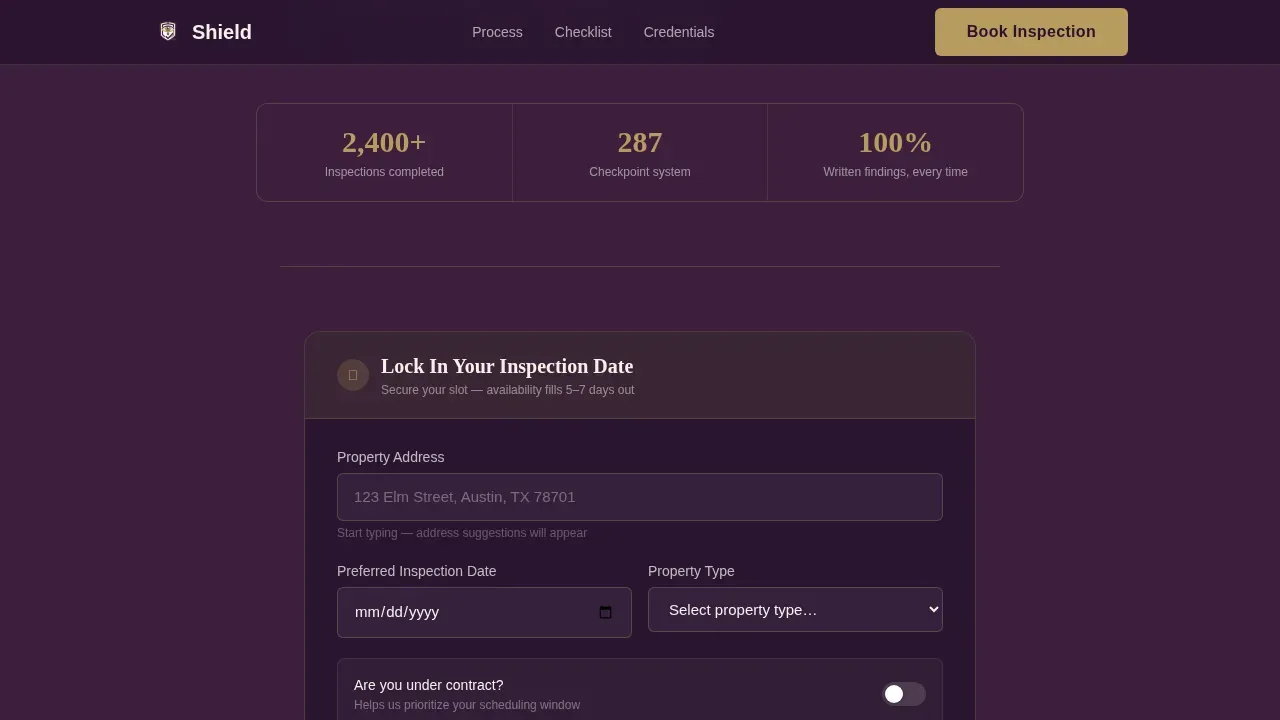
- A primary booking form with property address auto-complete, a calendar picker for preferred inspection date, a property type selector, and a conditional closing-date field triggered by an "under contract" toggle
- A secondary conversion path that offers a downloadable sample report and captures an email address for visitors who are not yet ready to book
Feature list
This template is built around a clear set of capabilities drawn directly from the inspection booking use case. Each feature below is present in the template as described.
Press Mentions Credibility Bar
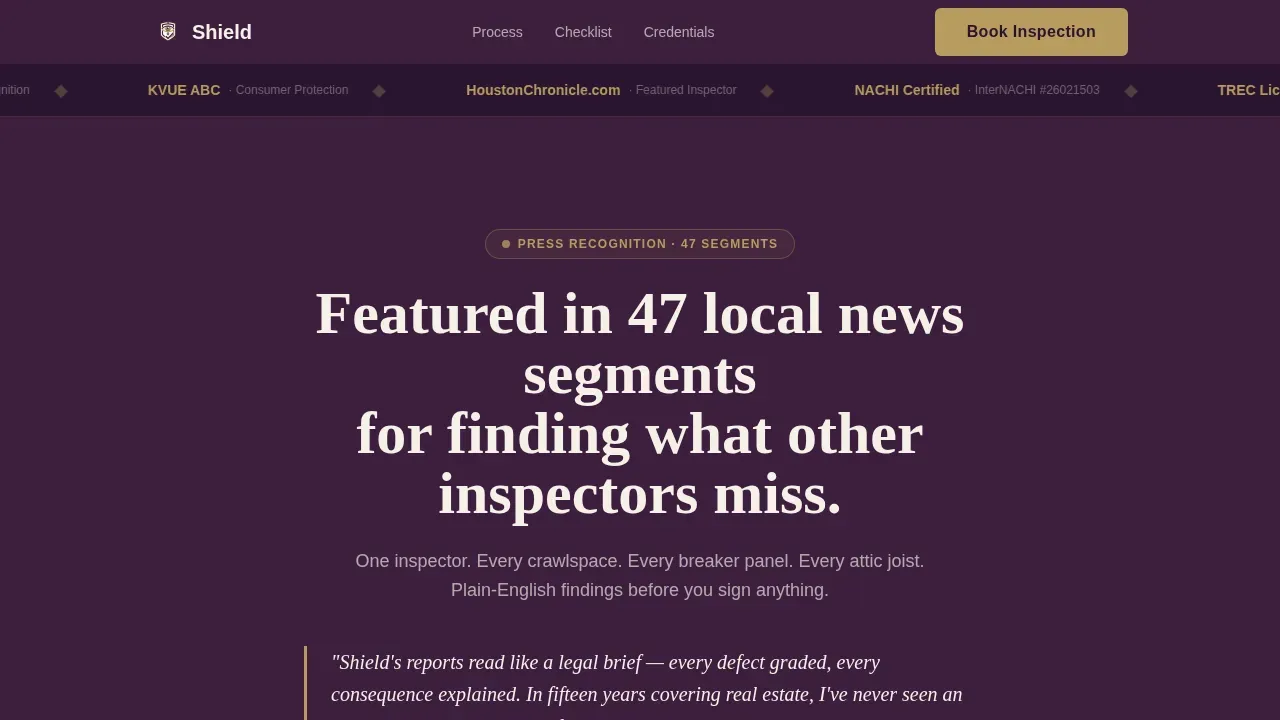
The very top of the page opens with a horizontal scroll of press logos set against deep plum. This bar communicates authority before a visitor reads a single word of copy. It references 47 local news segments and positions the inspector as the recognized expert in their service area, which builds trust with potential clients immediately.
4-Phase Transparent Process Narrative
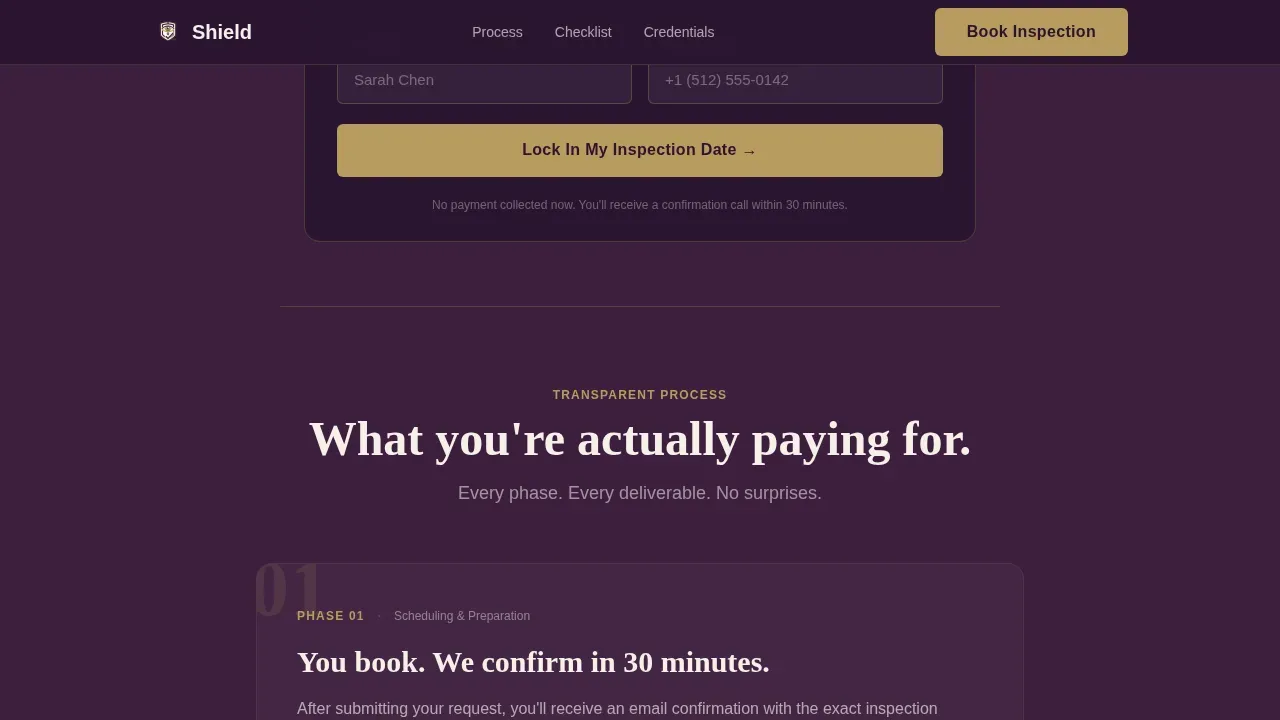
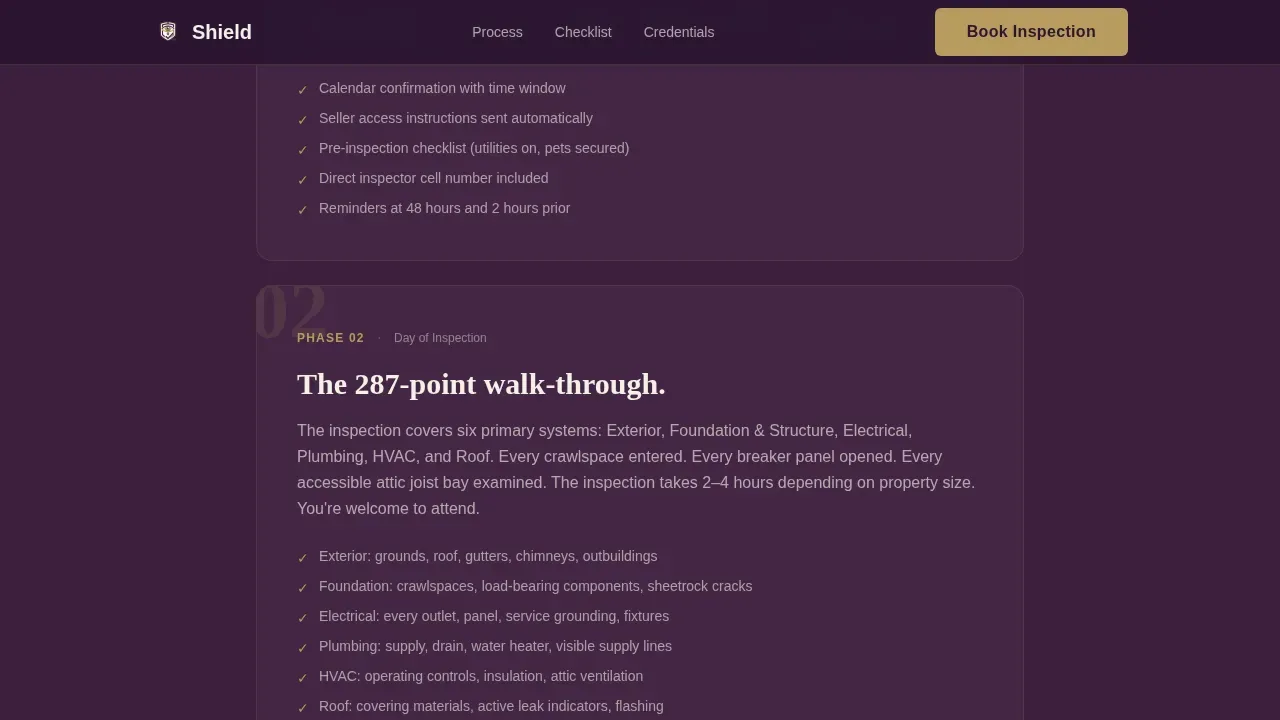
The page walks visitors through exactly what happens from the moment they book to the moment they hold their report. Each phase is a scroll-revealed section: scheduling confirmation, the 287-point inspection checklist displayed as an expandable accordion document, a sample report page with redacted client data and severity-graded findings, and a credentials section covering licensing, insurance, and errors-and-omissions coverage. This structure answers the unspoken question every buyer carries: what am I actually paying for?
Smart Booking Form with Conditional Fields
The primary contact form collects a property address with auto-complete, a preferred inspection date via calendar picker, and a property type selector covering single-family, condo, multi-unit, and commercial properties. A toggle asking "Are you under contract?" reveals a closing-date field conditionally. This keeps the form short for most users while capturing the urgency detail that matters most for buyers on a deadline. Online scheduling has never been easier to offer on an inspector website.
Sample Report Download Path
A secondary conversion path lets visitors who are not yet ready to book still engage with the page. They can request a downloadable sample inspection report by entering their email address. This approach captures a lead without pressure and gives the potential client something concrete to review before committing. Including a sample report is one of the most effective ways to showcase the quality of work beforehand.
Legal Shield Visual Design System
The Plum Executive color system uses deep plum (#3D1F3E) as the primary background, parchment cream (#F5F0E8) for text panels, muted gold (#B89B5E) on trust badges and interactive accents, and charcoal graphite (#2C2C2C) for body copy. Fraunces serif headlines pair with DM Sans for body and user interface text. The result feels like a leather-bound report on a mahogany desk: authoritative without being cold.
Expandable 287-Point Inspection Checklist
The checklist section is formatted as an expandable document with accordion interaction. Visitors can open and close checklist categories to see exactly what gets evaluated during the home inspection. This level of transparency is rare in the home inspection sector and directly addresses the buyer's core anxiety. It also reinforces the inspector's unique selling points without requiring a single line of marketing language.
Page sections overview
| Section | Purpose |
|---|---|
| Press Mentions Bar | Establishes authority with local news logos at the very top |
| Credibility Headline | Delivers the core trust statement in parchment cream type |
| Journalist Pull-Quote | Adds named third-party social proof styled as a legal citation |
| Primary Booking call to action | Presents the "Lock In Your Inspection Date" call to action |
| Phase 1: Scheduling | Explains what happens after a client books their inspection |
| Phase 2: Checklist | Displays the 287-point accordion checklist as an open document |
| Phase 3: Sample Report | Shows severity-graded findings with redacted client data |
| Phase 4: Credentials | Covers licensing, insurance, and errors-and-omissions coverage |
| Repeat Booking call to action | Restates the primary call to action after the process reveal |
| Sample Report Download | Captures email for visitors not yet ready to book |
| Footer | Linear single-row links and contact information |
Design & branding system
The template uses the Plum Executive color palette, which was chosen to evoke the authority of a legal document without the sterility of a courthouse. Every color has a specific role. The typography pairing reinforces the same idea: Fraunces handles headlines with editorial weight, while DM Sans keeps body text and user interface elements clean and readable on any screen. You can replace own text and add images to match your specific branding without breaking the layout.
- Deep plum (#3D1F3E) backgrounds, parchment cream (#F5F0E8) text panels, muted gold (#B89B5E) accents on trust badges and buttons, and charcoal graphite (#2C2C2C) for all body copy
- Fraunces serif for headlines and pull-quotes; DM Sans for body copy, form labels, and navigation links
- Medium scroll-reveal animations on section transitions and an expandable accordion for the checklist; all interactive elements use client-side components only
Mobile & speed optimization
Over 50 percent of home inspection traffic comes from mobile devices, and many buyers are browsing on their phones during live showings. This template is built mobile-first, which means the booking form, the checklist accordion, and the process narrative all render correctly on a phone before they are tested on a computer. The responsive design ensures the site displays correctly across various devices, from desktop to tablet to smartphone. Mobile optimization is built into the layout structure, not added as an afterthought.
- The template uses a static-first architecture, loading client components only for interactive elements like the booking form and email capture modal, which supports fast initial page loads
- The single-column flow means mobile optimized layouts do not require a separate design pass; the column stacks naturally and stays readable on small screens
- The booking form is touch-friendly, with large tap targets for the calendar picker and property type selector so users on various devices can easily book without pinching or zooming
How this template helps you convert
A home inspection landing page converts when it removes doubt faster than the visitor can generate new questions. Shield is structured around that principle. The press mentions bar handles credibility at a glance. The process narrative handles anxiety about the unknown. The conditional booking form handles urgency for buyers under contract. The email capture handles visitors who need more time. Every section has a job, and together they create a site that guides potential clients toward action rather than confusion.
- The page leads with third-party credibility in the hero section before asking for anything, which means visitors arrive at the booking form already primed to trust the inspector rather than still deciding whether to trust them
- Online booking is available immediately after the credibility headline and again after the full process reveal, so users who convert quickly and users who need the full context both reach the same contact form without backtracking
- The secondary download path captures email addresses from potential customers who are in research mode, giving the inspector a follow-up opportunity with visitors who left without booking
Other information about this template
Home inspection website templates are pre-designed layouts built specifically for home inspectors and home inspection businesses. The Shield template sits within a broader template library alongside other professional services themes and booking-focused layouts. Users who want to build their own home inspection website without starting from scratch will find this template reduces the time and effort required significantly.
The template is fully customizable. You can add pages, swap colors, replace own text, add images, and connect social media icons to your existing profiles. You can add testimonials from satisfied clients using the pre-styled testimonial format included in the layout. For inspectors who want to add pages beyond the core landing page, the platform supports that expansion without requiring a rebuild.
Home inspection companies ranging from solo operators to small teams in the home inspection sector will find the layout flexible enough to adapt. Franchise owners in the home inspection industry can use it to establish a local web presence that complements their parent brand. The design supports professional appeal across all use cases without forcing a one-size-fits-all look.
From an SEO standpoint, the template includes essential elements that help your site perform in search engine results. Built-in SEO structure means the page is organized the way search engines expect, which supports more organic traffic over time. A well-optimized home inspection website can attract organic traffic from buyers actively searching for inspectors in a specific service area. Using SEO best practices from the start, including proper heading structure and descriptive page content, helps your inspector website appear higher in search engine results without requiring technical expertise.
The template is compatible with website builder tools that offer drag-and-drop customization, making it accessible to home inspectors who are not developers. AI-powered website builder platforms can generate tailored content and add images based on user input, making it even faster to launch your own website. Many of these tools also integrate marketing tools such as social media icons, links to other pages, and contact options so potential customers can reach you through multiple channels.
Users can easily access all sections of the template from any computer or mobile device. The platform supports a free domain option during setup, which lowers the barrier for inspectors launching a professional online presence for the first time. Do not forget to verify that your service area is clearly stated on the page so local leads know they are in the right place.
- This template is part of a template library that includes themes for professional services, booking-focused businesses, and niche home inspection sector layouts
- The shield trusted home inspection booking landing page template is specifically designed for the trust-driven, booking-first conversion flow described in this page
- Home inspection companies and independent inspectors in the home inspection industry can use this template to establish a credible, conversion-ready home inspection website without building from scratch
- Users who want more organic traffic and stronger visibility in search engine results will benefit from the built-in SEO structure and the clean, crawlable single-column layout
Theme
Legal Shield
Creative direction
Transparent Process
Color system
Plum Executive
Direction
Booking/Scheduling
Page Sections
Press Mentions Authority Bar
Phase Transparent Process Reveal
Smart Conditional Booking Form
Sample Report Email Capture
Legal Shield Visual Design System
Expandable 287-point Checklist
Related questions
Can I customize the colors and text to match my brand?
Does the booking form work for buyers under tight contract deadlines?
Is the template mobile optimized for buyers browsing on their phones?
Can visitors download a sample report without booking an inspection?
Is this template suitable for small home inspection companies, not just solo inspectors?



