Tank Fabricator Landing Page Template
Vessel is a dashboard and data-grid landing page template built for tank and pressure vessel fabricators. It combines an animated technical infographic header, scrolling case study cards, and a persistent quote-request panel to turn procurement engineers and plant managers into qualified leads. The Corporate Precision design system uses deep charcoal and molten amber to communicate industrial authority at a glance.
by Rocket studio
Quick summary
Vessel is a single-page lead generation template for industrial tank and pressure vessel fabricators. It opens with a self-assembling technical cross-section of a horizontal vessel, then walks visitors through escalating project case studies on a dark data grid. Every section is engineered to earn trust before asking for the quote.
Who this template is for
This template is purpose-built for manufacturers that fabricate custom storage tanks, pressure vessels, and process containers for demanding industrial clients. It speaks the language of the people who actually sign purchase orders.
- Procurement engineers comparing fabricator bids on tight project timelines
- Plant managers sourcing replacement vessels ahead of scheduled shutdowns
- Engineering, procurement, and construction firms specifying tanks during the front-end engineering and design stage
What problem this template solves
Most fabricator websites look like brochures. They show photos of the factory and a phone number, but give engineers nothing to evaluate. Procurement teams need specifications, certifications, capacity ranges, and proven project examples before they will even start a conversation.
- Visitors leave without requesting a quote because the page does not prove technical depth early enough
- Standard templates lack the visual density and data-forward layout that industrial buyers expect
- Generic contact forms feel mismatched to the complexity of a custom fabrication inquiry
What you get with this template
You get a complete, structured landing page layout that carries a procurement buyer from first impression to quote request without a single weak moment. Every section is designed to accumulate credibility before the call to action arrives.
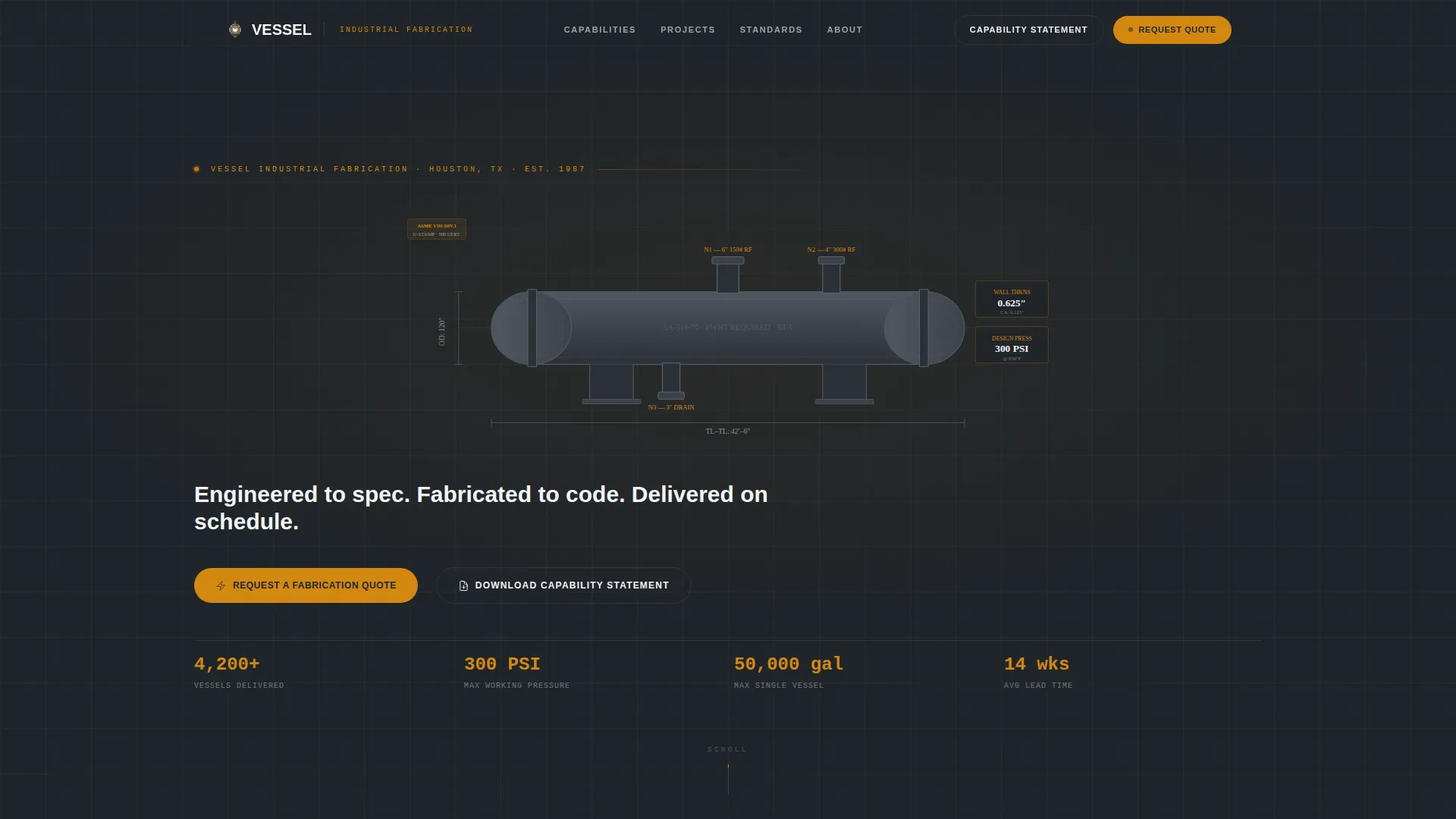
- An animated infographic header that assembles a pressure vessel cross-section with live dimensional callouts on page load
- A scrolling case study grid where completed projects are presented as specification-rich data cards, organized by industry and vessel type
- A persistent amber quote-request button in the top navigation that opens a slide-in panel with a structured fabrication inquiry form
Feature list
A brief overview of the core capabilities built into this template.
Self-Assembling Technical Header
The full-width header animates a horizontal pressure vessel cross-section as the page loads. Shell courses, flanged heads, nozzles, and dimensional callouts appear in sequence, showing wall thickness, design pressure, corrosion allowance, and capacity. The headline types itself below: "Engineered to spec. Fabricated to code. Delivered on schedule."
Case Study Data Grid
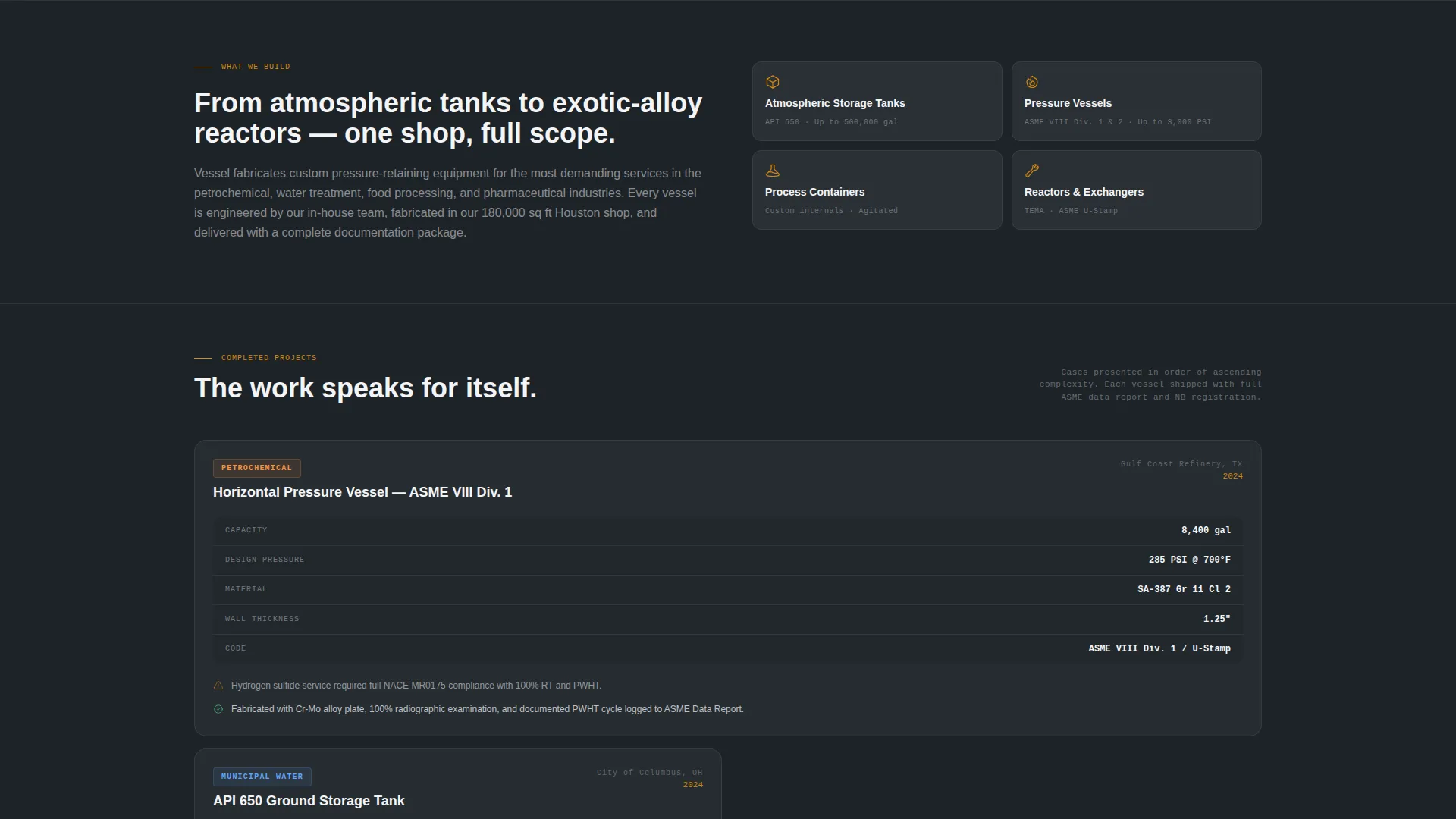
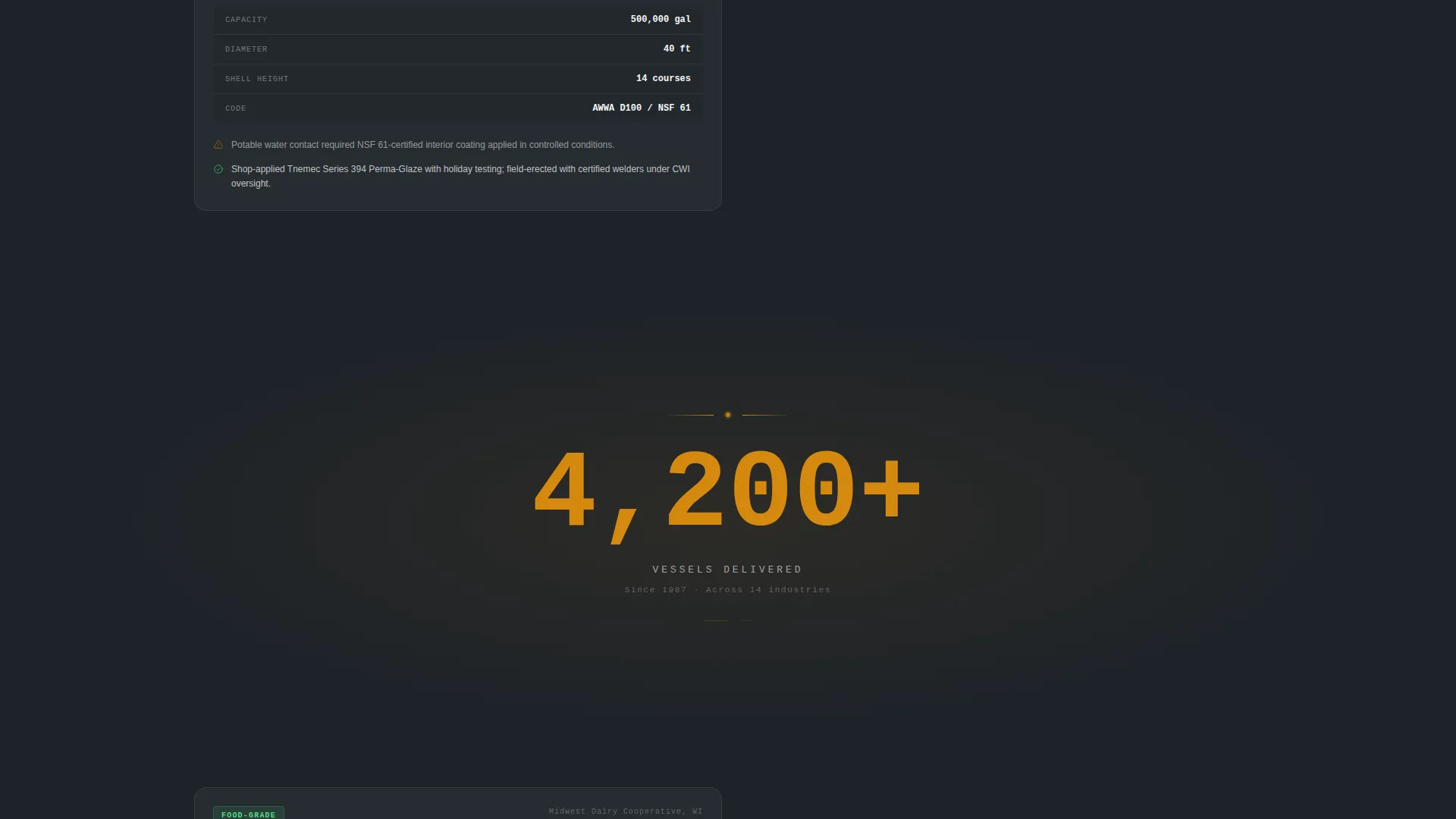
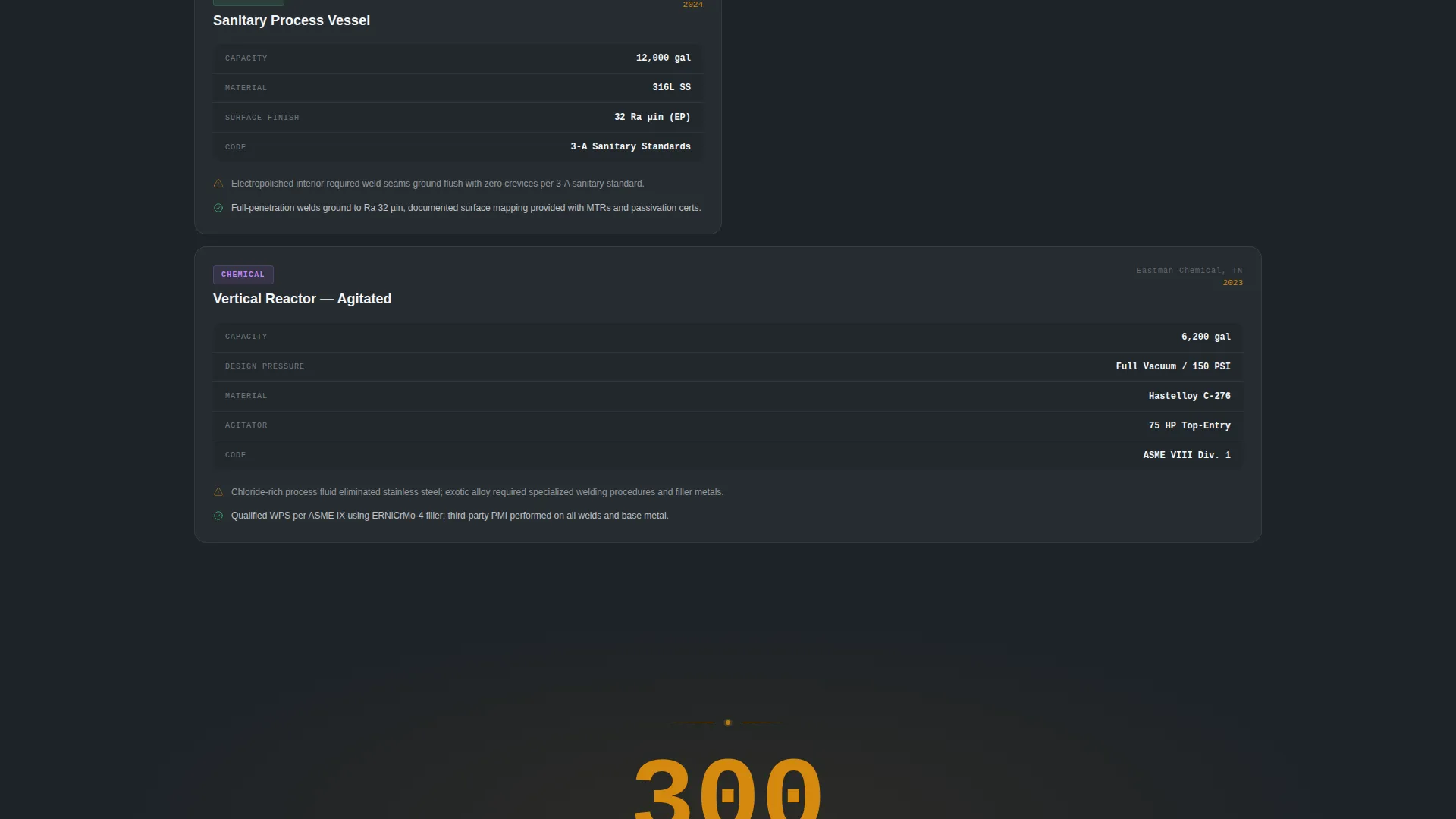
Each completed project appears as a structured data card on a dark grid. Cards display a client industry tag, vessel type, a mini specification table, a one-sentence engineering challenge, and a one-sentence solution. Projects escalate in complexity as the visitor scrolls, building layered credibility from atmospheric storage tanks through to exotic-alloy reactors.
Interstitial Stat Panels
Between every third case study card, a full-viewport interstitial breaks the grid to display a single high-impact statistic. Examples include total vessels delivered, applicable fabrication standards such as American Petroleum Institute 650 and American Society of Mechanical Engineers Section VIII Divisions 1 and 2, and average lead time. These panels give skimmers a reason to stop and read.
Persistent Quote Request Panel
A slide-in panel tied to the top navigation button holds the primary lead generation form. Fields include vessel type via dropdown, material preference, approximate capacity, design pressure if known, and an upload field for drawings or specification sheets. The structured form signals that the fabricator understands complex inquiries.
Capability Statement Download Path
A secondary conversion path captures lighter-intent visitors with a minimal form asking only for name, company, and email in exchange for a capability statement download. This ensures the template converts visitors at two intent levels, not just one.
Corporate Precision Color System
The Charcoal and Amber palette uses deep mill-scale charcoal, machined gunmetal, specification-sheet white, and molten amber to create a control-room aesthetic. Amber is reserved for callout numbers, active data points, and call-to-action elements. A secondary amber tint washes data cards on hover.
Page sections overview
| Section | Purpose |
|---|---|
| Animated Infographic Header | Establishes technical credibility with a self-assembling vessel cross-section and dimensional data |
| Persistent Top Navigation | Keeps the quote-request button visible at all times as the visitor scrolls |
| Case Study Card Grid | Presents completed projects as specification-rich data cards organized by industry and complexity |
| Interstitial Stat Panels | Punctuates the scroll with single-stat viewports to reinforce scale and certifications |
| Slide-In Quote Form | Captures high-intent leads with a structured fabrication inquiry panel |
| Capability Statement Form | Captures lighter-intent leads with a minimal name, company, and email form |
Design & branding system
The visual identity follows a Corporate Precision theme. Every color choice is functional, not decorative. Dark backgrounds keep data legible, and amber draws the eye only to information that matters.
- Core palette: deep mill-scale charcoal (#1E2328) for backgrounds, machined gunmetal (#3B4148) for card surfaces, specification-sheet white (#F4F5F7) for body text, and molten amber (#D4880F) for callout numbers and call-to-action elements
- Hover state: a secondary amber tint (#FFF3DC) washes data cards when a visitor moves over them, adding interactivity without visual noise
- No stock photography: the header relies entirely on technical illustration and real dimensional figures, which reinforces the fabricator's engineering identity
Mobile & speed optimization
The dashboard grid and animated header are designed to translate cleanly to smaller screens without losing their data-forward character. Technical content remains readable and navigable on mobile devices used by engineers reviewing specs on site.
- The case study card grid reflows into a single-column layout on smaller viewports, preserving specification table readability
- The persistent quote-request button remains accessible in the mobile navigation so the primary conversion path is never buried
- The slide-in inquiry panel is sized and structured to function on touch devices without requiring horizontal scrolling
How this template helps you convert
The page is sequenced so that trust is built long before the call to action appears. By the time a procurement engineer reaches the fifth case study card, requesting a fabrication quote feels like the logical next step.
- The animated technical header immediately signals engineering expertise, giving visitors a reason to keep scrolling rather than bouncing to a competitor's site.
- The escalating case study grid accumulates evidence across project types and industries, so buyers can self-identify their own situation in the data cards and feel confident the fabricator can handle their scope.
- The two-path conversion structure meets visitors at their readiness level: the full fabrication inquiry form captures decision-ready buyers, while the capability statement download captures early-stage evaluators for follow-up.
Other information about this template
This template is part of a niche-specific library of industrial and manufacturing landing page layouts. It is well suited to component and equipment manufacturing businesses that serve regulated industries requiring documented fabrication standards.
- The template style is Dashboard and Data Grid, making it distinct from typical service-page layouts in the manufacturing sector
- The creative direction follows a Case Study Narrative structure, which is particularly effective for custom fabrication businesses where past project proof matters more than feature lists
- The header concept is an Infographic animation, replacing photography with technical drawing to signal precision rather than personality
- This layout is appropriate for businesses fabricating under standards such as those referenced in the interstitial panels, including tank construction and pressure vessel codes used across petrochemical, municipal water, and food-grade processing industries
Theme
Corporate Precision
Creative direction
Case Study Narrative
Color system
Charcoal & Amber
Style
Dashboard/Data Grid
Direction
Lead Generation
Page Sections
Self-assembling Infographic Header
Escalating Case Study Card Grid
Full-viewport Interstitial Stats
Persistent Slide-in Quote Form
Two-path Lead Capture
Related questions
Who is this landing page template designed for?
Can I customize the case study cards with my own project data?
What fields does the slide-in quote form include?
Do I need to use both conversion paths?
Is this template suitable for fabricators who build multiple vessel types?



