Veterinary Clinic Marketing Directory Website Template
Vetpartner is a single-page editorial landing page built for veterinary clinics targeting B2B partnerships. It walks pet insurance underwriters, corporate wellness directors, and boarding operators through a fully transparent cost and process story. The design uses a dark Executive Suite palette, typographic infographics, and a dual conversion path to capture both ready partners and early-stage leads.
by Rocket studio
Quick summary
Vetpartner is a B2B-focused veterinary clinic landing page that turns fee transparency into a trust-building journey. Visitors scroll through a sample procedure cost breakdown, a real-case estimate-versus-invoice comparison, and a partner update timeline. Two conversion paths capture both committed partners and research-stage leads at different points in the scroll.
Who this template is for
This template is designed for veterinary practices that serve organizational clients rather than individual walk-ins. It speaks directly to partners who need documented proof of process before they commit.
- Pet insurance underwriters evaluating clinic network partnerships
- Corporate campus wellness directors building employee pet benefit programs
- Multi-location kennel and boarding operators seeking a trusted referral clinic on retainer
What problem this template solves
Most veterinary clinic pages are built for individual pet owners. They lead with warmth and photos but offer nothing for a procurement officer who needs to justify a network contract. This template solves that gap head-on.
- Organizational buyers have no clear place to find documented cost structures or process accountability
- Standard clinic pages bury pricing and offer no case evidence, stalling B2B decisions
- Capturing early-stage leads who are convinced but not yet ready to request a formal partnership is typically lost traffic
What you get with this template
You get a fully structured single-page layout that moves an organizational buyer from initial trust through to a partnership inquiry form. Every section is purpose-built for a professional audience that values evidence over enthusiasm.
- A dark full-bleed header with editorial type and a surgical operating-room photograph
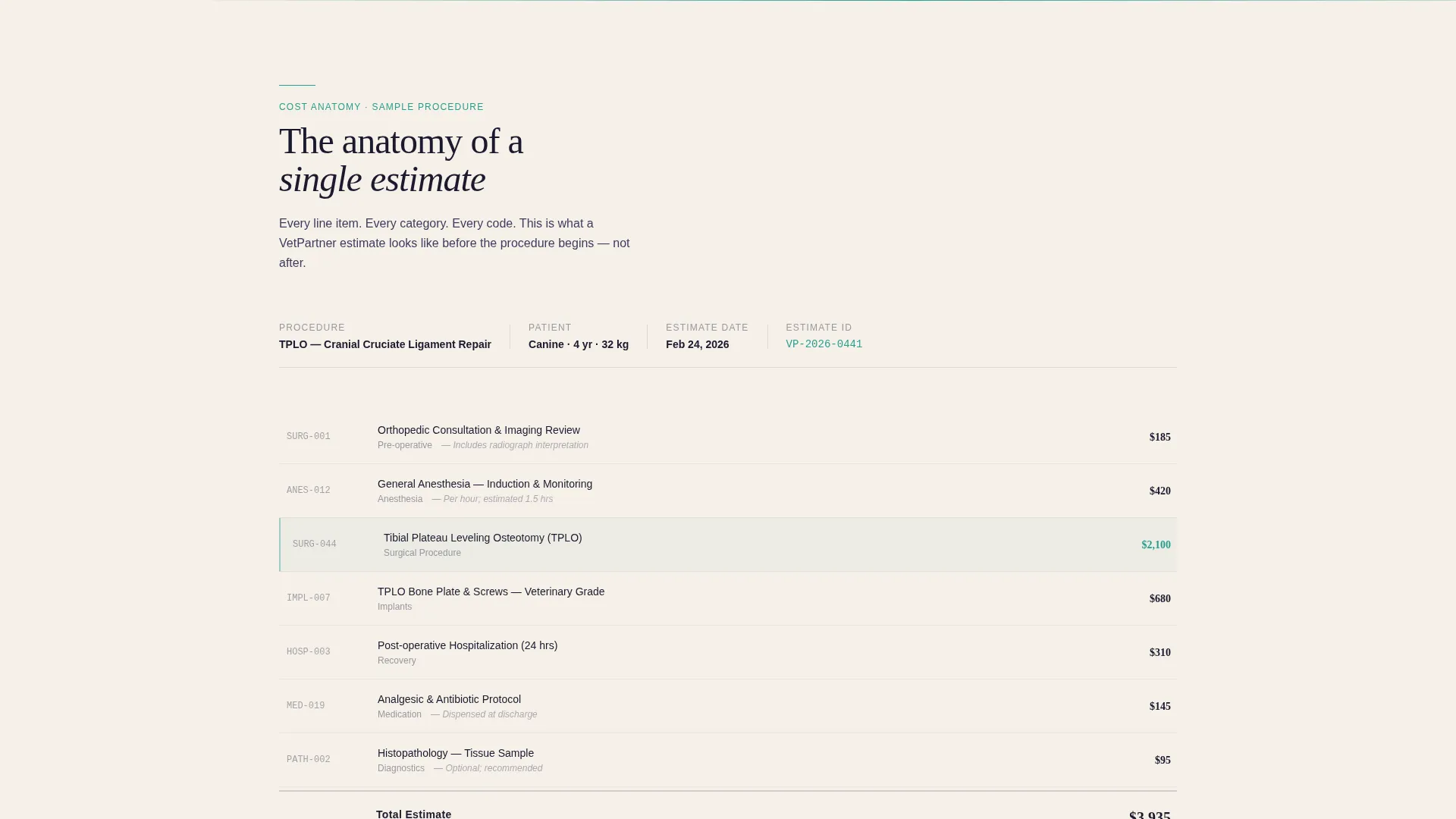
- A typographic procedure cost breakdown section styled as a magazine infographic
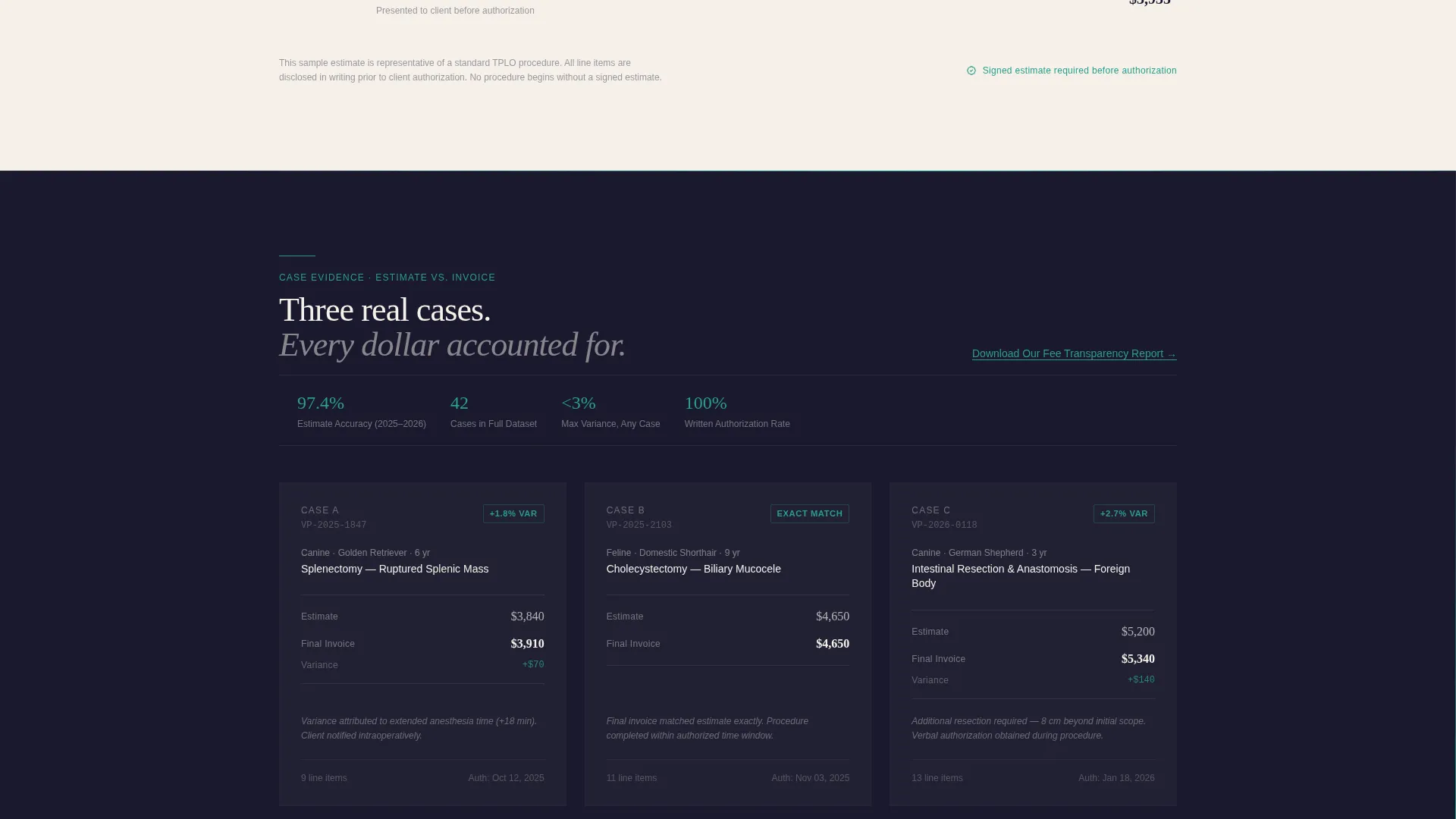
- A side-by-side estimate-versus-final-invoice editorial spread across three anonymized cases
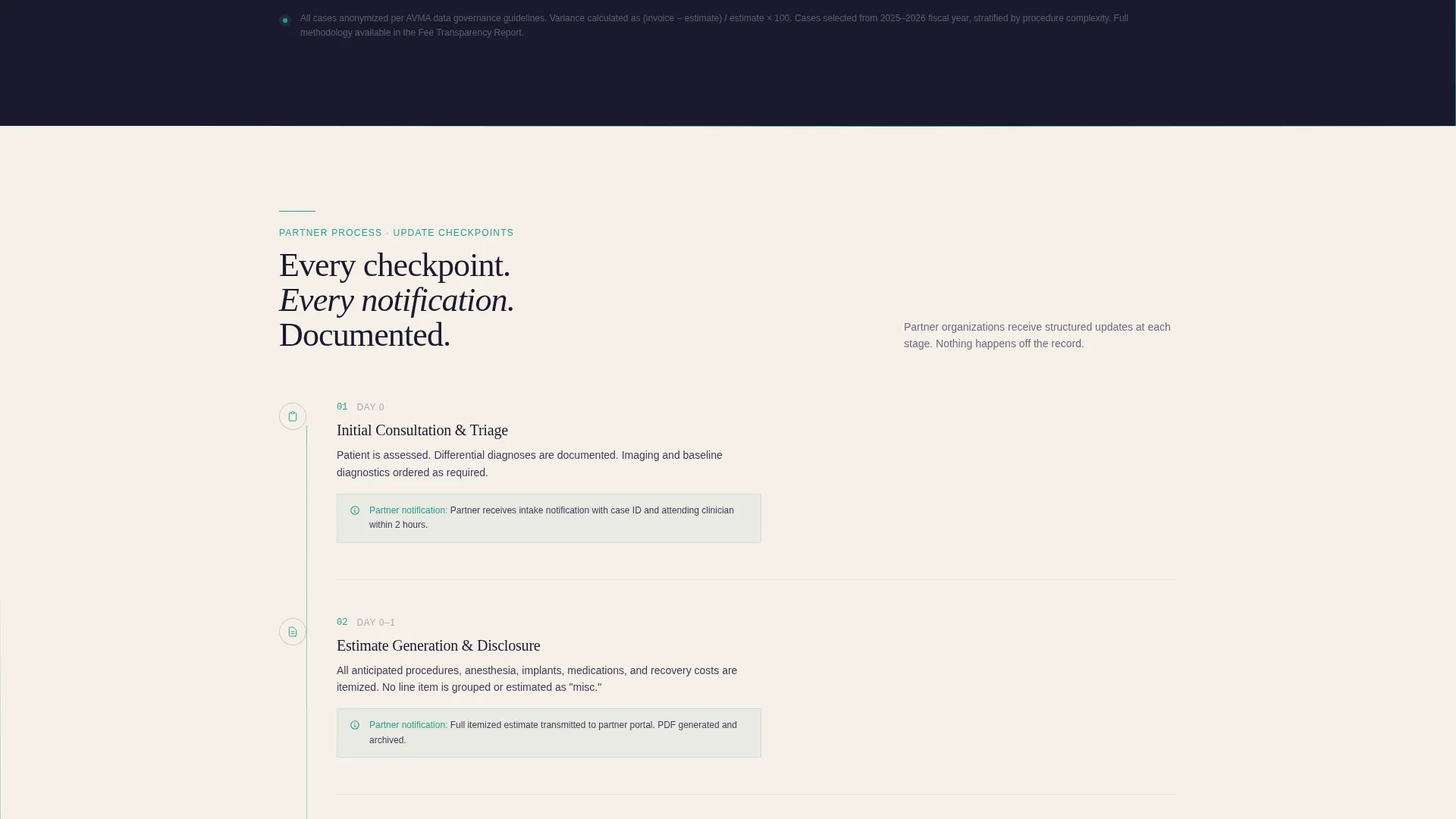
- A process timeline section showing each partner communication checkpoint
- A primary partnership inquiry form and a secondary PDF lead-capture link
Feature list
A paragraph introducing the core features of this template.
This template packages a full editorial B2B sales story into one focused landing page. Each built-in component serves a specific stage of the organizational buyer journey, from first impression to form submission.
Full-Bleed Dark Header with Fade-In Copy
The header uses a dark surgical photograph as a full-width background. A single line of cream editorial type fades in at the lower third after a two-second pause. No navigation is visible on load, keeping the visitor focused on the opening message before they scroll.
Typographic Procedure Cost Breakdown
One section presents a sample procedure as a structured cost infographic using typographic hierarchy. Line items are separated by scale and weight so the visitor reads it the way they would a printed prospectus, not a clinic brochure.
Estimate versus. Invoice Comparison Spread
A side-by-side editorial layout displays three anonymized real cases. Each case shows the original estimate alongside the final invoice and a variance percentage. This section acts as the primary evidence block for the transparency narrative.
Partner Update Process Timeline
A sequential timeline section maps every checkpoint at which a partner organization receives a status update. The layout reads as a case file moving forward in time, reinforcing accountability through visual structure.
Dual Conversion Path Design
The primary call to action, a partnership estimate request form, sits at the close of the process timeline. A secondary conversion path appears midway through the page as a teal underlined text link, gating a fee transparency report PDF behind a single email field.
Executive Suite Color and Type System
The palette uses deep manuscript black, warm archival cream, clinical charcoal, and a single surgical teal accent. Teal appears only on interactive elements, calls to action, and data highlights, keeping the visual hierarchy clean and authoritative throughout.
Page sections overview
| Section | Purpose |
|---|---|
| Dark Header | Opens with surgical photograph and editorial headline |
| Procedure Cost Breakdown | Shows sample procedure costs as a typographic infographic |
| Estimate versus. Invoice | Compares estimates to final invoices across three cases |
| Partner Timeline | Maps each partner communication checkpoint in sequence |
| PDF Lead Capture | Captures early-stage leads with a single email field |
| Partnership Request Form | Collects full partner inquiry details at the close |
Design & branding system
The visual identity follows an Executive Suite theme. Every color choice and type decision reinforces the feeling of a carefully prepared business document rather than a consumer health page.
- Deep manuscript black (#1A1A2E) for backgrounds, warm archival cream (#F5F0E8) for editorial type, and clinical charcoal (#3D3D5C) for body text
- A single surgical teal accent (#2A9D8F) reserved exclusively for interactive elements, calls to action, and data highlights
- Typography and layout hierarchy modeled on a printed prospectus: dense, scannable, and authoritative without being clinical or cold
Mobile & speed optimization
The layout is built with a single-column scroll flow that adapts naturally to smaller screens. The editorial infographic sections and comparison spreads are structured to restack clearly at mobile widths.
- The full-bleed header and typographic sections maintain legibility at all common screen widths
- The dual conversion paths, the inline PDF link and the closing form, remain accessible at any scroll depth on mobile
- Section-by-section content loading keeps each scroll step clean and readable without overwhelming the viewport
How this template helps you convert
This template treats the scroll as a structured sales sequence. Each section earns the next, building documented trust before the visitor ever sees a form field.
- The transparent cost and invoice comparison sections do the persuasion work early, so by the time the visitor reaches the primary call to action, the decision is already mostly made.
- The midpage PDF lead-capture link intercepts buyers who are convinced by the evidence but not yet ready for a full partnership conversation, turning exit-risk traffic into a captured lead.
Other information about this template
This template works best for clinics that have real anonymized case data they can drop into the estimate-versus-invoice comparison section. The stronger the actual numbers, the more persuasive the transparency narrative becomes.
- The partnership form collects organization name, partnership type via a dropdown, estimated monthly case volume, and a business email, keeping qualification built into the intake
- The PDF lead magnet path is gated behind only an email field, reducing friction for early-stage organizational prospects
- The page type is a single focused landing page, not a multi-page website, which keeps the visitor's attention on one clear conversion path from header to form

Theme
Executive Suite
Creative direction
Testimonial Mosaic
Color system
Monochrome Steel
Style
Split Screen (50/50)
Direction
Booking/Scheduling
Page Sections
Full-bleed Dark Header with Fade-in Type
Typographic Procedure Cost Breakdown
Estimate Versus. Invoice Comparison Spread
Partner Update Process Timeline
Dual Conversion Path Design
Executive Suite Color and Type System
Related questions
Is this template designed for individual pet owners or business clients?
Can I use my own case data in the estimate-versus-invoice section?
What does the partnership request form collect?
Do both conversion paths appear on the same page?
Is this template suitable for a clinic that also serves individual clients?



