Mountain Property Photography Landing Page Template
Vista is a single-page landing page template built for mountain property photographers. It uses an asymmetric 60/40 grid, an edge-to-edge panoramic header, and an interactive Before/After Reveal to show the true cost of bad listing photos. A five-question visual quiz guides visitors toward a personalized shot list and a direct booking call to action.
by Rocket studio
Quick summary
Vista is a landing page template designed for photographers who specialize in mountain properties. It pairs a dramatic panoramic header with a scrolling Before/After Reveal section and a five-question visual quiz. The layout guides rural realtors, vacation rental owners, and land brokers from first impression to a booked golden hour shoot.
Who this template is for
This template is built for photographers who work in elevated, rural, and wide-open landscapes. It speaks directly to service providers whose clients need more than a product listing; they need an emotional connection to a place.
- Mountain property photographers offering listing and editorial shoots
- Vacation rental owners and rural realtors looking for a done-for-you booking page
- Land brokers whose entire pitch rests on a single compelling landscape photograph
What problem this template solves
Most listing photos undersell a property. A snapshot taken at noon with a phone camera cannot compete with a composed golden hour image. This template gives photographers a structured page that proves that gap exists and then offers to close it.
- Visitors arrive without understanding how much a bad photo costs them in bookings or offers
- Competing listings all look alike, making differentiation nearly impossible without visual proof
- There is no clear path from "I need better photos" to "I just booked a shoot"
What you get with this template
This template delivers a complete, single-page layout built around visual proof and guided decision-making. Every section moves the visitor one step closer to recognizing the value of professional mountain property photography.
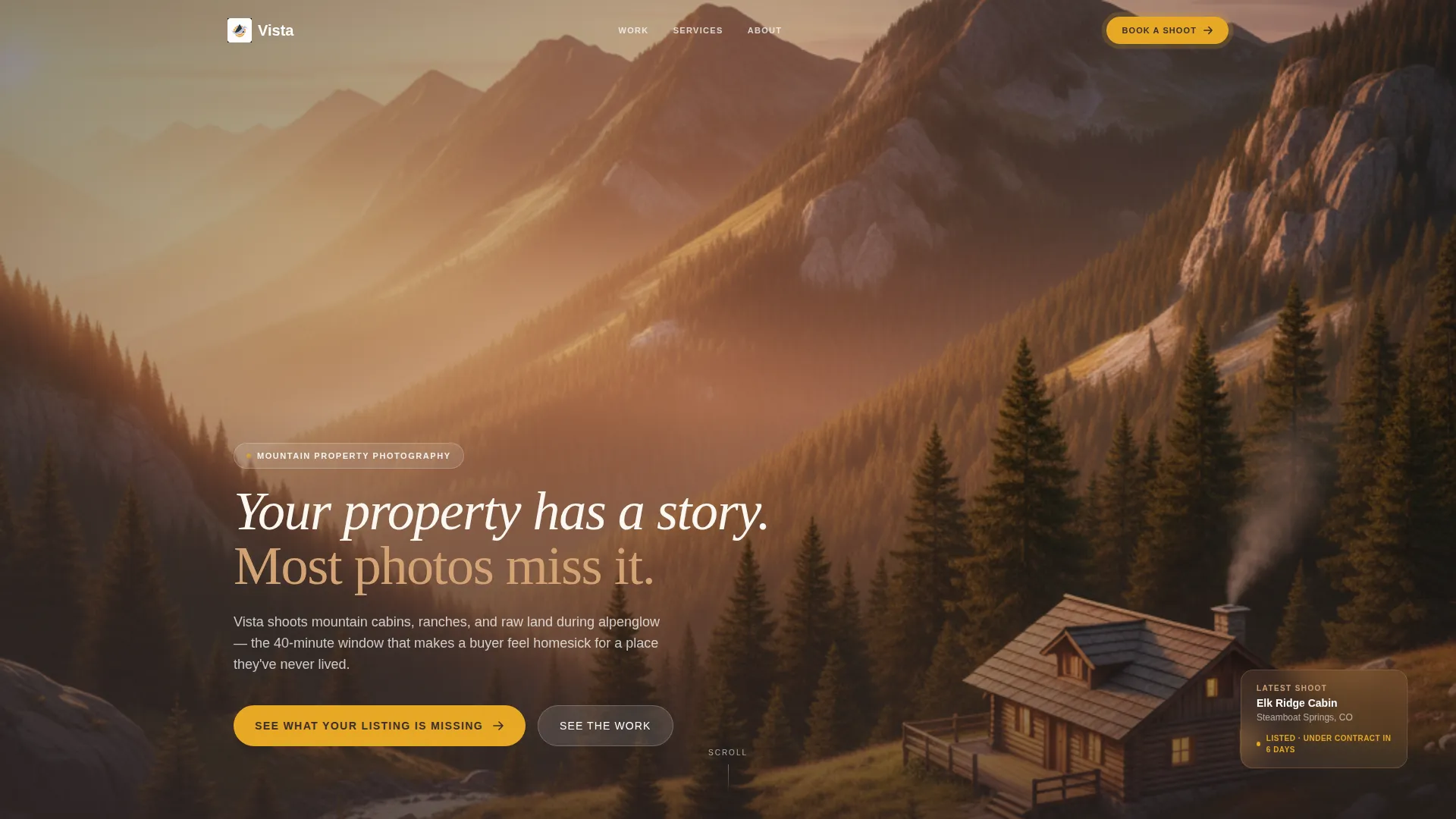
- An edge-to-edge panoramic header with a fade-in headline and sunset property composition
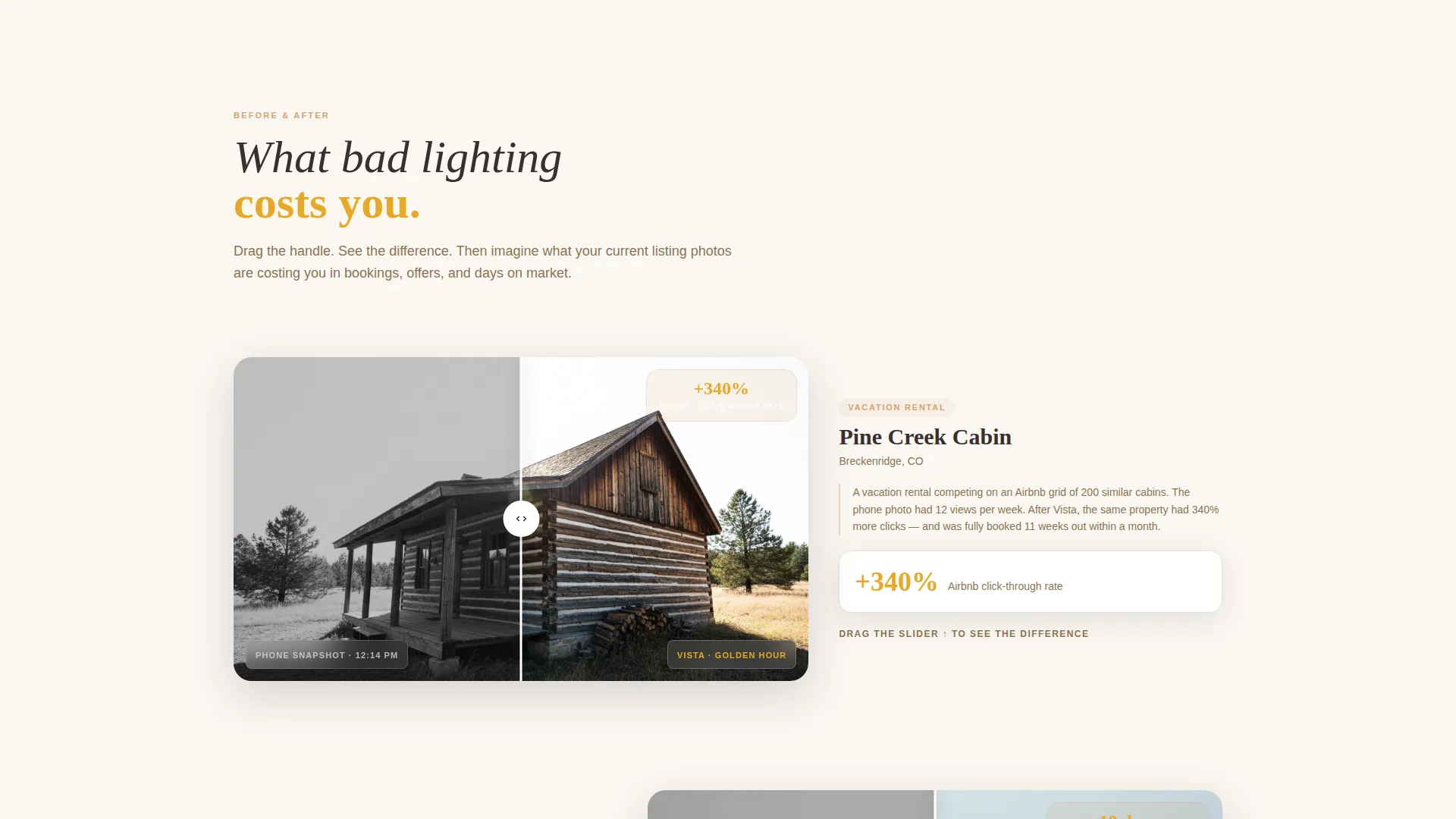
- A scrolling asymmetric 60/40 Before/After Reveal with an interactive drag handle
- A five-question visual quiz that ends with a personalized shot list and a calendar embed for booking
Feature list
This template packs its most persuasive tools into a focused, single-page flow. Each feature is built to earn trust visually before asking for a commitment.
Panoramic Edge-to-Edge Header
A full-width 16:9 photograph anchors the page. The cabin sits in the lower-right third of the frame while three receding ridgelines fill the rest. A light sandstone headline fades in after a brief pause, reading: "Your property has a story. Most photos miss it."
Asymmetric 60/40 Grid Layout
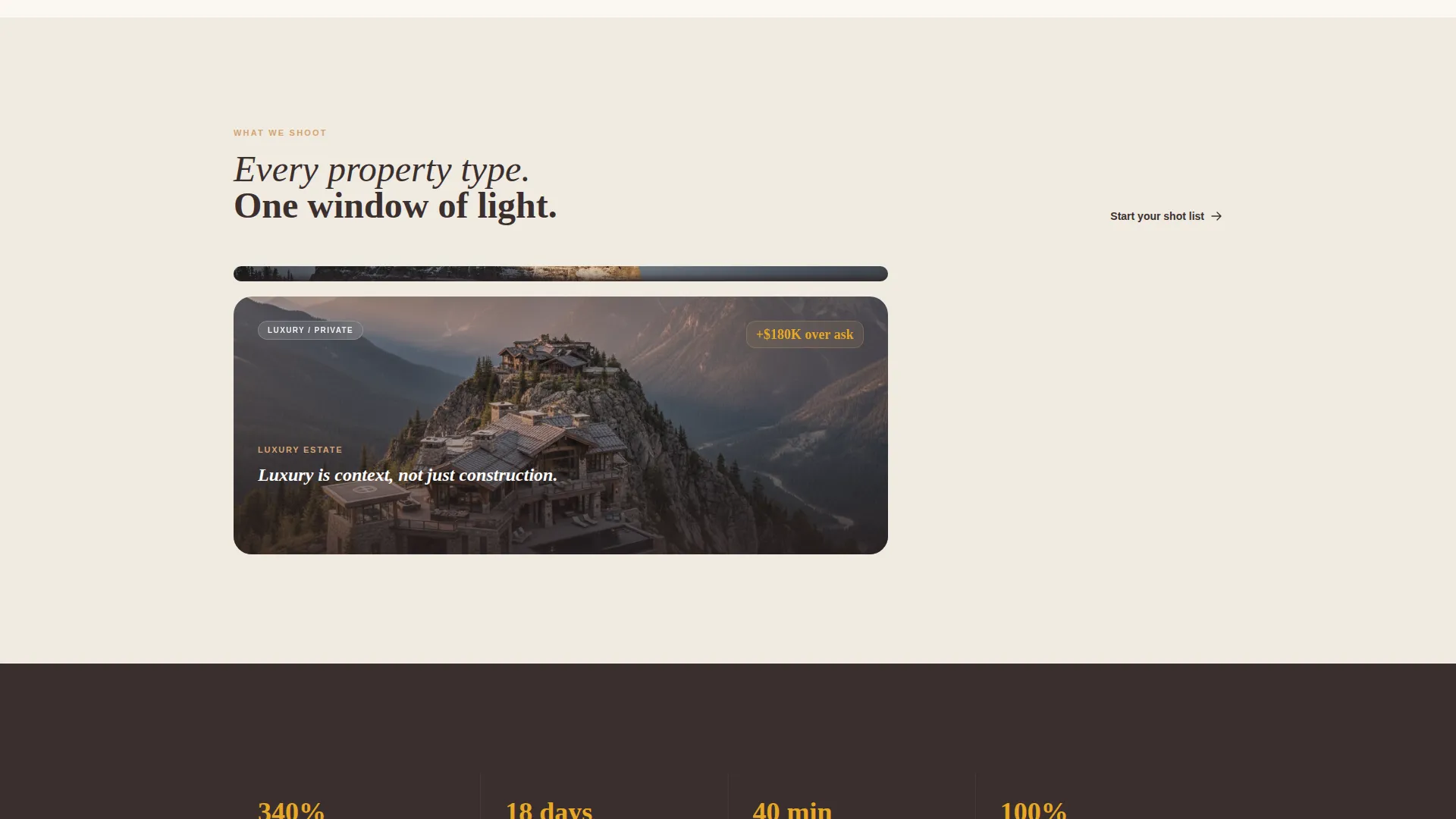
The page uses a 60-column and 40-column split throughout the scroll. This proportion gives the primary image room to breathe while keeping supporting content close enough to read without losing visual momentum.
Interactive Before/After Reveal
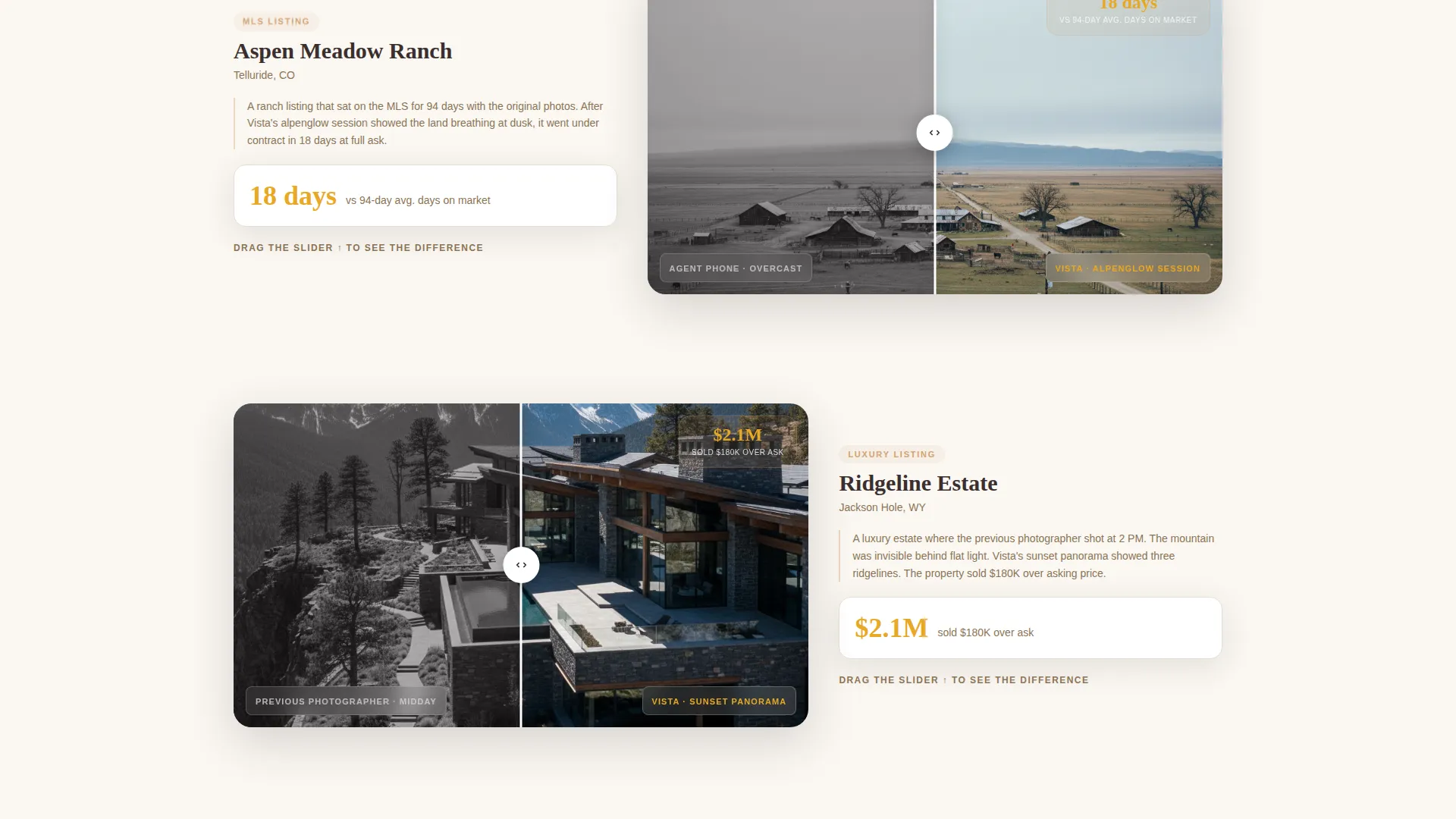
Each scroll section pairs a harsh smartphone snapshot with a professional golden hour reshoot of the same property. A drag handle lets visitors slide between the two versions. The property pairs escalate from a modest cabin to a sprawling ranch estate, making the transformation progressively more dramatic.
Five-Question Visual Quiz
The primary call to action, "See What Your Listing Is Missing," opens a quiz covering property type, current photo source, primary platform, biggest frustration, and best season. Results deliver a personalized shot list recommendation and a scoring breakdown of the visitor's current listing photos.
Calendar-Linked Booking call to action
After the quiz delivers results, a follow-up call to action reads "Book Your Golden Hour Shoot" and sits alongside a calendar embed. This removes any friction between deciding to hire and actually scheduling the session.
Sunset Mesa Color System
Warm sandstone, deep timber shadow, fading sky lavender, and ridgeline gold work together to evoke a landscape photograph developing slowly in a darkroom. Ridgeline gold is reserved for buttons and hover states, giving every interactive element a clear and warm visual cue.
Page sections overview
| Section | Purpose |
|---|---|
| Panoramic Header | Sets the emotional tone with a full-width sunset property photograph and fade-in headline |
| Before/After Reveal | Shows side-by-side proof of photography transformation using an interactive drag handle |
| Property Pair Series | Escalates transformations from cabin to ranch estate across multiple scroll sections |
| Visual Quiz Entry | Invites visitors to discover what their listing is missing through a five-question assessment |
| Quiz Results Panel | Delivers a personalized shot list and a scoring breakdown of current listing photos |
| Booking call to action Block | Pairs a "Book Your Golden Hour Shoot" button with a calendar embed for direct scheduling |
Design & branding system
The visual identity follows a Pastoral Calm theme. Every color choice is drawn from the natural landscape itself, creating a palette that feels earned rather than designed.
- Warm sandstone (#D4A373), deep timber shadow (#3B2F2F), and fading sky lavender (#C9B8D9) form the base palette
- Ridgeline gold (#E8A825) is reserved exclusively for buttons and hover states to draw attention without overpowering the imagery
- Typography uses light sandstone tones on dark backgrounds, keeping text readable against full-bleed landscape photography
Mobile & speed optimization
The asymmetric grid and full-width photography are designed to reflow cleanly at smaller screen sizes. Visitors arriving from a listing link on a phone should experience the same visual impact as those on a desktop.
- The 60/40 grid stacks vertically on smaller screens so neither column competes for space
- Before/After drag interaction is touch-friendly, allowing mobile visitors to swipe between photo versions
- The quiz flow is structured as a step-by-step sequence, keeping each screen focused on a single question
How this template helps you convert
Vista does not ask for a booking before earning it. The page builds trust through progressive visual proof, then channels that trust into a structured decision path.
- The panoramic header creates an immediate emotional hook, making visitors feel the quality difference before reading a single word of copy
- The Before/After Reveal trains the visitor's eye across multiple property pairs, turning abstract value into visible, undeniable proof
- The quiz personalizes the outcome so the final booking call to action feels like a natural next step rather than a cold sales push
Other information about this template
Vista is suited for photographers who want a single, polished page that works as hard as their best image. It is built around a gallery-forward layout with a direct sales flow, meaning every design decision serves the goal of converting a hesitant visitor into a confirmed booking.
- The template style follows a Gallery and Detail approach, letting large images carry the persuasion while structured text supports the decision
- The landing page direction is direct sales, so there are no detours or distraction menus pulling visitors away from the booking path
- The Before/After creative direction is the structural backbone of the page, making it especially effective for service providers whose work speaks louder than any written claim
Theme
Dark Immersive
Creative direction
Before/After Reveal
Color system
Cloud Canvas
Style
Gallery + Detail
Direction
Direct Sales
Page Sections
Panoramic Edge-to-edge Header
Interactive Before/after Reveal
Asymmetric 60/40 Grid Layout
Five-question Visual Quiz
Calendar-linked Booking Call to Action
Sunset Mesa Color System
Related questions
Who is the Vista template built for?
What does the five-question quiz actually do?
How does the Before/After Reveal work?
Does the template include a way for visitors to book directly?
Can I use this template if I specialize in only one property type?



