Academic CV Landing Page Template | Bento Grid
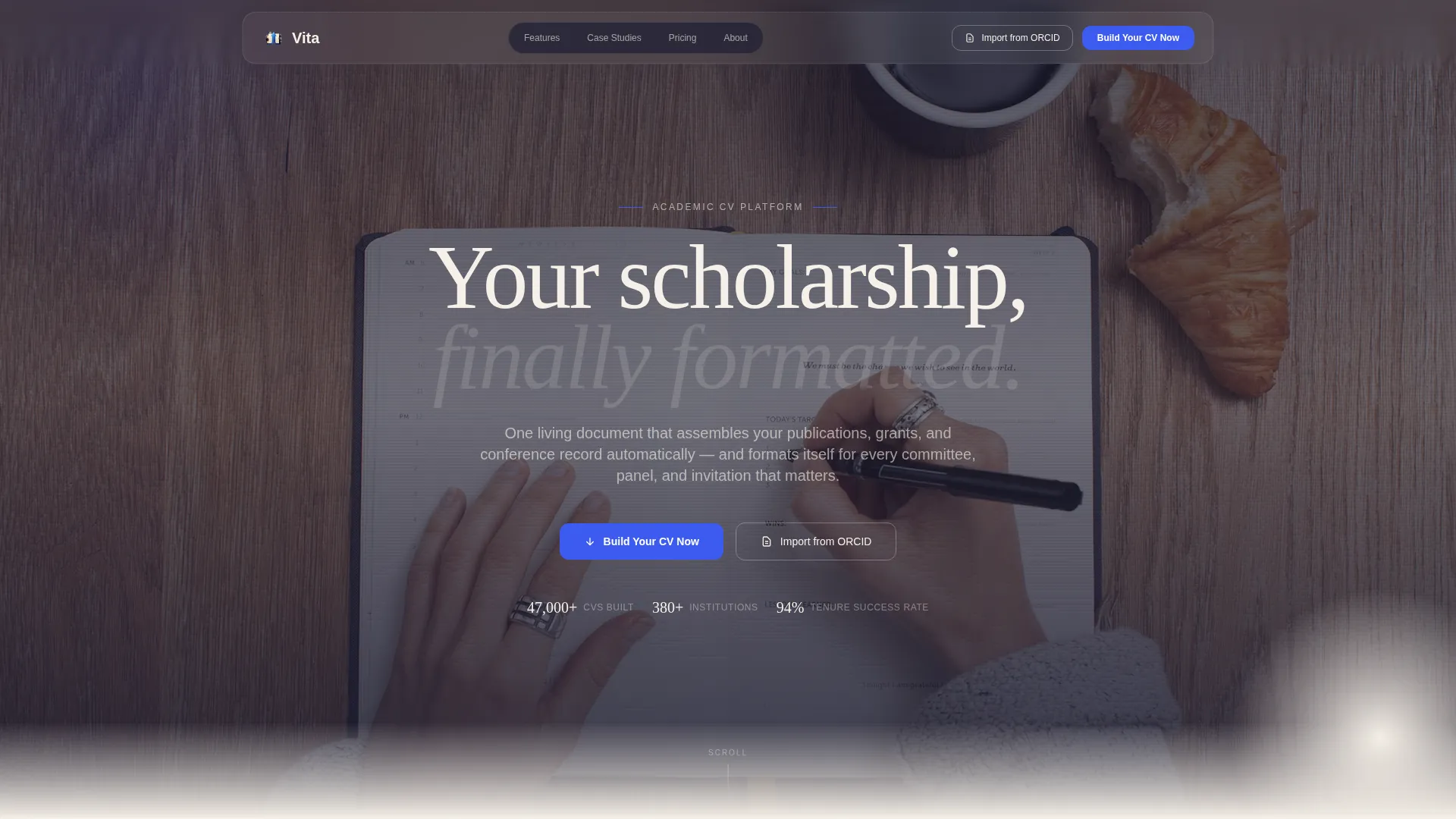
Vita is a bento grid academic CV landing page template built for researchers who need one authoritative document to replace a scattered collection of Word files and outdated profiles. With a full-screen video header, case study narrative layout, and a Tech Glass visual identity, it guides visitors directly into the CV builder through a single clear call to action.
by Rocket studio
Quick summary
Vita is a single-page bento grid template designed for academic professionals. It pairs a cinematic full-screen video header with a three-stage case study narrative that walks visitors through the CV-building journey. The Ink and Paper color system gives it the quiet authority of a university press publication, filtered through the clean lines of modern interface design.
Who this template is for
This template speaks directly to researchers and academics who feel the gap between the quality of their work and the document representing it. Whether you are just starting out or well into your career, Vita is built to meet you where you are.
- Newly defended PhDs and postdoctoral researchers who need a polished academic CV that reflects their real credentials
- Mid-career faculty and department chairs whose existing CV documents are fragmented across multiple files and versions
- Emeritus scholars and senior academics who want a single living document covering decades of publications, grants, and invited talks
What problem this template solves
Most academic professionals maintain several versions of their CV spread across email attachments, cloud folders, and partially completed online profiles. The result is a document that never quite represents the full weight of the work behind it. Vita gives that work a proper home.
- Scattered publications, grant records, and conference contributions have no single organized presentation
- Existing CV documents look informal or inconsistent when shared with tenure committees, fellowship panels, or conference organizers
- Researchers starting from a blank page lose time and confidence that a structured, pre-formatted template immediately recovers
What you get with this template
Vita delivers a fully structured single-page layout with every section a researcher needs, from the attention-commanding header to the final call to action. The design is ready to customize without rebuilding from scratch.
- A full-screen video background header with glass-morphism navigation and a typeset headline overlay
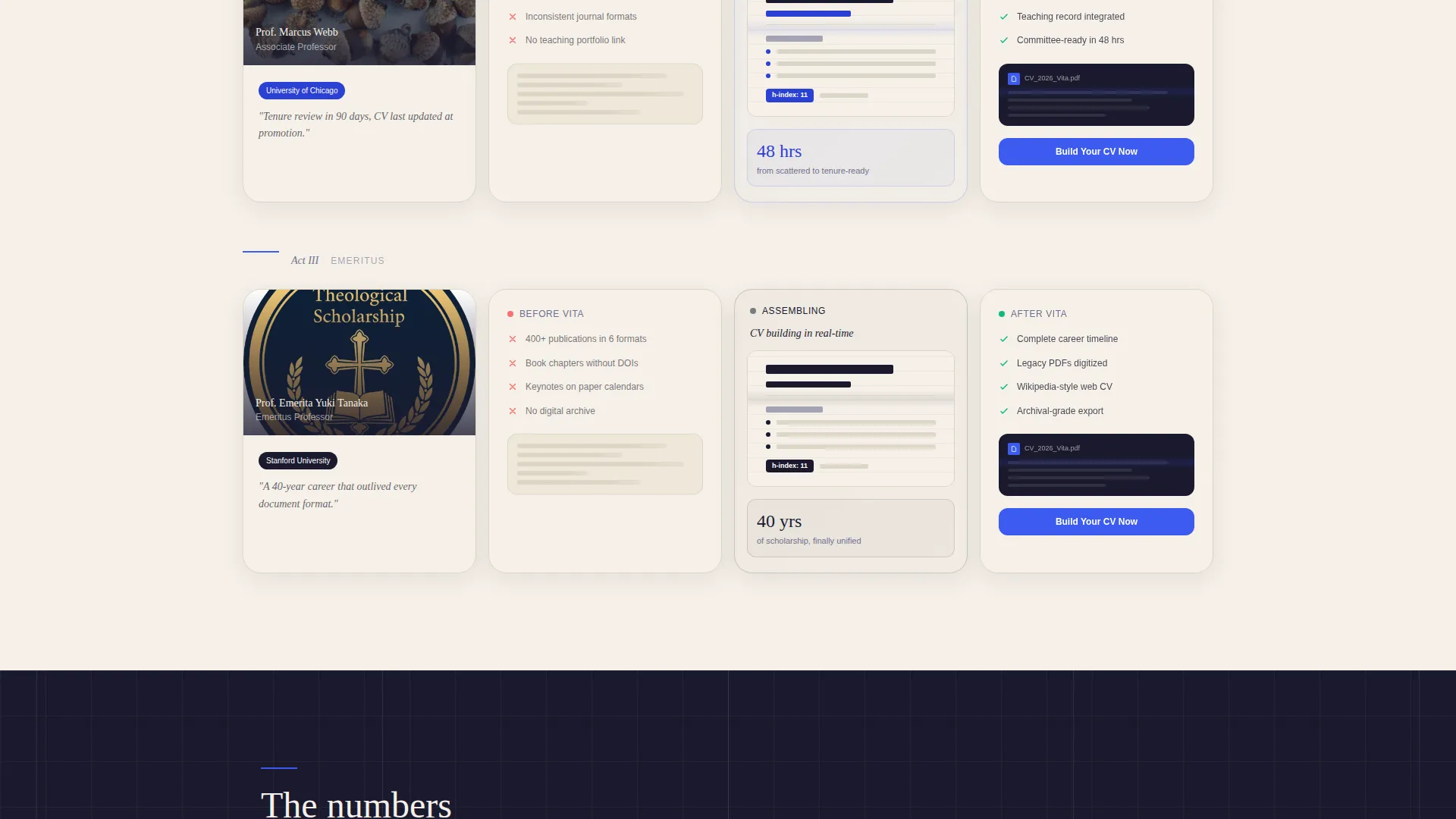
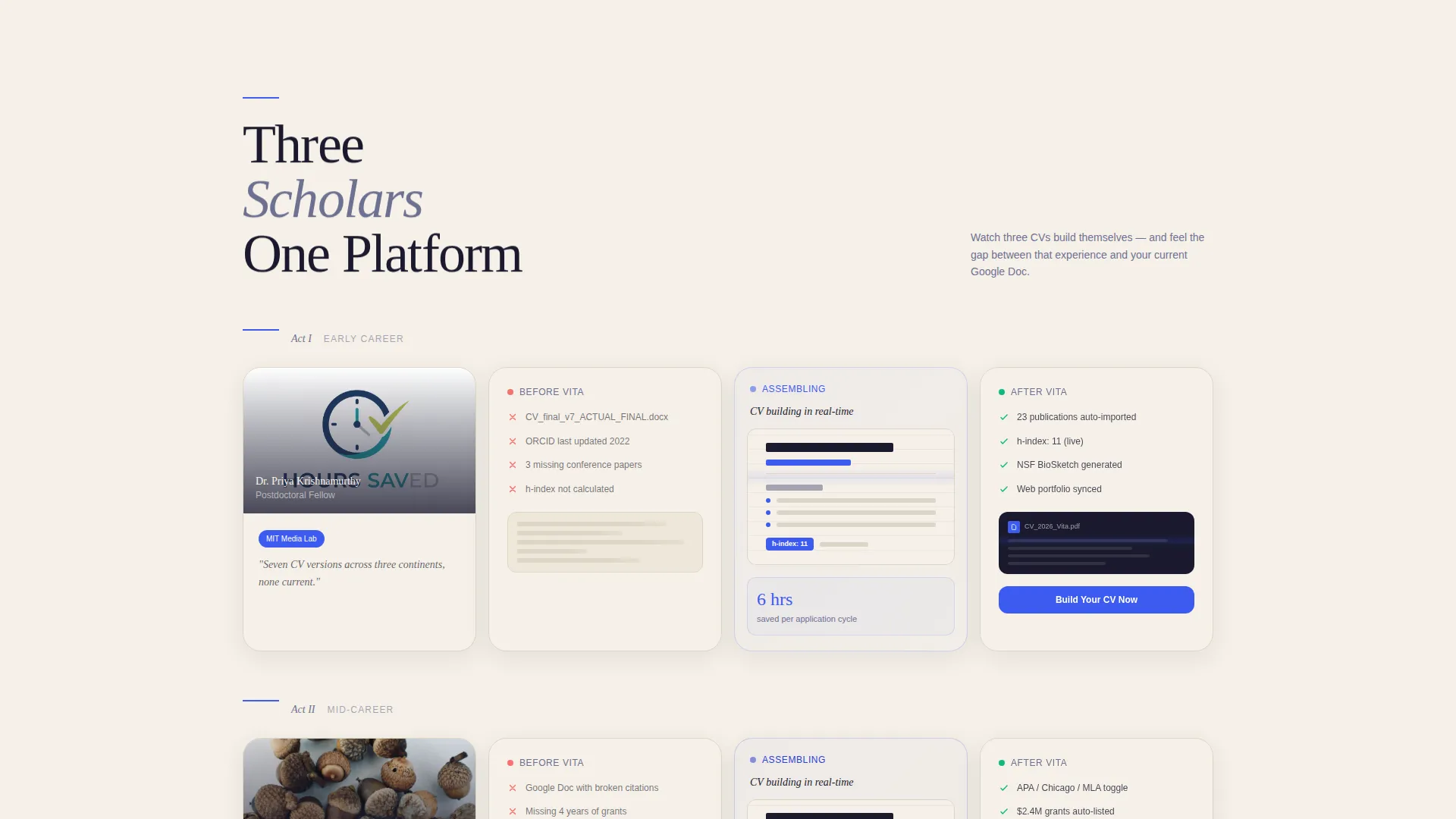
- A three-cluster bento grid case study section covering early-career, mid-tenure, and emeritus academic profiles
- Two distinct conversion paths: a primary "Build Your CV Now" button and a secondary "Import from ORCID" option placed side by side
Feature list
This template was designed around one purpose: turning a visitor's first impression into a motivated click toward the CV builder. Every feature below serves that goal directly.
Full-Screen Video Background Header
The header opens with a slow macro-lens tracking shot across the surface of a printed academic document. Cotton-fiber paper texture and letterpress type impression are visible up close. A single typeset headline fades in over the footage, and a translucent glass-morphism navigation bar floats above it all.
Bento Grid Case Study Layout
Three bento card clusters each tell the story of one researcher at a different career stage. The left cards show the messy starting point, the center card shows the CV assembling itself in a looping animation, and the right cards show the finished output as a PDF preview and web portfolio view.
Looping CV Assembly Animation
The center card in each case study cluster plays a short looping animation. It shows CV sections snapping into place, citations formatting automatically, and the h-index (a standard academic citation metric) populating live. The effect lets visitors watch the transformation before they commit to a click.
Dual Conversion Calls to Action
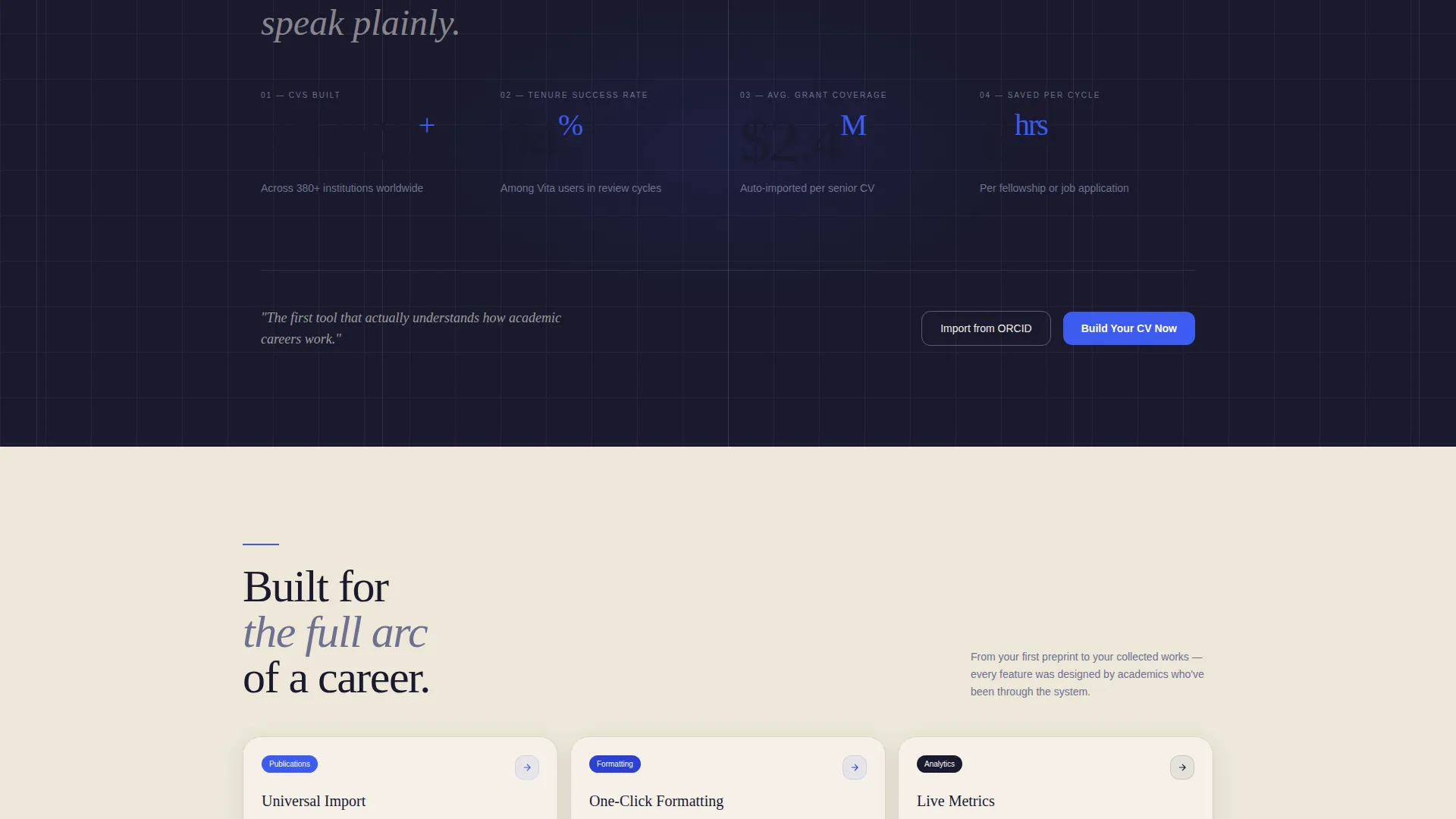
The primary call to action, "Build Your CV Now," appears first in the header navigation bar and repeats at the close of each case study cluster. A secondary option, "Import from ORCID" (the Open Researcher and Contributor ID registry), sits beside it for researchers who want to skip the blank starting point entirely.
Ink and Paper Color System
The palette uses four intentional values: deep manuscript black for typography, archival cream for card backgrounds, margin-note gray for grid gutters, and citation blue reserved strictly for links, buttons, and interactive highlights. The restraint makes every blue element feel like an invitation worth accepting.
Tech Glass Visual Theme
The frosted glass user interface elements, including the translucent navigation bar and frosted search field, are layered over the warm analog imagery below. The result reads like a university press page viewed through a modern glass interface, combining scholarly warmth with software precision.
Page sections overview
| Section | Purpose |
|---|---|
| Video background header | Opens with macro paper footage, headline overlay, and glass-morphism nav bar |
| Early-career cluster | Bento card group showing a postdoc's scattered inputs, CV assembly, and finished output |
| Mid-tenure cluster | Bento card group covering a faculty member's transformation from fragmented files to polished CV |
| Emeritus scholar cluster | Bento card group demonstrating the template's range across a full academic career |
| Case study call to action block | Conversion point at the close of each cluster with primary and secondary action buttons |
Design & branding system
The visual identity is built on the Tech Glass theme expressed through the Ink and Paper color system. Every design decision reinforces the feeling of scholarly credibility meeting contemporary software craft.
- Color palette: manuscript black (#1A1A2E) for type, archival cream (#F5F0E8) for card fills, margin-note gray (#6E7191) for gutters, and citation blue (#3D5AF1) for all interactive elements
- Typography anchors the layout with the weight and spacing of typeset print, giving the page a monograph-quality reading experience
- Glass-morphism user interface elements, including the frosted navigation bar and search field, layer over the video background without obscuring the analog warmth underneath
Mobile & speed optimization
The bento grid structure translates naturally to narrower viewports, keeping each card cluster readable and the conversion path clear on any screen size.
- Bento grid cards reflow for smaller screens so the case study narrative reads in the intended sequence on mobile devices
- The video background header is designed to degrade gracefully, preserving the headline and navigation without depending on full video playback in constrained environments
- The dual call-to-action buttons remain prominently placed and tappable at every breakpoint, keeping the primary conversion path accessible throughout
How this template helps you convert
Vita earns the click through demonstration rather than persuasion. By the time a visitor reaches the third case study cluster, they have watched three CVs build themselves and felt the distance between that experience and their own working documents.
- The full-screen video header creates immediate credibility by showing a real printed academic document up close, anchoring the promise of the headline before the visitor reads a single feature claim.
- The three escalating case study clusters build trust progressively. Each one mirrors a career stage the visitor likely recognizes, making the tool feel relevant before the call to action appears.
- The frictionless conversion path, a single button leading directly to a pre-loaded blank template with no form to fill, removes every barrier between intent and action.
Other information about this template
Vita fits naturally into a broader academic personal branding workflow. It is designed to be the front door of that process, not the whole house.
- The "Import from ORCID" secondary call to action acknowledges that many researchers already maintain a partial profile and want to build from existing data rather than start over
- The template is categorized under Personal and Resume, specifically the Resume and CV subcategory, with a focused niche alignment toward academic CV use cases
- The three career-stage case studies were chosen deliberately: early-career researcher, mid-tenure professor, and emeritus scholar, covering the full span of an academic life to show the template scales with a career over time
- The no-form conversion model, where the primary call to action leads directly to an editor with a blank template pre-loaded, reflects a deliberate choice to reduce friction at the point of highest intent
Theme
Tech Glass
Creative direction
Case Study Narrative
Color system
Ink & Paper
Style
Bento Grid
Direction
Click-Through
Page Sections
Full-screen Video Background Header
Bento Grid Case Study Layout
Looping CV Assembly Animation
Dual Conversion Calls to Action
Ink and Paper Color System
Tech Glass Visual Theme
Related questions
Who is this template designed for?
Does this template include a form or sign-up step on the page?
What is the "Import from ORCID" option?
Can this template handle different academic career stages?
What makes the visual design feel different from a standard resume template?



