Diagnostic Employee Wellness Landing Page Template
The Alarm Community Hearth Fire Safety landing page template gives fire departments a single-column, scroll-driven landing page built around an interactive home safety checklist. Residents work through room-by-room yes/no questions, watch a sticky risk counter tally their gaps, and then download a personalized fire safety report or schedule a free home visit. Clean, serious, and warm.
by Rocket studio
Quick summary
This landing page template was created for municipal fire departments that want to turn a public-service website into a genuine home fire safety resource. Residents scroll through a guided checklist, discover their own risks, and convert through a report download or a free home inspection form. The design is authoritative, calm, and community-focused.
Who this template is for
This template is ideal for fire departments and public-safety teams that want to reach everyday people in their community. It works equally well for departments building a standalone fire safety landing page or adding a dedicated resource section to a larger company or agency website.
- Firefighters and public education officers who want an effective outreach tool without coding from scratch
- Town selectmen and municipal budget holders who need to demonstrate measurable community fire safety services
- Fire protection and emergency services organizations looking to showcase projects, credentials, and free home visit programs
What problem this template solves
Many fire safety landing page designs rely on fear to push visitors toward action. That approach rarely builds lasting trust. This template solves the problem differently: it lets people understand their own home fire safety gaps through honest self-discovery, room by room, before a single call to action appears.
- Residents often do not know whether their smoke alarms cover every level and sleeping area, or whether they follow safe practices like the 3-Foot Rule near heat sources
- Departments struggle to convert web visitors into scheduled inspections or report downloads without a clear, engaging landing page flow
- Generic fire safety templates fail to communicate local warmth, authority, and the specific services a neighborhood station provides
What you get with this template
You get a fully structured single-column landing page layout built around a Checklist and Audit creative direction. Every section is pre-designed and ready to customize with your station logo, local fire safety information, and department contact details.
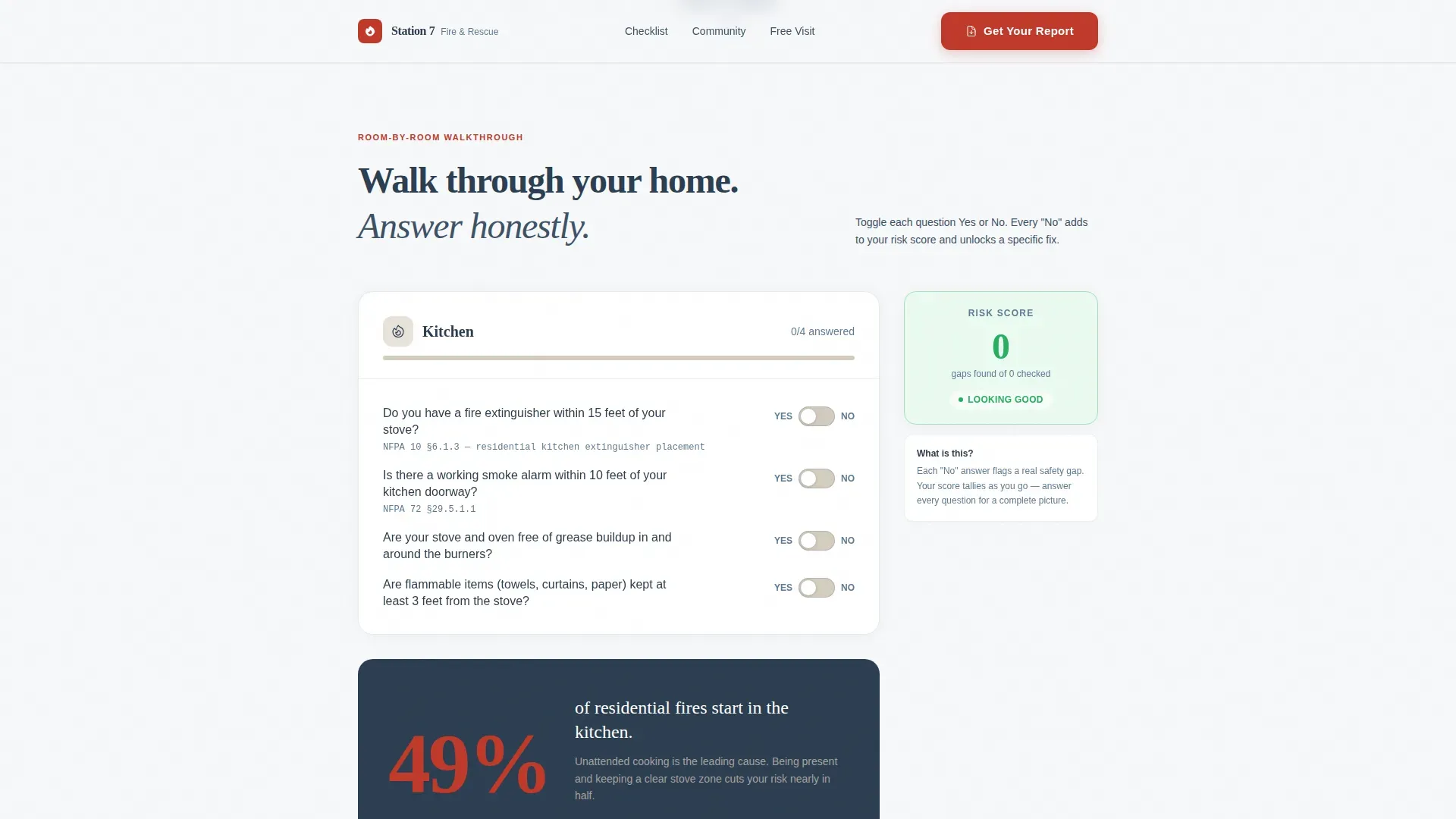
- An interactive room-by-room checklist with yes/no toggles, a sticky risk-score counter, and single-stat callout cards between checklist sections
- A dual conversion path: a report download form that compiles checklist answers into a personalized PDF, plus a secondary scheduling form with a date picker for free home visits
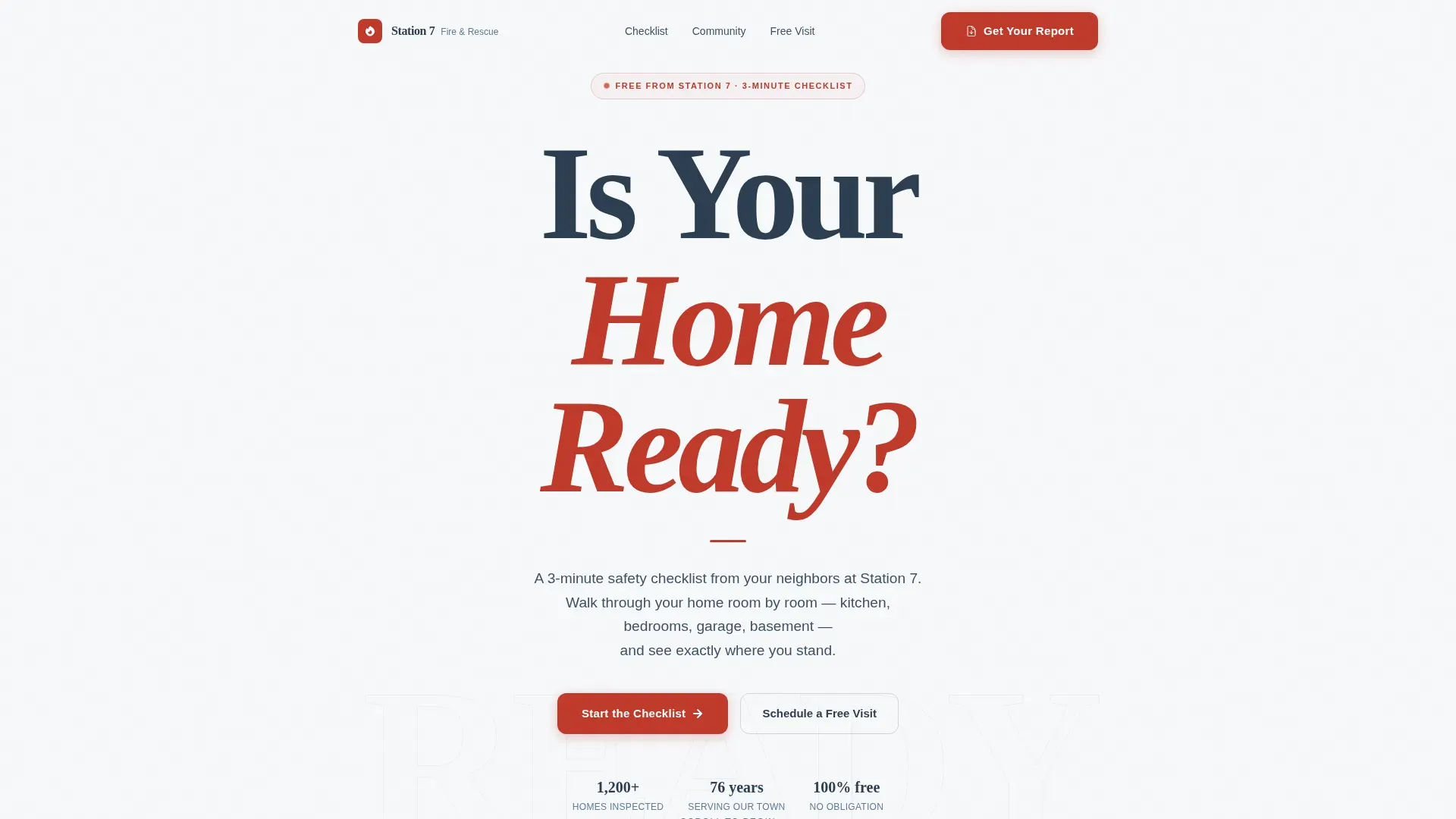
- A hero section with a giant centered headline, subline, and negative-space design that signals authority without illustrations or photography
Feature list
This landing page was created with six core feature areas. Each one serves a specific role in moving visitors from casual readers to active participants in their own home fire safety.
Interactive Room-by-Room Checklist
Visitors toggle yes/no questions across four home zones: kitchen, bedroom, garage, and basement. Every answer is logged in a sticky sidebar risk counter, allowing residents to see their safety score build in real time without being lectured.
Sticky Risk Score Counter
A persistent counter tracks unanswered or at-risk items as the visitor scrolls. This design choice keeps people engaged through the full page without requiring them to scroll back up to understand their standing.
Personalized Report Download
The primary call to action lets visitors download a home fire safety report compiled from their checklist responses. The form asks for an email address first, with an optional street address field so the department can flag the home for a courtesy inspection.
Free Home Visit Scheduler
A secondary conversion path offers a date picker and time-of-day preference form, making it simple for elderly residents or busy parents to sign up for a free fire safety check without a phone call.
Single-Stat Callout Cards
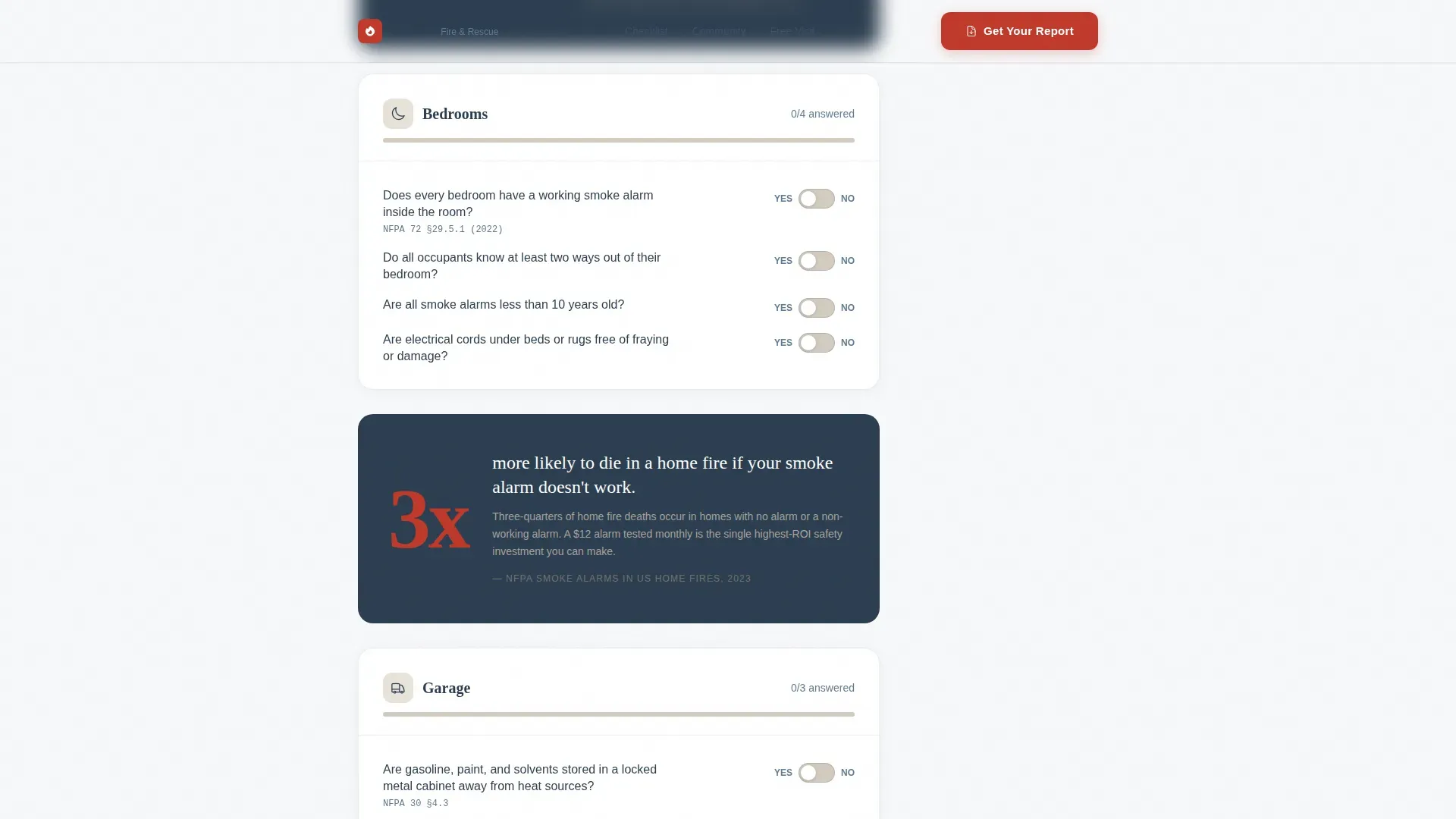
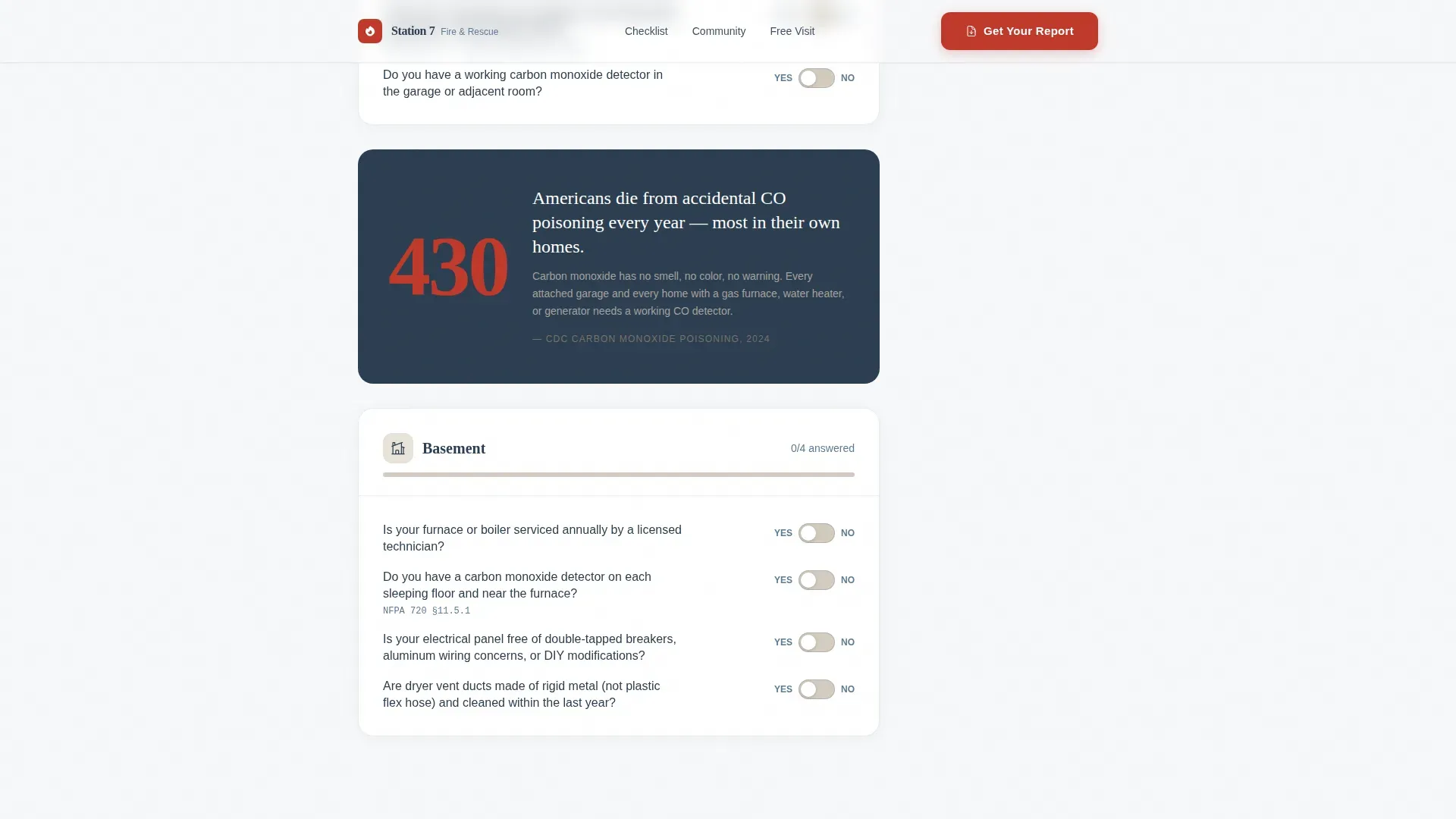
Between checklist sections, bold callout cards present one fire safety statistic each. These cards give visitors evidence-based context, reinforcing the value of completing the checklist without using fear or flames imagery to pressure them.
Community Trust Section
A dedicated section displays department credentials, response time stats, homes inspected, and years of service. Trust-building content like local certifications helps establish credibility and supports effective fire prevention campaigns at the community level.
Page sections overview
| Section | Purpose |
|---|---|
| Hero Headline | Grabs attention with bold centered type and subline |
| Kitchen Checklist | Yes/no fire safety toggle questions for kitchen |
| Bedroom Checklist | Smoke alarm and escape route questions |
| Garage Checklist | Fuel, heat source, and extinguisher checks |
| Basement Checklist | Carbon monoxide and utility safety questions |
| Stat Callout Cards | Single-stat fire safety evidence between sections |
| Community Trust | Credentials, response stats, open house invite |
| Report Download Form | Email capture and optional address for PDF |
| Free Visit Scheduler | Date picker and time preference form |
| Footer | Linear single-row with contact and logo |
Design & branding system
The visual design follows a Community Hearth theme that feels like a freshly painted engine bay in January: immaculate, restrained, and serious. The single stripe of apparatus red carries real weight because it is used sparingly.
- Color system: Arctic White (#F7F8FA) for backgrounds, Charcoal Turnout Gray (#2C3E50) for body text and dividers, Hearthstone Warm White (#E8E2D9) for alternating content blocks, and Apparatus Red (#C0392B) reserved for critical action buttons and alert badges only
- Typography: Fraunces serif display for headlines and section titles, DM Sans for body copy, ensuring the logo area and key headings read with warmth and authority at any size
- No illustrations or photography in the hero; negative space and bold type create urgency, while the rest of the page uses high-contrast colors to stimulate quick responses on call-to-action elements
Mobile & speed optimization
The template is built desktop-first with a strong mobile adaptation so elderly residents on tablets and parents on phones can complete the checklist without friction. Fast initial load is prioritized so the landing page is usable even in low-signal areas.
- Client-side components handle checklist interactivity only, keeping the initial page load light and navigation smooth on small screens
- High-contrast apparatus red buttons and clear DM Sans body text remain readable at every screen size, supporting quick responses during emergencies or planning sessions
- Emergency contact information and fire department services are prominently placed so they are visible without scrolling on any device
How this template helps you convert
This fire safety landing page earns the click by delivering real value before asking for anything. Visitors complete useful checklist work first. The conversion ask feels like a natural next step, not an interruption.
- The interactive checklist builds genuine investment: by the time visitors reach the download button, they have already identified personal home fire safety gaps and want the full report to understand what to fix
- The dual conversion path captures two distinct visitor types: those ready to download a fire safety report immediately and those who prefer to schedule a free home visit, broadening the range of people the department can serve
Other information about this template
This template was created to serve the full range of fire safety outreach needs a modern department faces. It supports fire prevention campaigns, community education projects, and free services that departments already provide but struggle to promote online.
- Fire flyers serve as an essential tool in fire prevention campaigns, and this landing page functions as a digital equivalent: visually striking, easy to understand, and shareable through social media, emails, or department websites for broader reach
- Creating a fire flyer or digital campaign that connects with people means customizing content to reflect local context; this template is built to sell that local authenticity, with a logo placement, editable stat cards, and room for local code references in the report section
- Effective fire prevention campaigns help educate the public and equip them to act before disaster strikes; the template supports that goal through its 4 P's structure: Prevention, Planning, Protection, and Preparedness
- Compliance with NFPA (National Fire Protection Association) standards can help build authority for fire safety information presented on the landing page; the report download section includes a field for local code references that align with those standards
- The template supports pro-level customization through its design system; teams can apply filters to color blocks, swap illustrations or icon sets in the stat card areas, and resize logo and headline elements to match department branding
- Free templates in this category often lack interactivity; this template fills that gap with scroll-triggered reveals, toggle micro-interactions, and an AI-friendly single-column structure that makes it easy to extend with generated content
- Visual storytelling, such as incorporating high-quality images of families practicing fire drills, helps build authenticity and trust; the community trust section is designed to accommodate that kind of photography when departments choose to add it
- Digital fire flyers and safety resources can be shared through social media or department websites; the landing page includes a sign-up path that captures emails for ongoing outreach
Theme
Community Hearth
Creative direction
Checklist & Audit
Color system
Arctic White
Style
Single Column Flow
Direction
Content/Resource
Page Sections
Interactive Room-by-room Checklist
Sticky Risk Score Counter
Personalized Report Download
Free Home Visit Scheduler
Single-stat Callout Cards
Community Trust Section
Related questions
Can I use this template for a fire protection company website?
Does the checklist work on mobile devices?
What information does the report download form collect?
Can I customize the fire safety checklist questions?
Is this a free template or a pro template?



