Seamless Automation Landing Page Template
Voicehome is a modular card-grid landing page built for small teams offering voice control integration in residential spaces. It presents real neighbor stories, a calm Monochrome Steel visual identity, and a three-step booking form that guides visitors from curiosity to a confirmed walkthrough appointment, all without pressure or complexity.
by Rocket studio
Quick summary
Voicehome is a single-page booking template for voice control integration specialists. It uses a modular card-grid layout to tell neighbor-style project stories, builds trust gradually through statistics and real-room examples, then drives visitors toward a free on-site walkthrough. The design is calm, uncluttered, and built around one clear next step.
Who this template is for
This template is for small, specialist teams who wire homes for voice control and need a credible, warm online presence. It works especially well for providers targeting residential clients rather than commercial developers.
- Installation teams that offer room-by-room voice zone mapping
- Smart home specialists serving renovation clients, retirees, or young families
- Independent contractors wanting a polished booking page without a complex website build
What problem this template solves
Most smart home service pages feel either too technical or too generic. Visitors cannot picture how voice automation actually fits their daily life. This template closes that gap by showing real home scenarios and a clear, low-pressure path to book a consultation.
- Vague service pages that list features but never show outcomes in real rooms
- No clear next step, leaving interested visitors unsure how to start
- High-pressure contact forms that feel like hiring a contractor rather than inviting a neighbor
What you get with this template
You get a complete, ready-to-edit single landing page that moves visitors from awareness to appointment in one scroll. Every section is purpose-built for a voice control integration service.
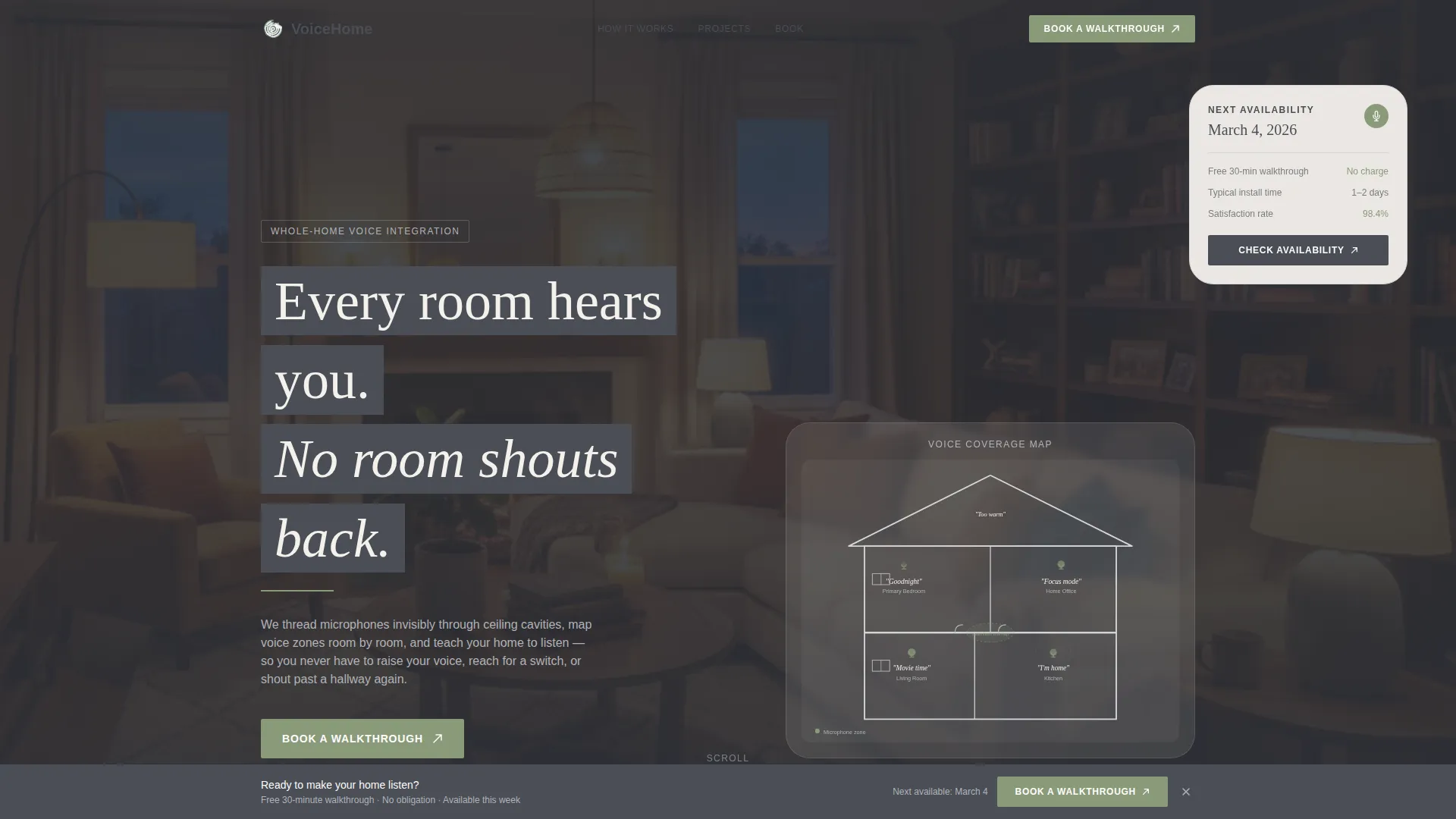
- A full-width line art header illustration with headline, subheadline, and primary call-to-action button
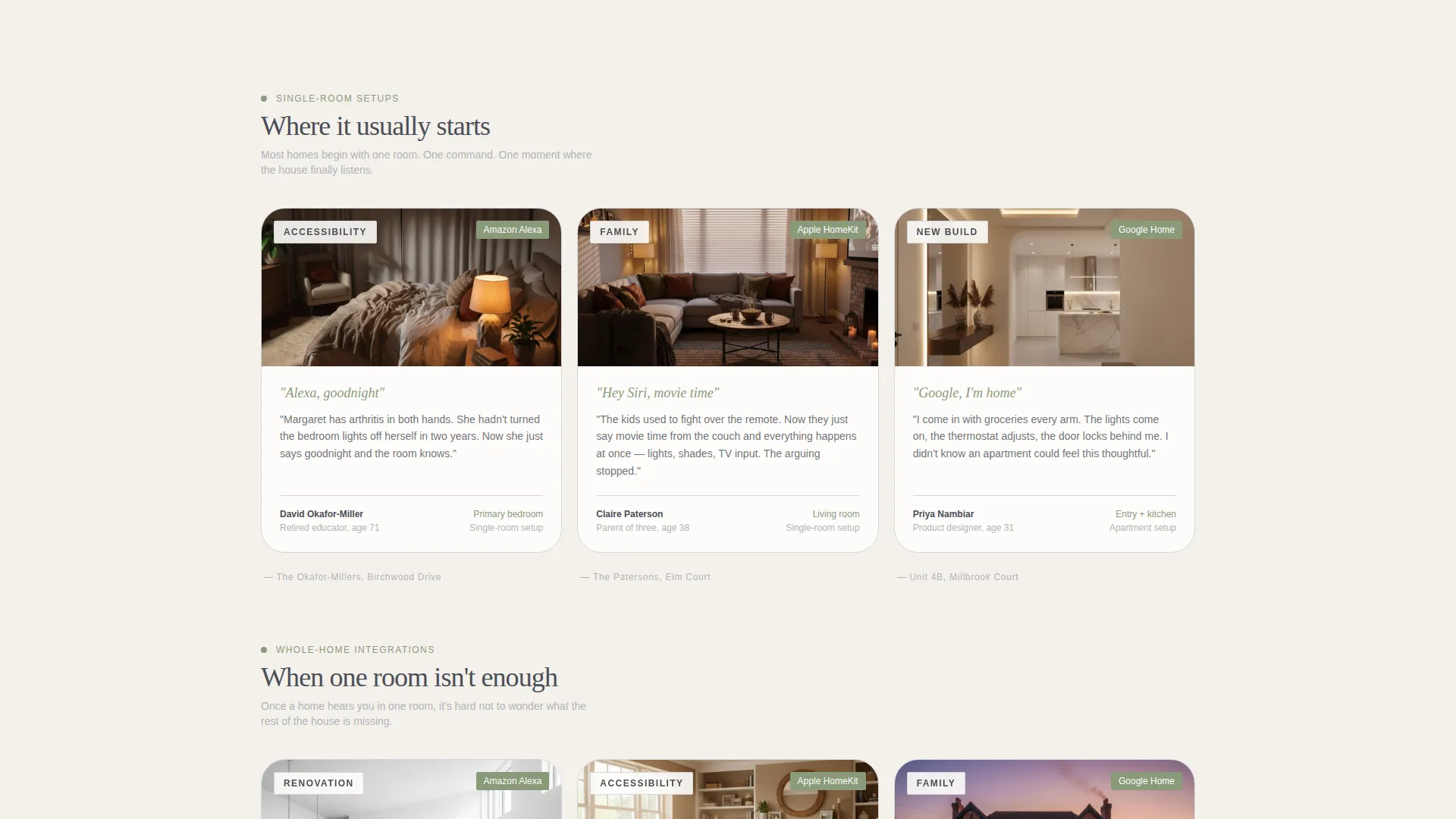
- Modular neighbor-story card clusters, each introduced by a neighborhood-style subhead and separated by single-statistic evidence bands
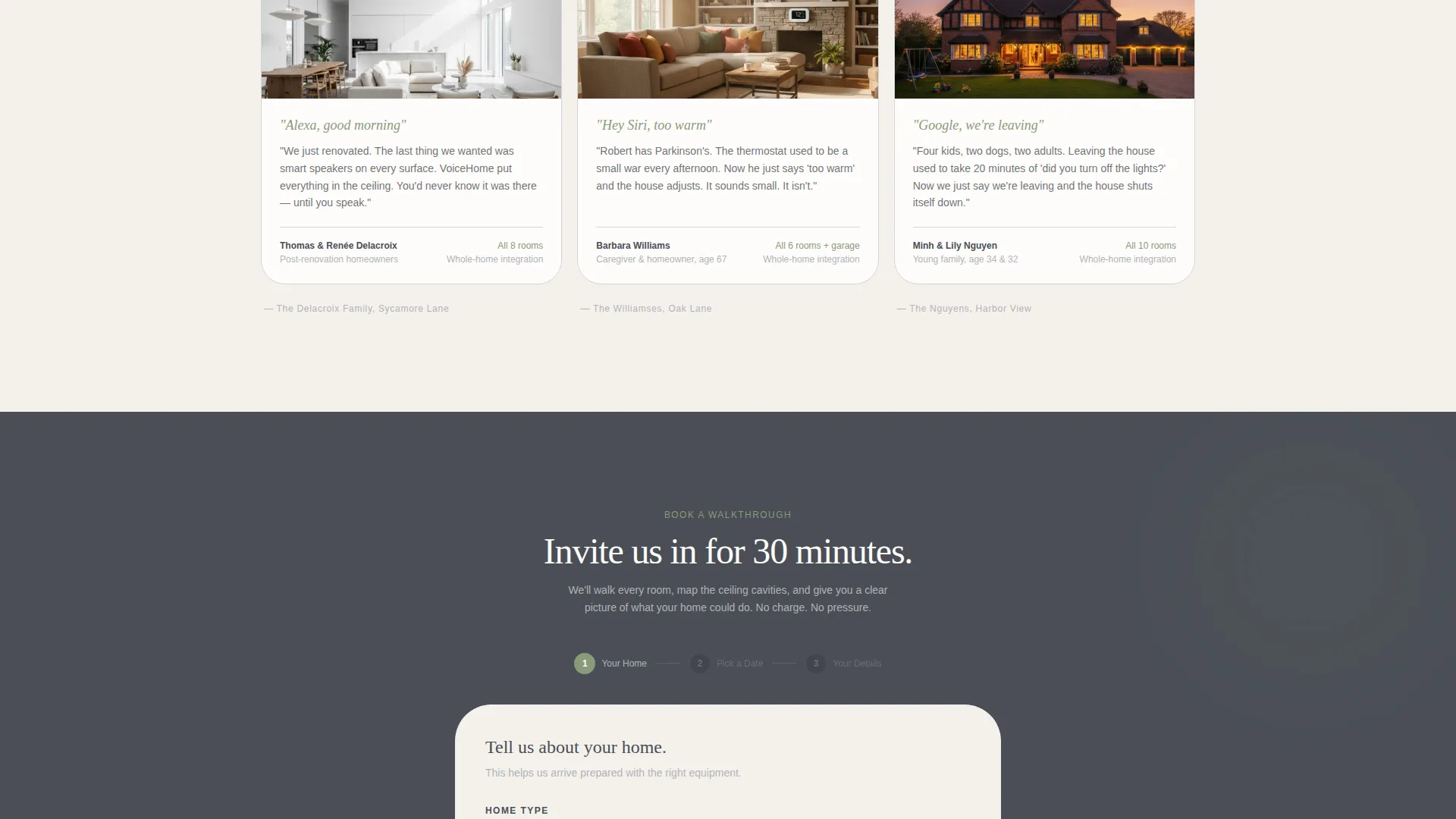
- A three-step inline booking form covering home type, calendar selection, and contact details
Feature list
This template includes a focused set of built-in components that support trust-building and appointment conversion for a residential voice integration service.
Line Art Header with Inline Call to Action
The header spans the full width and displays a hand-drafted cross-section of a two-story home drawn in a continuous graphite stroke. Rooms are labeled with voice commands rather than furniture. A sage-colored "Book a Walkthrough" button sits inside the header so visitors can act immediately.
Neighbor Story Card Grid
Cards are arranged in clusters of three, each cluster introduced by a neighborhood-style subhead such as a street name or unit identifier. Stories escalate naturally from single-room setups to whole-home integrations as the visitor scrolls, building scope without pressure.
Evidence Statistic Bands
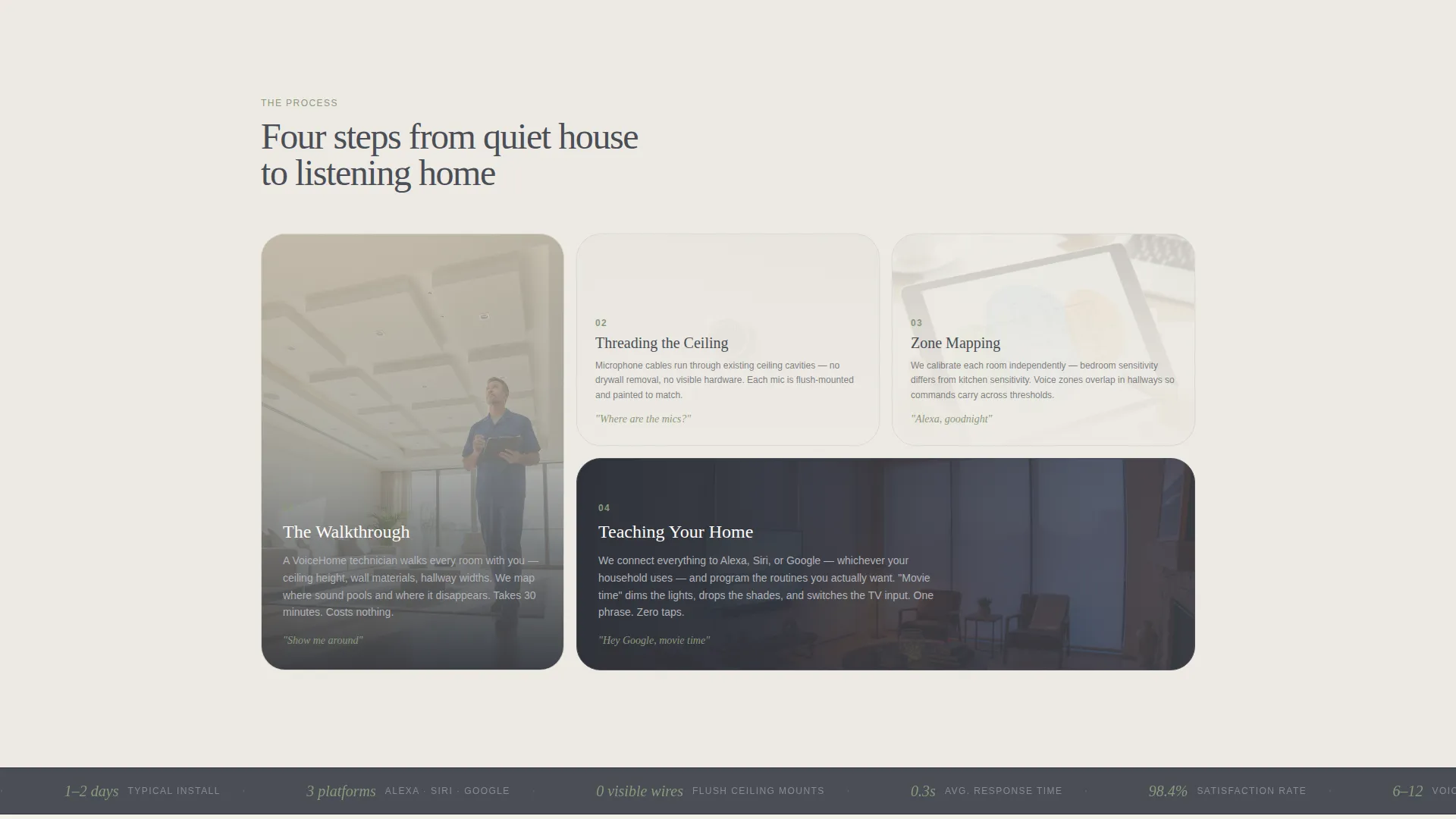
Slim horizontal bands appear between card clusters. Each band displays one data point in sage text, such as response time, zones covered, or satisfaction rating. These bands ground the personal stories in measurable evidence without interrupting the narrative flow.
Sticky Bottom Booking Bar
After the second card cluster, a sticky bar appears at the bottom of the viewport. It carries the "Book a Walkthrough" call to action in sage on graphite, keeping the primary action visible throughout the rest of the page scroll.
Three-Step Inline Booking Form
The booking form opens inline and guides the visitor through three focused steps. Step one captures home type and approximate room count. Step two presents a calendar picker for a free 30-minute on-site walkthrough. Step three collects name, address, and one optional open-text field.
Alternating Background Sections
Page sections alternate between linen white and a faint graphite wash. This creates visual rhythm and separates content clusters without heavy dividers or borders, keeping the page feeling calm and easy to read.
Page sections overview
| Section | Purpose |
|---|---|
| Full-width header | Introduce service and primary call to action |
| First card cluster | Show single-room voice integration stories |
| Statistic band one | Display one evidence data point in sage |
| Second card cluster | Show multi-room project stories |
| Sticky booking bar | Keep call to action persistently visible |
| Third card cluster | Show whole-home integration examples |
| Statistic band two | Reinforce trust with a second data point |
| Inline booking form | Capture appointment in three guided steps |
Design & branding system
The visual identity follows a Pastoral Calm theme expressed through a Monochrome Steel color palette. The result feels like a stainless-steel appliance on a farmhouse countertop: precise and modern, but completely at home.
- Core palette: soft graphite (#4A4E56) for text, brushed aluminum (#B0B3B8) for card borders, warm linen white (#F4F1EC) for backgrounds, and muted sage (#8A9A7B) reserved for active states and call-to-action elements
- Typography and illustration live in graphite; sage appears only where the visitor is invited to take an action, so the eye never guesses where to look next
- Card borders use barely-there aluminum strokes, backgrounds alternate between linen white and a faint graphite wash, and nothing blinks or competes for attention
Mobile & speed optimization
The modular card-grid layout is designed to reflow cleanly across screen sizes. The page structure keeps components lean so the experience remains smooth on smaller devices.
- Card clusters stack vertically on mobile without losing their neighborhood-subhead grouping or statistic band separators
- The sticky booking bar remains anchored at the bottom of the viewport on mobile, keeping the primary call to action reachable at any scroll depth
- The three-step inline form is broken into discrete steps so each screen presents only one focused task, reducing friction on touch devices
How this template helps you convert
The page is designed to earn the booking click by building familiarity before asking for commitment. Every layout decision supports that sequence.
- Neighbor stories escalate gradually from one room to a full home, so visitors self-identify with a project that matches their own situation before reaching the form
- Evidence bands and the sticky booking bar keep trust signals and the call to action visible throughout the scroll, reducing the chance that an interested visitor loses momentum before reaching the form
Other information about this template
This template is built for the voice control integration niche within the broader smart home and home automation category. It suits teams whose work spans connected devices, smart lighting, motorized shades, and door lock automation.
- The template style is Card Grid (Modular), making individual story cards easy to duplicate, reorder, or remove without breaking the page layout
- The Local and Neighborhood creative direction is intentionally personal, which helps smaller independent teams compete on warmth and specificity rather than scale
- The booking form's optional open-text field ("Anything your home struggles with today?") is designed to start a conversation, not collect data for a database
- The template fits services that use voice assistants such as those offered by major platforms, and the header illustration can be updated to reflect specific assistant icons or brand partnerships relevant to your market
- This template is part of the Construction and Home category, specifically the Smart Home and Automation subcategory, making it easy to position alongside related home technology services
Theme
Pastoral Calm
Creative direction
Local & Neighborhood
Color system
Monochrome Steel
Style
Card Grid (Modular)
Direction
Booking/Scheduling
Page Sections
Line Art Header with Primary Call to Action
Neighbor Story Card Grid
Evidence Statistic Bands
Sticky Bottom Booking Bar
Three-step Inline Booking Form
Related questions
Can I edit the neighbor story cards to feature my own clients?
How does the three-step booking form work?
Is the sticky booking bar always visible on the page?
Does this template work for apartment or condo installation services?
Can I adjust the color palette to match my own brand?



