Tennis Leagues Booking Website Template
Volley is a bento grid landing page built for semi-professional tennis training programs. It pairs a raw industrial aesthetic with data-forward design to convert ITF-ranked players into booked assessment sessions. The layout combines a live-stats hero dashboard, before-and-after comparison sliders, three-tier program tiles, and a persistent fixed booking call-to-action tile.
by Rocket studio
Quick summary
Volley is a single-page bento grid template built for high-performance tennis training programs targeting semi-professional players. It leads with real session metrics, guides visitors through a before-and-after transformation reveal, presents three program tiers, and closes with a three-step booking modal. The design feels industrial and data-driven from the first scroll.
Who this template is for
This template is built for serious tennis training operations that need to convert motivated, performance-focused athletes into booked sessions. It speaks directly to coaches, training directors, and program managers running structured technical development programs.
- Semi-professional tennis training compounds working with ITF-ranked players
- College tennis program coaches recruiting players chasing wild cards or professional circuits
- High-performance coaches who want to lead with measurable data rather than marketing language
What problem this template solves
Most sports training pages rely on stock photos, vague promises, and generic testimonials. That approach fails players who are making high-stakes decisions about their development window. Volley replaces surface-level marketing with the kind of raw data and transformation evidence that serious athletes actually trust.
- Players ranked between 200 and 1500 on the ITF circuit need proof, not pitch decks
- Aging juniors with narrow development windows cannot afford to book blind
- Generic booking flows lose prospects who want to submit match footage before committing
What you get with this template
You get a fully structured bento grid landing page with every section pre-built for a semi-professional tennis training audience. The layout, interactions, and content hierarchy are ready to customize to your program's specific data and session offerings.
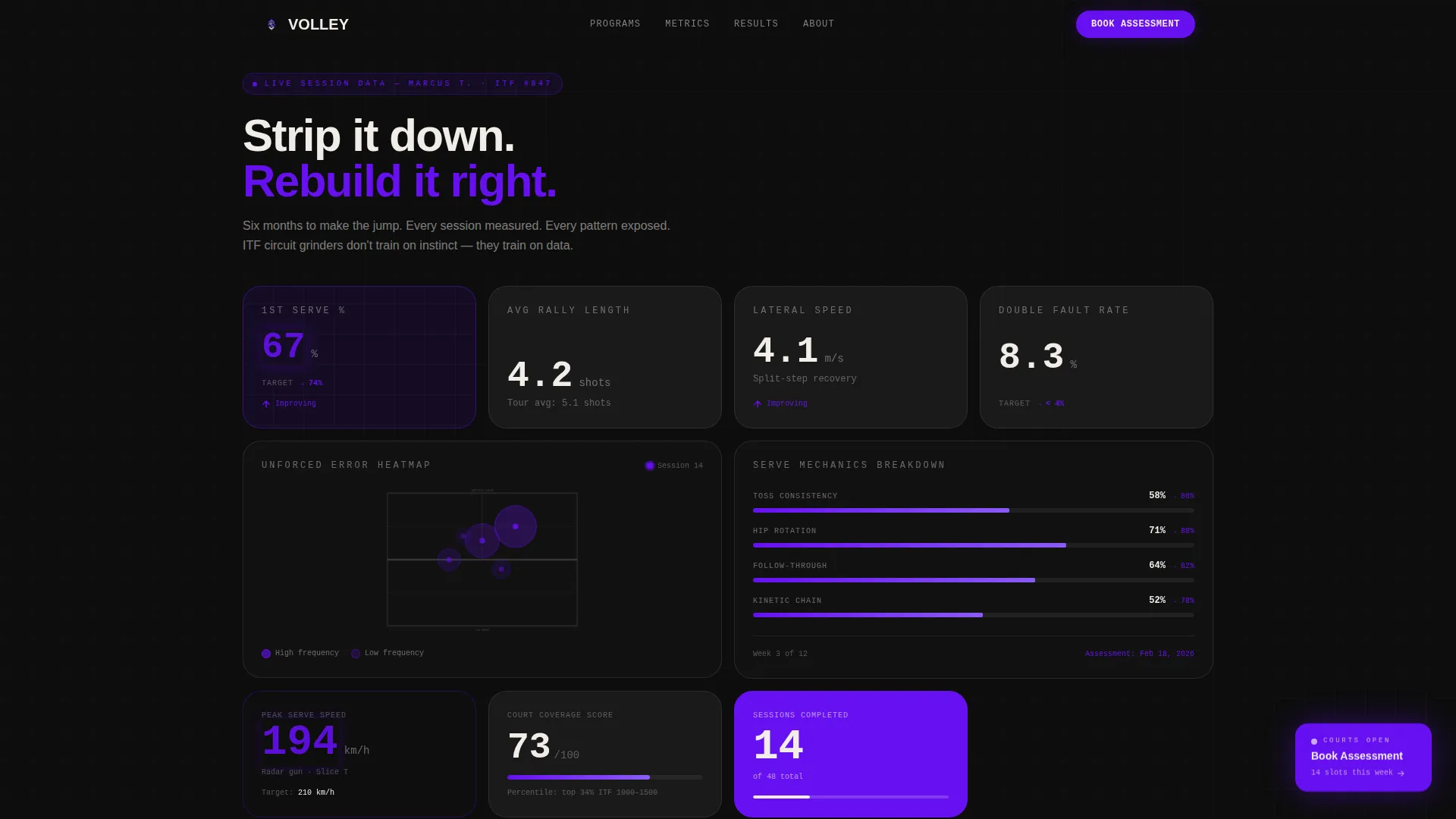
- A stats dashboard hero section with real session metrics in monospaced type
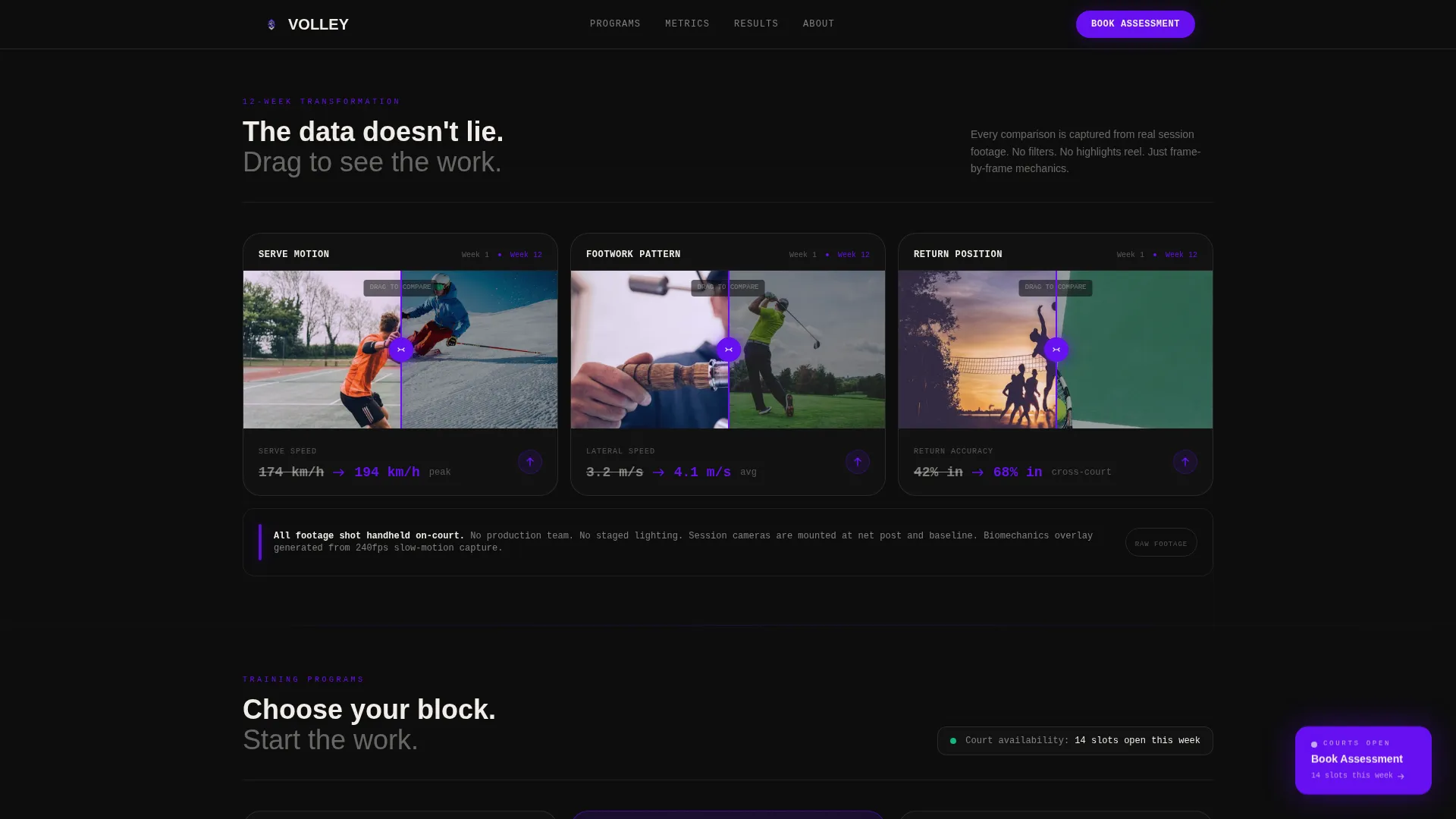
- Draggable before-and-after comparison sliders across multiple bento clusters
- A three-step booking modal with program selection, calendar scheduling, and player history input
Feature list
This template ships with six purpose-built interactive and visual components. Each one serves the core goal: turning a skeptical, data-oriented athlete into a confirmed booking.
Stats Dashboard Hero Section
The hero bento renders actual session data in oversized monospaced numerals. Metrics include first-serve percentage with a target indicator, average rally length, lateral movement speed, and an unforced error heat map overlaid on a court diagram. Indigo accent lines pulse on key figures to draw attention without decoration.
Draggable Before-and-After Slider
Each bento cluster pairs Week 1 and Week 12 data side by side. Visitors drag a slider handle across serve motion stills and movement drill comparisons to reveal the transformation. The interaction is tactile and direct, removing any need to describe progress in words.
Three-Tier Program Tiles
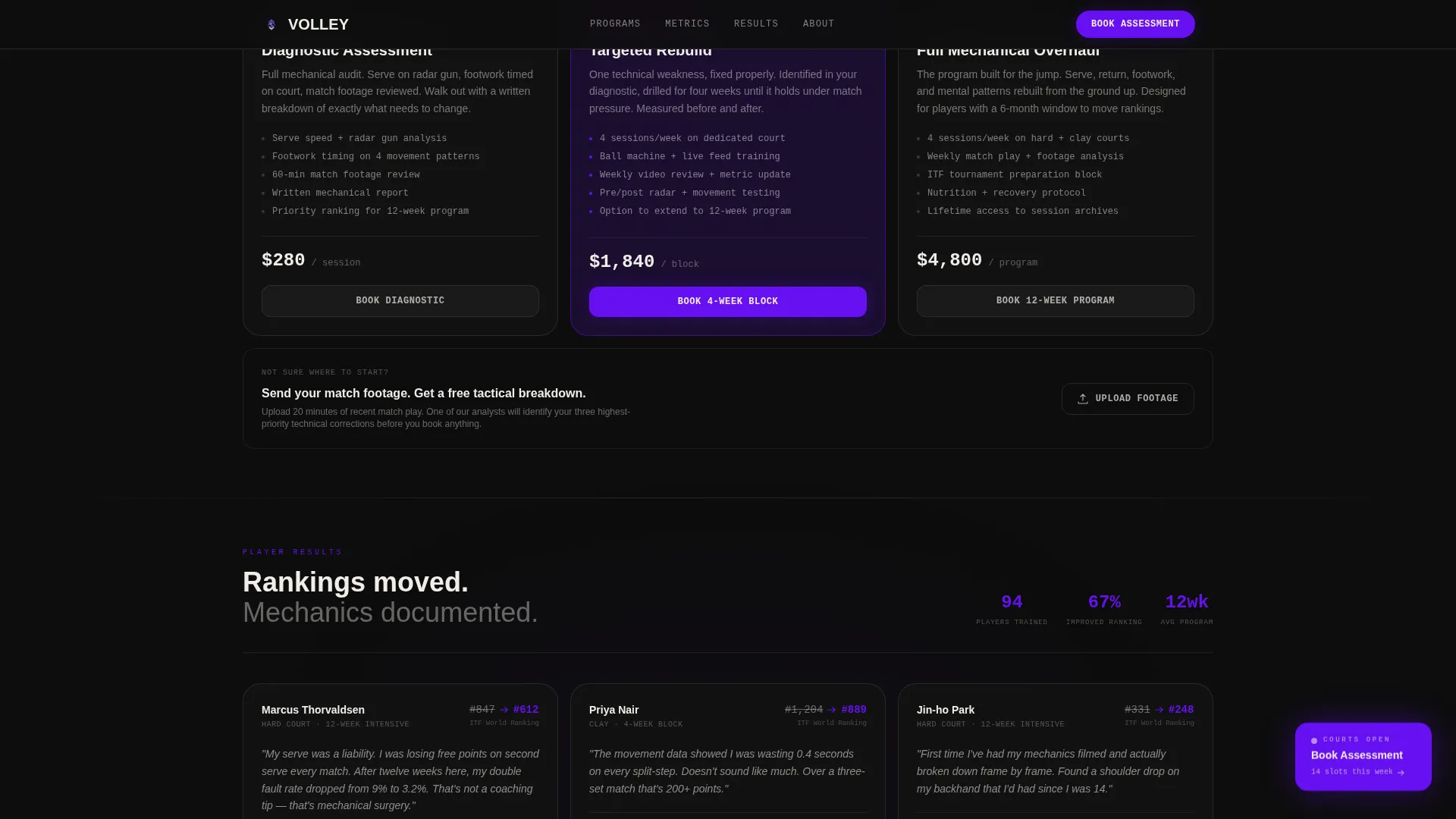
An asymmetric bento grid presents the three program options: a single-session diagnostic, a four-week block, and a twelve-week intensive. Each tile communicates scope and commitment level at a glance without dense body copy.
Persistent Fixed Booking Tile
A fixed indigo tile stays anchored in the bottom-right corner of the grid throughout the entire scroll. It carries the primary call to action and never disappears, so the path to booking is always one click away regardless of where the visitor is on the page.
Three-Step Booking Modal
Clicking the fixed tile opens a modal with three sequential steps. The visitor selects their program type, picks an available court time from a calendar showing real slot availability, and enters their playing history including current ranking, years competing, and primary surface.
Match Footage Upload Path
A secondary conversion path labeled "Send Your Match Footage" lets prospects upload video for a free tactical breakdown. This reduces the friction of committing to a session before the training team has reviewed their game.
Page sections overview
| Section | Purpose |
|---|---|
| Stats Hero Dashboard | Opens with live session metrics in a bento tile layout |
| Before/After Reveal | Draggable sliders compare Week 1 and Week 12 data |
| Program Tier Tiles | Three asymmetric tiles present diagnostic and block options |
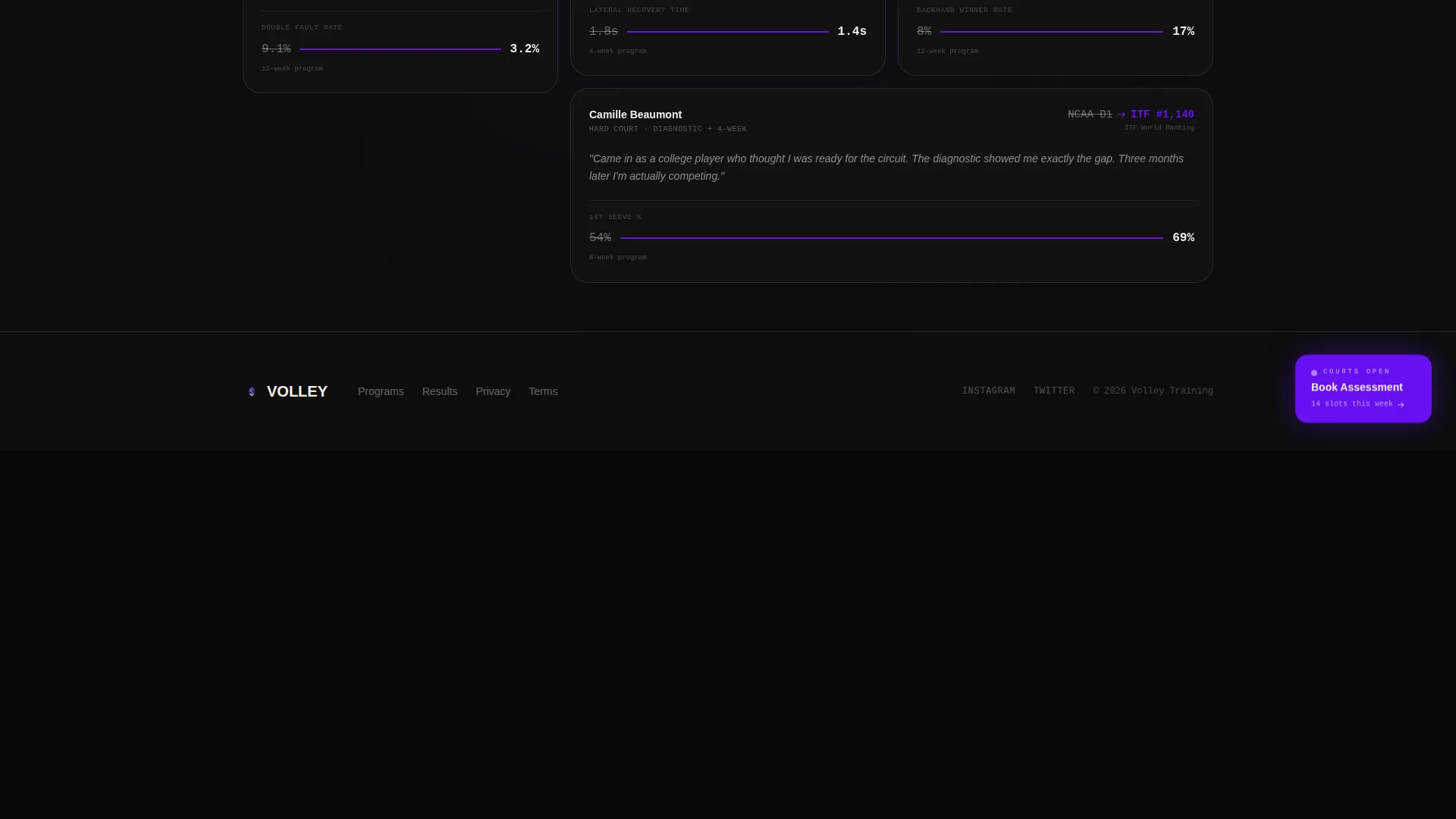
| Social Proof Cards | Metric-forward player cards show ranking progression data |
| Booking Flow Modal | Three-step modal handles program, schedule, and player history |
| Footer Row | Linear single-row footer closes the page cleanly |
Design & branding system
The visual identity follows an Industrial Raw direction: a warehouse converted into a high-performance training lab. Every color and type choice reinforces the feeling of an empty indoor court at 6 AM, functional, focused, and stripped of anything decorative.
- Color palette: deep facility black (#0D0D0D), poured-concrete gray (#3A3A3C), electric indigo (#6610F2), and chalk-line white (#F0EDE8) for all typography and borders
- Typography: JetBrains Mono for all metrics and numerical data, DM Sans for body text and interface elements
- No stock photography anywhere; visual content consists of handheld court footage stills, data overlays, and court diagrams
Mobile & speed optimization
The template is built desktop-first to match how coaches and players review programs on laptops. It scales responsively to mobile without losing the bento grid structure or interaction fidelity.
- GPU-accelerated CSS transforms power all card-in reveals, glow overlays, and slider animations
- Intersection Observer handles scroll-triggered reveals so off-screen elements never load prematurely
- The fixed booking tile repositions cleanly on smaller viewports so the primary call to action remains accessible
How this template helps you convert
Every design and interaction decision in this template points toward one outcome: a confirmed booking. The page earns trust with data before it ever asks for a commitment.
- The stats dashboard opens by showing session-level proof, immediately signaling that this program measures everything and hides nothing from prospective players.
- The before-and-after sliders let visitors physically interact with transformation evidence, turning passive scrolling into an active moment of conviction.
- The match footage upload path removes the single biggest barrier to booking by letting athletes get a tactical preview before entering the three-step booking flow.
Other information about this template
This template is delivered as a single bento grid landing page. It is built in English, priced in USD, and uses United States date formatting throughout the booking modal. Animation intensity is set to high, with card-in reveals, pulsing indigo accents, and hover glow states across all interactive tiles. The template targets a desktop-first experience and renders responsively on mobile devices.
- Localization: English language, USD currency, and US-format dates are pre-configured in the booking flow
- Animation settings: high-intensity reveals, glow overlays, and pulsing accents are built in and ready to use
- Social proof section displays ITF ranking progression figures and serve speed gain data in a metric-forward card layout
Theme
Industrial Raw
Creative direction
Before/After Reveal
Color system
Electric Indigo
Style
Bento Grid
Direction
Booking/Scheduling
Page Sections
Stats Dashboard Hero with Live Metrics
Draggable Before-and-after Comparison Slider
Asymmetric Three-tier Program Grid
Persistent Fixed Booking Call-to-action Tile
Three-step Booking Modal Flow
Match Footage Upload Secondary Path
Related questions
Who is this landing page template designed for?
Can I customize the session metrics shown in the hero section?
How does the three-step booking modal work?
What is the match footage upload path?
Is this a single-page template or a multi-page website?