EV Manufacturer Landing Page Template
Volt is a full-width immersive landing page template built for electric vehicle manufacturers targeting fleet managers, commuters, and transit authorities. It combines a cinematic Spotlight hero with an animated Comparison Journey, a fleet configurator form, and a persistent test-drive call-to-action bar. The Navy Authority color system and Dynamic Motion theme make every data point feel as powerful as the vehicles it represents.
by Rocket studio
Quick summary
Volt is a single-page lead generation template designed for electric vehicle manufacturers. It opens with a rotating vehicle reveal on a pitch-black stage, then walks visitors through animated cost comparisons across fuel, maintenance, carbon output, and cabin noise. By the time a visitor reaches the fleet configurator form, the math has already made the case.
Who this template is for
This template is built for organizations and individuals who need to justify an EV switch with real numbers, not just brand promises.
- Fleet managers converting corporate vehicle pools to meet emissions mandates
- Early-adopter commuters evaluating total cost of ownership against a combustion baseline
- Municipal transit authorities electrifying bus routes under federal funding deadlines
What problem this template solves
Selling electric vehicles to fleet buyers is a data problem before it is a design problem. Decision-makers need numbers they can bring to a boardroom or a budget meeting. Generic automotive landing pages lead with aesthetics and bury the economics. Volt flips that order.
- Animated comparison counters make the cost advantage visible and physical as visitors scroll
- The stepped fleet configurator form captures qualified leads without asking for commitment too early
- A persistent "Book a Test Drive" bar keeps individual buyers engaged without interrupting the fleet narrative
What you get with this template
You get a complete, production-ready landing page layout that guides two distinct buyer types through one coherent story. Every section is purpose-built, from the hero reveal down to the footer.
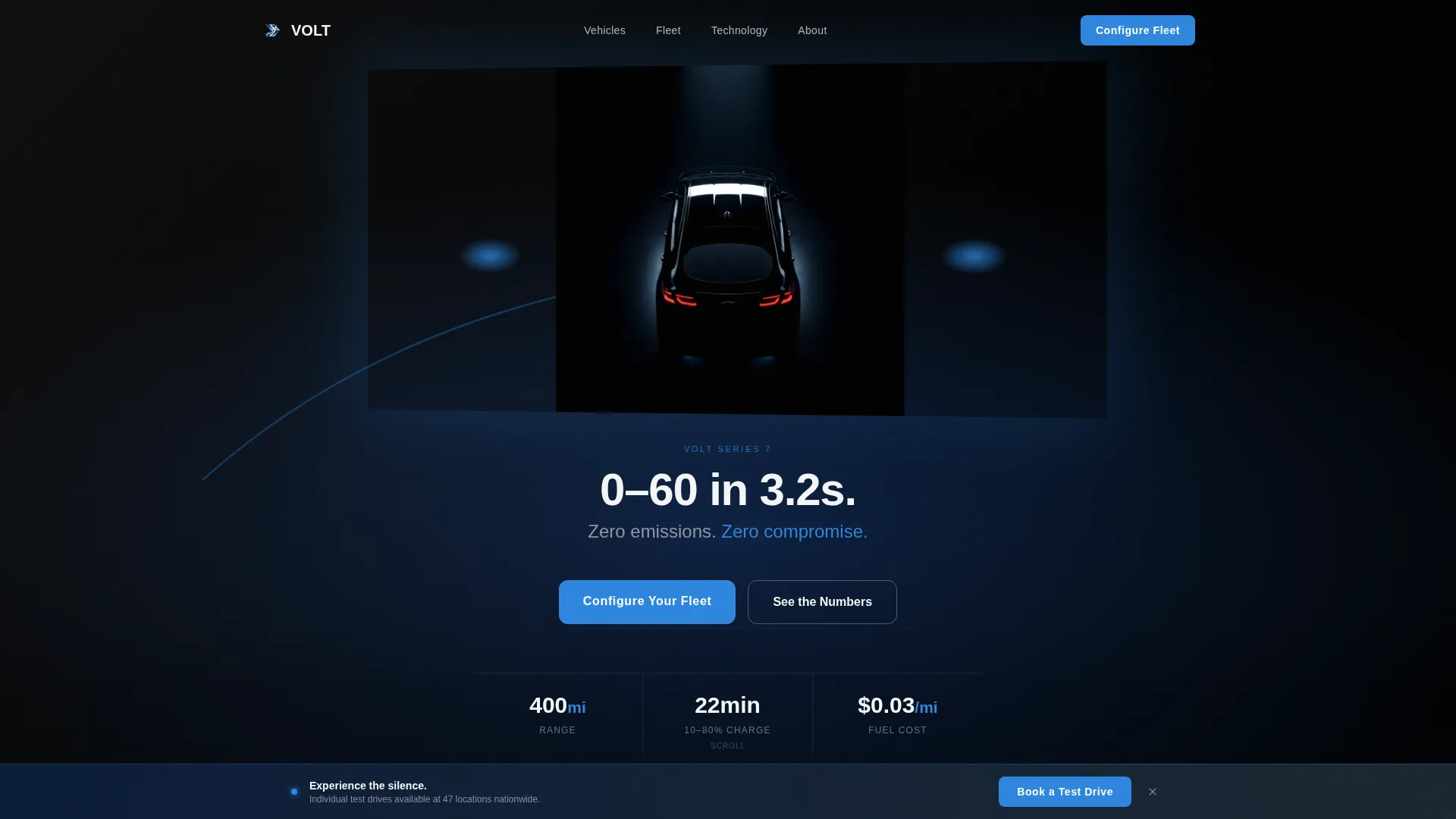
- A Spotlight hero with a rotating vehicle, studio-lit on a black stage, and an animated performance metric fade-in
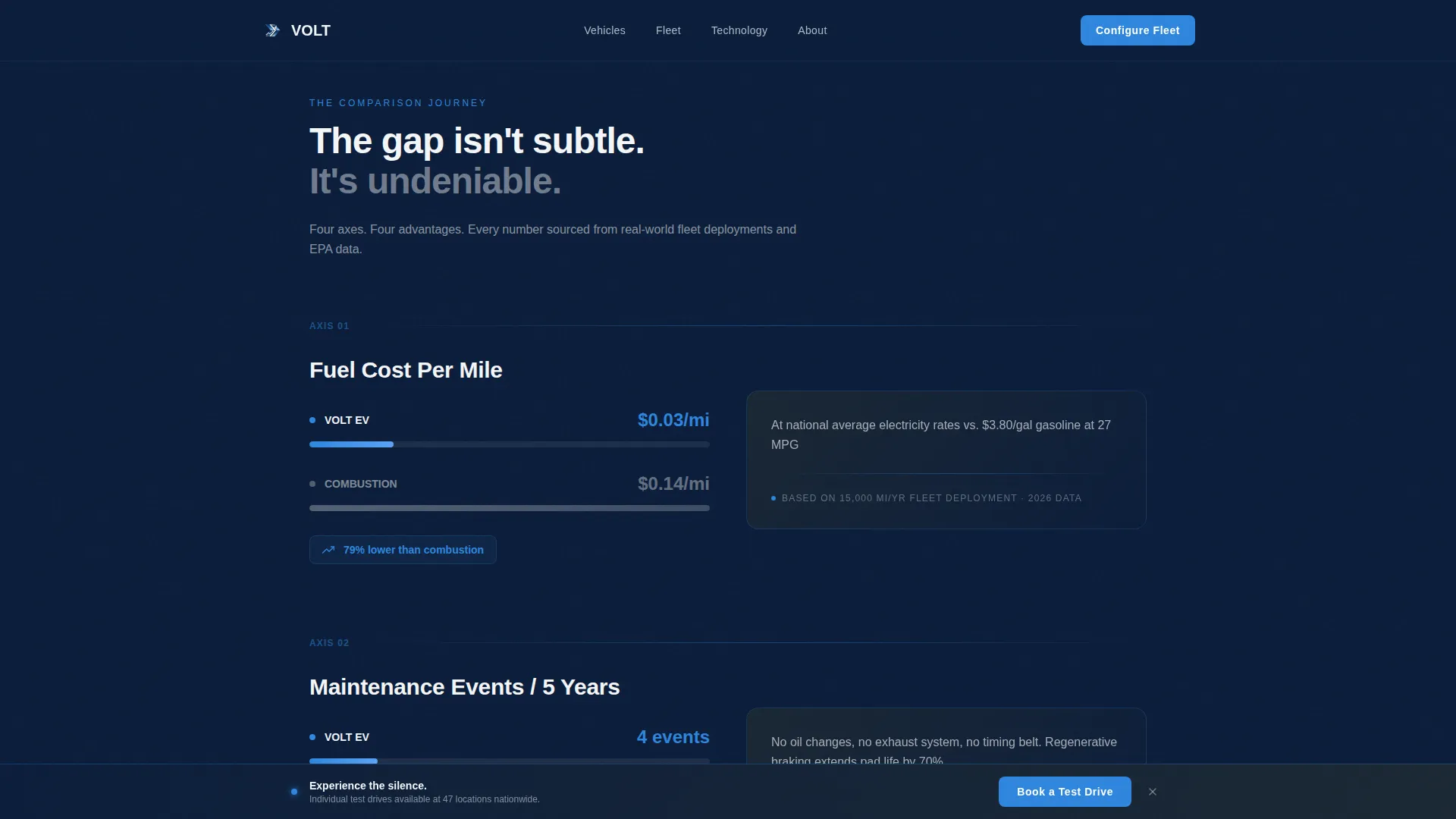
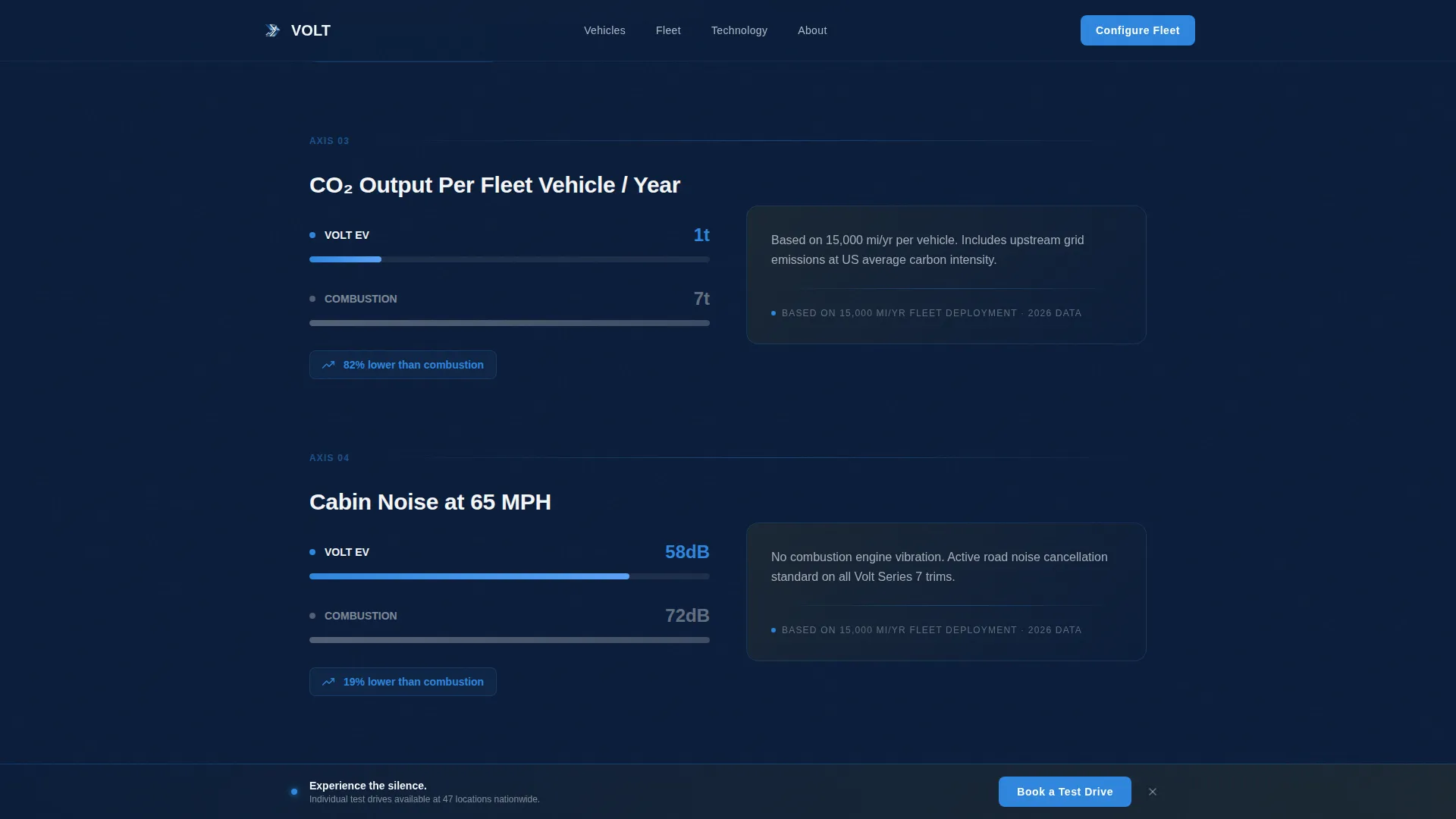
- A four-axis Comparison Journey with viewport-triggered counter animations and widening gap visualizations
- A stepped "Configure Your Fleet" form with a fleet size slider, fuel type toggle, annual mileage input, and a business email field
Feature list
This template ships with a focused set of high-impact features. Each one is tied directly to the goal of converting fleet buyers and individual drivers.
Cinematic Spotlight Hero
A single vehicle rotates slowly on a pitch-black stage under a hard-edged studio key light. The roofline and hood crease catch the light the way a concept car does at an auto show. A single performance metric fades in beneath: "0, 60 in 3.2s. Zero emissions. Zero compromise."
Animated Comparison Journey
Four comparison axes roll out as visitors scroll: fuel cost per mile, maintenance events over five years, carbon output per fleet vehicle, and cabin noise at highway speed. Counters animate on viewport entry. The gap between columns widens visibly, making the EV advantage feel tangible rather than statistical.
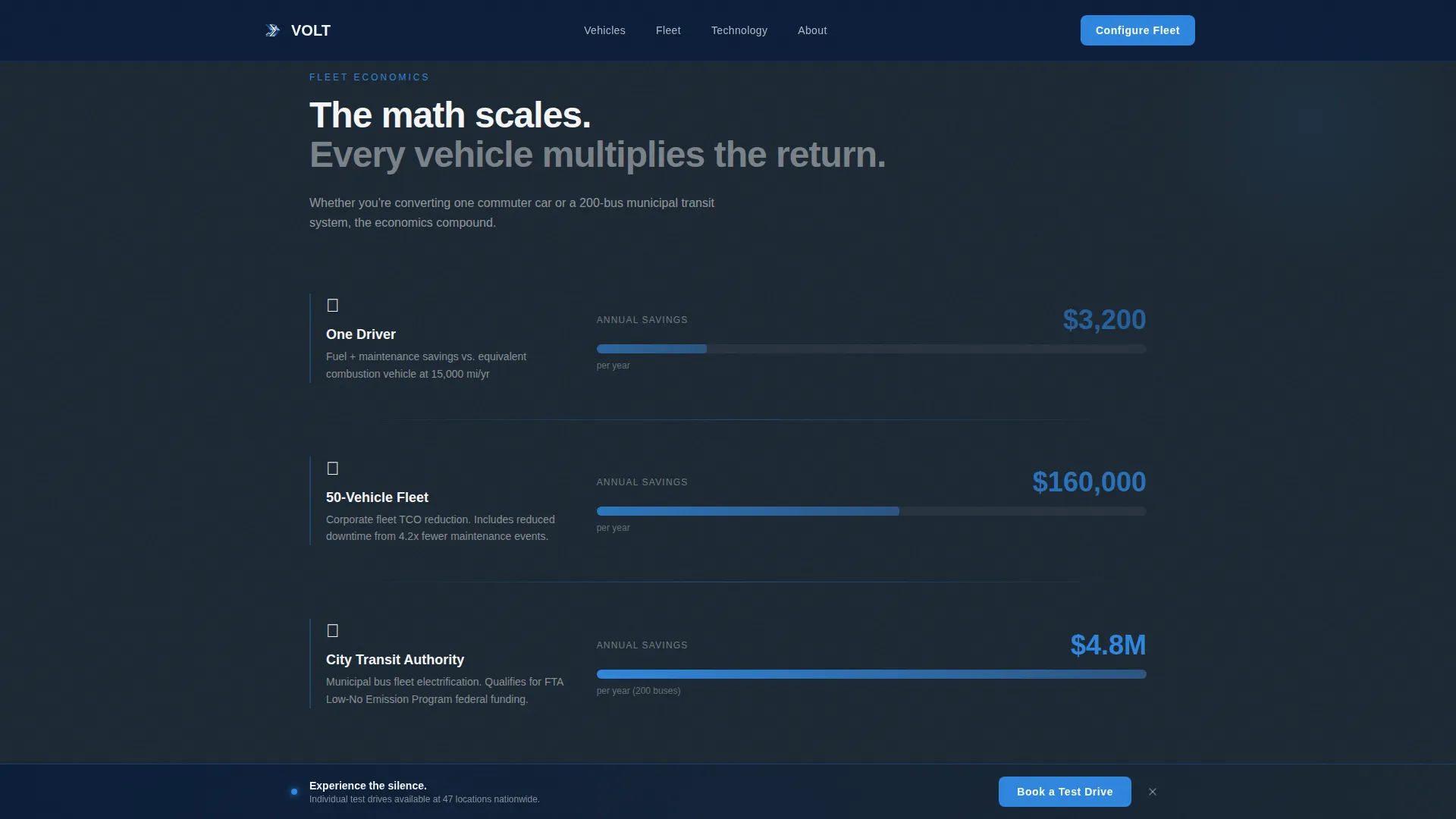
Fleet Economics Visualization
The page scales the economic argument from one driver to one company to one city. Widening gap bars show how the savings compound as fleet size grows, giving fleet managers a visual they can screenshot and share internally.
Stepped Fleet Configurator Form
The primary call-to-action is a multi-step form pinned after the final comparison section. Visitors set fleet size with a slider from 5 to 500 or more vehicles, toggle current fuel type between gas, diesel, and hybrid, enter estimated annual mileage, and submit a business email. The form qualifies the lead before any follow-up happens.
Persistent Test Drive Bar
A secondary call-to-action floats as a bottom bar across the entire page. Individual buyers can tap "Book a Test Drive" at any point without interrupting the fleet-focused narrative above. Both buyer types are served without either experience feeling compromised.
Social Proof Section
Fleet testimonials with specific deployment numbers sit between the comparison data and the configurator form. Real metrics from real deployments reinforce the cost story before the page asks for contact information.
Page sections overview
| Section | Purpose |
|---|---|
| Spotlight Hero | Introduce the vehicle with a cinematic rotating reveal and a single bold performance metric |
| Comparison Journey | Animate four cost and performance axes side by side with live viewport counters |
| Fleet Economics | Scale the savings argument from one driver to an entire city with widening gap bars |
| Social Proof | Reinforce trust with fleet testimonials and specific deployment metrics |
| Fleet Configurator Form | Capture qualified leads through a stepped form before asking for contact details |
| Footer | Close the page with a single-row linear layout |
Design & branding system
The visual identity runs on the Navy Authority color system. Every color decision serves the command-deck dark aesthetic and communicates speed through restraint.
- Navy (#0B1D3A) and deep graphite (#1C2833) form the dark backdrop that makes every glowing element feel deliberate
- Charged electric blue (#2E86DE) drives interactive elements, animated counters, and data highlights
- Titanium white (#F4F6F8) handles all body text and negative space, keeping legibility sharp against dark surfaces
- Plus Jakarta Sans is used for headings; DM Sans handles body copy, creating a typographic hierarchy that reads quickly at any scroll speed
Mobile & speed optimization
The template is built desktop-first, reflecting the workstation habits of fleet managers. Full mobile support is included so individual buyers on phones are never left behind.
- Scroll-linked reveals use Intersection Observer to trigger animations only when sections enter the viewport
- The rotating vehicle hero, counter animations, and widening gap bars are all optimized to fire on scroll rather than on page load
- The persistent test-drive bar and stepped configurator form are both touch-friendly and sized for comfortable mobile interaction
How this template helps you convert
The page is structured to earn the click by making the math undeniable before ever showing a form field.
- The Comparison Journey presents four hard data axes with animated counters, so visitors internalize the cost advantage through direct visual experience rather than static copy.
- The Fleet Economics section scales the argument, showing how individual savings multiply across a corporate fleet or a city transit network, giving decision-makers a boardroom-ready narrative.
- The stepped configurator form and persistent test-drive bar offer two distinct conversion paths, one for fleet buyers ready to configure and one for individual drivers who want a hands-on first impression.
Other information about this template
Volt is a full-width immersive template that fits naturally into a product launch or ongoing lead generation campaign for an electric vehicle manufacturer. A few additional details worth knowing before you build with it.
- The template uses Plus Jakarta Sans and DM Sans, both of which are available through Google Fonts
- The footer follows a linear single-row pattern, keeping the close of the page clean and uncluttered
- Localization defaults are set for the United States market, using USD pricing references and imperial units throughout
- The Dynamic Motion theme and high-interactivity animation settings make this template a strong fit for desktop-first automotive product presentations
Theme
Dynamic Motion
Creative direction
Comparison Journey
Color system
Navy Authority
Style
Full-Width Immersive
Direction
Lead Generation
Page Sections
Cinematic Spotlight Hero
Animated Comparison Journey
Fleet Economics Visualization
Stepped Fleet Configurator Form
Persistent Test Drive Bar
Social Proof with Deployment Data
Related questions
Who is this template designed for?
Can I adjust the fleet configurator form for my own fleet size ranges?
Does the template support both dark and light color schemes?
What animation approach does this template use?
Is this template suitable for a single product launch or ongoing lead generation?



