Advanced Family Travel & Experience Appointment Booking Website Template
Voyage is a hero-dominant family cruise landing page template built for educational cruise lines. It leads with a full-viewport UGC photo wall, scrolls through community gallery sections that tell real program stories, and closes with a three-step inline booking flow. Saturated Dopamine Pop colors and a joyful Educational Guide style make it impossible to scroll past.
by Rocket studio
Quick summary
Voyage is a single-page family cruise landing page template designed to convert browsing families into cruise bookings. It opens with a masonry photo wall of real family moments, unfolds into community-driven program stories, and guides visitors through a friendly inline booking flow. The design is bold, warm, and built around proof before pitch.
Who this template is for
This template was built for family cruise lines that want their landing page to feel as memorable as the trip itself. It works best when the cruise experience includes structured programs for children and genuine stories worth sharing.
- Homeschool families looking to align travel with real-world curriculum
- Dual-income parents who need a vacation that feels purposeful and worth the investment
- Grandparents gifting a shared experience to grandchildren they see only a few times a year
What problem this template solves
Most cruise landing pages lead with ship specs and cabin prices. Families booking with children need something different. They need to see proof that other families loved it before they feel confident enough to book.
- Families scroll away when they cannot picture their own kids in the experience
- Parents feel hesitant to commit without knowing which onboard programs fit their children's ages
- The gap between browsing and booking stays wide when there is no emotional pull early in the page
What you get with this template
You get a fully structured, single-page layout built around community proof and a clear booking path. Every section is designed to reduce hesitation and build excitement.
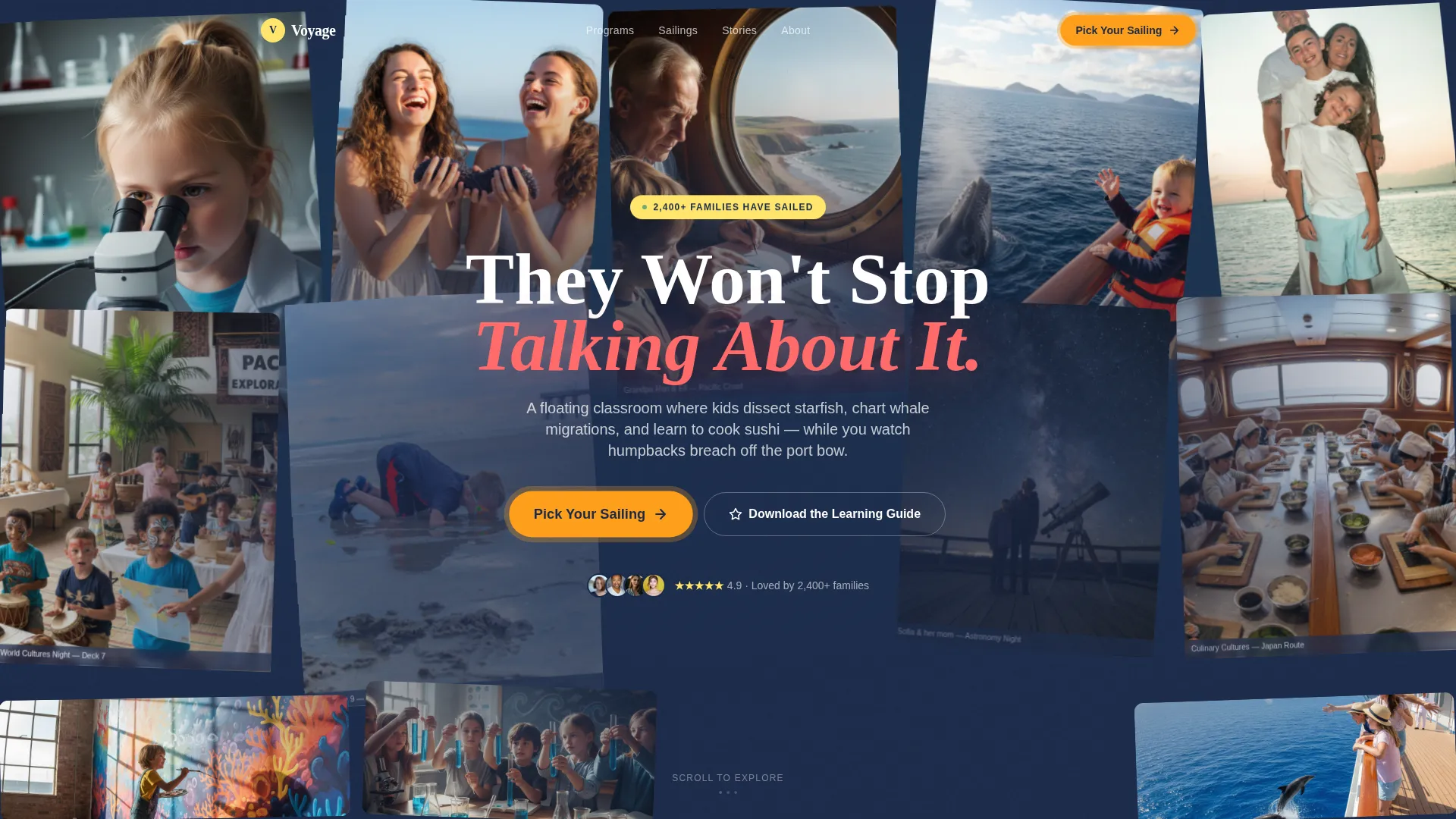
- A hero-dominant layout where the UGC photo wall fills ninety percent of the viewport on load
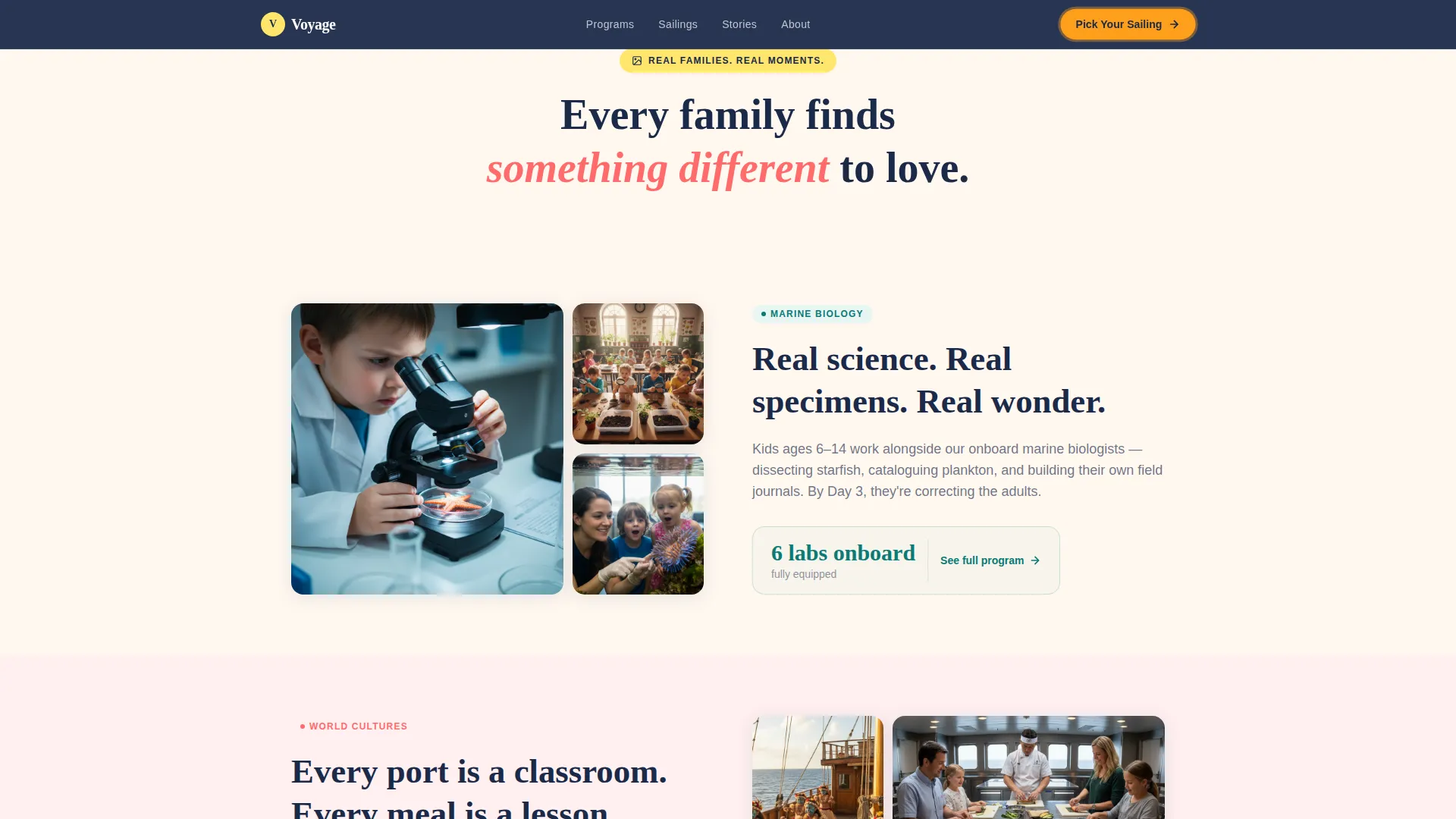
- A community gallery engine that connects real family photos to specific onboard program stories
- A three-step inline booking flow covering departure month, cabin type, and child ages with recommended programs
Feature list
A quick note before the breakdown: every feature listed here reflects what the Voyage template is designed to deliver based on the source brief. Nothing speculative has been added.
UGC Masonry Photo Wall Hero
The hero section tiles real family photos edge to edge in a gently animated masonry grid. Photos drift upward in slow parallax, some tilted slightly like pinned postcards. Bold chalkboard navy type reads "They Won't Stop Talking About It" over the center, with a pulsing tangerine call-to-action button beneath.
Community Gallery Engine
Each scroll section opens with a cluster of family-submitted photos. Clicking or expanding a photo reveals the educational story behind that moment. A child peering into a microscope opens the Marine Biology track. Face-painted children reveal the World Cultures program. Visitors scroll through proof, not brochure text.
Programs by Age Bento Grid
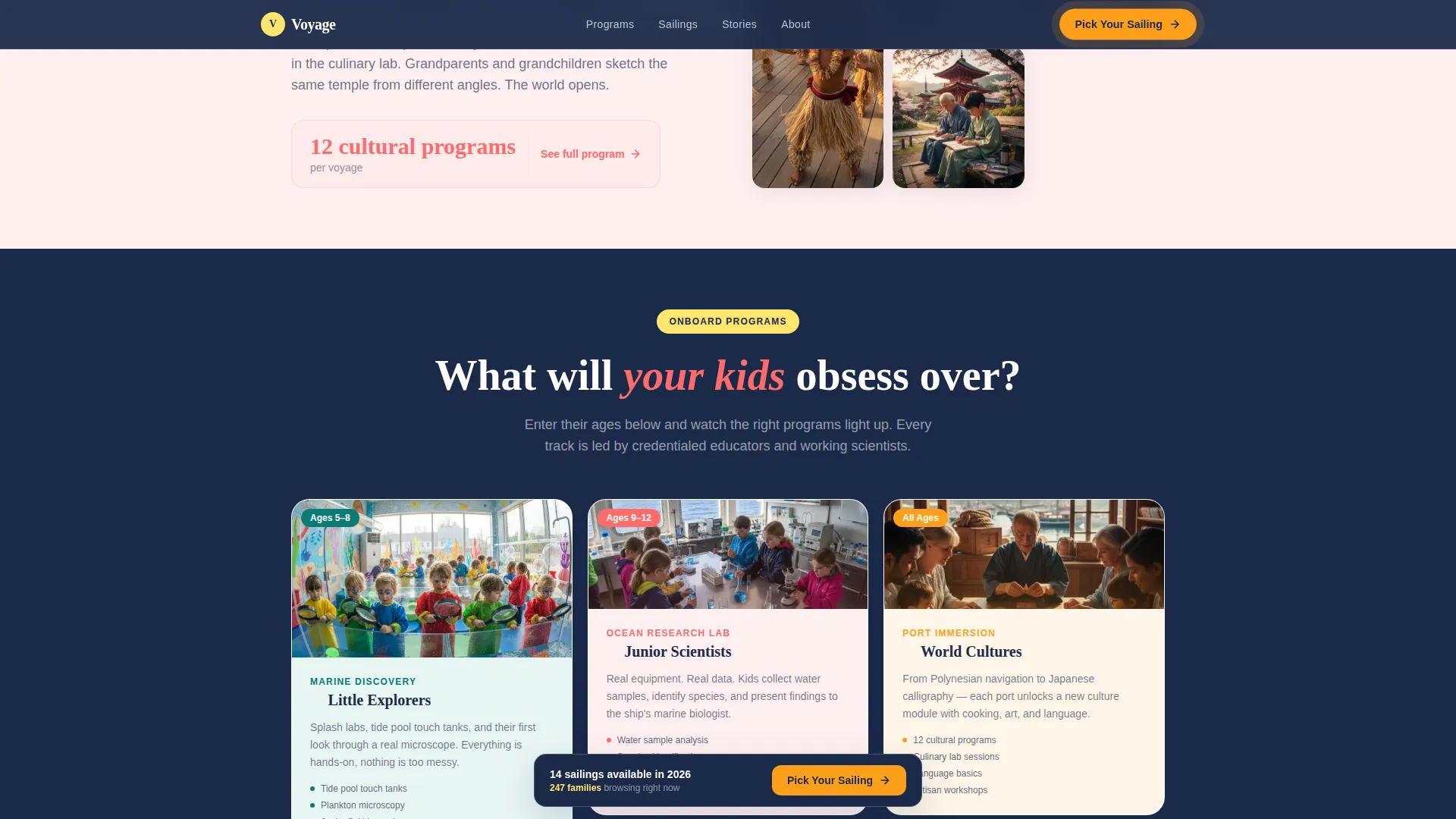
A bento-style grid displays age-specific onboard tracks as illustrated cards. Families with children between ages four and sixteen can immediately spot the programs relevant to their kids. The grid keeps browsing fast and visually engaging.
Three-Step Inline Booking Flow
The booking flow opens inline without redirecting the visitor. Step one shows a visual calendar with price hints by departure month. Step two presents an illustrated cross-section of the ship for cabin selection. Step three captures the number of children and their ages, then instantly surfaces recommended onboard programs.
Live Social Proof Counter
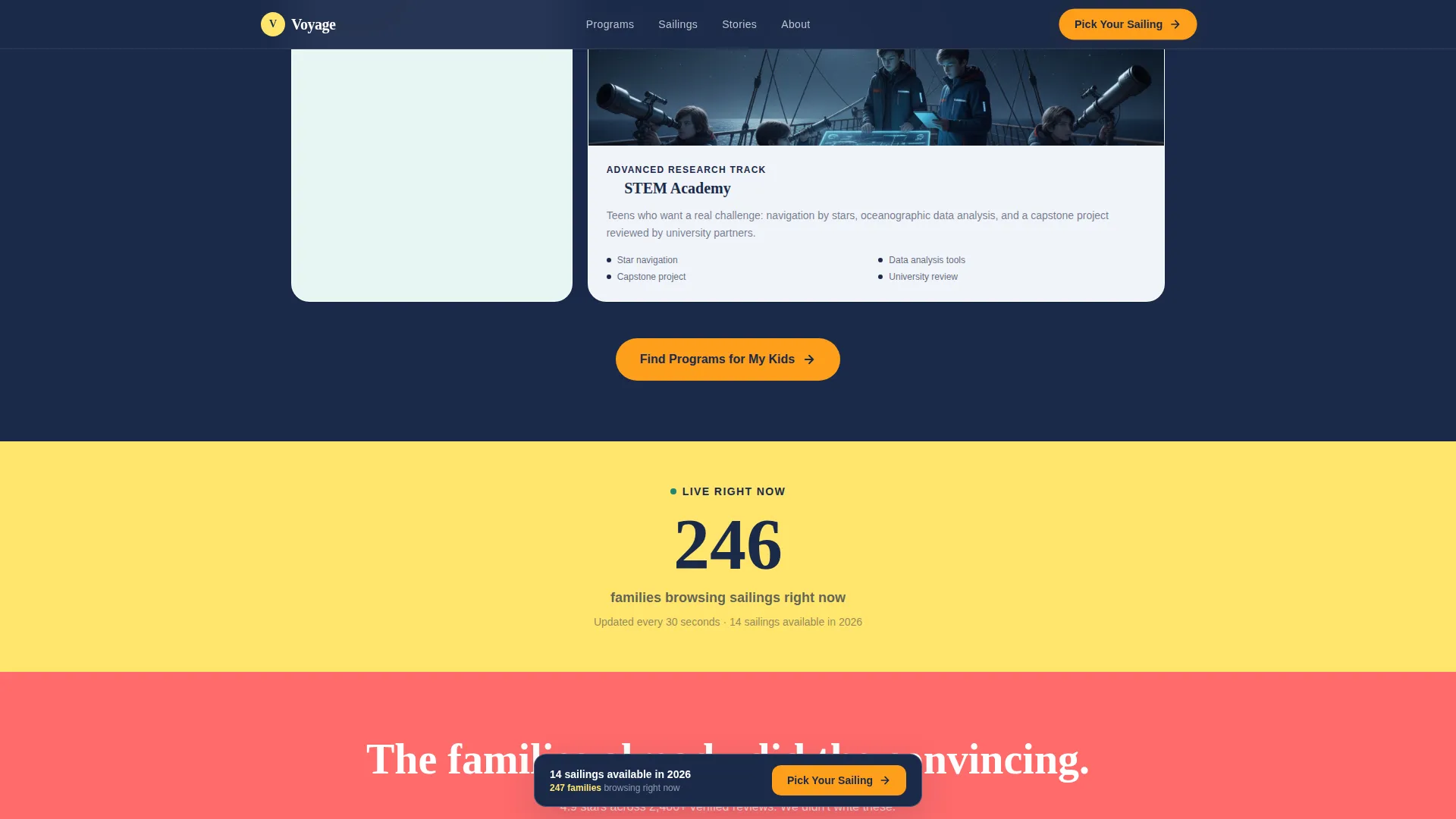
A live counter midway through the page shows how many families are browsing available sailings right now. A testimonial mosaic surrounds it with named family testimonials and photos, reinforcing trust at the exact moment a visitor is weighing whether to book.
Sticky Booking Bar
After the second scroll section, a sticky bottom bar appears with the primary "Pick Your Sailing" call to action in starfish yellow. It stays visible as the visitor reads, reducing the distance between interest and action.
Page sections overview
| Section | Purpose |
|---|---|
| Hero Photo Wall | Fills viewport with UGC family photos and primary call to action |
| Community Gallery | Connects family photos to Marine Biology and World Cultures program stories |
| Programs by Age | Shows age-specific onboard tracks in an illustrated bento grid |
| Social Proof Mosaic | Displays live family counter and named testimonials with photos |
| Inline Booking Flow | Guides visitors through three steps: month, cabin, and child ages |
| Email Capture Path | Offers a downloadable learning guide for families not ready to book |
| Footer | Presents horizontal layout with navigation and supporting links |
Design & branding system
The visual identity follows an Educational Guide theme powered by a Dopamine Pop color system. The palette feels saturated and fearless without tipping into visual chaos, because chalkboard navy anchors every section.
- Core colors: sun-bleached coral (#FF6B6B), deep ocean teal (#0B7A75), life-jacket tangerine (#FF9F1C), chalkboard navy (#1B2A4A), and starfish yellow (#FFE66D) on buttons and badges
- Typography pairing: Fraunces display serif for headlines and DM Sans for body text, creating a warm and readable contrast
- Coral and tangerine alternate as section backgrounds to keep energy high, while navy handles dividers and type so the pops never overwhelm
Mobile & speed optimization
The template was built mobile-first, recognizing that most parents browse on their phones during children's activities. Animations and interactions are handled through CSS transforms and Intersection Observer lazy reveals, keeping motion smooth without heavy load.
- Mobile-first layout ensures the hero, gallery clusters, and booking flow all reflow cleanly on small screens
- Intersection Observer triggers scroll reveals and staggered card animations only as sections enter the viewport
- CSS transforms power the masonry parallax and pulse animations without relying on layout-heavy rendering
How this template helps you convert
The page is structured so that families encounter proof long before they reach a price or a form. By the time a visitor sees the booking flow, they have already scrolled through dozens of real children having real experiences.
- The UGC photo wall and community gallery do the selling first, replacing skepticism with recognition and desire before any commitment is asked
- The inline booking flow reduces friction by keeping everything on one page, surfacing personalized program recommendations the moment a parent enters their children's ages
- A secondary email capture path using the downloadable learning guide catches families who are interested but not yet ready, keeping them connected for a future booking
Other information about this template
This section covers a few additional practical points that may be useful as you evaluate the Voyage template for your project.
- The template is localized for English language, United States dollar pricing, and the United States date format out of the box
- Animation intensity is high throughout, including masonry parallax in the hero, scroll-triggered reveals, pulse animations on call to action buttons, and staggered card entries in the bento grid
- Interactivity is also high, covering the booking flow, the program explorer within the gallery, and the photo expansion behavior in the community gallery clusters
- The footer follows a horizontal layout pattern suited to cruise line navigation needs
- The secondary conversion path, the "Download the Learning Guide" email capture, delivers a PDF of the onboard curriculum organized by child age group
Theme
Educational Guide
Creative direction
Community Gallery
Color system
Dopamine Pop
Style
Hero-Dominant (90/10)
Direction
Booking/Scheduling
Page Sections
UGC Masonry Photo Wall Hero
Community Gallery Engine
Programs by Age Bento Grid
Three-step Inline Booking Flow
Live Social Proof Counter and Testimonial Mosaic
Sticky Booking Call-to-action Bar
Related questions
Who is the Voyage template designed for?
Does the template include a booking form?
Can the template capture leads from families who are not ready to book?
What does the community gallery section do?
Is the template suitable for mobile users?



