Proven Custom Fabrication Landing Page Template
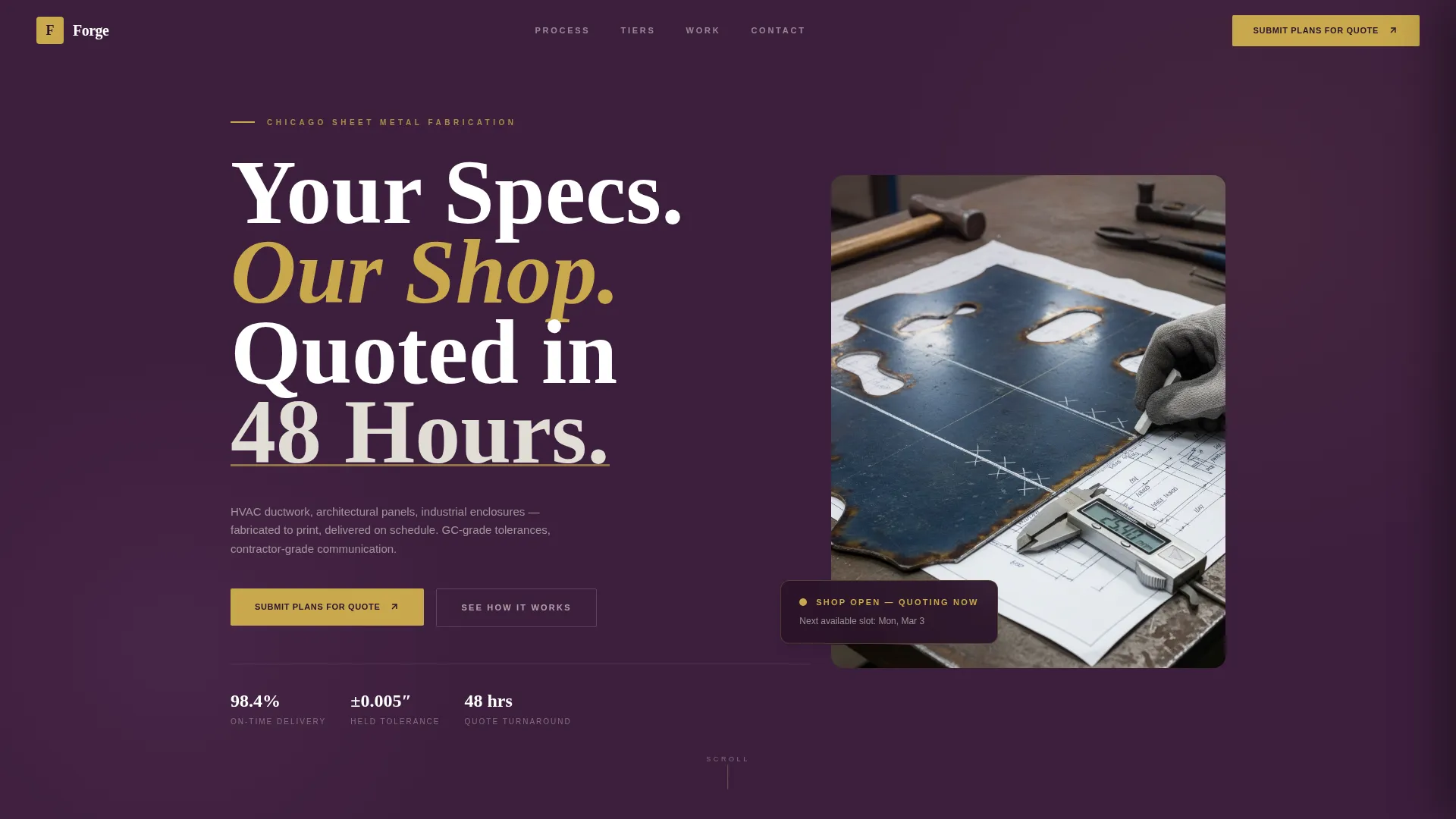
Forge is a single-page landing page template built for precision sheet metal fabrication shops. It combines a commanding visual identity with a transparent quoting process, a tiered comparison table, and a slide-out quote request form. The layout speaks directly to general contractors, facility managers, and architects who need fast quotes, tight tolerances, and reliable delivery.
by Rocket studio
Quick summary
Forge is a B2B landing page template designed for fabrication shops that cut, bend, and weld sheet metal into ductwork, enclosures, and architectural panels. It walks prospective clients through a four-stage quoting process, presents three engagement tiers in a transparent comparison table, and closes with a slide-out form for submitting project plans.
Who this template is for
This template is built for fabrication businesses that serve commercial and industrial clients. It speaks the language of contractors and project managers who make purchasing decisions based on lead time, accuracy, and reliability.
- General contractors bidding mechanical packages who need quick, accurate quotes
- Facility managers sourcing replacement HVAC ductwork runs on a tight schedule
- Architects specifying custom metal facades who need a shop that holds tolerance
What problem this template solves
Fabrication shops often struggle to communicate their process and pricing clearly to new clients. The result is slow deal cycles, repeated back-and-forth emails, and lost bids to shops that simply appear more organized online.
- Visitors leave without understanding what the quoting process actually involves
- Engagement tiers and pricing terms stay hidden behind a generic "Contact Us" button
- Contractors cannot compare service levels before deciding whether to reach out
What you get with this template
The template delivers a complete, single-page flow that moves a visitor from first impression to quote submission without friction. Every section has a defined job, and none of them waste the reader's time.
- A full-viewport hero section with a flush-left headline and a high-contrast shop photograph
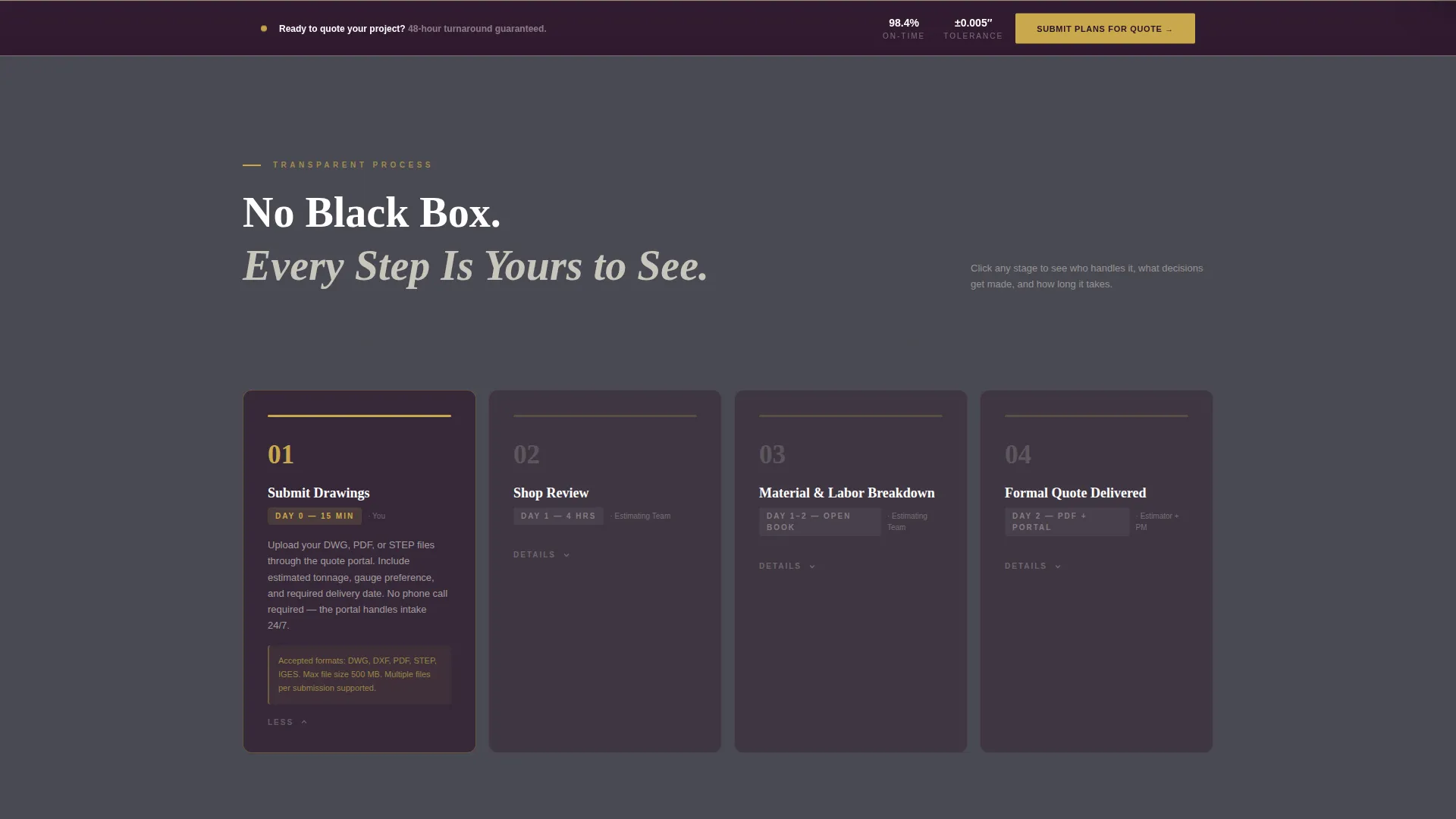
- A four-stage interactive timeline that expands to reveal process details on click
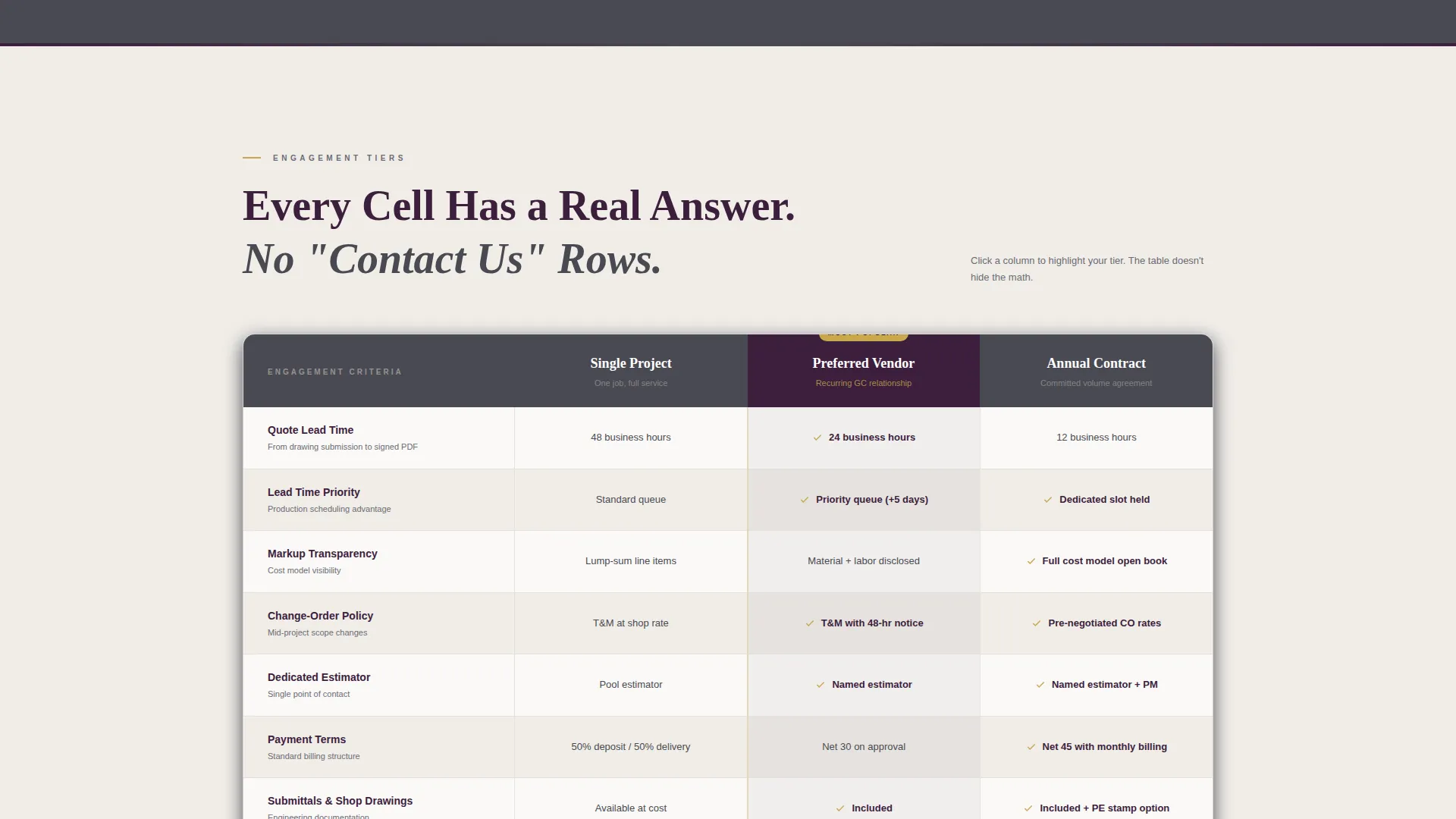
- A three-tier comparison table with real answers in every cell, no hidden pricing language
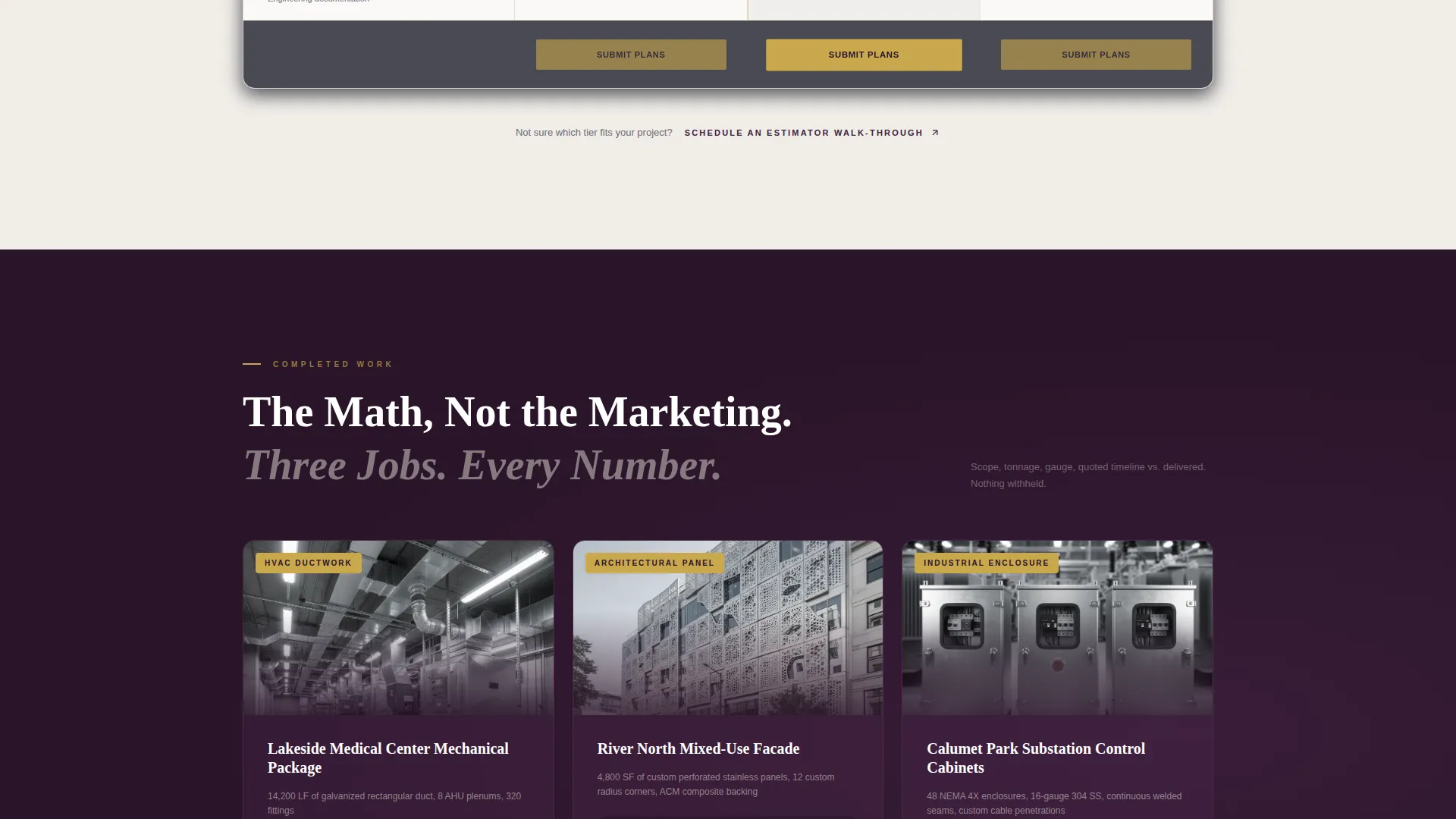
- A case-study strip showing three completed jobs with scope, gauge, timeline, and contractor testimonials
- A slide-out quote request form accepting DWG, PDF, and STEP file uploads
- A sticky call-to-action bar that reappears after the comparison table
Feature list
This template is built around components that build credibility and reduce friction for B2B buyers evaluating a fabrication partner.
Interactive Quoting Timeline
A horizontal timeline walks visitors through four stages: Submit Drawings, Shop Review, Material and Labor Breakdown, and Formal Quote Delivered. Each stage expands on click to show what happens, who handles it, and how long it takes.
Tiered Comparison Table
Three engagement tiers (Single Project, Preferred Vendor, Annual Contract) are displayed side by side. Rows cover lead time priority, markup transparency, change-order policy, dedicated estimator access, and payment terms. Every cell contains a direct answer.
Slide-Out Quote Request Form
The primary call-to-action opens a panel with fields for company name, project type, file upload (DWG, PDF, STEP), estimated tonnage range, and required delivery date. It keeps the main page visible behind the form.
Case Study Scroll Strip
A scrolling strip presents three completed fabrication jobs. Each entry shows project scope, metal gauge, tonnage, quoted timeline versus actual delivery, and a one-line testimonial from the contractor on record.
Sticky Call-to-Action Bar
After the comparison table, a persistent bar anchors the primary quote submission prompt at the bottom of the viewport. It ensures the action step stays visible as the visitor continues reading.
Secondary Estimator Path
A second conversion path below the table reads "Schedule an Estimator Walk-Through." This supports contractors who prefer a site visit before committing to a project, widening the conversion funnel without cluttering the page.
Page sections overview
| Section | Purpose |
|---|---|
| Hero Header | Introduces the shop with a headline and a shop photograph |
| Process Timeline | Explains the four-stage quoting flow with expandable detail |
| Comparison Table | Displays three service tiers with transparent, cell-level answers |
| Case Study Strip | Builds trust through real job data and contractor testimonials |
| Sticky call to action Bar | Keeps the quote submission prompt visible after the table |
| Slide-Out Form | Collects project details and file uploads for quote requests |
| Secondary call to action | Offers a site walk-through path for undecided contractors |
Design & branding system
The visual identity follows an Executive Suite theme built around the Plum Executive color system. The palette feels like a boardroom inside a working factory: authoritative but grounded in industrial materials.
- Deep plum (#3D1F3D) anchors the hero section and footer, establishing authority from first scroll
- Brushed graphite (#4A4A52) carries section dividers and table headers, adding industrial weight without heaviness
- Polished nickel (#E0DDD5) surfaces cards and open-content areas to keep the layout breathable
- Arc-flash gold (#C9A84C) is reserved exclusively for call-to-action buttons, hover states, and active table row highlights
Mobile & speed optimization
The layout is designed to remain clear and functional on smaller screens, where contractors and project managers often review vendor pages between site visits.
- The hero headline and photograph stack vertically on narrow viewports without losing hierarchy
- The comparison table adjusts column widths to maintain readability on tablet and phone screens
- The slide-out form panel is sized to operate comfortably on touch devices without covering critical content
How this template helps you convert
The page is structured so that every scroll beat earns the next action from the visitor. Trust accumulates progressively from the hero to the form.
- The transparent process timeline removes the most common objection: not knowing what happens after you send drawings. Visitors who understand the process are more likely to submit plans.
- The comparison table replaces the vague "Contact Us" loop with a self-service decision tool. By the time a visitor reaches the form, they have already chosen a tier that fits their project.
- Two conversion paths (quote submission and estimator walk-through) accommodate different buyer readiness levels, increasing the total number of visitors who take action.
Other information about this template
This template is a strong fit for fabrication businesses positioning themselves as precision partners rather than commodity vendors. The design language and content structure both reinforce that positioning without overstating it.
- The Corporate Precision theme used throughout aligns with how general contractors and facility managers evaluate vendors: organized, accountable, and specific
- The Case Study Narrative creative direction means the page earns trust by showing real job math rather than marketing language
- The template is delivered as a single landing page, making it straightforward to publish as a standalone quote-request destination or embed within an existing company site
Theme
Corporate Precision
Creative direction
Case Study Narrative
Color system
Arctic White
Style
Split Screen (50/50)
Direction
Click-Through
Page Sections
Interactive Four-stage Quoting Timeline
Transparent Three-tier Comparison Table
Slide-out Quote Request Panel
Scrolling Case Study Strip
Sticky Post-table Call to Action Bar
Secondary Estimator Walk-through Path
Related questions
What types of fabrication shops fit this template best?
Can I customize the comparison table tiers and row labels?
How does the slide-out quote request form work?
Is the process timeline interactive out of the box?
Do I need design experience to set up this template?



