Instant Pediatric Scheduling Landing Page Template
Checkup is a split-screen pediatric appointment booking landing page template built for clinics that want to replace late-night parent anxiety with calm, organized clarity. A five-question guided assessment matches families to the right doctor and surfaces available time slots in real time. The design uses a soft medical palette, rounded corners, and reassurance-first copy throughout every section.
by Rocket studio
Quick summary
Checkup is a single-page, split-screen landing page template purpose-built for pediatric practices. It guides parents through a five-question symptom assessment, matches them to a relevant doctor, and surfaces booking slots without friction. Every design decision, from the breathing pulse icon to the reassurance green call-to-action buttons, is made to calm worried caregivers and move them toward confirmed appointments.
Who this template is for
This template is designed for pediatric medical practices, children's clinics, and healthcare providers who want to convert anxious website visitors into booked patients. It suits teams who need a focused, one page booking experience rather than a full multi-page website.
- First-time parents searching for answers at midnight and needing fast, clear guidance on next steps
- Daycare directors managing immunization clearances and needing easy access to scheduling for multiple children
- Pediatric clinics and doctors looking to reduce phone call volume through streamlined online appointment scheduling
What problem this template solves
Parents arrive at a pediatric landing page scared, short on time, and unsure what kind of appointment their child actually needs. A generic booking form asks too little and reassures too little. This template solves that gap by making the booking process itself feel like a calm, competent first consultation.
- Parents struggle to find the right doctor or understand which services apply to their child's symptoms
- Clinics lose appointment requests because their pages lack clarity, trust indicators, or a guided path to booking
- Families managing multiple children across different insurance plans need scheduling that adapts to their preferences, not a one-size form
What you get with this template
You get a fully designed, interactive landing page built around a split-screen layout. The left panel collects symptom and preference input; the right panel updates in real time to show the matched doctor, visit timeline, and open slots. Every section of the page is built to deliver essential information without overwhelming a parent who is already stressed.
- A five-step guided assessment with illustrated tiles, scrollable age selector, insurance information input, and visit-type toggle
- A dynamic doctor match panel that surfaces relevant doctors with specific experience descriptions alongside a minute-by-minute visit walkthrough
- A trust and social proof section with parent testimonials, practice volume stats, and response time metrics to build confidence in your services
Feature list
This landing page template ships with purpose-built components for pediatric appointment booking. Each feature is designed to reduce friction and build trust across every scroll.
Symptom Selector with Live Right Panel
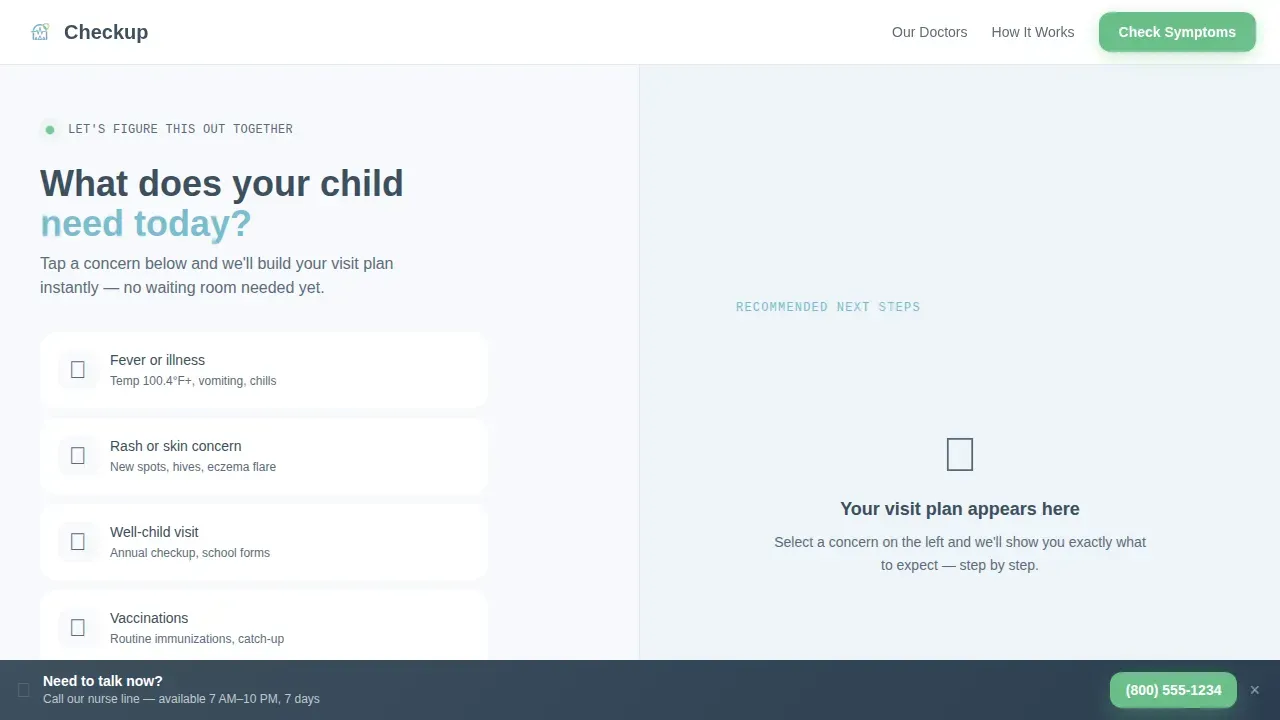
The hero section presents large, tappable icons covering common concerns such as fever, rash, well-visit, vaccination, and behavioral issues. Selecting one immediately updates the right panel with a visual timeline, estimated visit length, and a preparation checklist. This design makes the landing page itself the first reassurance a parent receives.
Five-Step Guided Assessment
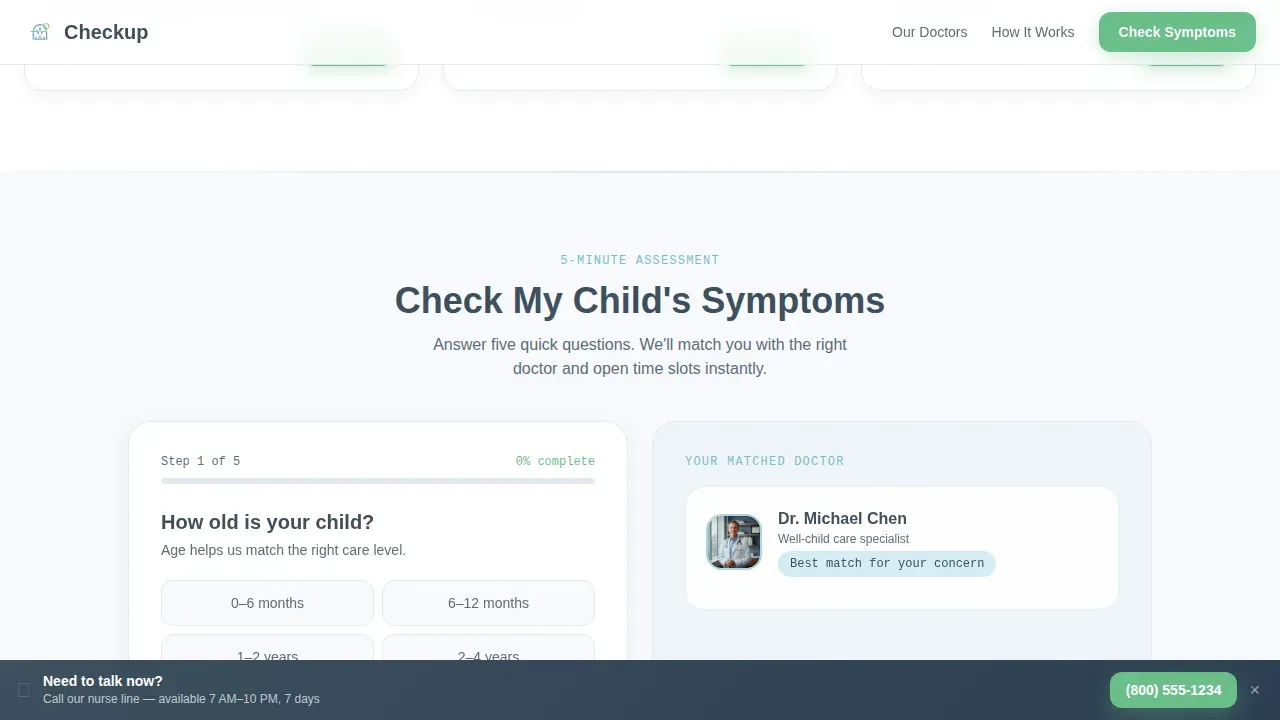
The assessment flow asks five focused questions: child's age via scrollable selector, primary concern via illustrated tiles, symptom duration via simple toggle, insurance information via searchable dropdown, and preferred visit type. Each answer narrows the recommendation in real time, making the path from concern to confirmed booking clear and easy for any user.
Dynamic Doctor Match Panel
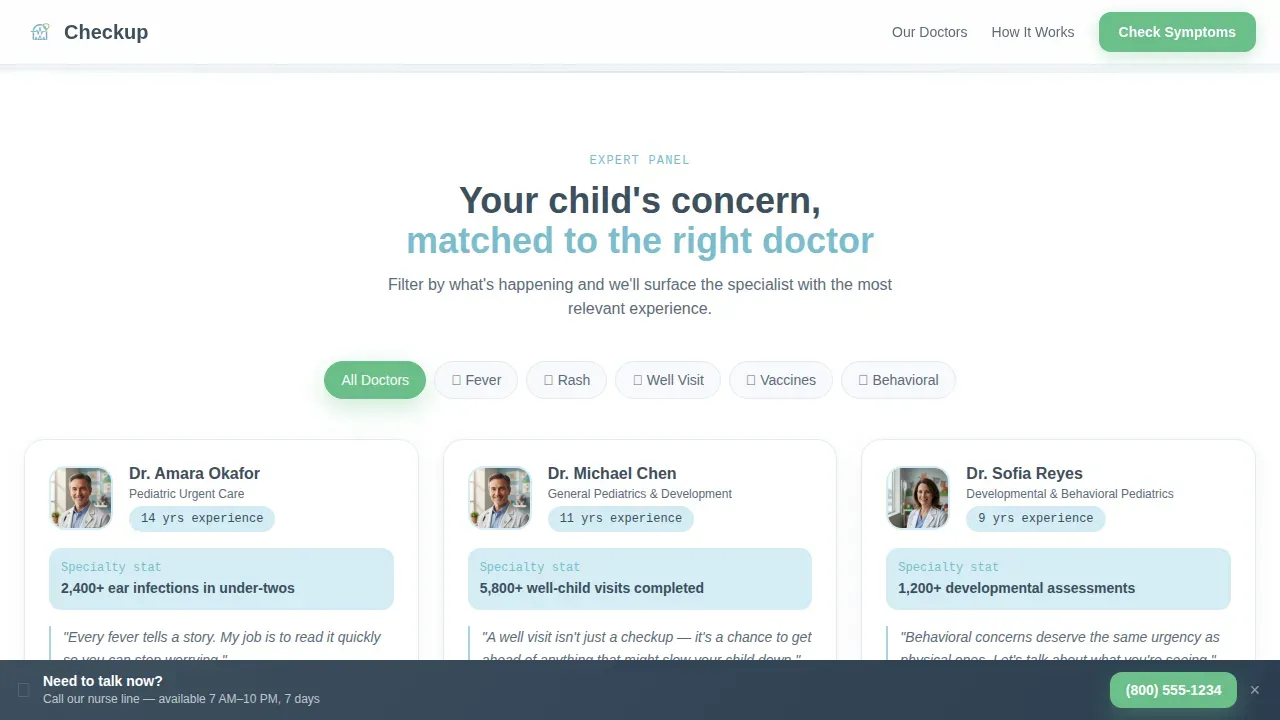
As parents complete the assessment, the page surfaces a matched specialist with a specific experience description. The doctor match panel helps patients and families understand exactly who will see their child and why that doctor fits their needs. This feature replaces generic headshot cards with targeted, credible context.
Visit Timeline Walkthrough
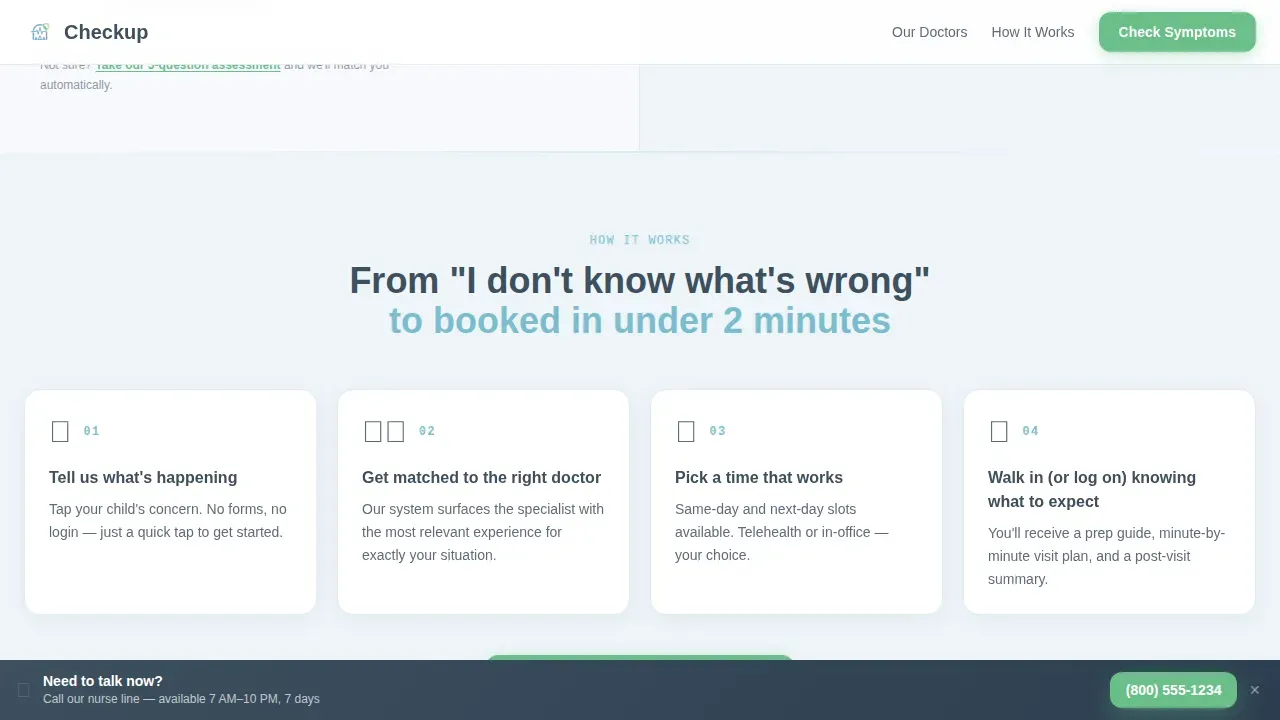
Section two of the page reveals what the appointment actually looks like, minute by minute. This section turns vague medical anxiety into organized, specific information. Parents can understand the visit flow before they arrive, which reduces no-shows and builds real trust with the practice.
Persistent Nurse Line Bar
A fixed bottom bar reads "Need to talk now? Call our nurse line" throughout the entire page. This secondary conversion path is always visible, giving parents who are too worried to scroll a direct, immediate way to reach the team without completing the full assessment.
Social Proof and Practice Stats
The template includes a dedicated section for parent testimonials and practice metrics. Real quotes, visit volume numbers, and response time data are displayed using a data-weight font to add credibility. Authentic patient testimonials are essential for building confidence in pediatric healthcare services.
Page sections overview
| Section | Purpose |
|---|---|
| Hero Split Screen | Symptom selector left, live visual timeline right, animated pulse icon |
| Doctor Match Panel | Surfaces matched specialist with experience stats based on selected concern |
| Visit Timeline | Minute-by-minute walkthrough replacing medical anxiety with clear steps |
| Assessment Flow | Five-question guided quiz narrowing to matched doctor and booking slot |
| Trust and Social Proof | Parent testimonials, practice stats, satisfaction scores, response time |
| Footer | Linear single-row footer with contact and navigation items |
Design & branding system
The template follows a Medical Clarity visual theme using the Soft Mist color system. Every color choice is intentional: calm enough for a stressed parent reading at midnight, clear enough to communicate clinical competence at a glance.
- Cloud white (#F7F9FC) backgrounds, pediatric sky (#A8D5E2) section dividers and progress indicators, gentle slate (#5B6C7D) body text, and reassurance green (#6BBF8A) on all interactive buttons and completion states
- Plus Jakarta Sans for headings, DM Sans for body text, and JetBrains Mono for data and stats, creating a layered typographic system that feels medical without feeling cold
- Rounded corners on every component, a gently animated pulse icon in the hero, and smooth panel transitions throughout the page design
Mobile & speed optimization
A mobile-first responsive design is critical because many parents book appointments using their phones, often late at night in low-light conditions. This template is built with that context as the primary device scenario.
- All interactive components, including the symptom selector tiles, assessment toggles, and doctor match panel, are designed to work clearly on small screens with large tap targets
- The one page layout avoids unnecessary navigation overhead, keeping parents focused on completing their booking without switching pages or losing context
- Static sections are separated from interactive quiz components in the design structure, supporting a clean, focused rendering approach on any device
How this template helps you convert
Every design and content decision in this landing page points toward one outcome: a confirmed pediatric appointment. The template removes the moments where anxious parents abandon booking forms and replaces them with calm, guided progress.
- The symptom selector in the hero immediately answers "where do I start?" and pulls parents into the assessment flow before doubt sets in, reducing drop-off at the top of the page
- Real-time doctor matching and the visit timeline make parents feel informed and prepared, which builds trust and reduces the hesitation that causes last-minute booking cancellations
- The persistent nurse line bar and the final green "Book This Visit" button ensure that every parent, regardless of how they move through the page, has a clear and easy path to completing their appointment
Other information about this template
This template is a strong starting point for any pediatric practice that wants to promote its services through a focused digital presence. It is easy to customize colors, copy, and doctor profile content to match your clinic's brand. The layout can also support promotional goals beyond direct booking.
- You can integrate social media platforms with your website to share health updates, community events, and seasonal care reminders that keep families engaged between visits
- Targeted ad campaigns driving traffic to this landing page benefit from its focused, one page design because every element is oriented toward a single conversion goal with no distracting navigation
- The template structure makes it straightforward to add email capture, update testimonials, promote new services, and set up additional pages when your practice is ready to expand its web presence
- Platforms such as TemplateMonster, ThemeForest, Nicepage, and Webflow each offer pediatric-focused templates and design tools for clinics building or refreshing their medical website; this template sits alongside those options as a purpose-built, booking-first alternative
- Tools such as Jotform and Lobbie offer customizable form solutions for pediatric checkup scheduling that can integrate with patient portals; this template's assessment design is built with a similar philosophy of gathering medical history details and insurance information upfront to reduce friction at the front desk
Theme
Medical Clarity
Creative direction
Expert Panel
Color system
Soft Mist
Direction
Quiz/Assessment
Page Sections
Symptom Selector with Live Panel
Five-step Guided Assessment
Dynamic Doctor Match Panel
Visit Timeline Walkthrough
Persistent Nurse Line Bottom Bar
Social Proof and Practice Stats
Related questions
Can I customize the doctors and services shown in this template?
Does this template support insurance information collection during booking?
Is this template suitable for clinics managing multiple doctors?
How does this landing page build trust with first-time parents?
Can this landing page be used to promote telehealth appointments?



