Condition Library Landing Page Template
A sidebar companion landing page built for a geriatric condition and treatment library. It combines expandable condition cards written in plain language with a fixed self-assessment sidebar that quietly builds a personal health snapshot as visitors scroll. The design uses warm parchment, sage, and teal to feel calm and clinical at once, with coral reserved for assessment prompts.
by Rocket studio
Quick summary
This template is a single-page sidebar companion for a geriatric condition and treatment library. Visitors read plain-language condition cards while a fixed sidebar tracks their selections and builds a personal health picture. A five-question geriatric screening modal converts engaged readers into qualified leads, delivering a personalized condition-priority summary as a downloadable PDF.
Who this template is for
This template serves anyone who needs a trusted, readable geriatric health reference presented alongside a gentle self-assessment tool. It works especially well for practices and platforms that want to earn a visitor's trust before asking for any information.
- Adult children aged 35 to 55 researching a parent's diagnosis or new prescription
- Retired patients managing multiple chronic conditions across more than one specialist
- Geriatricians looking for reliable, patient-facing resources they are comfortable forwarding
What problem this template solves
Medical information for older adults is often written for clinicians, not patients or family members. This template bridges that gap by presenting each condition in plain language, then giving visitors structured tools to organize what they learn.
- Scattered, jargon-heavy condition pages that leave caregivers more confused than before
- No clear path from reading about a condition to knowing what questions to ask a doctor
- Library pages that collect email addresses before they have earned any trust
What you get with this template
You get a fully structured landing page with a persistent sidebar, expandable condition cards, and an assessment modal, all ready to customize. Every major section is designed to deliver value first and ask for information only after the visitor has already found it useful.
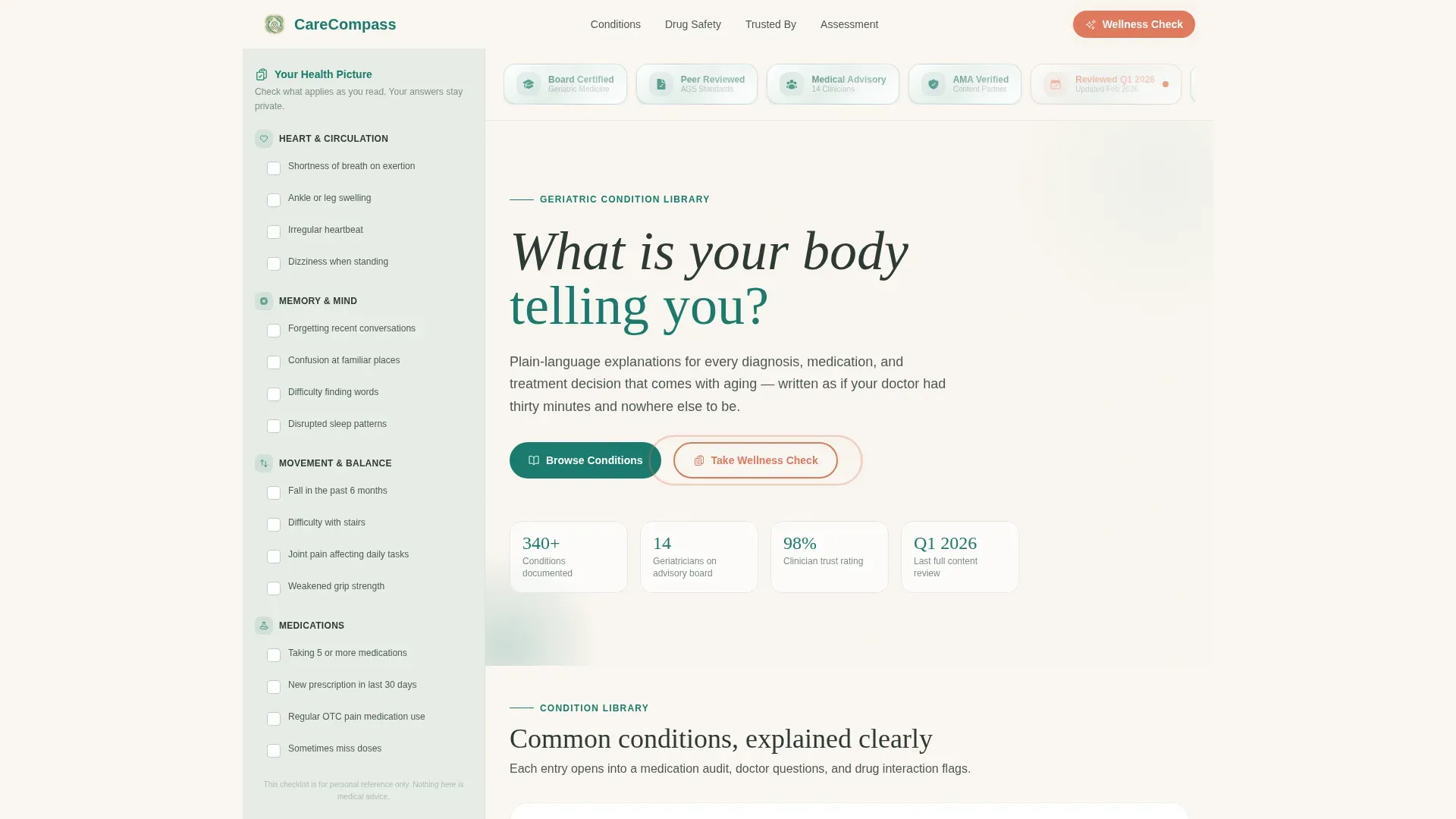
- Hero section with an award badge ribbon, a warm serif headline, and trust anchors
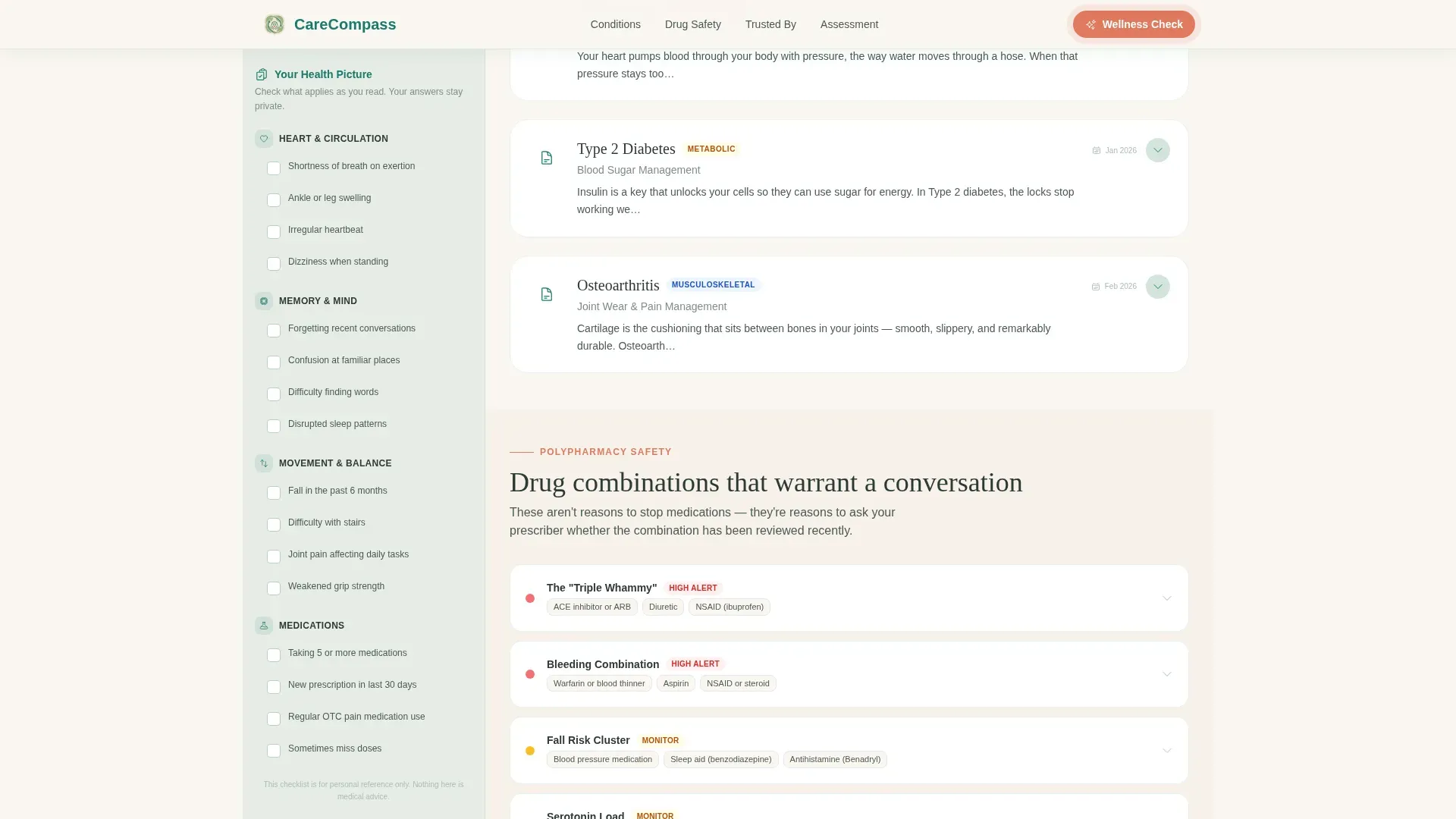
- Three expandable condition cards with plain-language summaries, medication audit checklists, and doctor question lists
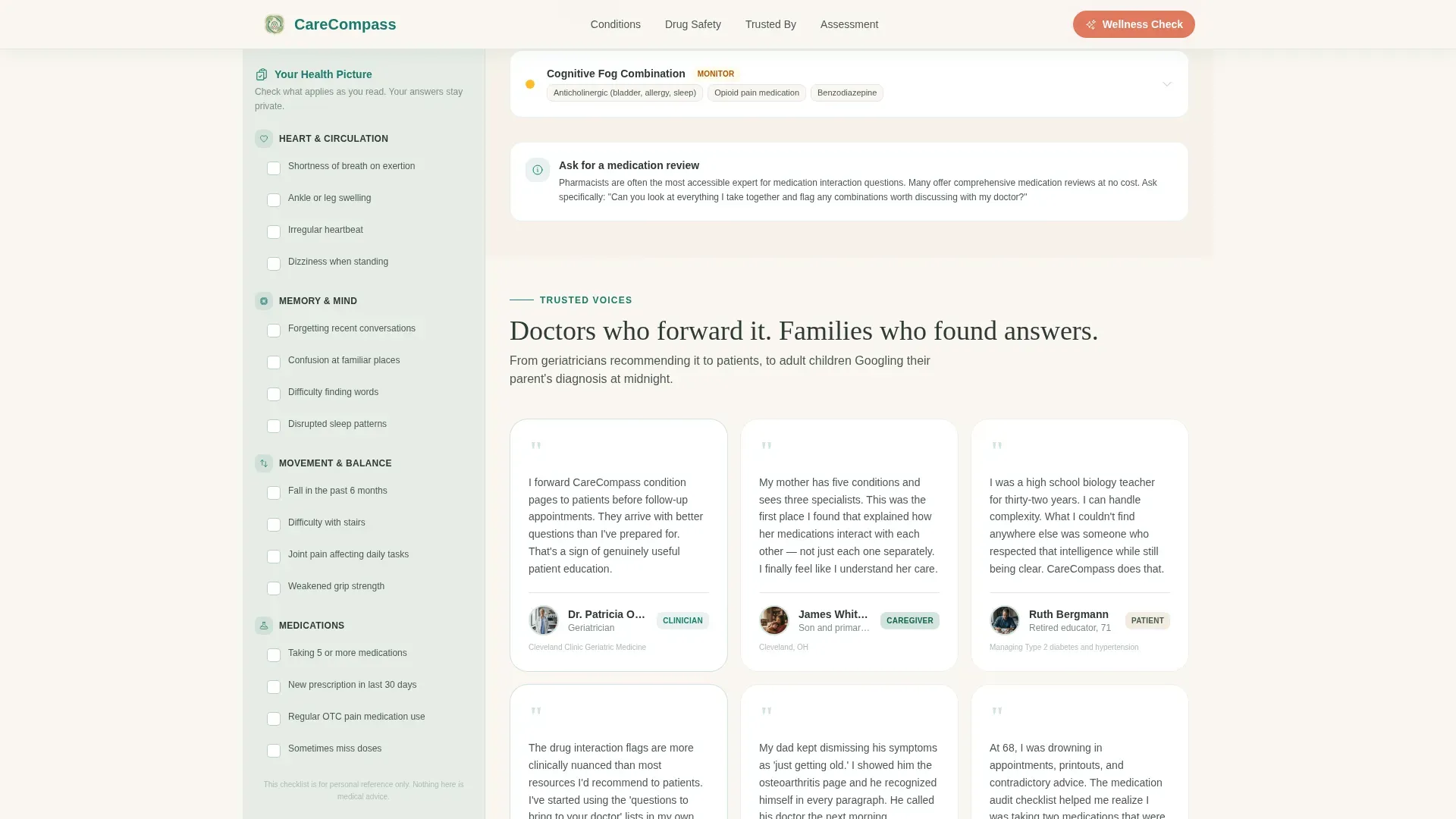
- A drug interaction flag panel, a voices section with endorsements, and a five-question assessment gateway with PDF output
Feature list
This template includes several distinct functional components that work together to guide visitors through a methodical, unhurried reading experience.
Fixed Sidebar Self-Assessment Companion
The sidebar stays anchored as visitors scroll. It displays symptom checkboxes and condition flags that update in real time. By the time a visitor has read three condition cards, the sidebar shows a coral-pulsing prompt inviting them to see their full wellness picture.
Expandable Condition Cards
Each condition card opens with a plain-language summary written like a letter from an attentive doctor. It then unfolds to show a medication audit checklist, a list of questions to bring to an appointment, and a drug-interaction flag panel highlighting polypharmacy risks.
Five-Question Geriatric Screening Modal
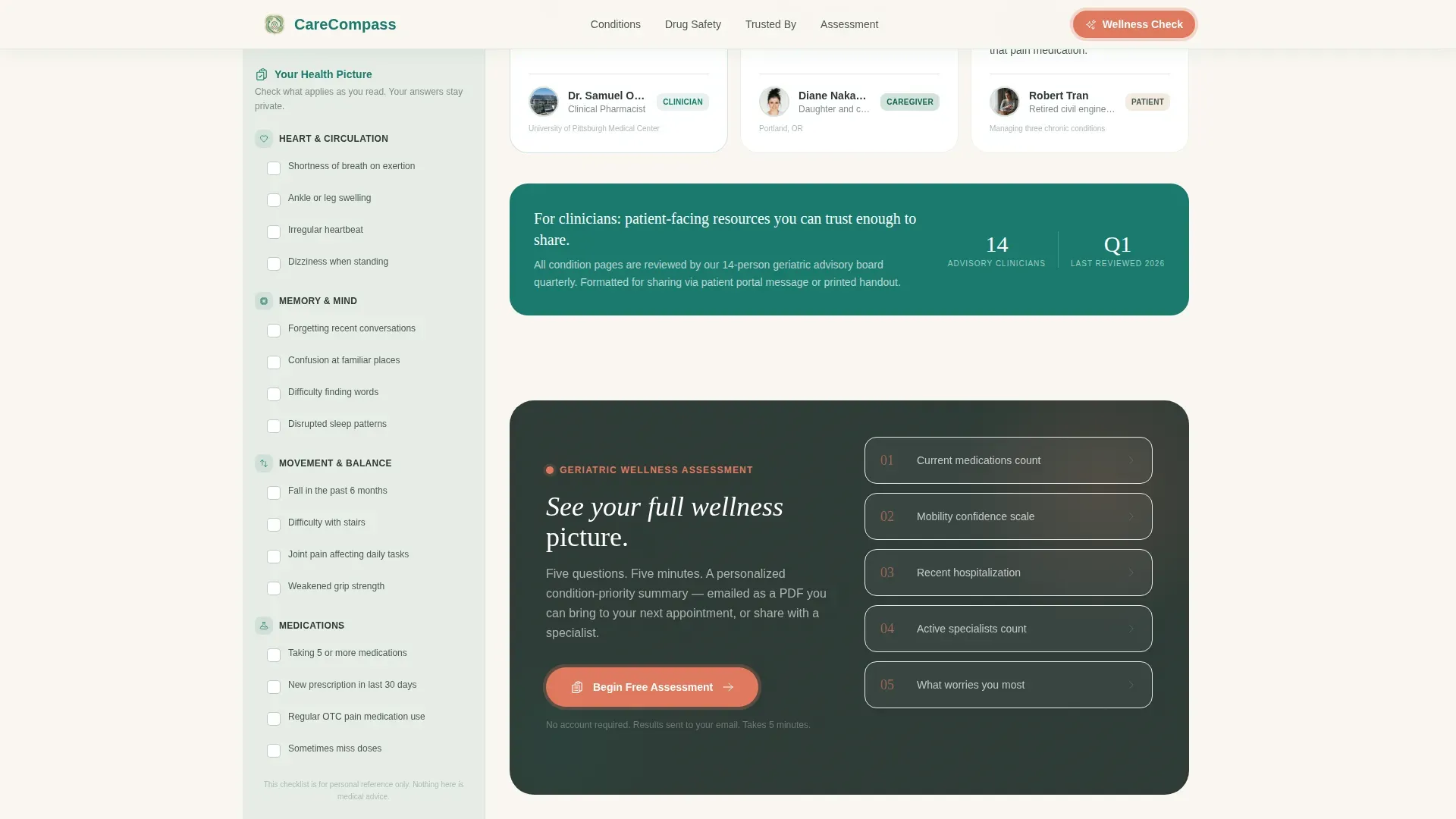
Clicking the sidebar prompt opens a progressive assessment modal. It asks five focused questions: current number of medications, mobility confidence, recent hospitalization, number of active specialists, and a free-text field for the visitor's primary concern. The final screen promises a personalized condition-priority summary delivered as a PDF.
Print My Checklist Micro-Conversion
Every condition card includes a "Print My Checklist" button. It requires only an email address, making it a low-friction secondary conversion that captures interested visitors who are not yet ready for the full assessment.
Award Badge Ribbon Header
The hero opens with a horizontal ribbon of trust insignia. Board certification seals, peer-review verification marks, medical advisory affiliations, and a "Reviewed This Quarter" timestamp badge are rendered in teal and sage with a subtle embossed texture, establishing credibility before any body copy appears.
Voices and Endorsement Section
A dedicated section surfaces geriatrician quotes and patient or caregiver testimonials. These appear below the condition library and reinforce the library's clinical credibility through real-voice social proof.
Page sections overview
| Section | Purpose |
|---|---|
| Hero Badge Ribbon | Display trust insignia and open with the serif headline |
| Condition Library Cards | Present three expandable plain-language condition entries |
| Drug Interaction Panel | Flag polypharmacy risks with severity indicators |
| Voices and Endorsements | Show geriatrician quotes and caregiver testimonials |
| Assessment Gateway Modal | Guide visitors through a five-question geriatric screening |
| Footer Row | Deliver a single-row linear footer with essential links |
Design & branding system
The visual identity is built around an Organic Flow theme using the Teal Catalyst color system. The palette feels like a well-tended herb garden behind a clinic: green things growing quietly in clean soil, with terracotta pots catching afternoon light.
- Parchment (#FAF6F0) dominates the reading surface, sage (#D4E4DC) holds the persistent sidebar, teal (#1A7A6D) anchors headers and navigation, and coral (#E07A5F) appears only on action states and assessment prompts
- Fraunces serif is used for headlines to create warmth and authority; DM Sans handles body copy and interface text for clarity
- Animation is medium in intensity, using scroll reveals, accordion unfolds, sidebar accumulation, and a coral pulse keyframe on the assessment call to action
Mobile & speed optimization
The layout is designed desktop-first because the sidebar companion structure requires sufficient screen width to function as intended. On smaller screens, the sidebar stacks responsively below the main content column.
- Desktop layout prioritizes the two-column sidebar and main content view for full self-assessment functionality
- Mobile stack collapses the sidebar below the condition cards so all content remains accessible on narrow screens
- Server Components handle static condition content while Client Components manage the sidebar checkboxes, accordion cards, assessment modal, and print checklist interactions
How this template helps you convert
This template is built around a philosophy of earning the click by delivering value first. Conversion happens gradually and naturally, not through pressure.
- The sidebar accumulates checked symptoms and condition flags as visitors scroll, creating a visible personal health picture that makes the "See Your Full Wellness Picture" prompt feel like a logical next step rather than an interruption.
- The "Print My Checklist" button on each condition card offers a useful tangible output in exchange for only an email address, capturing visitors at an earlier stage of intent before they reach the full assessment.
Other information about this template
This template is categorized under Health and Medical with a Geriatrician Website subcategory. It is localized for a United States audience, using imperial measurements, 12-hour time format, and United States dollar references where applicable.
- The Checklist and Audit creative direction means the entire page functions as a structured review, giving visitors a sense of methodical progress rather than passive reading
- The Quiz and Assessment landing-page direction ensures the primary conversion mechanism is the five-question geriatric screening modal, not a static contact form
- The template style is Sidebar Companion, a layout that keeps the self-assessment tool in constant view without interrupting the reading flow
- The header concept is Award Badges, meaning trust is established visually before any body copy is read
Theme
Organic Flow
Creative direction
Checklist & Audit
Color system
Teal Catalyst
Style
Sidebar Companion
Direction
Quiz/Assessment
Page Sections
Fixed Sidebar Self-assessment Companion
Expandable Condition Cards with Audit Tools
Five-question Geriatric Screening Modal
Print My Checklist Micro-conversion
Award Badge Ribbon Hero Header
Voices and Endorsement Section
Related questions
Who is the primary audience for this template?
What does the five-question assessment ask?
Do visitors need to submit a form to read the condition library?
What does the visitor receive after completing the screening?
Is this template suitable for a geriatric practice building patient trust online?



