
This is the engineering story behind the architectural call that defines how Build works in 1.0.
What this post covers: Why Rocket built two architecturally distinct execution systems — probabilistic chat and deterministic slash command pipelines — instead of routing everything through a single prompt-interpretation loop. It explains how 80+ commands are engineered as multi-step pipelines with hard input contracts, ordered execution, per-step validation, and output guarantees, organized into a dependency taxonomy that mirrors real production architecture.
The Problem That Started Everything
Go to any AI. Type the same operation three different ways.
1"add stripe payments to my app"
2"integrate stripe checkout"
3"implement stripe with subscription support and webhook handling"Three different outputs. Different things present, different things missing, each time.
The model isn't broken. The architecture is. For operations with known correct outputs, routing through a prompt-interpretation loop is a structural flaw — not a model quality problem. The output quality of a known operation was depending on the prompt quality of the person asking.
That's the bug we set out to fix.
The Architectural Decision
We built two separate systems inside Rocket's Build layer. Not one system with two modes. Two architecturally distinct systems:
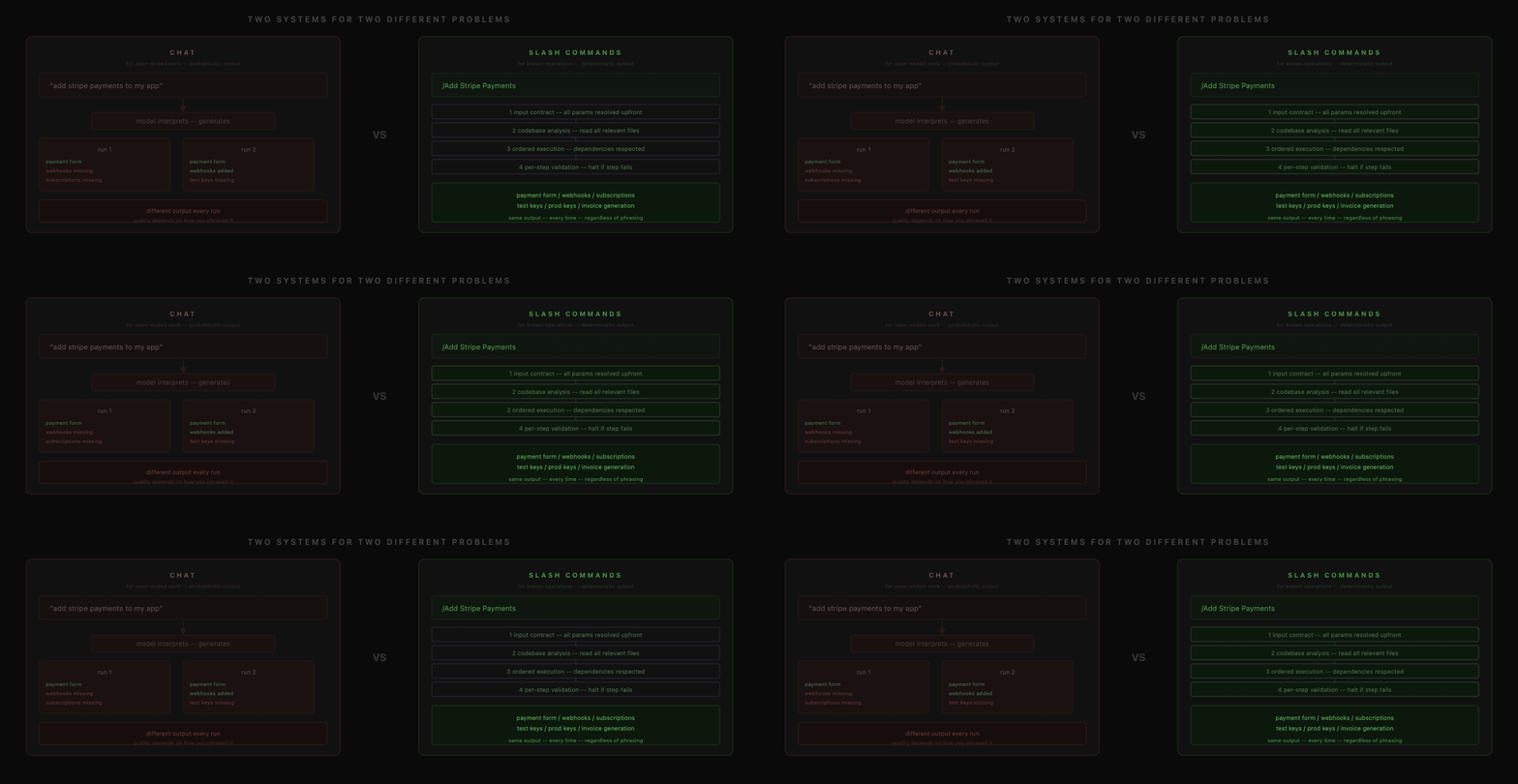
Chat handles open-ended work. Describe what you want. The model reads your project context, interprets intent, makes architectural calls, writes code. Flexible because it reasons about your intent.
Slash Commands handle known operations. A pre-engineered pipeline runs. The model doesn't interpret anything — the command already defines every step. The pipeline executes in sequence, validates each step, and produces the same output regardless of how you phrased the request.
These are not two skins on the same engine. Chat is probabilistic by nature. Commands are deterministic by design.
The decision we debated internally: we could have hidden this. Built one interface that silently detects "they're asking for payments" and routes to a pipeline under the hood. We didn't. When you select a command, you know exactly what's about to happen. Transparency over magic.
What a Command Actually Is
A slash command is not a prompt shortcut. A prompt shortcut still sends text to the model. The model still interprets. The output is still probabilistic.
A slash command is a multi-step execution pipeline with hard guarantees.
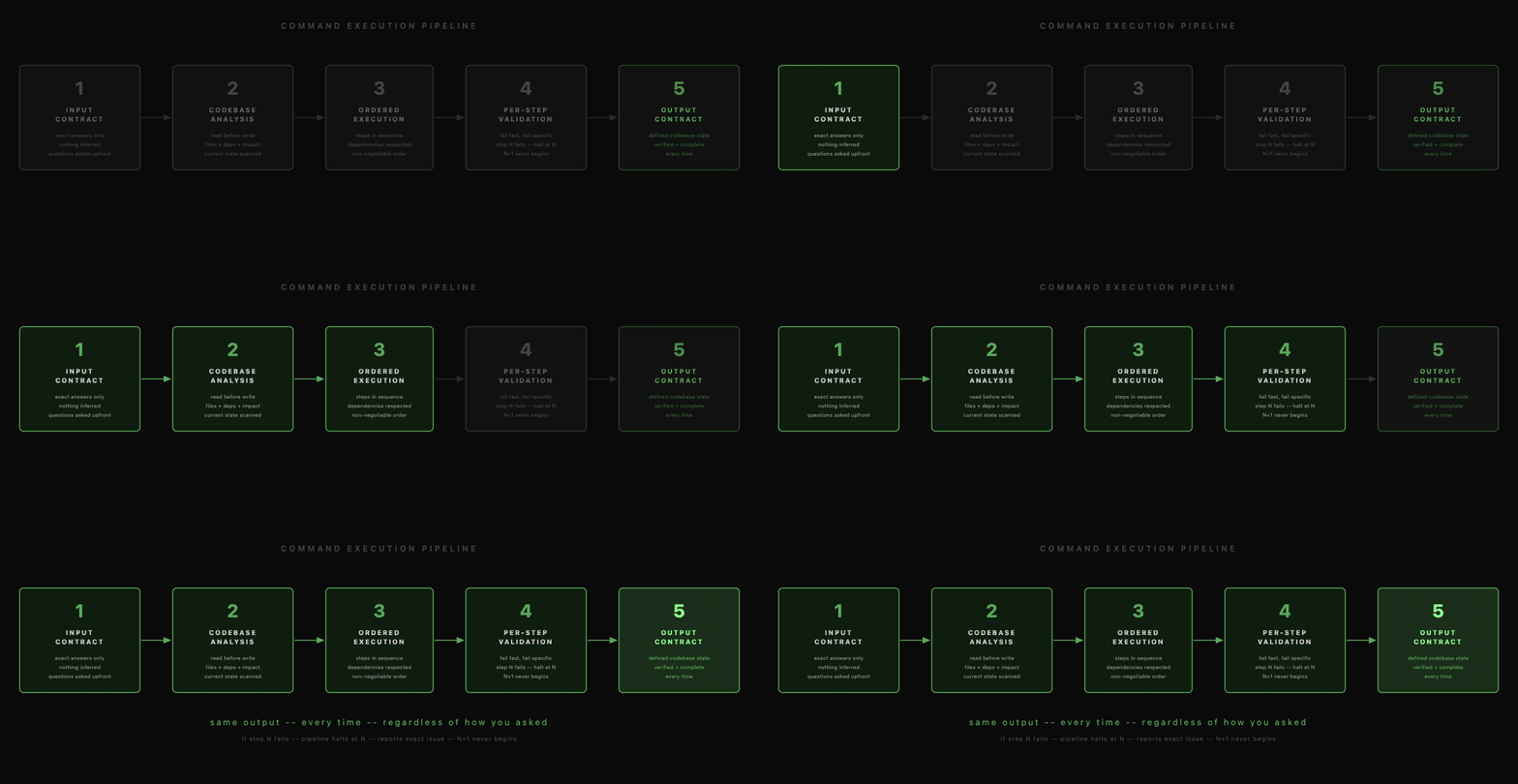
Here's the structure for every command:
1. Input Contract Before anything runs, the command asks only the questions the pipeline needs exact answers to. Not inferred. Asked. The pipeline needs exact inputs to produce exact output.
2. Codebase Analysis The command reads the current state of your project: what files exist, what dependencies are installed, what would be affected. It doesn't write into a project it hasn't read.
3. Ordered Execution Steps run in a defined, non-negotiable sequence. Dependencies are real. You can't generate webhook handlers before the payment form exists. You can't configure RLS before the auth tables exist.
4. Per-Step Validation Each step is verified before the next begins. If step 3 fails, step 4 doesn't start. The pipeline halts at the exact failure point and reports the specific issue.
5. Output Contract When the command completes, the codebase is in a defined, verified state. Every time. Regardless of how you triggered it.
The Command Taxonomy
The 80+ commands aren't a flat list. They're organized into dependency layers that mirror real production architecture:
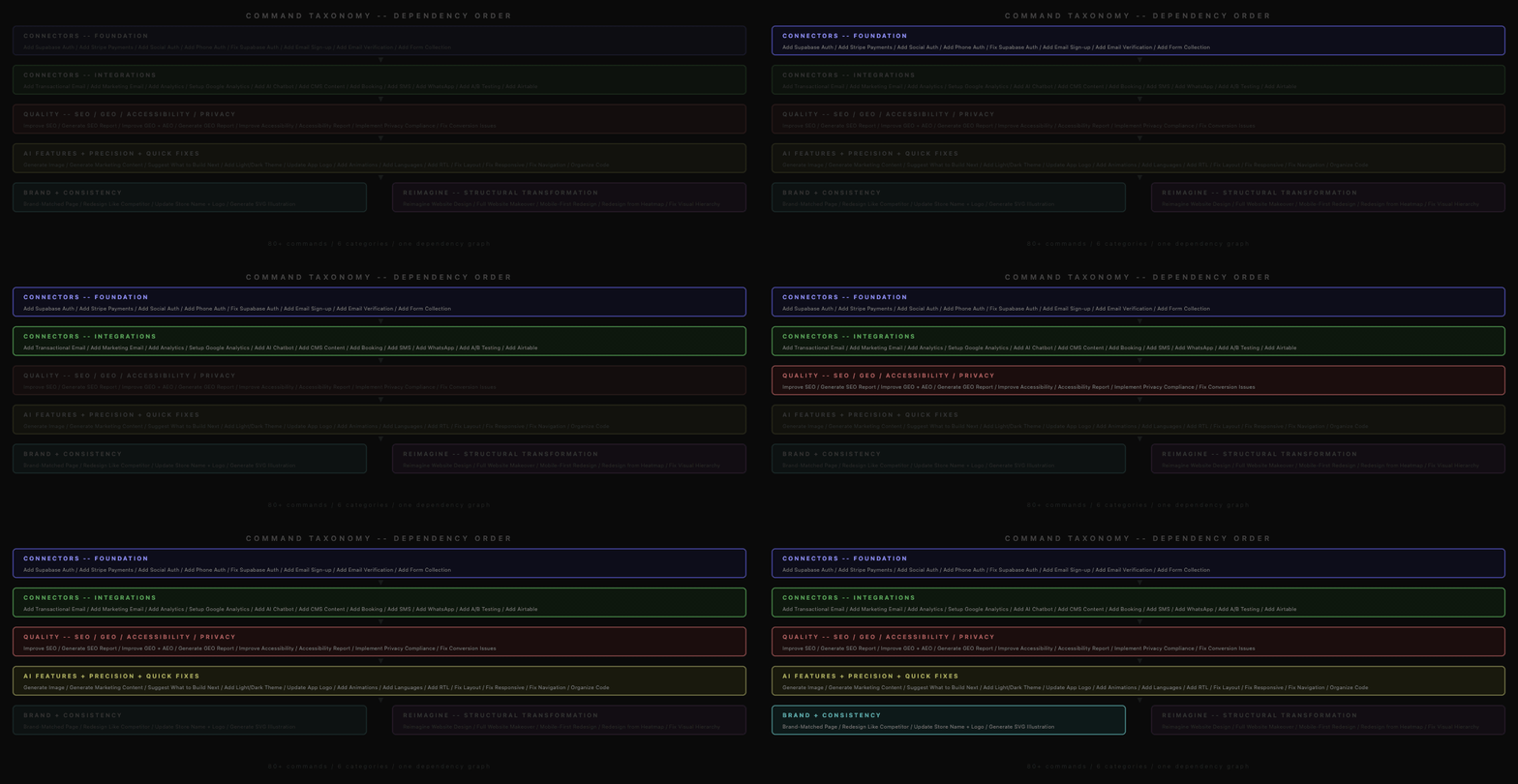
Foundation — Authentication, Payments. Everything else may depend on user models, auth state, or payment configuration. These go first because everything downstream references them.
Connectors — Email, Forms, CMS, Analytics, Scheduling, SMS, WhatsApp, A/B Testing, AI Chatbot. These create the data flows that Quality commands need to audit.
Quality — SEO, Accessibility, Privacy & Compliance, GEO/AEO, Conversion. These audit and improve what's already built. An SEO command run before the app exists produces garbage results.
Precision — Brand & Identity, Layout & Structure, Animations & Effects, Language/i18n. These modify visual and content properties without touching the data layer. Safe to run anytime.
Recovery — Fix Layout Issues, Fix Overflow, Fix Responsive Design, Fix Visual Hierarchy, Fix Navigation, Fix Touch Interactions. Specific diagnosis, targeted correction.
Reimagine — The Redesign family. Eight commands sharing one comprehension layer. Covered in depth below.
This isn't cosmetic organization. It's a real dependency map. Run Quality before Foundation and you get audits against an incomplete product. The order exists because the engineering constraints are real.
Composability: What Chat Cannot Do
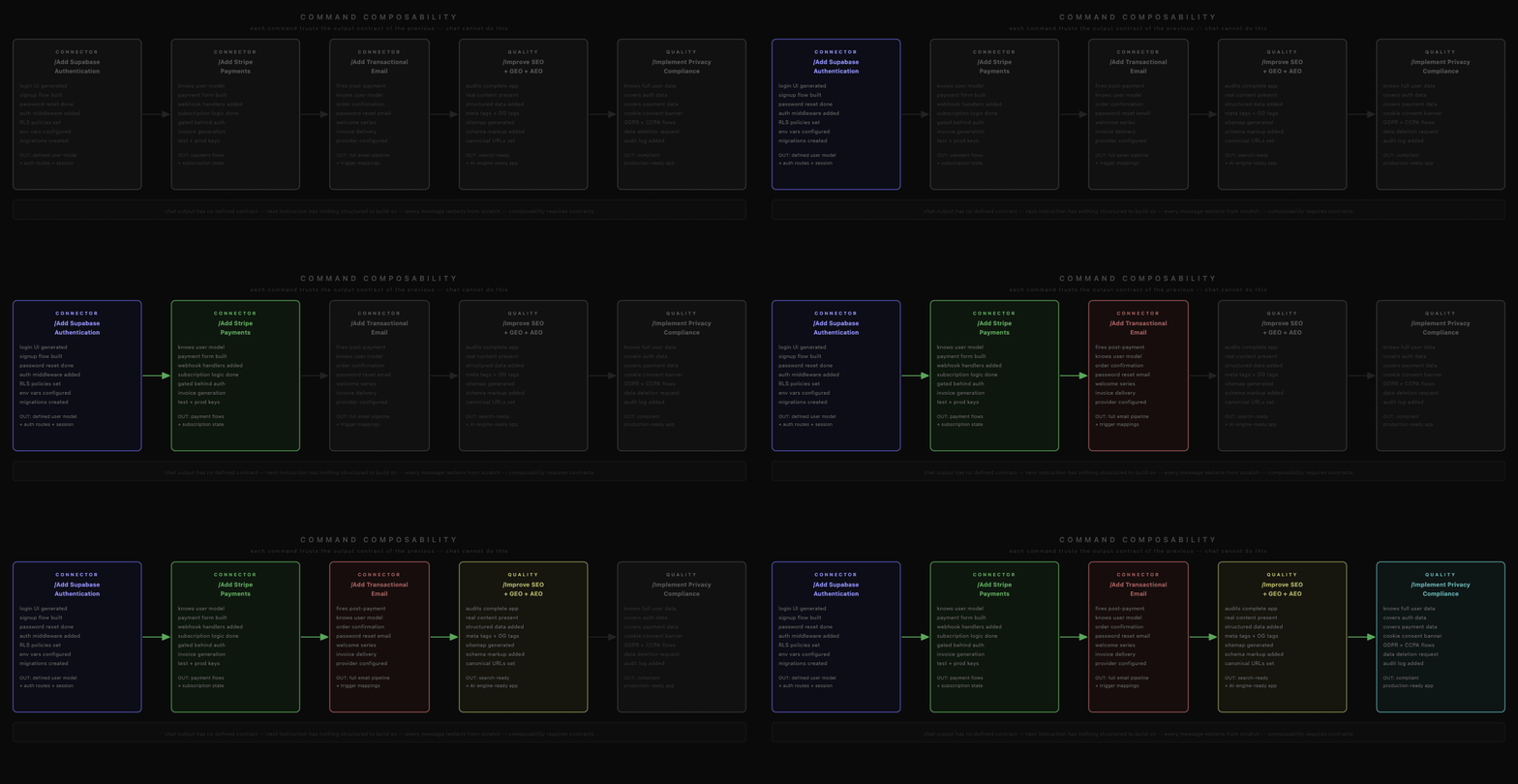
Because every command has a defined output contract, commands can chain. Each command trusts that the previous one left the codebase in a known state.
1/Add Supabase Authentication
2→ auth in place: login UI, middleware, RLS, migrations1/Add Stripe Payments
2→ payments gated behind auth; Stripe knows the user model1/Add Transactional Email Notifications
2→ order confirmation fires after successful payment1/Improve SEO
2→ audit runs against the complete, functional application1/Implement Privacy Compliance
2→ GDPR/CCPA covers all user data the app now collectsThe privacy command at the end doesn't need to guess what user data exists. It reads the auth configuration, the payment setup, and the email configuration the previous commands established and verified.
Chat cannot do this. An instruction doesn't have an output contract. You cannot chain instructions the way you chain commands because you cannot trust what the previous instruction actually produced. This is structural — not a model quality problem. Making the model smarter doesn't give you composability.
The Redesign Engine
The Redesign family is eight commands, one comprehension layer. It's the most architecturally complex part of the system.
Every redesign command starts with structural reading of the input URL. Not a screenshot. The system parses the live DOM and builds a structural intermediate representation:
- Content blocks tagged by semantic role (hero, nav, CTA, body, footer)
- Layout expressed as a containment tree (not absolute positions)
- Design language extracted as abstract properties (spacing rhythm, type scale ratio, color temperature, visual density)
- Visual hierarchy computed from element weight
This shared comprehension layer is built once. What makes each command different is its constraint set — three questions:
| Command | What stays | What changes | Diagnosis first |
|---|---|---|---|
/Reimagine Website Design | Every word | Entire visual system | None — unconditional |
/Full Website Makeover | Brand intent | Design + copy | What content actually means |
/Mobile-First Redesign | Content, features | Layout architecture | Current breakpoint behavior |
/Redesign from Heatmap | Structure | Element positions, visual weight | Why zones are hot or cold |
/Fix Conversion Issues | Design system | Conversion blockers | Root cause of drop-off |
/Fix Visual Hierarchy | Content, layout | Visual weight distribution | Intended vs actual hierarchy |
/Generate Brand-Matched Page | Nothing | Everything | Design language of reference |
/Redesign Like Competitor | Your content, brand | Visual style | Their design language |
Eight commands. Eight constraint sets. One comprehension layer.
Adding a ninth command means defining a new constraint set — not rebuilding the comprehension engine.
The Heatmap Problem: Ambiguous Inputs
/Redesign from Heatmap forced me to solve something no other command required: the input data itself has two opposite interpretations.
A cold zone on a heatmap means low user attention. But why it's cold has two completely different answers:
- It's irrelevant. Users correctly ignore it. Action: de-emphasize or remove.
- It's important but invisible. Users miss it because it lacks visual weight. Action: make it larger, increase contrast, reposition to a prominent location.
These are opposites. Acting on the heatmap data without diagnosing which interpretation is correct will either bury your CTA or give your legal disclaimer a hero section.
The fix: cross-reference heatmap data against the structural representation. A cold zone around a primary CTA (identified by semantic role) means the CTA is important but invisible. A cold zone around a legal disclaimer means users correctly ignore it.
Without this diagnosis step, the system would optimize everything for maximum attention equally. That's the wrong goal — some things should be ignored.
Visual Hierarchy as Computable Properties
/Fix Visual Hierarchy took the longest to get right because it requires the system to make a judgment that human designers make intuitively: where should the eye go first, second, and never?
I decomposed "visual hierarchy" into five measurable properties:
| Property | What it measures | Why it matters |
|---|---|---|
| Type scale ratio | Size gap between headings and body | Below 1.5×, a heading doesn't register as a heading |
| Contrast delta | Color contrast vs neighbors | Highest contrast wins attention. Equal contrast = split attention |
| Whitespace isolation | Space around element vs neighbors | More space = more prominence. Tight packing = visual noise |
| Position weight | Where in the viewport | Top-left dominates in LTR layouts. Below fold = invisible |
| Size vs viewport | Element area as % of screen | A CTA at 3% is invisible. At 8%, it registers instantly |
The command computes all five for every visible element, generates a ranking, and compares it against the intended hierarchy derived from semantic roles (primary CTA > secondary CTA > nav > body > legal).
Where they diverge: the command identifies which specific property is causing the mismatch and adjusts only that. A CTA with the right color but wrong size gets enlarged. A heading with right size but insufficient contrast gets a color shift. Nothing else changes.
That's the difference between a command and a chat response. A diagnosis, then a minimal targeted correction.
The Discoverability Property
There's a second reason we surface commands explicitly rather than routing through chat detection.
Type / and you see 80+ operations organized by category. You discover capabilities you'd never think to ask for in a chat box.
/Generate GEO and AEO Report — most people don't know what GEO and AEO are. They'd never type this. But when they see it in the menu under "GEO", they get curious, click it, and learn their app can be optimized for AI search engines.
/Implement Privacy Compliance — nobody wakes up thinking "let me ask the AI to make my app GDPR compliant." But seeing it in a menu makes it obvious.
In a pure chat interface, the discovery surface is limited to what users can imagine asking for. With commands, the discovery surface is the entire capability list. The menu doesn't just execute — it educates.
What It Looks Like From the Outside
Type /. A menu appears. Pick a command. Answer a couple of questions if prompted. The operation runs. Your preview updates.
The codebase analysis, the ordered execution, the per-step validation, the dependency taxonomy, the constraint engine, the heatmap cross-referencing, the hierarchy computation — all invisible. All running underneath.
The engineering complexity exists so that someone building a real product can chain authentication, payments, email, SEO, and GDPR compliance onto their application — correctly, completely, consistently — by picking items from a menu.
80 commands. Each one a pipeline. Each pipeline engineered so the user never has to be.
Key Takeaways
- Rocket's Build layer contains two architecturally distinct systems: a probabilistic chat interface and a deterministic slash command pipeline engine — not two modes of the same system.
- Every slash command is a multi-step pipeline with a defined input contract, ordered execution steps, per-step validation, and a verified output contract — producing the same codebase state regardless of how the command was triggered.
- The 80+ commands are organized into 6 dependency layers (Foundation, Connectors, Quality, Precision, Recovery, Reimagine) that mirror real production architecture — running Quality commands before Foundation commands produces audits against an incomplete product.
- Command composability is only possible because each command has an output contract — you cannot chain chat instructions the same way because an instruction doesn't guarantee what it produced.
- The Redesign engine is 8 commands sharing 1 comprehension layer; each command defines a different constraint set (what stays, what changes, what diagnosis runs first) rather than a separate parsing engine.
- Visual hierarchy is decomposed into 5 measurable properties (type scale ratio, contrast delta, whitespace isolation, position weight, size vs viewport) — the
/Fix Visual Hierarchycommand adjusts only the specific property causing the mismatch.
Table of contents
- -The Problem That Started Everything
- -The Architectural Decision
- -What a Command Actually Is
- -The Command Taxonomy
- -Composability: What Chat Cannot Do
- -The Redesign Engine
- -The Heatmap Problem: Ambiguous Inputs
- -Visual Hierarchy as Computable Properties
- -The Discoverability Property
- -What It Looks Like From the Outside
- -Key Takeaways