

Why do collaboration tools matter? Great team apps unify communication, tasks, and progress, reducing confusion, boosting productivity, and helping remote teams stay organized, aligned, and on schedule, consistently working together.
What actually goes into building a team collaboration app that people enjoy using?
The best collaboration software brings people together to talk, plan, manage tasks, and track project progress all in one place. It moves work forward with less confusion and more clarity.
In fact, teams that use collaboration tools are much more likely to stay productive and on schedule. According to WifiTalents workplace collaboration statistics, 67% of remote workers say collaboration tools make their work easier.
Why Team Collaboration Apps Matter?
Team collaboration isn’t just buzzwords. It’s how work gets done in small teams and big businesses. When teams communicate well, projects run more smoothly. When they don’t, tasks go missing, communication breaks down, and deadlines slip.
Good collaboration tools help:
- Stay on the same page with team communication
- Organize tasks and assign tasks to the right people
- Track project progress in real time
- Share documents and file sharing without email chaos
So many apps promise perfection. Some deliver better than others. Let’s break down how this landscape really works.
What Team Collaboration Apps Do?
Before you jump into building one, know what users expect from collaboration software. Think of it as a toolbox. Each tool has a job that helps the team get work done.
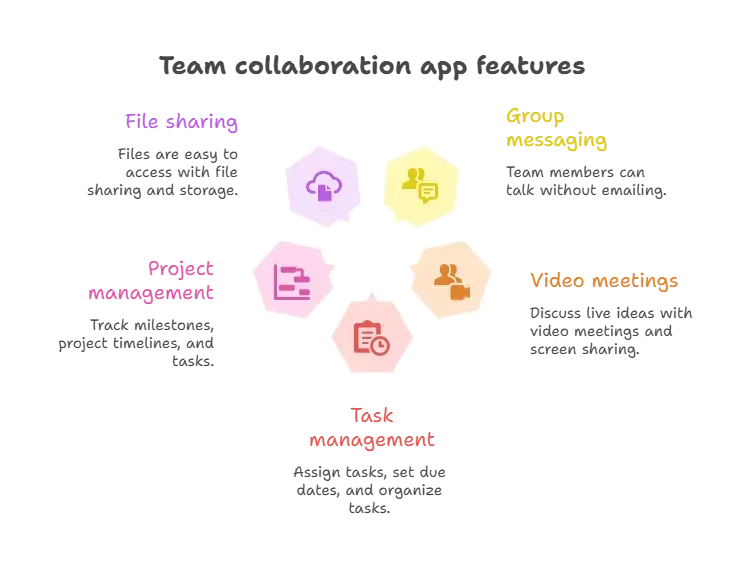
These features ensure users can talk, plan, and manage workflows without switching between too many apps.
Step by Step: Building Collaboration Software
Building collaboration software doesn’t need to feel mysterious or heavy. It’s mostly about making smart choices in the right order.
Break it down into clear steps, and the whole process starts to feel manageable instead of intimidating.
1. Define Who Will Use It
Start with a clear idea of your audience.
Are your users:
- Small teams needing quick chats?
- Cross-functional teams managing complex workflows?
- Remote or distributed teams working across time zones?
Understanding their needs helps pick the right features.
After that, decide which problem you solve better than others.
2. Pick the Collaboration Features First
Once users are clear, list the collaboration tools your app must include.
Prioritize:
- Teams chat and direct messages
- Video meetings and screen sharing
- Task creation and task tracking
- Project planning boards
- Drag and drop task cards to organize tasks
Think of it like setting the foundation before building floors.
3. Design the User Experience
A simple interface keeps people happy. Most teams switch collaboration platforms because the old one feels clunky. Clean slides, easy menus, and clear labels reduce frustration.
4. Organize Tasks and Projects
Allow teams to create boards for multiple projects.
Let them:
- Assign tasks
- Use to-do lists
- Track deadlines
- See project progress
This isn’t fancy stuff. But it’s what makes the collaboration software actually usable.
When these steps come together, teams get a workspace that actually works. No extra clicks. No guessing where things live.
Just clear tasks, steady communication, and projects that move forward without friction. That’s the difference between a tool people tolerate and one they use every day.
Choosing the Right Collaboration Tools to Build With
While building from scratch is one route, many teams prototype using existing software. Many collaboration tools already offer a free version or plan.
Consider how tools like Microsoft Teams or Google Workspace fit into your design. These platforms have robust communication tools and built-in file sharing. You can learn a lot from how they structure channels, threads, and task assignments.
Some teams use project management apps such as Trello or Asana to visually manage tasks and workflows. These tools let you drag boards and see what’s happening in real time.
Here’s a simple comparison to help think about what each type offers:
| Tool Type | Main Strength | Looks Good For |
|---|---|---|
| Communication tools | Chats and video meetings | Daily team communication |
| Task management tools | Organizing tasks | Small to mid-team task flow |
| Collaboration platforms | All-in-one workspace | Central hub for projects |
| Project management features | Milestones and timelines | Complex project planning |
This table shows how the components came together to form the larger puzzle.
Practical Tips That Make a Difference
So you’re building collaboration software. Great! Keep these human-tested tips in mind:
Add a Free Version that Isn’t Too Limited
Give people a free version that they can actually use. Not something so weak that they can’t test real collaboration features. It’s how users fall in love before they consider paid plans.
Good free plans usually include:
- Teams chat
- Basic file sharing
- A limited number of projects
- Simple task tracking
Once team members see value, they’ll gladly upgrade to two or three paid plans with more features.
Think About Project Scaling
Small teams might be fine with basic features. Distributed teams and larger groups need:
- Advanced project management features
- Better file storage
- Strong search functions across chats
- Custom fields in task cards to keep everything sorted
These features help teams that grow or manage complex project management.
Maintain Smooth Team Communication
Poor communication is a killer. Make messaging intuitive. Include:
- Group chats
- Threaded comments
- @mentions in messages
- Quick file previews
And please don’t make users jump between screens just to reply. Keep everything right where they expect it.
A Real Community Take
Real users often share the most honest feedback. In a Reddit discussion about no-code and AI app builders, one user highlighted that Rocket.new’s project setup reduces cleanup later.
“Rocket.new helps avoid messy setups at the start, which saves time later when the project grows.”
Team Collaboration App Development With Rocket.new
Rocket.new supports the early stages of building collaboration software. Teams describe their needs, such as task lists, internal tools, or shared views.
The platform then creates a usable app structure. This keeps attention on workflows, task flow, and collaboration features rather than on technical setup.
It’s useful during project planning or when teams want to validate ideas quickly.
Top Features
- Prompt-based app creation for internal tools
- A free plan for early testing and experiments
- Automatic generation of UI and backend logic
- Templates that can be adapted for task tracking or shared workspaces
- Code export for teams that want further customization
These features help teams shape tools around real work needs.
OKR Tracking for Team Collaboration
Rocket.new includes an OKR Tracking template that supports team collaboration around goals and progress. The template helps teams manage objectives and key results with a clear timeline view. It shows milestones, dependencies, and updates across departments in one place.
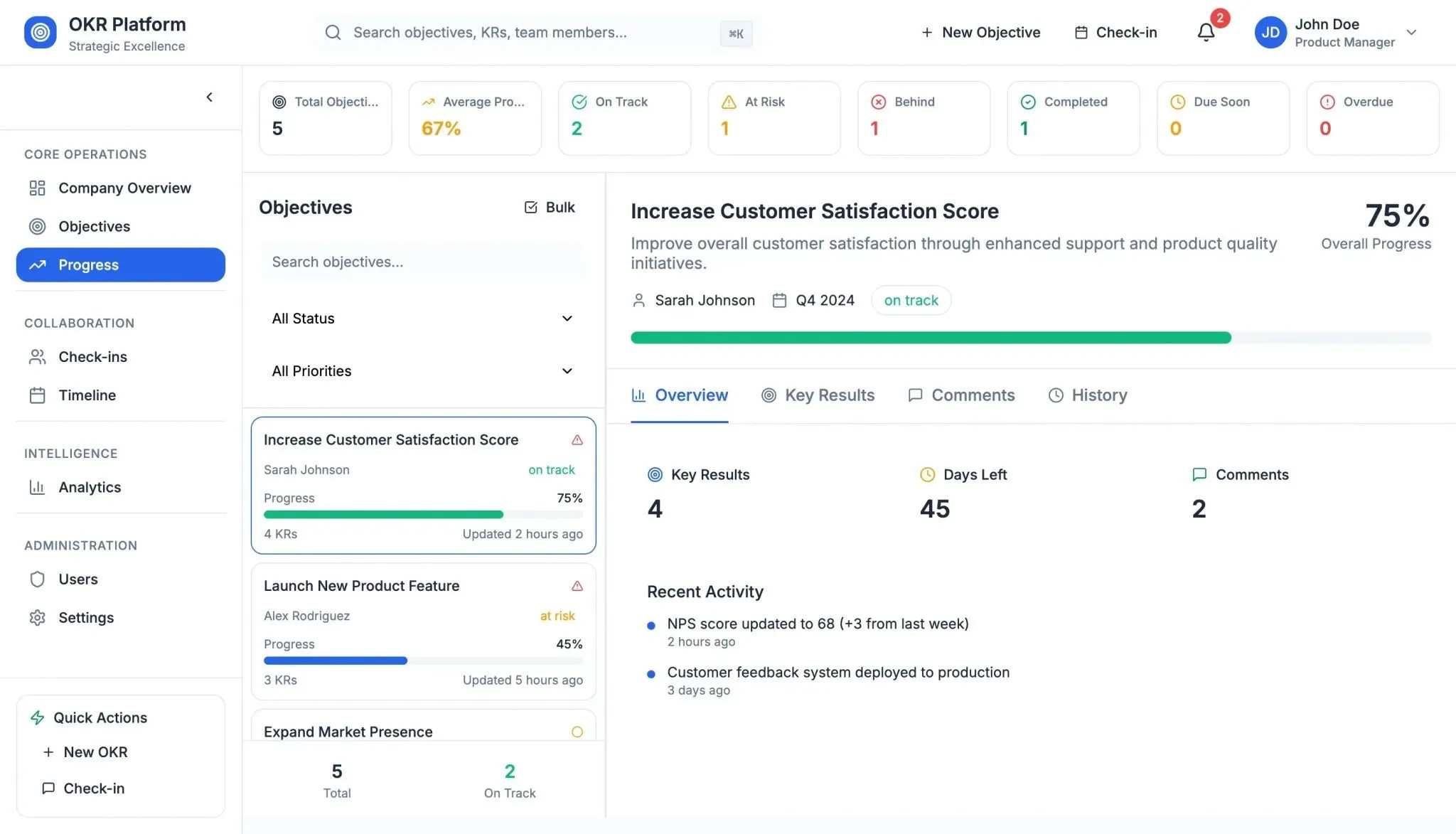
Teams can use check-ins for real-time collaboration, review progress through simple analytics, and adjust views using customizable dashboards. It works well for both technical and non-technical users and supports structured planning without complexity.
Team Collaboration App Development Made Simple
Team collaboration often breaks down because work feels scattered. People lose track of messages, tasks slip through the cracks, and file sharing becomes messy. That’s the problem most teams face.
A solid collaboration tool brings everything together in a way that feels natural. When teams use the right collaboration software, they see clear task lists, communicate more effectively, and see project timelines fall into place.
The main takeaway on team collaboration app development is this: build tools that feel intuitive and make work more predictable. Choose features that help teams talk, plan, and see progress without bouncing between too many apps.
Table of contents
- -Why Team Collaboration Apps Matter?
- -What Team Collaboration Apps Do?
- -Step by Step: Building Collaboration Software
- -1. Define Who Will Use It
- -2. Pick the Collaboration Features First
- -3. Design the User Experience
- -4. Organize Tasks and Projects
- -Choosing the Right Collaboration Tools to Build With
- -Practical Tips That Make a Difference
- -Add a Free Version that Isn’t Too Limited
- -Think About Project Scaling
- -Maintain Smooth Team Communication
- -A Real Community Take
- -Team Collaboration App Development With Rocket.new
- -Top Features
- -OKR Tracking for Team Collaboration
- -Team Collaboration App Development Made Simple

