

AI-powered full-stack tools remove the heavy lifting from development by automating repetitive coding, backend setup, testing, and deployments. Platforms like Rocket.new turn simple prompts and designs into production-ready apps, helping teams launch MVPs faster and build with a smoother, smarter workflow.
How software teams build full-stack apps faster without typing endless code?
An AI tool for full-stack automation that helps teams build AI agents, create complex features, and launch apps in record time.
According to the Report, 71% of developers say AI development tools speed up their workflow and reduce repetitive coding.
This blog breaks down how this smarter approach to building and scaling changes full-stack development. It keeps things simple, friendly, and practical.
Why Talk About AI Tools for Full Stack Development?
Full-stack development eats up a lot of time. Not because of big ideas, but because of small, repeated work. Writing boilerplate code. Setting up backend services. Running tests. Fixing tiny bugs that somehow take 30 minutes. It adds up fast.
This is where AI tools step in. They handle repetitive tasks so developers can focus on core logic, product decisions, and clean architecture. Less busywork. More actual building.
Think of it like a chef in a kitchen. The chef creates the dish. The assistant chops, preps, and cleans. Same outcome. Way less frustration.
Instead of fighting the process, teams can move faster and think more clearly.
Next, let’s look at what these tools actually bring to the table.
What Full Stack AI Tools Actually Do?
These development tools are more than assistants. They are AI-powered development platforms that understand natural language and translate it into actionable output.
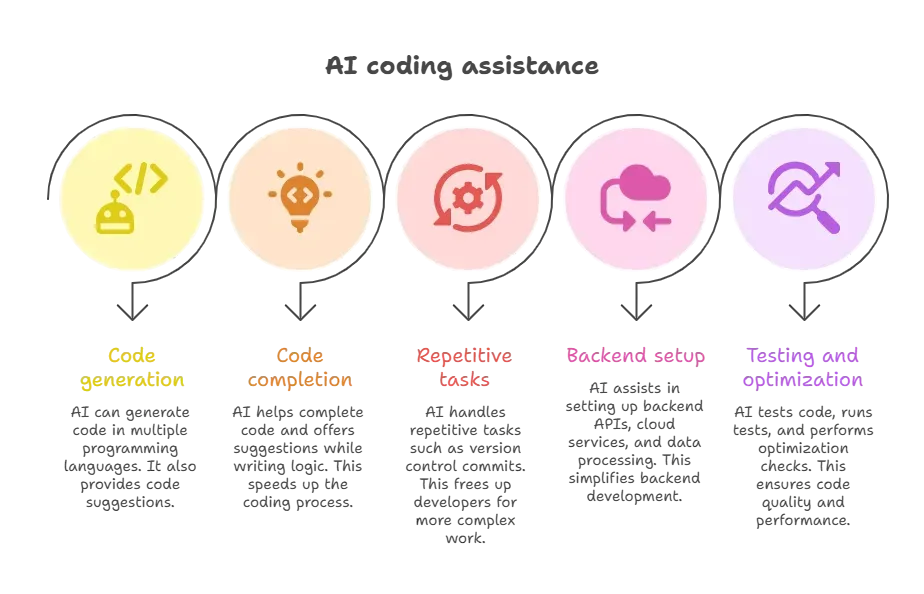
Core Advantages of AI-Powered Full Stack Workflows
Well, let’s be honest. Software development has many moving parts. Using AI tools doesn’t take away your power as a developer. It provides AI support only when you need it.
Here’s why teams adopt AI in their development process
- Reduced grunt work: Let the tools automate repetitive tasks so teams can think bigger.
- Faster delivery: Get production-ready components much sooner.
- Natural language input: Tell the tool what you need in plain language.
- Boost productivity: Developers spend more time on product strategy and less on repetitive code.
This is particularly helpful if you’re building full-stack apps for internal tools or customer projects.
A Quick Look at Popular AI Tools for Full Stack Development
Here’s a simple comparison table of how different AI tools usually help teams:
| Tool Type | Focus | Helps With |
|---|---|---|
| Chat Assistants | Code suggestions | Code completion, brainstorming logic |
| Full Stack Builders | App creation | Code generation, backend setup, deployments |
| AI Agents | Workflow runs | Monitoring, automation triggers |
| Code Review Tools | Quality & security | Bug detection, security vulnerabilities scanning |
| Debugging & Testing Tools | Reliability | Automated testing, error detection, performance debugging |
| Analytics Tools | Insights & tracking | User behavior analysis, performance metrics, usage insights |
| Deployment Tools | Release automation | CI/CD pipelines, environment setup, release management |
| Security Tools | Application protection | Threat detection, compliance checks, vulnerability management |
AI isn’t replacing developers. It’s not a replacement for deep thinking and design. However, it eliminates many tedious tasks.
A Real Community Take on AI in Automation
Here’s a candid user insight from LinkedIn about AI and automation tools in real workflows. This one reflects how people talk about automation outside corporate hype:
“LinkedIn has turned AI into theatre. Every day it’s the same cycle ‘10 AI tools you must try’. ‘My AI agent runs my business while I sleep’. … Real AI work isn’t loud. It’s boring, technical, and deeply unsexy. And it works.”
This quote shows that real-world AI tools must handle edge cases, scale under load, and not just look cool in demos.
Rocket.new: A Full Stack Builder with Natural Language Magic
If the idea above sounds promising, Rocket is one platform that puts it into practice. It lets people describe what they want in plain language and generates a live app, including the frontend, backend, and everything in between.
Rocket turns casual descriptions into production-ready apps. It directly aligns with the full-stack development approach by converting AI prompts into executable code and application structure. No drag-and-drop interface is needed. Instead, natural language guides the tool to build web apps, dashboards, and even integrated backend services fast and clean.
Top Features from the Rocket Platform
Rocket offers several things that make it stand out among the best AI tools for building full-stack apps:
- One-prompt full app creation generates frontend, backend, API endpoints, and auth.
- Figma design import and conversion into real UI code.
- Built-in backend setup with database schemas and authentication.
- Deployment options with GitHub and custom domains.
All this works across multiple systems, so developers and non-technical teams can build real apps without wrestling with toolchains.
If building full-stack apps through plain language sounds like a better way to work, trying Rocket is worth it. It turns ideas into working apps without long setup cycles or tool hopping.
👉Build Full-stack app with Rocket.new
It’s a practical way to see how AI-powered development fits into real full-stack workflows, especially for MVPs, internal tools, and fast-moving teams.
Use Cases
- MVPs in minutes: Founders can build and launch a product idea in record time.
- Internal tools for teams: Construct dashboards, portals, and internal systems.
- Design-first workflows: Figma designs are translated directly into the live app UI.
This makes the development process feel less like wrangling code and more like shaping ideas.
Overall, Rocket.new shows how AI-powered tools can support full-stack development without getting in the way. It keeps the focus on ideas, flow, and execution rather than setup and repetitive work. For teams that want to move fast while staying in control, this approach makes sense.
How AI Tools Change the Daily Workflow
Daily full-stack development often feels scattered. One moment is spent fixing a small bug, the next switching tools, then back to documentation.
AI tools quietly change that rhythm. They smooth the workflow's rough edges and reduce unnecessary back-and-forth.
- Less time on small fixes: AI-powered development tools can suggest fixes or run tests.
- Less context switching: You stay in the same flow instead of jumping between editors and docs.
- Better resource allocation: Developers can focus on strategic work instead of routine tasks.
- Natural language conversations: Say what you want. The AI models make it real.
There’s still human oversight. AI won’t magically know your business logic unless you guide it. It won’t replace deep design thinking or architectural planning. But it sure makes the ride smoother.
When AI Tools Aren’t All You Need
AI tools do a lot, but they’re not perfect. Some common real-world limitations include:
- Accuracy depends on how well you phrase prompts (try clear AI prompts).
- Tools may require manual edits for complex logic or edge-case handling.
- Some platforms’ training data or privacy setup requires review for sensitive data.
- Vendor lock-in can happen if code export isn’t available, though some tools let you own the code.
This means experienced developers still have a job. They just get more time for creative problem-solving.
The Future of Full-Stack Development with AI
Full-stack development can be slow and repetitive. Teams spend too much time on grunt work instead of solving real problems. Use an AI tool for full-stack automation to cut down repetitive tasks, help with code generation, and get production-ready results faster. These tools take natural-language instructions, generate code, set up backend logic, and help launch apps without sacrificing quality.
AI isn’t here to replace developers. It’s here to take on repetitive tasks, boost productivity, and make full-stack development less of a grind and more of a creative journey.
Table of contents
- -Why Talk About AI Tools for Full Stack Development?
- -What Full Stack AI Tools Actually Do?
- -Core Advantages of AI-Powered Full Stack Workflows
- -A Quick Look at Popular AI Tools for Full Stack Development
- -A Real Community Take on AI in Automation
- -Rocket.new: A Full Stack Builder with Natural Language Magic
- -Top Features from the Rocket Platform
- -Use Cases
- -How AI Tools Change the Daily Workflow
- -When AI Tools Aren’t All You Need
- -The Future of Full-Stack Development with AI

