
What features make the best AI platform for idea-to-app creation most effective? AI app builders accelerate development, simplify workflows, and help teams transform concepts into functional apps faster, saving time and resources.
What makes an AI app builder stand out when turning ideas into an app quickly?
The answer is predictable speed.
A recent McKinsey report found that teams using AI tools trim early app development cycles by nearly 40%. That single data point explains why more creators, startups, and development teams shift toward AI app building.
So, this blog walks through how the best AI app builders work today, why ai app building has become a go-to method for shaping complex applications, and what you should look for when picking a platform that fits your workflow.
Why AI App Builders Matter Right Now?
If you step back for a moment, the shift becomes obvious.
People want tools that turn natural inputs into real output without slowing down. Teams look for platforms that can manage backend logic, user interface elements, data models, and workflow automation without needing endless setup.
And also they prefer:
- Speed: Move from idea to a working app much faster than traditional development cycles.
- Low Coding Pressure: Lets non technical users build confidently without worrying about heavy syntax.
- Visual Editor: Helps shape layouts and logic in a clear, drag-and-drop style environment.
- Rapid Prototyping: Makes it easy to test app flows, validate ideas, and adjust before scaling.
- AI Assistance: Handles repetitive tasks and helps structure logic, saving mental load and time.
- Data Connections: Supports linking data sources and syncing data with tools like google sheets.
- Guided Templates: Offers layouts and flows that help build functional apps without starting from scratch.
- Team Collaboration: Allows teams to make updates and iterate quickly with less back-and-forth.
- Startup Friendly: Gives smaller teams the freedom to ship polished apps without large engineering resources.
So the real question becomes: which platforms help teams build fully functional apps, launch full stack apps, and turn ideas into a working app fast enough to test and refine?
What Makes Top AI App Builders Stand Out?
When you compare tools side by side, many seem similar at first glance.
But with a closer look, you’ll notice the key difference comes from how well each platform uses AI assistance during the moment-to-moment app building experience.
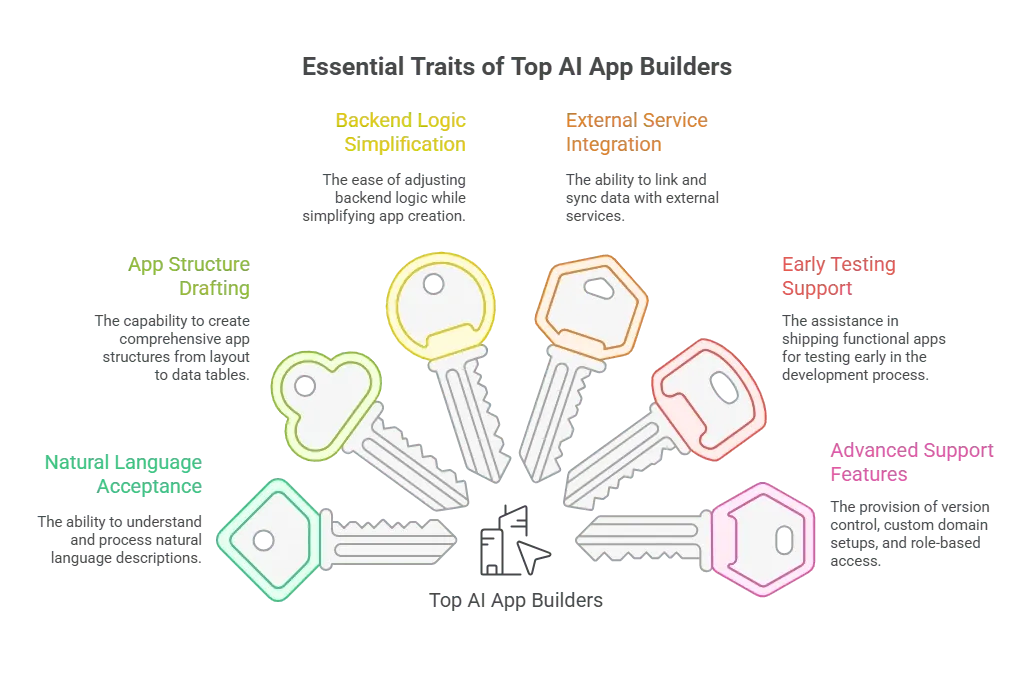 Modern tools aren’t just generators anymore. They guide users through AI app building, help with writing code when needed, and provide room to fine tune results. Many also offer agent mode settings that update logic or flows without requiring manual steps.
What Teams Usually Look For?
| Feature | Why It Matters |
|---|---|
| Natural language support | Helps teams describe app ideas and see them take shape. |
| Visual editor | Makes layout updates easy. |
| Full stack capability | Useful for full stack apps and complex apps. |
| AI agent support | Helps automate tasks through agent mode. |
| Integrations | Smooth connections with APIs, google sheets, and other tools. |
| Pricing | Clear paid plans, paid plans start details, and a solid free tier. |
Community Insight From Real Users
People share their experiences often, especially in developer spaces. One Reddit user described the difference clearly:
“I’ve been experimenting with Rocket.new recently … it does a really solid job of analyzing everything, and then generates a to‑do list where you can pick which screens to create.”
Core Features to Look For
Let's see a few factors that shape the overall experience.
Natural Language Workflow: Teams want tools that understand natural language clearly, respond in a structured way, and guide them through layout choices and backend logic adjustments.
Clear Visual Editor: A strong visual editor gives teams space to adjust the user interface, refine screens, modify component placement, and change styles without feeling boxed in.
Backend Logic Handling: Teams working with complex applications need backend logic to feel manageable. Conditional flows, triggers, checks, and multi-step actions should be easy to follow.
AI-Driven Generation: Platforms with strong ai powered features can generate draft screens, data tables, code snippets, and runtime flows for the entire app. This makes the early stages much faster.
Flexible Data Sources: Reliable integrations with APIs, google sheets, and other data sources help teams manage data cleanly. This cuts down on repeated linking work.
Workflow Automation: Platforms offering workflow automation make routine actions like form submission, approvals, routing, and notifications easier and more predictable.
Rocket.new: A Complete Vibe Solutioning Platform
Rocket.new has become a notable pick for teams who want a fast, organized way to create apps. The workflow centers around simplicity and clarity: write a single prompt, get a structured layout, and refine it using visual tools.
Rocket.new works well for full stack apps, internal tools, and client portals because it cuts the typical setup trouble most teams face early in app development.
Use Cases & Examples of Rocket.new
| Use Case / Example | What’s Built with Rocket.new |
|---|---|
| Client Onboarding / Project‑Tracking Portal | One user on LinkedIn said they built a “Client Onboarding Portal” in just 15 minutes with login, project tracking, file uploads, automated emails. (LinkedIn) |
| MVP Web or Mobile App for Startups | Public write‑up titled How to Build a $1M App with a Single AI Prompt Using Rocket.new describes using a single prompt to create a full app front end, back end, deployment included. (Medium) |
| Internal Tools / Dashboards / Admin Back‑ends | In an overview of Rocket.new use‑cases, many internal‑tool, dashboard, and back‑office apps are listed: compliance dashboards, HR portals, resource planners, team‑management tools, analytics dashboards, etc. (docs.rocket.new) |
| Landing Pages / Marketing or Promotional Sites | Rocket’s own template library supports landing pages, brand websites, marketing sites, or portfolio‑style pages, useful for service providers, freelancers, agencies. (Rocket.new) |
| Side‑Projects, Proof‑of‑Concepts, or Hobby Apps | Some developers use Rocket.new to quickly mock up ideas: small utilities, experimental apps, early‑stage prototypes without committing to a full dev effort. (AI BREWS) |
How AI Changes the App Building Process?
Once teams try AI app building tools, the difference becomes clear. Many platforms help map the layout automatically, generate flows, and align data sources within minutes. Others provide AI assistance that adjusts screens or rewrites logic without needing full manual edits.
Some tools even include an AI agent or agent mode that updates routes, logic, or API connections with prompts. Developers enjoy the extra flexibility because they can still write or tweak code when they want more control. And for those with limited coding knowledge, generated drafts reduce confusion and speed up decision making.
This mix of generated layouts, AI features, workflow automation, and manual editing helps teams build apps faster. And even when the project grows into complex apps, the structure stays flexible enough to continue improving it without starting over.
How to Pick the Right Platform?
Choosing the right platform depends on your pace, team size, and technical expectations.
Still, a few questions help narrow down the best fit:
- Does the platform make the user interface easy to adjust?
- Does it support backend logic in a structured way?
- Can it handle both mobile app and web app outputs?
- Does it integrate cleanly with APIs, google sheets, and external data sources?
- Does it support GitHub integration, giving engineers more control?
- Can it deliver a working app quickly for rapid prototyping?
- Do the paid plans and pricing model make sense for long-term use?
Teams that plan to deliver fully functional apps or large complex applications often lean toward tools with strong ai dev tools, flexible data layers, and compatibility with other platforms they use daily.
Key Decision Points
| Area | What to Check |
|---|---|
| AI flow | Support for ai prompts, agent mode, and generation strength. |
| Control | Options like version control and more control over output. |
| Integrations | API support, api keys, and data sources. |
| Performance | Strength in building full stack apps and a functional app early. |
| Pricing | A sustainable free plan and a clear pricing model. |
Choosing the Best AI Platform for Idea to App Creation
Finding the right platform depends on your workflow, technical style, and long-term needs. A great tool helps shape everything from early screens to final deployment, keeps data structured, and allows flexible adjustments. Whether you are building a mobile app, a web app, or another type of app, the goal stays the same: turn app ideas into real, testable output.
The best ai platform for idea to app creation is ultimately the one that supports your pace, adapts to your changes, and allows you to ship confidently.
Table of contents
- -Why AI App Builders Matter Right Now?
- -What Makes Top AI App Builders Stand Out?
- -What Teams Usually Look For?
- -Community Insight From Real Users
- -Core Features to Look For
- -Rocket.new: A Complete Vibe Solutioning Platform
- -Use Cases & Examples of Rocket.new
- -How AI Changes the App Building Process?
- -How to Pick the Right Platform?
- -Key Decision Points
- -Choosing the Best AI Platform for Idea to App Creation