
Can AI tools for developers really speed up coding? AI coding assistants handle repetitive tasks, help generate code, write tests, and debug faster, allowing developers to focus on architecture and problem-solving.
Ever felt like coding could be faster and smarter?
According to Gartner, 75% of enterprise software engineers will use AI coding assistants by 2028, up from less than 10% in 2023, reflecting the rapid adoption of AI tools in development workflows.
That is a huge leap for anyone juggling multiple projects or tight deadlines. AI tools for developers are no longer just a nice-to-have. They actively reshape how software development happens.
Developers are no longer stuck typing out repetitive boilerplate code. Instead, they can rely on AI coding assistants to handle mundane tasks while they focus on architecture, logic, and problem-solving.
Why AI Coding Tools Matter?
AI-powered development tools are more than autocomplete helpers. They understand context, predict errors, and provide real-time code suggestions that fit project needs. This means less mental load switching between tasks and more focus on logic. Developers can generate code snippets, refactor code, and improve code quality with fewer mistakes.
AI coding tools also make collaboration smoother. When multiple developers work on the same project, AI ensures a consistent coding style, generates helpful code snippets, and assists with code documentation. This reduces errors and friction, keeping large projects running efficiently.
Well, here is a question. Why type out boilerplate code when an AI coding assistant can do it accurately in seconds? The best AI tools can work across multiple programming languages, making them versatile.
Top AI Tools For Developers
The right AI tools can make a massive difference in workflow and efficiency.
Developers can choose from tools that assist with everything from code completion to unit test generation. Depending on the project, different tools may be more effective at generating code, optimizing quality, or reducing repetitive tasks.
Here is a roundup of AI tools that make coding workflows smoother. Each tool offers unique features, so developers can pick the one that best fits their workflow.
1. GitHub Copilot
GitHub Copilot is a favorite for developers using VS Code. It offers AI-powered code completion and helps generate functional code from natural language descriptions. This means you can type a comment like "create a function to fetch API data," and Copilot will generate the actual Python code.
Other features include:
- Unit test generation, automatically creating tests to check your code
- Context aware suggestions that understand surrounding code to improve relevance
- Works across multiple files, making it perfect for larger projects
- Learns from your coding habits over time to improve suggestions
- Helps maintain consistent coding style across the project
GitHub Copilot is particularly helpful in speeding up repetitive coding tasks and maintaining consistent code style.
2. Tabnine
Tabnine provides AI assistance for multiple IDEs, not just VS Code. It excels in delivering real time code suggestions that match your project's style.
Key advantages include:
- Support for major programming languages
- Maintains coding style across team projects
- Offers a VS Code extension for smooth integration
- Reduces errors by predicting code that aligns with project context
- Helps speed up long, complex coding functions
Tabnine is ideal for developers who want predictive code suggestions while working on large or complex projects.
3. Replit Ghostwriter
Replit Ghostwriter is built for both learning and professional coding. It is particularly strong at generating code snippets, refactoring, and writing code documentation.
Highlights include:
- Generates automated test generation scripts for QA
- Offers project context awareness across multiple files
- Supports Python code and other programming languages
- Helps maintain coding style consistency
- Speeds up repetitive tasks, letting developers focus on logic
A ghostwriter is helpful when projects require both rapid development and maintainable code.
4. Kite
Kite focuses on real-time code suggestions, primarily for Python code, though it supports other languages as well.
Its key features include:
- Provides code explanations for complex logic
- Predicts entire functions or lines of code
- AI powered code completion for faster typing
- Helps reduce coding errors and debug time
- Supports machine learning and data analysis workflows
Kite is especially useful for developers working on Python-heavy projects or AI/ML pipelines.
5. Codeium
Codeium is a free AI coding tool for AI powered code generation. It works with VS Code extensions and provides accurate code suggestions for multiple languages.
Benefits include:
- Generates relevant code snippets for reuse
- Supports AI coding assistance across multiple languages
- Integrates with team workflows for consistency
- Offers code refactoring and completion features
- Speeds up repetitive coding tasks without additional cost
Codeium is perfect for developers seeking a robust, free tool to streamline coding tasks and improve code quality.
How VS Code Extensions Improve Coding Workflow
VS Code has become the go-to development environment for AI-powered coding. Extensions allow AI tools to work directly within the code editor, creating a seamless experience. They integrate real-time code suggestions, code snippets, and context-aware guidance directly into the workflow.
For example, VS Code extensions like GitHub Copilot and Tabnine let developers focus on building features rather than worrying about syntax or minor mistakes. These extensions also adapt AI suggestions to different programming languages, making cross-language development faster and easier.
| Feature | Benefit |
|---|---|
| AI powered code completion | Speeds up typing and reduces typos |
| Code snippets | Provides reusable blocks of code |
| Real time code suggestions | Catches errors while typing |
| Multiple programming languages | Works across Python code, Java, JavaScript |
| Context aware suggestions | Adapts to your project structure |
Rocket.new for Quick Project Launches
Rocket.new complements AI coding tools for developers by helping teams create new projects instantly. It integrates with GitHub and VS Code, streamlining the development setup.
Key features include:
- Ready-to-use project templates for multiple languages
- Starter code for faster project setup
- Smooth integration with AI powered code completion and code snippets
- Reduces setup time so developers can start coding immediately
- Ideal for teams looking to accelerate project launches
Rocket.new fits perfectly into workflows supported by AI powered coding assistants.
Features To Look For in AI Coding Tools
Not all AI coding tools are created equal.
Developers should focus on tools that provide context-aware suggestions, accurate code generation, and support for unit testing. The right features can dramatically improve workflow efficiency and code quality.
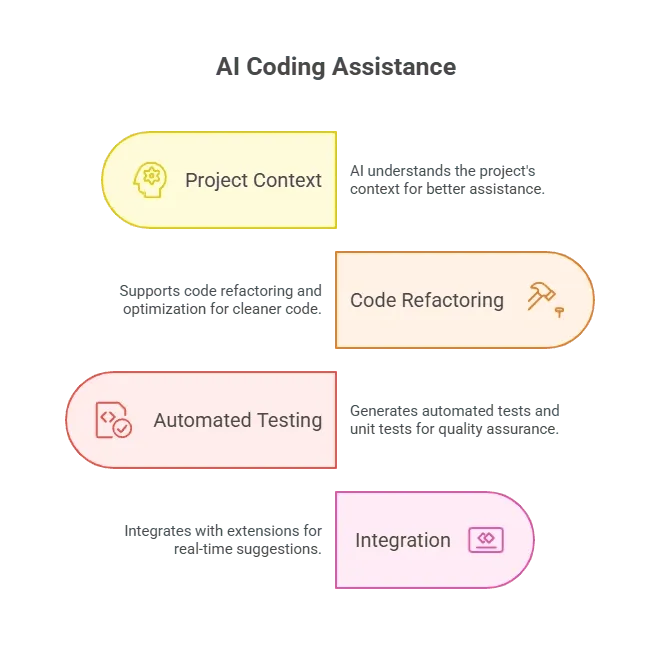 Selecting the right tools with these capabilities helps reduce errors and maintain code integrity.
Use Cases of AI Coding Tools
AI coding tools are useful at multiple stages of development. They support everything from generating functional code to maintaining clean, maintainable projects.
Typical use cases include:
- Code generation from natural language prompts
- Unit tests to catch errors automatically
- Code refactoring for cleaner architecture
- Code documentation for easier collaboration
- Error detection before running code
AI coding tools reduce repetitive work, allowing developers to focus on logic, architecture, and problem solving.
Best Practices Using AI Tools
To get the most out of AI coding tools, developers should approach them strategically. The goal is to save time and improve code quality without over-relying on AI.
Best practices include:
- Keep natural language prompts clear and concise
- Use AI for repetitive tasks and boilerplate code
- Review AI generated code for quality and security
- Combine multiple tools for code completion, documentation, and testing
- Train AI tools gradually to match coding style
Following these practices ensures AI coding tools complement workflows without creating dependency.
Common Challenges With AI Coding Tools
AI coding assistants are powerful, but they are not perfect. Developers must be aware of potential limitations to use them effectively.
Challenges include:
- Suggestions may not always be contextually accurate
- Generated code may require manual optimization
- Security concerns if AI generates insecure code
- Learning curve when integrating with existing workflow
Being aware of these challenges allows developers to use AI tools safely and efficiently.
Future of AI Coding Tools
AI coding tools will continue to evolve. Expect more accurate code completion, deeper context awareness, and better integration across multiple programming languages.
Future trends include:
- Improved unit test generation and automated testing
- AI assistants that understand project context across multiple files
- Collaborative AI tools acting as team members rather than just assistants
- Smarter suggestions for complex logic and architecture
The future promises AI tools that are increasingly indispensable for developers looking to optimize workflow and maintain high code quality.
AI Tools For Developers
AI tools for developers are changing the software development process. From code generation and code snippets to real time code suggestions and unit test generation, these tools streamline workflow, reduce errors, and let developers focus on creative logic. Smart use of AI coding assistants leads to faster development and cleaner functional code.
Table of contents
- -Why AI Coding Tools Matter?
- -Top AI Tools For Developers
- -1. GitHub Copilot
- -2. Tabnine
- -3. Replit Ghostwriter
- -4. Kite
- -5. Codeium
- -How VS Code Extensions Improve Coding Workflow
- -Rocket.new for Quick Project Launches
- -Features To Look For in AI Coding Tools
- -Use Cases of AI Coding Tools
- -Best Practices Using AI Tools
- -Common Challenges With AI Coding Tools
- -Future of AI Coding Tools
- -AI Tools For Developers