
A no-code app builder for startups helps teams move from idea to working product without writing code, combining prompt-based generation, a visual canvas, and 25+ integrations. Startups get web apps on Next.js and mobile apps on Flutter, both production-ready.
A no-code app builder for startups helps teams create apps quickly, handle shifts, and keep progress steady while focusing on ideas instead of hurdles. Startups move fast, budgets stay tight, and the right no-code platform turns early ideas into working products without slowing everyone down.
What "No-Code" Actually Means for Startups in Practice
The phrase "no-code app builder" covers a wide spectrum. Understanding where each tool sits helps founders pick the right one.
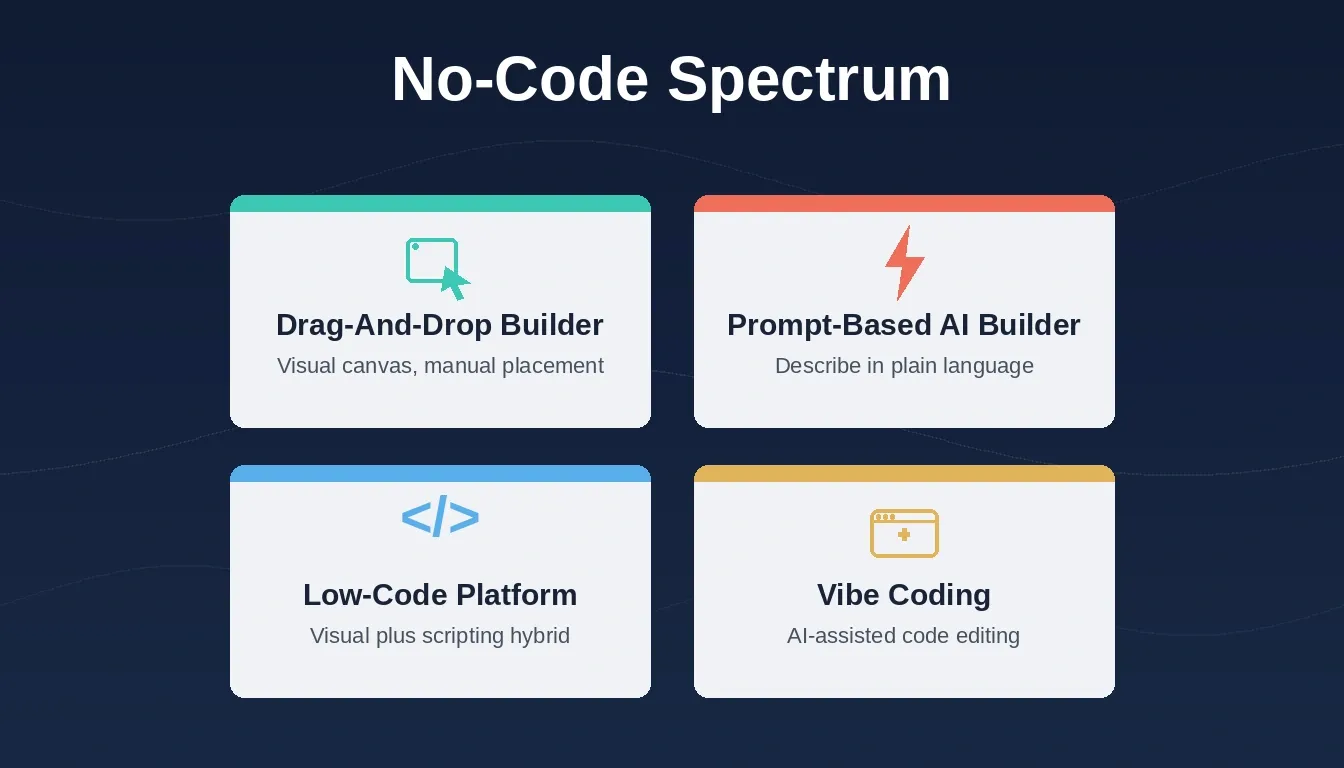
The no-code spectrum spans drag-and-drop builders, prompt-based AI builders, low-code platforms, and vibe coding tools.
Rocket sits in the prompt-based AI builder category. You describe your app in plain language and Rocket generates the screens, logic, and data layer automatically. From there, you refine through chat, click-to-edit on the visual canvas, Figma import, or by uploading a screenshot or wireframe.
This is meaningfully different from drag-and-drop tools. You are not placing components manually. You are directing an AI that writes production-grade Next.js (web) and Flutter (mobile) code, which you can download as a .zip, sync to GitHub, or deploy to Netlify in one click.
| Approach | How it works | Best for |
|---|---|---|
| Drag-and-drop builder | Visual canvas; users place and configure components manually | Designers comfortable with visual tools |
| Prompt-based AI builder | Describe in plain language; AI generates the full app | Founders and PMs who want speed |
| Low-code platform | Visual and code hybrid; requires some scripting | Developers building internal tools |
| Vibe coding | AI-assisted code editing in an IDE | Developers who write code but want AI help |
Why Startups Lean Toward No-Code Platforms
As teams try to move faster, no-code becomes more appealing. It fits naturally into quick iterations, short planning cycles, and constantly shifting priorities. Instead of waiting for developers to adjust screens or tweak flows, teams move directly into a no-code app builder.
This shift affects daily work. Product leads create advanced logic with a few prompts. Operations teams plug existing data into no-code apps. And teammates refine layouts on a visual canvas whenever needed.
The shift leads to faster decisions, clearer prototypes, and a lighter engineering load. Teams act quickly because they aren't blocked by long engineering cycles. Adjustments happen frequently, keeping momentum steady.
- Faster decisions: Teams act quickly because they aren't blocked by long engineering cycles.
- Clear prototypes: Ideas turn into something visual that everyone can review.
- Reusable parts: Components support multiple flows and layouts.
- Flexible workloads: Work spreads across product, marketing, ops, and design.
- Lighter engineering load: Developers spend more time on deeper logic rather than UI edits.
According to recent industry research, low-code and no-code platforms are projected to account for the majority of new application development activity in the coming years. Separately, Forrester reports that teams using no-code tools reduce development time by up to 50% compared to traditional methods.
How Startup Workflows Change
Figure 1: A no-code app builder for startups compresses the idea-to-testing cycle from weeks to hours.
What Startups Actually Need in a No-Code App Builder
Startups don't need every feature on day one. They need tools that match their pace. Some begin with simple web apps, others jump straight into mobile apps, and many need internal tools for operations.
- Fast iteration: Frequent updates keep apps aligned with shifting user needs.
- Pre-built components: Ready-made elements cut setup time significantly.
- App templates: A solid starting foundation helps teams begin quickly.
- Manage data: Linking spreadsheets or structured sources keeps information organized.
- Native mobile: Apps reach mobile audiences faster.
- Web apps: Browser-ready versions go live in minutes.
- Advanced logic: Conditional flows help build deeper interactions.
- API connections: External tools connect naturally when apps evolve.
- Low-code extension: When complexity rises, teams add custom touches.
Startup Needs vs. Features to Look For
| Startup Need | Why It Matters | Features to Look For |
|---|---|---|
| Fast iteration | Keeps product cycles moving | Prompt generation, app templates, simple flows |
| Data structure | Works with existing data | Google Sheets, API calls, Supabase |
| Mobile presence | Key for many audiences | Native mobile app, Flutter output |
| Deployment speed | Helps teams launch faster | One-click Netlify deploy, web app export |
| Growth capability | Supports audience expansion | Scalable apps, GitHub sync |
| Team collaboration | Keeps everyone aligned | Visual canvas, shared workspace |
For a deeper look at how low-code and no-code development fits into modern workflows, the comparison between approaches is worth reviewing before choosing a platform.
Use Cases by Startup Role
Different team members use a no-code app builder in different ways. The best platforms serve all of them without requiring a single line of code.
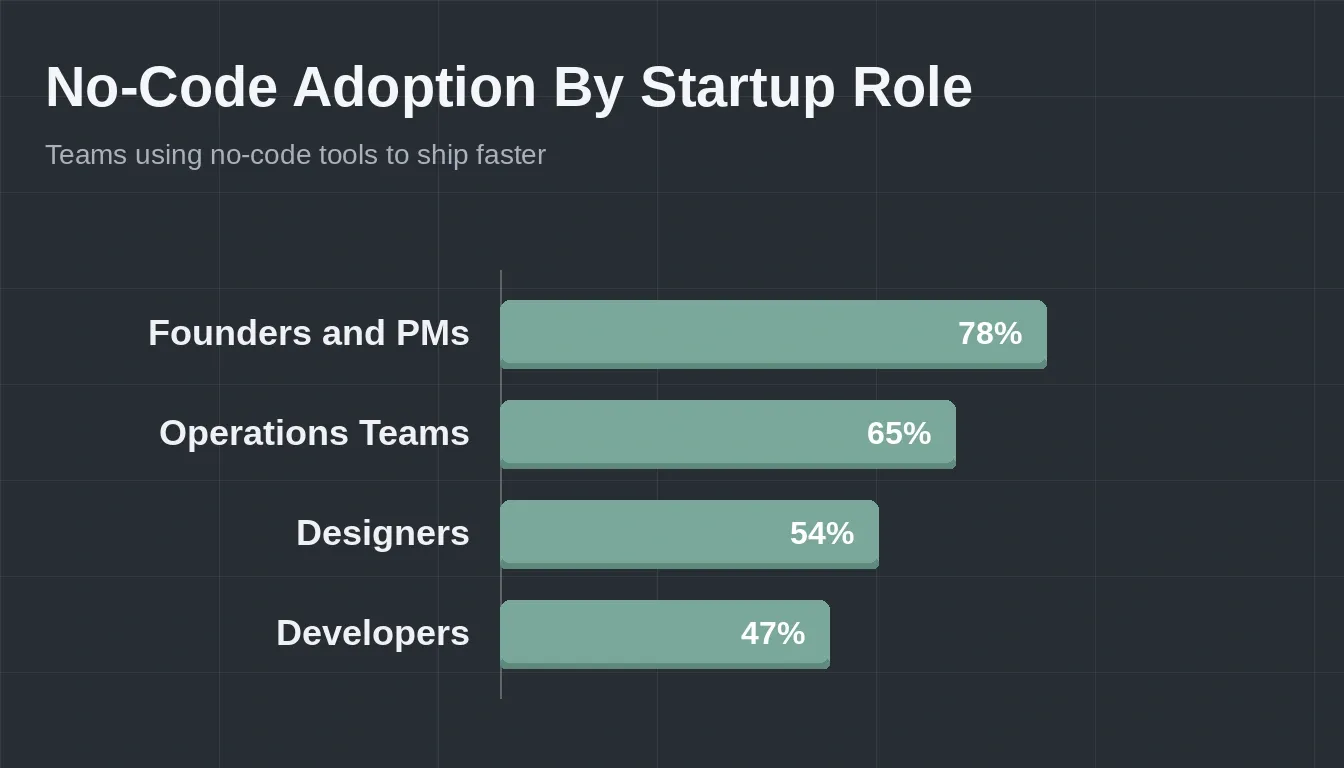
No-code adoption is highest among founders and PMs, who use it most directly for product validation and iteration.
Founders and PMs
Founders use no-code tools to validate ideas before committing engineering resources. A prompt-based builder lets a non-technical founder describe an MVP in plain language, review working screens the same day, and share a live link with early users by the end of the week. The feedback loop that used to take a sprint now takes an afternoon.
Designers
Designers import Figma frames directly and see them converted into production-ready code. Instead of handing off specs and waiting, they can iterate on the actual app. Click-to-edit on the visual canvas means layout changes happen in seconds, not tickets.
Developers
Developers use no-code tools to skip the scaffolding. Generating a full-stack app from a prompt means the first version of a CRUD app, a dashboard, or an internal tool is ready to extend rather than build from scratch. Two-way GitHub sync means the generated code lives in the same repo as everything else.
Operations Teams
Operations teams build internal tools without filing a development request. A form that writes to Airtable, a dashboard that reads from Supabase, or a workflow that sends a Slack notification when a row changes, all built by the ops team directly. Teams looking to build internal tools without a developer can get started the same day.
Marketers
Marketers launch landing pages, lead capture forms, and campaign microsites without a developer. A prompt generates the page; a Typeform or Tally integration captures leads; Mailchimp or Brevo handles the follow-up sequence.
How Rocket Supports Faster Building
Rocket gives founders a steady, flexible way to build apps quickly. It keeps complexity manageable, supports smooth editing, and lets teams build web apps on Next.js or mobile apps on Flutter without writing code. The generated code is open: you can view it in the Code tab, inject custom scripts, download the full project as a .zip, or sync to GitHub with two-way push and pull.
How Building on Rocket Works
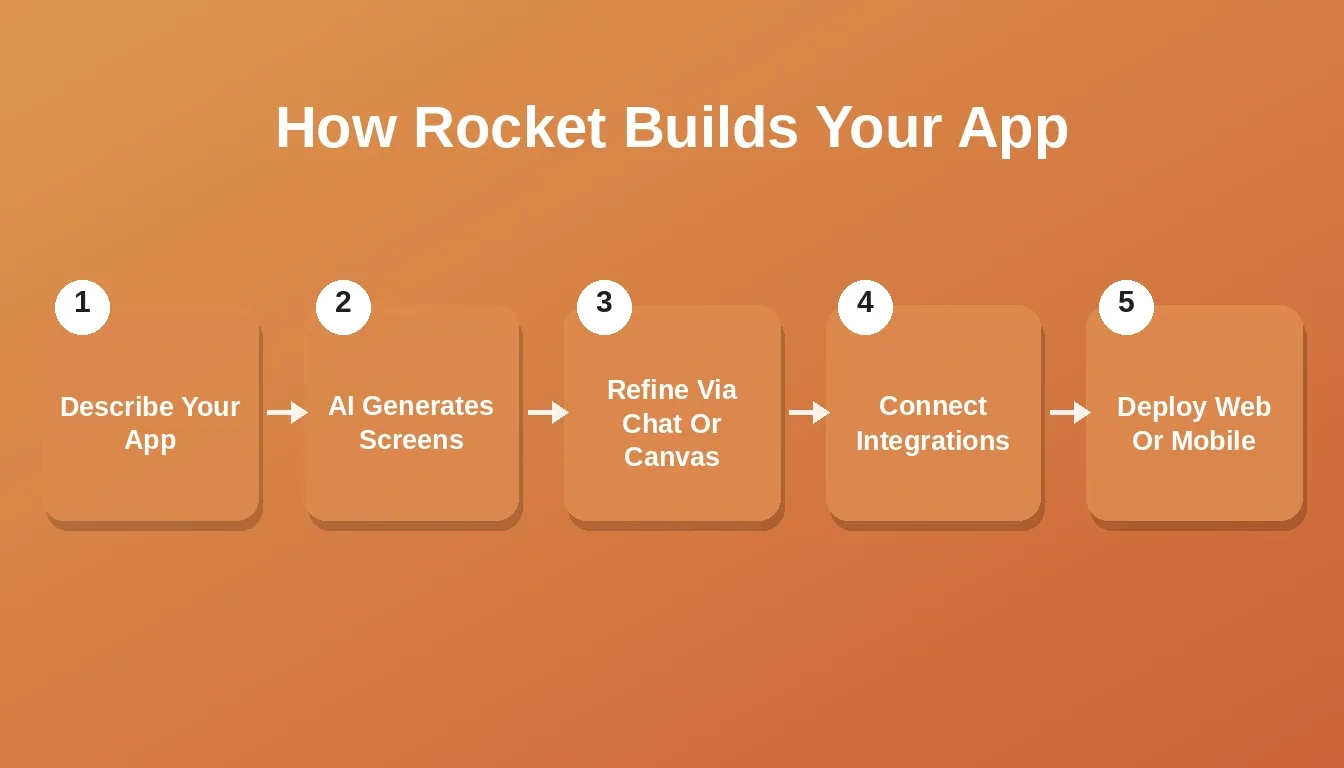
Rocket's build process takes you from a plain-language description to a deployed web or mobile app in five clear steps.
- Describe your app: Write a plain-language prompt explaining what you want to build and who it is for. Include 3 to 5 key features for the best initial output.
- Review the generated screens: Rocket generates a multi-screen app. Check the preview, which is responsive and testable at mobile width.
- Refine through chat or canvas: Add features one at a time through chat, or click directly on elements to edit them visually.
- Connect your data and integrations: Wire up Supabase for auth and database, Stripe for payments, Resend for email, or any of 25+ connectors.
- Deploy: Publish to a Netlify URL in one click. For mobile, the Flutter codebase targets iOS and Android from a single build.
Figure 2: Rocket's build workflow from plain-language prompt to live deployment.
What Rocket Builds On
Rocket generates production-grade code, not prototypes. Web apps run on Next.js with TypeScript. Mobile apps run on Flutter, targeting iOS and Android from a single codebase. Both are deployable to production: web via Netlify, mobile via the App Store and Google Play. The code is yours, open, downloadable, and GitHub-syncable.
Founders who want to understand the full technical picture can read more about why Rocket generates Next.js and Flutter and what that means for long-term maintainability.
Rocket Beyond Build: Solve and Intelligence
Most AI app builders stop at code generation. Rocket adds two capabilities that matter for startups making product decisions under uncertainty.
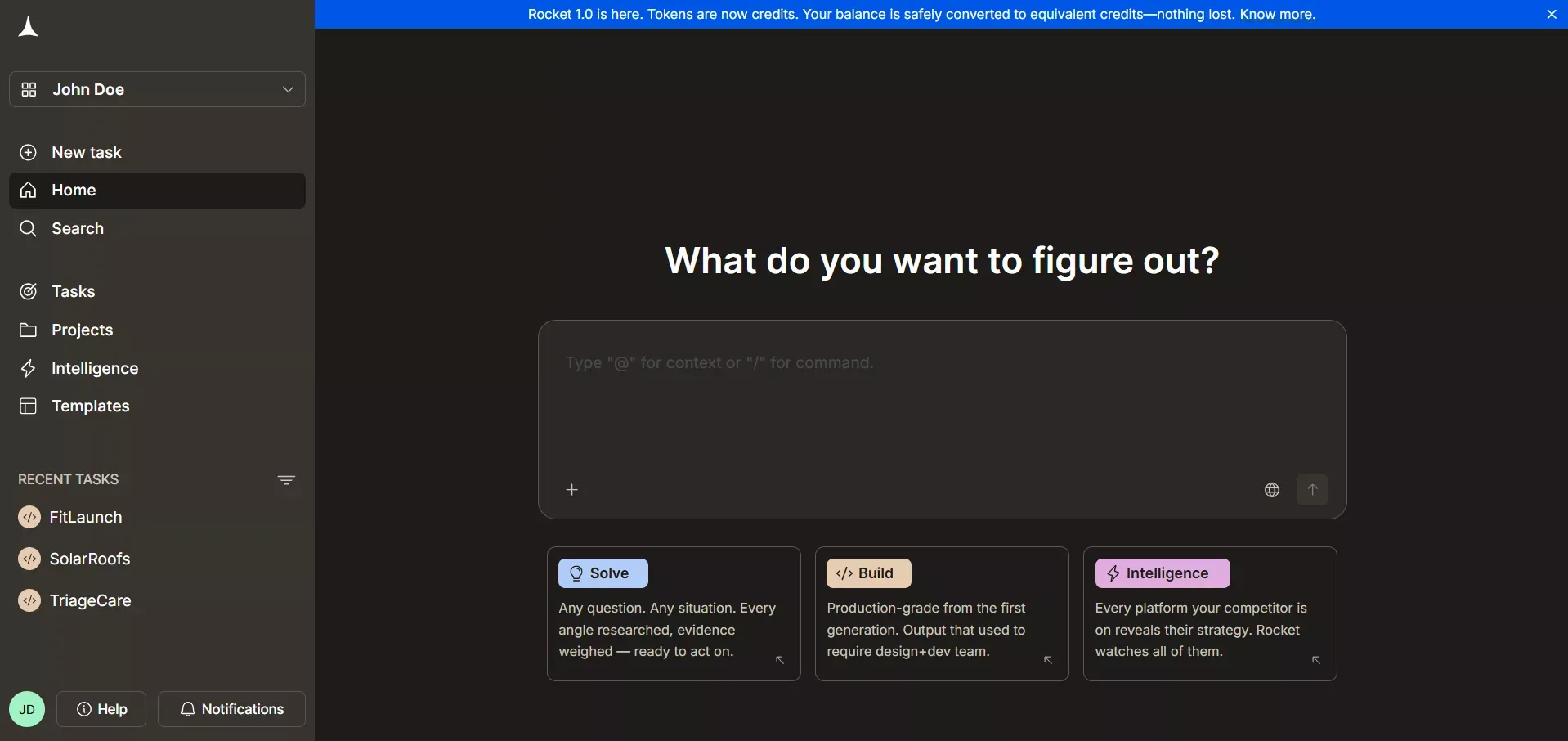
Build, Solve, and Intelligence share context on a single platform, so research informs what you build and monitoring informs when to pivot.
Solve is a research engine. Before you build, you can ask Solve to size a market, run a competitive teardown, benchmark pricing, or prioritize a feature backlog. It runs parallel research streams and returns a structured report with an executive summary, supporting data, and actionable recommendations.
Intelligence monitors your competitive landscape continuously. Set up a competitor or market to watch, and Intelligence surfaces changes as they happen. For a startup tracking Bubble, Lovable, or Webflow, this means no more manually checking competitor pages.
The three capabilities share context. A Solve report can scope what you build; an Intelligence alert can trigger a new Solve question; a Build task can reference findings from either. Teams that want to understand how this research-to-build loop works can explore how Solve carries directly into the build on Rocket.
Rocket vs. Competitors: What's Actually Different
| Feature | Rocket | Bubble | Lovable | Webflow |
|---|---|---|---|---|
| Generation method | Prompt-based AI | Drag-and-drop | Prompt-based AI | Drag-and-drop |
| Web stack | Next.js (production) | Proprietary | React (Vite) | Proprietary |
| Mobile output | Flutter (iOS and Android) | No native mobile | No native mobile | No native mobile |
| Code ownership | Full download and GitHub sync | Locked to platform | Export available | Locked to platform |
| Research layer | Solve (built-in) | None | None | None |
| Competitive monitoring | Intelligence (built-in) | None | None | None |
| Connectors | 25+ (one-click OAuth/API) | Plugin marketplace | Limited | Limited |
| Starting point | Prompt, Figma, screenshot, template, URL | Blank canvas | Prompt | Template |
Rocket's production-grade stack and built-in research layer set it apart from both drag-and-drop tools and other prompt-based builders.
A founder on Reddit put it plainly:
"Speed mattered more than perfection. Once we shipped our first prototype on a visual tool, users told us what to build next."
The difference with Rocket is that the research to decide what to build next is built into the same platform. Founders who want to see how this plays out in practice can read about generating MVPs with AI and practical steps for new founders.
How No-Code Platforms Fit Into a Tech Stack
Figure 3: Rocket-generated apps sit alongside existing backend systems, extending capability without replacing core infrastructure.
No-code platforms fit naturally alongside existing systems rather than replacing them entirely. A Supabase backend handles auth and data; Rocket generates the front-end and mobile layer on top. Teams building AI apps for operations teams follow exactly this pattern.
Where Rocket Is Not the Right Fit
Honest evaluation matters. Rocket is not the right tool in every situation.
- Apps requiring complex custom animations: Rocket handles standard transitions well. Advanced Figma animations may need manual refinement after import.
- Very large apps (15+ screens in a single task): Performance and review quality decrease as screen count grows. Rocket recommends building in phases and adding screens incrementally.
- Teams that prefer a visual drag-and-drop-first workflow: Rocket's primary interaction is prompt-based. If your team prefers placing components manually from a blank canvas, Bubble or Webflow may feel more natural.
- Offline-first mobile apps: Rocket's mobile output is Flutter-based and production-ready, but offline-first architecture requires custom code injection or local development.
- Replacing a dedicated engineering team at scale: No-code tools reduce the need for engineering on standard workflows. They don't replace engineers building proprietary infrastructure or complex algorithms.
Choosing the Right Fit
Choosing the best tool means understanding what the team needs now and what they might need later. Some groups want progressive web apps. Others want native mobile versions. Many need internal tools to streamline operations.
- What types of apps matter most right now?
- Does the team need to own the code and deploy independently?
- Will the app need to scale to thousands of users, or is it an internal tool?
- Does the team want research and competitive monitoring on the same platform?
The best no-code tools support a friendly learning curve, fast iteration, and space to grow. Founders evaluating their options can also compare the fastest AI app builders for startups to see how Rocket stacks up on speed and output quality.
Building Fast with the Best No-Code App Builder
Startups move quickly, and a reliable no-code app builder for startups helps maintain that momentum. It keeps experiments easy, reduces the pressure to write code constantly, and supports a clean flow from idea to working version. When teams can build, refine, ship, and test apps in one place, with research and competitive intelligence built in, progress comes naturally.
Ready to build your first app without writing a single line of code? Rocket.new is the no-code app builder for startups that combines prompt-based generation, production-grade code output, and built-in research tools. Start building for free today.
Table of contents
- -What "No-Code" Actually Means for Startups in Practice
- -Why Startups Lean Toward No-Code Platforms
- -How Startup Workflows Change
- -What Startups Actually Need in a No-Code App Builder
- -Startup Needs vs. Features to Look For
- -Use Cases by Startup Role
- -Founders and PMs
- -Designers
- -Developers
- -Operations Teams
- -Marketers
- -How Rocket Supports Faster Building
- -How Building on Rocket Works
- -What Rocket Builds On
- -Rocket Beyond Build: Solve and Intelligence
- -Rocket vs. Competitors: What's Actually Different
- -How No-Code Platforms Fit Into a Tech Stack
- -Where Rocket Is Not the Right Fit
- -Choosing the Right Fit
- -Building Fast with the Best No-Code App Builder