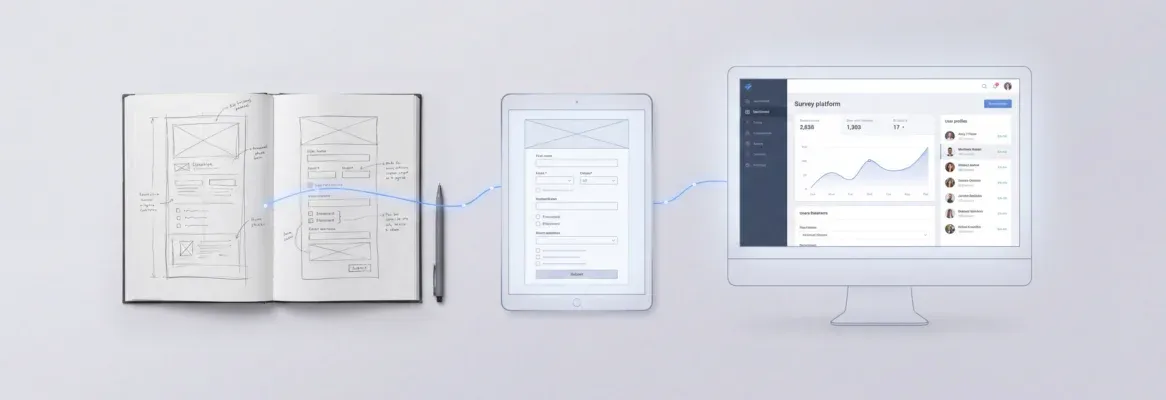
Yes, AI can build an internal dashboard that connects to Airtable, Notion, and Mixpanel. Connect your tools once, and an AI agent assembles a unified view with live metrics, account health scores, and linked customer notes. Gather your API tokens and you can have a working dashboard on Rocket.new by end of week.
Your operations team lives across three tools. Airtable holds the CRM. Notion holds the docs. Mixpanel holds the behavior data. And every Monday, someone spends hours pulling it together into a slide deck that's already out of date by Tuesday.
That is the problem AI-powered dashboards solve right now.
In 2026, AI-driven platforms act as "conversation-to-dashboard" tools that cut out manual API coding and ETL setup. You describe what you want, and the AI agent reads your schemas, proposes join keys, and builds the interface. Platforms like Rocket.new handle the entire flow, from data extraction through final visualization.
55% of product leaders are already investing in AI, and 76% expect that investment to grow. AI-powered dashboards are becoming the default, not the exception. This guide shows you exactly how to build one in a week.
Why AI Dashboards Are Replacing Manual Workflows?
AI tools can dramatically boost productivity and decision-making capabilities, helping product teams iterate and ship faster by automating routine tasks and providing deeper insights into user behavior. AI capabilities now extend with intelligent automation.
Product teams can perform data analysis, create roadmaps, produce documentation, and predict market trends, all from the same platform.
AI product management blends traditional product practices with machine learning and data-driven decision-making. That requires collaboration between engineering, data science, and design, and the dashboard is where all three teams see the same numbers at the same time.
What Are AI-Powered Dashboards?
AI-powered dashboards are interfaces that pull data from multiple sources, such as Google Sheets and Notion, automatically into an AI system, join it, and surface insights without requiring manual updates.
They replace the spreadsheet-and-slides workflow that slows down most operations teams, eliminating the manual effort of copying data between tools, chasing status updates, and building slide decks that become outdated before the meeting starts.
Think about what it takes to get a clear picture of your business today.
You open Airtable to check a new record in your pipeline, switch to Notion for product details on that account, then jump to Mixpanel for product analytics on how that customer actually uses your product. Three tools, three tabs, and zero time management. AI-powered dashboards collapse all of that into one place.
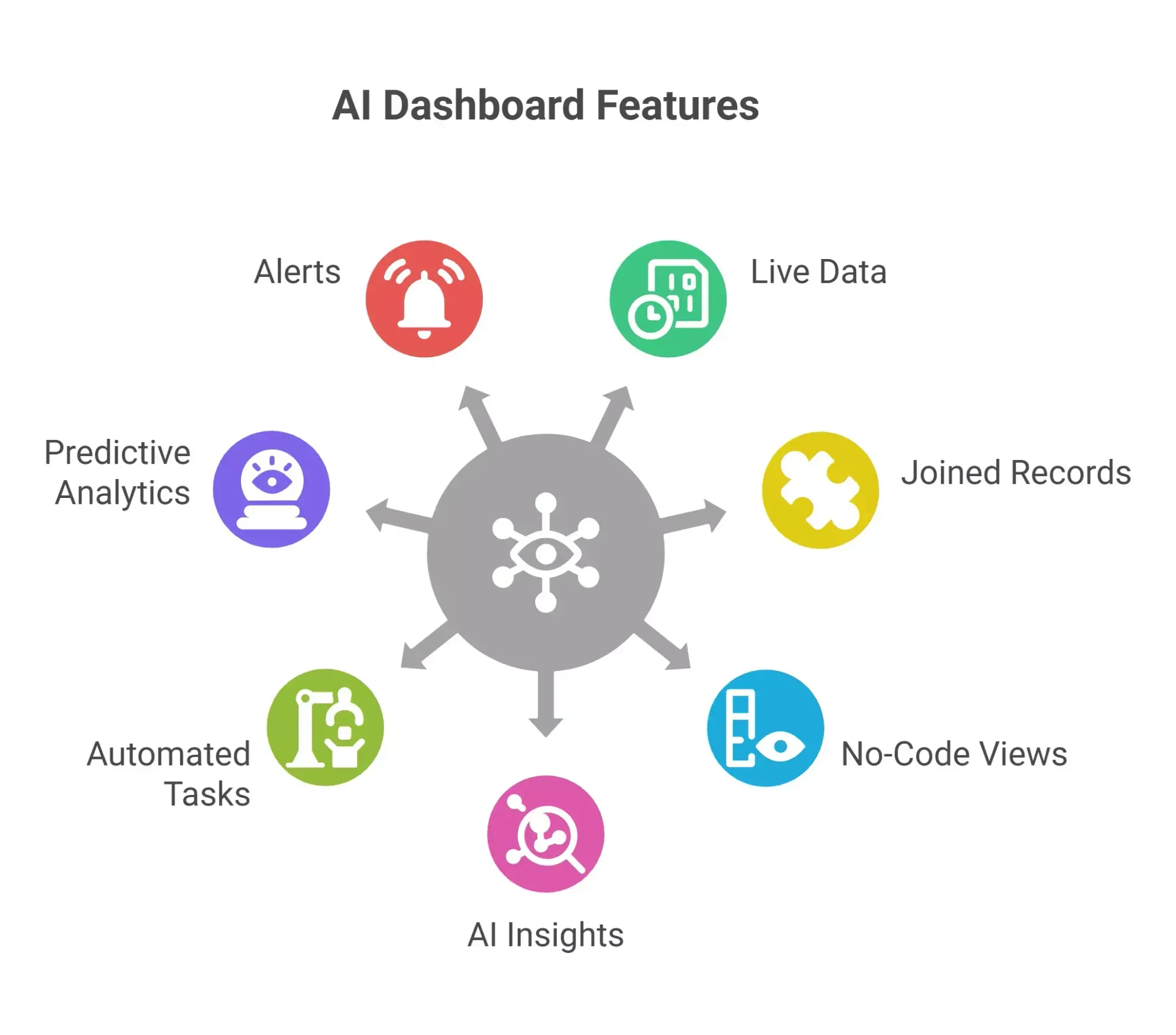
What a Good AI Dashboard Includes:
-
Live data from multiple tools, refreshed on a schedule or in real time
-
Joined records across platforms (for example, linking an Airtable account row to a Notion customer brief and Mixpanel event data)
-
The ability to create views and tables from that joined data without writing a line of code
-
AI features such as automated insights that flag anomalies, trends, and risks
-
Automate tasks like status updates that are pushed to your team when key metrics shift
-
Predictive analytics that estimate future outcomes from patterns in existing data
-
Alerts when metrics deviate from expected patterns
How Does the AI Model for Dashboard Work?
When a new record lands in your Airtable CRM, Rocket.new's Build pillar picks it up automatically through its native API import feature and does the heavy lifting across your stack:
-
Reads the Airtable schema and identifies fields like email, plan_tier, MRR, and last_contact_date
-
Pulls in matching product details from Notion using company_name or account_id as the join key
-
Surfaces relevant product analytics from Mixpanel by querying events tied to that account's user_id
-
Pushes status updates to your team via Slack or Microsoft Teams
-
Stores everything in a Supabase backend and renders it through a Next.js frontend
The AI agent proposes the join logic, but your team approves which connections make sense. AI suggests; humans validate.
Create Tables That Segment Your Data
You can create tables that slice the data however your team needs:
-
By plan_tier from Airtable, to see which segments are activating fastest in Mixpanel
-
By CSM_owner, to track which accounts have open risk notes in Notion
-
By region, to spot geographic trends in user behavior
-
By activation status, for a ready-made view for product managers and sales teams
How Automatic Syncing Works
The integration between Airtable and Mixpanel enables automatic record updates when specific events are tracked. When a user hits the "Activated" event in Mixpanel, that status reflects in your dashboard without a manual sync. Two-way syncing tools like Whalesync keep Airtable and Notion aligned when updates happen in either direction.
Smarter Triggers Beyond If-Then Rules
Airtable and Mixpanel integration enables automatic record updates when specific events are tracked, keeping data centralized without manual syncing.
But AI goes further than traditional if-then automation. When an enterprise account's engagement drops below a threshold, the system cross-references the renewal date from Airtable, checks for open risk notes in Notion, and surfaces a recommended action, all in one flow.
AI workflow automation reduces manual tasks by handling data classification, content generation, and document analysis, so teams focus on decisions instead of chasing status updates.
What Predictive Analytics Surfaces
AI dashboards go beyond static reporting. Predictive analytics leverage patterns in existing data so your team acts earlier instead of reacting after the fact:
-
Spot a drop in feature adoption before it shows up in churn numbers
-
Flag accounts where engagement trends are below their cohort average
-
Surface renewal risks weeks before they become urgent
-
Predict churn probability at 85-95% confidence on clean, well-joined data
Effective AI Dashboards: Keep the Visualization Simple and Readable
Effective AI dashboards rely on simple, readable data visualization techniques such as line charts for trends, bar charts for comparisons, and scorecards for quick insights.
-
Line charts for trends over time, such as weekly active users from Mixpanel across a 90-day window
-
Bar charts for comparisons across segments or cohorts, such as MRR by plan_tier from Airtable
-
Scorecards at the top of every view for quick insights like total active accounts, activation rate, and average NPS
-
Funnel visualizations from Mixpanel showing drop-off from "Signed Up" through "Activated" to "Retained 7 days"
The goal is clarity, not complexity. Every chart should answer one question a product manager or sales team lead would actually ask on a Monday morning.
What Do You Need Before Building?
Before an AI agent can build anything useful, you need the right access and clean data. Skipping this step means confident-looking dashboards built on bad joins.
Technical Prerequisites:
-
Airtable: Base IDs and a personal or service API key with read access to the relevant tables
-
Notion: An internal integration token from Settings > Integrations, plus database and page IDs
-
Mixpanel: Project token and a service account for server-side access (never use client-side tokens)
-
Rocket.new account: the free plan works for prototyping; paid plans give you code export and production features
Data Hygiene Steps:
-
Normalize status fields across tools ("Active," "active," and "ACTIVE" are three different values to most systems)
-
Use ISO 8601 date formats consistently across Airtable, Notion, and Mixpanel
-
Align user identifiers: if Airtable uses email and Mixpanel uses user_id, you need a mapping before the AI agent can join them
-
Clean up outdated records that would skew your analytics
Start narrow. Connect only active customers from the last six months and one product area. Validate on that slice before expanding. AI models can propose relationships, but humans need to confirm the joins make sense.
How Does Rocket.new Connect Airtable, Notion, and Mixpanel?
Rocket.new's Build pillar reads each tool's API, discovers the schema, and generates the integration logic automatically. This is what used to require a technical team and a custom integration build.
The Connection Process:
-
Rocket.new reads the Airtable schema and discovers an "Accounts" table with fields like email, plan_tier, MRR, and last_contact_date
-
It reads the Notion database structure and finds a "Customer Docs" database with company_name, CSM_owner, and last_notes
-
It queries the Mixpanel event catalog and identifies events like "Signed Up," "Activated," and "Upgraded Plan" with user_id and company properties
-
It proposes matching keys, flagging where naming conventions differ across your data sources
Because Rocket.new handles REST and HTTP integrations natively, you skip the separate workflow tool setup. The platform generates connection logic, stores data in Supabase, and renders the dashboard in Next.js from a single natural language prompt.
AI can be trained to pull data from Notion and Mixpanel, sync it into a central Airtable base, and generate a custom interface. Two-way syncing tools like Whalesync can further ensure that updates in one platform reflect across others, so your data stays consistent.
Sync Cadences by Data Source:
| Data Source | Typical Sync Pattern | Latency |
|---|---|---|
| Airtable | Scheduled pull every 15 minutes | Low |
| Mixpanel | Live query for last 24 hours | Real-time |
| Notion | Daily refresh of page content | Medium |
Mixpanel caps event exports at 10,000 per query. Rocket.new's Build pillar handles retry logic and pagination automatically through its API import feature, but you should still review rate-limit settings before going to production.
How to Design the Data Model Before You Build
The most important design decision is defining your core entities and aligning how they appear across tools. Without this, your dashboard will surface numbers that contradict each other.
How the Same Entity Looks Across Three Tools:
| System | How Account Appears | Key Fields |
|---|---|---|
| Airtable | Row in "Accounts" table | email, plan_tier, MRR, CSM_owner |
| Notion | Page in "Customer Briefs" database | company_name, last_QBR_date, risk_notes |
| Mixpanel | Property on events | company, user_id, last_active_at |
Rocket.new proposes a canonical schema: a unified account_id that maps to Airtable's record ID, plan_tier from Airtable linked to Mixpanel cohorts for segment analysis, and a derived health_score combining Mixpanel engagement data with support tickets.
Common Pitfalls to Avoid:
-
"customer" in Notion vs "account" in Airtable vs "company" in Mixpanel breaks joins
-
Multiple identifiers per user (team accounts with several emails) create duplicate records
-
Free-text plan names like "Enterprise," "enterprise," and "Ent" break aggregations
-
Renamed Airtable fields break automations without any warning
Let Rocket.new generate an initial mapping, then validate it on a real slice of data before rolling it out.
What Dashboard Structure Works Best?
Rocket.new builds AI dashboards with multiple views for different audiences. A well-structured dashboard typically has four pages.
Goal-to-view mapping:
| Goal | Best View | Why It Works |
|---|---|---|
| Leadership weekly review | Executive Overview | Summary cards with week-over-week changes |
| Feature adoption tracking | Product Usage | Mixpanel funnel + cohort retention matrix |
| At-risk account management | Account Health | Health scores + Notion risk note links |
| Customer insight synthesis | Feedback and Docs | AI-extracted themes from Notion pages |
Executive Overview surfaces what matters without requiring anyone to open three separate tools: total active accounts from Airtable, weekly active users from Mixpanel, average NPS from survey rollups, and linked Notion pages for current priorities.
Product Usage View gives product managers what they need: feature adoption over time as a line chart, activation funnels from "Signed Up" to "Retained 7 days," and cohort retention matrices showing 30/60/90-day rates. Airtable with Mixpanel allows product teams to create a structured log of app events, useful for debugging and improving user experience.
Account Health View is built for sales teams and customer success. Each row shows health score, renewal date, last engagement, and a direct link to the Notion risk note. Health scores derive from Mixpanel engagement metrics combined with support tickets stored in Airtable.
Customer Feedback View uses document analysis to extract themes from Notion meeting notes: aggregated topics, trending issues this quarter, and a breakdown of what enterprise vs SMB customers raise most often.
How Do Automated Insights and Alerts Work?
This is where AI dashboards go beyond static reporting. The time savings come from automated insights that surface problems before they escalate.
Weekly Digest Automation:
Rocket.new auto-summarizes changes across all three tools and posts to Slack or Microsoft Teams every Monday morning. This covers MRR changes from Airtable, activation rate shifts from Mixpanel, and new Notion pages flagging at-risk accounts.
Concrete alert examples:
-
Trigger when Mixpanel shows a 20% drop in activation for a specific segment
-
Alert when an enterprise account in Airtable has not logged in for 14 days
-
Notify when a Notion risk note is added to any account with renewal in the next 60 days
-
Flag when support tickets in Airtable exceed historical averages
AI monitoring can send alerts when metrics deviate from patterns, which tightens the feedback loop between user behavior data and the team responsible for acting on it.
AI That Accelerates Decision-Making
AI tools accelerate decision-making by quickly processing large volumes of data and surfacing the most relevant insights, democratizing access to analysis for product managers who previously depended on data teams to pull reports.
Instead of waiting two days for a dashboard export, a product manager types a question and gets an answer tied directly to live Airtable, Notion, and Mixpanel data.
Predictive Analytics in Action:
-
Highlight which features correlate with higher retention using Mixpanel event analysis
-
Identify which Notion docs are referenced most by high-value vs churned accounts
-
Predict churn risk based on behavioral patterns (85-95% confidence on clean data)
-
Surface accounts where users interact less than their cohort average
AI-powered dashboards help teams spot risks early and guide future actions by blending predictive analytics with real-time data. The key principle: AI proposes, humans decide. Never automate actions like plan downgrades without a human approval step.
Step-by-Step: How to Build Your Dashboard on Rocket.new
Here is a four-day build sequence for a B2B SaaS team starting from scratch.
Day 1: Connect Tools and Scan Schemas
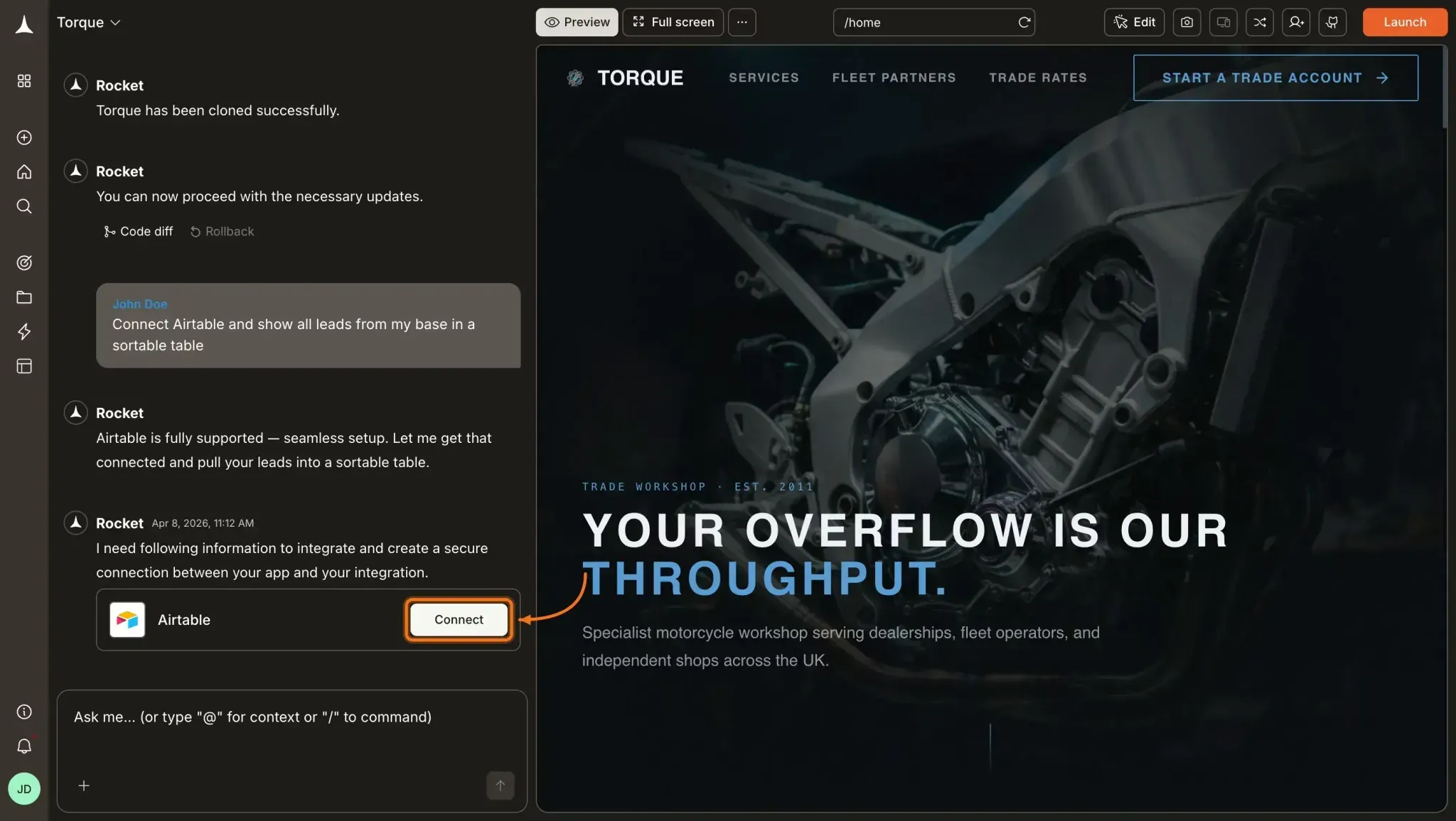
Connect your Airtable bases ("Accounts" and "Opportunities"), Notion database ("Customer Docs"), and Mixpanel production project via Rocket.new's API import feature. Let the Build pillar scan schemas and propose entity relationships.
 Example prompt:
"Create a dashboard showing MRR by segment from Airtable, activation from Mixpanel, and link to last QBR notes from Notion. Use Supabase for the backend and deploy to Netlify."
Rocket.new responds with a proposed mapping: Airtable account_id joins to Notion company_name and Mixpanel company event property.
Day 2: Validate Joins and Generate the Initial Dashboard
Validate joins on customers from the past 90 days. Review the proposed schema for mismatches ("customer" vs "account"). Generate the Executive Overview and Account Health views, then test with 10 real accounts to verify numbers match source systems.
Day 3: Add Summaries, Alerts, and Refinements
Break out the enterprise vs SMB segments. Add a churned cohort view for Q1 2026. Configure the Monday morning digest to post in your Slack channel. Set up the 20% activation drop alert.
Day 4: Roll Out and Retire Manual Processes
Run a 30-minute training session for new team members. Document how to drill from the dashboard to source records. Create a process for reporting data quality issues. Retire the manual spreadsheets and slide decks used in weekly reviews.
Success criteria by end of month one:
Leadership uses the dashboard in weekly reviews. Manual updates to spreadsheets are eliminated. Data gathering drops from a few hours to minutes. Project managers can self-serve answers about account status.
👉 Try building with Rocket now
Who Uses AI Dashboards? Real Examples by User Type
| User Type | What They Want to Build | How AI Dashboards Help |
|---|---|---|
| Product Manager | Activation funnels, retention cohorts | Pulls Mixpanel data and links feature usage to plan tier |
| Customer Success Manager | At-risk account view with renewal dates | Combines Airtable health data with Notion risk notes |
| Sales Team Lead | Pipeline visibility with engagement signals | Joins Airtable CRM data with Mixpanel last-active events |
| Operations Lead | Weekly digest across all tools | Auto-generates summaries and posts to Slack |
| Startup Founder | Single view of MRR, activation, and docs | Replaces three-tab workflow with one unified interface |
Across all user types, the outcome is the same: less time gathering information from multiple channels, more time acting on it.
What Rocket.new Does That Other Tools Do Not
Rocket.new is the world's first Vibe Solutioning platform. The distinction matters here. Most AI tools start at the build step. Rocket starts before it, with the Solve pillar validating whether the dashboard will actually deliver ROI before a single line of code gets generated.
Key Rocket.new AI capabilities for This Use Case:
-
Build pillar reads Airtable, Notion, and Mixpanel schemas and proposes joins automatically
-
Native REST and HTTP API import means no separate workflow tool like n8n
-
Supabase backend and Next.js frontend generated from a natural language prompt
-
Full source code export on paid plans eliminates vendor lock-in
-
Intelligence pillar monitors how competitor dashboards and tools evolve after launch
-
SOC 2, ISO 27001, GDPR, and CCPA compliance defaults out of the box
How Rocket.new Applies to This Specific Build:
-
Scan all three tool schemas in one session
-
Generate a canonical account entity that joins data across Airtable, Notion, and Mixpanel
-
Build Executive Overview, Product Usage, Account Health, and Feedback views
-
Configure weekly digest automation and alert thresholds
-
Deploy to Netlify with a Supabase backend, ready for the team on Day 4
Notion supports building dashboards in seconds using its "build with AI" option to input specifications for the layout.
Platforms like Noloco allow you to connect Airtable as a primary data source and use natural language to ask the AI to build dashboards, add charts, and create metrics.
Rocket.new goes further by handling all three tools in a single session with a unified data model and deployment pipeline.
Limits to Know Before You Build
AI dashboards are not magic. Understanding the gaps prevents you from shipping something that looks right but reports wrong.
Technical Limits:
-
Notion API coverage: some block types (embedded databases, synced blocks) are harder to analyze
-
Mixpanel rate limits: 10,000 events per query; heavy usage requires pagination and retry logic
-
Airtable schema drift: renamed fields break automations silently
-
Sync latency mismatches: 15-minute-old Airtable data combined with real-time Mixpanel creates temporary inconsistencies
Data Quality Risks:
AI can build confident-looking charts on bad joins. Inconsistent email addresses ("User@company.com" vs "user@company.com") produce missed matches or false joins. The resulting MRR numbers look authoritative and are wrong. Test on real data before trusting any trend analysis.
Governance Questions to Answer First:
-
Who approves new connections to external tools?
-
Who can allow Rock
-
et.new to write back into Airtable or Notion?
-
How do you audit what the platform did last week?
-
Where are approval logs stored for compliance?
When Not to Use Full AI Integration:
-
If data quality is poor and cleanup would take months
-
When regulatory requirements demand human review of every data movement
-
If task complexity exceeds your team's ability to validate AI outputs
Some teams do better starting with Airtable plus Mixpanel only, adding Notion once the first two are solid.
Building Your AI Dashboard: Start Here
Can AI build an internal dashboard that connects to Airtable, Notion, and Mixpanel? The answer is yes, and in 2026 it takes days, not months.
The teams that get the most from AI dashboards are the ones who stay involved in modeling and validation, not just the initial setup. Start with Day 1: define your core entities, gather your API tokens, and let Rocket.new handle the build while you focus on what the data actually means.
FAQ
Do I need coding skills to build this dashboard?
No. Rocket.new generates the frontend and backend from natural language prompts. You describe the dashboard you want, and the Build pillar handles the code. You will need to review the proposed schema and validate joins, but no programming knowledge is required.
Is there a free plan available? Y
es. Rocket.new's free plan works for initial prototyping and connecting your tools. The Personal plan at $25/month and Rocket plan at $50/month add production features and full source code export.
What if the AI proposes a join that does not match my data?
You review and approve all proposed joins before the dashboard goes live. Rocket.new flags naming mismatches (like "customer" vs "account") and gives you confidence scores on each join. Start with a small test cohort to catch issues before expanding to your full dataset.
How do I handle inconsistent data across Airtable, Notion, and Mixpanel?
Data hygiene before you connect is the most reliable fix. Normalize status fields, standardize date formats to ISO 8601, and align your user identifiers. If Airtable uses email and Mixpanel uses user_id, map them before the AI agent tries to join them.
What happens to my data if I stop using Rocket.new?
Paid plans include full source code export. You get the Next.js frontend and Supabase backend delivered to GitHub, and you continue development in any environment. There is no lock-in.
How do alerts and automated summaries get delivered?
Rocket.new supports Slack and Microsoft Teams for digest delivery. You configure the channel, schedule, and thresholds through the platform. Alerts trigger based on metric deviations you define, such as a 20% activation drop or a 14-day login gap.
Can this dashboard write back to Airtable or Notion?
Yes, but only with human approval steps in place. Never configure write-back automations that run without review. Rocket.new supports this, and governance policies for write access should be defined by your team before enabling it.
How accurate is the churn prediction?
On clean, well-joined data, Rocket.new's predictive analytics model reaches 85-95% confidence. Accuracy drops significantly with inconsistent identifiers, missing events, or sparse historical data. Validate the model's predictions against known churned accounts before acting on its recommendations.
Table of contents
- -Why AI Dashboards Are Replacing Manual Workflows?
- -What Are AI-Powered Dashboards?
- -What a Good AI Dashboard Includes:
- -How Does the AI Model for Dashboard Work?
- -Create Tables That Segment Your Data
- -How Automatic Syncing Works
- -Smarter Triggers Beyond If-Then Rules
- -What Predictive Analytics Surfaces
- -Effective AI Dashboards: Keep the Visualization Simple and Readable
- -What Do You Need Before Building?
- -Technical Prerequisites:
- -Data Hygiene Steps:
- -How Does Rocket.new Connect Airtable, Notion, and Mixpanel?
- -The Connection Process:
- -Sync Cadences by Data Source:
- -How to Design the Data Model Before You Build
- -How the Same Entity Looks Across Three Tools:
- -Common Pitfalls to Avoid:
- -What Dashboard Structure Works Best?
- -How Do Automated Insights and Alerts Work?
- -Weekly Digest Automation:
- -AI That Accelerates Decision-Making
- -Predictive Analytics in Action:
- -Step-by-Step: How to Build Your Dashboard on Rocket.new
- -Day 1: Connect Tools and Scan Schemas
- -Day 2: Validate Joins and Generate the Initial Dashboard
- -Day 3: Add Summaries, Alerts, and Refinements
- -Day 4: Roll Out and Retire Manual Processes
- -Who Uses AI Dashboards? Real Examples by User Type
- -What Rocket.new Does That Other Tools Do Not
- -Key Rocket.new AI capabilities for This Use Case:
- -How Rocket.new Applies to This Specific Build:
- -Limits to Know Before You Build
- -Technical Limits:
- -Data Quality Risks:
- -Governance Questions to Answer First:
- -When Not to Use Full AI Integration:
- -Building Your AI Dashboard: Start Here
- -FAQ