

Rocket.new can clone and continue real Next.js TypeScript projects directly from GitHub with full code ownership. It analyzes your app architecture, fixes inconsistencies, and generates features that fit your existing patterns. Unlike most AI builders, it works on real-world codebases, not just new apps, saving time, effort, and cost.
What happens when you bring a real React app into an AI-powered platform?
Not a blank canvas. Not a demo project.
Your actual Next.js codebase, with every pattern your team built, every environment variable nobody documented, and every half-finished feature nobody owns.
According to The Pragmatic Engineer, citing the 2025 Stack Overflow developer survey, Next.js is the most popular full-stack React framework, used by roughly half of all React developers worldwide.
Most of those are not new projects. They are active codebases that teams need to keep building, extending, and modernizing without starting from scratch.
Rocket.new supports cloning Next.js TypeScript repositories directly from GitHub and continuing development with AI-assisted code generation.
This blog walks through how that import process works, what Rocket can create inside your codebase, and what to expect in practice.
Why Next.js Projects Get Complicated Fast
Next.js is not a forgiving framework for teams that have grown without a clear focus.
Many teams find the learning curve steep, especially after Next 13 introduced server components, client components, and new caching strategies that changed how React app patterns had to be written.
The documentation has been widely criticized for inconsistency. Many developers find themselves landing on outdated pages.
Searching for solutions takes longer than it should, which adds real friction to building even straightforward features and makes it harder to fix errors quickly.
Inconsistent Patterns in Next.js
A real Next.js app that has been running for a few weeks tends to accumulate patterns like these:
-
React Router logic carried over from an earlier React app, sitting alongside Next.js file-system pages
-
Server and client components are split in ways that produce errors in event handling and browser code
-
Images handled inconsistently, with some pages using the Next.js Image component and others using plain img tags
-
Environment variables scattered across multiple config files or hardcoded into components
-
Authentication flows that someone started building and never connected to the rest of the app
-
UI inconsistency across components built by different developers at different times
-
Pages are split between the pages/ directory and the app/ directory, creating duplicate routing paths
These things happen gradually across projects. They also happen fast when a team is moving quickly without a consistent coding standard. By the time a team wants to accelerate development with AI, the codebase already has layers of inconsistency that most AI app builders simply ignore.
Rocket.new addresses this by analyzing the full architecture of the app before generating or editing anything.
What Most AI App Builders Miss About Real Codebases
Most AI app builders are designed to create something brand new.
They allow users to quickly create a web app or internal tools from a plain-language prompt. This works well when building from scratch using AI-powered templates or a blank canvas.
The Core Problem
Most real-world development does not start from zero.
Existing applications already have:
-
React components
-
Routing logic
-
Data fetching patterns
-
Business logic
When an AI app generates code without understanding this context, the output may compile but does not truly fit into the project.
Limitations in Code Ownership
Many platforms also struggle with code ownership.
Users build and scale their apps over multiple sprints, only to find:
-
Limited access to generated code
-
Difficulty in scaling or migrating
-
Platform-imposed constraints
This pattern has been seen in tools like Base44, where complex projects eventually hit platform limits.
How Rocket.new is Different
Rocket.new takes a different approach.
It is an AI-powered full-stack development platform that supports the entire software development lifecycle, including:
-
Market research
-
Planning
-
Code generation
-
Feature development
-
Internal tools
-
Live deployment
Instead of focusing only on greenfield apps, it works with real-world development needs and goes from concept to reality smoothly.
Full Code Ownership from Day One
With Rocket.new, code ownership gives more control from the start.
Projects remain standard Next.js applications that can run on any hosting provider. This ensures:
-
Full developer control
-
Easy scalability
-
Long-term flexibility
As a result, teams can continue to grow their applications without losing access or being restricted by the platform.
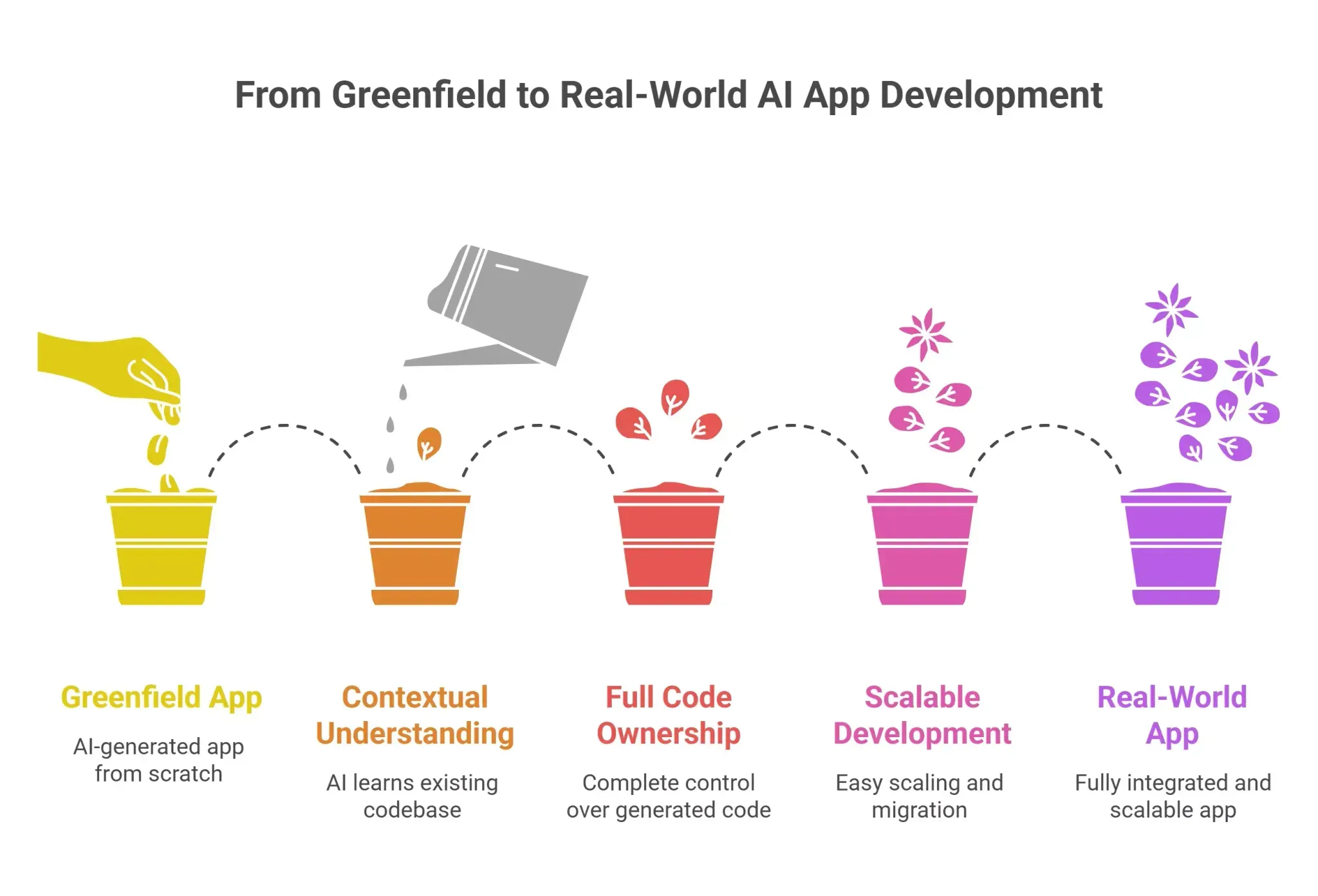
How Rocket.new Imports and Continues Your Next.js Project
The import process is clearly documented in the official GitHub import guide. Here’s the step-by-step flow:
Step-by-Step Import Process
-
Push your Next.js TypeScript project to GitHub
-
Sign in to Rocket.new and go to the Build tab
-
Click the + button and select Clone from GitHub
-
Connect your GitHub account (if not already connected)
-
Select your repository and default branch, then click Submit
-
Wait while Rocket validates, clones, installs dependencies, and creates a live preview
-
Use natural language to build features, edit pages, or fix bugs
Important Constraint
Rocket currently supports Next.js TypeScript projects only.
If your project uses:
-
JavaScript-only React
-
Vite
-
Create React App (without TypeScript)
You’ll need to add TypeScript first before importing.
What Happens After Import
Once cloned, Rocket enables full two-way GitHub sync:
-
Changes in Rocket → pushed to a rocket-update branch → auto PR to main
-
Changes from your team → can be pulled back into Rocket
Environment variables from `.env` files are also imported securely, with encrypted API keys.
What Rocket Can Do Inside Your Project
Rocket works directly within your existing codebase and can:
-
Create pages, routes, and components aligned with your structure
-
Edit UI, fix bugs, and update styling
-
Build authentication using existing libraries
-
Refactor data fetching (e.g., to server actions)
-
Fix TypeScript and ESLint errors
-
Build internal tools connected to your backend
-
Optimize images using Next.js Image
-
Maintain test and code coverage
-
Integrate services like Google, Stripe, Supabase, and more
Precision Mode for Advanced Control
For complex projects, Rocket offers Precision Mode:
-
100+ structured commands for targeted edits
-
Modify specific files without affecting the rest of the codebase
-
Ideal for safe refactoring and production-level changes
This allows teams to move from simple prompts to highly controlled edits as complexity grows.
Handling Routing Automatically
Rocket also simplifies routing challenges.
-
Next.js uses file-based routing (pages map to files)
-
Older apps may still use client-side routing libraries
When both exist, Rocket:
-
Detects routing conflicts
-
Maps routes to Next.js structure
-
Consolidates navigation into a single system
This removes a common source of bugs and saves significant manual effort—especially in older or migrated projects.
React Router, Next.js routing, and what Rocket handles automatically
Many older full-stack React apps still use client-side routing libraries for navigation before migrating to Next.js.
-
Next.js uses a file-system-based router, where pages are automatically created from files in the pages/ or app/ directory
-
There is no separate routing configuration like React Router; routing is handled by the file structure
-
Next.js supports server-side rendering, improving load speed and SEO compared to browser-only rendering
Importing Next.js Project into Rocket
When Rocket imports a project with both React Router and Next.js routing, it:
-
Detects overlapping routing systems
-
Maps routes to the correct Next.js file structure
-
Consolidates navigation into a single, consistent system
This eliminates routing conflicts and simplifies development. Without this cleanup, teams spend time debugging routing issues instead of building features. This is a common issue in older projects and one of the most tedious tasks to fix manually, which Rocket handles automatically
What Developers Are Saying
Here is a team from the developer community that went through this exact scenario:
"We took a five-year-old Next.js 10 marketing site and turned it into a Next.js 14, App Router, SEO-optimized platform using Rocket.new as the primary refactor assistant. What would have taken our team months happened in under two weeks. The AI understood our existing patterns and incrementally converted each section without breaking production." - Agency development lead, 2024
Spending a few weeks on a manual migration before switching to an AI-assisted approach is a pattern the community sees repeatedly across projects.
The difference between a useful ai powered tool and a frustrating one is whether it reads the app architecture or generates code as if the project were empty.
Rocket.new engineering team has written about how they built codebase understanding into the platform. The post covers how Rocket handles inconsistent naming conventions, undocumented dependencies, and half-finished features in shipping projects.
How Rocket.new Compares to Other AI App Builders
| Feature | Rocket.new | Most AI App Builders |
|---|---|---|
| Clone Next.js TypeScript projects from GitHub | Yes | Rarely available |
| Two-way GitHub sync | Yes | Not typically available |
| Full code ownership | Supported from the first session | Often limited |
| iOS and Android apps via Flutter | Supported | Web only in most cases |
| Precision Mode (100+ commands) | Supported | Not available |
| Full stack web and mobile apps | Supported | Varies by platform |
| Token efficiency vs blank state | Up to 80% savings | No equivalent |
| Free plan and free tier access | Available | Varies |
The Problem with Most App Builders
Most app builders let users create websites, landing pages, and web applications quickly. On new projects with no existing patterns to respect, the experience is smooth, and that's where most demos happen, on simple websites and internal tools.
The trouble starts as projects grow. Code control gets restricted, platform limits appear, and teams eventually discover they cannot edit or move the code without rewriting everything from scratch.
How Rocket.new is Different
Rocket.new is designed to avoid that pattern. Teams keep full control of their codebase from day one. The app stays standard Next.js throughout, meaning any developer can run it locally, connect it to any CI pipeline, and deploy to Vercel, Netlify, Google Cloud, or any other provider. Building on Rocket does not lock teams into Rocket.
The Cost Advantage
Rocket builds incrementally from what already exists in the codebase, rather than regenerating the full app each session. This results in an 80% reduction in token usage compared to building from a blank state, a concrete cost saving across multiple projects that makes paid plans more efficient than platforms that repeat full code generation from scratch every time.
How Rocket.new Handles Your Next.js Codebase
Rocket is not an AI app that generates code without context.
It reads the full architecture of an existing project first, then creates changes that fit the patterns, naming conventions, and partial features already in the codebase. This is what makes Rocket the right tool for continuing development on future projects and existing ones alike, rather than only creating apps from scratch.
Key Features
Here is the full feature set Rocket brings to imported Next.js projects:
-
Vibe-solutioning platform: Describe what you need in natural language, and Rocket's AI-powered engine plans, analyzes, builds an entire app, and monitors across the competitors.
-
25k+ templates library, free to use: Create new pages, React components, and features from production-ready patterns without starting blank.
-
Saves up to 80% tokens: Building from a real codebase costs far fewer tokens per session than code generation from scratch.
-
Supports Flutter for mobile: Rocket.new generates Flutter-based mobile apps for both iOS and Android platforms, allowing users to create mobile applications from a mobile Figma design or by describing their app idea in chat.
-
Web app development support: Rocket.new generates clean, modern React/Next.js code using industry-standard tools like Tailwind CSS.
-
Collaboration features built in: Multiple developers can build in the same imported project, with all building tracked through GitHub pull requests.
Use Cases
Specific use cases where Rocket creates the most value on imported projects:
-
Migrating React Router page navigation to the Next.js file-system router, one route at a time, with a live preview after each step
-
Completing half-built authentication flows so they are fully wired and ready to ship
-
Creating production-ready internal tools that connect to your backend services without rewriting the data layer
-
Converting React class components to functional components with hooks, with test files updated in the same step
Plans and Pricing
Rocket.new offers a free plan for users who want to evaluate the platform before committing. It lets you clone a project, create basic features, and test how Rocket handles your codebase before investing in a paid plan.
Paid plans unlock higher build limits, longer AI sessions, deployment, custom domains, and team collaboration. They're available at levels ranging from individual developers to full engineering teams building across multiple web and mobile apps, with the build time and token capacity to keep shipping consistently. Some paid plans also include priority support and deeper integrations with Google, Stripe, and Supabase.
The recommended approach is to start with the free tier on a non-critical feature branch. This gives you a real-world test of how Rocket handles your specific patterns before moving production work to a paid plan.
Your Next.js Project, Continued
Real app development happens inside codebases that already exist, with mixed patterns, partial migrations, inconsistent components, and accumulated UI debt. That's not an obstacle. That's the actual job.
Rocket reads what's already in your codebase before creating anything new, respects your team's conventions, and flags what it can't interpret rather than guessing. Connect your GitHub repository, let Rocket analyze the architecture, and pick up exactly where your team left off.
No context lost. No time spent rebuilding foundations. Your code stays yours, and your app stays standard Next.js.
Table of contents
- -Why Next.js Projects Get Complicated Fast
- -Inconsistent Patterns in Next.js
- -What Most AI App Builders Miss About Real Codebases
- -The Core Problem
- -Limitations in Code Ownership
- -How Rocket.new is Different
- -Full Code Ownership from Day One
- -How Rocket.new Imports and Continues Your Next.js Project
- -Step-by-Step Import Process
- -Important Constraint
- -What Happens After Import
- -What Rocket Can Do Inside Your Project
- -Precision Mode for Advanced Control
- -Handling Routing Automatically
- -React Router, Next.js routing, and what Rocket handles automatically
- -Importing Next.js Project into Rocket
- -What Developers Are Saying
- -How Rocket.new Compares to Other AI App Builders
- -The Problem with Most App Builders
- -How Rocket.new is Different
- -The Cost Advantage
- -How Rocket.new Handles Your Next.js Codebase
- -Key Features
- -Use Cases
- -Plans and Pricing
- -Your Next.js Project, Continued


