Rocket.new builds full apps from prompts, making it ideal for fast, no-code product creation. Windsurf AI enhances coding workflows with deep AI assistance for developers. Choose Rocket.new for speed and deployment, or Windsurf AI for control and code-level precision.
What is actually the difference between a tool that helps you write code and one that builds the entire product?
Both Rocket.new and Windsurf AI use AI to accelerate software development, and both show up in the same conversation when developers compare tools. According to the 2025 Stack Overflow Developer Survey, 51% of professional developers now use AI tools daily in their coding workflows.
That adoption covers a wide range. Some tools help experienced developers write code faster. Others skip writing code entirely and build the full product. This breakdown covers how each tool works, who it fits best, and where the real differences show up.
Two Tools, Two Different Jobs
Before comparing features, the core difference is worth naming clearly.
-
Windsurf is an AI-first code editor built for professional developers who write and review code daily.
-
Rocket.new is an AI-powered vibe solutioning platform that converts natural language prompts into complete, deployable applications.
One helps you write code faster. The other builds the product, so you do not have to write code at all. Both promise to make software development faster, but the path is completely different. Picking the wrong one wastes time.
What is Windsurf AI?
Windsurf is an AI-powered development environment built on VS Code, originally created by Codeium and acquired by Cognition AI in December 2025 for approximately $250 million.
As of early 2026, Windsurf ranks first in the LogRocket Dev Tool Power Rankings, ahead of Cursor and GitHub Copilot.
Windsurf is primarily a single-developer tool, focusing on professional developers who want AI leverage.
The Cascade AI Agent
The Cascade AI agent is what separates Windsurf from a standard code editor with AI bolted on.
-
Reads across entire projects, not just the current file
-
Suggests multi-file edits when you describe a refactor in natural language
-
Tracks terminal history to maintain context throughout the session
-
Windsurf's Cascade can execute terminal commands on behalf of the user, such as installing packages and running builds.
-
The feature allows for real-time collaboration, enabling developers to work together on the same codebase with shared visibility.
When you describe what you need, Cascade maps it to the codebase structure and shows the plan before making any changes.
Agent Mode
Agent mode extends Cascade by letting it execute multi-step tasks without you managing each step manually.
-
Runs terminal commands without breaking your flow
-
Detects and fixes lint errors it generated within the same session
-
Handles entire features from a single high-level instruction
This is why users describe Windsurf as closer to pair programming than basic code completion.
Key Features at a Glance
-
Built on VS Code: All existing extensions, keybindings, and settings carry over with no reconfiguration.
-
Supports multiple programming languages: Python, JavaScript, TypeScript, Go, Rust, and 70+ others, with AI suggestions adapting to the active language and framework.
-
Generating code snippets: Tab-powered engine generates code snippets that match existing codebase style, naming patterns, and conventions, with automatic dependency imports.
-
Multi-file editing: Cascade reads across entire projects before suggesting changes. Renaming a component updates all references across the codebase automatically.
-
Intelligent chat: Natural language commands like "add tests for this module" execute across multiple files. Explaining logic inside legacy functions happens without touching the code.
Windsurf Pricing
| Plan | Price | Includes |
|---|---|---|
| Free | $0/month | 25 prompt credits, unlimited Tab autocomplete, SWE-1 Lite model |
| Pro | $15/month | 500 credits, full SWE-1 model, 5 daily deploys |
| Teams | $30/user/month | Dedicated support, analytics, SSO, centralized billing |
Who Should Use Windsurf
Use Windsurf when you are a developer with coding knowledge who works in a code editor daily and needs deep AI integration without giving up control.
-
Your project involves multi-file codebases with complex logic and dependencies
-
Code quality review and control over every piece of generated code matter more than deployment speed
-
You want AI assistance on existing projects, not app creation from scratch
-
You need framework compatibility across multiple programming languages
What is Rocket.new?
Rocket.new is an AI-powered platform that converts natural language prompts into complete, production-ready applications. You describe what you want. Rocket generates the frontend, backend logic, database schema, and integrations as one connected system, all inside a single browser-based workspace with no local environment setup required.
Rocket.new reached 400,000 users in 180 countries and $4.5M ARR within months of its June 2025 beta, backed by $15M from Salesforce Ventures and Accel. About 80% of users are building real app projects with actual backend systems, not prototypes. Users rapidly create production-ready apps from a single prompt that would take days to scaffold in a code editor.
Prompt to App Generation
The core workflow starts with a natural language prompt and ends with a live app.
-
One prompt generates the UI, backend logic, database schema, authentication, and integrations together
-
The live app appears in the browser immediately after generation
-
Refine using natural language commands like "add user roles" or "connect this to the database."
There is no backend logic for you to write and no database schema to design manually.
Backend Logic and Database Schema
Backend logic is one of the most time-consuming parts of any application. Rocket generates it automatically.
-
Routes, API endpoints, authentication flows, and data processing all come from the initial prompt
-
The database schema adjusts automatically when app features change
-
Firestore automatically syncs data across the app as the data model evolves
Rocket.new is known for its high-complexity support and ability to handle advanced data models and richer integrations with third-party APIs. Most AI tools stop at generating a frontend and leave backend logic to the developer. Rocket includes both layers by default.
Specialized AI Agents
Rocket.new uses specialized AI agents assigned to different stages of the build, each managing a distinct layer of app logic.
-
Design agent: Handles the visual interface, layout, and component structure
-
Backend agent: Handles routes, app logic, data processing, and integrations
-
Deploy agent: Manages publishing, hosting, and custom domain configuration
These specialized AI agents run in parallel, which is why Rocket builds complete apps faster than sequential tools.
Code Generation and Export
Rocket's code generation produces real, exportable code using production-grade frameworks.
-
Flutter for mobile apps, Next.js for web apps
-
Code export is available on paid plans, so experienced developers can take the generated code outside Rocket
-
Git integration means the codebase follows version control from the first build
Key Features at a Glance
-
25,000+ free templates: Cover web apps, mobile apps, internal tools, landing pages, and dashboards. Starting from a template uses up to 80% fewer tokens compared to building from a blank prompt.
-
Custom domains: Included on paid plans. Real users can access the live app within hours of the first prompt.
-
Automatically generating frontend and backend together: Data flows correctly from the database to the UI without wiring anything manually.
-
Minimal setup: Go from sign-up to a live app preview in minutes.
Rocket.new Pricing
| Plan | Price | Includes |
|---|---|---|
| Free | $0/month | App generation, template access, basic AI assistance |
| Pro | $20/month | Higher token limits, custom domains, code export, git integration |
| Higher tiers | Custom | Collaboration, unlimited users on published apps, dedicated support |
Who Should Build with Rocket.new
-
You want to go from a natural language prompt to a live app without writing backend logic yourself
-
Your project needs web apps, internal tools, landing pages, or dashboards built fast
-
You have a product idea and want real users to test it before investing in custom software
-
You are a founder, agency, or product builder without daily coding knowledge
-
You want production-ready applications with minimal setup and no local environment required
Rocket.new vs Windsurf AI: Key Features Compared
| Factor | Rocket.new | Windsurf AI |
|---|---|---|
| Primary use | Full-stack app builder from natural language | AI-powered development environment for coding |
| AI agent | Specialized AI agents per build stage | Cascade AI agent for codebase-wide editing |
| Visual interface | Browser-based, no coding knowledge needed | Full VS Code-based code editor |
| Free tier | App generation and template access | 25 credits, Tab autocomplete |
| Pro plan | $20/month | $15/month |
| Backend logic | Generated automatically from prompt | Written by a developer with AI assistance |
| Database schema | Auto-generated, syncs automatically | Designed and written by the developer |
| Natural language | Complete the app from one prompt | Natural language commands inside the code editor |
| Multiple programming languages | Flutter and Next.js output | Supports 70+ languages |
| Custom domains | Included on paid plans | Requires an external hosting service |
| Code export | Yes, with git integration | Yes, local code is always available |
| Deploy code | Built into the browser workflow | External service required |
| Coding knowledge | Not required | Required to use effectively |
The Biggest Differences
Backend Logic
In Windsurf, you write the backend logic. The AI agent assists with generating code snippets, suggesting improvements, and handling multi-file changes, but the developer reviews everything.
In Rocket.new, the backend logic is generated automatically from the prompt. Routes, authentication, and app logic come from the natural language description without any developer input. For a team without a backend developer, Rocket.new is the only path to a complete backend without writing it.
Deployment and Live App Access
Rocket.new deploys the live app from within the browser. Real users can access it within hours, with custom domains available the same day.
Windsurf creates production-ready code but requires you to deploy code using an external service like Vercel or Netlify.
Database Schema Handling
Windsurf helps an experienced developer write a database schema faster with AI suggestions. Rocket.new generates the database schema from the app description and updates it automatically as features change.
Real-World Use Cases
Building Landing Pages
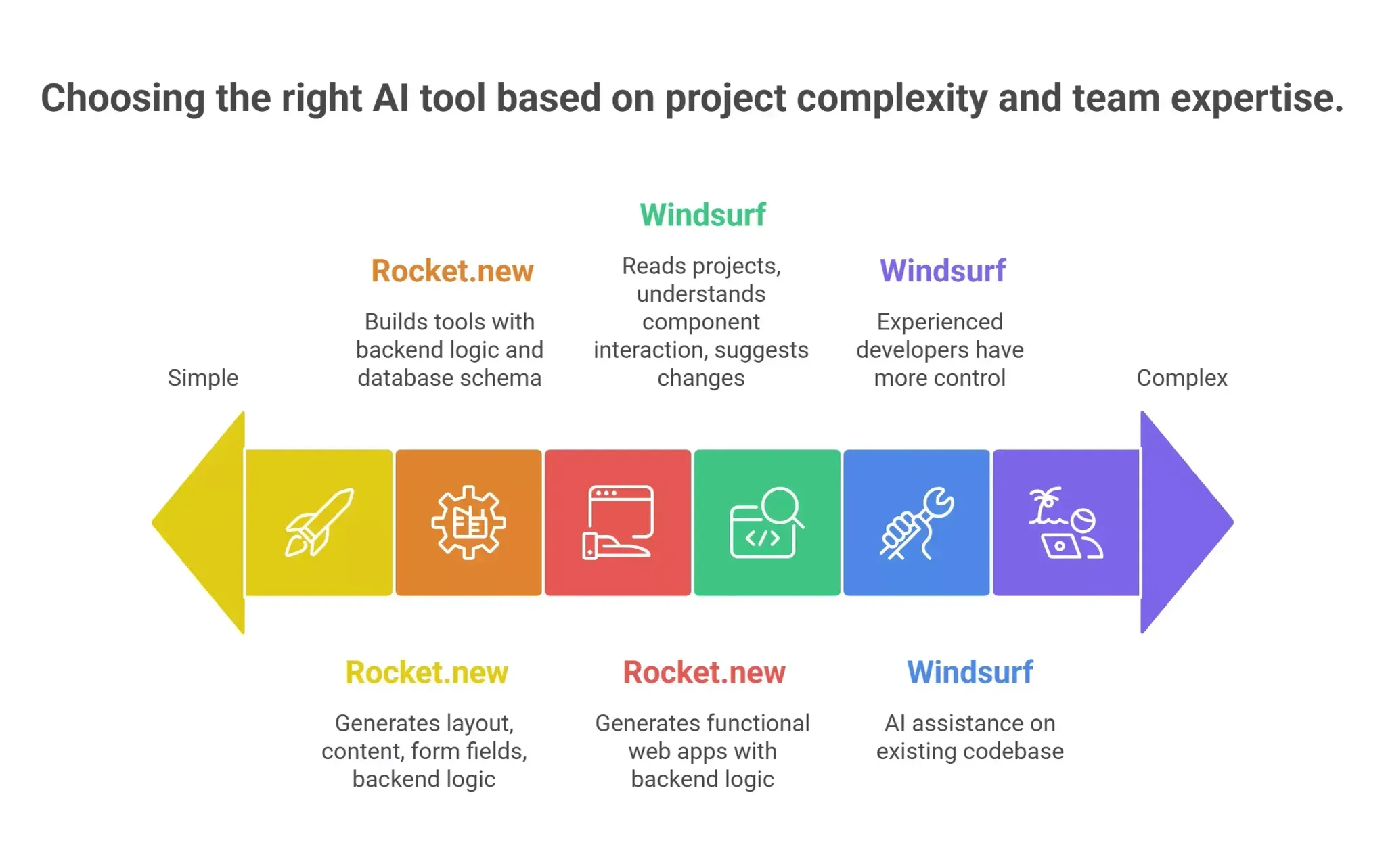
Landing pages favor Rocket.new for most teams. One natural language prompt generates the layout, content structure, form fields, and backend logic for capturing submissions. Custom domains let the page go live under a branded URL the same day.
Windsurf fits better when landing pages need to connect to an existing codebase with specific technical constraints.
Internal Tools and Dashboards
Rocket.new builds internal tools from natural language prompts, with backend logic and database schema included from the start. Data entry forms, admin panels, and reporting dashboards generate with data already connected. For a team with no developer, Rocket delivers internal tools that real users can operate immediately.
For a team with an experienced developer, use Windsurf to cut development time significantly.
Web Apps and Production Projects
Rocket.new generates fully functional web apps from a prompt with backend logic connected and the live app ready to deploy. For first versions where speed matters, Rocket handles the entire stack.
For web apps already in progress, use Windsurf for AI assistance on the existing codebase.
Complex Business Logic and Custom Software
Complex business logic and custom software favor Windsurf for engineering teams. Windsurf reads across entire projects and understands how different components interact before suggesting changes. Rocket handles complex business logic for standard app patterns well. For highly custom software, experienced developers working in Windsurf will have more control.
What Rocket.new Covers End to End
Rocket.new makes a different kind of promise than any code editor. It generates the code, connects the backend logic, creates the database schema, and puts a live app in front of real users from one browser session.
Here is what that looks like in practice:
-
A founder needs internal tools, a landing page, and a dashboard on the same database schema. Rocket generates all three from natural language prompts in one session.
-
An agency building client landing pages starts from Rocket's 25,000+ template library and customizes with natural language commands.
-
A product team generates the initial codebase for a new web app, exports the generated code to GitHub, and continues in their preferred code editor.
-
A product manager needs a dashboard for real users within the same week. Rocket delivers the app with backend logic and a custom domain in one build session.
Making the Right Choice
The answer is cleaner than most tool comparisons.
Use Windsurf when you are a professional developer who writes code daily and wants deep AI integration across your full codebase. Windsurf handles multi-file editing, AI-assisted coding that understands your project structure, and suggests improvements across entire projects. It is one of the most capable AI-powered development environment tools for experienced developers today.
Use Rocket.new when the goal is a complete, production-ready application from a natural language prompt with backend logic included and real users on it the same week. You type the problem. Rocket researches it, builds it, and deploys it.
One helps you write code faster. The other ships the product.
Table of contents
- -Two Tools, Two Different Jobs
- -What is Windsurf AI?
- -The Cascade AI Agent
- -Agent Mode
- -Key Features at a Glance
- -Windsurf Pricing
- -Who Should Use Windsurf
- -What is Rocket.new?
- -Prompt to App Generation
- -Backend Logic and Database Schema
- -Specialized AI Agents
- -Code Generation and Export
- -Key Features at a Glance
- -Rocket.new Pricing
- -Who Should Build with Rocket.new
- -Rocket.new vs Windsurf AI: Key Features Compared
- -The Biggest Differences
- -Backend Logic
- -Deployment and Live App Access
- -Database Schema Handling
- -Real-World Use Cases
- -Building Landing Pages
- -Internal Tools and Dashboards
- -Web Apps and Production Projects
- -Complex Business Logic and Custom Software
- -What Rocket.new Covers End to End
- -Making the Right Choice