

Code collaboration tools help developers work together in real time, manage code changes, and communicate clearly across teams. They reduce confusion, improve code quality, and keep distributed teams aligned while building faster.
Is your team losing time to scattered tools and broken handoffs?
Code collaboration tools bring editing, feedback, and project flow into one place. According to a report by GitLab, 52% of remote workers say they are more productive when working remotely. This shows how important the right collaboration tools have become for distributed teams.
If you are building apps, managing a project, or trying to collaborate better with your team, this blog walks you through everything. It covers core features, tool comparisons, and how to choose the right fit for your workflow.
Why Code Collaboration Tools Matter More Than Ever
Software development today is rarely a solo activity. Most developers work in teams, often across different time zones. The tools they use to coordinate directly affect how fast and how well they ship.
The cost of poor collaboration is measurable. Context gets lost at every handoff. A code review sits unread for three days. A pull request conflicts with work no one knew was happening. These are not edge cases. They are the default experience on teams without the right tools.
Modern code collaboration tools help teams:
- Work on the same codebase without stepping on each other
- Manage code changes and track every decision
- Improve code quality through structured code reviews
- Support real time collaboration across distributed teams
- Reduce onboarding time for new team members
The right tool does not just make collaboration possible. It makes it the path of least resistance.
What Makes a Code Collaboration Tool Genuinely Useful
Not all collaborative coding tools are built the same. The best ones share a cluster of capabilities that directly reduce friction in day-to-day development.
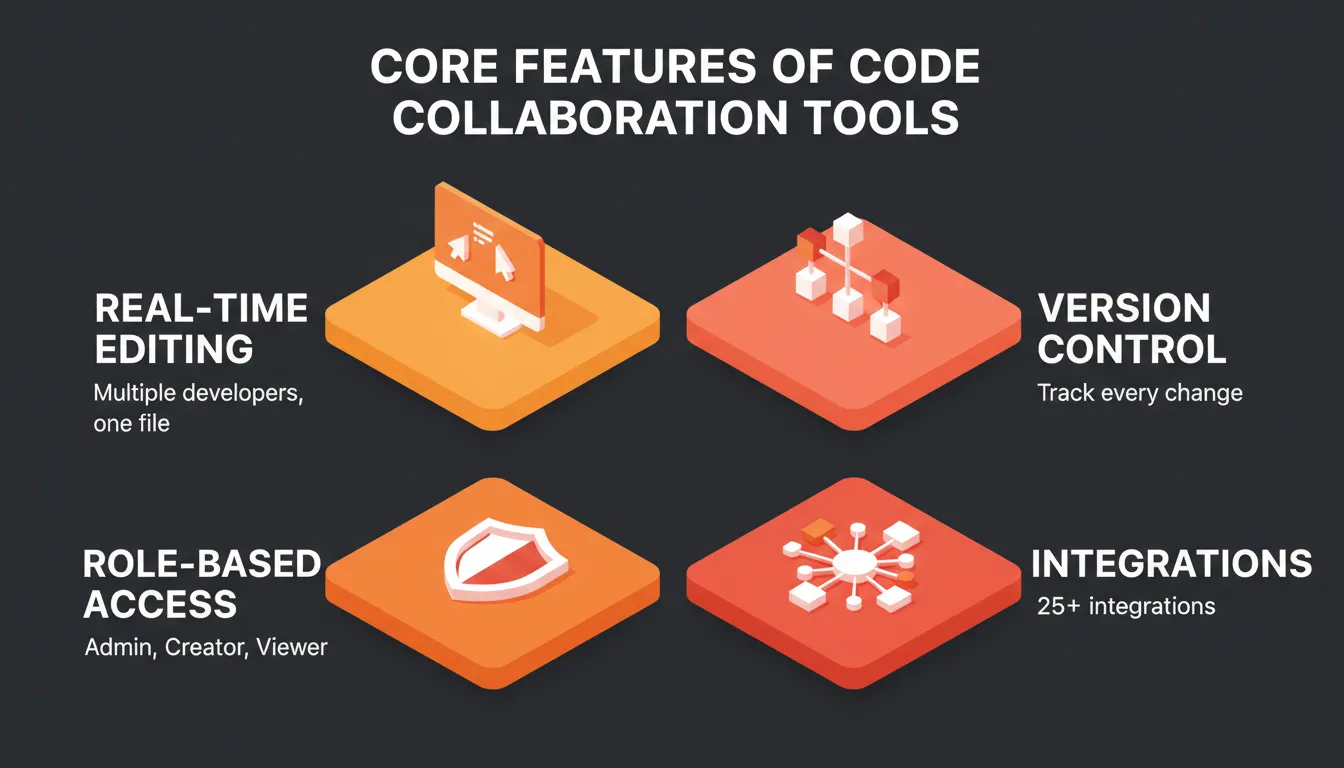
Real-Time Editing and Shared Workspaces
Real-time multiplayer editing lets multiple people work on the same files simultaneously. Tools like Visual Studio Live Share pioneered this for code. They enable shared editing sessions where both developers see each other's cursors and changes in real time.
Beyond raw co-editing, the best tools provide persistent shared workspaces where context accumulates over time. They also offer inline comments tied to specific lines or components. Notifications keep the right people informed without creating noise.
This is where pair programming and remote pair programming have evolved. Two developers no longer need to be in the same room to write code together effectively.
Version Control and Code Reviews
Version control is the backbone of collaborative coding. It tracks every code change, preserves history, and lets teams manage parallel workstreams without collisions.
With strong version control built into your collaboration tools, you can:
- Create and review pull requests with full context
- Run structured peer reviews with inline feedback
- Track code changes across branches and contributors
- Roll back to any previous state with confidence
Code reviews are not just about catching bugs. They are the primary mechanism for knowledge sharing, maintaining code quality standards, and keeping the whole team aligned on how the codebase evolves.
Role-Based Access and Team Governance
Enterprise and growing teams need more than shared access. They need controlled access. The best code collaboration tools offer role-based permissions that control who can create, edit, or only view. They also provide project-level isolation so contractors or clients see only what they need. Audit trails support compliance-sensitive environments.
This governance layer separates tools built for hobbyists from tools built for teams that ship production software.
Integration Ecosystem
No collaboration tool lives in isolation. The best platforms connect to the rest of your stack: databases, CI/CD pipelines, project management tools, communication platforms, and deployment infrastructure. A tool that requires constant context-switching defeats the purpose of collaboration.
For teams building full-stack products, read our guide on best web development tools every developer should use to see how collaboration tools fit into a broader developer workflow.
Popular Code Collaboration Tools in 2026
Here is a quick comparison of the most widely used collaborative coding tools available today:
| Tool | Best For | Real Time Co-editing | Version Control | Free Tier |
|---|---|---|---|---|
| Rocket | Teams building full-stack apps with shared research and build context | Shared workspace plus inline comments | Full version history plus rollback | Yes (20 credits) |
| GitHub | Open source, structured code review, pull request workflows | No | Yes (Git) | Yes |
| Visual Studio + Live Share | Full-stack development with real-time pair programming | Yes (Live Share) | Via Git integration | Yes (VS Code) |
| JetBrains IDEs | Advanced developers needing deep language intelligence | Via plugins | Via Git integration | No (paid) |
| Replit | Students, beginners, browser-based collaborative coding | Yes | Limited | Yes |
These platforms support collaborative coding in different ways. Some focus on real time work, while others focus on version control and project flow. The right choice depends on your team's size, workflow, and what you are building.
Rocket
 Rocket is a vibe solutioning platform that combines strategic research (Solve), AI app building (Build), and competitive intelligence (Intelligence) in a single shared workspace. It is built for teams where the founder, developer, marketer, and product manager all need to work from the same context. No one has to re-explain what was decided last week.
What makes Rocket's collaboration model distinct is its compound context architecture. When a team member opens a Build task inside a project, the market research the strategist ran, the competitive brief from Intelligence, and the product decisions from previous tasks are all already present. The handoff is not improved. It is eliminated.
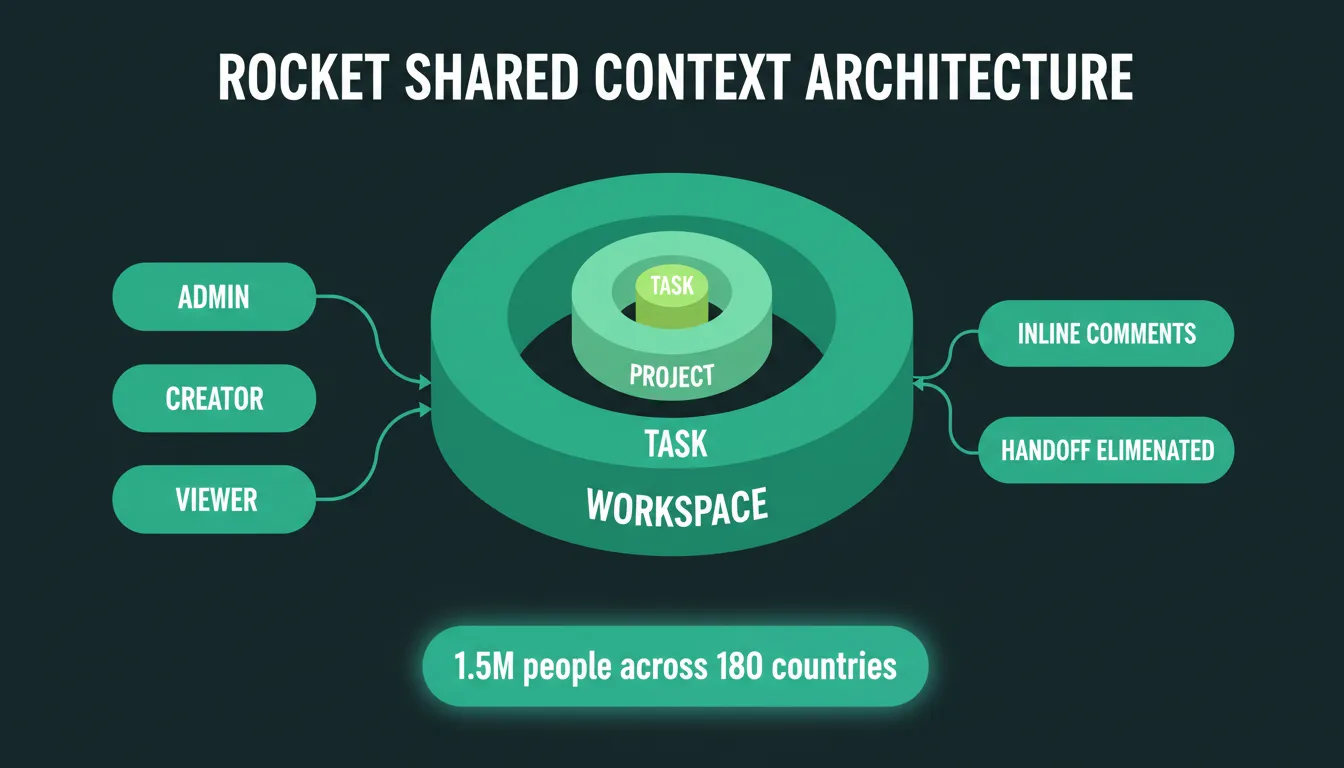
Rocket's three-level access control: Workspace, Project, and Task, with Admin, Creator, and Viewer roles cascading downward. Context accumulates across every task and never resets.
Collaboration features (verified from official docs):
- Three-level access control: Workspace, Project, and Task levels with Admin, Creator, and Viewer roles
- Inline comments: feedback lives next to the specific content it refers to, not in a separate thread
- Shared context: every team member works from the same accumulated intelligence, including files, task history, Solve outputs, and Build results
- Per-user credit allocation: admins set monthly credit caps per member, with full visibility into usage
- Unified billing: one account, one plan, no per-seat complexity
- Cross-task context: reference any previous task in a new one; decisions compound across the project
Rocket generates production-ready web apps in Next.js and mobile apps in Flutter. Every build ships with SEO-ready structure, WCAG accessibility compliance, and GDPR coverage by default. It connects to 25+ integrations including GitHub, Supabase, Notion, Linear, Airtable, Stripe, and Figma. These authenticate once at the workspace level and stay available across every project.
1.5 million people across 180 countries have tried Rocket, backed by Salesforce Ventures and Accel.
Who uses Rocket for team collaboration:
- Startup teams (founder and developer working from the same product context)
- Marketing and product teams (strategy and execution in one shared workspace)
- Agencies (clients get Viewer access to see outputs without editing)
- Enterprise teams (defined roles, three-level access control for governance and compliance)
Visual Studio
 Visual Studio is a full-featured development environment from Microsoft. Teams use it to build everything from enterprise web applications to desktop software. Its collaboration story centers on Visual Studio Live Share, an extension that enables real-time co-editing, shared debugging, and terminal access between multiple developers.
Note: Visual Studio (the full IDE) and Visual Studio Code (the lightweight editor) are different products. Live Share is available for both.
Key Highlights
- Real-time shared editing sessions via Live Share (both participants see live changes)
- Shared debugging: step through code together and set breakpoints collaboratively
- Read-only or full-edit guest modes for flexible collaboration
- Deep integration with Git and Azure DevOps for version control
- Extensive extension marketplace for adding collaboration and productivity tools
Live Share sessions start from a single URL. No project setup is required for guests. However, Live Share sessions are ephemeral. They do not persist context between sessions the way project-based tools do. It is excellent for synchronous pair programming but less suited for async team workflows.
JetBrains IDEs
 JetBrains produces a family of IDEs, including IntelliJ IDEA, PyCharm, WebStorm, and GoLand. Each is optimized for a specific language or stack. They are the preferred tools for many professional developers who need deep language intelligence, refactoring support, and code analysis beyond what general-purpose editors provide.
Note: JetBrains IDEs are not free for professional use. Pricing is subscription-based per product or via the All Products Pack.
Key Highlights
- Language-specific deep analysis (type inference, unused code detection, refactoring suggestions)
- Code With Me: JetBrains' built-in collaborative editing feature for real-time pair programming
- Plugin ecosystem for adding collaboration, deployment, and project management integrations
- Built-in Git support with visual diff tools and conflict resolution
- Strong support for code reviews through GitHub and GitLab integrations
Best for: Teams with a specific language focus, such as Java or Kotlin for Android, Python for data science, or JavaScript for web, who want the deepest possible tooling for that language.
Replit
 Replit is a browser-based development environment that runs entirely in the cloud. It requires no local setup. You open a browser, start coding, and share a link for others to join. This makes it the most accessible entry point for collaborative coding, particularly for students, educators, and developers who need to prototype quickly.
Key Highlights
- Zero setup: runs entirely in the browser with no installation required
- Real-time multiplayer editing: multiple users can type in the same file simultaneously
- Built-in hosting: every project gets a live URL automatically
- Supports 50+ programming languages
- Replit AI (Ghostwriter) for code completion and generation
Replit's version control is limited compared to Git-based tools. For teams building production software, it works better as a prototyping or learning environment than a primary development platform. Free tier projects are public by default.
GitHub
 GitHub is the world's largest code hosting platform, with over 100 million developers and more than 420 million repositories. It is built around Git, the distributed version control system. On top of that, it adds a collaboration layer: pull requests, code reviews, issue tracking, project boards, and GitHub Actions for CI/CD automation.
Note: GitHub and GitLab are different platforms. GitHub is owned by Microsoft. GitLab is an independent company with a stronger focus on DevOps and self-hosting.
Key Highlights
- Pull requests with inline code review comments and approval workflows
- Issue tracking and project boards for managing work alongside code
- GitHub Actions for automating testing, deployment, and code quality checks
- Codespaces: cloud-based development environments that run in the browser
- GitHub Copilot: AI-powered code completion integrated directly into the editor
Best for: Teams of any size working on shared codebases, open source projects, and any workflow where asynchronous code review is the primary collaboration pattern.
Each of these tools brings something different to the table. Some focus on real time collaboration, while others focus more on version control, pull requests, and structured workflows. The right choice depends on your team, your project, and how your developers prefer to work together.
Pair Programming and Remote Work
Pair programming is one of the most effective practices in collaborative software development. Two developers work on the same problem simultaneously. One writes code (the driver), the other reviews and guides (the navigator). Roles switch regularly.
Research on pair programming is consistent: it produces higher quality code, catches more bugs before they reach production, and accelerates knowledge transfer between team members. A study published in IEEE Software found that pair programming increases code quality while adding only 15% to development time. Most teams find that trade-off worthwhile.
Remote pair programming extends this practice across distance using tools like Visual Studio Live Share, JetBrains Code With Me, and Replit's multiplayer mode.
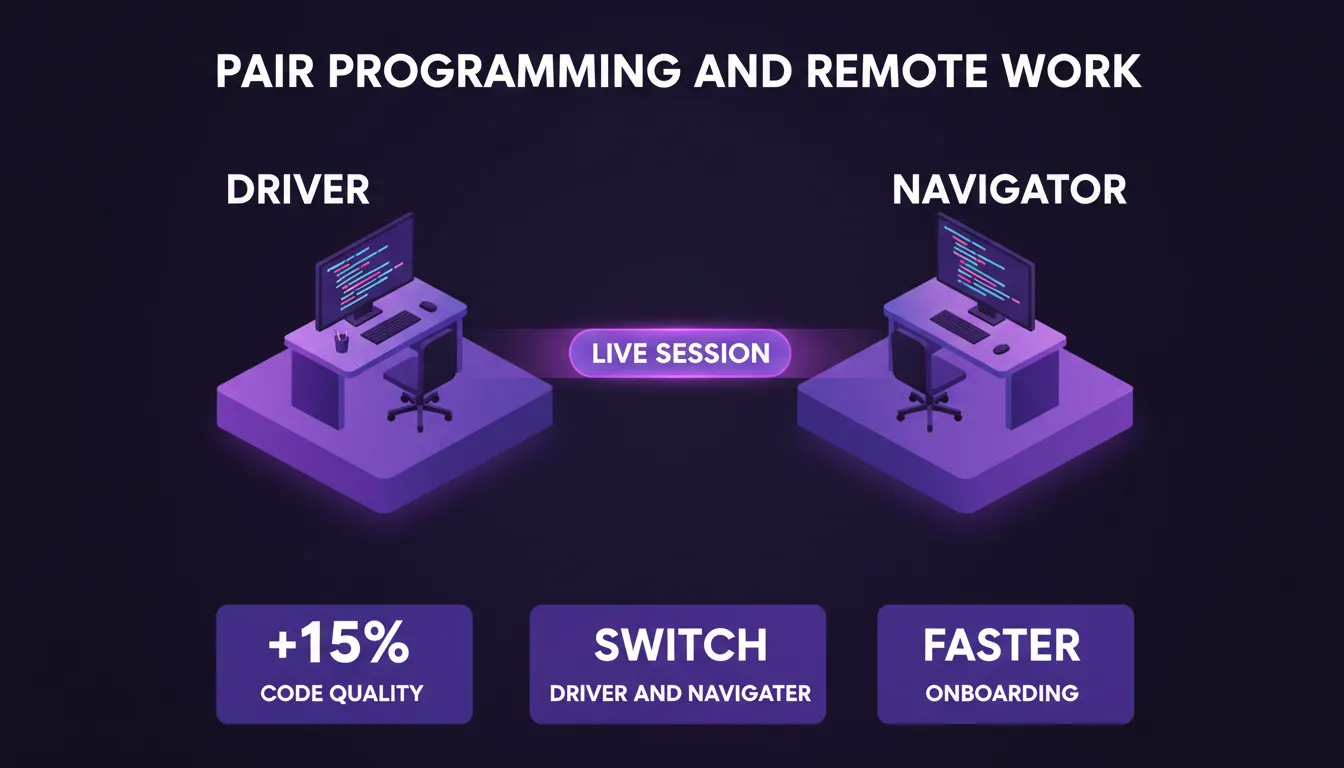
Pair programming: the Driver writes code while the Navigator reviews and guides. Remote tools like Visual Studio Live Share and JetBrains Code With Me bring this practice online across any distance.
Practical benefits of pair programming:
- Bugs caught in real time rather than in code review or production
- Faster onboarding: junior developers learn patterns directly from senior colleagues
- Reduced knowledge silos: critical system knowledge spreads across the team
- Better architectural decisions through immediate second-opinion feedback
When to use it: Use pair programming for complex features, onboarding new team members, or debugging stubborn issues.
When to skip it: Skip it for routine, well-understood tasks where the overhead outweighs the benefit, or when one developer needs deep focus time without interruption.
For a broader look at how AI is reshaping developer workflows, see our guide on vibe coding using AI tools to shape next-gen workflows.
How Code Collaboration Tools Fit Into Your Development Workflow
Understanding where these tools plug into your workflow helps teams adopt them faster and extract more value from day one.
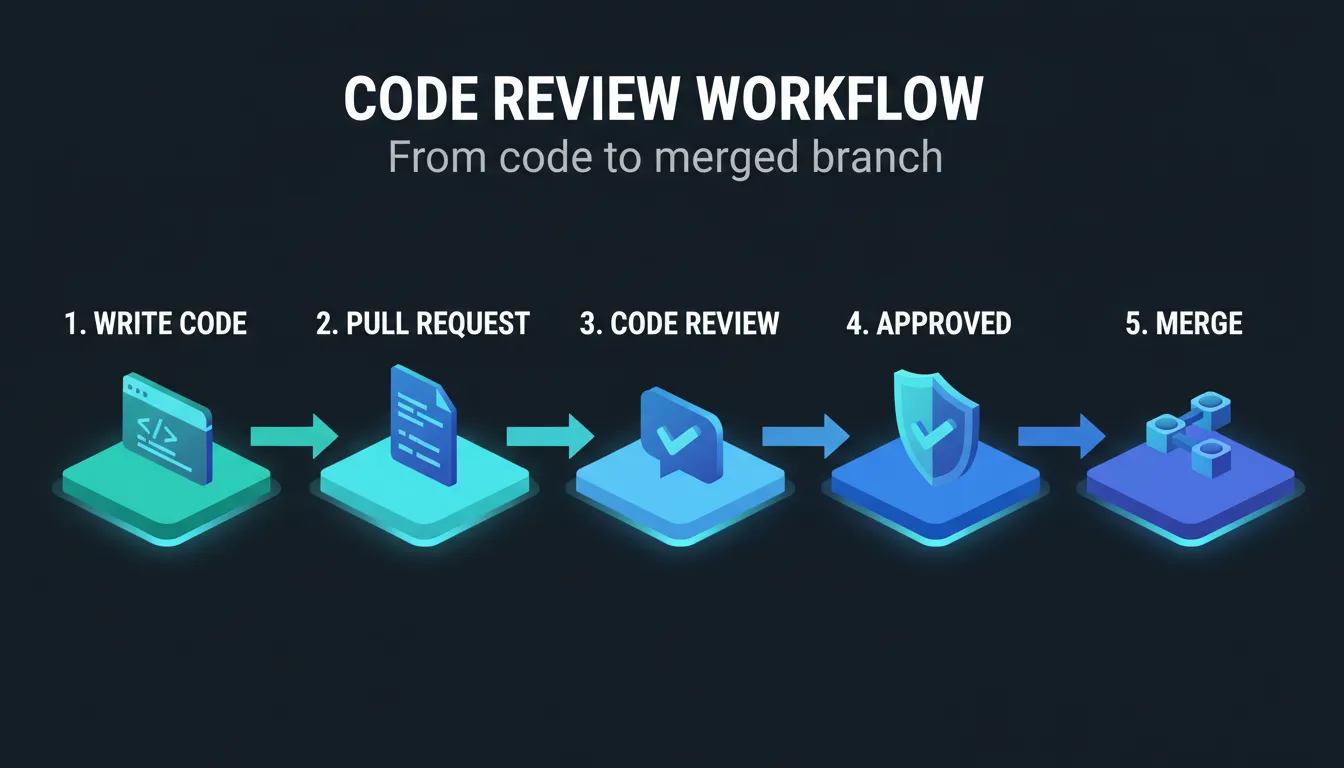
The two primary collaboration patterns, synchronous co-editing and asynchronous code review, both feed into the same shared feedback and merge workflow.
How to Choose the Right Code Collaboration Tool
The right tool depends on your team's size, workflow, and what you are building. Here is a practical decision framework:
| Team Type | Recommended Tools | Why |
|---|---|---|
| Solo developer | GitHub + VS Code | Version control plus lightweight editing |
| Startup (2 to 5 people) | Rocket + GitHub | Shared context, build, and code review in one workflow |
| Remote team (synchronous) | Visual Studio Live Share or JetBrains Code With Me | Real-time co-editing sessions |
| Open source project | GitHub | Pull request model, community discoverability |
| Students and learners | Replit | Zero setup, instant sharing |
| Enterprise team | Rocket or JetBrains + GitHub | Governance, access control, compliance |
| Agency with clients | Rocket | Client Viewer access, shared project context |
Key questions to ask before choosing:
- Does your team work synchronously or asynchronously?
- Do you need real-time co-editing or structured code review?
- How important is governance and access control?
- What does your existing stack look like, and what integrations do you need?
If your team relies heavily on live collaboration, Visual Studio Live Share is a strong option. If you want a browser-based development environment, Replit removes all setup friction. For teams that need version control and structured code reviews, GitHub remains the standard. For teams that want research, building, and collaboration in one shared workspace, Rocket is worth exploring.
For teams evaluating platforms for collaborative development, see how Rocket compares to Replit for teams.
The Role of Cloud and Browser-Based Development
Cloud-based development environments are changing the way developers work. Instead of setting up local environments that take hours to configure, cloud IDEs provide a consistent, shareable environment that anyone can access from a browser.
According to the Stack Overflow Developer Survey, cloud-based tools are now used by a majority of professional developers globally. Adoption is accelerating among distributed teams.
What cloud-based collaboration unlocks:
- Consistent environments across the team, with no "works on my machine" problems
- Instant onboarding: new team members are productive in minutes, not days
- Access from any device, anywhere, which is critical for truly distributed teams
- Reduced infrastructure overhead for smaller teams without dedicated DevOps
The trade-off is real. Cloud environments introduce latency and dependency on internet connectivity. For latency-sensitive workflows or air-gapped enterprise environments, local tooling with cloud sync remains the more practical choice.
Security and Compliance Considerations
For teams in regulated industries or building security-sensitive products, collaboration tool selection is not just about features. It is about risk management.
Key questions to evaluate:
| Consideration | What to Look For |
|---|---|
| Data residency | Where is your code stored? Does it meet your compliance requirements? |
| Access control | Can you enforce who sees what, down to the file or task level? |
| Audit logging | Can you produce a record of who accessed or changed what, and when? |
| SSO and MFA | Does the tool integrate with your identity provider? |
| Open source vs. proprietary | Self-hosted tools give full control; SaaS tools trade control for convenience |
GitHub Enterprise, JetBrains Space, and Rocket's enterprise tier all offer enhanced governance features. For most startups and small teams, the standard tiers are sufficient. However, understanding the ceiling before you hit it is worth the time.
Code Collaboration Tools: The Real Picture
Teams often struggle with communication gaps, scattered tools, and slow feedback loops. This leads to confusion, missed context, and delays in project delivery. When developers and team members are not aligned, code quality suffers and progress slows down.
The most expensive moment in any collaborative project is the context loss at the handoff. Research gets summarized into a brief. The brief gets read at 60%. The developer builds from memory. Three handoffs, three compressions, three opportunities for the original intent to get lost.
The tools that solve this problem most completely are the ones that keep context alive across the entire workflow. That is the architectural difference that matters most for teams shipping real products.
For a deeper look at how teams can build better together, explore our guide on a practical guide to team collaboration app development.
The Future of Code Collaboration
Code collaboration tools will only become more central to how development teams work. As distributed teams grow, AI-assisted workflows expand, and the gap between research and execution narrows, the tools that keep context alive across the full arc will define how fast and how well teams build.
The best code collaboration tools in 2026 are not just about writing code together. They are about making sure every decision, every insight, and every piece of research is available to everyone who needs it, exactly when they need it.
You type the problem. The right platform researches it, builds from that research, and keeps your team aligned from day one. Start building with Rocket.
Table of contents
- -Why Code Collaboration Tools Matter More Than Ever
- -What Makes a Code Collaboration Tool Genuinely Useful
- -Real-Time Editing and Shared Workspaces
- -Version Control and Code Reviews
- -Role-Based Access and Team Governance
- -Integration Ecosystem
- -Popular Code Collaboration Tools in 2026
- -Rocket
- -Visual Studio
- -Key Highlights
- -JetBrains IDEs
- -Key Highlights
- -Replit
- -Key Highlights
- -GitHub
- -Key Highlights
- -Pair Programming and Remote Work
- -How Code Collaboration Tools Fit Into Your Development Workflow
- -How to Choose the Right Code Collaboration Tool
- -The Role of Cloud and Browser-Based Development
- -Security and Compliance Considerations
- -Code Collaboration Tools: The Real Picture
- -The Future of Code Collaboration


