
Looking to build a customer portal with AI Builder? Learn to create secure, user-friendly portals with logins, data access, file sharing, and workflows, meeting growing demand for self-service support without coding expertise.
Can I create a customer portal with AI Builder?
Yes, you can.
Customer portals are becoming a must in modern business. According to Statista, 88% of customers expect brands or organizations to offer an online self-service support portal, highlighting the strong demand for self-service access.
If you’re a small team, a marketing agency owner, or someone who likes learning new tools fast, this article is for you.
We’ll walk through building a portal that handles secure logins, client data, file sharing, role-based access, and workflows without deep coding skills.
What is a Customer Portal and Why You Might Build One?
Let’s get the basics out of the way. A customer portal is an online space where your clients can log in safely to see exactly what matters to them.
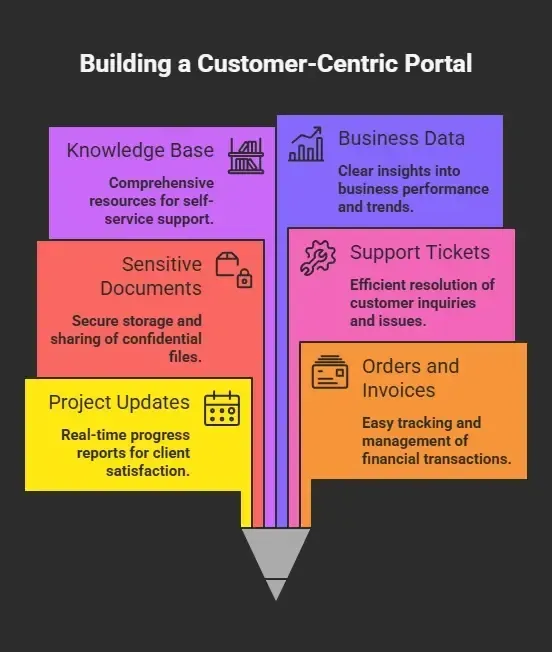
So instead of emailing spreadsheets or attaching PDFs in scattered threads, you centralize information in a custom client portal. That means less back‑and‑forth and happier customers.
A custom portal also gives you secure logins and role-based access so clients only see what they’re supposed to see. It’s like having a digital front door but with smarter locks and guest passes.
Now let’s see how to build one with AI tools and minimal fuss.
Guide to Creating Your Customer Portal
So, how do you actually put everything together and build a working portal without getting stuck?
Don’t worry, it’s simpler than it sounds. You don’t need deep coding experience or complicated setups. With the right portal builder and AI tools, you can create a functional and clean client portal step by step.
Here’s a quick look at what you’ll be doing:
-
Understand your business needs and what your clients expect
-
Choose and connect your data sources like Google Sheets or databases
-
Pick a customer portal builder that fits your workflow
-
Design your portal pages using a visual builder
-
Set up workflows and backend logic
-
Configure secure logins and role based access
-
Test everything and launch your portal
Now let’s go through each step in detail.
Step 1: Understand Your Needs First
Before you touch any tool, ask a few questions out loud:
-
What data do my clients need most?
-
Do I need document sharing or just view‑only dashboards?
-
Do internal teams need shared access too?
-
Should clients be able to upload documents?
-
Is role-based access a must?
Write these down. They’ll guide how you structure the portal, and they’re your north star when building workflows or connecting databases later.
This step keeps your portal from turning into a confusing maze.
Step 2: Pick Your Data Sources
Portals don’t just appear magically. You need data sources to pull from. Depending on your business needs, this could be:
| Data Source | Good For |
|---|---|
| Google Sheets | Light CRM, lead lists, simple tables |
| Databases | Business data, task logs, financial stats |
| External APIs | Real time data from other systems |
| File storage | Docs, PDFs, invoices |
If you use Google Sheets for simple client info, you can connect that sheet to your portal so it shows updated records in real time. That way, if you add a row in the sheet, the portal reflects it immediately.
Step 3: Choose an AI‑Powered Builder
Next up is choosing a portal builder that works with AI and visual tools so you can create without heavy writing code. Many platforms now support drag‑and‑drop building, backend logic, workflows and secure authentication.
The idea is to link your data sources and then design the portal screens with a visual builder. That makes things easier, friendlier, and quicker and keeps your portal neat.
Many tools let you design portals, connect data, handle client logins and push updates to users all without programming experience.
Step 4: Design Your Portal Pages
At this point, you’ll create the different screens your clients will use. These often include:
-
Dashboard (project status, progress)
-
Documents area (file sharing, uploads)
-
Messages and updates
-
Profile settings
-
Billing or invoice view
Most portal builders let you work like you’re building slides:
-
Pick a screen template
-
Drag and drop elements
-
Connect elements to data sources
-
Add conditions (who sees what)
-
Set role based access so a client only sees their own info
Here’s where things start to feel rewarding. You’re building a place your customers will log in to and use every day.
Step 5: Add Workflows and Logic
Once you have screens, the next step is to add simple automation and backend logic. Workflows might include:
-
Sending email updates when a file is uploaded
-
Notifying your team when a client posts a question
-
Updating project status automatically when tasks are done
-
Generating audit logs for security and tracking
Good portal builders give you built‑in workflows that you can configure without writing code. If a client logs in, you can ask the portal to show the right data, send a message, or prompt a download.
This is where AI can help bridge the gap from static screens to dynamic experiences.
Step 6: Connect Client Logins and Permissions
At its heart, a portal is only useful if clients can log in securely.
That means setting up:
-
Unique logins per client
-
Secure logins with MFA or magic links
-
Password resets
-
Role based access so internal teams and clients see different views
-
Permissions that match your business needs
Good tools help you manage this with dropdown settings. You just map who should see what.
Step 7: Test and Launch
Before you go live, ask a simple question out loud: Would I trust this with my own data?
You’ll want to test:
-
Client sign up & login flows
-
Viewing data across roles
-
Uploading and downloading documents
-
Real time updates
-
Audit logs
-
Notifications
Make sure your internal teams aren’t seeing something meant only for clients. Make sure clients can’t view sensitive data by accident.
Once everything checks out, push it live. Give a small client group access first to iron out early kinks.
Real Community Insight
Here’s a real take from Twitter (X) that shows how people are actually using these tools:
“You can literally build full apps and client systems just by describing what you want… AI handles most of the heavy lifting." Twitter
This matches what many builders are seeing right now. AI tools enable the creation of working portals, apps, and workflows much faster than before.
How Rocket.new Helps With Creating Customer Portals?
Rocket.new is a vibe solutioning platform that helps you build full apps just by describing what you want in plain English. You don’t need heavy coding experience, and you can go from idea to working portal much faster.
It works as an all-in-one platform where you can handle backend logic, databases, workflows, authentication, and UI building in one place. That means fewer tools, less confusion, and a smoother process.
Top Features
-
One-prompt app creation (type it, build it)
-
Visual builder with live preview
-
Supports web and mobile apps
-
Integration with databases, storage, auth systems
-
Built-in backend logic and workflows
-
Ability to export code for further customization
How to Create a Customer Portal with AI Builder Using Rocket.new?
Rocket.new lets you build a full portal just by describing what you want in plain English. It handles the app structure, backend logic, and setup so you can focus on customizing it for your clients.
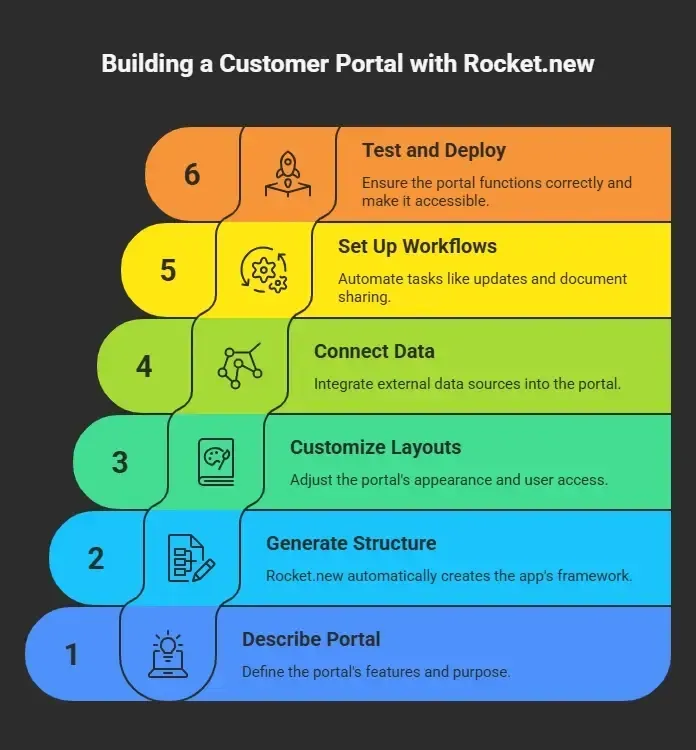
That’s it. You go from idea to a working portal quickly, without getting stuck in heavy coding or complicated setup.
Common Mistakes to Avoid When Building Portals
A few simple things can make or break your portal. Let’s keep it clean and easy.
-
Don’t show too much data at once. Keep pages focused so clients don’t feel lost.
-
Check who can see what using granular permissions. This avoids confusion and protects sensitive data.
-
Make client logins secure with magic links or multi-factor options. Simple for users, safer for your system.
-
Add a help section or small FAQ inside the portal so clients can solve things on their own.
-
Keep the design simple. A clean layout always works better than something crowded.
Small changes like these make your portal feel smooth, easy, and actually useful for your clients.
Create Customer Portal with AI Builder
Companies often juggle client data in messy emails, spreadsheets, and scattered systems. Clients get frustrated. Teams lose time. It’s confusing.
Building a portal brings order. You gather everything into one digital space where clients log in, see their updates, access documents, and interact with your team. Using tools like AI‑powered portal builders or platforms like Rocket.new makes setup fast without heavy coding.
The real value comes from giving clients a calm, clear place to get what they need. It saves hours of emails and makes your business look polished.
Table of contents
- -What is a Customer Portal and Why You Might Build One?
- -Guide to Creating Your Customer Portal
- -Step 1: Understand Your Needs First
- -Step 2: Pick Your Data Sources
- -Step 3: Choose an AI‑Powered Builder
- -Step 4: Design Your Portal Pages
- -Step 5: Add Workflows and Logic
- -Step 6: Connect Client Logins and Permissions
- -Step 7: Test and Launch
- -Real Community Insight
- -How Rocket.new Helps With Creating Customer Portals?
- -Top Features
- -How to Create a Customer Portal with AI Builder Using Rocket.new?
- -Common Mistakes to Avoid When Building Portals
- -Create Customer Portal with AI Builder