How can growing web platforms avoid frontend chaos? Micro Frontends split applications into independent, self-contained parts with separate logic and releases, enabling scalability, team autonomy, and structured growth for large development environments.
Can large web apps scale without mess?
A well-planned Micro Frontend approach allows teams to split a big frontend into smaller, self-contained parts that ship independently.
Instead of a single monolithic bundle, each part owns its own page, logic, and release cycle.
According to The State of Frontend 2024 survey, over 6,000 developers reported on usage and trends in micro-frontend patterns and multi-team frontend work.
That scale demands better structure. Micro Frontend architecture answers that need.
Why the Frontend Monolith Starts to Hurt?
Most projects begin as a single-page application.
One repository. One build pipeline. One team.
Then the project grows.
More developers join. The backend expands. The server handles more data. New features keep landing. The user interface gets larger. Soon, the once-clean frontend becomes a monolith.
In a monolithic frontend, every change touches the entire application. One small code update can break another page. Shared state becomes messy. Dependencies pile up. Developers wait on the same team for approvals. The development experience slows down.
And when three teams work on the same codebase? That is where things get tense.
This is where micro frontend architecture makes sense.
What is a Micro Frontend?
A Micro Frontend is an architectural style where the frontend is split into self-contained units. Each unit focuses on a specific page or feature. These units are independently developed and deployed.
Instead of a single frontend monolith, the application becomes a collection of smaller frontend applications.
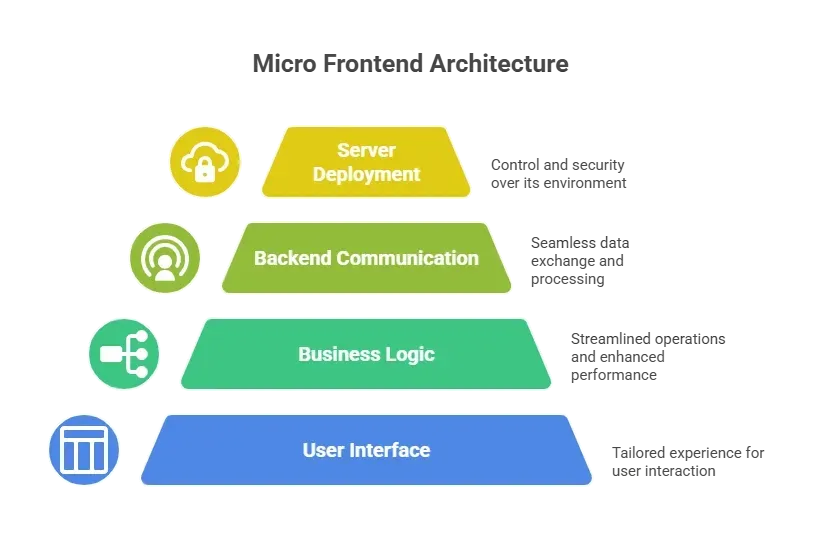
The only requirement is that each micro frontend runs in the browser and integrates with other micro frontends.
So the browser becomes the meeting point.
Core Principles of Micro Frontend Architecture
Breaking a large frontend into smaller pieces sounds simple. In practice, it needs structure. Without clear rules, a micro frontend setup can devolve into loosely coupled modules that barely communicate with each other.
Before implementing micro frontends, it helps to define a few foundational principles. These patterns keep the project
1. Self-Contained Modules
Every micro frontend should be self-contained. That means its code, components, styles, and dependencies live together. No tight coupling with other parts.
Self-contained modules reduce shared state problems. They avoid global variables. They keep the project stable.
2. Independently Developed and Deployed
Each team should build and release its part without waiting for other teams.
Independently developed modules reduce friction. Developers can ship faster. The development experience feels smoother.
This works well for cross-functional teams. Each team owns both the frontend and the backend for its feature.
3. Clear Communication
Micro frontend architecture still needs coordination. Data can pass via custom events, shared state stores, or APIs.
In some cases, custom events are cleaner than direct references. Event listeners handle communication at runtime.
Keep communication simple. Define boundaries early.
When these principles guide the structure, micro frontend architecture feels organized rather than fragmented. Each team knows what it owns. Each module stays self-contained. Communication remains predictable. That balance is what keeps large frontend projects growing without constant rework.
Client Side vs Server Side Approaches
Micro frontends can be composed on the client side or server side. Both have tradeoffs.
| Approach | How It Works | Pros | Cons |
|---|---|---|---|
| Client side rendering | Browser loads each micro frontend bundle dynamically | Flexible, faster iteration, strong development experience | Larger initial load |
| Server side includes | Server assembles HTML fragment from multiple services | Better first load, SEO friendly | More backend coordination |
With client-side rendering, JavaScript loads different components into the page at runtime. Tools like module federation help share code between bundles.
With server-side composition, the server combines fragments before sending the page to the browser. This works well for complex applications that need SEO.
Some teams even mix both.
Module Federation and Why It Matters
Module federation, introduced in Webpack 5, allows multiple frontend applications to share JavaScript code at runtime.
Instead of bundling everything together, module federation lets teams expose and consume components across builds.
For example:
- Team A exposes a custom element for checkout.
- Team B loads it into their page via module federation.
No copy-paste. No duplicate dependencies.
Module federation reduces shared state issues and avoids version conflicts when configured properly.
It also improves the development experience. Developers can run micro frontend modules locally without spinning up the entire project.
Web Components as a Base Layer
Some teams use web components to define reusable custom element tags.
A custom element follows the web component spec. It runs in the browser without caring about frameworks.
This allows different technologies to coexist. One team uses React. Another uses Vue. Another sticks to vanilla JavaScript.
Web components create isolation at the element level.
And yes, browser support today is solid for modern environments.
Handling Routing and Shared Concerns
Routing and shared services need structure in a micro frontend setup. Without clarity, modules start stepping into each other’s space. A simple pattern keeps things clean and predictable.
Routing logic can live in a root container application.
For example:
- A shell app handles top-level navigation.
- It loads specific micro frontend modules based on the page route.
Cross-cutting concerns like authentication, logging, and analytics should be handled in a shared layer.
Keep business logic within each self-contained unit. Avoid pushing too much into the root.
When routing remains centralized and shared concerns remain separate from feature logic, the architecture remains stable. Each micro frontend knows its responsibility, and the overall application stays organized as it grows.
Testing Strategy in a Micro Frontend World
Testing still matters in a micro frontend setup. Splitting the frontend does not remove the need for quality checks. It just changes how testing is organized.
Each micro frontend should have:
- Unit tests for individual components
- Integration testing for cross-module communication
Integration testing catches issues when modules talk via custom events or shared state.
The goal is simple. Keep quality high without slowing development experience.
When testing is structured at the micro frontend level, teams move faster without breaking other modules. Clear test boundaries protect the project as it scales.
A Simple Example
Consider an e-commerce project structured using micro frontend architecture. Instead of building a single large frontend where every feature lives in the same codebase, the application is organized by business domain.
Product listing page
- Cart page
- Checkout page
- User profile page
Instead of one frontend monolith, define each as a separate micro frontend.
Each team owns its backend service and frontend code. The server handles data APIs. The browser loads each page module dynamically.
The previous example shows how multiple teams can work in parallel without stepping on each other.
Community Insight
A developer on Reddit shared this about implementing micro frontends:
“We moved from a monolithic frontend to micro frontends using module federation. Our teams ship independently now, and the development experience improved a lot.”
Supercharge Your Frontend with Rocket.new
Building a micro frontend setup sounds great on paper. In reality, teams still need the right tools to define boundaries, structure modules, and connect frontend with backend services. That is where Rocket.new comes.
Rocket.new supports scalable frontend applications by helping teams create modular systems from the start. Instead of building a frontend monolith and refactoring later, teams can structure their project around self-contained modules from the outset.
Rocket.new makes it easier to:
- Define a clear separation between frontend modules
- Connect each micro frontend to its own backend service
- Generate APIs and data models without manual boilerplate
- Configure deployment-ready server environments
- Create modular components that can scale independently
Top Features
- Prompt to App Creation: Builds apps directly from single prompts
- Figma Import: Converts design files into live, editable layouts
- AI-Powered Backend: Automatically handles logic, data, and workflows
- Custom Domain Support: Publishes projects with a branded domain
- Code Export: Allows developers to extend or customize later
- Live Preview: Shows instant updates while editing
These features directly support micro-frontend architectures. Each team can scaffold its own section of the application, manage its backend logic, and deploy without interfering with other teams.
Use Cases
Internal tools: Teams can create self-contained admin panels that integrate with dedicated backend services. Each tool serves as its own micro-frontend within a larger system.
Customer portals: Billing, profile management, and support dashboards can exist as separate frontend modules. Each module connects to its own backend APIs and loads in the browser when needed.
SaaS dashboards: Analytics, reporting, and settings can be organized into independently developed sections. Different teams work on different parts without merging into a single frontend monolith.
Rocket.new is well-suited for implementing micro frontends in complex applications. It reduces setup time and enables developers to focus on business logic, routing logic, and user interface design rather than repetitive configuration work.
Challenges to Watch
Micro frontend architecture is not magic.
It can increase complexity if boundaries are unclear.
Too many shared dependencies create tight coupling. Poor routing logic causes confusion. And too much shared state breaks isolation.
The team must define ownership early.
Remember, micro frontend architecture works best for large, complex applications with multiple teams. A small single application does not need this pattern.
Is Micro Frontend Worth?
Large frontend projects grow into a frontend monolith. Code becomes harder to manage. Multiple teams block each other. Releases slow down. The development experience feels heavy. Micro Frontend architecture splits the frontend into self-contained, independently developed modules. Client-side and server-side composition allow flexibility. Module federation enables shared components without duplicating code.
For complex applications handled by cross-functional teams, this structure brings clarity. It defines boundaries, improves ownership, and supports scaling without constant friction.
Micro Frontend is not for every project. But when scale and multiple teams are involved, it makes practical sense.
Table of contents
- -Why the Frontend Monolith Starts to Hurt?
- -What is a Micro Frontend?
- -Core Principles of Micro Frontend Architecture
- -1. Self-Contained Modules
- -2. Independently Developed and Deployed
- -3. Clear Communication
- -Client Side vs Server Side Approaches
- -Module Federation and Why It Matters
- -Web Components as a Base Layer
- -Handling Routing and Shared Concerns
- -Testing Strategy in a Micro Frontend World
- -A Simple Example
- -Community Insight
- -Supercharge Your Frontend with Rocket.new
- -Top Features
- -Use Cases
- -Challenges to Watch
- -Is Micro Frontend Worth?