
The Figma-to-code problem is one of the oldest unsolved problems in front-end engineering.
Every year, a new tool claims to solve it. Every year, the output "looks similar" to the design. Similar is not the same as correct. A heading that is 23px instead of 24px. Padding that is 14px instead of 16px. A font weight of 500 instead of 600. Border radius of 6px instead of 8px.
To a non-designer, these are invisible differences. To the designer who spent two hours choosing those values, they are the entire point.
We built the Figma-to-code pipeline at Rocket to meet a specific fidelity standard: every spacing value is correct. Not "close." Not "similar." Correct. The padding value in the generated code matches the padding value in the Figma file exactly.
That standard shaped every engineering decision in the pipeline.
The Parsing Challenge: Appearance vs Intent
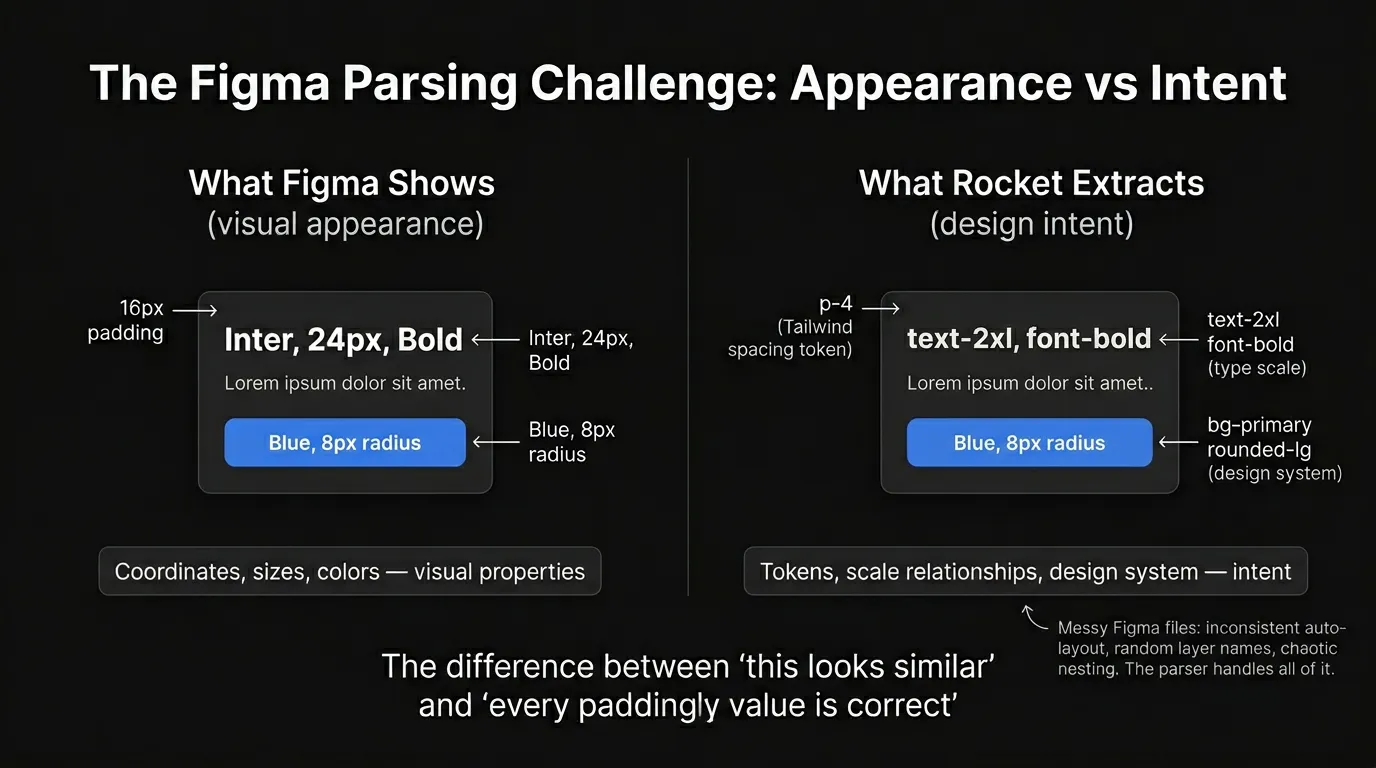
The naive approach to Figma-to-code: read the visual properties of each element (position, size, colour, font) and generate code that reproduces those properties.
This produces "looks similar" output. It fails because it captures appearance but misses intent.
What Appearance Gives You
A Figma frame contains elements at absolute positions with specific sizes, colours, and fonts. Reading these directly produces:
1.heading {
2 position: absolute;
3 top: 24px;
4 left: 24px;
5 font-size: 24px;
6 font-weight: 700;
7 color: #1a1a2e;
8}Absolute positioning. Hardcoded values. No design system. No responsive behaviour. The output looks correct at the exact viewport size of the Figma frame and breaks at every other size.
What Intent Gives You
The same element, parsed for design intent, produces:
1<h1 className="text-2xl font-bold text-primary p-6">Project Title</h1>Tailwind utility classes. Design system tokens. Responsive by default. The spacing is p-6 (24px) because the system detected that 24px is the designer's chosen spacing unit not a random number, but a deliberate token in a spacing scale.
The difference: appearance reads coordinates. Intent reads the design system underneath the coordinates.
The Pipeline
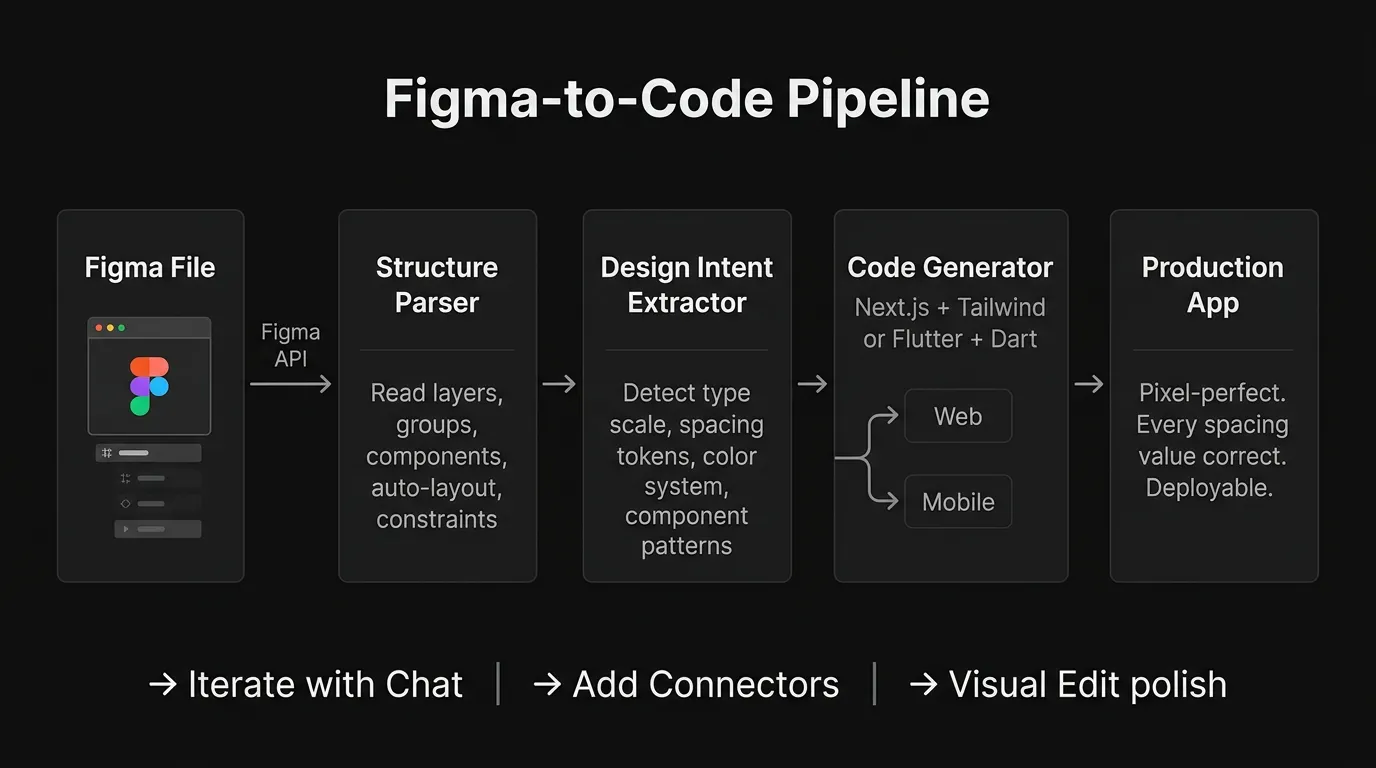
The Figma-to-code pipeline has four stages:
Stage 1: Structure Parser
The system connects to the Figma API and reads the file's complete layer tree. Every frame, group, component, vector, text element, and image is mapped with its:
- Layer name (becomes the component/variable name in code)
- Parent-child relationships (containment hierarchy)
- Auto-layout properties (flex direction, gap, padding, alignment)
- Constraints (how the element resizes relative to its parent)
- Component instances (which elements are reusable)
This is not a pixel read. It is a structural read. The system understands that a card is a card it has children, it has padding, it has a specific layout direction not just "a rectangle at these coordinates."
Stage 2: Design Intent Extractor
This is where the engineering gets hard.
The structure parser gives us the tree. The intent extractor gives us the design system:
| What It Detects | How It Determines Intent |
|---|---|
| Type scale | Analyses all text elements, identifies the heading/body/caption hierarchy by size ratios |
| Spacing tokens | Finds recurring spacing values (8, 16, 24, 32, 48) and maps them to a spacing scale |
| Colour system | Groups colours by usage pattern (primary, secondary, background, text, accent) — not just hex values |
| Component patterns | Identifies which Figma components map to which code component types (button, card, input, nav) |
| Layout patterns | Detects grid systems, flex layouts, and responsive breakpoint intentions from auto-layout configuration |
The intent extractor is what allows the system to generate p-6 instead of padding: 24px — it recognises that 24px is the 6th step in a 4px-based spacing scale used consistently throughout the design.
Stage 3: Code Generator
The extracted intent feeds into the code generator, which produces either:
- Next.js + React + Tailwind + shadcn/ui for web applications
- Flutter + Dart for mobile applications (iOS + Android)
The generator uses Tailwind utility classes that map to the detected design tokens. It produces component files that mirror the Figma component structure. It generates responsive layouts from auto-layout properties.
The framework selection is based on the Figma frame dimensions — standard web widths (1440px, 1280px) produce Next.js. Mobile dimensions (390×844px, 360×800px) produce Flutter.
Stage 4: Production App
The output is a deployable application. Not a static export. Not a code snippet. A full application with routing, components, styles, and project structure ready to iterate on with Chat, Visual Edit, or the command system.
The Messy Figma Reality
Figma files are messy. Always.
Designers use auto-layout inconsistently. Some frames have it, some don't. Layer names are "Frame 427" and "Group 12" and "Rectangle 3." Components are nested five levels deep. Vectors are ungrouped. Hidden layers exist everywhere. Elements overflow their parent frames.
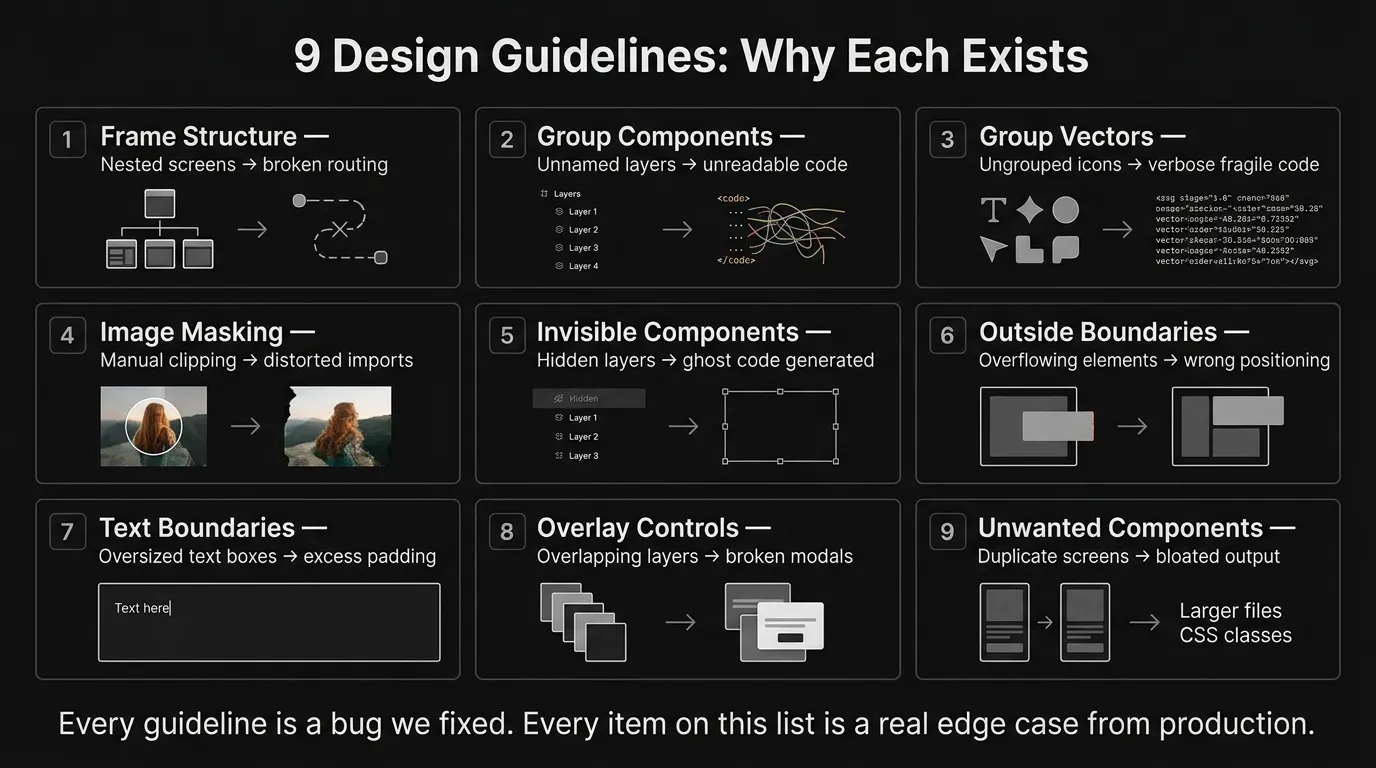
We documented 9 design guidelines based on the edge cases that broke our parser in production. Every guideline is a bug we fixed.
The Edge Cases That Shaped the Parser
Invisible components. A designer hides a layer during exploration and forgets about it. The layer still exists in the Figma file structure. Without detection, the parser generates code for an element the user never intended to include. The system now identifies and skips hidden layers unless explicitly included.
Ungrouped vectors. An icon that looks like one element in Figma might be 12 separate vector paths. Importing them individually produces 12 SVG elements instead of one icon component. The system detects visually co-located vectors and groups them before code generation.
Oversized text boundaries. A text box in Figma can have a fixed width of 400px while containing only 80px of text. The parser would generate a container with 400px width and apparent excess whitespace. The system now detects text boundary overflow and adjusts to content-fit dimensions.
Overlapping modals. Designers model dialogs by stacking layers on top of a screen visually correct, structurally wrong. The parser needs to recognise that the stacked layer is a modal overlay, not part of the page. The system reads Figma's prototype overlay connections to correctly generate modal/drawer/bottom-sheet components.
Components outside frame boundaries. A card with a drop shadow that extends 20px beyond the parent frame's edge. A decorative element that intentionally overflows. The parser must decide: is this overflow intentional (preserve it) or accidental (clip it)? The system uses shadow detection and frame constraint analysis to determine intent.
The Fidelity Standard
The bar is not "this looks like the Figma." The bar is: open the generated code, inspect any element, compare it to the Figma spec. The values match.
| Figma Property | Generated Code | Fidelity Check |
|---|---|---|
| Padding: 24px | p-6 (6 × 4px = 24px) | Exact |
| Font: Inter, 18px, Semibold | font-inter text-lg font-semibold | Exact |
| Colour: #2563EB | text-blue-600 (Tailwind mapped) or text-[#2563EB] if custom | Exact |
| Border radius: 12px | rounded-xl (12px) | Exact |
| Gap between items: 16px | gap-4 (4 × 4px = 16px) | Exact |
| Layout: horizontal, centred | flex flex-row items-center | Exact |
When a value does not map to a standard Tailwind class, the system uses Tailwind's arbitrary value syntax (text-[#2563EB], p-[22px]) to preserve the exact value. No rounding. No approximation.
After Import: The Context Loop
Figma import is not the end. It is an entry point into the same project context system that every other Rocket capability uses.
After import:
- Chat adds functionality the design does not include data fetching, form validation, API integrations, business logic. The chat has full context of what was imported.
- Slash commands wire connectors
/Add Supabase Authentication,/Add Stripe Payments. The commands operate on the Figma-generated components directly. - Visual Edit handles the polish spacing adjustments, colour tweaks, image replacements. Zero tokens for cosmetic refinements.
- Solve research in the same project provides context. A competitive analysis done before the Figma import is available to every Build iteration.
The Figma file enters the same context loop as every other starting method. The design informs the build. The build inherits the project intelligence. Nothing resets.
Rate Limits and Constraints
Figma screen limits by plan:
| Plan | Figma Screens per Import |
|---|---|
| Starter (Free) | 2 screens |
| Personal ($25/mo) | 6 screens |
| Rocket ($50/mo) | 12 screens |
| Booster ($100/mo) | 25 screens |
Web browser only Figma import is not available in the Rocket mobile app. The Figma API enforces its own rate limits; if you hit one, wait 30-60 seconds and retry, or import fewer frames at once.
The Problem We Actually Solved
The Figma-to-code problem was never about reading a design file. Every tool can read Figma's API. The coordinates are right there.
The problem was always about intent extraction. Understanding that 24px is a spacing token, not a random number. Understanding that a group of layers is a reusable component, not just a visual cluster. Understanding that an auto-layout frame with specific gap and padding values IS a flex container with specific utility classes not just a box that happens to be a certain size.
The gap between "this looks similar" and "every padding value is correct" is the gap between reading coordinates and reading the design system.
We closed that gap. The Figma file goes in. Production code comes out. Every spacing decision preserved.
Table of contents
- -The Parsing Challenge: Appearance vs Intent
- -What Appearance Gives You
- -What Intent Gives You
- -The Pipeline
- -Stage 1: Structure Parser
- -Stage 2: Design Intent Extractor
- -Stage 3: Code Generator
- -Stage 4: Production App
- -The Messy Figma Reality
- -The Edge Cases That Shaped the Parser
- -The Fidelity Standard
- -After Import: The Context Loop
- -Rate Limits and Constraints
- -The Problem We Actually Solved