
Discover the complete workflow for transforming a Figma design into a deployed product, including design handoff, development tools, collaboration tips, and deployment strategies for faster and more efficient product launches.
Why does turning a design into a live product take so long?
Because the biggest delay sits between design and code. Teams spend days translating a Figma design into working code, fixing mismatches, and going back and forth.
That gap eats time. According to McKinsey & Company, inefficient and fragmented workflows can consume a significant share of productivity, with many organizations struggling due to siloed processes and unnecessary complexity.
The platform like Rocket.new remove that slow step by directly turning your Figma file into something ready for production. Less translation. Less confusion. More building.
The Real Problem with Figma to Code Workflows
So, let’s talk about what actually happens.
You create a clean Figma design. It looks perfect. Colors, spacing, fonts, everything is in place. Then comes the next step. You hand it to developers.
That’s where things stretch.
They open the figma file, switch to dev mode, inspect css, copy values, and try to rebuild it in code. Sounds simple. But in reality, it’s not.
- They miss small details
- They need to add logic manually
- They go back for feedback
- They fix layout again and again
This loop can go on for a long time.
Example: A simple landing page might take 2 days to design, but 5 to 7 days to build.
And that’s just one project.
Where Most Tools Try to Help (But Fall Short)
Well, there are many tools and plugin options inside Figma.
You can:
- Import assets
- Export images
- Generate partial code
- Use plugin libraries to speed things up
Still, something feels off.
Why?
Because most tools don’t actually remove the gap. They just reduce it a bit.
Example:
You use a plugin to export CSS. It gives raw code, but you still need to clean it up. That means more manual work.
Another example is using Figma sites or exporting layouts. It helps you view the structure, but you still need to rebuild everything.
So yes, these tools support the process, but they don’t replace the slow step.
The Step That Costs the Most Time
Let’s name it clearly.
Translation.
The step where a Figma design becomes actual code.
This step is slow because:
- It depends on human interpretation
- It needs constant feedback
- It often leads to small change requests
- It requires both design and development knowledge
And depending on the complexity, it can take a long time.
Note: Even skilled developers spend hours just matching spacing and alignment.
That’s time that could be spent building real features.
So, What Does Rocket.new Do Differently?
Now here’s where things get interesting.
Rocket.new removes the translation step.
Instead of:
Design → Developer → Code → Fix → Repeat
It becomes:
Design → Build → Deploy
That’s it.
You can import your Figma file, and the platform helps you create something close to production directly.
No heavy back and forth.
How Rocket.new Works
Let’s break it down in a simple way based on their docs.
Step 1: Import Your Design
You connect your Figma account and import your design file.
It supports multiple layouts and structures from Figma.
Step 2: Interpret Design into Build
The platform reads:
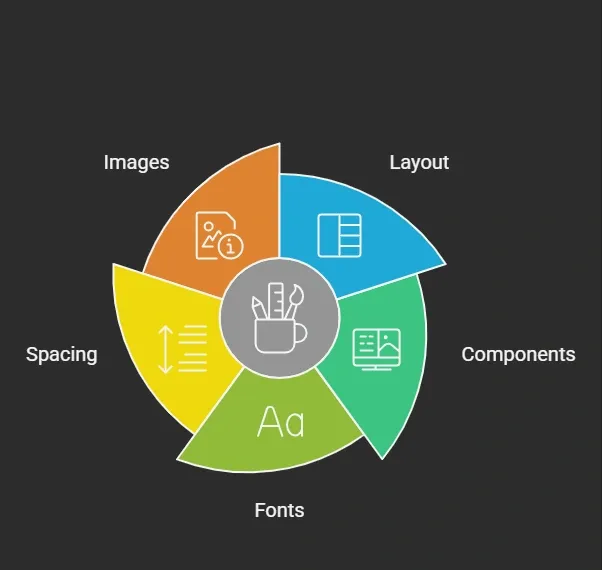 Then it maps them into structured output.
Step 3: Generate Production Ready Output
Instead of messy exports, it generates cleaner code that is closer to production.
You can view and tweak it.
Step 4: Add Logic and Continue
You can add logic, connect APIs, and continue building.
Step 5: Deploy
Once ready, you push it live.
That’s the flow.
Key Features
Here’s a quick look at what’s supported**:**
| Feature | What it does |
|---|---|
| Figma Import | Lets you import designs directly |
| Smart Mapping | Converts layout into usable structure |
| Code Generation | Produces cleaner code output |
| Component Handling | Keeps reusable parts intact |
| Dev Support | Works alongside developers |
| Deployment | Moves your build to production |
| Free Access | Offers a free plan to start |
Note: It also works in beta, so features continue to improve over time.
Example: Before vs After Using Rocket.new
Let’s make it simple.
Traditional Way
- Create design in Figma
- Share with developers
- Rebuild in code
- Fix issues
- Repeat
With Rocket.new
- Import Figma file
- Auto build structure
- Add logic
- Deploy
Example:
A dashboard UI that took 10 days earlier can now be done in 3 to 4 days depending on complexity.
Community Insight
Here’s something from Reddit that reflects this problem:
“The hardest part isn’t designing. It’s converting Figma into clean code without wasting days fixing spacing.”
This sums it up well.
People don’t struggle with ideas. They struggle with execution.
Why Designers and Developers Both Benefit
For designers, it means:
- Less dependency
- Faster work
- Better control over output
For developers, it means:
- Less repetitive job
- Cleaner code
- More focus on logic
So both sides win.
How It Connects Back to the Title
The title talks about removing the step that costs the most time.
That step is translation.
Rocket.new removes that by turning Figma design into something usable instantly.
No long cycles. No repeated fixes.
Just a faster way to build.
Small Things That Make a Big Difference
Let’s not ignore the little details.
- You can view the structure easily
- You can connect APIs quickly
- You can send email triggers inside flows
- You can add custom logic where needed
- You can continue your post deployment changes
These small touches reduce friction.
Is It Perfect?
Well, not fully.
Since it’s in beta, you may still:
- Need manual fixes
- Adjust some CSS
- Handle edge cases
But compared to the old process, it’s much faster.
Figma File to Deployed Product
Turning a Figma design into working code takes too much time. The translation step slows everything down. Teams spend hours fixing small details, sending feedback, and repeating the same loop. Remove the translation step. Use tools that import designs and convert them into usable output. That cuts down manual effort and speeds up delivery.
When you remove unnecessary steps, your work becomes smoother. You spend less time fixing and more time building. That shift changes how fast you ship products. The idea of going from a Figma File to a deployed product is no longer far away. It’s already happening. And it’s getting better with time.
Table of contents
- -The Real Problem with Figma to Code Workflows
- -Where Most Tools Try to Help (But Fall Short)
- -The Step That Costs the Most Time
- -So, What Does Rocket.new Do Differently?
- -How Rocket.new Works
- -Step 1: Import Your Design
- -Step 2: Interpret Design into Build
- -Step 3: Generate Production Ready Output
- -Step 4: Add Logic and Continue
- -Step 5: Deploy
- -Key Features
- -Example: Before vs After Using Rocket.new
- -Traditional Way
- -With Rocket.new
- -Community Insight
- -Why Designers and Developers Both Benefit
- -How It Connects Back to the Title
- -Small Things That Make a Big Difference
- -Is It Perfect?
- -Figma File to Deployed Product