
A Flutter app builder AI converts a plain-text prompt into a full Flutter project with screens, backend, and store-ready builds. Rocket.new does this in minutes, no Dart knowledge needed.
A Flutter app builder AI is a system that reads a plain-text description of your app and outputs a complete Flutter project: screens, navigation, backend logic, authentication, and store-ready builds for Android and iOS, without requiring you to write Dart code manually.
Rocket turns that idea into a deployable mobile app in hours, not weeks. Mobile app revenue is set to top 600 billion USD worldwide, and the fastest path to capturing that market is skipping the manual build cycle entirely.
What is an AI-powered Flutter app builder?
A Flutter app builder AI is an AI-powered development system that converts a natural-language prompt into a working Flutter codebase, including screens, navigation, backend logic, and store-ready builds for Android and iOS, without requiring you to write Dart code manually.
Before tools like this existed, building a cross-platform mobile app meant opening Android Studio, configuring Dart, wiring databases by hand, and assembling Flutter widgets one by one. After Flutter was launched in May 2017 by Google, it quickly became widely adopted.
A Flutter AI app builder compresses that entire process into a single prompt. You describe what you want; the AI produces a real, exportable Flutter project. Flutter is now the most popular cross-platform mobile framework, with 42% of developers using it in 2021, and many teams choose it over other frameworks because custom widgets speed UI work, the documentation is strong, and it is supported by Google.
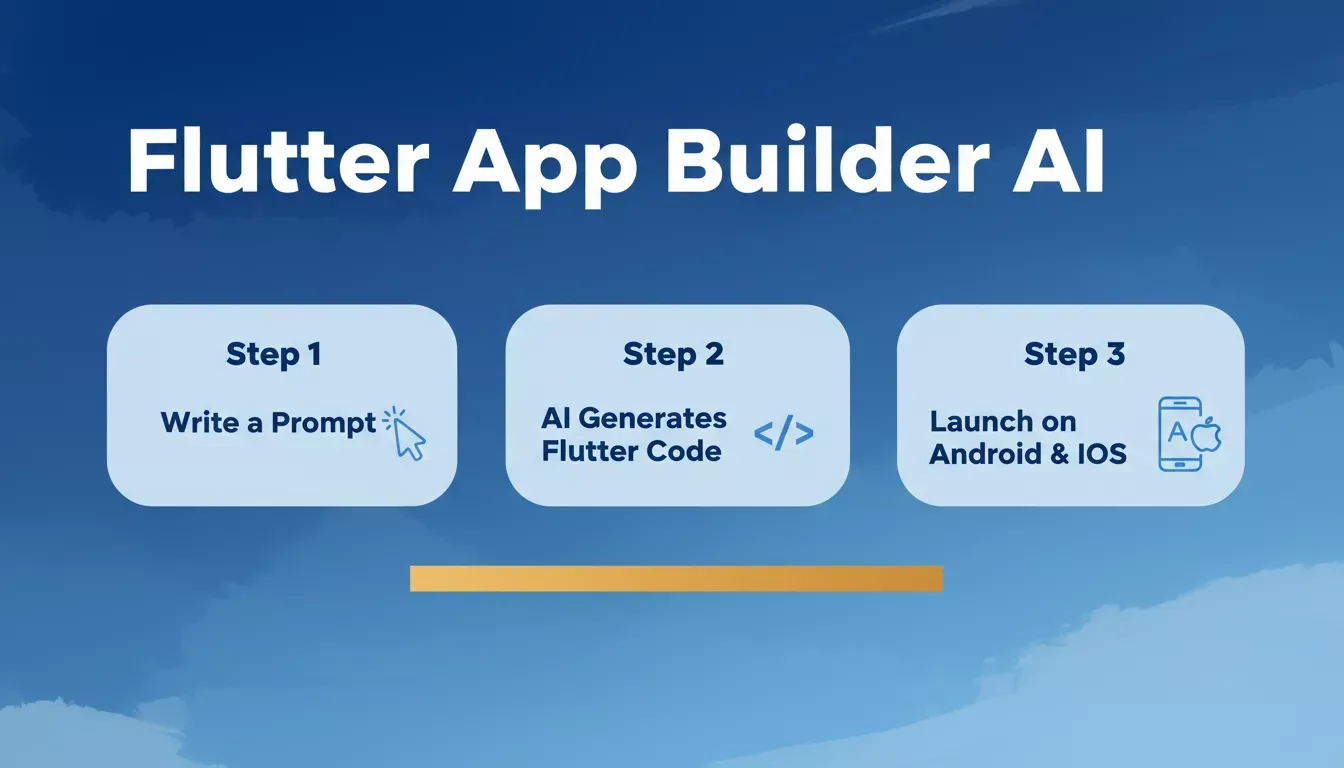 From a plain-text prompt to a store-ready Flutter app in three steps.
Traditional App Development vs. AI Generation
The speed and complexity gap between manual coding and AI-generated Flutter apps is significant. The traditional route requires deep knowledge of state management libraries, Flutter widget trees, and platform-specific tooling.
The AI route reduces that barrier dramatically, and mobile app revenue is set to top 600 billion USD worldwide, making speed to market a genuine competitive advantage.
| Step | Manual Coding | Rocket-Powered Flutter App Builder |
|---|---|---|
| Start | Design UI in a tool, then code everything manually | Type what you want in plain language |
| Code | Write Dart code for every screen | The AI writes most Flutter code for you |
| Backend | Build and connect backend services yourself | Backend logic generated automatically |
| Build | Compile with Android Studio and Xcode | Compiles inside the builder |
| Deploy | Submit to the Play Store and the Apple App Store yourself | Generates builds ready for submission |
How a Flutter App Builder AI Works
The AI behind a Flutter app builder reads your prompt and executes a sequential pipeline:
- Interprets what you want: screens, user flows, and features extracted from your description.
- Plans the Flutter project structure: navigation architecture, UI layout, backend dependencies for Flutter development.
- Generates real Dart code: screens, widgets, state management, and business logic, including code generation for pixel-perfect widget trees from design specifications to speed up Dart development.
- Handles backend setup: authentication, database, storage, and AI-assisted integration of RESTful and GraphQL APIs configured automatically.
- Prepares platform builds: Android APK and iOS archive ready for store submission instantly.
The output is a real Flutter project. You can download the code and open it in Android Studio to add custom logic, extend state management, or integrate additional APIs.
The platform acts as a co-developer, not a prototype generator, and it can identify issues in Flutter and Dart code, suggest how to fix them, and help you fix errors with suggestions.
What Types of Apps Can You Build
Rocket helps users create and build apps across categories with its Flutter app builder, with no prior programming knowledge required. You can start with one app idea and pivot to another without rewriting core logic, and Rocket generates working Flutter projects for Android, iOS, and web from a single codebase.
- Social and community platforms
- E-commerce experiences with cart and checkout flows
- Dashboards and data visualization tools
- SaaS products with login systems and subscription billing
- Games with simple interaction flows
- Internal tools and hardware dashboards, including app-making use cases that monetize through ad placements
Rocket's Build module supports web apps, mobile apps, landing pages, and ecommerce stores, all from the same prompt-driven interface, with no separate tooling required for each platform.
The Mobile App Market Opportunity
The demand behind Flutter app builder AI tools is not just about convenience; it is about market scale and the Future of app development, with builders around the world looking for faster ways to launch. The global mobile app market continues to grow at a pace that rewards builders who ship fast.
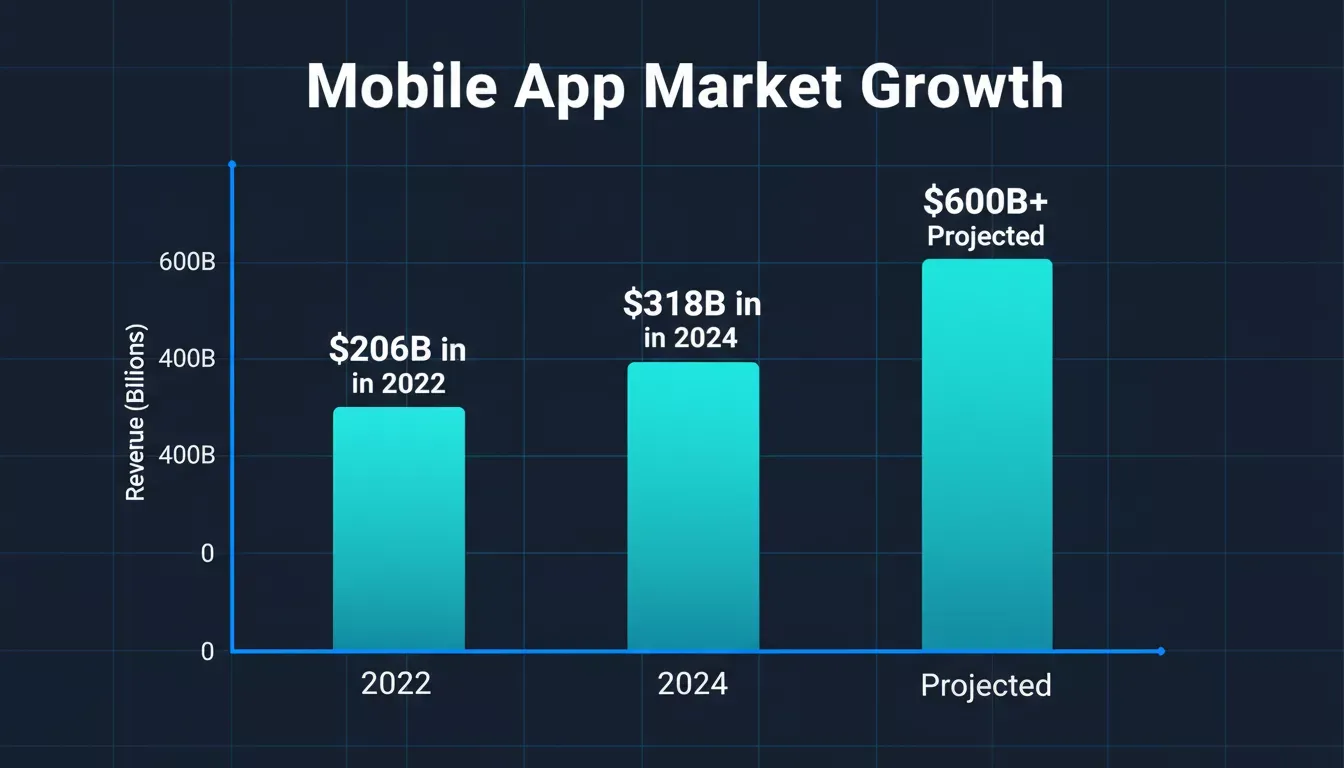 Mobile app revenue growth from 2022 to projected figures, illustrating why speed to market matters.
The no-code development platform market is projected to reach $187 billion by 2030, driven by tools that compress the gap between idea and deployable product, and many platforms draw users in with free trials or entry points. Meanwhile, mobile app revenues continue to grow year over year across every category, and the builders who ship fastest capture the most ground.
What the AI Handles Under the Hood
Core Generation Capabilities
Here is what Rocket's Flutter app builder AI produces on every build for production-ready Flutter apps across multiple platforms:
- Screen navigation and routing for responsive apps
- UI components using Flutter widgets, with functionality tailored to custom features and interactive elements
- Data models and backend logic
- Authentication flows: email, social sign-in, OTP, with out-of-the-box Firebase or Supabase integration
- State management setup, including common options like Provider, Riverpod, and Bloc
- Platform-specific features: push notifications, camera permissions, deep links
- Android APK and iOS builds are ready for store submission, so users can access the app after deployment
- Some builders, such as FlutterFlow use AI to generate UI components and page layouts from prompts in a low-code, drag-and-drop workflow, then allow full code export for customization
A Concrete Example
A founder typed this prompt into Rocket: "Build a fitness tracking app with user profiles, workout logging, a progress dashboard, and social sharing." The result was a six-screen Flutter project with a working Supabase backend, authentication, and a compiled APK in under 15 minutes. No prompt iteration. No manual wiring.
The generated Dart code was clean enough to open directly in Android Studio for custom tweaks, and as you experiment, AI can also identify and fix issues in Flutter and Dart code with suggestions during iteration.
That is the difference between a prototype generator and a genuine Flutter app builder AI.
Rocket vs. Other Flutter App Builders
How does Rocket compare to other tools in the Flutter app builder AI space? Rocket is the only Flutter AI app builder that generates a complete, exportable Flutter project with a fully configured backend from a single prompt, without requiring visual drag-and-drop or manual backend wiring.
In contrast, some tools in the broader ecosystem focus on application designs and design-to-code workflows; for example, Supernova converts Figma or Sketch files into usable Flutter code, while some platforms also support a code extension workflow for direct editing in developer tools.
Rocket.new leads on the features that matter most for shipping a real Flutter app fast.
| Tool | Output Type | Dart Code Export | Backend Included | Cross-Platform |
|---|---|---|---|---|
| Rocket | Full Flutter project | Yes | Yes (Supabase) | Android, iOS, Web |
| FlutterFlow | Visual Flutter builder | Yes (limited) | Partial | Android, iOS |
| Bolt.new | Web apps (React) | Yes | Partial | Web only |
| Lovable | Web apps (React) | Yes | Partial | Web only |
| Replit | Code environment | Yes | Manual setup | Web-first |
Some alternatives lean on templates or visual workflows rather than single-prompt generation.
For a deeper look at how Rocket stacks up against visual builders, see our FlutterFlow alternatives breakdown.
What Builders Are Saying About Rocket
Independent builders across Product Hunt, LinkedIn, and developer communities have shared their experiences with Rocket's Flutter app builder. This reflects a broader pattern: Rocket produces complete mobile apps with real backend logic and clean, exportable code, not rough prototypes.
"This AI App Builder from India is going viral. I gave one wild idea to Rocket, and it built the entire AI app in one shot. No prompt tweaking. No debugging. No waiting. Just a fully functional, multi-page product built from a single input." LinkedIn
The conversations about Flutter app builders keep growing in professional networks because the results are concrete and repeatable.
Tips for Flutter Development with AI
If you are using Rocket or a similar Flutter app builder AI, these practices improve output quality significantly. The single biggest lever is prompt specificity; vague prompts produce generic scaffolding, while specific prompts produce usable apps.
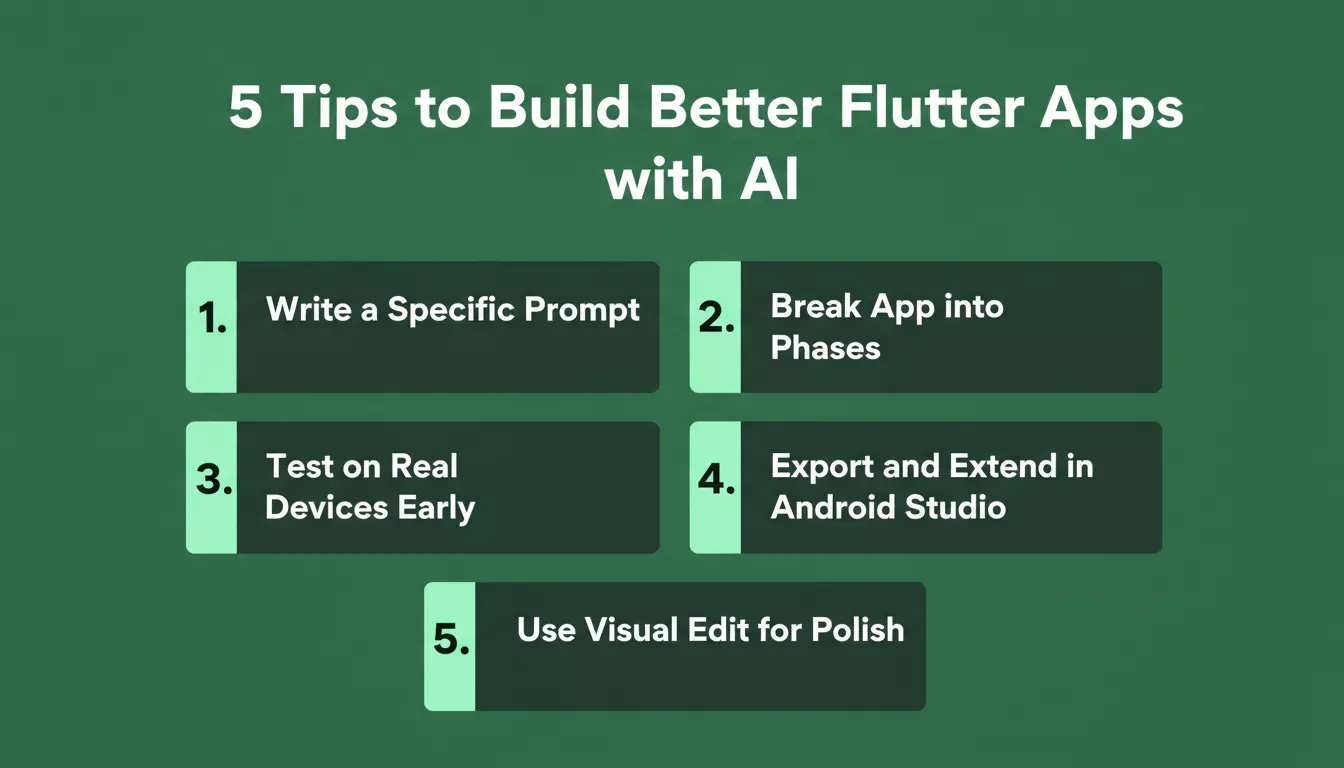 Five practices that consistently improve the quality of AI-generated Flutter apps.
- Write a specific prompt. Name the screens, user roles, and core actions.
- Break complex apps into phases. Describe your MVP first, then iterate for tighter Dart code output.
- Test on real devices early. Flutter performs differently across screen sizes, so check layouts across each device size and OS version.
- Export and extend. Download the Flutter project and open it in Android Studio for custom logic, third-party SDKs, or AI features added with SDKs and APIs such as the Firebase SDK for Generative AI or TensorFlow Lite.
- Use the visual editor for polish. Rocket's visual editing tools let you adjust UI without touching code, while TensorFlow Lite can run AI models on-device for low latency, better data privacy, and easier testing.
Challenges and Honest Limitations
Rocket is powerful, but it is not a replacement for every development scenario. Knowing where the limits are helps you plan the right build strategy from the start.
- Complex custom animations: Flutter's animation system requires hand-coded controllers that AI builders do not yet generate reliably.
- Native device integrations: Bluetooth, NFC, and custom hardware SDKs need platform-channel code written by a developer, and the same can apply when supporting desktop targets or specialized embedded devices.
- Generated code cleanup: AI-generated Dart occasionally produces redundant widget nesting or non-idiomatic state patterns that benefit from a developer review, especially if you need to inspect project files and use debugging tools to troubleshoot generated output.
- App Store review: You still need an Apple Developer account, provisioning profiles, and compliance with App Store guidelines. Rocket generates the build; the submission process is yours.
Treat the AI-generated app as a strong, production-ready starting point. Rocket is optimal for MVPs, prototypes, and apps that need to ship fast, and scaling a complex product still benefits from a developer's involvement.
Flutter App Builder AI: The Shift That Matters
Traditional app development requires weeks of Dart code, Flutter widget knowledge, and tooling like Android Studio. Most founders and creators cannot afford that timeline, and they should not have to.
A Flutter app builder AI changes the equation: describe what you want, get a working Flutter project with real code, install it on a device, test it, and publish. Because Flutter can target mobile, web, desktop, and other platforms from a single codebase, AI-assisted development matters long-term, not just for speed today. AI-powered builders like Rocket are compressing the path from idea to installable app, and that is a structural shift, not a trend.
If you are ready to go from idea to a fully functional Flutter app in a few clicks without writing a single line of code, start building on Rocket.new today. Rocket is the fastest Flutter app builder AI available: no dev team, no Dart experience, no waiting.
Table of contents
- -What is an AI-powered Flutter app builder?
- -Traditional App Development vs. AI Generation
- -How a Flutter App Builder AI Works
- -What Types of Apps Can You Build
- -The Mobile App Market Opportunity
- -What the AI Handles Under the Hood
- -Core Generation Capabilities
- -A Concrete Example
- -Rocket vs. Other Flutter App Builders
- -What Builders Are Saying About Rocket
- -Tips for Flutter Development with AI
- -Challenges and Honest Limitations
- -Flutter App Builder AI: The Shift That Matters