
Building a Flutter mobile app without a development team is achievable when you start from validated research, choose the right tools, and follow a clear step-by-step process from idea to app store.
How do you build a Flutter mobile app without a development team?
You validate the idea first, set up Flutter, build features incrementally, test on real devices, and ship to the app stores. This guide covers every stage, from idea validation and environment setup to state management, testing, deployment, and post-launch improvement. Follow these steps and you can ship a production-ready Flutter mobile app on your own.
According to Statista, there are over 3.5 million apps available on the Google Play Store alone. That number shows both the competition and the opportunity. Most apps fail not because of poor execution, but because the idea was never properly tested before a line of code was written.
Why Start with a Validated App Idea?
Before you write any code, your app idea must be validated. Not guessed. Not assumed. Tested with real users.
Talk to users. Share mockups. Post in communities. Run small Google Ads campaigns to see interest.
Ask yourself these questions:
- Do users actually want this app?
- Will they use it in real-world situations?
- Does it solve a real problem?
This step protects you from building the wrong thing fast. Good execution of the wrong idea is the most expensive mistake in any product.
Four Ways to Validate Before You Build
Validation does not require a working app. It requires evidence that real people have the problem you are solving. Here are four methods that work well.
- Landing page test: Build a simple page describing your app and collect email sign-ups. If nobody signs up, the idea needs rethinking.
- User interviews: Talk to at least ten potential users. Ask about their current workflow, not about your solution.
- Community research: Post in Reddit, IndieHackers, or niche forums. Look for people already asking for what you are building.
- Competitor analysis: If competitors exist and are growing, the market is real. If none exist, ask why.
For a deeper look at how to run structured market research before building, read how to do market research and validate a business idea.
Why Flutter Makes This Possible
Flutter lets you create apps for Android and iOS using a single codebase. That means less code, less complexity, and faster development. You write code once, and it runs on multiple devices.
Flutter development reduces the need for large teams. Many Flutter developers work solo and still ship production-ready apps. According to the Flutter official documentation, Flutter is Google's open-source UI toolkit for building natively compiled applications for mobile, web, and desktop from a single codebase.
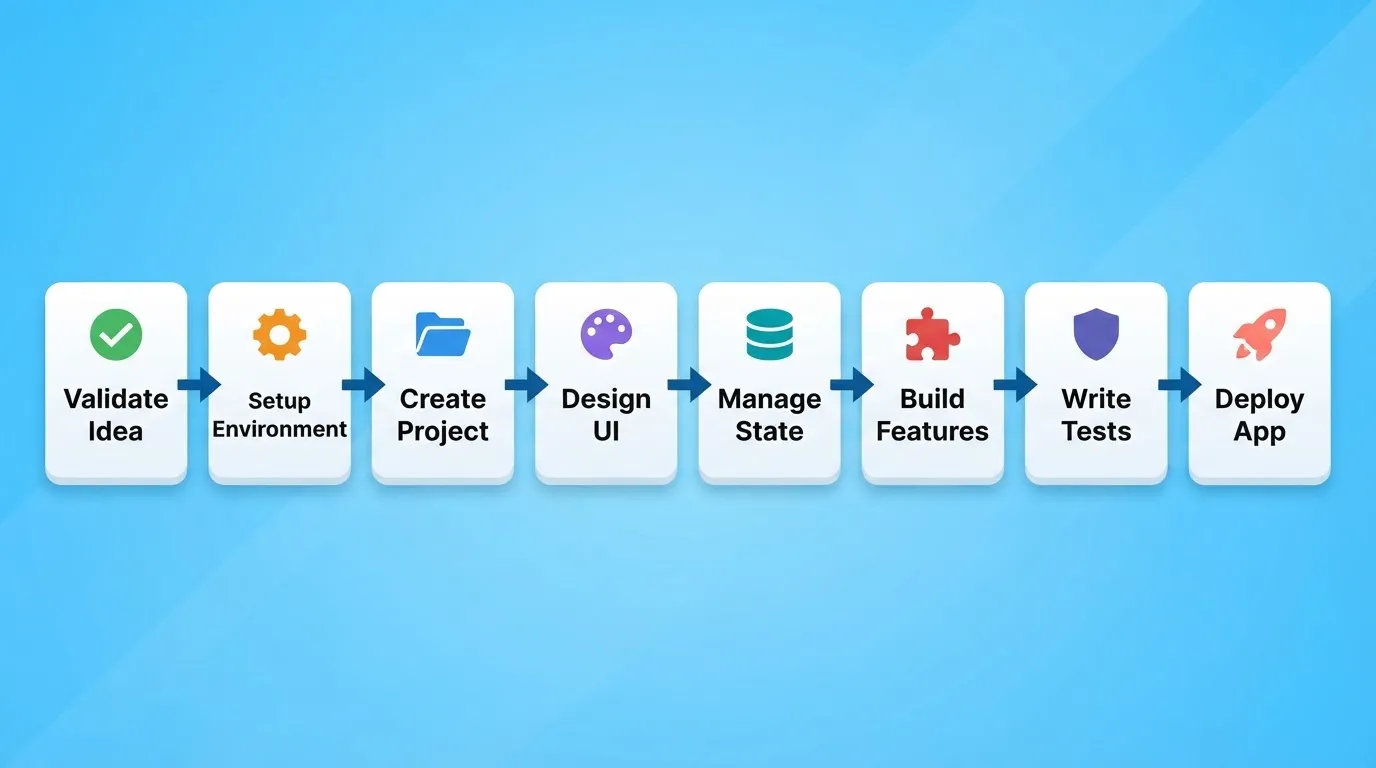
Flutter App Development Workflow
Flutter vs React Native: Which Should You Choose?
This is one of the most common questions for solo developers. Here is a direct comparison to help you decide.
| Factor | Flutter | React Native |
|---|---|---|
| Language | Dart | JavaScript / TypeScript |
| Performance | Near-native (compiled to ARM) | Near-native (JS bridge) |
| UI consistency | Pixel-perfect across platforms | Platform-native components |
| Learning curve | Moderate (new language) | Lower (if you know JS) |
| Community size | Large and growing | Larger (more mature) |
| Hot reload | Yes | Yes |
| Best for | Consistent UI, animation-heavy apps | Teams with existing JS background |
If you want pixel-perfect UI consistency across Android and iOS and are starting fresh, Flutter is the stronger choice. If your team already knows JavaScript, React Native reduces onboarding time.
Read Further: Why Rocket Generates Next.js and Flutter
Set Up Your Development Environment
Before you start building your app, you need to get your setup ready. This step helps you avoid errors later and makes development smoother from the beginning.
What to Install
Start by installing the basic tools you will need:
- Flutter SDK: The core toolkit that lets you build your app. Download it from flutter.dev.
- Android Studio: Use this for writing code, running your app, and managing Android emulators.
- Xcode (on Mac for iOS): Required if you want to build and test your app for Apple devices.
- VS Code (optional): Many solo developers prefer VS Code with the Flutter and Dart extensions for a lighter setup.
Connect Your Device
Use a USB cable to connect your phone to your system. This lets you test your app on a real device, which is always better than relying only on emulators. Enable USB debugging in your Android device settings before connecting.
Run Initial Checks
Open your terminal and run this command:
1flutter doctorFix any issues shown, then run it again. Common issues include missing Android SDK licenses and missing Xcode command line tools. Once all checks pass, your development environment is ready.
Create Your First Flutter Project
Now that your setup is ready, it is time to create something. Open your terminal and run this command:
1flutter create my_appThis command generates a complete Flutter application with a basic structure.
What You Get
Your Flutter project includes these key files and folders:
- main.dart: The starting point of your app where everything begins.
- lib/ folder: Where all your Dart code lives.
- pubspec.yaml: Your project configuration and dependency file.
- test/ folder: Where your tests go.
- android/ and ios/ folders: Platform-specific configuration files.
Run Your App
To launch your app on a connected device or emulator, run:
1flutter runYour app will launch on your connected device or emulator. This small step is the foundation of your entire project.
Understand Flutter's Widget Architecture
Flutter builds everything from widgets. Understanding this concept is essential before you write any real feature code.
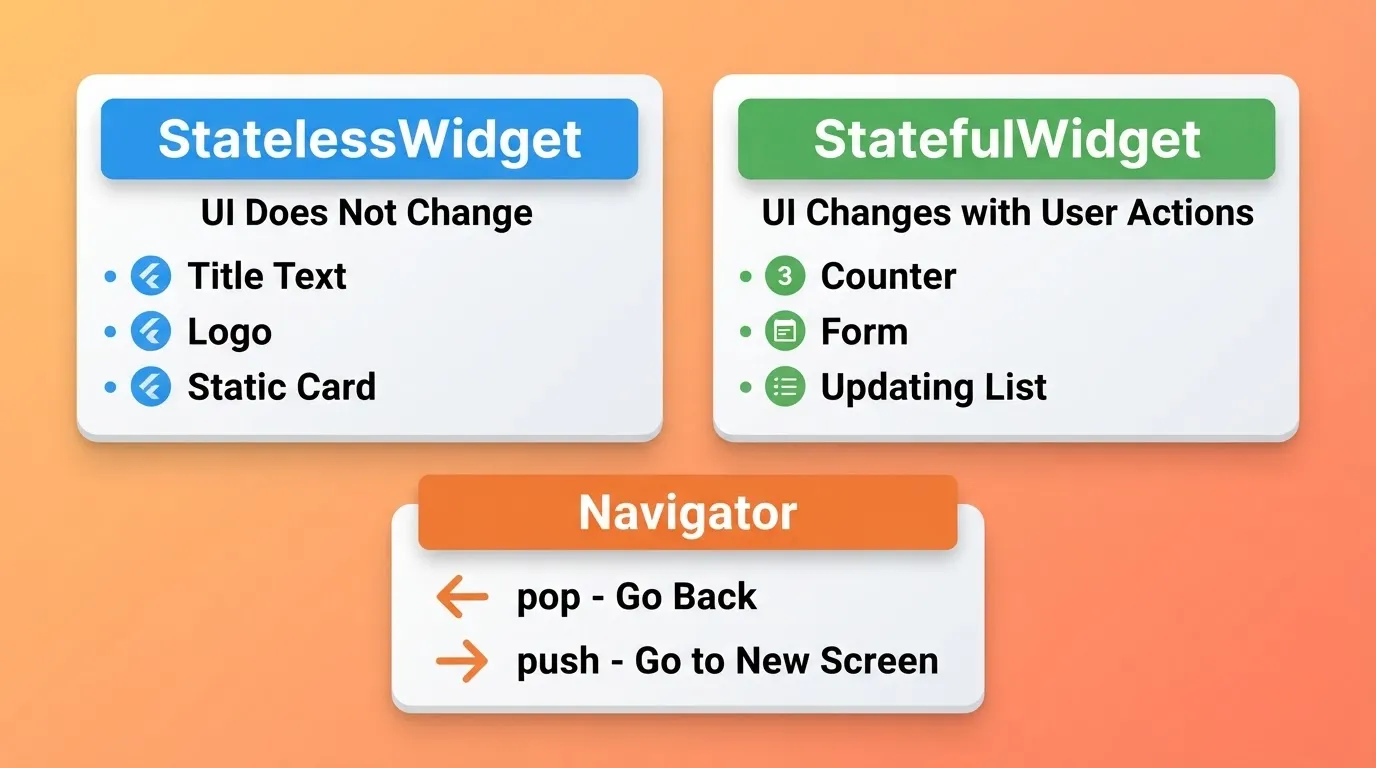
Flutter Widget Architecture
Stateless vs Stateful Widgets
Flutter has two types of widgets you will use constantly.
StatelessWidget is used for UI that does not change after it is built. Good examples include a title text, a logo, or a static card.
StatefulWidget is used for UI that changes in response to user actions or data. Good examples include a counter, a form, or a list that updates.
Core Layout Widgets
| Widget | Purpose |
|---|---|
Column | Stack children vertically |
Row | Stack children horizontally |
Stack | Overlay children on top of each other |
Container | Add padding, margin, and decoration |
Expanded | Fill available space in a Row or Column |
ListView | Scrollable list of items |
GridView | Scrollable grid of items |
Navigation in Flutter
Flutter uses a Navigator to manage screens. For simple apps, use Navigator.push and Navigator.pop. For larger apps, use a named routes system or a dedicated routing package like go_router. A simple UI works best, so start clean, test it with real users, and improve as your project grows.
Design the UI First
Before adding features, shape how your app looks and feels. A clean and simple UI makes your app easier to use and more enjoyable.
Focus on these key areas:
- Clean layout: Keep screens simple and avoid clutter so users don't get confused.
- Readable text: Use clear fonts and proper contrast so content is easy to read.
- Proper spacing: Give elements space so the UI feels balanced and easy to navigate.
- Responsive design: Use
MediaQueryandLayoutBuilderto ensure your app works across different screen sizes.
Read Further: How to Build a Mobile App with AI: Step-by-Step Guide
Manage State and Data Flows
Next comes the logic part. Without proper state management, your app will become hard to maintain as it grows. Choosing the right tool early saves a lot of time later.
State Management Options Compared
| Tool | Complexity | Best For | Learning Curve |
|---|---|---|---|
| setState | Low | Small apps, single screens | Very easy |
| Provider | Medium | Medium apps, shared state | Easy |
| Riverpod | Medium-High | Larger apps, testable state | Moderate |
| Bloc | High | Enterprise apps, strict patterns | Steep |
| GetX | Low-Medium | Rapid development | Easy |
Start with setState for simple screens. Move to Provider or Riverpod when you need to share state between screens. Avoid Bloc unless you have a strong reason for the added complexity. Good state management keeps your app stable and easier to maintain.
Build Features Step by Step
After setting up state management, start adding features. Break your app idea into small parts and tackle them one at a time:
- Login system
- Dashboard
- Settings
- Notifications
Add push notifications using Firebase Cloud Messaging. Handle payment processing if needed, especially for fintech solutions. Avoid jumping into complex integrations early. Build simple first, then grow.
Common Flutter Packages You Will Need
| Package | Purpose |
|---|---|
http | Make API calls |
shared_preferences | Local key-value storage |
firebase_core | Firebase initialization |
firebase_auth | User authentication |
cloud_firestore | NoSQL database |
go_router | Navigation routing |
flutter_riverpod | State management |
image_picker | Camera and gallery access |
Add packages to your pubspec.yaml and run flutter pub get to install them.
Test Your Flutter App
Testing is not optional. It is what separates apps that break in production from apps that don't. Flutter supports three types of tests.
Unit tests check a single function or class in isolation. They are fast and require no UI.
Widget tests check a single widget in isolation. They run faster than integration tests.
Integration tests check the full app on a real device or emulator. They are the slowest but most realistic option.
Run all tests with this command:
1flutter testTest after every significant change. This single habit will save you the most debugging time throughout your project.
How Rocket Accelerates Flutter Mobile App Development
You have a validated idea and a Flutter setup. The next question is how to get from here to a production-ready app without a team.
Rocket is a vibe solutioning platform that combines strategic research, AI app building, and competitive intelligence into a single product. 1.5 million people have tried Rocket across 180 countries, from solo founders validating ideas to enterprise teams running strategy and execution on the same platform.
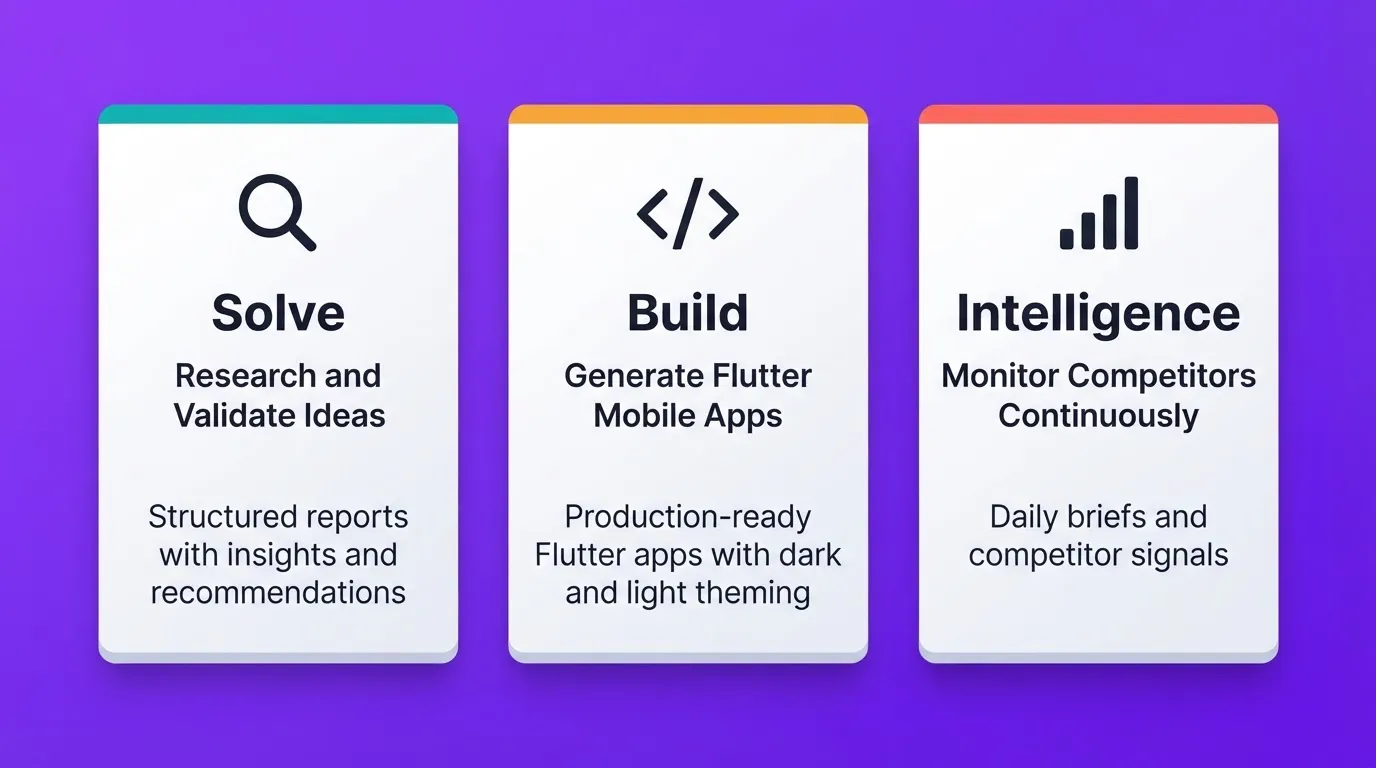
Rocket's Three Pillars For App Building
For building a flutter mobile app, three pillars matter most.
Solve takes your business question and delivers a complete, structured analysis. It covers market research, competitive landscape, findings with evidence, and a clear recommendation. You type your app idea in plain language. Rocket researches the market across 150 or more sources and returns a structured output in 60 to 90 minutes. That output becomes the foundation of your Build task.
Build generates production-ready Flutter code from a plain language description. Describe your app, including what it does, who it is for, and the key screens. Rocket writes the Flutter codebase with real design systems, dark and light theming, fluid navigation, and staggered animations. Most apps generate in 1 to 3 minutes. You can then iterate through Chat (natural language), Visual Edit (click any element), or Code (edit the Flutter source directly). There is no change limit.
Intelligence monitors every public platform your competitors operate on, continuously. It interprets what signals mean for your product, including pricing shifts, feature launches, and hiring spikes. Rocket delivers daily briefs so you are never caught off guard after launch.
Rocket Flutter App Deployment Options
| Method | Speed | Audience | Cost |
|---|---|---|---|
| Web Preview | Instant | Anyone with a link | Included |
| APK Download | Minutes | Android testers | Included with paid plan |
| Google Play Store | Days to weeks | Public | $25 one-time developer account |
| Apple App Store | Days to weeks | Public | $99/year developer account |
Tools You Can Use to Build a Flutter Mobile App Without a Team
Here is a comparison of the core tools that solo developers use to build and ship a flutter mobile app.
| Tool | Purpose | Best For |
|---|---|---|
| Rocket | Validate idea and generate Flutter app with AI | Idea-to-production without a team |
| Firebase | Backend, auth, push notifications, database | Backend services |
| Figma | UI design and prototyping | Screen design before coding |
| GitHub | Code version control | Code management and backup |
| Supabase | Open-source Firebase alternative | SQL-based backend |
| Stripe | Payment processing | Monetization |
Read Further: Ship a Production Flutter App Without a Dev Team
Use Hot Reload to Speed Things Up
Hot reload is one of the best features in Flutter. It helps you work faster and see changes instantly while building your app. Here is how it works:
- Change code and press save.
- See updates instantly on your device.
- No need to restart the app.
- Great for testing UI changes live.
Hot reload reduces development time significantly. Use it often to build faster and make quick improvements without breaking your flow. Note that hot restart is different from hot reload. Hot restart resets the app state completely. Use it when hot reload does not pick up your changes.
Deploy Your Flutter App
Now it is time to launch your app and make it available to users.
Steps for Google Play Store
- Run
flutter build appbundleto generate a signed AAB file. - Create a Google Play Developer account ($25 one-time fee).
- Upload the AAB to the Google Play Console.
- Complete the store listing, including description, screenshots, and privacy policy.
- Submit for review. Typical review time is 1 to 3 days.
Steps for Apple App Store
- Run
flutter build ipaon a Mac with Xcode installed. - Create an Apple Developer account ($99/year).
- Open App Store Connect and create a new app record.
- Upload the build through Xcode or Transporter.
- Complete the store listing and submit for review. Typical review time is 1 to 7 days.
Follow all store guidelines carefully to avoid rejection. Common rejection reasons include an incomplete privacy policy, missing app permissions explanation, and placeholder content.
Monetize Your Flutter App
Building the app is only half the job. Choose your monetization model before you build. It affects your app architecture, your onboarding flow, and which features belong in the paid tier.
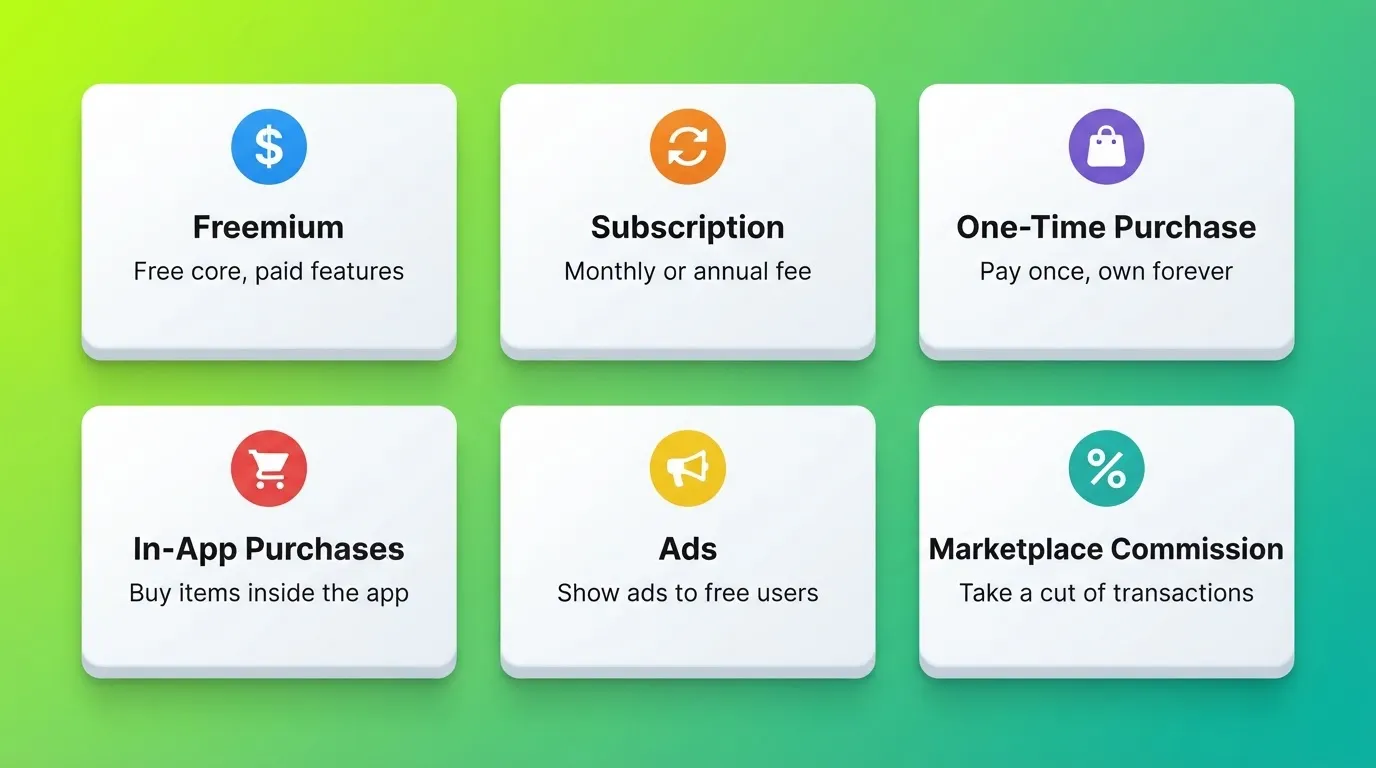
Flutter App Monetization Models
| Model | How It Works | Best For |
|---|---|---|
| Freemium | Free core, paid premium features | SaaS, productivity apps |
| Subscription | Monthly or annual recurring fee | Content, tools, services |
| One-Time Purchase | Pay once, own forever | Utilities, games |
| In-App Purchases | Buy items or features inside the app | Games, marketplaces |
| Ads | Show ads to free users | High-volume consumer apps |
| Marketplace Commission | Take a cut of transactions | Two-sided marketplaces |
Read Further: Vibe Coding for Mobile App Development
Keep Improving with Data
Launching your app is just the start. To make it better, you need to watch how users interact with it and improve based on real data.
Track these key metrics after launch:
- Retention rate: What percentage of users come back after day 1, day 7, and day 30?
- Crash rate: How often does the app crash? Use Firebase Crashlytics to monitor this.
- User behavior: Which screens do users visit most? Where do they drop off?
- Conversion rate: What percentage of free users upgrade to paid?
Use this data to understand what is working and what needs fixing. Release app updates based on feedback and improve performance over time. Focus on what real users actually use. Keep testing, keep improving, and let data guide your next steps.
Trade-Offs to Keep in Mind
Building an app on your own is possible, but it comes with a few trade-offs. Knowing them early helps you stay prepared and avoid frustration during development.
- Slower progress: Working solo means everything depends on you, so things may take more time.
- Limited design skills: You might not have advanced UI skills, which can affect how your app looks.
- Challenges with complex integrations: Some features can be hard to implement without experience.
- No code review: Without a team, bugs can slip through that a second pair of eyes would catch. Compensate with thorough testing.
These challenges are normal. With the right tools, a learning mindset, and proper planning, you can manage them and still build a solid app on your own.
Build Your Flutter Mobile App the Right Way
The Flutter mobile app development process has never been more accessible. Flutter's single codebase approach, combined with a clear validation-first methodology and the right toolset, means a solo developer can ship a production-ready app that competes with anything a full team would build.
The thinking before the build is what separates apps that succeed from apps that don't. Validate your idea, set up your environment, build features incrementally, test on real devices, and use data to improve after launch. That process works whether you are writing every line yourself or generating your Flutter codebase from a description.
As AI-assisted development continues to mature, the gap between solo builders and full teams will keep narrowing. The advantage will go to those who start from validated research, not a blank prompt.
Start building with Rocket and describe your Flutter mobile app idea. Rocket generates the production-ready Flutter codebase, complete with real design systems and full source code you own.
Table of contents
- -Why Start with a Validated App Idea?
- -Four Ways to Validate Before You Build
- -Why Flutter Makes This Possible
- -Flutter vs React Native: Which Should You Choose?
- -Set Up Your Development Environment
- -What to Install
- -Connect Your Device
- -Run Initial Checks
- -Create Your First Flutter Project
- -What You Get
- -Run Your App
- -Understand Flutter's Widget Architecture
- -Stateless vs Stateful Widgets
- -Core Layout Widgets
- -Navigation in Flutter
- -Design the UI First
- -Manage State and Data Flows
- -State Management Options Compared
- -Build Features Step by Step
- -Common Flutter Packages You Will Need
- -Test Your Flutter App
- -How Rocket Accelerates Flutter Mobile App Development
- -Rocket Flutter App Deployment Options
- -Tools You Can Use to Build a Flutter Mobile App Without a Team
- -Use Hot Reload to Speed Things Up
- -Deploy Your Flutter App
- -Steps for Google Play Store
- -Steps for Apple App Store
- -Monetize Your Flutter App
- -Keep Improving with Data
- -Trade-Offs to Keep in Mind
- -Build Your Flutter Mobile App the Right Way