
Why do founders struggle to move from idea to a live product without switching tools?
The process is fragmented. Most platforms only handle one part of the journey, so teams keep jumping between tools. This slows down development, increases human error, and makes deployment harder than it should be.
According to Statista, a large share of AI and data projects fail to reach full production, with many initiatives never moving beyond pilot stages due to challenges in deployment, data management, and coordination.
Why the Research to Deployed Product Journey Breaks Mid-Build
A team begins with research and data collection, then moves into model development using machine learning and data science tools. Everything feels smooth at first. Then the process starts to break.
Different tools are used for development, deployment, and monitoring. This leads to constant context switching, which slows teams down and increases human error. Many organizations face this issue when moving ML models into a production environment, as the deployment process feels disconnected.
That gap between research and deployment is where most organizations struggle today. This is especially true when managing data, tools, and workflows across disconnected systems.
Here is what happens in practice:
- Data scientists and software developers are not on the same page
- Multiple requests slow down the workflow
- More errors appear during application deployment
- Machine learning model performance drops after production deployment
That is why many AI projects fail to deliver real value.
The Real Cost of Tool Fragmentation
Before looking at solutions, it helps to understand what fragmented workflows actually cost. Most teams underestimate how much time is lost to tool-switching alone.
Every handoff between tools destroys context. Decisions made during the research phase do not carry forward into the build. Engineers re-ask questions that product managers already answered. Deployment teams encounter surprises that the data science team could have predicted weeks earlier.
This context loss compounds over time. A product that should take six weeks to ship takes four months. A feature validated in research gets built incorrectly because the nuance did not survive the handoff.
Think about a typical fragmented stack:
- Research phase: Notion, Google Docs, Miro, survey tools
- Development phase: VS Code, GitHub, local environments, Docker
- Deployment phase: cloud providers, CI/CD pipelines, manual configuration
- Monitoring phase: separate observability tools, custom dashboards
Each tool requires its own login, its own mental model, and its own workflow. Each handoff is a potential failure point. And when something breaks in production, the team has to reverse-engineer decisions across four or five different systems just to find the root cause.
The burden falls unevenly. Junior engineers spend hours on environment setup instead of building. Product managers maintain documentation that quickly goes stale. Data scientists produce models that never make it to production because the deployment process is simply too complex to navigate alone.
According to McKinsey, over 70% of companies now use some form of AI in their workflows. Yet only a fraction successfully operationalize it at scale. The bottleneck is not intelligence. It is workflow fragmentation.
The Traditional Workflow vs a Unified Platform
Here is a direct comparison of how the journey from research to deployed product looks across both approaches:
| Stage | Traditional Fragmented Workflow | Unified Platform Approach |
|---|---|---|
| Research | Separate tools (Notion, Miro, surveys) | Built-in research and decision flow |
| Market Validation | Manual analysis, spreadsheets | AI-powered market analysis |
| Model Building | External ML tools, Jupyter notebooks | Unified model building environment |
| Development | Multiple IDEs, local environments | One cloud development environment |
| Deployment | Complex CI/CD pipelines, manual config | Automated one-click deployment |
| Monitoring | External observability tools | Built-in analytics and performance tracking |
| Iteration | Manual process, new sprint cycle | Continuous deployment with retained context |
When teams use multiple tools, the process from research to software deployment becomes slow and error-prone. With one platform, the entire software delivery flow becomes faster and more consistent. Context never gets lost along the way.
Deployment is Where Most AI Projects Die
Deployment is a critical phase in the data science lifecycle. It transforms models from theoretical constructs into practical applications that can deliver real value to businesses.
Building a model is the easy part. Studies indicate that nearly 87% of AI projects fail to transition from the research phase to production. This highlights the importance of effective deployment strategies in realizing the potential of AI solutions.
Successful deployment requires not only technical skills but also an understanding of organizational change management. It often involves altering existing business processes to integrate new models effectively.
In short, it demands change management. Teams need to align, adjust existing processes, and make sure the organization is actually ready to adopt what has been built.
What Makes Deployment So Hard?
As projects move closer to production, the process becomes more complex. What starts as a smooth workflow during development often turns into a struggle during deployment.
The deployment bottleneck: fragmented tools cause the majority of AI projects to stall before reaching production.
1. Too Many Tools, Zero Integration
Most data scientists rely on tools like Google Cloud, GitHub Actions, and Octopus Deploy. These tools are powerful on their own. The problem is they are not connected in one place. That means switching tabs, managing infrastructure across multiple dashboards, and handling different authentication systems for each stage.
2. Inconsistent Environments
When the development environment differs from the production environment, things break in unpredictable ways. ML models behave differently under different compute configurations. APIs that work locally often fail in production.
3. Weak or Absent Monitoring
Without monitoring tools integrated from the start, teams cannot track model performance or key application metrics after launch. Issues compound silently until they become full production crises.
4. Human Error in Manual Processes
Manual deployment steps increase human error at every stage. A misconfigured environment variable, a missed migration script, or an incorrect build flag can bring down an entire service.
How Rocket Changes the Game
Rocket is built to eliminate these problems. It brings research, development, and deployment into one platform, so teams never have to switch tools mid-build.
1.5 million people have tried Rocket across 180 countries. The platform is built around one belief: the work is only as good as the thinking before it.
Rocket's architecture connects three layers. Solve handles research and decision intelligence. Build covers development and deployment. Intelligence manages continuous market and performance monitoring. Each layer feeds into the next, and context flows between them automatically.
Rocket's three-layer architecture: Solve feeds context into Build, which feeds data into Intelligence, which informs the next research cycle.
Start with Solve: Research That Feeds Directly into Build
Most platforms start with a blank prompt. Rocket starts with Solve, a research and decision intelligence layer that answers business questions before a single line of code is written.
Solve conducts structured market analysis, competitive teardowns, pricing strategy research, and product direction analysis. The outputs are not just reports. They are structured, decision-ready deliverables that carry directly into the Build phase.
The core advantage is that the research context does not disappear when you open the builder. It informs the architecture, the feature set, and the deployment configuration. That context continuity from research to deployed product is what separates Rocket from every other tool in this space.
Build: Development and Deployment in One Environment
The Build layer is where ideas become production-ready applications. Rocket generates full-stack code in Next.js for web and Flutter for mobile. Both are production-grade frameworks used by teams worldwide.
Key capabilities within Build:
- Visual editor and code editor in one environment, with no switching between design and development
- 80+ precision commands for surgical edits without breaking existing functionality
- Built-in connectors for Supabase, Stripe, OpenAI, Anthropic, HubSpot, Mixpanel, and 25+ other services
- One-click deployment to custom domains with automatic SSL and environment management
- Version control and rollback built into the editor so teams can iterate without fear
Every product ships with SEO-ready structure, WCAG accessibility compliance, GDPR coverage, and performance optimization by default. These are the baseline, not optional extras.
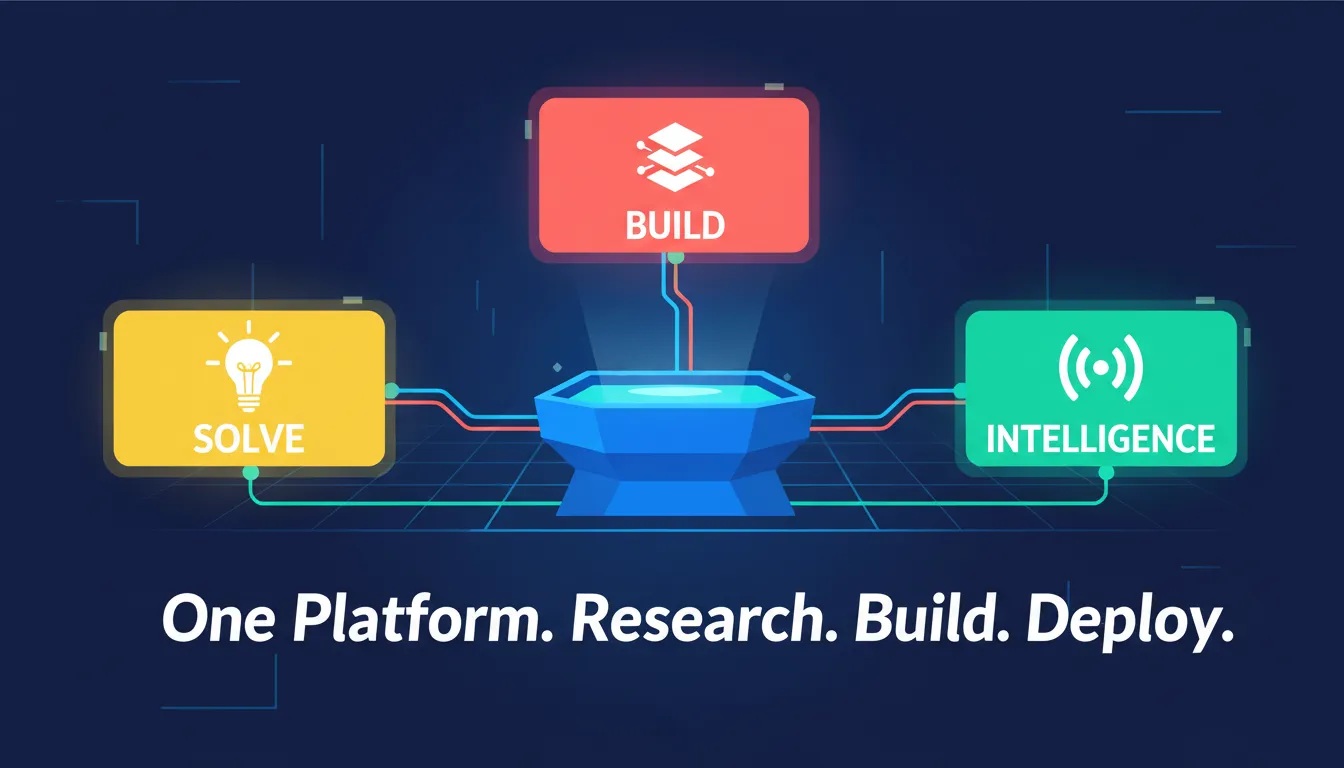 Rocket connects Solve, Build, and Intelligence into one shared-context platform. Research informs the build. The build feeds monitoring. Monitoring informs the next decision.
Intelligence: Continuous Monitoring After Launch
Deployment is not the end of the journey. The Intelligence layer monitors market signals, competitor moves, and product performance continuously after launch.
Teams receive alerts when market conditions shift. They can then feed those insights back into the next build cycle. This closes the loop between research and deployment, turning a linear process into a continuous improvement engine.
Key Platform Features at a Glance
| Feature | What It Does | Why It Matters |
|---|---|---|
| Solve Research | AI-powered market and competitive analysis | Validates ideas before building |
| Unified Build Environment | Full-stack development in one place | Eliminates environment fragmentation |
| Built-in Model Registry | Tracks ML model versions | Prevents deployment confusion |
| Automated Deployment | One-click production deployment | Reduces human error |
| Continuous Integration | Automated testing on every change | Keeps development stable |
| Continuous Deployment | Push updates without manual steps | Accelerates iteration cycles |
| Built-in Monitoring | Performance and analytics tracking | Catches issues before users do |
| 25+ Native Connectors | Pre-built integrations with major services | Eliminates integration overhead |
| Context Retention | Research context flows into build | No information lost between stages |
Rocket Pricing
All plans include unlimited team members. Credits never expire, and you can purchase additional credits on any plan. Enterprise options with SSO, data localization, and premium support are available via sales. A 20% discount applies to all paid plans when billed annually.
| Plan | Monthly Fee | Monthly Credits | Best For |
|---|---|---|---|
| Free | $0 | 20 | Light, exploratory, personal use |
| Pro | $25 | 100 | Production websites, web apps, mobile apps |
| Rocket | $50 | 250 | Full suite for individuals and teams |
| Booster | $250 | 1,500 | Power users and fast-moving teams |
Real-World Use Cases
The research to deployed product workflow applies across a wide range of teams. Here are the scenarios where a unified platform delivers the greatest impact.
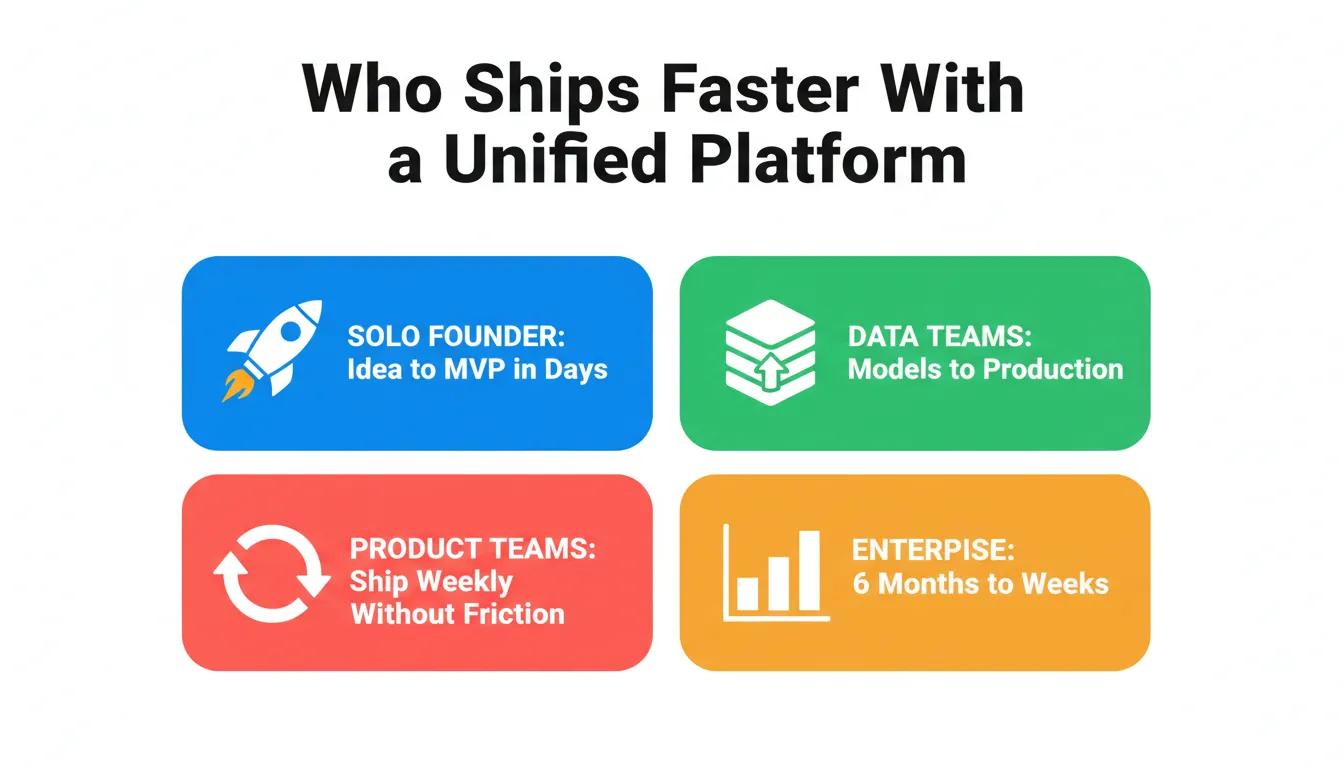
Four types of teams, one common outcome: faster shipping when research and deployment live in the same system.
Solo Founder Building a SaaS MVP
A non-technical founder has a validated idea but no engineering team. They need to go from market research to a live product without hiring anyone.
The founder uses Solve to run competitive analysis and validate pricing. They use Build to generate a full-stack application with authentication, payments, and a database. They deploy to a custom domain in one click. The entire journey from research to deployed product takes days, not months. For more on this path, see how validated ideas reach deployment faster.
Data Science Team Deploying ML Models
A data science team has built a high-performing model but cannot get it into production. The deployment process requires DevOps expertise they simply do not have.
The team builds an application around their model using Rocket's AI connectors. The deployment pipeline handles environment configuration automatically. Built-in monitoring then tracks model performance post-launch, without needing a separate observability stack.
Product Team Iterating on a Live Product
A product team needs to ship new features weekly but is slowed down by a fragmented toolchain. Research happens in one tool, development in another, and deployment requires a separate ticket.
The team uses Solve for feature research. Build handles development and deployment in one environment. Intelligence monitors how new features perform. The entire cycle, from identifying an opportunity to shipping a fix, happens on one platform without handoffs. For teams exploring how market validation connects to a deployed product, the principle holds at every scale.
Enterprise Team Reducing Time-to-Market
An enterprise product team takes an average of six months to go from research to a deployed product. Stakeholders are frustrated. Competitors are shipping faster.
By consolidating the research, development, and deployment workflow onto one platform, teams eliminate the coordination overhead between tools and teams. Research context flows directly into build specifications. Deployment is automated. Monitoring is built in. Time-to-market compresses significantly as a result.
Why This Matters for Data Science and Product Teams
As projects move from model building to deployment, the gap between roles becomes more visible. Data scientists, machine learning engineers, and software developers often work with different tools and different priorities. This creates confusion, delays, and extra effort during the deployment process.
A unified platform bridges that gap. It creates a shared environment where every role operates from the same context.
- Data science managers can focus on machine learning operations without worrying about deployment infrastructure
- Machine learning engineers can handle deployment using automated pipelines that do not require DevOps expertise
- Software developers can work in the same system as researchers and product managers, eliminating the handoff problem entirely
- Product managers can see research, build progress, and post-launch performance all in one place
This setup keeps teams aligned and reduces back-and-forth. As a result, teams spend less time fixing issues and more time building products that actually reach production.
The Role of Continuous Processes in Production Stability
As projects grow and move closer to production, maintaining stability becomes a real challenge. Teams need a reliable way to manage updates, track changes, and catch issues early. This is exactly where continuous processes play a decisive role.
Continuous Integration runs automated tests on every code change. This keeps the development process stable and prevents regressions from reaching production.
Continuous Deployment releases updates automatically once changes pass testing. This reduces the deployment cycle from days to minutes. It also eliminates the class of errors that come from manual deployment procedures.
Continuous Monitoring tracks model performance, application health, and user behavior after launch. It detects issues early, before they escalate into production incidents.
Together, these three processes create a steady, predictable workflow. Teams can build, deploy, and monitor with confidence. They are not optional enhancements. They are the foundation of any production system that needs to stay reliable as it grows.
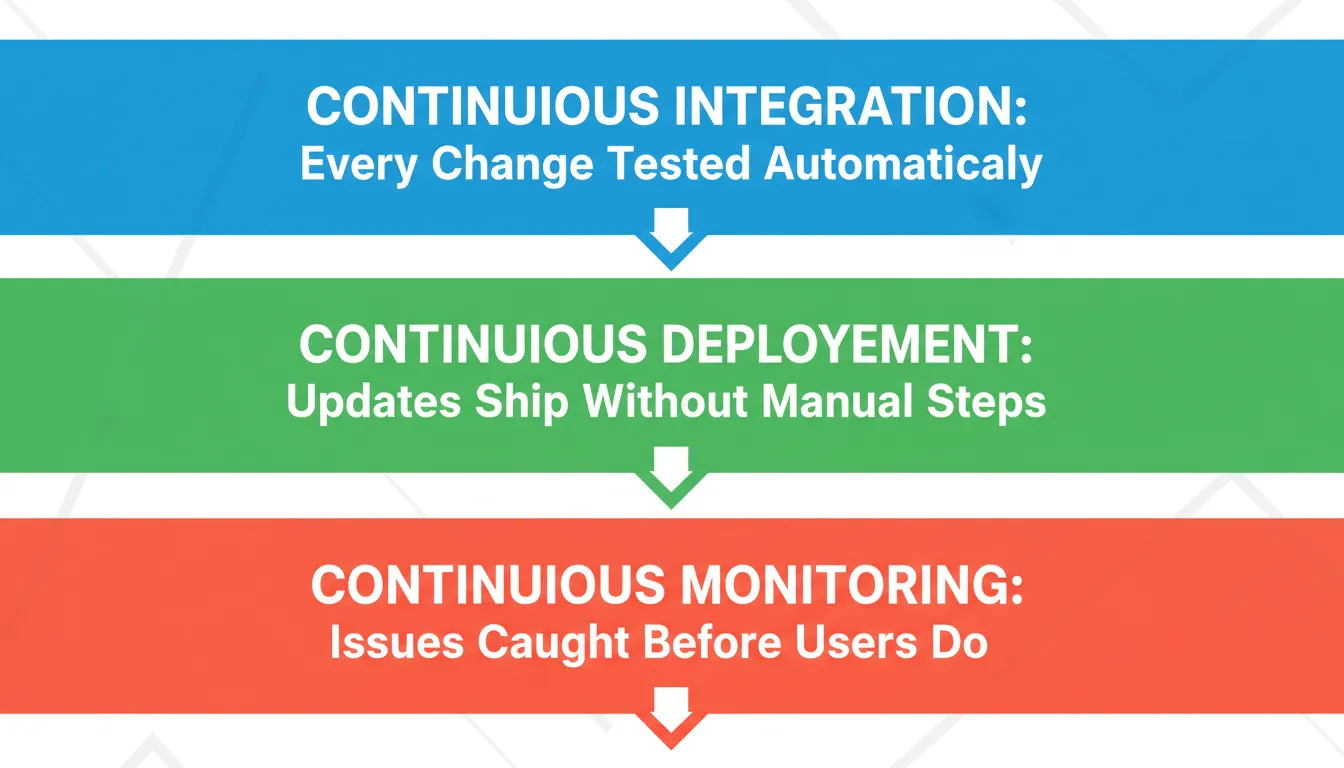 The three continuous processes that keep a production system stable: every change tested, every update shipped automatically, every issue caught early.
Competitive Comparison: Unified Platform vs Fragmented Toolchain
How does a unified platform compare to assembling best-in-class tools for each stage?
| Dimension | Fragmented Toolchain | Unified Platform |
|---|---|---|
| Setup time | Days to weeks | Minutes |
| Context retention across stages | None (manual handoffs) | Automatic |
| Deployment complexity | High (requires DevOps expertise) | Low (one-click) |
| Monitoring setup | Separate tool, separate cost | Built-in |
| Research-to-build connection | Manual (copy-paste, meetings) | Native |
| Time to first deployment | Weeks to months | Hours to days |
| Team coordination overhead | High | Low |
| Iteration speed | Slow (handoff bottlenecks) | Fast (single environment) |
The core difference is context retention. Separate tools require manual handoffs at every stage. This introduces delays, errors, and information loss. A unified platform retains context across all stages automatically. Research informs build. Build feeds monitoring. Monitoring informs the next research cycle.
For a broader look at how AI is reshaping the full product development lifecycle, the AI product development platform guide covers how these capabilities work together for teams at different stages of growth.
Bridging the Gap from Research to Deployed Product
Most organizations struggle to move from research to deployment because the process is scattered. Teams rely on multiple tools, which leads to disconnected workflows, constant context switching, and increased human error. This slows down development and makes it harder to maintain stability in production systems.
Rocket solves this by bringing development, deployment, and monitoring into one platform. Moving from research to a deployed product becomes faster and more manageable when everything stays in one place. Teams can build, deploy, and track performance without interruptions. The result is fewer errors and more real value from AI projects.
For teams working through the full arc from planning to shipping, the full-stack AI agents deployment guide covers how context continuity applies across every stage of a production build.
The Future of Research to Deployed Product: What Comes Next
The shift from fragmented toolchains to unified platforms is a structural change in how software products are built. It is not a temporary trend.
As AI capabilities improve, the gap between research and deployment will continue to compress. Teams that adopt unified platforms today will build the operational muscle to ship faster, iterate more reliably, and respond to market signals in real time. Teams that remain on fragmented toolchains will find the coordination overhead increasingly unsustainable as the pace of product development accelerates.
The organizations winning in AI product development share one characteristic. They treat the journey from research to deployed product as a single, continuous workflow rather than a sequence of disconnected phases.
Ship Your Next Product Without Switching Tools
The gap between a validated idea and a live product is where most teams lose momentum. Fragmented tools, lost context, manual deployments, and disconnected monitoring create friction at every stage. That friction compounds into months of delay, increased costs, and products that never reach the users they were built for.
You type the problem. Rocket researches the market, recommends a direction, builds the product, and deploys it. One input. One system. The research to deployed product journey becomes a continuous loop rather than a fragmented sequence of handoffs.
1.5 million people have tried Rocket across 180 countries. The next product you ship does not have to start from a blank prompt or end in a deployment queue.
Start building on Rocket today and take your next product from research to deployed product on a single platform built for the full journey.
Table of contents
- -Why the Research to Deployed Product Journey Breaks Mid-Build
- -The Real Cost of Tool Fragmentation
- -The Traditional Workflow vs a Unified Platform
- -Deployment is Where Most AI Projects Die
- -What Makes Deployment So Hard?
- -1. Too Many Tools, Zero Integration
- -2. Inconsistent Environments
- -3. Weak or Absent Monitoring
- -4. Human Error in Manual Processes
- -How Rocket Changes the Game
- -Start with Solve: Research That Feeds Directly into Build
- -Build: Development and Deployment in One Environment
- -Intelligence: Continuous Monitoring After Launch
- -Key Platform Features at a Glance
- -Rocket Pricing
- -Real-World Use Cases
- -Solo Founder Building a SaaS MVP
- -Data Science Team Deploying ML Models
- -Product Team Iterating on a Live Product
- -Enterprise Team Reducing Time-to-Market
- -Why This Matters for Data Science and Product Teams
- -The Role of Continuous Processes in Production Stability
- -Competitive Comparison: Unified Platform vs Fragmented Toolchain
- -Bridging the Gap from Research to Deployed Product
- -The Future of Research to Deployed Product: What Comes Next
- -Ship Your Next Product Without Switching Tools