
Curious how SaaS teams reduce costs with AI app builders? Automation cuts manual work, speeds delivery, and lowers expenses. Learn where savings happen and how to build efficient, cost-effective AI apps.
Are SaaS teams really cutting costs with AI app builders?
Yes, they are. In many cases, teams reduce development costs by automating tasks, cutting down manual work, and speeding up delivery.
According to a report by McKinsey, generative AI could add up to $4.4 trillion annually to the global economy, with software development being one of the biggest beneficiaries. That tells you one thing. The shift toward AI apps and no-code tools is not just hype. It’s a real cost-saving move.
In this blog, you’ll clearly understand where SaaS teams actually save money, how AI app builders reduce effort and time, and how you can apply the same approach to build cost-effective AI apps.
What Makes an AI App Builder So Useful?
So, what exactly is an AI app builder, and why are SaaS teams paying so much attention to it?
At its core, an app builder powered by AI simplifies the entire process of creating software. It removes a lot of the heavy lifting and lets teams focus more on ideas and outcomes instead of technical steps.
Here’s what makes it stand out:
-
Uses natural language: You can describe what you want in plain words. The system understands and turns it into a working app.
-
Faster code generation: Instead of manual coding, it handles code generation automatically, saving time and effort.
-
Supports machine learning: Many platforms come with built-in machine learning features, so your AI apps can make smarter decisions.
-
Reduces coding dependency: You don’t have to spend hours writing code from scratch. Even non-technical users can build apps.
-
Quick app creation: From idea to a working app, the process is much faster compared to traditional methods.
-
Smart AI model usage: The AI model works in the background to turn your inputs into real functionality.
Think of it like this. You describe your idea, and the system builds it for you.
In simple terms, an AI app builder changes how app development works. It makes the process faster, easier, and far more accessible for SaaS teams aiming to build and scale quickly.
Traditional vs AI-Driven App Development
Let’s keep it simple and compare.
| Factor | Traditional App Development | AI App Builder Approach |
|---|---|---|
| Speed | Slow due to manual coding | Fast with code generation |
| Cost | High app development costs | Lower development costs |
| Skills Needed | Developers only | Works for non technical users too |
| Maintenance | High ongoing maintenance costs | Reduced effort with automation |
| Flexibility | Limited by resources | Supports multiple AI models |
Well, this shift explains why many SaaS teams are moving away from traditional app development.
Where Do the Cost Savings Actually Come From?
So, where do SaaS teams really save money when using an AI app builder? It’s not just one thing. The savings come from multiple small changes that add up quickly across the entire app development process.
Let’s break it down:
1. Less Manual Coding
Manual coding takes time. Time means money.
With an AI app builder, a big part of the work is automated. Teams don’t spend weeks writing code. Instead, they use natural language prompts to define business logic.
This reduces development costs and speeds up delivery.
2. Faster Minimum Viable Product
Next, think about launching a minimum viable product.
Using an app builder, you can create a working app in days, not months. This lowers the initial investment and helps test ideas quickly.
Startups and SaaS teams love this.
3. Lower Team Dependency
You don’t always need a big team.
An AI app builder allows non-technical users to create AI apps. Designers, marketers, and founders can build internal tools or even mobile apps.
This reduces hiring needs and cuts app costs.
4. Built-In AI Features
Many platforms come with AI features built in.
Things like:
-
Predictive analytics
-
Natural language processing
-
Automation via AI agents
These advanced features would normally increase AI app development costs, but here they’re included.
5. Reduced Maintenance
Then comes maintenance.
With an AI app builder, updates are simpler. You don’t need to fix everything manually. That cuts ongoing maintenance costs and avoids technical debt.
When you put all of this together, the savings become clear. Less manual effort, faster launches, and built-in intelligence all help SaaS teams reduce development costs while still building powerful AI apps.
The Hidden Costs You Avoid
Let’s talk about something people ignore. Hidden costs.
In regular app development, you deal with:
-
Debugging issues
-
Scaling problems
-
Cloud infrastructure setup
-
Security and user authentication
-
Handling regulatory compliance
All of these increase development costs.
An AI app builder handles many of these in the background. That means fewer surprises in your budget.
AI Agents and Automation in Action
So, how do AI agents actually help reduce effort and costs in real projects? Let’s look at how they work inside modern AI apps.
Now, this is where things get interesting. AI agents are like mini assistants inside your app.
They handle tasks like:
-
Responding to users
-
Managing workflows
-
Analyzing user behavior
Instead of building these systems manually, an AI app builder lets you plug them in. For SaaS teams building AI apps, this saves both time and app development costs.
Data Matters More Than Code Now
So, what’s really driving modern AI apps today? It’s not just code. It’s the data behind it. After that, let’s talk about data.
Modern AI apps rely on:
-
Training data
-
Real world data
-
Strong data quality
Instead of focusing only on code, teams now prioritize data preparation to get better results.
An AI app builder often connects with tools like Google Sheets or databases. This helps you turn raw data into a data-driven app.
Less coding, more value.
When your data is strong, your app performs better. That’s why teams are shifting focus from heavy coding to smarter data handling.
AI Models and Cost Efficiency
Now, let’s break down how AI model choices affect your costs. Not all setups are expensive, especially when you use what’s already available.
Here’s how teams save:
-
Using existing models instead of building from scratch
-
Avoiding heavy custom model training
-
Reducing model complexity
-
Lowering overall data requirements
Some tools even let you switch between multiple AI models, giving flexibility without increasing app costs.
The smarter your approach to models, the lower your AI app development costs. It’s about using the right tools, not building everything from zero.
Community Insight: What Real Builders Say
Here’s something from Reddit that sums it up well:
“I built a SaaS tool using an AI app builder in under a week. What would’ve taken months with a dev team cost me a small monthly subscription instead.”
Monthly Pricing vs Traditional Spending
So, how does pricing actually compare when you switch to an AI app builder? Let’s break down the cost model in a simple way.
With a typical app builder, you usually pay a monthly subscription. Some platforms also offer paid plans based on usage, features, or support for unlimited users. This makes your spending predictable and easier to manage.
Now compare that to traditional setups, where costs keep stacking up:
-
Developer salaries
-
Infrastructure and cloud infrastructure costs
-
Ongoing maintenance and updates
-
Unexpected hidden costs during scaling
In many cases, the cost comparison clearly leans toward AI-driven tools. You’re not just saving money upfront, you’re also avoiding long-term expenses that can grow quickly.
A fixed monthly subscription model gives SaaS teams more control over budgets while reducing surprise expenses that often come with traditional builds.
AI App Builders and SaaS Growth
Now, think about scaling your SaaS product.
As your platform grows, your needs grow too. You need systems that can handle more users and more complexity without breaking.
Here’s what typically increases with growth:
-
More users joining your platform
-
A better and smoother user interface
-
Stable and scalable business logic
-
Higher expectations for performance
An AI app builder helps manage this growth without adding too much pressure on your team. It adapts as your project complexity increases.
It also supports different types of applications:
-
Web apps for browser-based access
-
Mobile apps for on-the-go users
-
Internal tools for team operations and workflows
This flexibility makes it easier to expand without rebuilding everything from scratch.
When scaling becomes smoother and less resource-heavy, SaaS teams can focus more on users and growth, which directly improves customer satisfaction.
Fuel Your Apps with Rocket.new
Rocket.new is a Vibe solutioning platform built for teams that want to create AI apps quickly without getting stuck in heavy coding. It combines no-code, AI agents, and smart automation to simplify app development from start to finish.
For SaaS teams, this directly connects to the goal of lowering app development costs while still building a solid working app.
It focuses on speed and simplicity, but also supports real-world needs like scaling, handling business logic, and connecting with existing systems. That means you’re not just building fast, you’re building something usable and ready to grow.
Top Features
-
Prompt to App Creation: Builds apps directly from single prompts
-
Figma Import: Converts design files into live, editable layouts
-
Reusable Components: Speeds up building with ready-to-use elements
-
Command-based actions: Use / and @ to run actions and quickly scope edits.
-
AI-Powered Backend: Automatically handles logic, data, and workflows
-
Code Export: Allows developers to extend or customize later
-
Custom Domain Support: Publishes projects with a branded domain
-
Live Preview: Shows instant updates while editing
How Rocket.new Helps Save Costs in SaaS Teams
So, how does Rocket.new actually reduce AI app development costs in practical terms?
It starts with simplicity. You can begin with a clear prompt using natural language, or pick from ready templates. This removes the need for heavy planning and speeds up the start of your AI development process.
-
Start with prompts or templates: You describe your idea using natural language prompts, and the AI app builder creates a base working app. This cuts down early-stage effort and reduces initial investment.
-
Less manual coding, faster builds: With built-in code generation, you avoid long hours of manual coding. This directly lowers development costs and shortens timelines.
-
Pre-built AI functionality: Features like AI agents, automation, and ai powered workflows are already included. You don’t need to build these from scratch, which reduces AI app development costs.
-
Supports non technical users: Teams don’t need large developer groups. Even non-technical users can create internal tools, dashboards, or mobile apps, lowering hiring and app costs.
-
Easy scaling without extra cost pressure: As your SaaS grows, Rocket.new supports unlimited users and handles increasing project complexity without requiring a full rebuild.
-
Better use of data: You can plug in proprietary data or connect tools like Google Sheets to build a data driven app. This reduces the need for complex backend setups and extra resources.
In simple terms, Rocket.new removes a lot of the steps that usually increase development costs. You build faster, spend less, and still get a reliable working app ready for real users.
Challenges You Should Still Know
So, while an AI app builder helps reduce development costs, what are the trade-offs you should keep in mind? Nothing is perfect.
Even the best AI app builder comes with a few limitations that SaaS teams should understand before getting started.
Here are the main ones:
-
Vendor lock-in: Some platforms may create vendor lock-in, making it harder to switch tools or migrate your AI apps later.
-
Data issues: Poor data quality can lead to weak performance. Since AI apps rely heavily on training data, bad inputs mean poor results.
-
Compliance concerns: Handling regulatory compliance is still your responsibility, especially when dealing with user data in SaaS products.
So yes, while development costs go down, risk management still plays a role in making the right decisions.
Understanding these challenges early helps you avoid problems later and build more stable, reliable ai apps.
Best AI App Builder: What to Look For
Now, how do you choose the best AI app builder for your needs? Not all platforms are the same, so it helps to focus on features that actually matter for your app development goals.
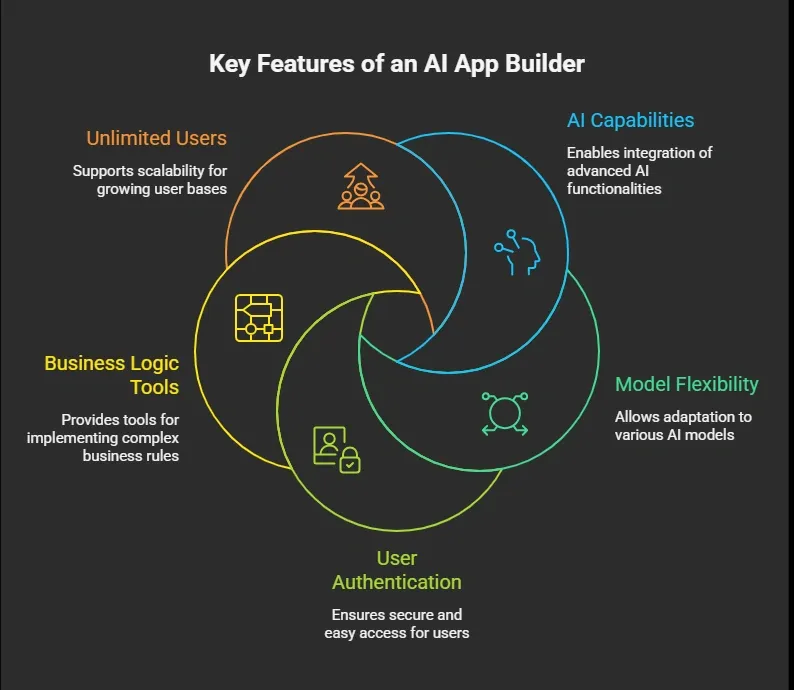
Choosing the right AI app builder makes a big difference. The right tool keeps your ai development smooth while controlling app costs as you grow.
Cutting Costs Without Slowing Down
SaaS teams often face rising app development costs, slow timelines, and increasing project complexity as their products grow. Managing resources, scaling features, and keeping up with demand can quickly become expensive. An AI app builder helps solve this by reducing manual work, speeding up delivery, and simplifying processes through AI agents and no-code tools. This approach lowers development costs while still allowing teams to build functional and scalable AI apps.
When you look at how AI app builders save development costs, the idea is simple. Less coding, faster builds, and smarter tools lead to lower spending. At the same time, teams need to stay aware of hidden costs, data quality, and platform choices. With the right balance, AI apps become a practical and cost-friendly way to build and scale SaaS products.
Table of contents
- -What Makes an AI App Builder So Useful?
- -Traditional vs AI-Driven App Development
- -Where Do the Cost Savings Actually Come From?
- -1\. Less Manual Coding
- -2\. Faster Minimum Viable Product
- -3\. Lower Team Dependency
- -4\. Built-In AI Features
- -5\. Reduced Maintenance
- -The Hidden Costs You Avoid
- -AI Agents and Automation in Action
- -Data Matters More Than Code Now
- -AI Models and Cost Efficiency
- -Community Insight: What Real Builders Say
- -Monthly Pricing vs Traditional Spending
- -AI App Builders and SaaS Growth
- -Fuel Your Apps with Rocket.new
- -Top Features
- -How Rocket.new Helps Save Costs in SaaS Teams
- -Challenges You Should Still Know
- -Best AI App Builder: What to Look For
- -Cutting Costs Without Slowing Down