
Rocket.new saves a new version after every build message, tracks code diffs across your entire project, and lets you restore any previous version with one click. Here is how version history and rollback work inside the platform.
What happens to your app when an AI-generated edit breaks something three steps back? With 93.87% of developers relying on Git for version control, tracking changes is standard practice. Rocket.new builds version history directly into its editor, so every build message saves a new version of your project.
The platform tracks your entire codebase, frontend and backend, pages, assets, and configuration. It lets you restore any previous version with a single click.
What Version History Looks Like Inside Rocket.new
Rocket.new creates a new version each time you accept an AI generation, make a manual edit, or modify files through the platform. Every version is tied to the build message that triggered it.
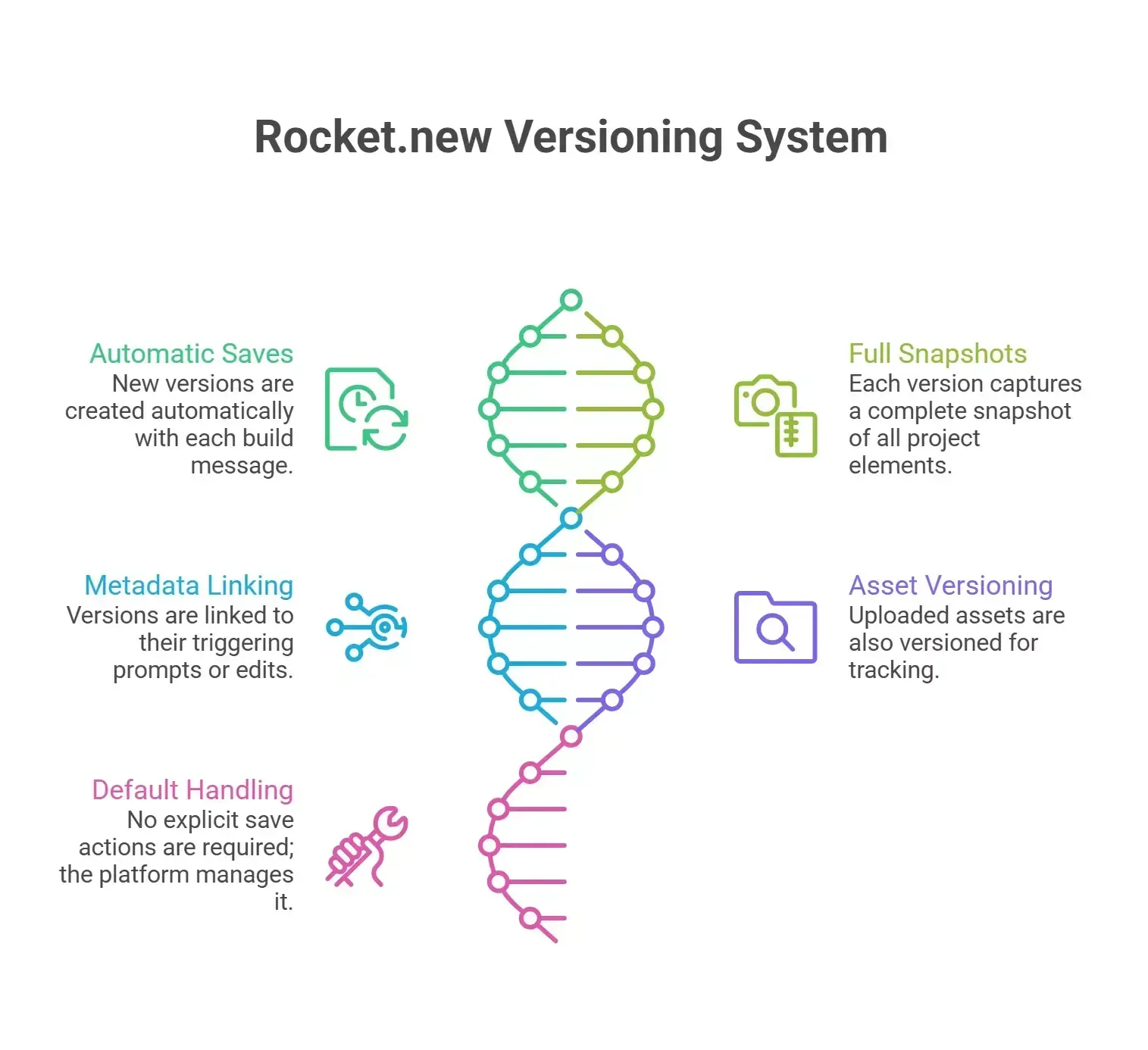
-
Each build message in the chat editor saves a new version automatically
-
The version captures a full snapshot of all modified files, settings, assets, and pages
-
Metadata links each version back to the prompt or edit that created it
-
Users upload images, PDFs, CSVs, or Markdown files as part of a build, and those assets get versioned too
-
No explicit save or commit action is needed; the platform handles it by default
Rocket also tracks frontend code, backend logic, configuration files, and test files. Component files, UI assets, image assets, and layout assets update with each new version.
File additions, deletions, and moves across folders show up in the version history. Static assets, media assets, and uploaded assets are included in every snapshot.
Each change in a version history system is recorded as a new commit, preserving the entire history of modifications. Users can view exact changes between versions using a code diff feature that highlights new lines in green and removed lines in red.
Navigating Your Version History in the Dashboard
The chat interface doubles as your version timeline, and every build message acts as a version marker.
-
Scroll through your chat history to find the version you want
-
Click the "Files (x)" panel under any build message to see the code diff and preview
-
Use the context menu for quick access to rollback, code diff, or label options
-
Create a label on any version to bookmark it for later; this helps when your team works on long-running projects
-
Version labels appear in your dashboard settings, making it easy to switch between milestones
-
On both web and mobile apps, version history with code diff and rollback stays accessible from the chat editor
Semantic labeling by prompt text rather than arbitrary commit hashes makes navigation clear for both technical and non-technical team members. Your team can track what changed and why without leaving the editor. These tools help manage version history during development without extra setup.
How One-Click Rollback Works in Rocket.new
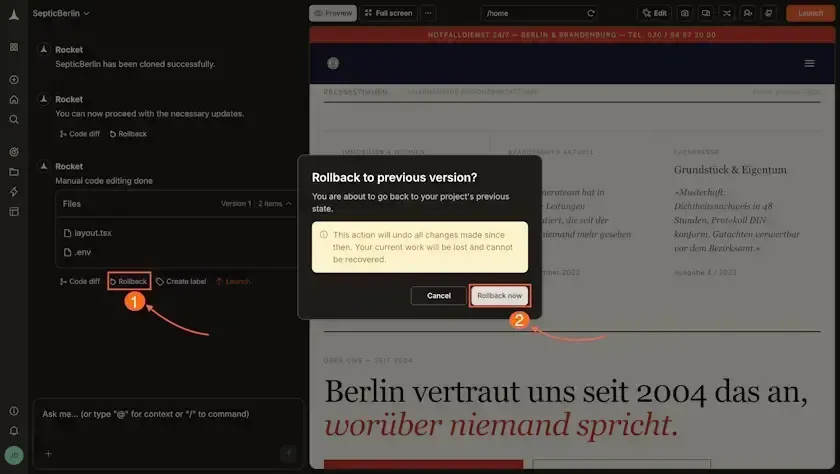 One-click rollback in Rocket.new restores your entire project to a selected version. Rocket includes a rollback button below each code change, allowing users to restore earlier states of their app with a single click.
-
Find the build message for the version you want to restore
-
Click the Rollback button
-
Review the confirmation dialog (rollback cannot be undone directly)
-
Confirm to run the restore
Rolling back in Rocket creates a new commit, preserving the full change log. Users can undo the rollback if needed by rolling forward to another version. Each rollback is treated as a new version entry, so you never lose history.
The restore is atomic; either all files are updated, or nothing changes if an error occurs.
What Rollback Restores and Common Fixes
Rollback in Rocket.new covers your full file tree, but there are limits. The rollback process undoes all changes made since a specific checkpoint.
| Rollback Scenario | Scope of Changes | Time to Execute | Reversibility |
|---|---|---|---|
| Single generation undo | All files from one snapshot | Seconds (one click) | Roll forward to a later version |
| Multi-step rollback | Multiple generations of changes | Seconds (one click) | Requires a forward snapshot |
| Partial file restore | Not supported natively | Manual effort needed | N/A |
| Post-GitHub push rollback | Internal state only; external may differ | Seconds internally | GitHub needs separate handling |
What Rollback Restores:
-
All changed files and assets from the selected version to their captured state
-
The complete file tree structure, including added or removed files, folders, and pages
-
Conversation context trimmed to that turn, so future prompts match your current code
-
Brand guidelines, template settings, layout details, and image assets are stored in the version
What Rollback Does Not Cover:
-
Tokens used between the snapshot and rollback point are not refunded
-
External changes pushed to GitHub may need separate handling
-
If an app was previously published, it may need to be republished after a rollback to fix the live version
-
Current work can be lost upon rolling back, as it reverts to the checkpointed version
Fixes for Common Questions and Scenarios:
-
Accidental changes: Scroll back to the last good build message and click Rollback. The fix takes seconds.
-
Multi-component rollbacks: Roll back to the base version first, then use prompts or manual edits to re-apply the changes you want. Paste specific code from a later version if needed.
-
Long histories: For projects with hundreds of versions, use GitHub integration to store and download milestone snapshots and assets externally. For example, download pages and image assets before a major rebuild.
-
Preview mismatches: After a restore, preview your app to confirm visual elements, test backend logic, and generate a test build. Refresh your browser or app, and check the display settings on Android or on the web if something looks off.
-
Errors after rollback: If you see errors in the restored version, use the code diff to find the issue and fix it with a new prompt. Every fix creates a new version, so your team can always roll back again. This makes it safe to fix problems without worrying about losing progress.
Note that partial rollbacks are not available yet. Roll back the full snapshot, then re-apply the changes you want to keep.
Version History and Rollback With GitHub Integration
For teams that want an external backup or a traditional version control workflow, Rocket.new integrates with GitHub.
-
Connect your GitHub repository from the dashboard to sync your project
-
One-way sync pushes snapshots from Rocket to GitHub as commits
-
Two-way sync (available for Next.js TypeScript projects) lets you pull and push changes between platforms
-
GitHub integration creates an additional restore path if you need to download or recover assets from a previous version
-
Your team works with a shared repository, keeping both Rocket and GitHub histories in sync
Push significant milestones after your initial build, after launching your app live, or before switching to a new feature branch.
If your team needs to switch between a Rocket version and a GitHub commit, the link between platforms keeps your history intact.
How Rocket.new Makes Version History and Rollback Part of the Build
Developers building web and mobile apps with AI tools find that traditional version control does not always fit their workflow.
"Treating prompts like code means you can build reliable systems instead of praying your magic words keep working." - Source
Version history and one-click rollback are built into the same editor where you design, generate, and publish your app. The platform handles it on the free plan and on paid tiers, so all users get full details of their version history.
Rocket.new lets users experiment without risking permanent data loss.
-
Vibe-solutioning platform: Describe what you want in plain language, and Rocket generates the code, pages, screens, and assets. Every step saves a version you can restore.
-
25k+ templates library, free to use: Start from a template for websites, mobile apps, dashboards, or landing pages. Each template edit creates a new version with all assets tracked, so your team can roll back to any previous version.
-
Saves up to 80% tokens: Rocket's template and research library means less back-and-forth with the AI. The value here is fewer wasted builds and a cleaner version history.
-
Supports Flutter (mobile) and Next.js (web): Build for Android, iOS, and web from one platform. Version history tracks all screens, pages, and assets across frameworks. You can fix errors, manage publishing, and restore assets on any build.
-
Collaboration features built in: Your team works together on the same project. Every team member's edits create trackable versions with code diffs and rollback options.
-
3 Products, One Platform: Solve, Build, and Intelligence: Solve for research, Build for app creation and deployment, and Intelligence for analytics, all with version history and asset tracking baked in.
Use cases where version history and rollback matter:
-
A team building a mobile app on Flutter rolls back a broken layout after an AI generation, then re-applies only the fix they want. All assets restore to the earlier state.
-
A solo developer publishing a web app on Next.js uses version labels to bookmark each publishing milestone before adding new features. Pages, assets, and screens all roll back together.
-
A startup uses the free plan to build and test multiple landing pages, rolling back failed experiments without losing data or assets
-
An agency managing client websites downloads version snapshots and assets to GitHub for external backup and install tracking
Getting Version History Right on Every Build
Version history systems track every change made to a project, allowing users to revert to previous states without losing any data. Rollback features in version history systems are non-destructive, meaning that reverting to a previous version creates a new entry rather than deleting the existing history.
Rocket.new handles all of this inside one editor, so you build, preview, roll back, and publish without switching tools.
That is how Rocket.new handles version history and one-click rollback, built into every step of the workflow.
Table of contents
- -What Version History Looks Like Inside Rocket.new
- -Navigating Your Version History in the Dashboard
- -How One-Click Rollback Works in Rocket.new
- -What Rollback Restores and Common Fixes
- -What Rollback Restores:
- -What Rollback Does Not Cover:
- -Fixes for Common Questions and Scenarios:
- -Version History and Rollback With GitHub Integration
- -How Rocket.new Makes Version History and Rollback Part of the Build
- -Getting Version History Right on Every Build