
Rocket.new lets you build production-ready Next.js web apps and Flutter mobile apps by describing what you want in plain language. This guide covers the full workflow, from first prompt to scaled app, with verified features, component breakdowns, and practical steps.
Learning how to build apps using natural language prompts is now a practical skill for any team. Rocket.new's Build pillar generates production-ready Next.js web apps and Flutter mobile apps from a single description.
This guide walks through the full workflow: from writing your first prompt to scaling a production app, with verified feature details, component breakdowns, and the decisions that keep growth manageable.
What Does It Mean to Build Apps With Natural Language Prompts?
Building apps with natural language prompts means describing what you want in plain language and having an AI system generate working, editable code. You type "build a SaaS dashboard with user authentication and a Stripe billing page" and the platform produces a Next.js or Flutter project with real files you can inspect, edit, and deploy. No drag-and-drop templates. No locked-in abstractions. Just code that you own.
This is different from no-code tools that generate visual configurations. Prompt-based app builders generate actual source code: Next.js TypeScript for web, Flutter for iOS and Android. That code is yours to edit, connect to GitHub, and deploy to Netlify with one click.
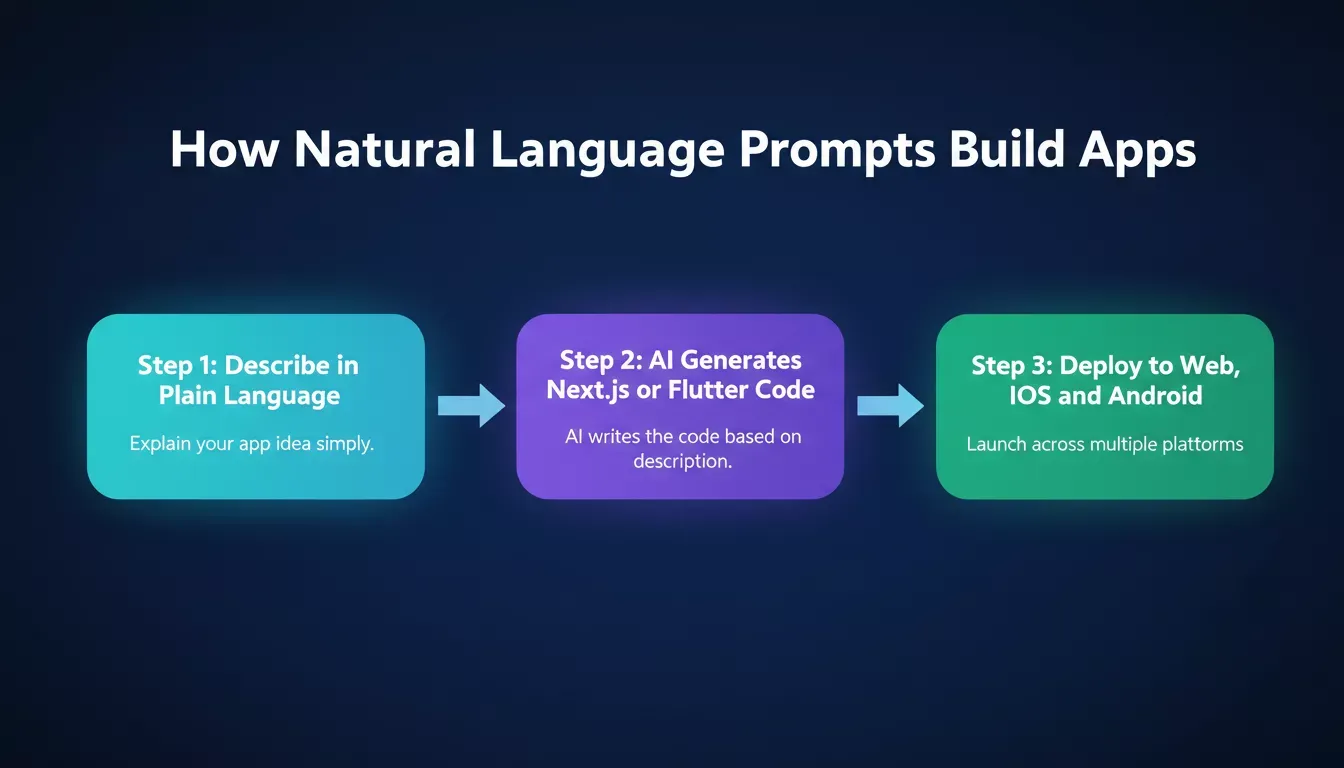
From plain language description to deployed app: the three-step prompt-to-production workflow
The Rise of Prompt-Based App Creation
People who try a prompt to set up an app builder often feel the speed right away. A quick message produces a layout. Another prompt adjusts the flow. A short description updates the screen. And just like that, the app takes shape faster than anyone expected.
Teams already familiar with AI tools notice the pattern. They describe features in natural language. The system forms screens, connects logic, and builds components. At first, the process feels like a small experiment. Before long, it becomes part of normal work.
And even with this speed, control stays important. Developers want complete code ownership. They want access to all files. They want to modify and refine anything they see. That level of access ensures long-term scalability and avoids vendor lock-in situations.
As of 2025, 78% of organizations worldwide report using AI in at least one business function. This shift moves quickly. Teams write simple prompts and watch the first version of an app take shape in minutes. That pace changes how people plan, test, and ship software.
Why Natural Language Changes the Build Process
Natural language prompts feel casual, yet teams use them with surprising depth. They describe data flows, user steps, component behavior, and screen logic. Prompts act like a flexible spec that evolves as the project grows, and everyone on the team understands them without extra translation.
A few clear trends show up:
- People describe app ideas much faster than they document them.
- Teams build mini apps in minutes to test early concepts.
- Developers shift from starting with code to reviewing and refining generated code.
- A visual editor supports all of this by letting teams adjust screens, modify layouts, and customize components any time.
And with less waiting, teams feel like they're talking their way into a working app. It shortens the distance between concept and build.
How Prompt-Based Systems Scale
Scaling apps using natural language prompts involves more than quick generation. It requires structure under the hood. And teams adapt best when a platform balances speed with clarity.
Here's what helps these systems scale smoothly:
1. Real, Editable Code Output
The most important scaling factor is that the platform generates real source code, not a visual configuration. When Rocket.new generates a Next.js web app, you get TypeScript files you can open, edit, and push to GitHub. When it generates a Flutter mobile app, you get Dart files ready for the App Store or Google Play.
That code is yours. You can connect it to GitHub for two-way sync, deploy it to Netlify, or hand it to any developer who knows the stack.
2. A Shared Workflow
With everyone describing tasks in the same natural language format, teams stay on the same page. Product leads write the early prompts. Developers refine the structure and add logic. Designers use the visual editor to polish screens. The AI model fills in the structure based on each prompt.
3. Precision Commands for Targeted Edits
Open-ended prompts work well for generating first versions. Precision commands work better for targeted changes. In the web browser editor, type / to open a menu of screen-aware shortcuts: layout fixes, content updates, theme changes, SEO audits, accessibility reports, and connector setup. Type @ to scope any edit to a specific file, folder, or previous task.
Both commands use fewer credits than open-ended prompts and are available in the web browser editor. Learn more about prompt engineering best practices to get the most from each build session.
4. Reusable Components
Reusable components form the backbone of mini apps, dashboards, and full web apps. They reduce repeated work and keep the structure tidy. This is essential for teams building apps using natural language prompts at scale.
5. Stable Connectors
Rocket.new supports 26+ third-party connectors: Supabase for database and auth, Stripe for payments, Netlify for deployment, GitHub for code sync, and more. Each connector is wired up from chat with a single prompt. Consistent connector behavior keeps the workflow flowing as the app grows.
Shifting From Manual Code to Prompt-Guided Build Cycles
People often wonder how prompt-based app development compares to traditional software development. The difference appears in the flow of work.
Instead of jumping straight into code, teams describe what they want. Screens. Data. User actions. A few simple prompts paint the first version. Developers still write code. They still create logic. They still test. The difference is that AI tools give them a head start, and when something goes wrong, the built-in Advisor Agent diagnoses root causes and resolves error loops automatically.
The app grows piece by piece. Each step builds on the last. Teams that build with AI tools consistently report shorter cycles from idea to working product.
Key Components That Support Scale
Teams often ask which components have the biggest impact when they build apps using natural language prompts. Most connect to structure, data, or screen logic.
| Component | What It Supports | Rocket.new Implementation |
|---|---|---|
| Inputs | User actions and data capture | Form logic, Supabase auth, Tally/Typeform embeds |
| Screens | Layouts for web and mobile apps | Next.js pages (web), Flutter screens (mobile) |
| Tables | Structured data and live preview | Supabase database, Airtable, Directus |
| APIs | External data connections and AI calls | 26+ connectors, Postman/cURL/Swagger import |
| Events | Triggers and workflow steps | Stripe webhooks, Supabase edge functions, Twilio SMS |
| Files | Generated code and manual edits | Full code export, GitHub two-way sync |
AI adoption is accelerating: most organizations now use AI in at least one business function
Figma to Code: Turning Designs Into Working Apps
Teams with existing Figma designs can skip the prompt-from-scratch workflow entirely. Paste a Figma file or frame URL into Rocket.new and generates a pixel-perfect Next.js web app or Flutter mobile app that matches your design: layout, colors, typography, spacing, and components included.
Important caveat: Figma import is available in the web browser editor at Rocket.new only. It is not available in the Rocket.new mobile app. For web apps, Rocket.new generates React or Next.js code. For mobile apps, it generates Flutter code for iOS and Android.
After import, you iterate with prompts and commands exactly as you would with any other build. The generated code is yours to edit, extend, and deploy.
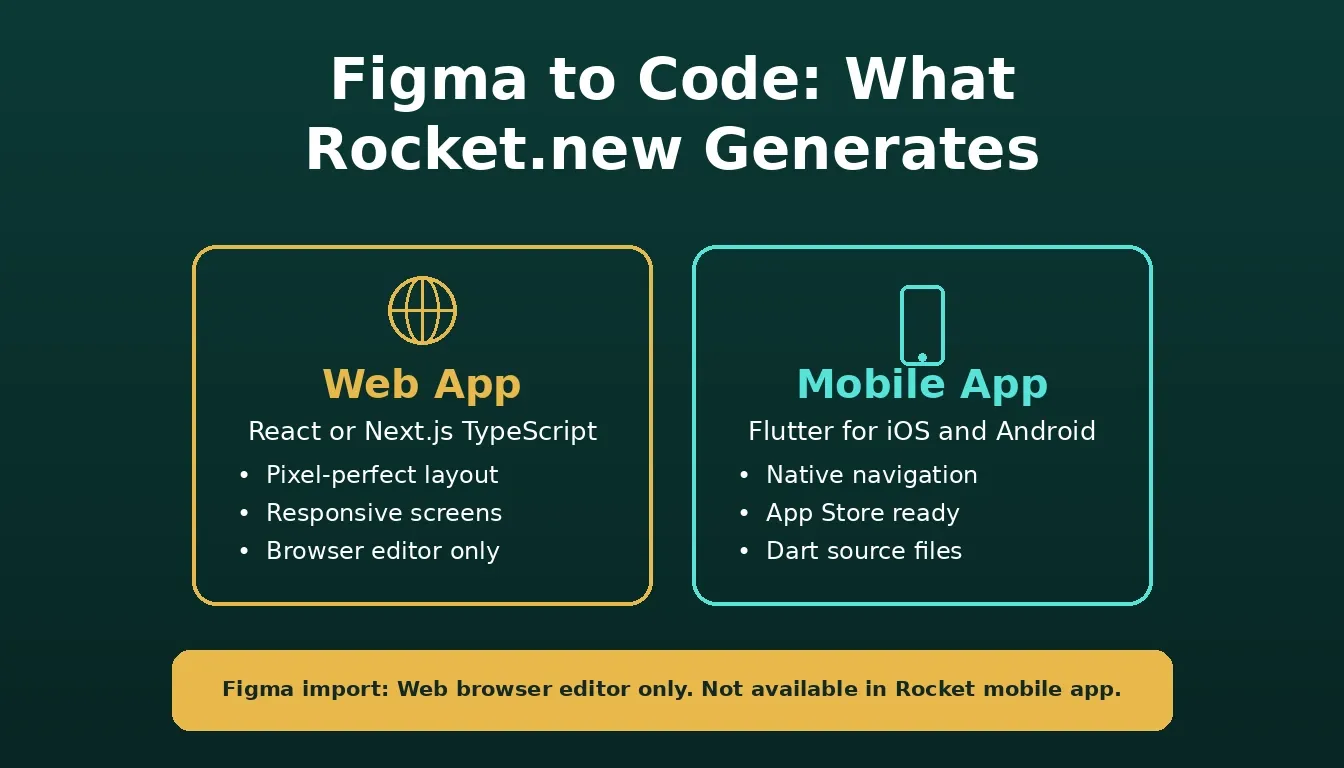
Figma import generates Next.js for web and Flutter for mobile. Web browser editor only.
Improving Prompt Quality
Prompts shape everything. Writing them with care helps the app come together faster. Good prompt engineering is the foundation of effective natural language app development.
Teams tend to do a few things consistently:
- They describe workflows instead of one-off screens.
- They reference data types, connector names, and file paths when useful.
- They use / commands for targeted edits instead of re-prompting the whole app.
- They use @ to scope changes to a specific file when they know exactly what needs updating.
- They adjust prompts as the build grows and test each change with the live preview.
Short tests after each round help catch any odd output. It's a natural part of the development rhythm. Teams building full-stack apps with AI prompts find that structured prompting cuts revision cycles significantly.
Why Scale Matters Early
Scale appears early when building software with AI support. A single-page form might grow into an internal platform. A tiny dashboard might expand into a multi-screen product. This shift happens quickly, so teams value code ownership from day one.
When teams can write their own functions, modify files, and adjust structure, they stay flexible. Rocket.new generates real Next.js and Flutter code, not a locked-in abstraction, so any developer can pick up where the AI left off. Connect to GitHub for version control, deploy to Netlify for hosting, and the app lives in infrastructure you control.
Try it yourself: Start with a prompt like "Build a SaaS dashboard with Supabase auth, a usage analytics page, and a Stripe billing screen." Rocket.new generates the full Next.js project. From there, use /Add Supabase Authentication to wire up login, and /Add Stripe Payments to set up checkout. The whole first version takes minutes.
Rocket.new and the Full Vibe Solutioning Platform
Rocket.new is more than an app builder. It's a vibe solutioning platform with three pillars that work together.
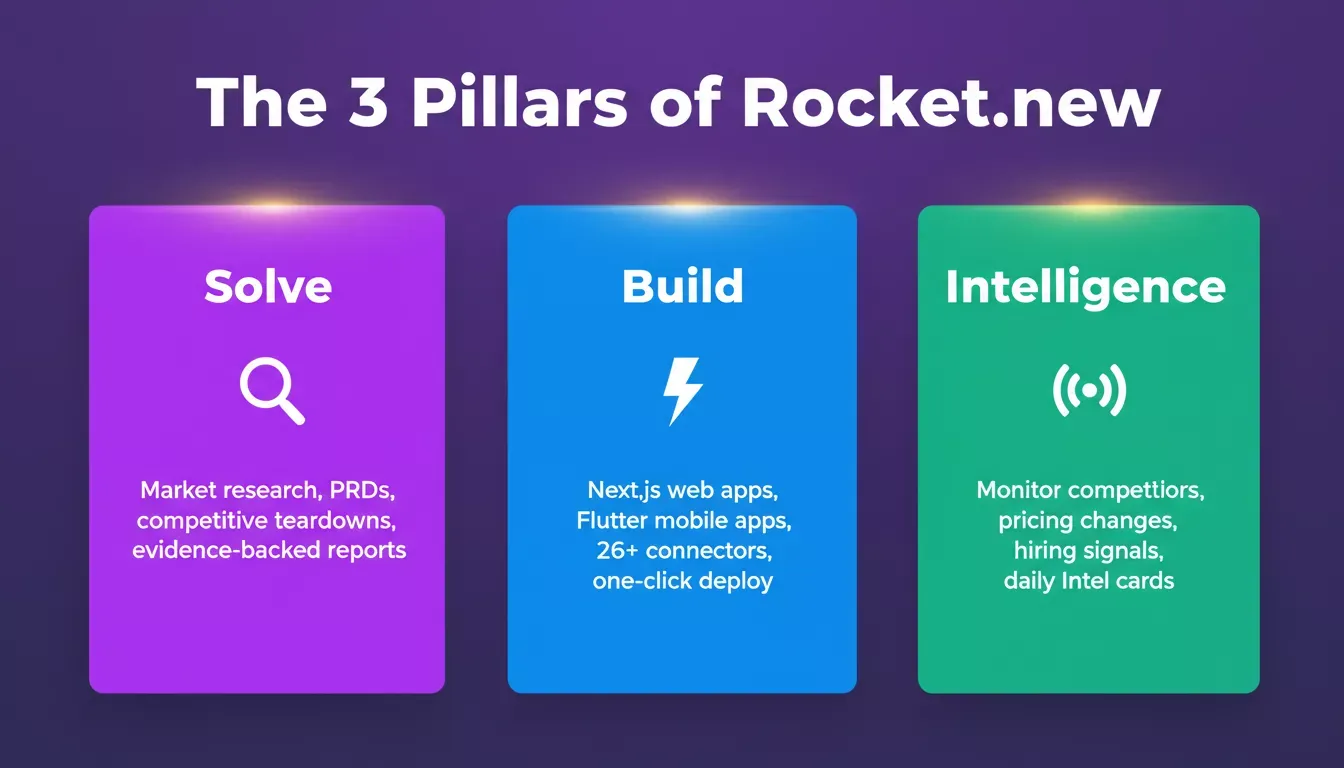
Solve, Build, and Intelligence: three pillars that share context inside a single Rocket.new project
- Solve: Research markets, run competitive teardowns, generate PRDs, and get structured evidence-backed reports before you write a single prompt. Solve turns complex business questions into actionable deliverables.
- Build: Generate production-ready Next.js web apps and Flutter mobile apps from natural language prompts. Iterate with chat,
/commands,@scoping, and the Advisor Agent. Deploy to Netlify or the App Store. - Intelligence: Monitor competitors across nine signal types, including product launches, hiring patterns, pricing changes, ad spend, and reviews. Intel cards connect signals into meaning, not just alerts.
Context flows between all three pillars inside a single project. Research from Solve informs what Build generates. Intelligence signals feed back into Solve questions. Teams that research before they build ship more defensible products.
Explore the Intelligence pillar to see how competitor monitoring connects to your build workflow.
Build Features at a Glance
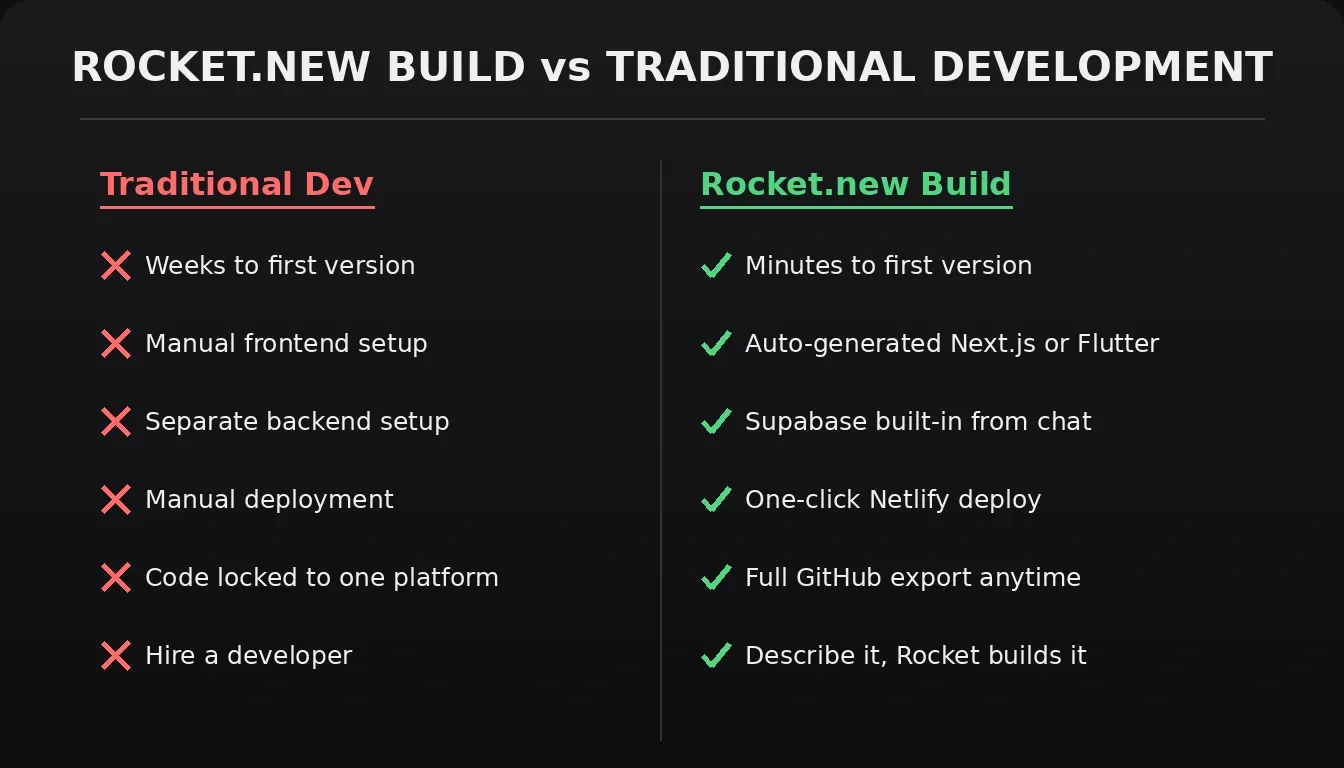
Rocket.new Build vs traditional development: speed, ownership, and deployment compared
- Prompt-based full-stack generation: Describe your idea and get a working Next.js or Flutter project with frontend, backend, and integrations.
- Figma to code: Convert Figma designs into production-ready Next.js (web) or Flutter (mobile) code. Web browser only.
- Built-in backend and auth: Supabase database, auth, file storage, and edge functions, all scaffolded from chat.
- Cross-platform output: Build once and publish to web, iOS, and Android.
- One-click deployment: Launch to Netlify with automatic HTTPS and a global CDN. Custom domain support included.
- Full code ownership: Export the entire codebase or sync with GitHub at any time.
- Slash and
@commands: Type/for screen-aware shortcuts and@to scope edits to specific files or tasks. Web browser editor only. - Advisor Agent: Built-in senior architect sub-agent that diagnoses root causes, resolves error loops, and makes architectural decisions automatically.
- 26+ connectors: Stripe, Supabase, Netlify, GitHub, HubSpot, Airtable, OpenAI, Anthropic, Twilio, and more, all wired up from chat.
How Teams Adjust in Real Life
Teams that adopt prompt-driven workflows often share a familiar story. Product leads write the early prompts. Developers refine the structure and add logic. Designers use the visual editor to polish screens. Meanwhile, the AI model fills in the structure based on each prompt.
Smaller teams that once shipped slowly now move faster. Larger teams treat prompt-driven workflows as a way to test new app ideas without extra planning overhead. It doesn't replace engineering. It changes its pace. The key insight is that natural language becomes the shared language between business requirements and technical implementation.
Non-technical founders and product managers can explore how AI app builders compare to hiring a developer to understand the real cost and speed trade-offs.
Managing Data, Testing, and Files
A scalable app needs stable data. So teams refine data structures, connect APIs, review logic, and test each flow. Prompts provide the first version, but manual review brings depth.
Testing continues throughout the process. Teams run events, test screen logic, and check output. They make small adjustments as they go. This continuous testing cycle is what keeps apps using natural language prompts production-ready.
Files remain a core part of the process. Developers can view and edit source files directly in the code tab, write their own logic, and push changes via GitHub sync. That level of control keeps growth manageable.
The Role of AI Models
The AI model responds to prompts, generates layouts, and organizes workflows. But the team directs the process. They describe. They adjust. They refine.
When the model gets stuck or hits an error loop, the Advisor Agent steps in. It acts as a senior architect: diagnosing root causes, making architectural decisions, and resolving issues so the build keeps moving. The model provides structure, and the developers shape it into something solid.
People working this way often describe the process as a conversation that turns into code. And the rhythm becomes natural quickly.
Scaling with Apps Using Natural Language Prompts
Teams building with natural language now rely on prompts as part of the everyday workflow. They create faster. They test more often. They refine as they go. And they keep full control of the generated code, real Next.js and Flutter files, from start to finish.
As more companies adopt this approach, teams will build apps using natural language prompts to scale ideas into stable production-ready systems. The platforms that enable this, ones that generate real code, support real connectors, and give teams full ownership, are the ones worth building on.
Teams looking to move from idea to deployed product in a single workflow can explore the full Rocket.new AI app builder to see how Solve, Build, and Intelligence work together.
Ready to build apps using natural language prompts without limits? Rocket.new gives teams full-stack Next.js and Flutter generation, editable code, GitHub sync, and one-click Netlify deployment in a single platform.
Whether you're shipping an MVP or scaling a production app, Rocket.new handles the structure, so your team can focus on what matters.
Start building on Rocket.new for free and turn your first prompt into a working app today.
Table of contents
- -What Does It Mean to Build Apps With Natural Language Prompts?
- -The Rise of Prompt-Based App Creation
- -Why Natural Language Changes the Build Process
- -How Prompt-Based Systems Scale
- -1. Real, Editable Code Output
- -2. A Shared Workflow
- -3. Precision Commands for Targeted Edits
- -4. Reusable Components
- -5. Stable Connectors
- -Shifting From Manual Code to Prompt-Guided Build Cycles
- -Key Components That Support Scale
- -Figma to Code: Turning Designs Into Working Apps
- -Improving Prompt Quality
- -Why Scale Matters Early
- -Rocket.new and the Full Vibe Solutioning Platform
- -Build Features at a Glance
- -How Teams Adjust in Real Life
- -Managing Data, Testing, and Files
- -The Role of AI Models
- -Scaling with Apps Using Natural Language Prompts