How can you create a scalable e-learning platform with Rocket.new? This blog explains setup, user roles, course delivery, payments, and deployment strategies for building a production-ready learning system.
Can you create your own online learning platform without getting buried in code?
Yes, you can. And it is more practical than most people think.
According to data, the online learning market is expected to reach nearly 400 billion dollars by 2026 as schools and businesses continue shifting to digital training. That growth opens real opportunities.
But where do you start? And how do you turn an idea into a working product without a technical team?
If you are searching for how to build an e-learning platform with Rocket.new, you are likely looking for clarity, not complexity. You want clear steps. You want simple tools. You want results without wasting time.
Let’s get started.
Why Building an E‑Learning Platform Matters?
Thinking about why one's own e-learning platform can make a difference?
Well, it’s not just about putting videos online. A well-built learning platform changes the way people learn and interact with content.
Here’s why it matters:
- Learn anytime, anywhere: Students can study from home, cafes, or while traveling.
- Faster employee training: Companies can train teams efficiently without lengthy workshops.
- Reach more learners: Educators and trainers can connect with students across cities or even countries.
- Centralized management: A learning management system keeps course materials, progress tracking, and user engagement all in one place.
- Flexibility and instant access: Modern learners want control over their schedules and learning pace.
- Skill development and certifications: Platforms can help learners build real-world skills and earn credentials.
- Community and collaboration: Learners can join forums, discussion groups, and learning communities.
In short, an e-learning platform is more than content delivery. It’s a hub for learning, feedback, and engagement, designed to make education smarter and more interactive.
First Things First: What is a Learning Management System?
A learning management system (LMS) is software that lets you manage, deliver, track, and report on online courses. Think of it as the engine behind your learning platform.
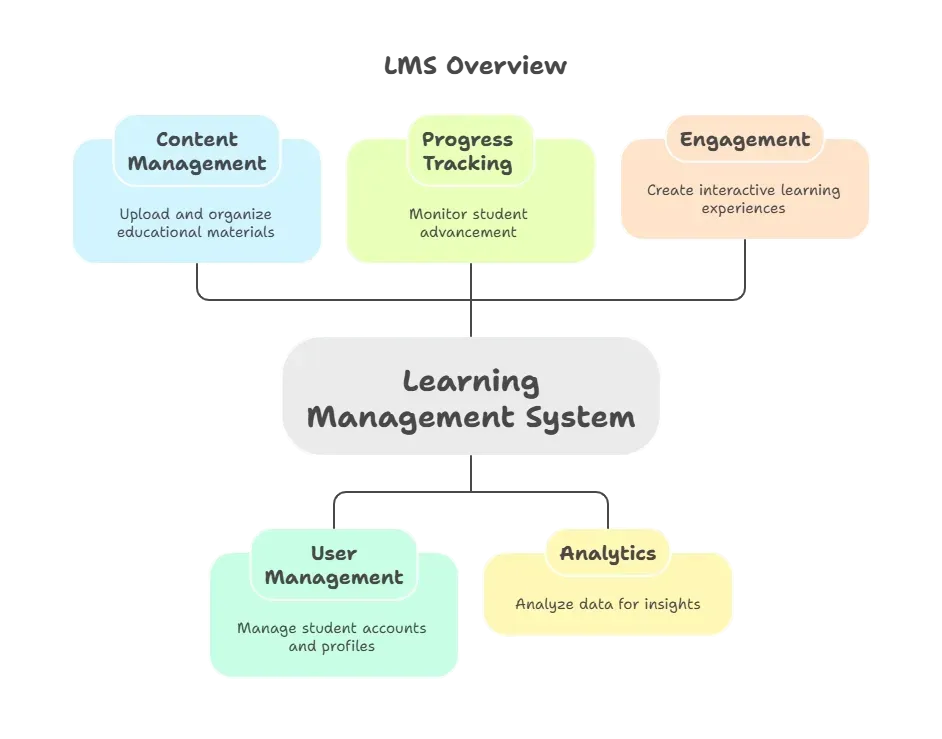
Good management systems also include mobile apps so learners can study on phones or tablets, as well as communication tools such as discussion boards or chats.
Core Features Your Learning Platform Should Have
So, you’ve got the idea for your own e-learning platform. Great! But what actually makes it work? A successful learning platform isn’t just about content; it’s about how learners interact, track progress, and stay engaged.
Here’s a friendly checklist to guide you.
Key Features to Think About
| Category | Features you’ll want |
|---|---|
| Teaching tools | Video lessons, quizzes, assignments |
| Communication | Forums, messaging, direct support |
| Engagement tools | Gamification elements, progress badges |
| Progress tracking | Dashboards, analytics tools |
| Access | Works on mobile devices and laptops |
| Support | Collect feedback and user feedback tools |
A platform that blends course content, progress tracking, and feedback keeps learners engaged and coming back for more. Remember, your learning management system is only as strong as the experience it offers so make it smooth, interactive, and user-friendly.
Step‑by-Step: How to Build Your Own E‑Learning Platform?
Building your own learning platform doesn’t have to feel like climbing a mountain. Think of it as a series of small, practical steps.
Follow this guide, and you’ll see how a structured approach turns your idea into a working platform without losing your sanity.
1. Define Your Goals and Learning Objectives
Every great platform starts with a clear purpose. Knowing what you want your learning platform to achieve sets the tone for everything else.
Key Points to Consider:
- Identify your target audience: Are they students, professionals, or hobby learners?
- Define what learners should achieve: language fluency, professional certification, or skill mastery.
- Decide your business model: subscription, one-time purchase, or corporate licensing.
- Outline learning objectives: These help structure courses, quizzes, and assessments.
Clear goals prevent confusion down the line. With defined objectives, every feature you add has a purpose and aligns with your learners’ needs.
2. Pick the Right Tech Stack
Your tech stack is the engine behind your platform. The right tools make everything smoother and less stressful.
Key Points to Consider:
- Choose your platform base WordPress with LMS plugins, custom frameworks, or no-code solutions.
- Decide on database and backend user accounts, course storage, progress tracking.
- Use tools like Rocket.new to generate code from descriptions, reducing development time.
- Consider scalability will it handle hundreds or thousands of learners?
A solid tech stack keeps your platform stable, future-proof, and ready to grow without unexpected crashes.
3. Plan the Learner Experience
Learners will judge your platform by how easy and enjoyable it is. Planning the user journey is key.
Key Points to Consider:
- Design a smooth user interface simple navigation, easy-to-find lessons.
- Make it mobile-friendly learners often access content on phones or tablets.
- Ensure fast-loading content videos, quizzes, and PDFs should load quickly.
- Map out learner pathways sequences, prerequisites, and progress indicators.
A clear, intuitive experience keeps learners coming back. Happy users = engaged users.
4. Build the Core LMS Features
The backbone of your learning management system is what makes learning measurable and manageable.
Key Points to Consider:
- Create user accounts and dashboards for tracking progress.
- Add course pages and modules for structured learning.
- Include progress tracking quizzes, completion bars, badges.
- Ensure content delivery videos, PDFs, and interactive materials are easy to access.
These are the features learners expect. A platform without them feels incomplete, no matter how pretty it looks.
5. Add Communication Channels
Learning isn’t just content it’s interaction. Communication keeps learners connected.
Key Points to Consider:
- Include discussion forums for peer-to-peer learning.
- Add direct messaging for instructor support.
- Offer live Q&A sessions or webinars for real-time engagement.
- Integrate notification systems for course updates and reminders.
Strong communication channels create a sense of community, making learners more invested and likely to complete courses.
6. Use Analytics Tools
Data is your best friend when building a learning platform. It shows what works and what doesn’t.
Key Points to Consider:
- Track learner progress who’s completing courses, who’s dropping off.
- Monitor quiz performance to spot knowledge gaps.
- Use dashboard analytics to see engagement trends and popular courses.
- Analyze drop-off points to improve content or flow.
Analytics turns guesses into actionable insights, helping you refine your platform and improve user engagement.
7. Test With Real Users
Before going live, nothing beats testing with real learners. Their feedback is gold.
Key Points to Consider:
- Invite a small beta group diverse learners provide better insights.
- Give clear instructions for testing course features.
- Collect valuable feedback on usability, navigation, and content clarity.
- Observe how users interact naturally not just what they report.
Real-world testing ensures your platform works the way learners expect, reducing future headaches.
8. Launch and Iterate
Launching is exciting, but the real work begins after. Continuous improvement keeps your platform relevant.
Key Points to Consider:
- Roll out the platform gradually or in phases.
- Continue collecting user feedback for tweaks and improvements.
- Monitor analytics tools to track engagement and course performance.
- Update features and content regularly to meet learner needs.
Treat your platform like a living project. Keep iterating, and it will grow into a fully engaging, learner-centric learning management system.
Think of your platform like a living thing. It grows with your learners, adapts to feedback, and improves over time. Follow these steps, focus on the experience, and your own e-learning platform can be something learners actually enjoy using.
A Peek Into the Market
Before building your own learning platform, it helps to understand the landscape. The e‑learning world isn’t just growing it’s booming, and the opportunities are enormous.
Market Highlights:
- Massive industry growth: The global online learning market has expanded rapidly since 2000.
- Expanding learner base: Millions of students, professionals, and hobby learners are moving to digital platforms.
- Room for innovation: Platforms that focus on user engagement, intuitive design, and educational content can stand out.
The market is ripe for well-built learning management systems. A platform that meets learner needs, tracks progress, and encourages interaction can capture attention and grow steadily in this booming industry.
Community Insights
Here’s a snippet from a Reddit thread where someone asked about using Rocket.new to create apps:
“Can I develop fully working app in Rocket? Can I publish apps made in Rocket on App and Play Stores? … Rocket New is an exciting platform for those without a coding background.”
Create an E‑Learning Platform Using Rocket.new
So you’re ready to move from planning to building?
With Rocket.new, the process becomes much simpler than traditional development.
Instead of writing backend logic, UI code, and deployment scripts manually, you describe your e‑learning idea and let Rocket.new generate a working app. It handles everything from database configuration to mobile app readiness.
Think of it as telling a teammate what you want and getting a full app in return. Rocket.new’s natural‑language interpretation means you can focus on what your platform should do (courses, progress tracking, forums) rather than how to code it.
How Rocket.new Works for E‑Learning?
Here’s how Rocket.new helps turn your vision for an e‑learning platform into a real, deployable web and mobile app:
- Prompt to App Creation: Builds apps directly from single prompts
- Figma Import: Converts design files into live, editable layouts
- AI-Powered Backend: Automatically handles logic, data, and workflows
- Custom Domain Support: Publishes projects with a branded domain
- Code Export: Allows developers to extend or customize later
- Live Preview: Shows instant updates while editing.
Rocket.new turns ideas into production‑ready applications without manual coding, so you can bring your learning platform to life faster than ever.
Example: Built with Rocket.new
Here's one example of the learning platform built by Rocket.new
It's called Linguaflow for learning a new language, a mobile app that offers a comprehensive and engaging way to acquire new skills.
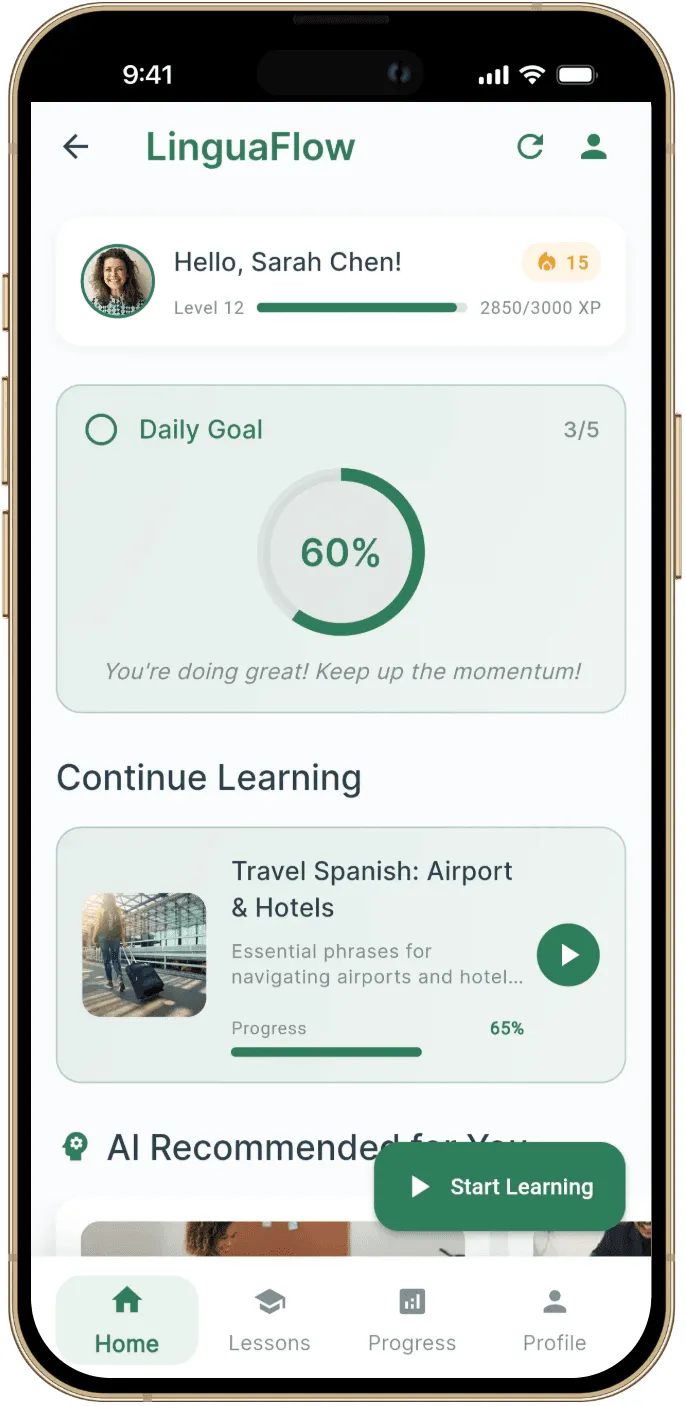
Linguaflow shows how Rocket.new makes building apps fast and intuitive. With a clean design and engaging features, learning becomes effortless and enjoyable.
👉Build Your E-learning App with Rocket 🚀
Must‑Have LMS Elements for Engagement
Remember, people don’t just attend courses, they participate. So add features like:
- Forums and discussion forums to create community
- Native mobile apps for learning on the go
- Progress badges and gamification items
- Tools for instructors to give actionable feedback
- Multilingual support for broader reach
These keep learners coming back.
Building Your Own E‑Learning Platform Easily
Creating one's own e learning platform used to mean months of coding, endless testing, and caffeine-fueled late nights. Not anymore. With Rocket.new, you can turn plain-language descriptions into fully functional apps, complete with backend logic, a polished user interface, and ready-to-deploy code.
This means you can focus on learners instead of code. Define your goals, plan your key features, and design how users interact with your platform. With some structured planning and Rocket.new doing the heavy lifting, your e-learning platform can go live on both web and mobile apps faster than you might expect.
Table of contents
- -Why Building an E‑Learning Platform Matters?
- -First Things First: What is a Learning Management System?
- -Core Features Your Learning Platform Should Have
- -Key Features to Think About
- -Step‑by-Step: How to Build Your Own E‑Learning Platform?
- -1. Define Your Goals and Learning Objectives
- -2. Pick the Right Tech Stack
- -3. Plan the Learner Experience
- -4. Build the Core LMS Features
- -5. Add Communication Channels
- -6. Use Analytics Tools
- -7. Test With Real Users
- -8. Launch and Iterate
- -A Peek Into the Market
- -Community Insights
- -Create an E‑Learning Platform Using Rocket.new
- -How Rocket.new Works for E‑Learning?
- -Example: Built with Rocket.new
- -Must‑Have LMS Elements for Engagement
- -Building Your Own E‑Learning Platform Easily