
To build online store that converts: pick the right platform, design for mobile, connect payments, optimize product pages, and layer your marketing. Rocket.new generates your full store from a prompt, no code needed, no credit card required.
To build an online store that converts, follow these steps: define your business model, choose an eCommerce platform, design for mobile-first UX, set up payment and shipping, optimize product pages, and run layered marketing. According to Statista, US eCommerce sales are projected to reach $1.92 trillion in 2026. The opportunity is real, but execution separates stores that sell from ones that sit empty.
Plan Your Online Business Before You Build
Before building your store, it's important to define your business model. Are you selling physical products, digital downloads, or services?
Your online business depends on understanding market demand. Spend time on market research to see what potential customers want and how competitors are performing, since competitive analysis can also help you identify a unique value proposition in the market.
Next, create a clear business plan for your e-commerce business. Decide on your product categories, estimate startup costs, and set realistic goals based on your business needs, including choosing the right domain name for your own website to build long-term credibility. Knowing your target audience is critical, and creating user personas for your ideal customer type is a practical way to recognize their needs and requirements so your online store does not feel empty and unnoticed.
Strong planning also means thinking about your supply chain, return policies, and customer service workflows before you launch. These operational foundations determine how smoothly your eCommerce store runs once orders start coming in.
Legal setup also includes registering the business and choosing a structure such as an LLC or a sole proprietorship.
Compliance may also require permits and adherence to data privacy laws like GDPR or CCPA.
What to define before you choose a platform:
| Decision | Why It Matters |
|---|---|
| Business model | Determines the platform features you actually need |
| Target customer and niche | Shapes design, copy, and marketing channel choices |
| Pricing and margin structure | Affects payment gateway selection and checkout flow |
| Fulfillment and returns policy | Drives shipping integration requirements |
| Legal and tax requirements | Some platforms handle sales tax automatically; others do not |
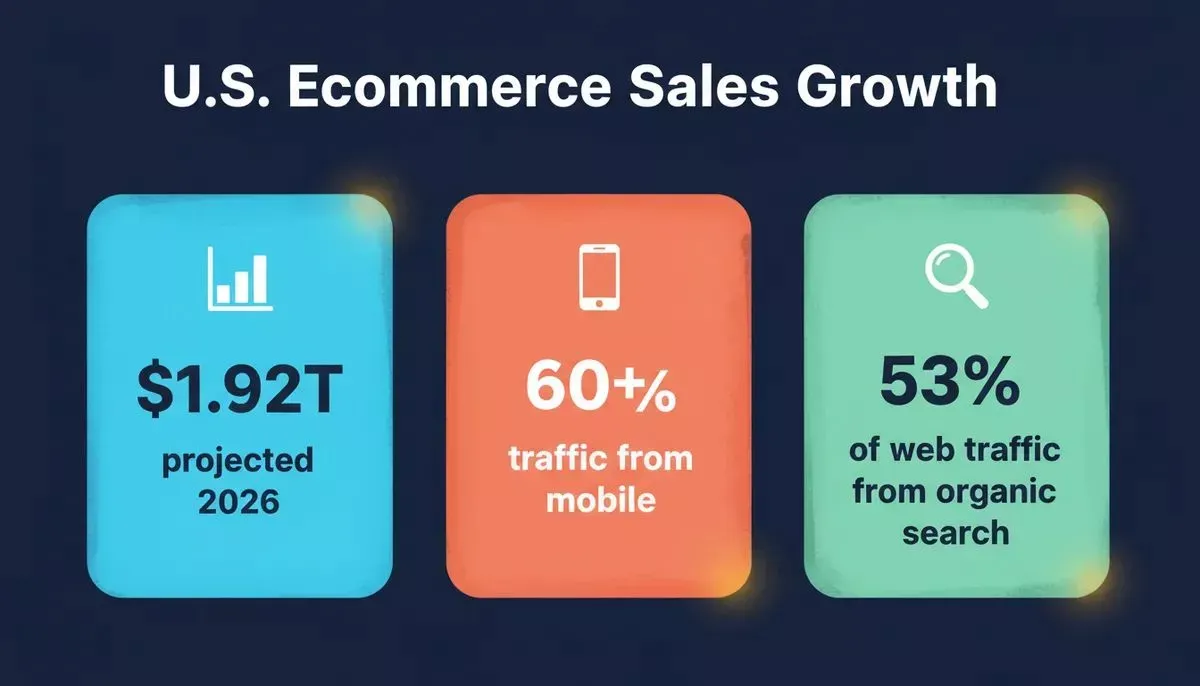
Key eCommerce benchmarks every store owner should know before launch.
Choose Your Platform Approach: Dedicated Store Builder vs. AI App Builder
This is the decision most guides skip, and it is the one that shapes everything downstream.
Dedicated store builders like Shopify, BigCommerce, and WooCommerce are purpose-built for retail. They work as an all-in-one solution for sellers who want to start selling quickly, with pre-built checkout flows, inventory management, and a large ecosystem of e-commerce plugins.
They are a good fit for users who want less technical management, do not want to handle website coding, and, in many cases also support dropshipping. The tradeoff is that you are working within a fixed product category, and customization beyond the template layer requires developer resources or paid apps. The cost of an online store depends on the platform and features you choose, and monthly fees can range from about $12 to $300+ depending on the business plans available.
Many major platforms also offer free trials, typically around 14 to 15 days, so you can test workflows before committing.
AI app builders take a different approach. Rather than giving you a storefront template, they generate the entire application, including store UI, checkout logic, backend, and integrations, from a natural language description. Rocket.new is in this category. It is not a traditional eCommerce website builder. It is a broader AI development platform whose Build pillar generates production-ready Next.js web apps and Flutter mobile apps, including eCommerce stores, from a single prompt.
The practical difference: with a dedicated builder, you configure a pre-built system. With an AI app builder, you describe what you want and the system generates it, including custom logic a template could never accommodate. If you want to understand how no-code tools compare for building faster, that context helps frame this choice.
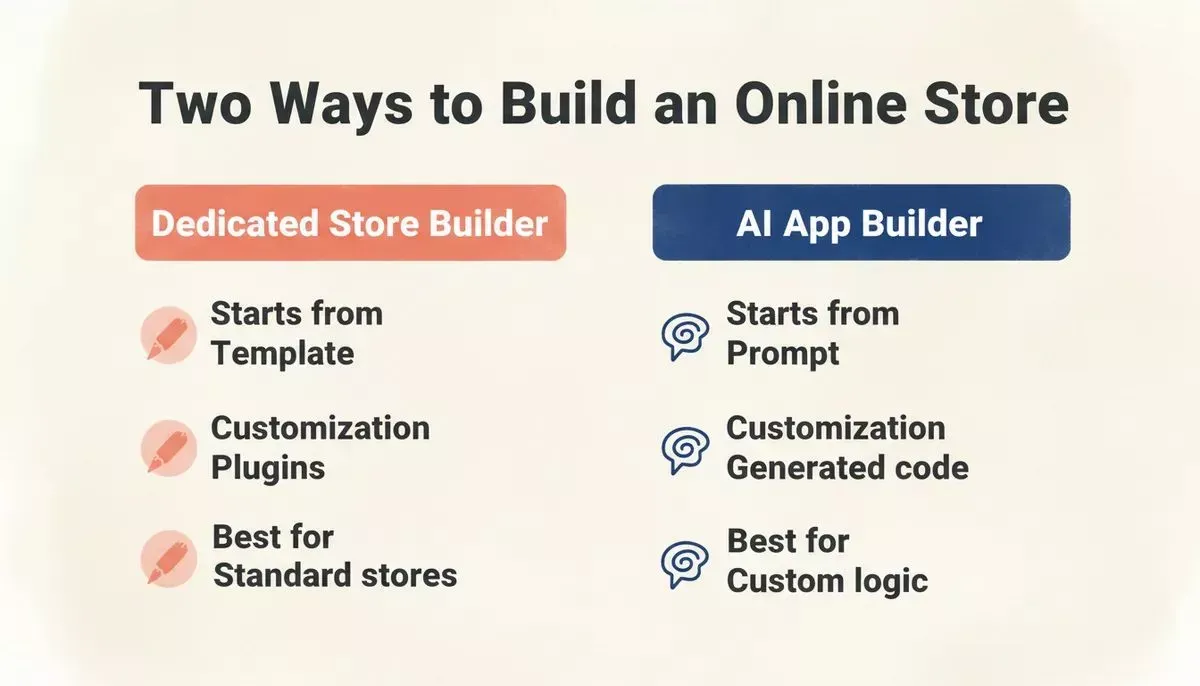
Dedicated store builders vs. AI app builders: the key differences at a glance.
| Dimension | Dedicated Store Builder | AI App Builder (Rocket.new) |
|---|---|---|
| Starting point | Pre-built storefront template | Natural language description |
| Customization ceiling | Template and paid plugins | Generates custom code to spec |
| eCommerce-specific features | Deep, out-of-the-box | Built on demand via prompt |
| Other app types | Not supported | Dashboards, SaaS tools, internal tools |
| Payment integration | Native | Stripe connector, one-time or subscriptions |
| Deployment | Hosted by the platform | Custom domain, GitHub sync, Netlify |
| Best for | Sellers who want a standard store fast | Builders who need custom logic or more |
The Step-by-Step Build Process
Whether you use a dedicated builder or an AI app builder, this step by step guide shows the core sequence to create your own online store from idea to launch.
- Define Model: Choose your business model and niche
- Validate Demand: Research market demand and pricing
- Choose Platform: Pick the right store builder approach
- Design Store: Build your storefront and product pages
- Connect Payments: Set up payment and shipping
- Launch and Grow: Go live, drive traffic, and iterate
Design Your Online Store for Conversions
Before diving into details, remember that your store should be designed to make buying easy and enjoyable. Strong store design improves conversions by making products easier to browse, compare, and buy, while clean layouts, clear calls to action, and mobile-first thinking are the three pillars of a high-converting storefront.
- Focus on clean layouts that guide visitors smoothly.
- Use clear and compelling product pages that showcase key features clearly.
- Include high-quality product images from multiple angles.
- Add customer feedback to build trust.
- Optimize your store for mobile devices and mobile browsers so the online store features shoppers use feel clear and intuitive.
- Highlight your brand values and share a brand story, since a unique brand identity helps create a branded storefront and differentiate a successful online store.
- Use visual hierarchy and clear calls to action to guide buying decisions.
These steps ensure your online storefront not only looks appealing but also converts visitors into customers. More than 60% of eCommerce traffic now comes from mobile devices, meaning a store that is not optimized for small screens is leaving revenue on the table.
If you are building with Rocket.new: the Visual edit feature lets you adjust layout, colors, and component spacing without writing code. You can also upload a screenshot or wireframe and Rocket.new will generate a working storefront from it. Understanding how to design a website that drives more sales gives you the design principles to apply at every step.
How Do I Set Up Payment and Shipping for an Online Store?
Setting up payments and shipping does not have to be tricky. A transparent, friction-free checkout is one of the highest-leverage improvements you can make to conversion rate.
- Offer multiple payment gateways so customers can pay however they prefer, and note that many platforms include integrated payment options for secure checkout.
- Provide clear and simple shipping options with estimated delivery times, and clearly set up payment and shipping options that customers will see during checkout.
- Be upfront about costs and offer shipping choices customers understand before they place an order.
- Make the process easy to follow to reduce friction and abandoned carts.
Offering free shipping above a minimum order threshold can improve the conversion rate.
A simple and transparent payment and shipping setup keeps customers happy and helps your online store convert better. Consider offering buy-now-pay-later (BNPL) options, which have been shown to increase average order values.
If you are building with Rocket.new: Rocket.new's Stripe connector handles one-time product checkout, recurring subscriptions, and multi-product cart flows from a single prompt. Native shipping integrations can streamline fulfillment and unlock discounted carrier rates.
Describe the payment flow you want in chat, for example "Add a Stripe checkout for a $49 product with a success page," and Rocket.new generates the complete checkout experience including pricing pages, payment forms, and webhook handlers. Webhooks for events like checkout.session.completed are set up automatically. You can also explore AI builders with payment integration to compare your options.
How Do I Optimize Product Pages to Increase Sales?
Optimizing product pages is key to making sales easy. Every element on the page should reduce hesitation and move the visitor toward the buy button.
Here is a checklist:
- Include compelling product descriptions that highlight key features and benefits, not just basic features.
- Add high-quality images showing multiple angles.
- Suggest related products or bundles to encourage repeat purchases.
- Highlight discounts or deals to increase average order value.
- Keep the buying process smooth with simple navigation and clear calls to action, and use abandoned-cart recovery to win back shoppers who leave before checkout.
Friction on product pages drives visitors away, so aim for clarity and ease at every step. Search engine optimization matters here too. Each product page should have a unique meta title, a descriptive URL slug, and alt text on every image, because stronger on-page optimization can improve search engine rankings.
Well-optimized product pages help drive sales and can boost sales over time.
According to BrightEdge research, organic search drives roughly 53% of all website traffic, making SEO-ready product pages a direct revenue driver. If you want to go deeper on the technical side, the guide on building an ecommerce app with AI for modern businesses covers the full architecture.
If you are building with Rocket.new: Ask Rocket.new in chat to add Product schema (JSON-LD) to product pages, generate an XML sitemap, and optimize meta tags per page. Rocket.new also supports GEO (Generative Engine Optimization), which structures content so AI search engines like Perplexity and ChatGPT can cite your store as a source.
You can run /Generate SEO Report and /Generate GEO And AEO Report directly in the editor to audit your store's search readiness before launch. Learn more in Rocket.new's SEO and discoverability docs.
What Marketing Strategies Actually Work for a New Online Store?
Start small with social media marketing, content marketing, and paid ads. Building an online store without a marketing plan is like opening a physical shop with no signage. Your eCommerce store needs a mix of channels working together, and built-in marketing tools help store owners launch and measure marketing campaigns.
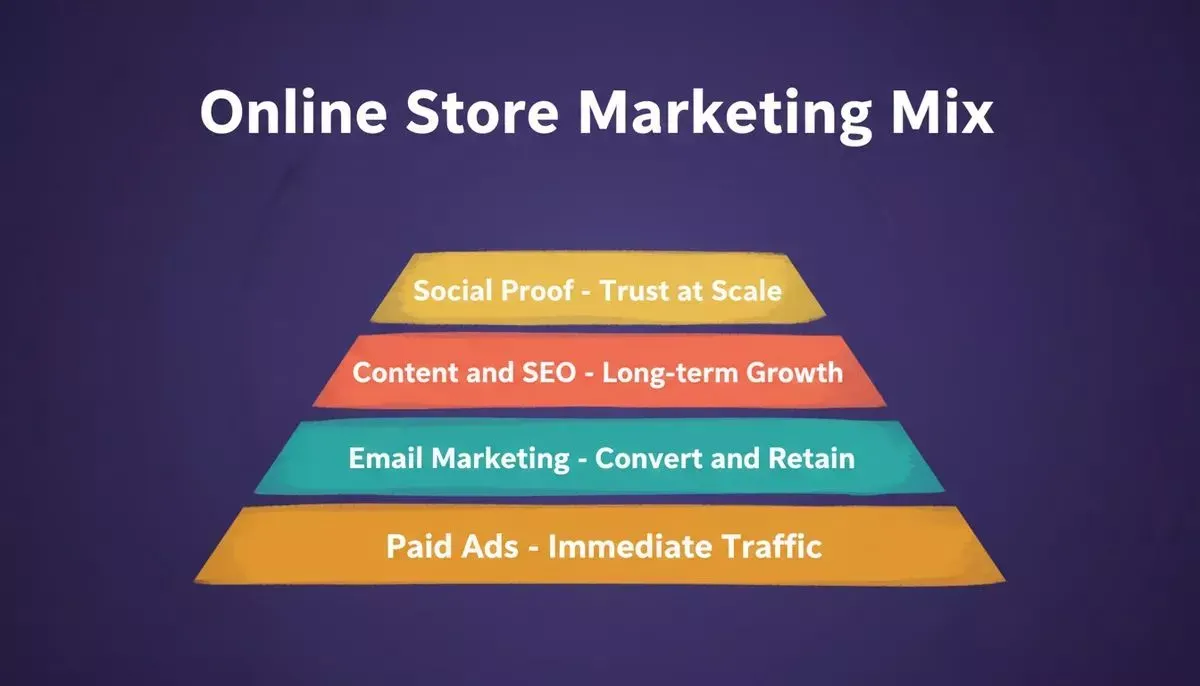
The four marketing layers that compound over time for a sustainable online store.
- Content marketing: Blog posts and buying guides that rank in search engines, answer customer questions, and improve search engine rankings over time.
- Email marketing: Automated sequences for abandoned carts, post-purchase follow-ups, and loyalty programs, including targeted campaigns for repeat buyers.
- Paid advertising: Targeted campaigns on Google Shopping and social platforms to reach in-market buyers.
- Social proof: Customer reviews, user-generated content, and influencer partnerships that build trust at scale.
Analytics tools can track customer data, sales performance, and customer behavior across campaigns.
The most durable stores combine all four. Paid ads drive immediate traffic; content and SEO compound over time; email converts and retains. Discounts and coupons can increase revenue and strengthen loyalty when used strategically.
Start with one channel, prove it works, then layer in the others. For a deeper look at how to reach customers on every channel, the guide on proven omnichannel best practices for retail and digital teams is worth reading alongside this one.
How Does Rocket.new Help You Build an Online Store Differently?
Rocket.new is not a traditional eCommerce website builder. It is an AI development platform built around three pillars: Build, Solve, and Intelligence.
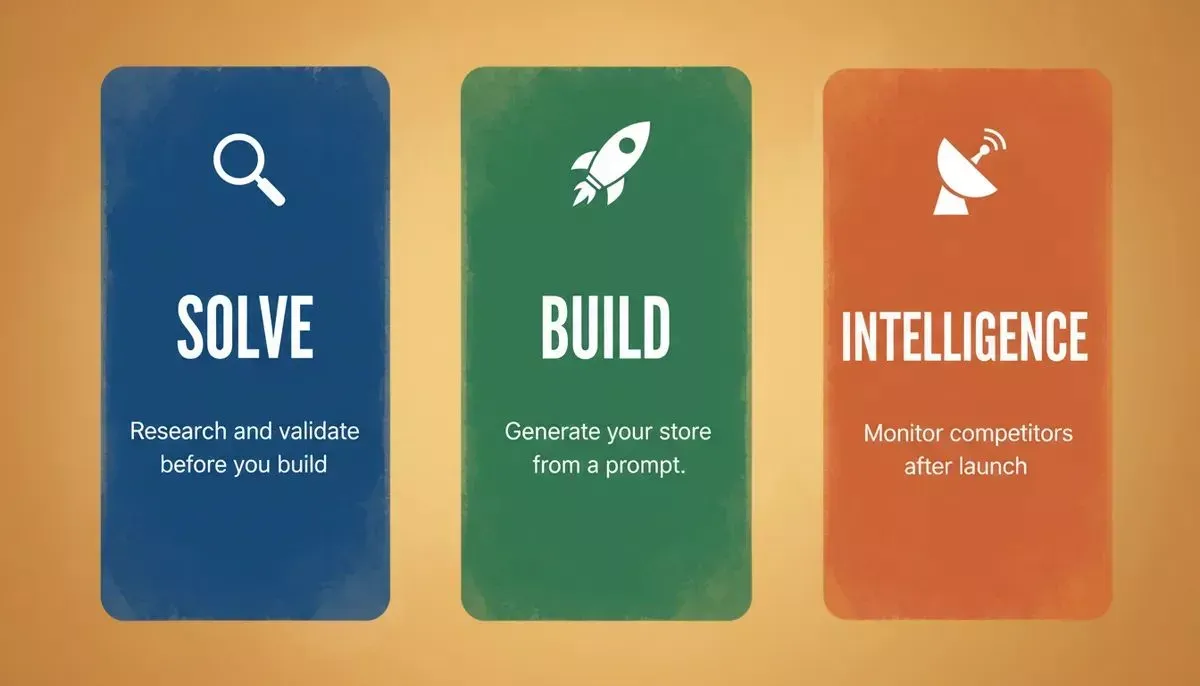
Rocket.new's three-pillar model: research before you build, generate as you build, monitor after you launch.
Before you build: Use Solve to research your market, validate pricing, and generate a product requirements document so the store you build is grounded in real demand, not assumptions. Solve produces structured, evidence-backed reports from live data, covering market analysis, competitive teardowns, and pricing strategy.
When you build: Describe your store in plain language. Rocket.new generates the complete application, including product catalog, checkout flow, and inventory management across multiple sales channels, plus payment integration, SEO metadata, and mobile-responsive layout, as production-ready Next.js code. You can start from an idea, upload a Figma design, or import a screenshot. Connect Stripe for payments, Supabase for user accounts, and deploy to a custom domain or sync to GitHub. As an all-in-one system, it can support businesses that want to sell online through their own website while keeping operations coordinated from one place.
Syncing inventory across channels and store locations helps avoid overselling and creates a more optimized stocking system.
After you launch: Use Intelligence to track competitor pricing changes, new product launches, and ad spend shifts so you can respond strategically instead of reacting late. No credit card is required to start. You can sign up, describe your store, and see a live preview before committing to a plan. If you are exploring whether to build with AI versus hiring a developer, the ROI comparison is a useful reference point.
Build an Online Store That Works
Building an online store that converts visitors fast takes planning, design, and marketing. From picking a store builder to optimizing product pages, every step counts.
When all these pieces come together, the store starts working for you instead of needing constant fixing. Clear structure, simple flows, and the right tools reduce friction and help visitors move naturally from browsing to buying. That is what turns effort into consistent results.
Ready to build an online store that turns browsers into buyers?
Start building for free on Rocket.new, no credit card required.
Table of contents
- -Plan Your Online Business Before You Build
- -Choose Your Platform Approach: Dedicated Store Builder vs. AI App Builder
- -The Step-by-Step Build Process
- -Design Your Online Store for Conversions
- -How Do I Set Up Payment and Shipping for an Online Store?
- -How Do I Optimize Product Pages to Increase Sales?
- -What Marketing Strategies Actually Work for a New Online Store?
- -How Does Rocket.new Help You Build an Online Store Differently?
- -Build an Online Store That Works