Worried about keeping your app safe after launch? Build security into every stage, assess risks early, review integrations, and protect sensitive data to reduce breaches and maintain user trust effectively.
How to secure an app in production?
You must tackle core risks early and weave security into every step of the development lifecycle. If you don’t, data breaches and cyber attacks can cost millions and users’ trust.
In fact, 62% of teams reported app security breaches last year, despite high confidence in their protections, that’s a real wake‑up call.
App security is not just about writing code. It’s about thinking like a threat actor, reviewing every integration, and checking every line that touches sensitive information.
Let’s look at what you should do so your mobile applications are safer once they go live.
Why Security Matters in Production?
Moving an app from testing to production is more than just a release. Your app leaves the safety of the development sandbox and encounters the real world real devices, real networks, and real threat actors. This shift makes security a top priority.
 Mobile app security should be integrated into the development process from day one. Treat it as part of your workflow, not a step you add just before launch, to reduce risks and keep your users safe.
Common Security Risks for Apps in Production
Before we get into how to secure an app in production, it’s worth spotting the problems that let attackers inside.
Here are some frequent risk areas:
1. Insecure Data Storage
Apps often store tokens, cached files, and user information on devices. If sensitive data isn’t encrypted properly, it’s easy pickings for attackers.
2. Weak Authentication
Passwords only, no multi‑factor authentication (MFA), or poor session handling make account compromise much easier for hackers.
3. API Vulnerabilities
APIs are the backbone of modern apps. If they leak data, allow unsafe access, or “trust” everything the client sends, your backend becomes exposed.
4. Third‑Party Code Risks
Many apps depend on libraries and SDKs. If these aren’t checked or updated, they become silent attack doors.
5. Unpatched Flaws
Old versions of frameworks, repositories, or open components are classic reasons for breaches even though fixes already exist.
Recognizing these common security risks is the first step toward building safer apps. Once you know where attackers are likely to strike, you can take targeted actions to protect sensitive data, strengthen authentication, and keep your APIs and dependencies secure. Awareness today means fewer surprises in production tomorrow.
How to Secure an App: Practical Steps for Production
Security starts at the design phase and follows you into production. Below are concrete actions that reduce risks without turning your project upside down.
Build Security Into the Software Development Lifecycle
Security should be part of your development process from day one, not an afterthought. That means:
-
Defining security requirements early
-
Educating team members about secure coding
-
Doing small frequent reviews instead of one big audit at the end
This way, your development process becomes one where you identify vulnerabilities while building features.
Common Risks vs. Fixes
Before diving into detailed security measures, it helps to have a quick reference of common app risks and their simple protections. This table makes it easy to spot vulnerabilities and take action.
| Common Risk | Simple Protection |
|---|---|
| Weak authentication | Multi‑factor authentication (MFA) and strong password rules |
| Insecure data storage | Encrypt stored sensitive data and keys |
| API misconfigurations | Use API protections like token expiry and rate limits |
| Third‑party dependencies | Regular dependency scanning and updates |
| Unpatched components | Security testing with automated scanners |
Before diving into detailed security measures, it helps to have a quick reference of common app risks and their simple protections. This table makes it easy to spot vulnerabilities and take action.
Focus on API Security
APIs are how your mobile applications talk to servers and external services. They also happen to be where most vulnerabilities are found.
Practical protections you can apply include:
-
Requiring strong authorization for every endpoint
-
Limiting data returned per call
-
Monitoring API traffic for unusual patterns
-
Automatic token expiration and refresh logic
-
SSL/TLS configured strictly
Thinking of API security as part of the core app logic is one of the best ways to reduce data theft and session hijacking.
Regular Security Testing and Audits
You can’t fix what you don’t see. That’s why regular security testing in production is non‑negotiable.
Here are useful security checks:
-
Penetration Testing: Ethical hackers try to break in so you can patch holes
-
Static Analysis: Tools scan your code for vulnerabilities before it’s pushed
-
Dynamic Monitoring: Look at how the app behaves on real devices
-
Runtime Application Self Protection (RASP): Adds in‑app defenses while your app runs
These checks are like health checkups. You do them regularly because threats evolve and attackers get more creative.
Securing Sensitive Information
Apps often handle sensitive information, from location data to financial details. Protecting this data isn’t just good practice, it prevents breaches, builds user trust, and keeps your app compliant with regulations.
Key Steps to Secure Sensitive Information:
-
Encrypt Data: Always encrypt stored and transmitted data so attackers can’t read it if they intercept it.
-
Use Tokenization: Replace sensitive information with tokens where possible to minimize risk.
-
Set Careful Access Rules: Restrict who and what can access private data inside your app.
-
Limit Data Storage: Don’t store any sensitive information that isn’t strictly necessary, especially financial or personal data.
-
Monitor for Leaks: Regularly check for potential data exposure or misconfigurations.
Securing sensitive information is more than a technical requirement; it protects your users and your app’s reputation. Small, consistent steps like encryption and access controls go a long way in reducing risks.
What Experts Say About Mobile App Security
Here’s a real perspective from the LinkedIn community on mobile app security:
“Security in mobile apps isn’t just about performance or features in areas like banking, HR, and healthcare, it becomes a matter of trust. Biometric authentication, SSL pinning, encrypted storage, and regular audits against standards like OWASP help make apps resilient against interception and unauthorized access.” Linkedin
This insight shows that professionals think beyond basic protection. They focus on real techniques like SSL pinning and encrypted storage so sensitive information stays safe. It’s a reminder that strong application security isn’t a checklist‑only task. Facing real threats means combining multiple layers of defenses throughout the app’s lifecycle.
How Rocket.new Helps Build Secure Apps
Rocket.new isn’t just an AI code generator; it builds apps with security built into the structure. Authentication flows, API routes, and database setups follow safe patterns by default, reducing the risk of exposing sensitive data.
The platform enforces consistent coding practices and secure defaults, so common security mistakes like unencrypted storage, weak authentication, or misconfigured APIs are less likely to happen. You get speed without sacrificing app security..
Top Features
-
Prompt to App Creation: Builds apps directly from single prompts
-
Figma Import: Converts design files into live, editable layouts
-
Reusable Components: Speeds up building with ready-to-use elements
-
Command-based actions: Use / and @ to run actions and quickly scope edits.
-
AI-Powered Backend: Automatically handles logic, data, and workflows
-
Live Preview: Shows instant updates while editing
-
Custom Domain Support: Publishes projects with a branded domain
-
Code Export: Allows developers to extend or customize later
Building Your App Securely with Rocket.new
Rocket.new doesn’t just generate code it gives you personalized access to the app’s structure, letting you implement security measures with ease. Here’s how you can build a more secure app using it:
-
Pre-Configured Security Defaults: Authentication, access control, and data handling are set up following best practices.
-
Customizable Code Access: You can review and modify generated code, ensuring sensitive data is handled exactly how you want.
-
Safe API and Database Integration: Rocket.new provides structured APIs and databases that follow secure patterns, reducing risk of misconfigurations.
-
Real-Time Testing: Identify and fix potential vulnerabilities while building the app, not after deployment.
By combining AI-powered automation with hands-on control, Rocket.new lets developers focus on building functionality while maintaining strong mobile application security standards.
Common Security Risks to Watch After Launch
Once your app is live, security doesn’t stop. You now have production traffic, real users, and real threat exposure.
Here’s what to watch:
-
User authentication failures
-
APIs giving out more data than needed
-
Unpatched dependencies creeping back in
-
New threat actors looking for flaws
Keeping your app secure after launch means logging, monitoring, alerts, and quick updates when issues crop up.
Best Practices for Securing Your App in Production
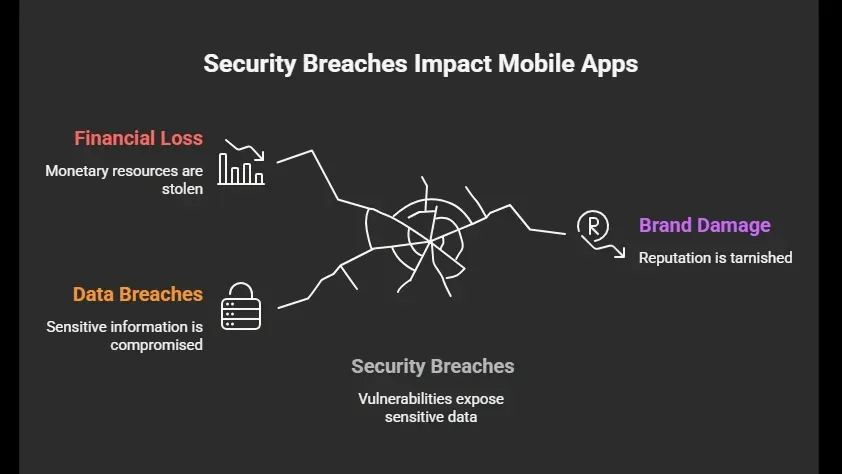
Many apps reach production with vulnerabilities because security was treated as an afterthought. Attackers actively look for gaps such as weak authentication, unprotected APIs, and insecure data storage. These oversights can lead to data breaches, financial loss, and damage to your brand’s reputation. Understanding the common risks and preparing for them early is key to keeping your app and your users safe.
The solution is to build security into every stage of your development process. Focus on API security, sensitive data protection, regular security testing, and following good development lifecycle habits. How to secure an app in production isn’t about last-minute patches it’s about careful planning, consistent checks, and proactive data handling to prevent vulnerabilities before they appear.
Table of contents
- -Why Security Matters in Production?
- -Common Security Risks for Apps in Production
- -1\. Insecure Data Storage
- -2\. Weak Authentication
- -3\. API Vulnerabilities
- -4\. Third‑Party Code Risks
- -5\. Unpatched Flaws
- -How to Secure an App: Practical Steps for Production
- -Build Security Into the Software Development Lifecycle
- -Common Risks vs. Fixes
- -Focus on API Security
- -Regular Security Testing and Audits
- -Securing Sensitive Information
- -What Experts Say About Mobile App Security
- -How Rocket.new Helps Build Secure Apps
- -Top Features
- -Building Your App Securely with Rocket.new
- -Common Security Risks to Watch After Launch
- -Best Practices for Securing Your App in Production