
Websites stay consistent across devices through smart synchronization, secure cloud systems, and reliable updates, ensuring accurate data, seamless user experiences, minimized errors, and efficient, uninterrupted business operations across all platforms.
How does a website stay in sync across multiple devices without breaking things?
It is simple. It uses smart data synchronization methods, reliable systems, and secure cloud services to keep data consistent across all locations. When done right, users see the same page on laptops, mobile devices, and computers in real time.
According to Statista, more than 60% of global web traffic comes from mobile devices. That means websites must sync across two or more devices without error.
If data fails to sync, customers leave. Business suffers. Revenue drops.
So yes, this topic matters.
Why Website Sync Matters for Modern Business?
Websites no longer live on a single machine. They connect to cloud systems, mobile devices, backend services, and external apps. All of this relies on data synchronization.
Think about a simple example. A customer updates billing details on a phone. The team expects the same data to appear on desktop computers. The support team also expects access to up-to-date information. If systems fail to sync, the records mismatch. That creates error after error.
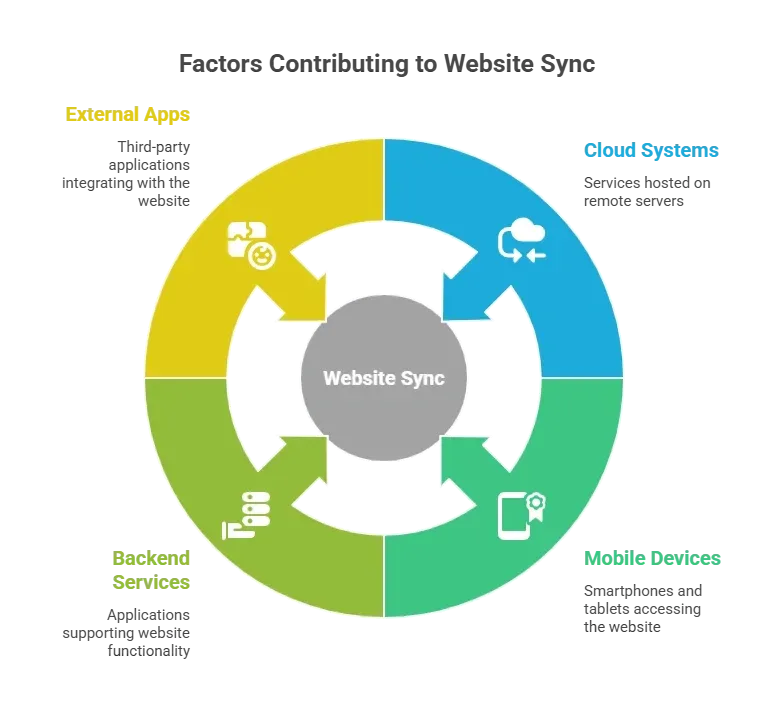
In simple terms, synchronization keeps files, documents, DOM elements, and objects aligned across systems.
What does Website Synchronization Mean in Simple Terms?
Website synchronization is the process of keeping data, documents, DOM state, and objects consistent across devices, computers, and cloud systems.
It is not magic. It is a structured process.
For example:
- A user edits a document on mobile devices.
- The system detects the change.
- Data moves through data pipelines.
- The server updates records.
- Other devices sync automatically.
That is data synchronization in action.
Sometimes it uses file synchronization.
Sometimes it uses a distributed file system.
Sometimes it uses mirror computing.
The method depends on business needs.
But the goal stays the same. Keep synced files accurate. Keep dom content consistent. Deliver up-to-date data everywhere.
Core Methods Developers Use to Sync Data
So how do developers actually make systems sync without breaking everything?
It comes down to choosing the right method for the right business case. Not every app needs instant updates. Not every platform can handle a heavy real-time load. The smart move is matching the synchronization method to business needs, user expectations, and system capabilities.
Different systems require different synchronization methods. Here are common ones.
1. Real Time Sync
Real-time data synchronization updates systems instantly. When a user edits a form, the DOM changes, and sync starts immediately.
Example:
Google Docs style collaboration. Documents update live. Objects refresh. The same page appears for all clients.
Real-time sync supports:
- Live chat apps
- Billing dashboards
- Support portals
This method needs strong cloud services and encryption for security.
2. Scheduled Sync
Not all business systems require real-time updates. Some use scheduling.
Example:
A company syncs records every night. Files update in bulk. Large datasets transfer during low load hours.
This protects performance and reduces error risk.
3. Event Based Sync
Event based synchronization triggers when a specific action happens.
Example:
A customer uploads documents. The system tracks the event. Then it syncs files to cloud storage and backup services.
This method saves resources. It also gives better control.
4. Mirror Computing
Mirror computing creates an exact copy of systems across devices.
Example:
An enterprise portal mirrors the dom states across computers. When one server updates objects, others sync instantly.
Mirror computing works well with distributed file system setups. It supports consistent data and strong data quality.
Each method has its place. Real-time works great when customers expect instant updates. Scheduled sync fits structured business workflows. Event-based sync keeps systems lightweight. Mirror computing helps when teams need an exact copy across devices. The goal stays the same every time. Keep data
File Synchronization vs Data Synchronization
Both sound similar. They are not identical.
| Aspect | File Synchronization | Data Synchronization |
|---|---|---|
| Focus | Files and documents | Structured data and records |
| Example | Syncing PDFs in cloud storage | Syncing billing records |
| Target | Documents across devices | Databases across systems |
| Use Case | Backup and document access | Business apps and decision making |
So the difference is pretty straightforward. File synchronization keeps documents and files aligned across devices. Data synchronization keeps structured records, objects, DOM updates, and databases consistent across systems. One handles content.
The other handles logic and business intelligence. Most modern platforms need both to work together to keep everything clean, synced, and reliable.
Security and Data Protection
Security cannot be optional. When systems sync across cloud services and mobile devices, encryption protects sensitive records. A secure process prevents unauthorized access.
Developers must:
- Use encryption in transit and at rest
- Add version control for tracking changes
- Log every sync event
- Protect billing and customer records
- Implement role based access control
Example: A SaaS company encrypts files before syncing. That protects data if an error occurs during transfer.
Security improves data quality and protects business reputation.
Maintaining Data Quality and Accuracy
Bad sync leads to duplicate records. Or outdated dom states. Or missing objects. That hurts decision making.
To maintain data quality:
- Validate records before sync
- Detect conflict between two or more devices
- Track version control changes
- Keep backup copies
- Monitor performance
Example: If two clients edit the same page on the same date, the system must detect a conflict. It should merge objects or alert the team.
Consistent data improves accuracy. Accurate data improves business value.
Supporting Teams and Customers
Sync is not just technical. It supports real people. When team members work across computers and mobile devices, they expect documents to be synced. Support teams need access to up-to-date information. Customers expect the same page everywhere.
Example: A sales team updates customer records during a call. The support team sees those updates instantly. That improves services.
Data synchronization supports:
- Internal team collaboration
- Customer portals
- Cloud apps
- Billing dashboards
Ultimately, sync is about trust. Teams trust the data they see. Customers trust the services they use.
When systems stay consistent and documents stay synced, business runs smoother. And fewer late night “why is this not updated?” messages show up in the team chat.
Handling Errors in Sync Systems
Let’s be honest. Sync systems are not perfect. Networks drop. Files get corrupted. Two users edit the same records simultaneously. Things break. That does not mean the system is bad. It means the synchronization process needs strong error handling built in from the start.
Errors happen. Networks fail. Objects conflict. Files corrupt.
A good synchronization method includes:
- Error detection
- Retry logic
- Logging
- Backup restore
- Monitoring
Example: If sync fails between systems, the server logs the issue. The process retries automatically. If it still fails, the team receives a notification.
That keeps data consistent and secure.
Smart systems do not just sync data. They prepare for failure. With proper monitoring, backup, and retry logic, businesses protect records and maintain data quality. A secure sync setup does not panic when something goes wrong. It fixes the issue quietly and keeps everything moving.
Community Insight
Here’s a relevant community insight from LinkedIn you can use in your blog:
“Creating offline-first apps means thinking beyond simple real time updates. You must store data locally on the device and sync it later when the connection returns. That makes user experience smooth even when the network drops.
That post highlights a real-world challenge developers face when syncing data across devices. It’s not just about real time updates. It’s also about planning for offline use and conflict resolution between local and cloud data.
Rocket Fuel for Sync: Rocket.new
Website synchronization becomes easier when the right technology handles the heavy lifting. That is where Rocket.new fits in. It helps developers create systems that manage data synchronization across cloud services, apps, and devices without writing endless code.
Instead of manually wiring every dom update to backend systems, Rocket.new connects frontend objects to databases and services in a structured way. When data changes, systems sync in real time or based on defined logic. That keeps records consistent across mobile devices, computers, and cloud platforms.
Key features:
- Prompt to App Creation: Builds apps directly from single prompts
- Figma Import: Converts design files into live, editable layouts
- AI-Powered Backend: Automatically handles logic, data, and workflows
- Custom Domain Support: Publishes projects with a branded domain
- Code Export: Allows developers to extend or customize later
- Live Preview: Shows instant updates while editing
These features connect directly to the synchronization strategy. For example, an AI-powered backend setup helps implement structured data synchronization rules. Real-time data pipelines enable records and objects to sync across systems in real time. Code export gives the team full control when advanced sync logic is needed.
Rocket.new reduces setup time for new systems while keeping cloud deployments secure. When business needs demand faster app creation with reliable sync capabilities, tools like Rocket.new support that process without turning it into a complicated engineering project.
Choosing the Right Strategy for Business Needs
Choosing a sync strategy isn't about picking the fanciest technology. It is about solving the right problem. Not every company needs mirror computing. Not every system needs real time sync. Sometimes, simple works better.
Ask simple questions:
- How often does data change?
- Do customers need instant updates?
- How large are the datasets?
- What level of security is required?
- What performance target exists?
Example:
A document storage app may rely on file synchronization.
A trading platform requires real time data synchronization.
Match the method to business goals.
The strategy should match business goals, customer expectations, and system capabilities. When the method fits the business need, sync feels natural. When it does not, teams start patching problems instead of building features.
Keeping Systems in Sync Without the Headache
Modern digital platforms must run seamlessly across cloud, mobile, and desktop environments. Poor data synchronization causes inconsistencies, conflicting records, and erodes customer trust. Teams spend excessive time correcting errors instead of focusing on innovation and growth.
Implementing a clear synchronization strategy from the start mitigates these risks. Combining secure cloud infrastructure, strong encryption, version control, and continuous monitoring establishes a stable data foundation.
Effective synchronization ensures accurate information across all devices, supports real-time collaboration, enhances decision-making, and aligns teams. Ultimately, it keeps business operations efficient, scalable, and reliable, enabling organizations to expand confidently while maintaining operational integrity.
Table of contents
- -Why Website Sync Matters for Modern Business?
- -What does Website Synchronization Mean in Simple Terms?
- -Core Methods Developers Use to Sync Data
- -1. Real Time Sync
- -2. Scheduled Sync
- -3. Event Based Sync
- -4. Mirror Computing
- -File Synchronization vs Data Synchronization
- -Security and Data Protection
- -Maintaining Data Quality and Accuracy
- -Supporting Teams and Customers
- -Handling Errors in Sync Systems
- -Community Insight
- -Rocket Fuel for Sync: Rocket.new
- -Choosing the Right Strategy for Business Needs
- -Keeping Systems in Sync Without the Headache