

An instant prototype generator is an AI-powered tool that turns a plain-language prompt into clickable, interactive screens in minutes, so teams can test ideas before writing code. For designers, product managers, developers, solopreneurs, and small to medium businesses, that means faster validation, tighter collaboration, and a clearer path from early concepts to production-ready apps. Validate ideas with Solve, build production-ready apps with Build, and track competitors with Intelligence.
How can an instant prototype generator reshape team workflows?
AI-driven instant prototype generators shorten design cycles, giving teams faster concept drafts and prompting discussions about quality, control, and team coordination as the pace accelerates.
This article looks at how AI-powered prototyping fits into no-code workflows, uses natural-language prompts to shape designs, connects with backend integrations and deployment, and increasingly blurs the line between early mockups and launch-ready software.
What Drives Rapid Jumps in Prototyping Speed Today?
Much of it comes from new AI systems that shorten design loops. According to McKinsey, teams using AI-driven ideation cut early product cycles by up to 40 percent. That changes daily work for designers, product managers, and developers noticeably.
And with concepts forming in minutes instead of days, the pace feels different. Almost like someone pressed fast-forward on the creative process. Teams can test ideas earlier, iterate with less risk, and ship higher-quality digital products more efficiently.
This shift sparks new conversations about prototype quality, creative control, and how teams keep alignment while moving at this speed.
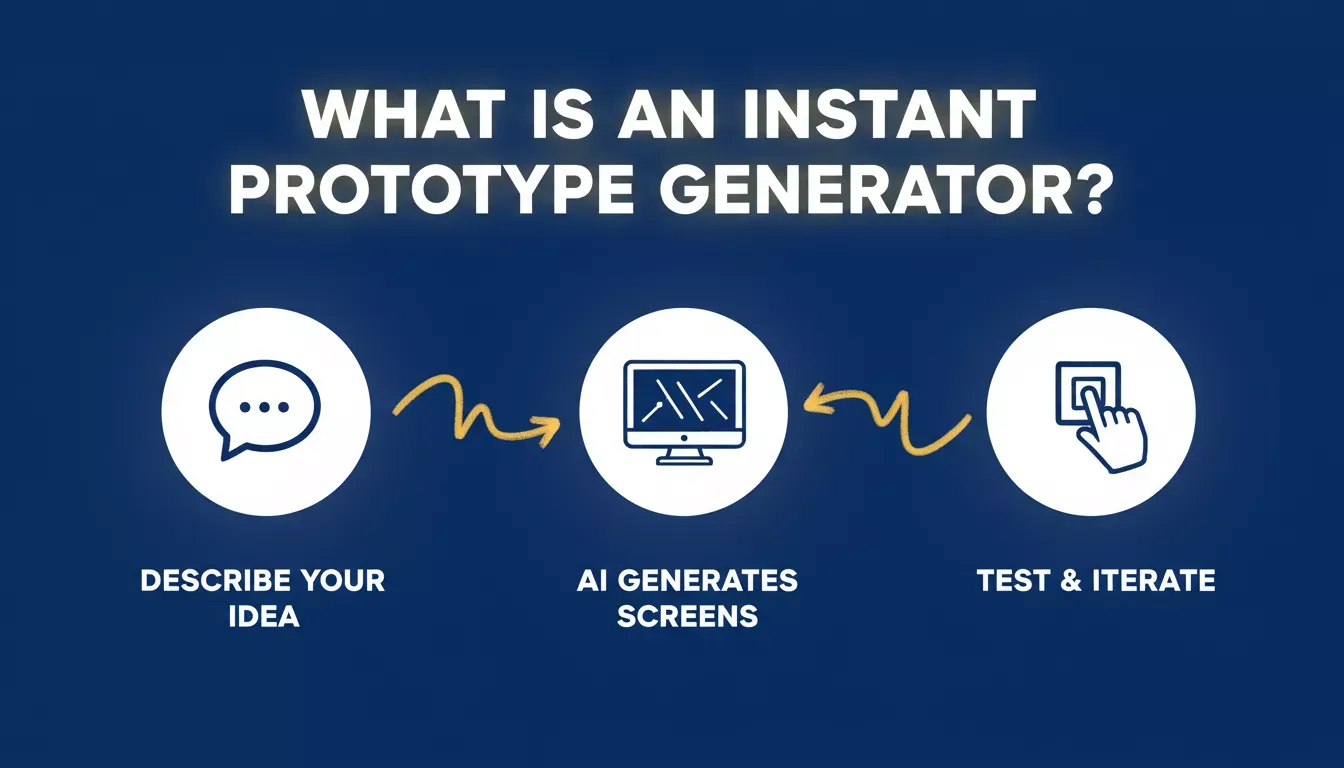
An instant prototype generator converts a plain-language prompt into clickable screens in minutes
Why AI Prototype Generation Feels Different
Working with an AI prototype generator brings a refreshing rhythm to a project. The pace shifts immediately. Loops tighten. The gap between an idea and a workable prototype narrows.
Teams often describe it as moving from slow marching to quick sprints. And yes, many still start with sticky notes. Those early sketches matter, but teams no longer have to start from scratch. Now those same sketches turn into functional prototypes in minutes.
That blend of old habits and new AI-powered workflows creates a balanced, flexible rhythm that many teams prefer. As teams move faster, they also gain space to experiment. Designers can create multiple variations without worrying about a long setup time. AI can help bring a great idea to life faster.
How AI Reshapes Early Design Work
AI models now give teams a strong head start in the early design process. A simple text prompt can create a full set of screens. It is not perfect. But it is close enough to guide early choices.
These tools help teams create early layouts, support early-stage UI design, map features, and fine-tune interactions while streamlining the broader design workflow for teams. Designers still shape the final look and decide what stays, what changes, and what needs more control. But the heavy lifting gets handled faster.
Product managers can gather feedback sooner, test with users earlier, and preview interactions without waiting for long design cycles. That kind of pace reduces early risk. Projects move forward with clearer alignment between designers, developers, and clients.
A Look at How Teams Use It
Teams bring an AI prototyping tool into their workflow to create early flows for an app, website, or digital product, and some tools generate cross-platform prototypes for any device. It works especially well for mobile projects because patterns and layouts form quickly. Teams generate screens, adjust elements, and customize visuals without touching code.
Designers still lead. They handle creative control, polish spacing, refine typography, and adjust control points across screens. Templates give a starting structure, and then teams add the features that shape the project.
Interactive prototypes generated through these tools let teams test functionality early, with an ai generated prototype serving as the first version teams can review in practice. Not real code, but close enough to feel how an interaction might play out.
This is where how prototyping tools improve product design and speed becomes a practical advantage rather than a theoretical one.
What the Workflow Looks Like
The following steps describe how teams move from idea to tested prototype using an AI-powered instant prototype generator:
- Write a prompt using natural language to describe the idea, layout, features, or interactions.
- Generate early screens from the prompt automatically, producing a first version in minutes.
- Fine-tune spacing, elements, and data using visual editing tools- no code required.
- Test interactions with users by sharing a live preview link directly from the editor.
- Iterate based on feedback, using version control to roll back or branch safely from any saved version.
This rhythm feels simple, but the speed changes everything. Teams create more variations, scale experiments quickly, and gather feedback without delaying the whole project.
AI-powered instant prototype generator workflow: from prompt to iteration
The Role of AI in Prototyping
AI tools shape how teams create prototypes today. They speed up early drafts, clarify structure, and remove repetitive tasks. They help generate layouts, interactions, and flows while supporting no-code methods for people who do not use traditional design software.
The shift from manual wireframing to AI-generated screens is not just a speed gain; it is a mindset shift. Teams that once spent two days preparing for a stakeholder review now walk in with a clickable prototype built the same morning. Understanding rapid prototyping as a complete innovation practice helps teams get the most from these tools.
Traditional vs AI-Driven Prototype Generation
The table below compares how traditional and AI-driven prototyping differ across the stages that matter most to product teams.
| Stage | Traditional Prototyping | AI-Driven Prototype Generation |
|---|---|---|
| Starting point | Sketches or manual drafts | Text prompt with automatic generation |
| Time to first version | Hours or days | Minutes |
| Iterations | Limited by time | Rapid variations |
| Collaboration | Manual handoff | Shared screens with real data |
| Fidelity | Low to mid-level | Production-ready Next.js or Flutter output |
| Interaction setup | Manual linking | Automatic interactions |
| Code ownership | Separate dev handoff required | Full source code downloadable or GitHub-syncable |
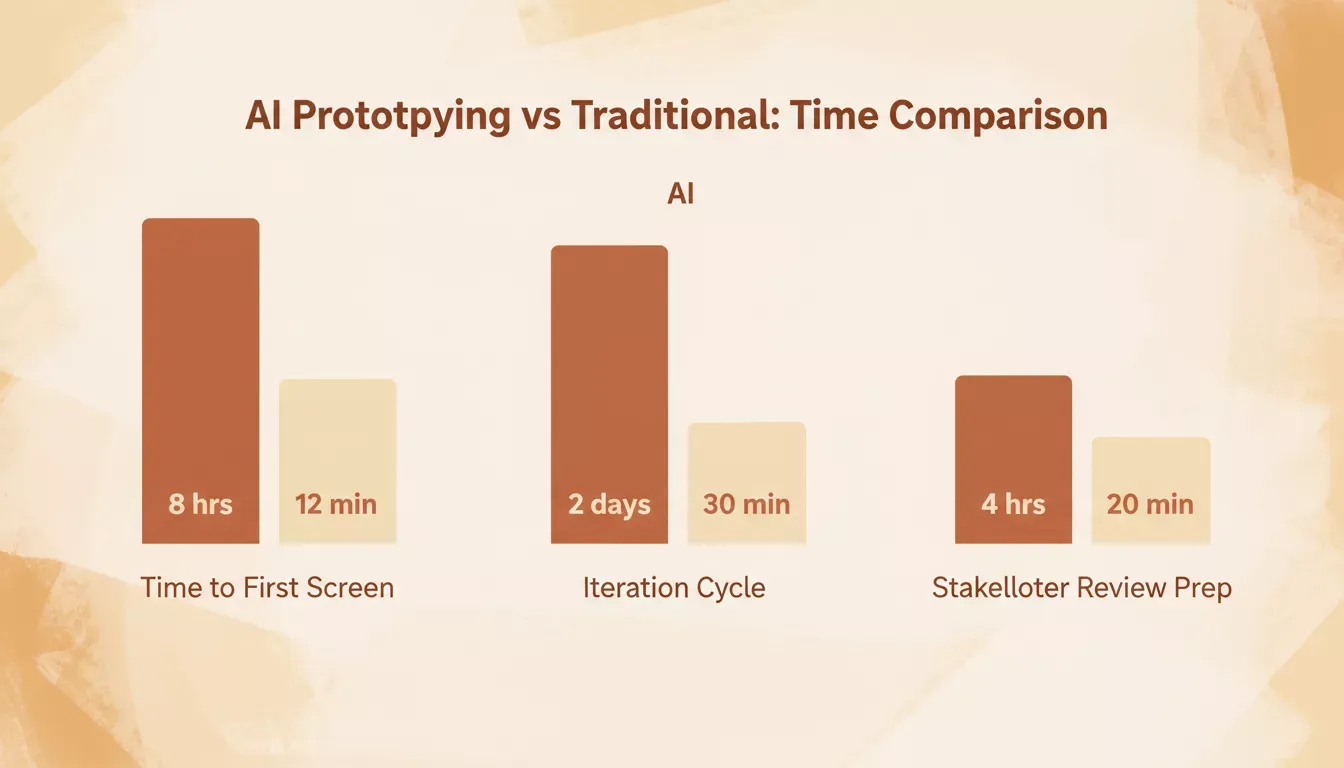
AI-driven prototyping cuts time-to-first-screen from hours to minutes across every stage
Why Teams Appreciate the Speed
Speed shapes mindset. When screens form in minutes, teams think more broadly. They test more ideas, find issues earlier, and compare variations without wasting effort.
This blend of interactive prototypes and faster cycles makes meetings far more productive. Instead of debating abstract concepts, teams react to something real. Designers get clearer direction, product managers get cleaner insights, and users engage with something that feels meaningful.
Research from Nielsen Norman Group consistently shows that realistic data in prototypes produces sharper, more actionable user feedback than placeholder content. Filling prototypes with real content is one of the highest-leverage improvements a team can make to its feedback loop.
A Closer Look at Interactive Prototypes and Workflows
Interactive designs help teams see how a concept behaves, not just how it looks. When people test interactions early, they spot friction points before they become bigger issues.
Feedback becomes more grounded when users respond to something that feels alive. They point out navigation errors, unclear flows, or missing functionality. That level of clarity lifts the quality of every iteration.
Screens stop being static documents. They become evolving conversations. Teams that adopt this approach consistently ship products that feel more polished at launch, because the friction was caught and fixed weeks earlier.
Why Designers Still Matter
Even with AI-powered systems, designers remain the heart of the process. They translate vision into structure, refine functionality, and judge the quality of interactions. They understand emotion, accessibility, and context in ways AI cannot replicate.
AI helps create drafts. Some platforms generate prototypes with structured data and user accounts, giving ux designers more realistic states to review. Designers bring the human view that shapes the final experience. The best teams treat AI as a capable first-draft collaborator, not a replacement for design thinking.
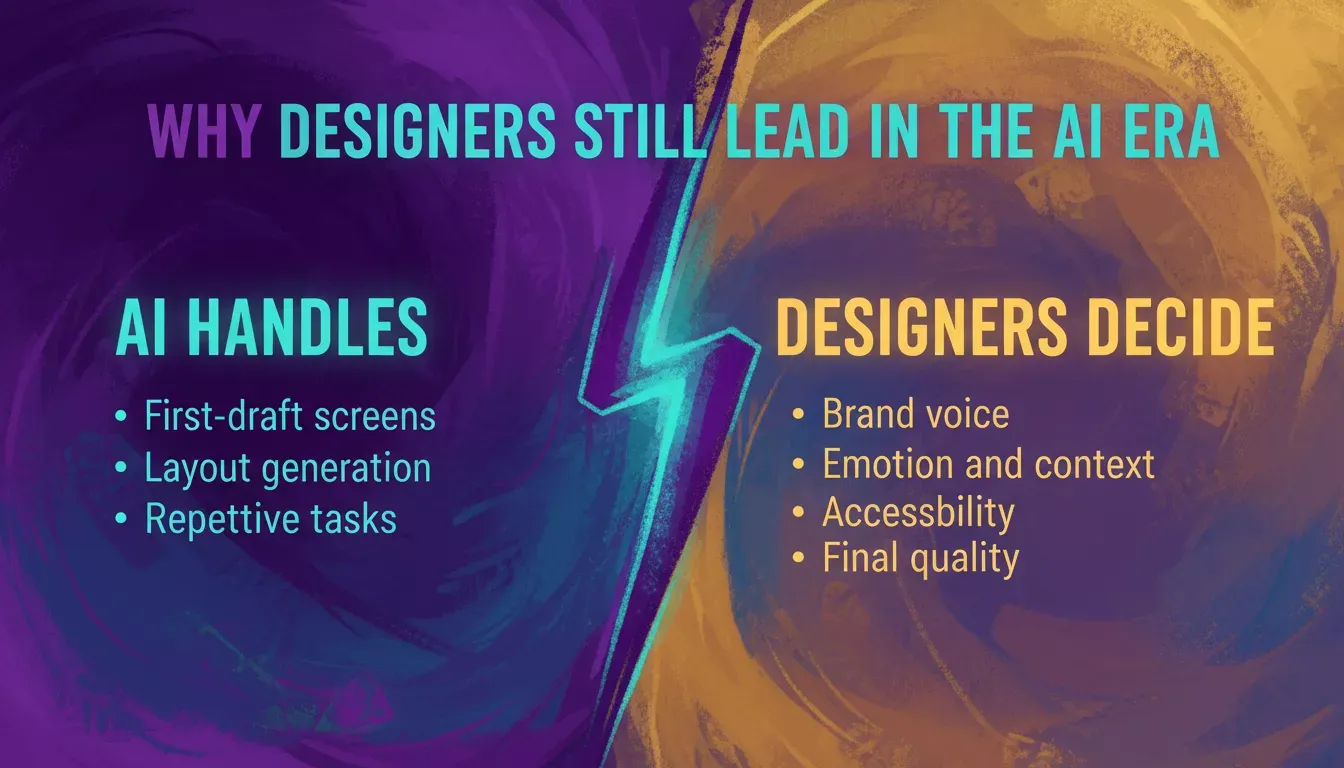
AI accelerates the repetitive work; designers own the decisions that require judgment
When AI Prototyping Has Limits
AI prototype generators are not a replacement for every design decision. A few honest caveats are worth noting.
On free plans, projects are typically public and may appear in a platform's showcase. Private projects require a paid plan. Highly custom business logic or multi-step conditional flows still benefit from a developer's review before moving to production.
AI-generated layouts give a strong starting point, but brand-specific spacing, typography, and motion details still need a designer's hand. Understanding these limits helps teams use the instant prototype generator where it adds the most value and hand off to specialists where it does not.
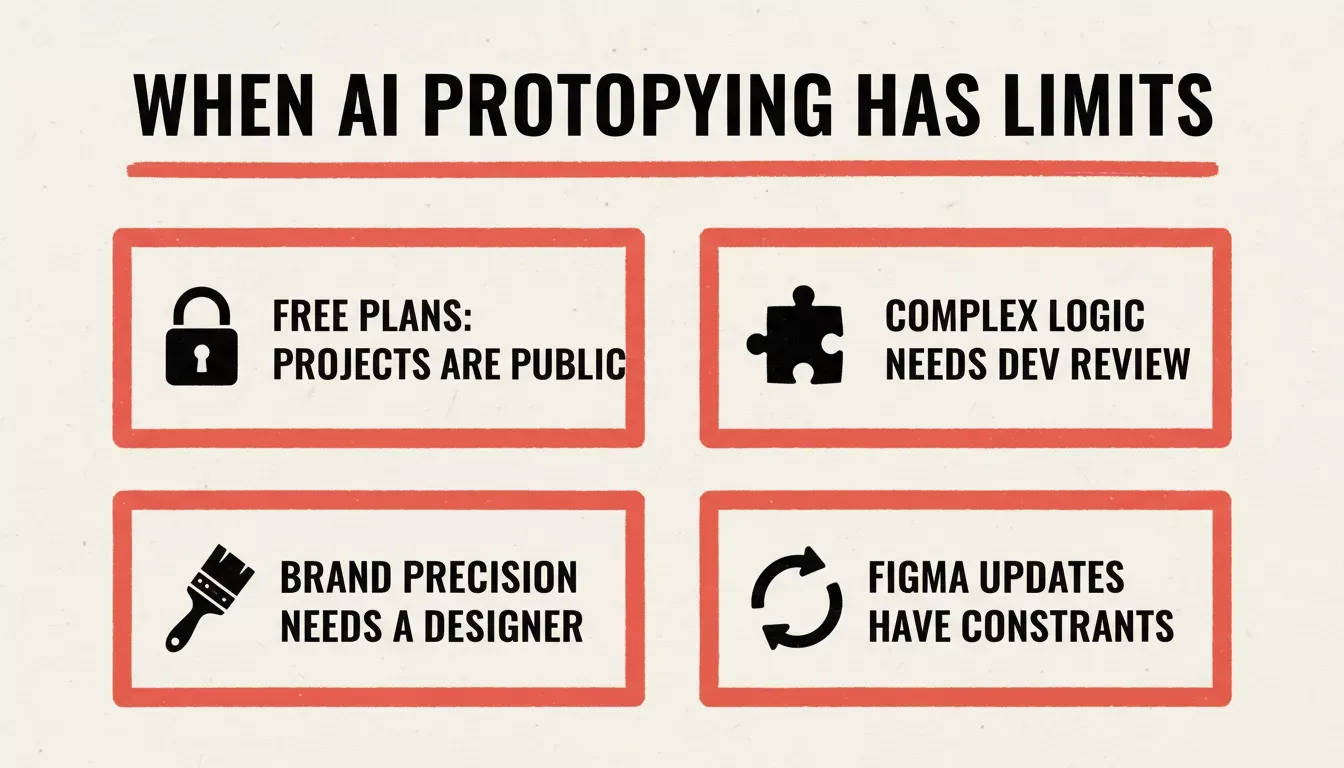
Four situations where AI prototyping needs a human hand to deliver the right result
From Prototype to Production: The Validate, Build, Monitor Loop
Most AI prototype generators stop at the screen level. The more powerful approach treats prototyping as the first step in a complete product lifecycle: validate the idea, build the real thing, then monitor how it performs in the market.
Rocket is built around exactly this workflow. It is a vibe solutioning platform with three integrated pillars. Understanding how AI is changing product development gives useful context for why this integrated approach matters.
Validate Idea
Solve turns complex business questions into structured, evidence-backed research reports. Before a single screen is drawn, teams can use Solve to size a market, run a competitive teardown, validate a pricing model, or generate a product requirements document. Solve outputs are exportable as PDF, HTML, or PPTX and are designed to be stakeholder-ready.
Build Web or Mobile Apps
Build generates production-ready Next.js web apps and Flutter mobile apps from a single prompt, a Figma file, a URL, a screenshot of websites or web pages, a spreadsheet, or an existing GitHub repo. The output is real, downloadable source code that you own outright. Paid plans include GitHub sync and private projects.
Build includes 26+ third-party connectors, with integrations for services like Stripe and SendGrid alongside Supabase, HubSpot, OpenAI, and more, all wired up from chat, plus Visual Edit for clicking directly on any element to change text, style, or spacing without writing code.
Monitor Competitor
Intelligence watches companies you care about across nine signal dimensions, including product launches, hiring moves, pricing changes, ad spend shifts, and review sentiment, and delivers structured Intel cards framed to your role and strategic questions. It is continuous competitor monitoring, not a one-time report.
Most AI app builders focus on code generation alone. Rocket adds strategic research before the build and competitive monitoring after it. The prototype you test today is grounded in real market data, and the product you ship tomorrow stays informed by what competitors do next. Teams building full-stack apps with AI prompts find that this research-first approach significantly reduces wasted build cycles.
You can get started for free in about 30 seconds with no credit card required, signing up with Google, Apple, or email. Explore the full Rocket platform to see how Solve, Build, and Intelligence work together.
Moving From Idea to Real Interaction
The path from idea to interaction becomes much shorter. Teams generate early drafts, adjust elements, customize screens to match goals, then test and gather feedback.
The energy around new digital products feels more alive when teams can see and click on something real within the same hour the idea was formed. This shift marks a practical and meaningful step forward for anyone working with an instant prototype generator. For a deeper look at the underlying methodology, the Interaction Design Foundation's guide on prototyping covers the principles that make this approach so effective.
Teams that want to go further can explore how to use AI for rapid prototyping to understand the full range of techniques available today.
Faster Creative Flow With an Instant AI Prototype Generator
The rise of AI-powered prototyping brings a new pace to digital work. Loops tighten, experiments grow easier, and teams shape ideas into functional prototypes much earlier in the project.
With natural language prompts, interactive prototypes, quick prototype generation, and high-fidelity prototypes, the workflow becomes more fluid. Designers gain more control, product managers react to clearer options, and clients understand direction with fewer meetings.
As teams create, test, and refine faster, this shift marks a practical and meaningful step forward for anyone working with an instant prototype generator.
Build Your Next Prototype With Rocket
Rocket gives teams a complete path from idea to live product. Use Solve to validate your concept with real market research. Use Build to generate production-ready Next.js or Flutter code from a prompt, a Figma file, a URL, or a screenshot, with 26+ connectors like Stripe, Supabase, and OpenAI wired up automatically. Use Intelligence to track what competitors ship after you launch.
Sign up free in 30 seconds, no credit card needed.
Start building on Rocket.new today and see how quickly an idea becomes something real.
Table of contents
- -What Drives Rapid Jumps in Prototyping Speed Today?
- -Why AI Prototype Generation Feels Different
- -How AI Reshapes Early Design Work
- -A Look at How Teams Use It
- -What the Workflow Looks Like
- -The Role of AI in Prototyping
- -Traditional vs AI-Driven Prototype Generation
- -Why Teams Appreciate the Speed
- -A Closer Look at Interactive Prototypes and Workflows
- -Why Designers Still Matter
- -When AI Prototyping Has Limits
- -From Prototype to Production: The Validate, Build, Monitor Loop
- -Validate Idea
- -Build Web or Mobile Apps
- -Monitor Competitor
- -Moving From Idea to Real Interaction
- -Faster Creative Flow With an Instant AI Prototype Generator
- -Build Your Next Prototype With Rocket

