
What makes productivity apps truly satisfying? Thoughtful design, clear features, and real user focus drive success. With rising demand, developers must create intuitive tools that simplify tasks, support habits, and encourage long-term engagement.
Why do some productivity apps feel effortless?
The truth is, a thoughtful approach to productivity app development can make all the difference. Productivity apps are everywhere, from simple to-do list tools to full-featured project managers.
The global market for such apps is expected to be worth over $14 billion in 2026 and is growing fast, showing real demand for tools that actually help people stay productive rather than cluttering their screens.
If users want productivity tools that help them manage daily tasks, track time, handle projects, and even build good habits. Developers, meanwhile, want to create apps people will genuinely stick with.
So, what makes an app stand out? Let’s break it down.
Why Productivity Apps Matter?
Before diving into the best practices, it helps to understand why people even care about productivity apps. Knowing the “why” makes it easier to build tools that people actually want to use.
- Growing demand: Productivity apps are in high demand for individuals and teams.
- Multiple tools fatigue: People juggle calendars, task managers, note-taking apps, and more, often resulting in stress.
- User expectation: Users expect tools to help them get work done, not just exist on their devices.
With these points in mind, it’s clear that users want apps that simplify their lives, not add more clutter. This sets the stage for why proper productivity app development is so crucial.
Know Your Users First
Before building any feature, take a moment to step into your users’ shoes. Understanding their daily struggles and workflow is the key to creating a productivity app people will actually use.
The first step is simple: ask questions. Who are your users? What’s their pain?
- Are they students, freelancers, or team members in a company?
- Do they need project management apps or a personal habit tracker?
- What’s missing in their current productivity system?
Research is key. Forums, surveys, and beta tests reveal real user problems. For instance, a busy freelancer might need a note-taking app synced with Google Calendar, while a team lead might want task management with reporting features.
Ask early, iterate often, and your core features will naturally fall into place.
Start Simple, Then Grow
When it comes to productivity app development, starting small is often smarter than trying to do everything at once. A clean, easy-to-use app draws users in, and then you can layer in extra features over time.
Apps that start simple attract more users. Classic to-do list apps show this. But users also want depth.
Your roadmap could look like this:
Phase 1: Core Features
- Create and edit tasks
- Set reminders
- Calendar sync
- Lightweight note taking
- Quick task list management
Phase 2: Added Features
- Reporting features
- Time tracking
- Pomodoro timer
- Habit tracking
This phased approach keeps your app approachable while giving room to grow. Users won’t feel overwhelmed, and your app can evolve with their needs.
Mobile-First Design
These days, most people reach for their phones first when managing tasks or tracking habits. That means your productivity app needs to feel right on mobile from day one.
Most people use mobile apps for productivity. Designing with mobile in mind is non-negotiable.
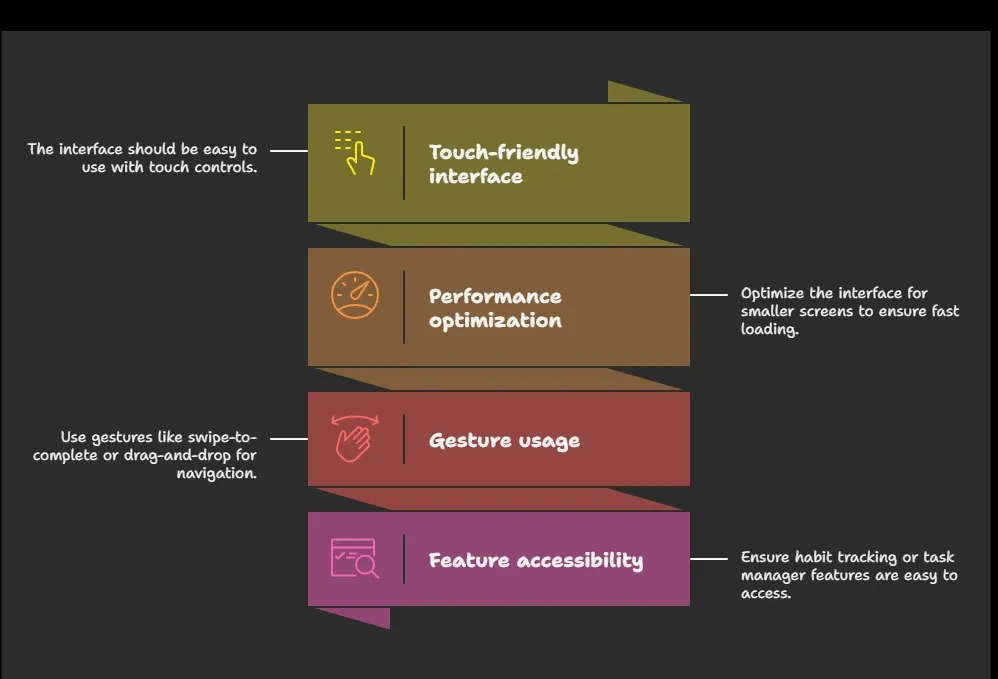
A responsive design also ensures your app works on tablets and desktops, which is crucial for project management apps used in teams.
A mobile-first approach helps users stay productive on the go, turning your app into a tool they rely on every day.
Simple and Intuitive UI
First impressions matter, especially in productivity app development. Users decide in seconds whether your app feels useful or confusing.
Your app is judged by users in seconds. A clean, intuitive design encourages engagement.
Focus on:
- Quick onboarding
- Clear task list views
- Fast “add tasks” buttons
- Minimal clutter
Remember, simplicity is the best productivity tool. Users should see their important tasks immediately.
A smooth, easy-to-use interface keeps users coming back. When tasks are clear and accessible, staying productive becomes effortless.
Integrations Are Your Friend
Your users don’t live in one app; they move between calendars, storage, and messaging tools. Integrations let your productivity app fit seamlessly into their workflow.
Nobody works in isolation. Integrations make your app part of a productivity system rather than an island.
Some popular integrations:
- Google Drive and cloud storage
- Email clients for task creation
- Slack messages for team communication
- Other productivity tools your audience already uses
Smooth integration reduces context switching and helps users stay focused.
A connected app feels like a natural part of daily life. Integrations turn your app from a standalone tool into a productivity hub.
Habit Tracking and Pomodoro Techniques
Productivity isn’t just about tasks; it’s about forming habits and managing energy. Habit tracking and Pomodoro techniques help users stay consistent.
A great productivity app can help users form habits and manage their time more effectively.
- Habit tracker: Track streaks, routines, and progress
- Pomodoro timer: Break work into manageable chunks
- AI features: Suggest tasks based on priorities or completed tasks
Small touches like this make an app feel personal, helping users stay productive daily.
Supporting habits and time management builds trust. Users feel your app isn’t just a tool it’s a partner in their productivity journey.
Time Tracking and Reporting
Knowing how time is spent is a game-changer. Time tracking and reporting help users make better decisions about where to focus.
Tracking time and reviewing completed tasks helps users see what’s working.
Include:
- Daily, weekly, and monthly views
- Billable hours for freelancers
- Custom reporting features for team projects
Time tracking also ties into task management, letting users focus on most important tasks first.
Time tracking turns abstract work into tangible progress. It helps users prioritize and make smarter productivity choices.
Pricing Strategy: Free vs Paid Plans
Your pricing model affects adoption, engagement, and revenue. A well-planned approach makes your app accessible while still generating income.
Choosing the right pricing model impacts adoption.
- Free version: Basic features like task lists, reminders, and habit tracking
- Paid plans: Offer premium features such as advanced reporting, shared projects, and granular control over notifications
Most productivity apps follow a freemium model, growing a user base while earning revenue for upgrades. Plans can be billed monthly or annually, depending on usage.
A flexible pricing model encourages trial and keeps users upgrading as they get value from your app.
Keep Users Engaged, Not Overloaded
More features don’t always mean more engagement. Focus on what users actually use, not what looks cool on a feature list.
Many apps fall into the trap of adding every feature under the sun. That’s a mistake.
Users will try 30 apps and return to only a few. Focus on features users actually use: task list, calendar view, habit tracking, and time tracking. Extra bells and whistles can wait.
Less is more. A focused app keeps users coming back rather than getting lost in unnecessary options.
Team Communication Features
Productivity apps used in teams need built-in communication. Without it, users end up bouncing between apps.
For project management apps, communication is key.
- Allow assigning tasks to team members
- Threaded comments or notes on tasks
- Notifications for deadlines
- Integration with chat apps
A small communication feature prevents users from juggling multiple tools.
Built-in communication keeps teams aligned. Users spend less time chasing updates and more time completing important tasks.
Community Insight
A LinkedIn user shared a common frustration many people face when using too many tools:
“I prefer simple tools like Apple Notes or a basic task list because I spend more time setting up complex systems than actually doing the work. The extra steps add friction, not focus.” (LinkedIn)
This reminds us that users don’t just want more features. They want clarity and tools that help them get things done with less friction, not more complexity.
Features vs. User Value
Not all features are created equal. Some tools get used constantly, while others gather digital dust. Mapping features against their value helps you focus on what really matters to users.
| Feature | Value for Users |
|---|---|
| Task list | Very High |
| Calendar view | High |
| Habit tracker | Medium |
| Time tracking | Medium |
| Reporting features | Medium |
| Third‑party integrations | Very High |
| Pomodoro timer | Low to Medium |
| Team communication | High |
This helps prioritize your core features for early development.
By knowing which features deliver the most value, you can build an app that users actually rely on. Focus on high-value items first, and add the rest as your app grows.
Staying Flexible Post-Launch with Rocket.new
Launching your app isn’t the finish line; it’s the starting point. Users’ needs evolve, and your app should too. Staying flexible keeps your productivity app relevant and useful.
This is where Rocket.new comes in.
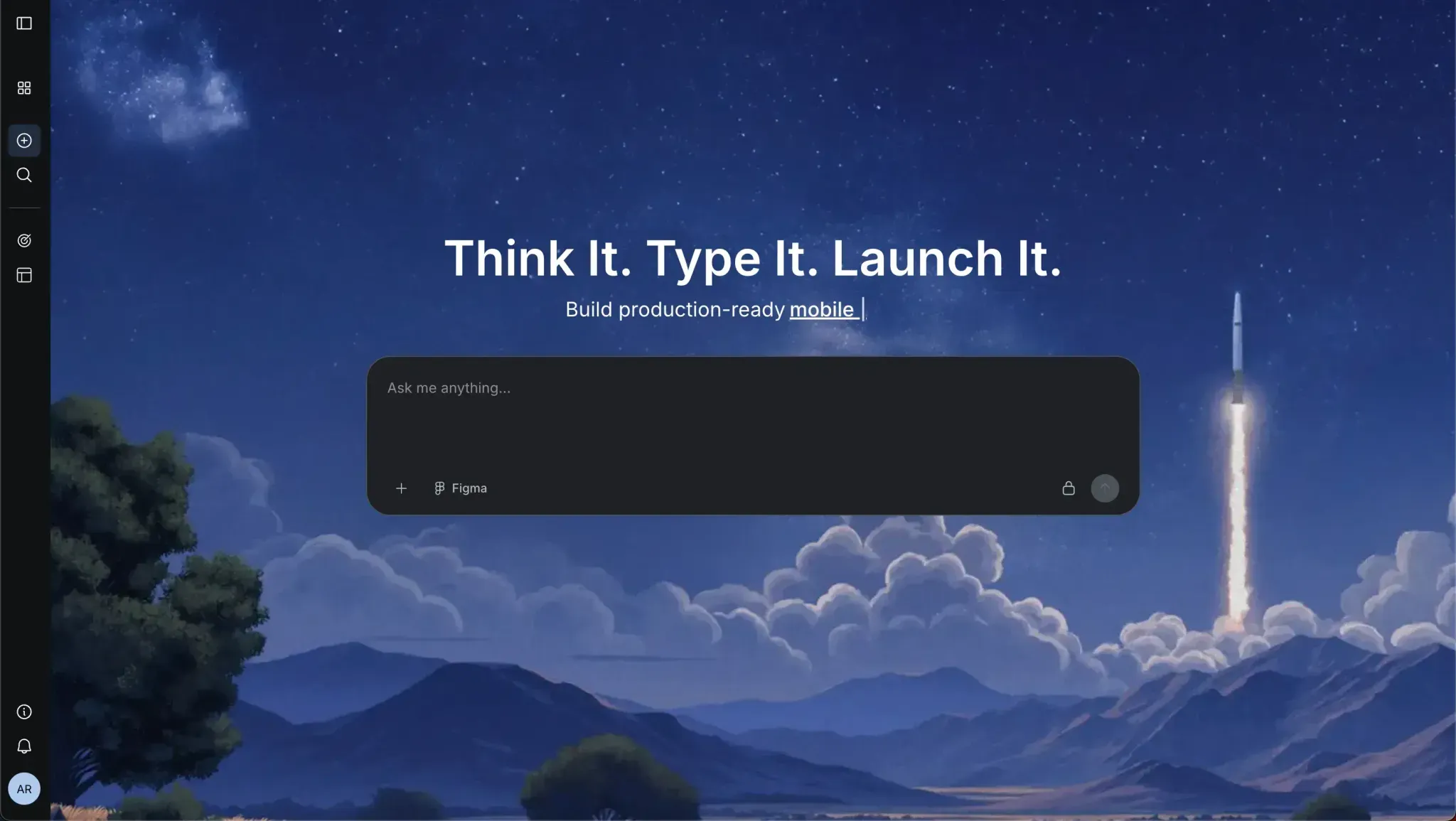
Rocket.new is a Vibe Solutioning Platform designed to simplify the development of productivity apps. It helps teams quickly create tasks, notes, and workflows, making the post-launch iteration process smoother and faster.
Launching your app is just the start. A productive app evolves based on feedback.
Rocket.new helps by letting you:
- Track feature usage
- Listen to user feedback
- Fix performance issues
- Add features gradually
Rocket.new Features:
- Prompt to App Creation: Builds apps directly from single prompts
- Custom Domain Support: Publishes projects with a branded domain
- Figma Import: Converts design files into live, editable layouts
- Live Preview: Shows instant updates while editing
- AI-Powered Backend: Automatically handles logic, data, and workflows
- Command-based actions: Use / and @ to run actions and quickly scope edits.
- Reusable Components: Speeds up building with ready-to-use elements
- Code Export: Allows developers to extend or customize later
Easy App Building with Rocket.new:
One of the best parts? Building an app is almost as easy as typing a prompt. With Rocket.new, you can describe what you want: tasks, workflows, or notes, and it generates them instantly. No complex coding or setup. It’s ideal for testing new ideas, creating prototypes, or adding features post-launch.
A living app adapts and grows alongside its users’ habits. With Rocket.new, staying flexible and iterating quickly becomes effortless, helping your users stay productive and engaged long after launch.
Staying Flexible Post-Launch
Launching your app isn’t the finish line, it’s the starting point. Users’ needs evolve, and your app should too. Staying flexible keeps your productivity app relevant and useful.
Launching your app is just the start. A productive app evolves based on feedback:
- Track feature usage
- Listen to user feedback
- Fix performance issues
- Add features slowly
A living app adapts and grows alongside its users’ habits.
Apps that adapt stay valuable. By observing real usage and responding carefully, your app can continue to help users stay productive long after launch.
Best Practices for Productivity App Development
Users today are overwhelmed by too many productivity apps. Many tools are either too simple to be useful or so complex that they create more stress than solutions. People end up juggling multiple apps, struggling to stay organized, and losing focus on their most important tasks.
The answer is to develop apps that combine intuitive design with the right core features, seamless integrations, and habit tracking. Focus on helping users accomplish tasks without distractions. Simple task lists, clear calendar views, and easy-to-use habit trackers go a long way in keeping users engaged and productive.
Great productivity app development isn’t about cramming in every feature possible. It’s about understanding your users, keeping things simple, and providing actionable tools that make productivity feel natural. When done right, your app becomes more than just a tool it becomes a trusted companion in helping users get work done efficiently.
Table of contents
- -Why Productivity Apps Matter?
- -Know Your Users First
- -Start Simple, Then Grow
- -Mobile-First Design
- -Simple and Intuitive UI
- -Integrations Are Your Friend
- -Habit Tracking and Pomodoro Techniques
- -Time Tracking and Reporting
- -Pricing Strategy: Free vs Paid Plans
- -Keep Users Engaged, Not Overloaded
- -Team Communication Features
- -Community Insight
- -Features vs. User Value
- -Staying Flexible Post-Launch with Rocket.new
- -Easy App Building with Rocket.new:
- -Staying Flexible Post-Launch
- -Best Practices for Productivity App Development