
Need a smoother path from research to deployment? Rocket.new keeps design, backend, and launch unified, cutting tool switching, reducing delays and errors, and helping teams turn ideas into working apps faster.
How to go from research to a deployed app without jumping across tools?
Platforms like Rocket.new are built to handle the full process in one place. Instead of switching between design tools, backend services, and deployment systems, you stay on the same page and move from idea to production smoothly.
In fact, studies show that teams spend nearly 30% of their time switching between tools during the software development process, which slows down delivery and increases errors.
This blog will help you understand how to simplify your workflow, reduce tool overload, and move faster from idea to a working app.
Why the Traditional Application Deployment Process Feels Messy
So, let’s be honest. The usual application deployment process is not fun.
You start with research. Then you move to development. After that, you test. Then you deal with deployment. And each stage needs a different platform.
This creates friction.
Teams write code in one repository, manage infrastructure in another, and handle web application deployment somewhere else. Many organizations struggle with this because each step adds complexity.
Here’s what typically happens:
-
You create code in one tool
-
You configure environments manually
-
You write scripts for deployment
-
You test in different environments
-
You deploy to production environments
This process increases human error. One small mistake in configuration files can break the entire system.
Also, switching tools means more errors, more delays, and more confusion.
The Shift Toward All-in-One Platforms
Well, this is where modern platforms come in.
Instead of breaking the process into multiple tools, these platforms combine everything into one system.
 All in one platform. This improves operational efficiency and reduces errors.
Many organizations are now moving toward this approach because it simplifies software deployment and helps teams focus on building features instead of managing tools.
A Simpler Way to Manage Everything in One Place
Now let’s talk about Rocket.new and where it fits in this process. It works as a single platform that handles the full application deployment process, so you don’t have to jump between tools.
What makes it stand out
-
All-in-one workflow: You can build, test, and manage application deployment in one place.
-
Accessible for everyone: It works for developers and also for non-technical users who want to create an app easily.
-
No complex scripts needed: A visual system takes care of infrastructure and setup in the background.
-
Fewer errors: Staying on the same page helps reduce human error and configuration issues.
-
Faster to production: You can move from idea to a deployed app without unnecessary delays.
Instead of dealing with multiple tools and a scattered process, Rocket keeps everything in one flow. It connects development, testing, and deployment in a way that feels simple, controlled, and much easier to manage from start to finish.
Bridging the Gap From Idea to Deployment
So how does Rocket.new actually connect to going from research to a deployed app? It comes down to removing the gaps between each stage of the process.
What changes with Rocket
-
No context switching: You don’t need separate tools for development, testing, and deployment. Everything stays on the same page.
-
Fewer errors: A connected system reduces human error and broken configurations.
-
Faster deployment process: Moving through stages becomes quicker since there are no tool handoffs.
-
Better control over environments: You can manage different environments without confusion or mismatches.
This kind of setup fits perfectly with how modern software development works. It keeps the process smooth, connected, and much easier for teams to handle.
How Rocket Handles the Entire Process
So how does Rocket.new actually work behind the scenes? It focuses on a few key areas that cover the full application flow, from building to deployment.
Core areas it covers
- App creation made simple
You can create web applications visually without relying heavily on code.
- Built-in backend systems
It provides services to manage data, APIs, and server-side logic in one place.
- AI integration
You can connect AI models directly into your app to add smarter features.
- Workflow automation
Tasks like testing, deployment, and monitoring can be handled automatically.
Instead of managing multiple tools and systems, everything is handled within one platform, making the process smoother and easier to control.
For more details, check:
Key Features of Rocket
Here’s a quick breakdown:
| Feature | What It Does |
|---|---|
| Visual Builder | Create apps without writing too much code |
| Built-in Database | Manage data easily |
| AI Connections | Add smart features to your app |
| Automation Tools | Handle deployment and testing |
| API Support | Connect external services |
These features help reduce errors and make the deployment process smoother.
From Idea to Deployment on One Platform
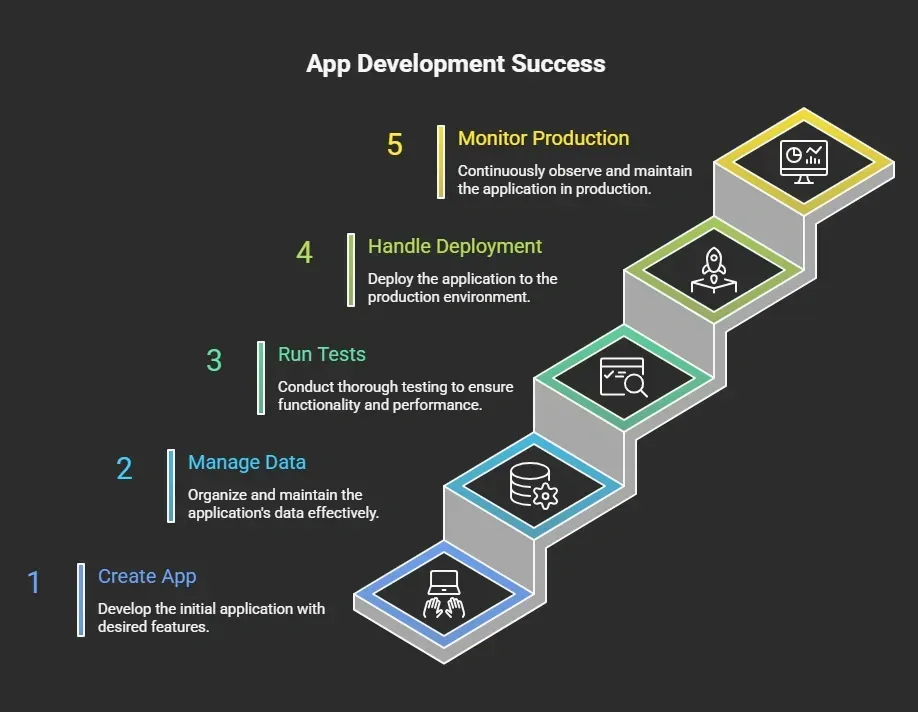
Let’s walk through how a smooth application deployment process looks when everything is handled on one platform.
This kind of setup simplifies the deployment process and keeps your software development flow clean and controlled.
Step-by-step flow
- Step 1: Research and planning
You start by identifying a problem and planning your app features. This stage sets the base for the entire software development process and helps teams align on goals.
- Step 2: Development
You create your app using a visual builder or code-based setup. You define functionality, connect services, and prepare your system for deployment. This stage also involves managing dependencies and writing clean code.
- Step 3: Testing
You run automated testing and integration testing to catch errors early. This helps reduce errors before moving into production environments and improves software quality.
- Step 4: Configuration
You set up environments and manage configuration files. Proper configuration ensures your app runs smoothly across different environments without unexpected issues.
- Step 5: Deployment
You move into application deployment by deploying applications directly to production environments. This stage involves scripts, server setup, and final checks before the app is deployed.
- Step 6: Monitoring
After deployment, you track performance using key performance indicators. Monitoring helps teams maintain system stability and handle issues in real time.
All these steps happen within one platform, which simplifies the deployment process, improves control over environments, and reduces the risk of errors during application deployment.
Why This Approach Works Better
Next, let’s talk about why this actually works better in real scenarios.
1. Fewer Errors
When you reduce tool switching, you naturally reduce errors. Most errors in application deployment happen due to human error, like wrong configuration or missing steps.
Keeping everything in one system helps avoid these issues and reduces deployment failures.
2. Faster Deployment
Automated deployment and continuous deployment speed up the entire deployment process. Instead of manually running scripts or setting up servers, the platform handles these tasks.
This helps teams move from development to production much faster.
3. Better Team Collaboration
Teams work on the same platform, repository, and system. Everyone stays on the same page, which makes it easier to manage tasks, track changes, and handle deployment together.
This improves the overall software development flow.
4. Consistent Environments
Managing different environments in one place avoids mismatches between development, testing, and production environments.
This is a common issue in software deployment, and solving it makes the process much more reliable.
So overall, this approach simplifies the application deployment process, helps teams avoid common errors, and makes deploying applications faster and more controlled in real production environments.
Traditional vs Rocket-Based Deployment
Let’s make this easier to understand with a quick comparison. When you look at the traditional application deployment process and compare it with Rocket.new, the difference in complexity and workflow becomes very clear.
| Aspect | Traditional Process | Rocket Approach |
|---|---|---|
| Tools | Multiple platforms | One platform |
| Errors | High due to manual steps | Lower with automation |
| Speed | Slower | Faster |
| Deployment Process | Complex | Simplified |
| Monitoring | Separate tools | Built-in |
This shows how a single platform can simplify the deployment process, reduce errors, and help teams handle application deployment more efficiently from development to production.
The Role of Automation in Modern Deployment
Let’s talk about automation and why it matters so much in the application deployment process today. When automation is built into the system, the deployment process becomes faster, cleaner, and easier to manage.
Automation plays a big role here. With automated deployment and continuous deployment,
You can:
-
Reduce manual tasks
-
Reduce errors
-
Improve consistency
Continuous integration and automated testing help teams catch issues early. This makes deploying applications smoother and more reliable.
So, instead of relying on manual steps and scripts, automation helps teams simplify the deployment process and keep everything consistent across environments and production.
Handling Environments and Production
Now let’s look at one of the most challenging parts of software deployment, managing environments and production setups.
Managing environments is one of the toughest parts.
You have:
-
Development environments
-
Testing environments
-
Production environments
Each environment needs proper configuration. Rocket.new simplifies this by managing environments within the same platform.
This reduces deployment failures and improves stability.
Keeping all environments connected in one system makes the deployment process more reliable and helps teams avoid common configuration errors in production environments.
Real Example of Deployment Flow
Let’s say you are building a small app.
-
You create the app using Rocket
-
You connect APIs
-
You configure services
-
You test the app
-
You deploy to production
No need for external tools like GitHub actions or manual scripts. Everything happens in one place.
From Idea to Production Without Friction
Many teams still deal with a messy application deployment process. They jump between tools, manage complex configuration, and face frequent errors during deployment. This slows down development, affects production environments, and creates confusion across teams. Even small mistakes caused by human error can lead to deployment failures and unstable systems.
A better way is using a unified platform like Rocket.new. It brings development, testing, and application deployment into one place. Moving from Research to a deployed app becomes faster and simpler when you remove unnecessary steps. Keep the process clean, stay on the same page, and focus on building apps that users actually need.
Table of contents
- -Why the Traditional Application Deployment Process Feels Messy
- -The Shift Toward All-in-One Platforms
- -A Simpler Way to Manage Everything in One Place
- -Bridging the Gap From Idea to Deployment
- -How Rocket Handles the Entire Process
- -Key Features of Rocket
- -From Idea to Deployment on One Platform
- -Why This Approach Works Better
- -Traditional vs Rocket-Based Deployment
- -The Role of Automation in Modern Deployment
- -Handling Environments and Production
- -Real Example of Deployment Flow
- -From Idea to Production Without Friction